Microsoft 365 Email Security Services

Secure Office 365 Email, Identity, Data & Collaboration

Email remains the primary attack vector for phishing, ransomware, credential theft, and business email compromise (BEC). Organizations using Microsoft 365 / Office 365 must go beyond default settings to protect users, data, and communications.

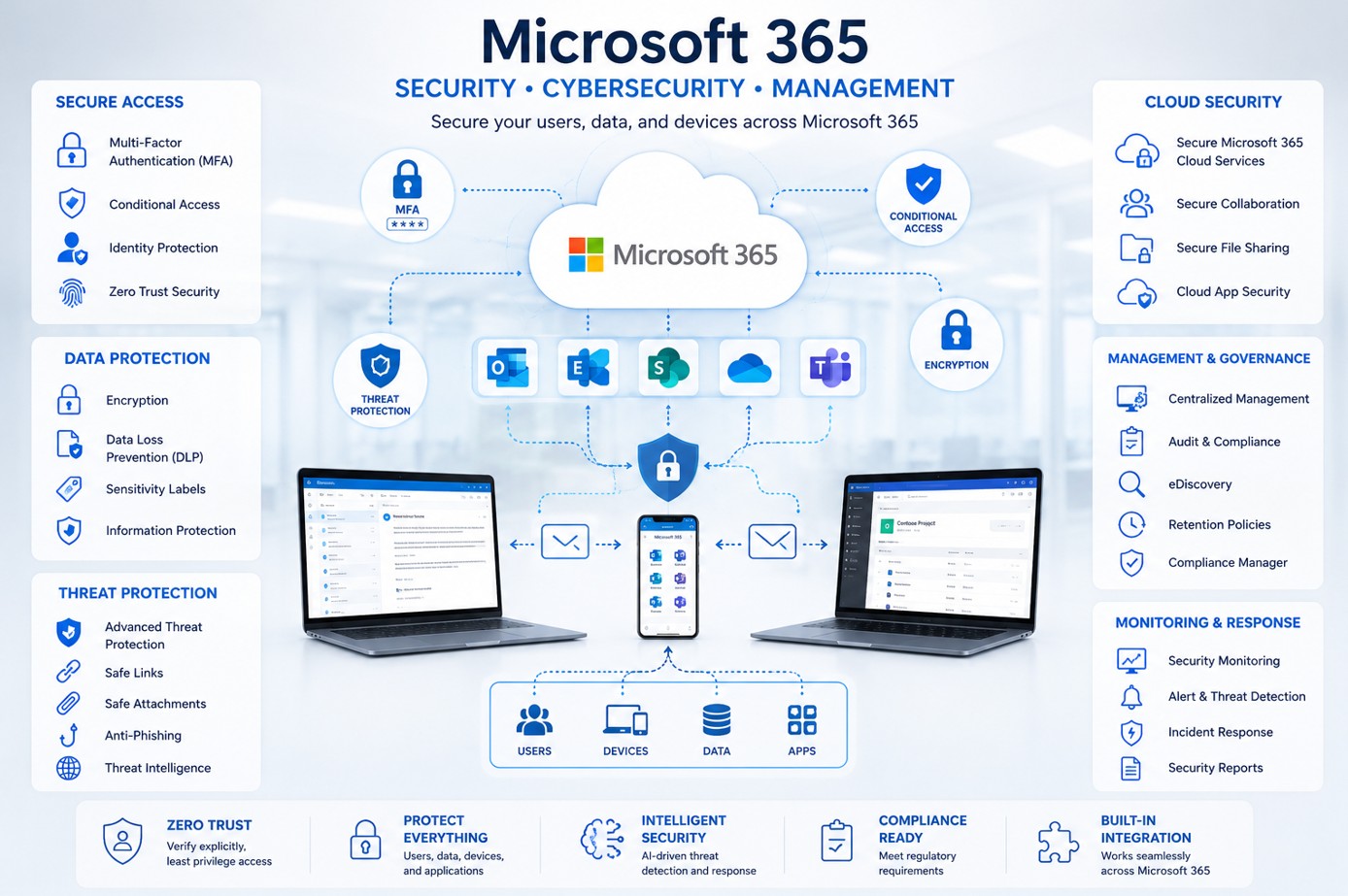
Our Microsoft 365 Email Security Services are designed to secure email flow, identities, data, endpoints, and collaboration using Microsoft-native security controls aligned with Zero Trust principles.

✅ Advanced Email & Anti-Phishing Protection
✅ Zero Trust Identity Security with MFA & Conditional Access
✅ Email Encryption, DLP & Data Protection Controls
✅ Secure Collaboration Across Outlook, Teams & SharePoint
✅ Centralized Logging, Monitoring & Compliance Readiness

OC_Security_Audit_Microsoft-Office-365-Email-security-Audit
Office 365 Email Security & Compliance

Why Office 365 Security Is Critical

Office 365 Is a Primary Target for Attackers

Attackers commonly target Microsoft 365 and Office 365 because one compromised account can expose email, files, contacts, internal communication, financial workflows, and password reset paths.

Email Security Is Not Enough

Office 365 security requires layered protection across identity, email, DNS authentication, administrator accounts, sensitive data, logging, backups, compliance controls, and secure collaboration across Outlook, Teams, SharePoint, and OneDrive.

MFA Conditional Access Defender for Office 365 DLP Audit Logging Backup Recovery
Microsoft 365 Layered Protection
Secure Email • Identity • Data • Compliance

Office 365 Security and Compliance Requirements

HIPAA Compliance and Office 365

For healthcare, dental, medical, insurance, and business associate organizations, Office 365 may store or transmit electronic protected health information. HIPAA requires administrative, physical, and technical safeguards to protect the confidentiality, integrity, and availability of ePHI.

  • MFA enforcement
  • Access control
  • Audit logging
  • Encryption
  • DLP for PHI
  • Secure email delivery
  • User activity monitoring
  • Backup and recovery planning
  • Incident response readiness
  • Business Associate Agreement review

PCI-DSS and Office 365

If Office 365 is used to store, transmit, discuss, or support payment-related processes, it may affect PCI-DSS scope. Security controls should focus on account access, MFA, logging, email protection, password policy, data handling, and administrative access control.

Other Compliance Frameworks

Microsoft Purview DLP can help identify and protect regulated data across Exchange, SharePoint, OneDrive, Office apps, endpoints, and other locations.

SOC 2 NIST Cybersecurity Framework ISO 27001 / ISO 27002 CMMC FTC Safeguards Rule Cyber Insurance

Why Choose OC Security Audit for Office 365 Security

25+ Years of Cybersecurity and Network Security Experience

OC Security Audit helps businesses secure Microsoft 365, Office 365, email systems, networks, cloud environments, user accounts, and regulated data.

Certified Security Professionals

CISSP certified CISO / CCISO certified CCNP MCSE Security MCSA Security MCITP Microsoft security and network security experience

We Take Care of Your Office 365 Security

OC Security Audit reviews, hardens, documents, and improves your Office 365 security posture. We help protect user accounts, administrator access, email flow, DNS records, sensitive data, audit logs, backups, and compliance controls so your business can operate securely.

Contact OC Security Audit

Request help with Office 365 security, email protection, compliance, and account hardening.

Advanced Microsoft 365 Security Review

Complete Office 365 Security Components We Review and Secure

OC Security Audit reviews the full Microsoft 365 and Office 365 security stack, including identity, MFA, Conditional Access, email protection, DNS authentication, DLP, logging, collaboration security, backup readiness, and compliance controls.

Identity Security Email Protection Defender for Office 365 DLP and Purview Backup and Recovery Compliance Readiness
Logs
Identity
MFA
Email
DLP
Backup
Office 365 Security Layered Controls

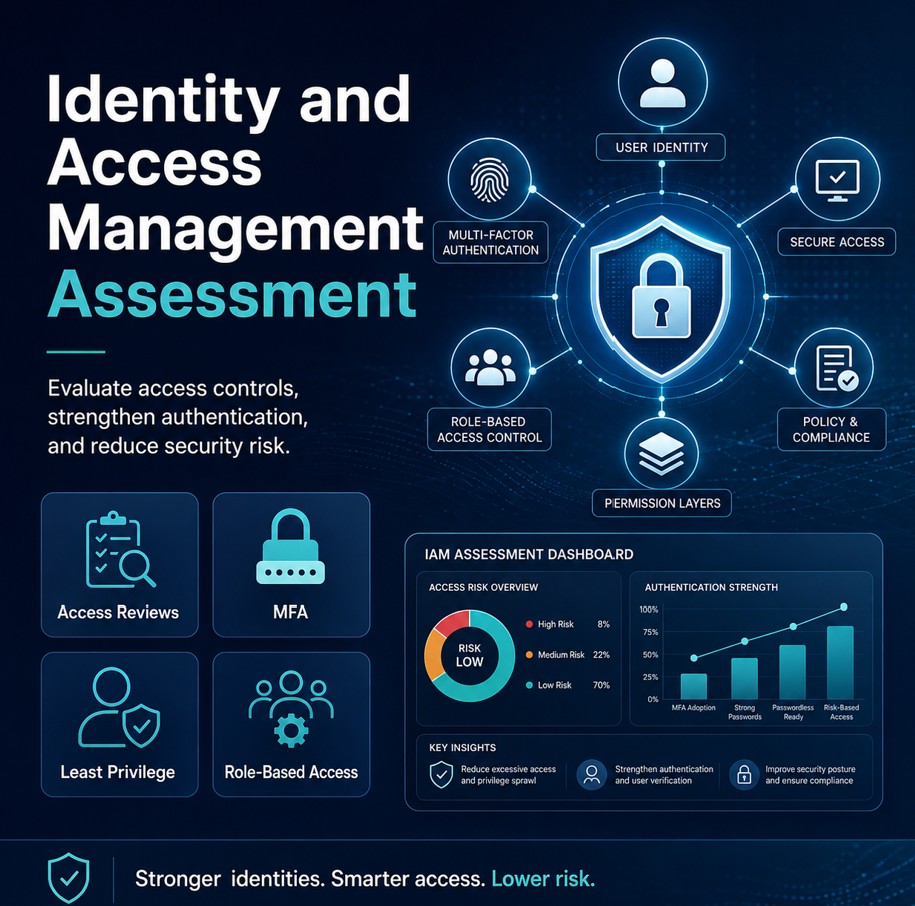
1. Microsoft Entra ID / Identity Security

  • User account, disabled account, stale account, guest user, and external user access review
  • Privileged admin account, break-glass account, service account, and shared mailbox access review
  • Role-based access control, least-privilege permissions, and Entra admin role assignment review
  • Risky user detection, risky sign-in review, password policy review, and passwordless readiness
  • Legacy authentication, mailbox delegation, and access exposure review

2. Multi-Factor Authentication

  • MFA enabled for all users and enforced for administrators
  • Conditional Access MFA policies and MFA registration status review
  • Phishing-resistant MFA, Microsoft Authenticator, FIDO2 security key, and certificate-based authentication readiness
  • SMS and voice MFA risk review
  • MFA bypass, exclusion, and break-glass account exception control
MFA adds an extra layer of protection to Microsoft 365 sign-ins, especially when stronger methods are used.

3. Conditional Access Policies

  • Require MFA for risky sign-ins and administrators
  • Block legacy authentication and high-risk country access where appropriate
  • Require compliant devices, managed devices, and approved client apps
  • Restrict access to admin portals and apply session controls
  • Review sign-in risk, user risk, report-only testing, and emergency access exclusions

4. Administrator and Privileged Access Security

  • Global, security, Exchange, SharePoint, and Teams administrator review
  • Privileged Identity Management review
  • Admin MFA enforcement and admin account separation
  • Admin audit logging and admin role minimization
  • Just-in-time access recommendations

5. Exchange Online Email Security

  • Anti-spam, anti-malware, anti-phishing, quarantine, spoof intelligence, and Zero-hour auto purge review
  • Safe Links, Safe Attachments, Business Email Compromise protection, and impersonation protection
  • Executive, domain, and user impersonation protection
  • Mail forwarding rule detection and suspicious inbox rule review
  • External sender tagging, transport rule review, mail connector review, accepted domain review, and message trace capability
Defender for Office 365 uses anti-phishing protection, email authentication signals, reputation, and behavioral analysis to help identify forged senders.

6. DNS, Domain, and Email Authentication Security

  • SPF, DKIM, DMARC setup, validation, enforcement, and reporting review
  • MX, Autodiscover, CNAME, public DNS exposure, subdomain, and parked domain protection
  • Look-alike domain risk review
  • Third-party sender, marketing platform, copier/scanner SMTP relay, and website contact form sender validation
SPF, DKIM, and DMARC should be configured for custom Microsoft 365 domains, including parked domains and subdomains.

7. Microsoft Defender for Office 365

  • Defender licensing, preset security policy, and Standard vs. Strict protection comparison
  • Threat policy, anti-phishing, Safe Links, and Safe Attachments policy review
  • Campaign detection and attack simulation readiness
  • User-reported message workflow, Threat Explorer, and automated investigation and response
  • Security alerts and quarantine management

8. Data Loss Prevention and Sensitive Data Protection

  • DLP policy review for HIPAA PHI, PCI cardholder data, Social Security numbers, financial data, and sensitive attachments
  • Outbound email DLP, SharePoint DLP, OneDrive DLP, Teams DLP, and Endpoint DLP where licensed
  • User warnings, policy tips, auto-encryption rules, and compliance alerting
  • Block or restrict external sharing

9. Email Encryption and Message Protection

  • Microsoft Purview Message Encryption
  • Automatic encryption rules and manual encryption options
  • Do Not Forward policies and external recipient encryption
  • Sensitive attachment encryption
  • TLS, mail flow encryption, HIPAA, and confidential data encryption workflow review

10. Logging, Auditing, and Monitoring

  • Unified audit log status, audit retention, admin activity logging, and mailbox audit logging
  • Sign-in logs, risky sign-ins, message trace, DLP alerts, Defender alerts, and compliance alerts
  • Forwarding rule, impossible travel, and suspicious inbox rule alerts
  • SIEM integration and incident investigation readiness

11. SharePoint and OneDrive Security

  • External sharing, anonymous link restrictions, default link type, and sharing expiration review
  • Guest access, sensitive site, site owner, data classification, and DLP review
  • OneDrive sync restrictions
  • Ransomware recovery readiness, versioning, recycle bin, and retention review

12. Microsoft Teams Security

  • Guest access and external access review
  • Teams file sharing, meeting policy, chat retention, and channel retention review
  • DLP for Teams
  • App permissions and third-party app review
  • Teams recording storage and sensitive team membership review

13. Endpoint and Mobile Device Access

  • Intune readiness and mobile device access policy review
  • Outlook mobile app protection and device compliance requirements
  • Conditional Access by device health
  • Lost device data protection and remote wipe readiness
  • BYOD policy, app protection policies, and Windows security baseline review

14. Office 365 Backup and Recovery

  • Exchange Online, SharePoint, OneDrive, and Teams data backup review
  • Retention vs. backup clarification
  • Accidental deletion recovery and ransomware recovery planning
  • Legal hold, retention policy, third-party Microsoft 365 backup recommendation, and recovery testing
  • Backup access control
Microsoft 365 includes retention, recycle bin, and recovery features, but many businesses still need a dedicated backup strategy for accidental deletion, ransomware, insider threats, long-term retention, and compliance recovery.

15. Compliance, Retention, and eDiscovery

  • Retention policy, litigation hold, eDiscovery readiness, and Compliance Manager review
  • Purview audit readiness, sensitivity labels, data classification, and records management
  • HIPAA, PCI, SOC 2, NIST, ISO, and CMMC mapping
  • Evidence collection for audits
  • Microsoft cloud compliance resource and documentation readiness review
Need a professional Office 365 security review?

OC Security Audit can review, harden, document, and improve your Microsoft 365 security posture across identity, email, data protection, admin access, backup readiness, and compliance controls.

Contact OC Security Audit
Structured Office 365 Security Implementation

Our Step-by-Step Office 365 Security Implementation Process

OC Security Audit follows a structured implementation process to review, prioritize, harden, document, and improve your Microsoft 365 environment with practical security controls, risk-based remediation, and business-aware implementation support.

Tenant Review Risk Assessment Identity Hardening Email Security Compliance Controls Ongoing Review
Secure Microsoft 365 Cloud Encrypted Mail Flow
Data Center A
Data Center B
Secure encrypted email delivery through the cloud
01

Step 1: Discovery and Tenant Review

We review your Microsoft 365 tenant, licenses, users, administrators, domains, DNS records, email security policies, collaboration settings, and compliance requirements.

02

Step 2: Risk Assessment

We identify high-risk areas such as weak MFA, excessive administrator permissions, exposed mailboxes, poor DNS authentication, insecure sharing, missing logs, risky sign-ins, and weak email protection.

03

Step 3: Identity and Access Hardening

We secure user access with MFA, Conditional Access, role-based permissions, least privilege, admin account protection, legacy authentication blocking, and risky sign-in controls.

04

Step 4: Email Security Hardening

We configure or improve anti-phishing, anti-spam, anti-malware, Safe Links, Safe Attachments, quarantine policies, spoof protection, impersonation protection, and suspicious forwarding detection.

05

Step 5: DNS and Email Authentication

We validate and improve SPF, DKIM, DMARC, MX records, third-party sender alignment, and public DNS records to reduce spoofing and improve email trust.

06

Step 6: Data Protection and Compliance Controls

We implement or tune DLP, encryption, sensitivity labels, retention policies, audit logging, alerting, and compliance controls for HIPAA, PCI, SOC 2, NIST, ISO, or CMMC requirements.

07

Step 7: SharePoint, OneDrive, and Teams Security

We review external sharing, guest access, anonymous links, file permissions, Teams settings, collaboration policies, and sensitive data exposure.

08

Step 8: Logging, Monitoring, and Alerting

We confirm that audit logging, sign-in logs, mailbox audit logs, Defender alerts, DLP alerts, message trace, and incident investigation records are available and usable.

09

Step 9: Backup and Recovery Review

We review Microsoft 365 recovery options, retention settings, backup gaps, ransomware recovery readiness, and third-party backup requirements.

10

Step 10: Documentation and Remediation Report

We provide findings, recommendations, screenshots where needed, risk ratings, remediation steps, and a prioritized Office 365 security improvement roadmap.

11

Step 11: Implementation Support

We can assist with implementing approved security changes, testing policies, validating mail flow, tuning alerts, and reducing business disruption.

12

Step 12: Ongoing Security Review

We recommend periodic Office 365 security reviews because users, vendors, domains, licensing, threats, and Microsoft security features change over time.

Findings Risk Ratings Remediation Steps Policy Testing Security Roadmap
Ready to improve your Office 365 security posture?

OC Security Audit can help review your tenant, harden your controls, document findings, and support implementation with minimal business disruption.

Contact OC Security Audit

Microsoft 365 / Office 365 Security Checklist

OC Security Audit helps organizations secure Microsoft 365 across identity, email, compliance, data protection, DNS authentication, backup, logging, and cloud collaboration. This checklist is designed for ongoing review, hardening, and compliance readiness including HIPAA and PCI-related controls.

Security Domains
10+
Coverage across identity, email, DNS, compliance, monitoring, backup, and collaboration.
Priority Controls
22
Critical and high-value Microsoft 365 security controls that should be reviewed regularly.
Compliance Scope
HIPAA / PCI
Mapped to key administrative, technical, and operational security requirements.
Managed By
OCSA
25+ years of experience with CISSP, CISO, CCNP, MCSE Security, and MCITP credentials.
Security Area Security Item Control Type Risk Level Risk Score Recommended Review Owner HIPAA / PCI Relevance Policies & Procedures
Identity & Access Review all active Microsoft 365 users Administrative / Technical High
90Risk Score
Monthly IT Administrator HIPAA Access Control / PCI User Access Remove terminated users, disable stale accounts, and verify continued business need.
Identity & Access Enforce Multi-Factor Authentication for all users Technical Critical
100Risk Score
Quarterly Security Administrator HIPAA Access Control / PCI MFA Require MFA for users, administrators, remote access, and cloud applications.
Identity & Access Review Conditional Access policies Technical Critical
95Risk Score
Quarterly Security Administrator HIPAA Technical Safeguards / PCI Access Control Block risky sign-ins, require MFA, restrict admin access, and block legacy authentication.
Privileged Access Review Global Administrator accounts Administrative / Technical Critical
100Risk Score
Monthly CISO / IT Manager HIPAA Access Control / PCI Least Privilege Limit global admins, require MFA, use separate admin accounts, and document approvals.
Privileged Access Review administrator role assignments Administrative High
90Risk Score
Quarterly IT Manager HIPAA Workforce Security / PCI Privileged Access Apply least privilege and remove unnecessary admin roles.
Password Security Review password policy and password protection Technical High
85Risk Score
Quarterly Security Administrator HIPAA Access Control / PCI Authentication Use strong password protection, block common passwords, and monitor risky sign-ins.
Email Security Review anti-phishing policy Technical Critical
95Risk Score
Quarterly Email Administrator HIPAA Security Management / PCI Security Monitoring Enable impersonation protection, spoof intelligence, and executive protection.
Email Security Review anti-spam and anti-malware policies Technical High
90Risk Score
Quarterly Email Administrator HIPAA Integrity Controls / PCI Malware Protection Review filtering, quarantine, malware detection, and user reporting process.
Email Security Enable Safe Links and Safe Attachments Technical High
90Risk Score
Quarterly Security Administrator HIPAA Security Controls / PCI Malware Protection Protect users from malicious URLs and attachments in email and collaboration tools.
Email Security Review mailbox forwarding rules Technical Critical
95Risk Score
Monthly Email Administrator HIPAA Audit Controls / PCI Data Protection Detect unauthorized forwarding to external accounts and suspicious inbox rules.
DNS & Email Authentication Validate SPF record Technical High
85Risk Score
Quarterly DNS Administrator HIPAA Transmission Security / PCI Email Security Verify authorized senders and remove obsolete third-party email services.
DNS & Email Authentication Enable and validate DKIM Technical High
85Risk Score
Quarterly DNS Administrator HIPAA Integrity / PCI Email Authentication Digitally sign outbound email to reduce spoofing and improve trust.
DNS & Email Authentication Configure DMARC policy Technical Critical
95Risk Score
Quarterly DNS Administrator HIPAA Transmission Security / PCI Anti-Spoofing Implement DMARC monitoring, then move toward quarantine or reject enforcement.
Logging & Monitoring Enable Microsoft 365 unified audit logging Technical Critical
95Risk Score
Quarterly Security Administrator HIPAA Audit Controls / PCI Logging Ensure user, admin, mailbox, and security events are logged and retained.
Logging & Monitoring Review sign-in logs and risky users Technical High
90Risk Score
Monthly Security Administrator HIPAA Audit Controls / PCI Monitoring Investigate risky sign-ins, impossible travel, unfamiliar locations, and failed login patterns.
Data Protection Review Data Loss Prevention policies Technical / Compliance Critical
95Risk Score
Quarterly Compliance Officer HIPAA PHI Protection / PCI Cardholder Data Detect and restrict PHI, credit card numbers, SSNs, financial records, and confidential files.
Data Protection Review email encryption settings Technical High
90Risk Score
Quarterly Compliance Officer HIPAA Transmission Security / PCI Data Protection Encrypt sensitive outbound email and restrict forwarding where appropriate.
SharePoint & OneDrive Review external sharing settings Technical / Administrative High
90Risk Score
Quarterly SharePoint Administrator HIPAA Access Control / PCI Data Access Restrict anonymous links, review guest access, and set link expiration policies.
Microsoft Teams Review Teams guest and external access Technical / Administrative Medium
75Risk Score
Quarterly Teams Administrator HIPAA Access Control / PCI Collaboration Security Limit external collaboration and verify access to sensitive teams and channels.
Devices & Endpoints Review device compliance and mobile access Technical High
85Risk Score
Quarterly Endpoint Administrator HIPAA Device Security / PCI Endpoint Security Require compliant devices, app protection, encryption, and remote wipe capability.
Backup & Recovery Review Microsoft 365 backup strategy Administrative / Technical High
90Risk Score
Semi-Annual IT Manager HIPAA Contingency Plan / PCI Recovery Review Exchange, SharePoint, OneDrive, and Teams backup and recovery procedures.
Compliance Review retention and eDiscovery policies Compliance / Administrative Medium
80Risk Score
Semi-Annual Compliance Officer HIPAA Documentation / PCI Evidence Retention Verify retention, legal hold, audit evidence, and compliance documentation requirements.
Incident Response Review Microsoft 365 incident response procedure Administrative Critical
95Risk Score
Semi-Annual CISO / IT Manager HIPAA Security Incident Procedures / PCI Incident Response Document procedures for compromised accounts, phishing, data exposure, and ransomware.
This Microsoft 365 security checklist is designed for Office 365 security reviews, HIPAA readiness, PCI-related security validation, email protection, identity hardening, logging, backup review, and ongoing cloud security assessment.
Office 365 Security Assessment

Schedule an Office 365 Security Assessment

Do not rely on default Office 365 settings to protect your business. OC Security Audit can review your Microsoft 365 environment, identify security gaps, harden your tenant, improve compliance readiness, and help protect your email, users, data, and cloud collaboration systems.

25+ years of experience CISSP CISO / CCISO CCNP MCSE Security MCITP Orange County cybersecurity experts
Microsoft 365 Security Assessment Ready
Tenant
Protected
Secure tenant, email, identity, data, and collaboration review