
Perimeter and internal controls
Review firewalls, VLANs, routing, switching, wireless, DNS, DHCP, VPN tunnels, remote access, and network segmentation.
Find exposure, strengthen essential controls, and build practical resilience around the systems your organization depends on.
Explore cybersecurity services →Evaluate controls independently, document defensible findings, and focus remediation on the risks with the greatest operational impact.
Explore security audits →Translate security obligations into clear evidence, accountable remediation, and a practical path toward audit or customer readiness.
Explore compliance services →Bring security governance, risk decisions, leadership communication, and improvement planning into one accountable executive program.
Explore vCISO services →Network Security
CISO-led guidance for internal network security for business networks, focused on the business risk, affected environment, evidence available, and practical action that should follow.
CISO-led guidance from Ali Hassani, backed by 25+ years of IT, cybersecurity, compliance, and infrastructure experience.
Internal network security protects users, devices, applications, servers, network hardware, cloud platforms, remote access tools, and sensitive data inside the organization. OC Security Audit reviews the full environment to find gaps, connect them to business risk, and build a remediation plan that can support executive decisions and compliance readiness.

Explore service areas across your business network, cloud platforms, identity systems, endpoints, and data center.
Review firewalls, VLANs, routing, switching, wireless, DNS, DHCP, VPN tunnels, remote access, and network segmentation.
Connect scan results, configuration gaps, exposed services, wireless weaknesses, and remediation ownership to real risk.
Review Microsoft 365, Azure, conditional access, cloud storage, virtual networks, Sentinel, cloud firewall controls, and tenant security.
Assess EDR, MDR, XDR, antivirus, server hardening, patching, mobile device management, disk encryption, and local admin exposure.
Strengthen log collection, alerting, threat detection, Microsoft Sentinel or SIEM integration, investigation workflow, and incident visibility.
Support HIPAA, PCI DSS, ISO 27001, SOC 2, NIST CSF, cyber insurance readiness, backup validation, and executive risk reporting.
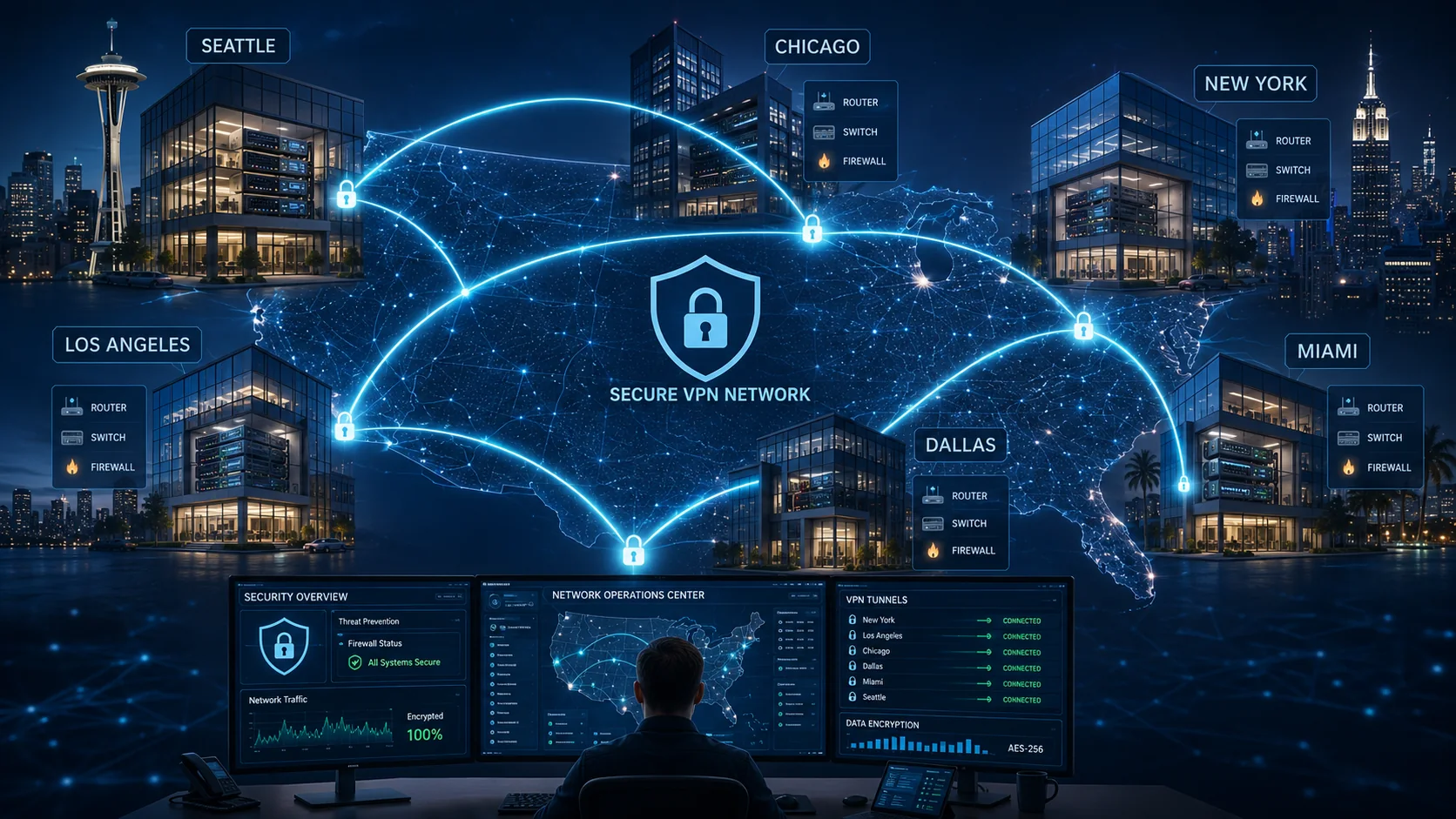
A modern business network is not only routers and switches. It includes physical and virtual servers, administrative accounts, cloud workloads, Microsoft 365, VPN access, remote workers, line-of-business applications, monitoring systems, backup platforms, and the data moving between them.
OC Security Audit turns technical findings into a practical remediation roadmap with business impact, ownership, evidence, and next steps.
Identify business systems, network zones, endpoints, servers, cloud services, remote access paths, and administrative access.
Review configurations, policies, access controls, monitoring coverage, patch posture, backup readiness, and evidence quality.
Rank findings by risk, exploitability, business disruption, compliance exposure, and remediation effort.
Build an action plan for quick wins, executive decisions, technical remediation, and longer-term security maturity.
Understand how detection, identity, and monitoring capabilities support your security operations.
Endpoint Detection and Response helps detect suspicious endpoint behavior, malware activity, lateral movement, and attacker actions on workstations and servers.
Managed Detection and Response adds security analyst monitoring, alert triage, investigation support, and response guidance when internal resources are limited.
Extended Detection and Response correlates endpoint, identity, email, cloud, and network signals so security teams can see threats across the environment.
Identity and Access Management covers centralized identity, SSO, MFA, conditional access, role-based access, privileged access, and user lifecycle controls.
Security Information and Event Management collects and correlates logs from endpoints, firewalls, servers, identity platforms, cloud services, and applications.
Logging and monitoring help detect outages, suspicious activity, firewall events, server issues, cloud activity, and user access events before they become larger problems.
Use this checklist to track risk, evidence, ownership, and remediation during monthly, quarterly, or audit-readiness reviews.
| # | Assessment Category | Control Type | Checklist Item / Security Control | Primary Systems / Scope | Verification Questions | Evidence / Documents to Review | Risk Level | Risk Assessment | Risk Impact if Not Controlled | Recommended Frequency | Last Date Checked | Status | Owner | Remediation / Action Required | Due Date | Residual Risk / Exception Notes |
|---|---|---|---|---|---|---|---|---|---|---|---|---|---|---|---|---|
| Governance, Administrative Controls & Risk Management | ||||||||||||||||
| 1 | Governance | Administrative | Information Security Policy is approved, published, and reviewed on a defined schedule. | Enterprise security program, management approvals, policy repository | When were security policies last reviewed? Who approves exceptions? How are staff informed? | Information Security Policy, Acceptable Use Policy, review records, management approval evidence | High | Policies establish security expectations and accountability across internal network operations. | Inconsistent enforcement, unclear ownership, audit findings, and unmanaged risk acceptance. | Annually and after major business or technology changes | Not Started | |||||
| 2 | Governance | Administrative | Risk management methodology is documented and consistently applied to network, cloud, email, and endpoint risks. | Risk register, internal network, cloud tenants, SaaS applications, email systems | Is risk assessed at least annually? Are findings tracked to closure? Are exceptions formally approved? | Risk assessment reports, risk register, risk acceptance forms, remediation plans | High | Confirms risks are scored, prioritized, assigned, and reviewed with leadership. | Critical exposures may remain unresolved or accepted without visibility. | Quarterly review; full assessment annually | In Progress | |||||
| Asset Inventory, Classification & Lifecycle Security | ||||||||||||||||
| 3 | Asset Management | Technical | Hardware, software, virtual, cloud, and SaaS assets are inventoried with defined owners. | CMDB, endpoints, servers, switches, routers, firewalls, cloud assets, SaaS inventory | How is inventory updated? Are cloud assets included? Are end-of-life systems tracked? | Asset inventory, CMDB, cloud asset reports, software license records, hardware lifecycle documentation | High | Complete inventory enables patching, monitoring, access control, and incident response. | Unknown devices and shadow IT can introduce unmanaged vulnerabilities and data exposure. | Monthly reconciliation | Not Started | |||||
| 4 | Asset Management | Administrative | Data classification levels are defined and mapped to sensitive data locations. | File shares, databases, cloud storage, email, collaboration platforms, backups | How is sensitive data classified? Where is regulated or confidential data stored? | Data classification policy, data inventories, DLP reports, storage access reviews | Medium | Identifies sensitive data requiring stronger access, encryption, monitoring, and retention controls. | Data leakage, excessive access, compliance violations, and poor breach scoping. | Semiannually | Not Started | |||||
| Internal Network Architecture, Segmentation & Perimeter Security | ||||||||||||||||
| 5 | Network Security | Technical | Network diagrams are current and accurately represent VLANs, subnets, trust zones, cloud connections, and critical systems. | LAN, WAN, VPN, wireless, data center, cloud interconnects, remote offices | When was segmentation last reviewed? Are flat networks present? How are changes approved? | Network diagrams, subnet design, firewall rules, VLAN configurations, change tickets | High | Accurate architecture documentation supports secure design, troubleshooting, and incident containment. | Blind spots can allow lateral movement, misconfigured access paths, and delayed response. | Quarterly and after major changes | In Progress | |||||
| 6 | Network Security | Technical | VLAN segmentation and east-west traffic controls isolate users, servers, management networks, IoT/OT, guest Wi-Fi, and critical systems. | Switching fabric, internal firewalls, ACLs, NAC, IoT/OT networks, server VLANs | How is lateral movement controlled? Are IoT/OT networks separated? Is guest access isolated? | VLAN configs, firewall segmentation rules, NAC policies, network diagrams, penetration test results | Critical | Limits attacker movement and protects critical internal assets after endpoint compromise. | Compromised endpoints may reach domain controllers, servers, backups, and sensitive systems. | Quarterly validation | Exception | |||||
| 7 | Network Security | Technical | Firewall rule base follows least privilege with default deny inbound traffic, documented approvals, logging, and periodic cleanup. | Internet firewalls, internal firewalls, cloud security groups, web gateways | How often are rules reviewed? Are unused rules removed? Who approves changes? | Firewall configurations, rule review reports, change tickets, IDS/IPS logs, vendor documentation | Critical | Ensures only required traffic is allowed and that risky exposures are detected and removed. | Unnecessary open ports, unauthorized access, malware command-and-control, and audit exceptions. | Monthly for critical rules; quarterly full review | Not Started | |||||
| 8 | Network Security | Technical | Routers and switches use secure management access, strong SNMP configuration, current firmware, disabled unused ports, and tested backups. | Core switches, access switches, routers, management interfaces, network device backups | Are default credentials removed? Is management restricted? Are backups tested? | Device configurations, firmware versions, ACLs, backup files, vendor advisories | High | Protects foundational network devices from compromise and unauthorized configuration changes. | Network outage, traffic interception, rogue access, credential compromise, and persistence. | Monthly configuration review; firmware per risk | Not Started | |||||
| 9 | Network Security | Technical | Wireless networks use WPA3 or WPA2-Enterprise, strong authentication, rogue AP monitoring, and isolated guest access. | Corporate Wi-Fi, guest Wi-Fi, SSIDs, wireless controllers, RADIUS, NAC | How is Wi-Fi authenticated? Are rogue APs monitored? Are old SSIDs removed? | Wireless configurations, authentication policies, monitoring logs, network diagrams, vendor settings | High | Reduces unauthorized wireless access and prevents guest or rogue devices from reaching internal assets. | Unauthorized network entry, credential theft, lateral movement, and data exposure. | Quarterly | Not Started | |||||
| Identity, Access, Privileged Administration & Remote Access | ||||||||||||||||
| 10 | Identity & Access | Technical | MFA is enforced for users, administrators, remote access, cloud services, email, and SaaS platforms. | Identity provider, VPN, cloud tenants, email, SaaS, privileged accounts | Is MFA mandatory? Are exclusions approved? Are legacy authentication methods blocked? | IAM policies, MFA configurations, conditional access policies, access reviews, exception approvals | Critical | Reduces account takeover risk across internal and cloud-connected services. | Stolen credentials may allow unauthorized VPN, email, admin, and cloud access. | Monthly exception review; continuous enforcement | In Progress | |||||
| 11 | Identity & Access | Administrative | Least privilege access reviews are performed for users, service accounts, shared folders, applications, and cloud roles. | Active Directory, Entra ID/IdP, SaaS apps, file shares, databases, admin groups | How are access rights reviewed? Are shared accounts used? How are leavers handled? | Access review reports, user provisioning records, password policy, HR termination records | High | Validates that access remains appropriate and removes unnecessary permissions. | Privilege creep, insider risk, unauthorized data access, and compliance violations. | Quarterly for privileged access; semiannual for standard access | Not Started | |||||
| 12 | Identity & Access | Technical | Privileged accounts are inventoried, vaulted, monitored, MFA-protected, and assigned through approval-based workflows. | Domain admins, local admins, cloud admins, network admins, break-glass accounts | Are credentials rotated? Is admin access logged? Are emergency accounts controlled? | PAM configurations, admin access logs, credential rotation reports, privileged account list, approvals | Critical | Prevents and detects misuse of elevated permissions across network and cloud systems. | Full environment compromise, ransomware spread, data theft, and destructive changes. | Monthly | Not Started | |||||
| 13 | Identity & Access | Technical | VPN and remote access enforce encryption, MFA, session logging, contractor restrictions, idle timeout, and split tunneling controls. | VPN concentrators, ZTNA, remote desktop gateways, contractor access, admin access paths | Who has VPN access? Are sessions monitored? Are contractors restricted? | VPN configurations, access lists, authentication policies, connection logs, change records | High | Controls external entry points into the internal network. | Compromised remote accounts may provide direct access to internal systems. | Monthly access review; continuous logging | Not Started | |||||
| Endpoint, Server, Patch & Vulnerability Management | ||||||||||||||||
| 14 | Endpoint & Server Security | Technical | EDR/AV is installed, centrally managed, monitored, and configured for real-time protection, USB/device control, and disk encryption. | Laptops, desktops, mobile endpoints, servers, virtual machines | Are all devices covered? Are alerts monitored? Is disk encryption enforced? | EDR dashboards, endpoint inventory, alert reports, encryption policies, incident records | Critical | Detects malicious activity and reduces endpoint compromise impact. | Malware infection, ransomware execution, data theft, and uncontained compromise. | Continuous monitoring; monthly coverage review | Complete | |||||
| 15 | Endpoint & Server Security | Technical | Servers follow hardened configuration baselines with secure admin access, unused services disabled, monitoring, and change tracking. | Windows/Linux servers, domain controllers, application servers, databases, management servers | How are servers hardened? Who has admin access? Are configurations standardized? | Server hardening guides, baseline configurations, access lists, monitoring reports, patch history | High | Reduces attack surface and ensures consistency across critical internal systems. | Exploitable services, misconfigurations, unauthorized admin activity, and persistence. | Quarterly baseline review | Not Started | |||||
| 16 | Endpoint & Server Security | Technical | Patch and vulnerability management includes authenticated scans, risk-based remediation, coverage validation, and exception handling. | Endpoints, servers, network devices, cloud assets, SaaS integrations, exposed services | How often are scans run? How are critical vulnerabilities handled? Are exceptions approved? | Vulnerability scan reports, patch schedules, exception approvals, remediation tickets, risk forms | Critical | Prioritizes remediation of exploitable vulnerabilities across the internal network and connected services. | Known vulnerabilities may be exploited for ransomware, privilege escalation, or lateral movement. | Weekly for critical assets; monthly enterprise scan | In Progress | |||||
| Logging, SIEM, Alerting & Incident Response | ||||||||||||||||
| 17 | Monitoring & Response | Technical | Centralized logging is enabled with retention, time synchronization, alert thresholds, and tamper protection. | Firewalls, switches, routers, servers, endpoints, identity provider, cloud, email, SaaS | What logs are collected? How long are logs retained? Are logs protected from tampering? | Logging policies, SIEM dashboards, retention settings, alert configurations, audit logs | High | Provides visibility needed to detect, investigate, and prove security events. | Attacks may go undetected, investigations may fail, and audit evidence may be incomplete. | Monthly coverage review; continuous collection | Not Started | |||||
| 18 | Monitoring & Response | Technical | SIEM use cases are tuned for internal network threats, privilege abuse, malware, suspicious authentication, cloud activity, and email attacks. | SIEM, EDR, firewall logs, identity logs, cloud audit logs, email gateway logs | Are alerts investigated? How are incidents escalated? Are use cases reviewed? | SIEM configurations, alert runbooks, incident records, use case lists, threat feeds | High | Ensures actionable alerts are generated for likely attack paths and business-critical systems. | Alert fatigue, missed intrusions, slow containment, and weak incident evidence. | Monthly tuning; quarterly use-case review | Not Started | |||||
| 19 | Monitoring & Response | Administrative | Incident response plan includes defined roles, escalation procedures, evidence handling, communication templates, and tabletop testing. | Security team, IT operations, legal, HR, executive leadership, external responders | Is the IR plan tested? Who leads incidents? Are lessons learned documented? | IR plan, incident reports, exercise results, communication templates, escalation matrix | High | Confirms the organization can contain and recover from security incidents with defined responsibilities. | Delayed response, poor communications, lost evidence, and extended operational disruption. | Semiannual tabletop; annual plan review | Not Started | |||||
| Data Protection, Encryption, Backup & Disaster Recovery | ||||||||||||||||
| 20 | Data Protection | Technical | Encryption is enforced at rest and in transit with documented key management and DLP controls for sensitive data. | Databases, file shares, email, cloud storage, backups, endpoints, SaaS repositories | How is data encrypted? Who manages keys? Is DLP enforced? Are backups encrypted? | Encryption policies, key management documents, DLP reports, data inventories, backup configurations | High | Protects sensitive data from disclosure during theft, interception, or unauthorized access. | Confidential data exposure, regulatory penalties, breach notification, and reputational damage. | Quarterly control review | Not Started | |||||
| 21 | Resilience & Compliance | Technical | Backups are frequent, encrypted, protected from ransomware, stored offsite or immutably, and validated through restore testing. | Servers, endpoints, databases, file shares, cloud workloads, SaaS data, configuration backups | How often do backups run? Are restores tested? Where are backups stored? | Backup reports, restore test results, DR plan, RTO/RPO definitions, storage configurations | Critical | Ensures recoverability after ransomware, accidental deletion, hardware failure, or cloud misconfiguration. | Permanent data loss, prolonged downtime, ransom pressure, and failed disaster recovery. | Daily backup monitoring; quarterly restore testing | In Progress | |||||
| Cloud, SaaS & Email Security | ||||||||||||||||
| 22 | Cloud, SaaS & Email | Technical | Email security controls include anti-phishing protection, spam filtering, attachment scanning, domain authentication, and user reporting. | Email platform, gateway, DMARC/DKIM/SPF, user mailboxes, phishing reporting tools | How is phishing detected? Are email domains protected? How are incidents handled? | Email security configurations, DMARC reports, training records, incident logs, gateway dashboards | Critical | Reduces phishing, malware delivery, spoofing, business email compromise, and credential theft. | Account takeover, wire fraud, malware infection, credential harvesting, and data leakage. | Monthly configuration review; continuous monitoring | Not Started | |||||
| 23 | Cloud, SaaS & Email | Technical | Cloud and SaaS tenants use secure baseline configurations, conditional access, logging, least privilege roles, and shadow IT detection. | Microsoft 365, Google Workspace, AWS/Azure/GCP, CRM, collaboration tools, CSPM/CASB | Which SaaS platforms are used? Are logs collected? Are admin roles limited? Is CSPM used? | Cloud security configurations, access policies, audit logs, SaaS inventory, CSPM reports | Critical | Protects externally hosted services that connect to internal identity, data, and business processes. | Cloud misconfiguration, excessive admin access, unmanaged SaaS exposure, and data exfiltration. | Monthly posture review; continuous alerting | Not Started | |||||
| 24 | Cloud, SaaS & Email | Administrative | User security awareness includes phishing training, acceptable use reinforcement, reporting procedures, and role-based education. | All employees, IT administrators, executives, help desk, finance, HR | Are users trained? Are phishing reports tracked? Are high-risk roles trained more frequently? | Training records, phishing simulation results, reporting metrics, policy acknowledgements | Medium | Improves human detection of phishing, social engineering, and unsafe data handling. | Higher likelihood of credential theft, malware execution, and policy violations. | Quarterly awareness; annual formal training | Not Started | |||||
| Expert Network Security Services & Advanced Technical Reviews | ||||||||||||||||
| 25 | Network Security | Technical | Firewall setup and optimization is reviewed for SonicWall, Palo Alto, Fortinet, cloud firewalls, and internal segmentation firewalls. | SonicWall, Palo Alto, Fortinet, cloud firewall policies, perimeter firewalls, internal firewalls | Are firewall rules optimized? Are unused objects removed? Are NAT, VPN, IDS/IPS, and logging policies reviewed? | Firewall configuration exports, rule review reports, change tickets, vendor advisories, access control review evidence | Critical | Validates that firewalls are configured to reduce exposure, support segmentation, and detect suspicious traffic. | Overly permissive access, exposed services, failed segmentation, malware communication, and compliance findings. | Monthly for critical rules; quarterly full review | Not Started | |||||
| 26 | Network Security | Technical | IDS/IPS protections are enabled, tuned, monitored, and integrated with alerting workflows. | Network IDS/IPS, firewall security profiles, EDR telemetry, SIEM alerts, threat intelligence feeds | Are signatures current? Are blocked events reviewed? Are false positives tuned? Are alerts escalated? | IDS/IPS logs, tuning records, alert runbooks, SIEM correlation rules, incident tickets | High | Provides detection and prevention for known threats, exploit attempts, and suspicious network behavior. | Threats may pass unnoticed, exploit attempts may succeed, and incident response may be delayed. | Weekly alert review; monthly tuning | Not Started | |||||
| 27 | Network Security | Technical | Secure VLAN, DMZ, and Zero Trust Network Architecture controls are designed and validated. | VLANs, DMZ, ZTNA, NAC, microsegmentation, identity-aware access, east-west controls | Are public-facing systems isolated in a DMZ? Are Zero Trust policies identity-aware? Is lateral movement restricted? | Topology diagrams, VLAN maps, DMZ firewall rules, ZTNA policies, NAC policies, test results | Critical | Strengthens internal containment and limits access based on identity, device posture, and business need. | Flat-network exposure, unauthorized access, attacker lateral movement, and compromise of critical systems. | Quarterly design review; after major network changes | Not Started | |||||
| 28 | Identity & Access | Administrative | Account control audit is performed for Active Directory, cloud identity, service accounts, privileged accounts, and stale users. | Active Directory, Azure AD/Entra ID, Okta, Duo, service accounts, admin groups, group policies | Are stale accounts disabled? Are service accounts documented? Are privileged groups reviewed? Are group policies enforced? | Account audit reports, access reviews, GPO reports, disabled account evidence, privileged group listings | High | Reduces unauthorized access risk by validating account ownership, privilege levels, and lifecycle controls. | Credential misuse, orphaned accounts, privilege creep, failed access reviews, and insider risk. | Monthly for privileged accounts; quarterly for all users | Not Started | |||||
| 29 | Identity & Access | Technical | Secure remote access includes site-to-site VPN, client VPN, always-on VPN, RDP hardening, and MFA for all remote sessions. | VPN tunnels, remote workforce VPN, RDP gateways, ZTNA, contractor access, MFA provider | Is MFA required for all remote access? Is RDP internet exposure blocked? Are VPN tunnels documented and reviewed? | VPN configs, tunnel inventory, RDP hardening baseline, MFA policies, remote access logs | Critical | Protects external entry points used by remote users, vendors, and site-to-site connectivity. | Remote compromise, ransomware entry, unauthorized vendor access, exposed RDP, and tunnel misconfiguration. | Monthly | Not Started | |||||
| 30 | Endpoint & Server Security | Technical | Endpoint and device protection includes EDR, MDM, patch management, OS hardening, device encryption, and CIS-compliant baselines. | Workstations, laptops, servers, mobile devices, MDM platform, EDR console, baseline management | Are devices encrypted? Are CIS baselines applied? Are mobile devices enrolled? Are patches deployed by risk? | EDR coverage reports, MDM inventory, patch compliance reports, CIS benchmark evidence, encryption reports | Critical | Validates endpoint resilience against malware, device loss, misconfiguration, and unpatched vulnerabilities. | Malware infection, data loss, ransomware spread, noncompliant devices, and unauthorized local admin access. | Monthly coverage review; weekly patch review | Not Started | |||||
| 31 | Identity & Access | Technical | Identity and access integrations support SSO, MFA, role-based access, PAM, and enforced group policies. | Azure AD/Entra ID, Duo, Okta, Active Directory, PAM, SSO applications, RBAC roles | Are SSO apps approved? Are MFA integrations complete? Are RBAC roles reviewed? Is PAM used for admin access? | SSO application inventory, MFA reports, RBAC matrix, PAM logs, group policy reports | Critical | Centralizes authentication and limits access according to job role and administrative need. | Account takeover, excessive access, unmanaged app access, privileged abuse, and weak audit trails. | Quarterly | Not Started | |||||
| 32 | Cloud, SaaS & Email | Technical | Microsoft 365, Azure, cloud VPN, cloud storage, virtual networks, cloud firewalls, policy enforcement, and cloud-native SIEM alerts are reviewed. | Microsoft 365, Azure, cloud storage, virtual networks, cloud firewalls, Microsoft Sentinel, cloud VPN | Are Microsoft 365 and Azure secure baselines applied? Are cloud alerts enabled? Are storage permissions reviewed? | Microsoft 365 security reports, Azure policy evidence, Sentinel alerts, cloud firewall rules, storage access reviews | Critical | Protects cloud-hosted identity, email, data, network connectivity, and security monitoring. | Cloud data exposure, tenant compromise, weak conditional access, excessive permissions, and missed alerts. | Monthly posture review | Not Started | |||||
| 33 | Endpoint & Server Security | Technical | Vulnerability management includes internal and external vulnerability scanning, firewall access reviews, wireless testing, penetration testing, and remediation execution. | Internal network, external perimeter, wireless networks, firewalls, servers, endpoints, cloud assets | Are scans authenticated? Are firewall findings reviewed? Is penetration testing performed? Are remediation owners assigned? | Scan reports, penetration test reports, wireless assessment reports, firewall review evidence, remediation tickets | Critical | Finds exploitable weaknesses before attackers can use them and confirms remediation accountability. | Known vulnerabilities, exposed services, weak wireless security, compliance gaps, and ransomware exposure. | Monthly scanning; annual penetration test | Not Started | |||||
| 34 | Monitoring & Response | Technical | Threat detection and incident response includes SIEM deployment, 24/7 alerting, log correlation, playbooks, containment strategies, Splunk, and Microsoft Sentinel integration. | SIEM, Splunk, Microsoft Sentinel, EDR, firewall logs, identity logs, cloud logs, incident response workflows | Are alerts monitored around the clock? Are logs correlated? Are containment playbooks tested? Are integrations working? | SIEM architecture, alert dashboards, playbooks, containment procedures, integration test evidence, incident reports | Critical | Improves detection speed, investigation quality, and containment of active threats. | Delayed detection, extended attacker dwell time, poor containment, and greater business disruption. | Continuous monitoring; quarterly playbook testing | Not Started | |||||
| 35 | Resilience & Compliance | Administrative | Risk, audit, and compliance support includes PCI-DSS, HIPAA, ISO 27001 assistance, gap analysis, policy development, executive reporting, and audit readiness. | Compliance program, security policies, risk register, audit findings, executive reporting, remediation roadmap | Which frameworks apply? Are gaps tracked? Are policies current? Are executives receiving risk reporting? | Gap assessments, compliance reports, policy documents, executive risk reports, remediation trackers | High | Connects technical security work to regulatory obligations, executive oversight, and audit evidence. | Audit failure, unresolved risks, regulatory exposure, incomplete policies, and poor leadership visibility. | Quarterly; before audits | Not Started | |||||
| 36 | Asset Management | Technical | Network visibility and documentation includes topology mapping, device/IP/VLAN/endpoint inventory, firewall rules, VPN tunnels, access policies, change tracking, and executive diagrams. | Network topology, IP inventory, VLANs, endpoints, firewall rules, VPN tunnels, access policies, configuration baselines | Are diagrams current? Are firewall rules and VPN tunnels documented? Are baseline changes tracked? | Topology diagrams, IP/VLAN inventory, firewall rule documentation, VPN tunnel inventory, access policy records, change logs | High | Creates operational and audit visibility into the full internal network and connected cloud environment. | Unknown assets, undocumented access paths, failed audits, poor troubleshooting, and delayed incident response. | Monthly updates; quarterly executive review | Not Started | |||||
| Physical Security, Compliance & Third-Party Risk | ||||||||||||||||
| 37 | Resilience & Compliance | Physical | Network closets, server rooms, backup media, and critical infrastructure are physically secured and access is logged. | Server rooms, MDF/IDF closets, backup storage, network racks, access control systems | Who has physical access? Are visitor logs maintained? Are environmental controls monitored? | Badge access logs, visitor records, camera retention policy, environmental monitoring reports | High | Prevents unauthorized tampering, theft, rogue devices, and outage-causing physical access. | Network disruption, device theft, unauthorized taps, data loss, and safety risk. | Quarterly | Not Started | |||||
| 38 | Resilience & Compliance | Administrative | Compliance obligations, vendor risks, audit findings, and remediation actions are documented, assigned, and tracked to closure. | Regulatory requirements, vendors, managed service providers, audit findings, third-party access | Which regulations apply? Are vendors assessed? Are audit findings remediated? | Compliance reports, vendor assessments, audit findings, remediation plans, third-party contracts | Medium | Maintains accountability for compliance and external risks affecting internal network security. | Unresolved audit gaps, vendor compromise, contractual issues, and compliance penalties. | Quarterly | Not Started | |||||
Network security work should connect technical controls to operational resilience: management access, firmware, logging, backup configurations, segmentation, ACLs, VPN exposure, wireless controls, and physical rack security all matter.
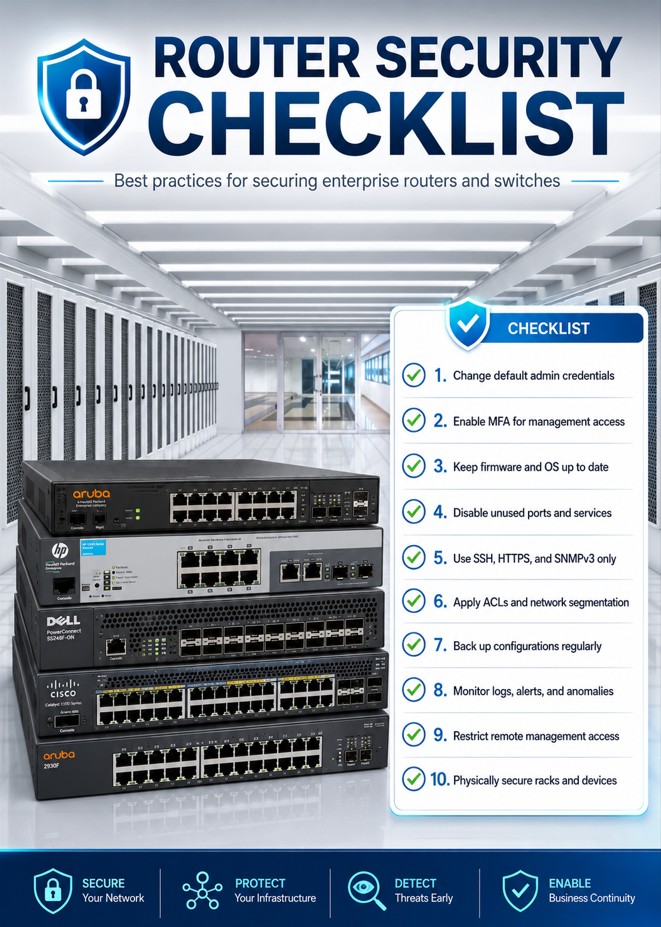
OC Security Audit identifies the internal network risks, evidence gaps, and remediation priorities. When the next step is implementation, troubleshooting, network design, managed IT, or operational support, IT Perfection can help turn the roadmap into practical work across users, servers, Microsoft 365, Azure, firewalls, VPNs, monitoring, backups, and network infrastructure.
Both service focuses are managed by Ali Hassani: OC Security Audit provides independent cybersecurity audit, assessment, compliance-readiness, and vCISO guidance, while IT Perfection supports implementation, troubleshooting, managed IT, cloud support, network operations, help desk, monitoring, and day-to-day technology operations.

Ali Hassani helps organizations connect internal network findings to executive risk, remediation priorities, audit evidence, and business continuity. His 25+ years of experience include cybersecurity, network security, Microsoft infrastructure, Microsoft 365 security, Azure, firewall security, vulnerability management, compliance auditing, healthcare IT, and IT operations.
Internal network security is the protection of users, devices, servers, applications, identity systems, cloud services, remote access paths, and sensitive data inside the organization. It goes beyond the firewall and looks at how systems are configured, monitored, patched, segmented, and recovered.
No. Vulnerability scanning is one input. A complete internal network security audit also reviews identity, privileged access, segmentation, endpoint protection, logging, monitoring, backups, policies, evidence, and business impact.
No. The checklist is for initial guidance and organizing evidence. It does not replace a professional cybersecurity audit, compliance assessment, penetration test, or legal/compliance review.
Healthcare practices, CPA firms, law firms, real estate companies, manufacturers, nonprofits, professional services firms, and local businesses in Irvine, Orange County, Los Angeles County, and Southern California can benefit when they rely on Microsoft 365, Azure, servers, VPN, firewalls, endpoints, or regulated data.
Critical controls such as privileged access, remote access, endpoint coverage, backups, and vulnerability exposure should be reviewed monthly or quarterly. Broader policy, compliance, and executive risk reviews are commonly performed annually and after major business or technology changes.
OC Security Audit helps Orange County and Southern California organizations review internal network security, document evidence, prioritize remediation, and prepare for compliance, cyber insurance, and executive risk discussions.
This website uses essential cookies for security and operation. Optional analytics and advertising cookies help measure site use and outreach. Choose Allow or Deny. You can change your choice at any time.