
Identity and Administrator Access
Review users, privileged roles, Global Administrators, MFA, Conditional Access, risky sign-ins, guest users, inactive accounts, PIM readiness, and emergency access.
Find exposure, strengthen essential controls, and build practical resilience around the systems your organization depends on.
Explore cybersecurity services →Evaluate controls independently, document defensible findings, and focus remediation on the risks with the greatest operational impact.
Explore security audits →Translate security obligations into clear evidence, accountable remediation, and a practical path toward audit or customer readiness.
Explore compliance services →Bring security governance, risk decisions, leadership communication, and improvement planning into one accountable executive program.
Explore vCISO services →Microsoft 365 Security
Plan microsoft Office 365 full audit with authorized scope, clear criteria, reliable evidence, reproducible testing, and findings that leadership and technical teams can act on.
CISO-led guidance from Ali Hassani, backed by 25+ years of IT, cybersecurity, compliance, and infrastructure experience.
Executive Summary
A Microsoft Office 365 security audit is a structured review of your Microsoft 365 tenant, security settings, identity controls, email protection, audit logs, data protection policies, administrative access, and compliance readiness.
Many Microsoft 365 environments grow over time without a formal security review. Users are added, administrators change settings, vendors receive access, Teams and SharePoint sites expand, and security tools may be enabled without being fully configured.
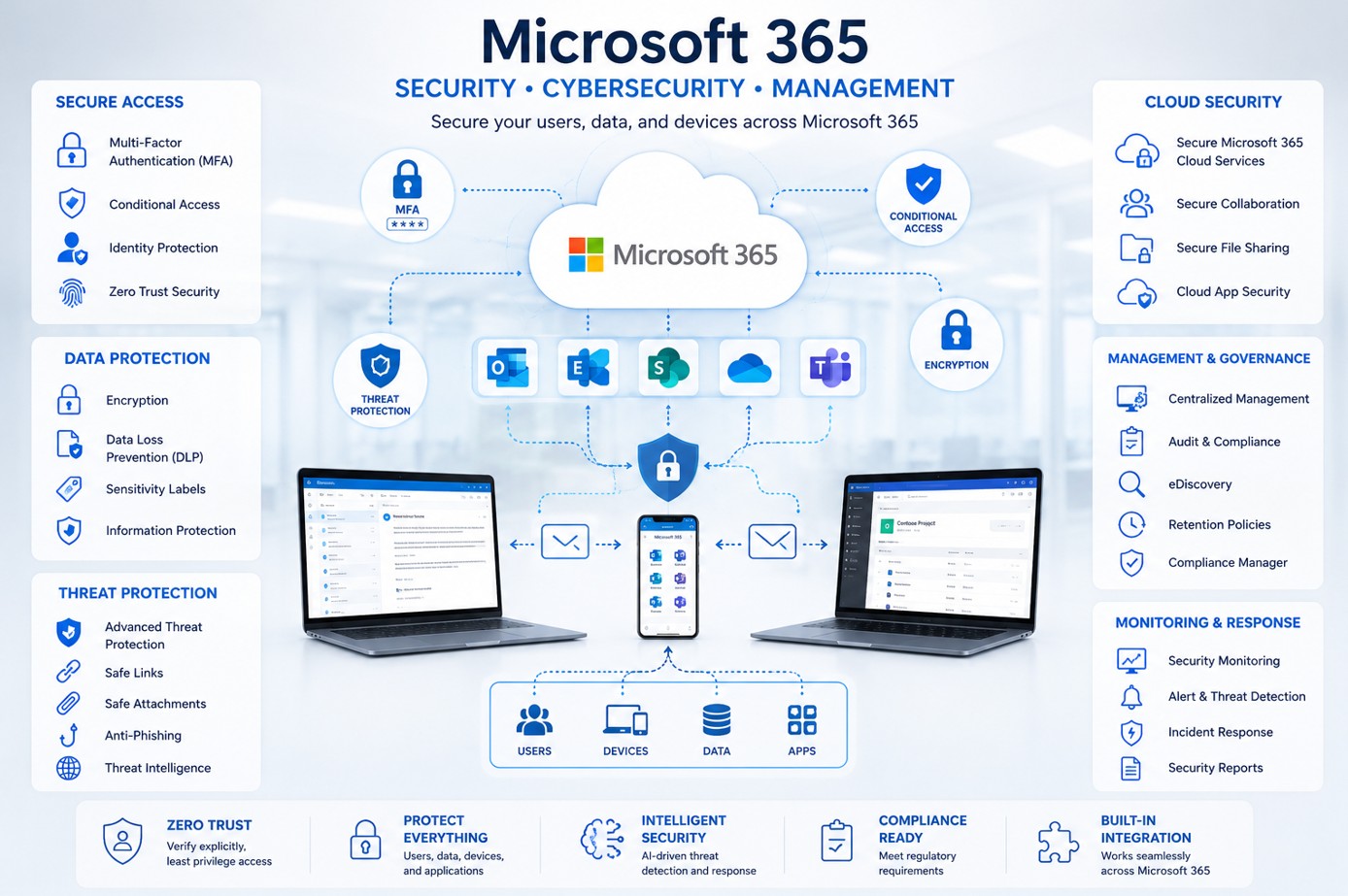
Audit Scope
OC Security Audit reviews the most important areas of your Microsoft 365 environment and turns technical evidence into business-readable findings, risk ratings, and remediation priorities.
Review users, privileged roles, Global Administrators, MFA, Conditional Access, risky sign-ins, guest users, inactive accounts, PIM readiness, and emergency access.
Review Exchange Online, mail flow rules, external forwarding, delegation, anti-phishing, Safe Links, Safe Attachments, quarantine, SPF, DKIM, and DMARC.
Review audit log availability, retention settings, DLP policies, sensitivity labels, eDiscovery readiness, alert policies, and evidence collection.
Review SharePoint, OneDrive, Teams, external sharing, guest access, anonymous links, retention, backup readiness, ransomware recovery, and incident response documentation.
Common Findings
Deliverables
High-level Microsoft 365 security posture, major risks, business impact, and recommended priorities.
Findings categorized as Critical, High, Medium, Low, or Informational so your team knows what to fix first.
Detailed review across identity, email, Defender, audit logs, DLP, SharePoint, OneDrive, Teams, admin access, and compliance readiness.
Reviewed evidence, screenshots, exports, configuration areas, audit artifacts, and a prioritized remediation plan.
Audit vs Implementation
This page focuses on Microsoft 365 auditing and assessment. The audit identifies gaps, reviews evidence, risk-rates findings, assesses compliance readiness, and builds a remediation roadmap.
For implementation, hardening, Defender tuning, SPF/DKIM/DMARC improvements, DLP configuration, Conditional Access, secure collaboration, and ongoing Microsoft 365 support, IT Perfection can support the operational implementation side through Microsoft 365 managed services, Microsoft 365 Copilot readiness, and co-managed IT services.
Audit Worksheet
This Office 365 security audit checklist includes 200 itemized checks across 14 categories. Use it as a planning and review reference; it does not replace a professional cybersecurity audit, compliance assessment, penetration test, or legal/compliance review.
On smaller screens, focus the category summary and use arrow keys or the visible scrollbar to review all columns.
| Checklist Category | What the Checklist Helps Review | Example Security Risk |
|---|---|---|
| Identity Security | Confirm users and administrators are properly protected | MFA gaps, risky sign-ins, inactive accounts |
| Administrator Access | Review privileged roles, admin exposure, and role governance | Too many Global Administrators or permanent admins |
| Email Security | Evaluate Exchange Online and Defender controls | Phishing, spoofing, mailbox forwarding, and unsafe mail rules |
| SPF, DKIM, DMARC | Review email authentication and domain protection | Domain spoofing and unauthorized senders |
| Audit Logging | Confirm investigation readiness and evidence retention | Insufficient log retention or no log review process |
| DLP and Purview | Review sensitive data controls, labels, and alerts | Data leakage or DLP policies left in test mode |
| SharePoint and OneDrive | Evaluate file sharing exposure and site permissions | Anonymous links and external data exposure |
| Teams Security | Review guest access, external access, apps, and meeting controls | Uncontrolled collaboration and external communication risk |
| Retention and eDiscovery | Assess records, legal hold, and compliance readiness | Missing records, legal hold gaps, or incomplete exports |
| Backup and Recovery | Review recoverability and incident recovery procedures | Poor recovery readiness and ransomware recovery gaps |
| ID | Category | Control Area | Checklist Item | Security Risk | Security Impact | Likelihood | Severity | Evidence to Review | Expected Secure Configuration | Audit Result | Owner | Remediation Priority | Notes |
|---|---|---|---|---|---|---|---|---|---|---|---|---|---|
| M365-001 | Identity Security | Validation | Confirm all user accounts are active, assigned to valid employees, and reviewed against HR records. | Dormant or unauthorized account remains active | Account compromise, unauthorized access to email, files, and apps | High | High | Entra admin center reports, sign-in logs, user exports, authentication method reports | Documented, reviewed, risk-rated, and aligned with business, compliance, and security requirements. | Audit checklist item | — | — | — |
| M365-002 | Identity Security | Validation | Review disabled accounts to confirm they are removed from licensing and sign-in access. | Disabled accounts are retained with permissions | Residual access and license waste | Medium | Medium | Entra admin center reports, sign-in logs, user exports, authentication method reports | Documented, reviewed, risk-rated, and aligned with business, compliance, and security requirements. | Audit checklist item | — | — | — |
| M365-003 | Identity Security | Review | Review inactive accounts with no sign-in activity in the last 30/60/90 days. | Inactive account can be exploited | Undetected compromise and lateral movement | High | High | Entra admin center reports, sign-in logs, user exports, authentication method reports | Documented, reviewed, risk-rated, and aligned with business, compliance, and security requirements. | Audit checklist item | — | — | — |
| M365-004 | Identity Security | Validation | Validate account lifecycle process for onboarding, role changes, and terminations. | Weak account lifecycle governance | Excessive access and delayed deprovisioning | Medium | Medium | Entra admin center reports, sign-in logs, user exports, authentication method reports | Documented, reviewed, risk-rated, and aligned with business, compliance, and security requirements. | Audit checklist item | — | — | — |
| M365-005 | Identity Security | Validation | Confirm administrator accounts are separate from daily user accounts. | Admins use normal accounts for privileged work | Higher risk of credential theft and admin compromise | High | High | Entra admin center reports, sign-in logs, user exports, authentication method reports | Documented, reviewed, risk-rated, and aligned with business, compliance, and security requirements. | Audit checklist item | — | — | — |
| M365-006 | Identity Security | Review | Review guest users and external identities for business justification. | Unreviewed guest access | External exposure of Microsoft 365 data | Medium | Medium | Entra admin center reports, sign-in logs, user exports, authentication method reports | Documented, reviewed, risk-rated, and aligned with business, compliance, and security requirements. | Audit checklist item | — | — | — |
| M365-007 | Identity Security | Validation | Validate guest user expiration and review process. | Guest accounts remain indefinitely | Former vendors retain access | Medium | Medium | Entra admin center reports, sign-in logs, user exports, authentication method reports | Documented, reviewed, risk-rated, and aligned with business, compliance, and security requirements. | Audit checklist item | — | — | — |
| M365-008 | Identity Security | Review | Review password policies and banned password settings. | Weak passwords remain allowed | Credential stuffing and account takeover | Medium | Medium | Entra admin center reports, sign-in logs, user exports, authentication method reports | Documented, reviewed, risk-rated, and aligned with business, compliance, and security requirements. | Audit checklist item | — | — | — |
| M365-009 | Identity Security | Review | Review authentication methods registered by users. | Weak or outdated authentication methods | Bypass or downgrade of strong authentication | Medium | Medium | Entra admin center reports, sign-in logs, user exports, authentication method reports | Documented, reviewed, risk-rated, and aligned with business, compliance, and security requirements. | Audit checklist item | — | — | — |
| M365-010 | Identity Security | Review | Review risky users and risky sign-ins history. | Risk events are not investigated | Account takeover may go unnoticed | Medium | Medium | Entra admin center reports, sign-in logs, user exports, authentication method reports | Documented, reviewed, risk-rated, and aligned with business, compliance, and security requirements. | Audit checklist item | — | — | — |
| M365-011 | Identity Security | Validation | Confirm self-service password reset settings are controlled and monitored. | Improper SSPR configuration | Unauthorized password reset or support burden | Medium | Medium | Entra admin center reports, sign-in logs, user exports, authentication method reports | Documented, reviewed, risk-rated, and aligned with business, compliance, and security requirements. | Audit checklist item | — | — | — |
| M365-012 | Identity Security | Review | Review OAuth consent settings and user consent permissions. | Users can grant risky app permissions | Data exfiltration through malicious OAuth apps | Medium | Medium | Entra admin center reports, sign-in logs, user exports, authentication method reports | Documented, reviewed, risk-rated, and aligned with business, compliance, and security requirements. | Audit checklist item | — | — | — |
| M365-013 | Identity Security | Review | Review enterprise applications and service principals with high privileges. | Overprivileged app registrations | Tenant-wide compromise through application permissions | High | High | Entra admin center reports, sign-in logs, user exports, authentication method reports | Documented, reviewed, risk-rated, and aligned with business, compliance, and security requirements. | Audit checklist item | — | — | — |
| M365-014 | Identity Security | Validation | Confirm break-glass accounts exist and are secured with monitored access. | No secure emergency access process | Lockout during incident or uncontrolled emergency access | Medium | Medium | Entra admin center reports, sign-in logs, user exports, authentication method reports | Documented, reviewed, risk-rated, and aligned with business, compliance, and security requirements. | Audit checklist item | — | — | — |
| M365-015 | Identity Security | Review | Review conditional sign-in risk policies if Entra ID P2 is available. | Risk-based controls not used | Missed automatic response to compromised identities | High | High | Entra admin center reports, sign-in logs, user exports, authentication method reports | Documented, reviewed, risk-rated, and aligned with business, compliance, and security requirements. | Audit checklist item | — | — | — |
| M365-016 | Identity Security | Validation | Validate named locations and trusted IP configuration. | Trusted locations are too broad | Attackers bypass Conditional Access | High | High | Entra admin center reports, sign-in logs, user exports, authentication method reports | Documented, reviewed, risk-rated, and aligned with business, compliance, and security requirements. | Audit checklist item | — | — | — |
| M365-017 | Identity Security | Review | Review authentication strength policies for privileged users. | Weak MFA methods allowed for admins | Increased admin compromise risk | High | High | Entra admin center reports, sign-in logs, user exports, authentication method reports | Documented, reviewed, risk-rated, and aligned with business, compliance, and security requirements. | Audit checklist item | — | — | — |
| M365-018 | Identity Security | Validation | Confirm sign-in logs are retained and accessible for investigation. | Sign-in evidence unavailable | Poor investigation and compliance readiness | Medium | Medium | Entra admin center reports, sign-in logs, user exports, authentication method reports | Documented, reviewed, risk-rated, and aligned with business, compliance, and security requirements. | Audit checklist item | — | — | — |
| ID | Category | Control Area | Checklist Item | Security Risk | Security Impact | Likelihood | Severity | Evidence to Review | Expected Secure Configuration | Audit Result | Owner | Remediation Priority | Notes |
|---|---|---|---|---|---|---|---|---|---|---|---|---|---|
| M365-019 | Administrator Access | Validation | List all Global Administrators and confirm business justification. | Too many Global Administrators | Tenant-wide compromise if one admin is breached | High | High | Role assignment exports, admin audit logs, PIM reports, access review evidence | Documented, reviewed, risk-rated, and aligned with business, compliance, and security requirements. | Audit checklist item | — | — | — |
| M365-020 | Administrator Access | Review | Review Exchange Administrator assignments. | Excessive Exchange admin rights | Mailbox, mail flow, and data exposure | Medium | Medium | Role assignment exports, admin audit logs, PIM reports, access review evidence | Documented, reviewed, risk-rated, and aligned with business, compliance, and security requirements. | Audit checklist item | — | — | — |
| M365-021 | Administrator Access | Review | Review SharePoint Administrator assignments. | Excessive SharePoint admin rights | File sharing and site control risk | Medium | Medium | Role assignment exports, admin audit logs, PIM reports, access review evidence | Documented, reviewed, risk-rated, and aligned with business, compliance, and security requirements. | Audit checklist item | — | — | — |
| M365-022 | Administrator Access | Review | Review Teams Administrator assignments. | Excessive Teams admin rights | Collaboration and guest access exposure | Medium | Medium | Role assignment exports, admin audit logs, PIM reports, access review evidence | Documented, reviewed, risk-rated, and aligned with business, compliance, and security requirements. | Audit checklist item | — | — | — |
| M365-023 | Administrator Access | Review | Review Security Administrator and Compliance Administrator assignments. | Overbroad security or compliance roles | Policy changes and evidence tampering | Medium | Medium | Role assignment exports, admin audit logs, PIM reports, access review evidence | Documented, reviewed, risk-rated, and aligned with business, compliance, and security requirements. | Audit checklist item | — | — | — |
| M365-024 | Administrator Access | Validation | Confirm privileged roles are reviewed on a scheduled basis. | No privileged role review | Privilege creep and former staff access | High | High | Role assignment exports, admin audit logs, PIM reports, access review evidence | Documented, reviewed, risk-rated, and aligned with business, compliance, and security requirements. | Audit checklist item | — | — | — |
| M365-025 | Administrator Access | Validation | Validate emergency access accounts are excluded from normal policies only as required. | Improper emergency account exclusions | Unmonitored high-privilege access | Medium | Medium | Role assignment exports, admin audit logs, PIM reports, access review evidence | Documented, reviewed, risk-rated, and aligned with business, compliance, and security requirements. | Audit checklist item | — | — | — |
| M365-026 | Administrator Access | Validation | Confirm administrator MFA is enforced with phishing-resistant or strong authentication where possible. | Weak administrator MFA | Privileged account takeover | High | High | Role assignment exports, admin audit logs, PIM reports, access review evidence | Documented, reviewed, risk-rated, and aligned with business, compliance, and security requirements. | Audit checklist item | — | — | — |
| M365-027 | Administrator Access | Review | Review role assignments for former IT staff, consultants, and vendors. | Former personnel retain admin access | Unauthorized administrative control | Medium | Medium | Role assignment exports, admin audit logs, PIM reports, access review evidence | Documented, reviewed, risk-rated, and aligned with business, compliance, and security requirements. | Audit checklist item | — | — | — |
| M365-028 | Administrator Access | Validation | Validate Privileged Identity Management readiness or usage. | Permanent admin rights remain enabled | Increased attack window | High | High | Role assignment exports, admin audit logs, PIM reports, access review evidence | Documented, reviewed, risk-rated, and aligned with business, compliance, and security requirements. | Audit checklist item | — | — | — |
| M365-029 | Administrator Access | Review | Review admin audit logs for recent role changes. | Admin role changes are not monitored | Unauthorized privilege escalation | Medium | Medium | Role assignment exports, admin audit logs, PIM reports, access review evidence | Documented, reviewed, risk-rated, and aligned with business, compliance, and security requirements. | Audit checklist item | — | — | — |
| M365-030 | Administrator Access | Validation | Confirm admin consent workflow for high-risk application permissions. | Uncontrolled app consent | Data access granted without review | Medium | Medium | Role assignment exports, admin audit logs, PIM reports, access review evidence | Documented, reviewed, risk-rated, and aligned with business, compliance, and security requirements. | Audit checklist item | — | — | — |
| M365-031 | Administrator Access | Review | Review service accounts with administrative permissions. | Service accounts overprivileged | Persistent compromise path | High | High | Role assignment exports, admin audit logs, PIM reports, access review evidence | Documented, reviewed, risk-rated, and aligned with business, compliance, and security requirements. | Audit checklist item | — | — | — |
| M365-032 | Administrator Access | Validation | Confirm admin access is not shared between people. | Shared admin accounts | No accountability or audit trail | Medium | Medium | Role assignment exports, admin audit logs, PIM reports, access review evidence | Documented, reviewed, risk-rated, and aligned with business, compliance, and security requirements. | Audit checklist item | — | — | — |
| M365-033 | Administrator Access | Review | Review mailbox delegation for executive and privileged mailboxes. | Improper delegated access | Sensitive email exposure | High | High | Role assignment exports, admin audit logs, PIM reports, access review evidence | Documented, reviewed, risk-rated, and aligned with business, compliance, and security requirements. | Audit checklist item | — | — | — |
| M365-034 | Administrator Access | Validation | Validate admin workstation or secure access expectations. | Admins operate from unmanaged endpoints | Credential theft and session hijacking | Medium | Medium | Role assignment exports, admin audit logs, PIM reports, access review evidence | Documented, reviewed, risk-rated, and aligned with business, compliance, and security requirements. | Audit checklist item | — | — | — |
| M365-035 | Administrator Access | Validation | Confirm admin alerting for risky sign-ins and role changes. | No admin activity alerting | Delayed detection of compromise | High | High | Role assignment exports, admin audit logs, PIM reports, access review evidence | Documented, reviewed, risk-rated, and aligned with business, compliance, and security requirements. | Audit checklist item | — | — | — |
| M365-036 | Administrator Access | Review | Review audit evidence for last privileged access review. | No proof of role governance | Compliance and insurance evidence gap | High | High | Role assignment exports, admin audit logs, PIM reports, access review evidence | Documented, reviewed, risk-rated, and aligned with business, compliance, and security requirements. | Audit checklist item | — | — | — |
| ID | Category | Control Area | Checklist Item | Security Risk | Security Impact | Likelihood | Severity | Evidence to Review | Expected Secure Configuration | Audit Result | Owner | Remediation Priority | Notes |
|---|---|---|---|---|---|---|---|---|---|---|---|---|---|
| M365-037 | Email Security | Review | Review Exchange Online accepted domains. | Uncontrolled accepted domains | Mail flow and spoofing exposure | Medium | Medium | Exchange admin center settings, mail flow rules, message trace, mailbox reports | Documented, reviewed, risk-rated, and aligned with business, compliance, and security requirements. | Audit checklist item | — | — | — |
| M365-038 | Email Security | Review | Review all mail flow rules for bypass, redirect, and delete actions. | Mail rules bypass security controls | Phishing, data loss, and hidden forwarding | Medium | Medium | Exchange admin center settings, mail flow rules, message trace, mailbox reports | Documented, reviewed, risk-rated, and aligned with business, compliance, and security requirements. | Audit checklist item | — | — | — |
| M365-039 | Email Security | Assessment | Identify rules that bypass spam filtering or malware scanning. | Security filtering is bypassed | Malicious email reaches users | Medium | Medium | Exchange admin center settings, mail flow rules, message trace, mailbox reports | Documented, reviewed, risk-rated, and aligned with business, compliance, and security requirements. | Audit checklist item | — | — | — |
| M365-040 | Email Security | Review | Review external forwarding settings at tenant and mailbox level. | External forwarding is allowed | Business email compromise and data exfiltration | High | High | Exchange admin center settings, mail flow rules, message trace, mailbox reports | Documented, reviewed, risk-rated, and aligned with business, compliance, and security requirements. | Audit checklist item | — | — | — |
| M365-041 | Email Security | Review | Review mailbox forwarding reports. | Hidden forwarding rules exist | Sensitive email leakage | Medium | Medium | Exchange admin center settings, mail flow rules, message trace, mailbox reports | Documented, reviewed, risk-rated, and aligned with business, compliance, and security requirements. | Audit checklist item | — | — | — |
| M365-042 | Email Security | Review | Review inbox rules for suspicious forwarding, deletion, or keyword triggers. | Malicious inbox rules persist | Stealthy BEC activity | Medium | Medium | Exchange admin center settings, mail flow rules, message trace, mailbox reports | Documented, reviewed, risk-rated, and aligned with business, compliance, and security requirements. | Audit checklist item | — | — | — |
| M365-043 | Email Security | Review | Review shared mailbox permissions and delegation. | Overbroad shared mailbox access | Unauthorized email access | Medium | Medium | Exchange admin center settings, mail flow rules, message trace, mailbox reports | Documented, reviewed, risk-rated, and aligned with business, compliance, and security requirements. | Audit checklist item | — | — | — |
| M365-044 | Email Security | Validation | Confirm executives and finance users have enhanced anti-phishing controls. | High-value users are not protected | Impersonation and wire fraud | Medium | Medium | Exchange admin center settings, mail flow rules, message trace, mailbox reports | Documented, reviewed, risk-rated, and aligned with business, compliance, and security requirements. | Audit checklist item | — | — | — |
| M365-045 | Email Security | Review | Review anti-phishing policy settings. | Weak phishing protection | Credential theft risk | Medium | Medium | Exchange admin center settings, mail flow rules, message trace, mailbox reports | Documented, reviewed, risk-rated, and aligned with business, compliance, and security requirements. | Audit checklist item | — | — | — |
| M365-046 | Email Security | Review | Review anti-spam inbound policy settings. | Weak spam filtering | Increased malicious email exposure | Medium | Medium | Exchange admin center settings, mail flow rules, message trace, mailbox reports | Documented, reviewed, risk-rated, and aligned with business, compliance, and security requirements. | Audit checklist item | — | — | — |
| M365-047 | Email Security | Review | Review anti-spam outbound policy settings. | Compromised account sends spam | Domain reputation damage | High | High | Exchange admin center settings, mail flow rules, message trace, mailbox reports | Documented, reviewed, risk-rated, and aligned with business, compliance, and security requirements. | Audit checklist item | — | — | — |
| M365-048 | Email Security | Review | Review anti-malware policy settings. | Weak malware filtering | Ransomware or malicious attachment risk | High | High | Exchange admin center settings, mail flow rules, message trace, mailbox reports | Documented, reviewed, risk-rated, and aligned with business, compliance, and security requirements. | Audit checklist item | — | — | — |
| M365-049 | Email Security | Validation | Validate quarantine policies and review process. | Quarantine is not reviewed | Missed threats or business disruption | Medium | Medium | Exchange admin center settings, mail flow rules, message trace, mailbox reports | Documented, reviewed, risk-rated, and aligned with business, compliance, and security requirements. | Audit checklist item | — | — | — |
| M365-050 | Email Security | Review | Review user-reported phishing mailbox/process. | No phishing reporting workflow | Delayed detection and training gaps | Medium | Medium | Exchange admin center settings, mail flow rules, message trace, mailbox reports | Documented, reviewed, risk-rated, and aligned with business, compliance, and security requirements. | Audit checklist item | — | — | — |
| M365-051 | Email Security | Validation | Confirm message trace availability and investigation process. | Poor mail flow visibility | Weak incident response | Medium | Medium | Exchange admin center settings, mail flow rules, message trace, mailbox reports | Documented, reviewed, risk-rated, and aligned with business, compliance, and security requirements. | Audit checklist item | — | — | — |
| M365-052 | Email Security | Review | Review transport rules for external warning banners. | No external sender awareness | Higher phishing susceptibility | Medium | Medium | Exchange admin center settings, mail flow rules, message trace, mailbox reports | Documented, reviewed, risk-rated, and aligned with business, compliance, and security requirements. | Audit checklist item | — | — | — |
| M365-053 | Email Security | Review | Review mailbox audit settings. | Mailbox activity not logged | Poor evidence during investigations | Medium | Medium | Exchange admin center settings, mail flow rules, message trace, mailbox reports | Documented, reviewed, risk-rated, and aligned with business, compliance, and security requirements. | Audit checklist item | — | — | — |
| M365-054 | Email Security | Validation | Confirm Exchange Online PowerShell access is controlled. | Uncontrolled PowerShell access | Bulk changes and attacker persistence | Medium | Medium | Exchange admin center settings, mail flow rules, message trace, mailbox reports | Documented, reviewed, risk-rated, and aligned with business, compliance, and security requirements. | Audit checklist item | — | — | — |
| ID | Category | Control Area | Checklist Item | Security Risk | Security Impact | Likelihood | Severity | Evidence to Review | Expected Secure Configuration | Audit Result | Owner | Remediation Priority | Notes |
|---|---|---|---|---|---|---|---|---|---|---|---|---|---|
| M365-055 | SPF, DKIM, DMARC | Review | Review SPF record syntax and authorized senders. | Invalid SPF record | Email authentication failure | Medium | Medium | DNS records, Defender domain reports, DMARC aggregate report configuration | Documented, reviewed, risk-rated, and aligned with business, compliance, and security requirements. | Audit checklist item | — | — | — |
| M365-056 | SPF, DKIM, DMARC | Validation | Confirm SPF record is not too broad. | Overly permissive SPF | Spoofing through unauthorized senders | Medium | Medium | DNS records, Defender domain reports, DMARC aggregate report configuration | Documented, reviewed, risk-rated, and aligned with business, compliance, and security requirements. | Audit checklist item | — | — | — |
| M365-057 | SPF, DKIM, DMARC | Review | Review SPF include mechanisms and lookup count. | SPF lookup limit exceeded | Authentication breaks for legitimate email | Medium | Medium | DNS records, Defender domain reports, DMARC aggregate report configuration | Documented, reviewed, risk-rated, and aligned with business, compliance, and security requirements. | Audit checklist item | — | — | — |
| M365-058 | SPF, DKIM, DMARC | Validation | Confirm DKIM is enabled for all accepted domains. | DKIM not enabled | Spoofing and deliverability risk | Medium | Medium | DNS records, Defender domain reports, DMARC aggregate report configuration | Documented, reviewed, risk-rated, and aligned with business, compliance, and security requirements. | Audit checklist item | — | — | — |
| M365-059 | SPF, DKIM, DMARC | Validation | Validate DKIM selectors and DNS records. | Incorrect DKIM DNS records | Email authentication failure | Medium | Medium | DNS records, Defender domain reports, DMARC aggregate report configuration | Documented, reviewed, risk-rated, and aligned with business, compliance, and security requirements. | Audit checklist item | — | — | — |
| M365-060 | SPF, DKIM, DMARC | Review | Review DMARC record existence. | No DMARC record | Domain spoofing not controlled | High | High | DNS records, Defender domain reports, DMARC aggregate report configuration | Documented, reviewed, risk-rated, and aligned with business, compliance, and security requirements. | Audit checklist item | — | — | — |
| M365-061 | SPF, DKIM, DMARC | Review | Review DMARC policy enforcement level. | DMARC monitoring only | Spoofed messages may still deliver | High | High | DNS records, Defender domain reports, DMARC aggregate report configuration | Documented, reviewed, risk-rated, and aligned with business, compliance, and security requirements. | Audit checklist item | — | — | — |
| M365-062 | SPF, DKIM, DMARC | Validation | Validate DMARC alignment for Microsoft 365 and third-party senders. | Alignment failure | Legitimate email rejected or spoofing persists | High | High | DNS records, Defender domain reports, DMARC aggregate report configuration | Documented, reviewed, risk-rated, and aligned with business, compliance, and security requirements. | Audit checklist item | — | — | — |
| M365-063 | SPF, DKIM, DMARC | Validation | Confirm DMARC aggregate reports are sent to monitored mailbox or service. | No DMARC reporting process | No visibility into abuse | High | High | DNS records, Defender domain reports, DMARC aggregate report configuration | Documented, reviewed, risk-rated, and aligned with business, compliance, and security requirements. | Audit checklist item | — | — | — |
| M365-064 | SPF, DKIM, DMARC | Review | Review third-party sending services inventory. | Unknown senders use domain | Spoofing and deliverability failures | Medium | Medium | DNS records, Defender domain reports, DMARC aggregate report configuration | Documented, reviewed, risk-rated, and aligned with business, compliance, and security requirements. | Audit checklist item | — | — | — |
| M365-065 | SPF, DKIM, DMARC | Validation | Confirm subdomain DMARC policy. | Subdomains not protected | Subdomain spoofing exposure | High | High | DNS records, Defender domain reports, DMARC aggregate report configuration | Documented, reviewed, risk-rated, and aligned with business, compliance, and security requirements. | Audit checklist item | — | — | — |
| M365-066 | SPF, DKIM, DMARC | Review | Review return-path and envelope-from alignment. | Poor sender alignment | DMARC failures | High | High | DNS records, Defender domain reports, DMARC aggregate report configuration | Documented, reviewed, risk-rated, and aligned with business, compliance, and security requirements. | Audit checklist item | — | — | — |
| M365-067 | SPF, DKIM, DMARC | Documentation | Document DNS ownership and change control for mail authentication records. | DNS changes unmanaged | Authentication breaks or abuse | Medium | Medium | DNS records, Defender domain reports, DMARC aggregate report configuration | Documented, reviewed, risk-rated, and aligned with business, compliance, and security requirements. | Audit checklist item | — | — | — |
| M365-068 | SPF, DKIM, DMARC | Review | Review BIMI readiness if relevant. | Brand protection not mature | Lower trust in email identity | Medium | Medium | DNS records, Defender domain reports, DMARC aggregate report configuration | Documented, reviewed, risk-rated, and aligned with business, compliance, and security requirements. | Audit checklist item | — | — | — |
| M365-069 | SPF, DKIM, DMARC | Validation | Confirm email authentication evidence is captured for audit. | No evidence for external reviewers | Compliance and customer questionnaire gap | Medium | Medium | DNS records, Defender domain reports, DMARC aggregate report configuration | Documented, reviewed, risk-rated, and aligned with business, compliance, and security requirements. | Audit checklist item | — | — | — |
| ID | Category | Control Area | Checklist Item | Security Risk | Security Impact | Likelihood | Severity | Evidence to Review | Expected Secure Configuration | Audit Result | Owner | Remediation Priority | Notes |
|---|---|---|---|---|---|---|---|---|---|---|---|---|---|
| M365-070 | Defender for Office 365 | Validation | Confirm Defender for Office 365 licensing availability. | Security features available but unused | Reduced protection from phishing and malware | Medium | Medium | Defender portal policies, quarantine reports, threat explorer, alert settings | Documented, reviewed, risk-rated, and aligned with business, compliance, and security requirements. | Audit checklist item | — | — | — |
| M365-071 | Defender for Office 365 | Review | Review Safe Links policy coverage. | Safe Links not applied to all users | Malicious links reach users | Medium | Medium | Defender portal policies, quarantine reports, threat explorer, alert settings | Documented, reviewed, risk-rated, and aligned with business, compliance, and security requirements. | Audit checklist item | — | — | — |
| M365-072 | Defender for Office 365 | Review | Review Safe Attachments policy coverage. | Attachments not detonated consistently | Malware and ransomware exposure | High | High | Defender portal policies, quarantine reports, threat explorer, alert settings | Documented, reviewed, risk-rated, and aligned with business, compliance, and security requirements. | Audit checklist item | — | — | — |
| M365-073 | Defender for Office 365 | Validation | Confirm Safe Links applies to Teams, Office apps, and supported workloads as needed. | Incomplete workload coverage | Threats bypass controls in collaboration apps | Medium | Medium | Defender portal policies, quarantine reports, threat explorer, alert settings | Documented, reviewed, risk-rated, and aligned with business, compliance, and security requirements. | Audit checklist item | — | — | — |
| M365-074 | Defender for Office 365 | Review | Review anti-phishing impersonation protection settings. | Weak impersonation protection | Executive and vendor fraud | Medium | Medium | Defender portal policies, quarantine reports, threat explorer, alert settings | Documented, reviewed, risk-rated, and aligned with business, compliance, and security requirements. | Audit checklist item | — | — | — |
| M365-075 | Defender for Office 365 | Validation | Confirm protected users and domains are configured. | High-value identities not protected | Targeted phishing risk | Medium | Medium | Defender portal policies, quarantine reports, threat explorer, alert settings | Documented, reviewed, risk-rated, and aligned with business, compliance, and security requirements. | Audit checklist item | — | — | — |
| M365-076 | Defender for Office 365 | Review | Review preset security policies. | Baseline protections not enabled | Inconsistent security posture | Medium | Medium | Defender portal policies, quarantine reports, threat explorer, alert settings | Documented, reviewed, risk-rated, and aligned with business, compliance, and security requirements. | Audit checklist item | — | — | — |
| M365-077 | Defender for Office 365 | Review | Review threat policies and overrides. | Overrides weaken protection | Malicious content allowed | Medium | Medium | Defender portal policies, quarantine reports, threat explorer, alert settings | Documented, reviewed, risk-rated, and aligned with business, compliance, and security requirements. | Audit checklist item | — | — | — |
| M365-078 | Defender for Office 365 | Review | Review quarantine policy permissions. | Users can release risky messages | Threat exposure | Medium | Medium | Defender portal policies, quarantine reports, threat explorer, alert settings | Documented, reviewed, risk-rated, and aligned with business, compliance, and security requirements. | Audit checklist item | — | — | — |
| M365-079 | Defender for Office 365 | Review | Review alert policies and notification recipients. | Alerts not routed | Delayed incident response | Medium | Medium | Defender portal policies, quarantine reports, threat explorer, alert settings | Documented, reviewed, risk-rated, and aligned with business, compliance, and security requirements. | Audit checklist item | — | — | — |
| M365-080 | Defender for Office 365 | Validation | Validate investigation workflow for Defender alerts. | No response process | Unresolved security events | Medium | Medium | Defender portal policies, quarantine reports, threat explorer, alert settings | Documented, reviewed, risk-rated, and aligned with business, compliance, and security requirements. | Audit checklist item | — | — | — |
| M365-081 | Defender for Office 365 | Review | Review Attack Simulation Training readiness. | No phishing training validation | User risk remains unknown | Medium | Medium | Defender portal policies, quarantine reports, threat explorer, alert settings | Documented, reviewed, risk-rated, and aligned with business, compliance, and security requirements. | Audit checklist item | — | — | — |
| M365-082 | Defender for Office 365 | Review | Review spoof intelligence and allowed senders. | Spoofed senders allowed | Impersonation exposure | Medium | Medium | Defender portal policies, quarantine reports, threat explorer, alert settings | Documented, reviewed, risk-rated, and aligned with business, compliance, and security requirements. | Audit checklist item | — | — | — |
| M365-083 | Defender for Office 365 | Review | Review Tenant Allow/Block List entries. | Dangerous allow entries | Known threats bypass controls | Medium | Medium | Defender portal policies, quarantine reports, threat explorer, alert settings | Documented, reviewed, risk-rated, and aligned with business, compliance, and security requirements. | Audit checklist item | — | — | — |
| M365-084 | Defender for Office 365 | Review | Review submission process for false positives and false negatives. | Poor tuning process | Detection quality remains weak | Medium | Medium | Defender portal policies, quarantine reports, threat explorer, alert settings | Documented, reviewed, risk-rated, and aligned with business, compliance, and security requirements. | Audit checklist item | — | — | — |
| M365-085 | Defender for Office 365 | Validation | Confirm Defender reports are reviewed periodically. | Reports ignored | Missed trends and repeated attacks | Medium | Medium | Defender portal policies, quarantine reports, threat explorer, alert settings | Documented, reviewed, risk-rated, and aligned with business, compliance, and security requirements. | Audit checklist item | — | — | — |
| M365-086 | Defender for Office 365 | Review | Review automated investigation and response settings if available. | Automation not used | Slower containment | Medium | Medium | Defender portal policies, quarantine reports, threat explorer, alert settings | Documented, reviewed, risk-rated, and aligned with business, compliance, and security requirements. | Audit checklist item | — | — | — |
| ID | Category | Control Area | Checklist Item | Security Risk | Security Impact | Likelihood | Severity | Evidence to Review | Expected Secure Configuration | Audit Result | Owner | Remediation Priority | Notes |
|---|---|---|---|---|---|---|---|---|---|---|---|---|---|
| M365-087 | Audit Logging | Validation | Confirm Microsoft Purview audit logging is enabled. | Audit logs unavailable | Cannot investigate suspicious activity | High | High | Microsoft Purview audit settings, audit search results, alert policies, retention settings | Documented, reviewed, risk-rated, and aligned with business, compliance, and security requirements. | Audit checklist item | — | — | — |
| M365-088 | Audit Logging | Review | Review audit log retention period. | Retention too short | Evidence unavailable during late discovery | Medium | Medium | Microsoft Purview audit settings, audit search results, alert policies, retention settings | Documented, reviewed, risk-rated, and aligned with business, compliance, and security requirements. | Audit checklist item | — | — | — |
| M365-089 | Audit Logging | Validation | Confirm audit search access is assigned to authorized staff. | No one can search logs | Incident response delay | Medium | Medium | Microsoft Purview audit settings, audit search results, alert policies, retention settings | Documented, reviewed, risk-rated, and aligned with business, compliance, and security requirements. | Audit checklist item | — | — | — |
| M365-090 | Audit Logging | Review | Review admin activity visibility. | Admin changes not monitored | Unauthorized configuration changes persist | Medium | Medium | Microsoft Purview audit settings, audit search results, alert policies, retention settings | Documented, reviewed, risk-rated, and aligned with business, compliance, and security requirements. | Audit checklist item | — | — | — |
| M365-091 | Audit Logging | Review | Review Exchange mailbox activity logging. | Mailbox access not visible | Email compromise investigation gap | High | High | Microsoft Purview audit settings, audit search results, alert policies, retention settings | Documented, reviewed, risk-rated, and aligned with business, compliance, and security requirements. | Audit checklist item | — | — | — |
| M365-092 | Audit Logging | Review | Review SharePoint and OneDrive activity logging. | File access not visible | Data leakage investigation gap | Medium | Medium | Microsoft Purview audit settings, audit search results, alert policies, retention settings | Documented, reviewed, risk-rated, and aligned with business, compliance, and security requirements. | Audit checklist item | — | — | — |
| M365-093 | Audit Logging | Review | Review Teams activity logging. | Collaboration events not visible | Guest and Teams misuse gaps | Medium | Medium | Microsoft Purview audit settings, audit search results, alert policies, retention settings | Documented, reviewed, risk-rated, and aligned with business, compliance, and security requirements. | Audit checklist item | — | — | — |
| M365-094 | Audit Logging | Validation | Confirm DLP event visibility. | DLP events not reviewed | Sensitive data exposure persists | Medium | Medium | Microsoft Purview audit settings, audit search results, alert policies, retention settings | Documented, reviewed, risk-rated, and aligned with business, compliance, and security requirements. | Audit checklist item | — | — | — |
| M365-095 | Audit Logging | Review | Review alert policies tied to audit events. | No alerting from important events | Delayed detection | Medium | Medium | Microsoft Purview audit settings, audit search results, alert policies, retention settings | Documented, reviewed, risk-rated, and aligned with business, compliance, and security requirements. | Audit checklist item | — | — | — |
| M365-096 | Audit Logging | Validation | Confirm evidence collection procedure for investigations. | Evidence not preserved | Legal, insurance, and compliance weakness | Medium | Medium | Microsoft Purview audit settings, audit search results, alert policies, retention settings | Documented, reviewed, risk-rated, and aligned with business, compliance, and security requirements. | Audit checklist item | — | — | — |
| M365-097 | Audit Logging | Review | Review audit log export process. | Logs cannot be shared with auditors | Audit readiness gap | Medium | Medium | Microsoft Purview audit settings, audit search results, alert policies, retention settings | Documented, reviewed, risk-rated, and aligned with business, compliance, and security requirements. | Audit checklist item | — | — | — |
| M365-098 | Audit Logging | Validation | Validate time synchronization and timezone documentation. | Timeline reconstruction difficult | Investigation confusion | Medium | Medium | Microsoft Purview audit settings, audit search results, alert policies, retention settings | Documented, reviewed, risk-rated, and aligned with business, compliance, and security requirements. | Audit checklist item | — | — | — |
| M365-099 | Audit Logging | Review | Review who can modify audit settings. | Unauthorized audit changes possible | Evidence tampering risk | Medium | Medium | Microsoft Purview audit settings, audit search results, alert policies, retention settings | Documented, reviewed, risk-rated, and aligned with business, compliance, and security requirements. | Audit checklist item | — | — | — |
| M365-100 | Audit Logging | Validation | Confirm sensitive admin events generate alerts. | No alert on high-risk changes | Tenant compromise risk | High | High | Microsoft Purview audit settings, audit search results, alert policies, retention settings | Documented, reviewed, risk-rated, and aligned with business, compliance, and security requirements. | Audit checklist item | — | — | — |
| M365-101 | Audit Logging | Review | Review audit evidence for recent suspicious sign-ins or file sharing. | Known issues not investigated | Repeated exposure | Medium | Medium | Microsoft Purview audit settings, audit search results, alert policies, retention settings | Documented, reviewed, risk-rated, and aligned with business, compliance, and security requirements. | Audit checklist item | — | — | — |
| M365-102 | Audit Logging | Validation | Confirm audit log review cadence is documented. | Logs enabled but ignored | Controls not operating effectively | Medium | Medium | Microsoft Purview audit settings, audit search results, alert policies, retention settings | Documented, reviewed, risk-rated, and aligned with business, compliance, and security requirements. | Audit checklist item | — | — | — |
| ID | Category | Control Area | Checklist Item | Security Risk | Security Impact | Likelihood | Severity | Evidence to Review | Expected Secure Configuration | Audit Result | Owner | Remediation Priority | Notes |
|---|---|---|---|---|---|---|---|---|---|---|---|---|---|
| M365-103 | DLP and Purview | Assessment | Inventory DLP policies across Exchange, SharePoint, OneDrive, and Teams. | DLP coverage incomplete | Sensitive data leakage | Medium | Medium | Purview DLP policies, retention labels, sensitivity labels, alert reports | Documented, reviewed, risk-rated, and aligned with business, compliance, and security requirements. | Audit checklist item | — | — | — |
| M365-104 | DLP and Purview | Review | Review DLP policy mode: test, simulation, or enforcement. | DLP left in test mode | Data not protected | Medium | Medium | Purview DLP policies, retention labels, sensitivity labels, alert reports | Documented, reviewed, risk-rated, and aligned with business, compliance, and security requirements. | Audit checklist item | — | — | — |
| M365-105 | DLP and Purview | Review | Review sensitive information types used in policies. | Wrong data patterns monitored | Missed sensitive data | Medium | Medium | Purview DLP policies, retention labels, sensitivity labels, alert reports | Documented, reviewed, risk-rated, and aligned with business, compliance, and security requirements. | Audit checklist item | — | — | — |
| M365-106 | DLP and Purview | Review | Review DLP alert routing and review process. | Alerts not reviewed | Data leakage persists | Medium | Medium | Purview DLP policies, retention labels, sensitivity labels, alert reports | Documented, reviewed, risk-rated, and aligned with business, compliance, and security requirements. | Audit checklist item | — | — | — |
| M365-107 | DLP and Purview | Validation | Confirm policy tips are configured where appropriate. | Users not warned | Preventable violations continue | Medium | Medium | Purview DLP policies, retention labels, sensitivity labels, alert reports | Documented, reviewed, risk-rated, and aligned with business, compliance, and security requirements. | Audit checklist item | — | — | — |
| M365-108 | DLP and Purview | Review | Review DLP exceptions and exclusions. | Too many exclusions | Controls ineffective | Medium | Medium | Purview DLP policies, retention labels, sensitivity labels, alert reports | Documented, reviewed, risk-rated, and aligned with business, compliance, and security requirements. | Audit checklist item | — | — | — |
| M365-109 | DLP and Purview | Review | Review retention policies. | Retention missing | Records unavailable or retained improperly | Medium | Medium | Purview DLP policies, retention labels, sensitivity labels, alert reports | Documented, reviewed, risk-rated, and aligned with business, compliance, and security requirements. | Audit checklist item | — | — | — |
| M365-110 | DLP and Purview | Review | Review retention labels. | Labels not applied | Governance gaps | Medium | Medium | Purview DLP policies, retention labels, sensitivity labels, alert reports | Documented, reviewed, risk-rated, and aligned with business, compliance, and security requirements. | Audit checklist item | — | — | — |
| M365-111 | DLP and Purview | Review | Review sensitivity labels. | Sensitive data not labeled | Poor access and sharing control | Medium | Medium | Purview DLP policies, retention labels, sensitivity labels, alert reports | Documented, reviewed, risk-rated, and aligned with business, compliance, and security requirements. | Audit checklist item | — | — | — |
| M365-112 | DLP and Purview | Validation | Confirm label publishing policies cover target users. | Labels unavailable to users | Classification not adopted | Medium | Medium | Purview DLP policies, retention labels, sensitivity labels, alert reports | Documented, reviewed, risk-rated, and aligned with business, compliance, and security requirements. | Audit checklist item | — | — | — |
| M365-113 | DLP and Purview | Review | Review auto-labeling readiness. | Manual labeling only | Sensitive data remains unlabeled | Medium | Medium | Purview DLP policies, retention labels, sensitivity labels, alert reports | Documented, reviewed, risk-rated, and aligned with business, compliance, and security requirements. | Audit checklist item | — | — | — |
| M365-114 | DLP and Purview | Review | Review eDiscovery role assignments. | Improper eDiscovery access | Legal data exposure | Medium | Medium | Purview DLP policies, retention labels, sensitivity labels, alert reports | Documented, reviewed, risk-rated, and aligned with business, compliance, and security requirements. | Audit checklist item | — | — | — |
| M365-115 | DLP and Purview | Review | Review eDiscovery case process documentation. | No eDiscovery process | Legal hold readiness gap | Medium | Medium | Purview DLP policies, retention labels, sensitivity labels, alert reports | Documented, reviewed, risk-rated, and aligned with business, compliance, and security requirements. | Audit checklist item | — | — | — |
| M365-116 | DLP and Purview | Review | Review Insider Risk readiness if applicable. | Insider risk unmanaged | Data theft indicators missed | Medium | Medium | Purview DLP policies, retention labels, sensitivity labels, alert reports | Documented, reviewed, risk-rated, and aligned with business, compliance, and security requirements. | Audit checklist item | — | — | — |
| M365-117 | DLP and Purview | Validation | Confirm compliance portal access is role-based. | Overbroad compliance access | Sensitive investigation data exposure | Medium | Medium | Purview DLP policies, retention labels, sensitivity labels, alert reports | Documented, reviewed, risk-rated, and aligned with business, compliance, and security requirements. | Audit checklist item | — | — | — |
| M365-118 | DLP and Purview | Assessment | Map DLP and retention controls to business requirements. | Policies not business-aligned | Overblocking or underprotection | Medium | Medium | Purview DLP policies, retention labels, sensitivity labels, alert reports | Documented, reviewed, risk-rated, and aligned with business, compliance, and security requirements. | Audit checklist item | — | — | — |
| M365-119 | DLP and Purview | Review | Review evidence of DLP incident handling. | No proof of control operation | Audit readiness gap | Medium | Medium | Purview DLP policies, retention labels, sensitivity labels, alert reports | Documented, reviewed, risk-rated, and aligned with business, compliance, and security requirements. | Audit checklist item | — | — | — |
| ID | Category | Control Area | Checklist Item | Security Risk | Security Impact | Likelihood | Severity | Evidence to Review | Expected Secure Configuration | Audit Result | Owner | Remediation Priority | Notes |
|---|---|---|---|---|---|---|---|---|---|---|---|---|---|
| M365-120 | SharePoint and OneDrive | Review | Review SharePoint external sharing setting at tenant level. | External sharing too broad | Sensitive data exposure | Medium | Medium | SharePoint admin center, sharing reports, site permissions, external sharing evidence | Documented, reviewed, risk-rated, and aligned with business, compliance, and security requirements. | Audit checklist item | — | — | — |
| M365-121 | SharePoint and OneDrive | Review | Review OneDrive external sharing settings. | User file sharing uncontrolled | Data leakage | Medium | Medium | SharePoint admin center, sharing reports, site permissions, external sharing evidence | Documented, reviewed, risk-rated, and aligned with business, compliance, and security requirements. | Audit checklist item | — | — | — |
| M365-122 | SharePoint and OneDrive | Validation | Confirm anonymous links are disabled or restricted. | Anonymous sharing allowed | Untraceable data access | High | High | SharePoint admin center, sharing reports, site permissions, external sharing evidence | Documented, reviewed, risk-rated, and aligned with business, compliance, and security requirements. | Audit checklist item | — | — | — |
| M365-123 | SharePoint and OneDrive | Review | Review default link type and permission. | Default sharing is too permissive | Oversharing | Medium | Medium | SharePoint admin center, sharing reports, site permissions, external sharing evidence | Documented, reviewed, risk-rated, and aligned with business, compliance, and security requirements. | Audit checklist item | — | — | — |
| M365-124 | SharePoint and OneDrive | Review | Review guest user sharing process. | Guests added without approval | External exposure | Medium | Medium | SharePoint admin center, sharing reports, site permissions, external sharing evidence | Documented, reviewed, risk-rated, and aligned with business, compliance, and security requirements. | Audit checklist item | — | — | — |
| M365-125 | SharePoint and OneDrive | Review | Review site-level sharing exceptions. | Sensitive sites exposed | Data loss | Medium | Medium | SharePoint admin center, sharing reports, site permissions, external sharing evidence | Documented, reviewed, risk-rated, and aligned with business, compliance, and security requirements. | Audit checklist item | — | — | — |
| M365-126 | SharePoint and OneDrive | Review | Review externally shared files report. | Overshared files remain public | Confidential data exposure | Medium | Medium | SharePoint admin center, sharing reports, site permissions, external sharing evidence | Documented, reviewed, risk-rated, and aligned with business, compliance, and security requirements. | Audit checklist item | — | — | — |
| M365-127 | SharePoint and OneDrive | Review | Review site owner permissions. | Owners not governed | Uncontrolled sharing and access changes | Medium | Medium | SharePoint admin center, sharing reports, site permissions, external sharing evidence | Documented, reviewed, risk-rated, and aligned with business, compliance, and security requirements. | Audit checklist item | — | — | — |
| M365-128 | SharePoint and OneDrive | Review | Review sensitive site access controls. | Critical data lacks restrictions | Unauthorized access | Medium | Medium | SharePoint admin center, sharing reports, site permissions, external sharing evidence | Documented, reviewed, risk-rated, and aligned with business, compliance, and security requirements. | Audit checklist item | — | — | — |
| M365-129 | SharePoint and OneDrive | Review | Review inactive SharePoint sites. | Old sites retain data and permissions | Stale exposure | Medium | Medium | SharePoint admin center, sharing reports, site permissions, external sharing evidence | Documented, reviewed, risk-rated, and aligned with business, compliance, and security requirements. | Audit checklist item | — | — | — |
| M365-130 | SharePoint and OneDrive | Review | Review OneDrive access for terminated users. | Former employee data unmanaged | Data loss or unauthorized access | Medium | Medium | SharePoint admin center, sharing reports, site permissions, external sharing evidence | Documented, reviewed, risk-rated, and aligned with business, compliance, and security requirements. | Audit checklist item | — | — | — |
| M365-131 | SharePoint and OneDrive | Validation | Validate sharing expiration settings. | Links remain active indefinitely | Long-term external exposure | Medium | Medium | SharePoint admin center, sharing reports, site permissions, external sharing evidence | Documented, reviewed, risk-rated, and aligned with business, compliance, and security requirements. | Audit checklist item | — | — | — |
| M365-132 | SharePoint and OneDrive | Review | Review file download restrictions where needed. | Sensitive data downloadable | Data exfiltration | Medium | Medium | SharePoint admin center, sharing reports, site permissions, external sharing evidence | Documented, reviewed, risk-rated, and aligned with business, compliance, and security requirements. | Audit checklist item | — | — | — |
| M365-133 | SharePoint and OneDrive | Review | Review synchronization restrictions for unmanaged devices. | Files synced to unmanaged endpoints | Data leakage | Medium | Medium | SharePoint admin center, sharing reports, site permissions, external sharing evidence | Documented, reviewed, risk-rated, and aligned with business, compliance, and security requirements. | Audit checklist item | — | — | — |
| M365-134 | SharePoint and OneDrive | Validation | Confirm audit evidence for external sharing reviews. | No proof of sharing governance | Compliance gap | Medium | Medium | SharePoint admin center, sharing reports, site permissions, external sharing evidence | Documented, reviewed, risk-rated, and aligned with business, compliance, and security requirements. | Audit checklist item | — | — | — |
| M365-135 | SharePoint and OneDrive | Review | Review sensitivity label use on sites and files. | Labels not used to control access | Weak data protection | Medium | Medium | SharePoint admin center, sharing reports, site permissions, external sharing evidence | Documented, reviewed, risk-rated, and aligned with business, compliance, and security requirements. | Audit checklist item | — | — | — |
| ID | Category | Control Area | Checklist Item | Security Risk | Security Impact | Likelihood | Severity | Evidence to Review | Expected Secure Configuration | Audit Result | Owner | Remediation Priority | Notes |
|---|---|---|---|---|---|---|---|---|---|---|---|---|---|
| M365-136 | Teams Security | Review | Review Teams guest access setting. | Guest access unmanaged | External collaboration risk | Medium | Medium | Teams admin center policies, guest access settings, app policies, audit events | Documented, reviewed, risk-rated, and aligned with business, compliance, and security requirements. | Audit checklist item | — | — | — |
| M365-137 | Teams Security | Review | Review Teams external access setting. | External domains unrestricted | Uncontrolled communication | Medium | Medium | Teams admin center policies, guest access settings, app policies, audit events | Documented, reviewed, risk-rated, and aligned with business, compliance, and security requirements. | Audit checklist item | — | — | — |
| M365-138 | Teams Security | Review | Review allowed and blocked domains. | Domain policy too permissive | Data and communication exposure | Medium | Medium | Teams admin center policies, guest access settings, app policies, audit events | Documented, reviewed, risk-rated, and aligned with business, compliance, and security requirements. | Audit checklist item | — | — | — |
| M365-139 | Teams Security | Review | Review private channel governance. | Private channel access unmanaged | Hidden sensitive collaboration | Medium | Medium | Teams admin center policies, guest access settings, app policies, audit events | Documented, reviewed, risk-rated, and aligned with business, compliance, and security requirements. | Audit checklist item | — | — | — |
| M365-140 | Teams Security | Review | Review shared channel usage if enabled. | Shared channels unmanaged | Cross-tenant exposure | Medium | Medium | Teams admin center policies, guest access settings, app policies, audit events | Documented, reviewed, risk-rated, and aligned with business, compliance, and security requirements. | Audit checklist item | — | — | — |
| M365-141 | Teams Security | Review | Review meeting policy for anonymous users. | Anonymous meeting access too broad | Unauthorized meeting participation | High | High | Teams admin center policies, guest access settings, app policies, audit events | Documented, reviewed, risk-rated, and aligned with business, compliance, and security requirements. | Audit checklist item | — | — | — |
| M365-142 | Teams Security | Review | Review file sharing behavior through Teams. | Teams files inherit weak SharePoint settings | Data exposure | Medium | Medium | Teams admin center policies, guest access settings, app policies, audit events | Documented, reviewed, risk-rated, and aligned with business, compliance, and security requirements. | Audit checklist item | — | — | — |
| M365-143 | Teams Security | Review | Review app permissions and Teams app governance. | Unapproved apps allowed | Data access and malware risk | Medium | Medium | Teams admin center policies, guest access settings, app policies, audit events | Documented, reviewed, risk-rated, and aligned with business, compliance, and security requirements. | Audit checklist item | — | — | — |
| M365-144 | Teams Security | Review | Review Teams retention policies. | Teams records not retained | Compliance evidence gap | Medium | Medium | Teams admin center policies, guest access settings, app policies, audit events | Documented, reviewed, risk-rated, and aligned with business, compliance, and security requirements. | Audit checklist item | — | — | — |
| M365-145 | Teams Security | Review | Review Teams audit events. | Teams activity not monitored | Poor incident investigation | Medium | Medium | Teams admin center policies, guest access settings, app policies, audit events | Documented, reviewed, risk-rated, and aligned with business, compliance, and security requirements. | Audit checklist item | — | — | — |
| M365-146 | Teams Security | Review | Review owner and member controls for sensitive teams. | Sensitive teams lack governance | Unauthorized access | Medium | Medium | Teams admin center policies, guest access settings, app policies, audit events | Documented, reviewed, risk-rated, and aligned with business, compliance, and security requirements. | Audit checklist item | — | — | — |
| M365-147 | Teams Security | Validation | Confirm lifecycle process for inactive teams. | Old teams remain active | Stale data and permissions | Medium | Medium | Teams admin center policies, guest access settings, app policies, audit events | Documented, reviewed, risk-rated, and aligned with business, compliance, and security requirements. | Audit checklist item | — | — | — |
| M365-148 | Teams Security | Review | Review federation with external organizations. | Federation too open | External phishing and data leakage | Medium | Medium | Teams admin center policies, guest access settings, app policies, audit events | Documented, reviewed, risk-rated, and aligned with business, compliance, and security requirements. | Audit checklist item | — | — | — |
| M365-149 | Teams Security | Review | Review messaging policies for security and compliance needs. | Messaging controls misaligned | Governance gaps | Medium | Medium | Teams admin center policies, guest access settings, app policies, audit events | Documented, reviewed, risk-rated, and aligned with business, compliance, and security requirements. | Audit checklist item | — | — | — |
| M365-150 | Teams Security | Validation | Confirm Teams security evidence is captured for audit. | No review artifacts | Audit readiness gap | Medium | Medium | Teams admin center policies, guest access settings, app policies, audit events | Documented, reviewed, risk-rated, and aligned with business, compliance, and security requirements. | Audit checklist item | — | — | — |
| ID | Category | Control Area | Checklist Item | Security Risk | Security Impact | Likelihood | Severity | Evidence to Review | Expected Secure Configuration | Audit Result | Owner | Remediation Priority | Notes |
|---|---|---|---|---|---|---|---|---|---|---|---|---|---|
| M365-151 | Retention and eDiscovery | Review | Review Exchange retention coverage. | Email retention incomplete | Records unavailable or over-retained | Medium | Medium | Purview retention policies, eDiscovery roles, hold reports, case procedures | Documented, reviewed, risk-rated, and aligned with business, compliance, and security requirements. | Audit checklist item | — | — | — |
| M365-152 | Retention and eDiscovery | Review | Review SharePoint retention coverage. | Files not governed | Compliance and legal risk | Medium | Medium | Purview retention policies, eDiscovery roles, hold reports, case procedures | Documented, reviewed, risk-rated, and aligned with business, compliance, and security requirements. | Audit checklist item | — | — | — |
| M365-153 | Retention and eDiscovery | Review | Review OneDrive retention coverage. | User data not governed | Legal and recovery gap | Medium | Medium | Purview retention policies, eDiscovery roles, hold reports, case procedures | Documented, reviewed, risk-rated, and aligned with business, compliance, and security requirements. | Audit checklist item | — | — | — |
| M365-154 | Retention and eDiscovery | Review | Review Teams retention coverage. | Chat and channel data not governed | Compliance gap | Medium | Medium | Purview retention policies, eDiscovery roles, hold reports, case procedures | Documented, reviewed, risk-rated, and aligned with business, compliance, and security requirements. | Audit checklist item | — | — | — |
| M365-155 | Retention and eDiscovery | Validation | Confirm retention policies align with legal and business requirements. | Retention misaligned | Legal exposure | Medium | Medium | Purview retention policies, eDiscovery roles, hold reports, case procedures | Documented, reviewed, risk-rated, and aligned with business, compliance, and security requirements. | Audit checklist item | — | — | — |
| M365-156 | Retention and eDiscovery | Review | Review litigation hold usage and governance. | Holds missing or overused | Legal readiness risk | Medium | Medium | Purview retention policies, eDiscovery roles, hold reports, case procedures | Documented, reviewed, risk-rated, and aligned with business, compliance, and security requirements. | Audit checklist item | — | — | — |
| M365-157 | Retention and eDiscovery | Review | Review eDiscovery role assignments. | Too many eDiscovery users | Sensitive data exposure | Medium | Medium | Purview retention policies, eDiscovery roles, hold reports, case procedures | Documented, reviewed, risk-rated, and aligned with business, compliance, and security requirements. | Audit checklist item | — | — | — |
| M365-158 | Retention and eDiscovery | Review | Review eDiscovery case creation process. | No case process | Legal response delays | Medium | Medium | Purview retention policies, eDiscovery roles, hold reports, case procedures | Documented, reviewed, risk-rated, and aligned with business, compliance, and security requirements. | Audit checklist item | — | — | — |
| M365-159 | Retention and eDiscovery | Review | Review preservation and export procedure. | Evidence export not defined | Investigation and litigation delays | Medium | Medium | Purview retention policies, eDiscovery roles, hold reports, case procedures | Documented, reviewed, risk-rated, and aligned with business, compliance, and security requirements. | Audit checklist item | — | — | — |
| M365-160 | Retention and eDiscovery | Validation | Confirm deleted item recovery settings are understood. | Recovery expectations unclear | Data loss | Medium | Medium | Purview retention policies, eDiscovery roles, hold reports, case procedures | Documented, reviewed, risk-rated, and aligned with business, compliance, and security requirements. | Audit checklist item | — | — | — |
| M365-161 | Retention and eDiscovery | Review | Review compliance search permissions. | Overbroad search access | Privacy and data exposure | Medium | Medium | Purview retention policies, eDiscovery roles, hold reports, case procedures | Documented, reviewed, risk-rated, and aligned with business, compliance, and security requirements. | Audit checklist item | — | — | — |
| M365-162 | Retention and eDiscovery | Documentation | Document retention exceptions and exclusions. | Unknown exclusions | Control gaps | Medium | Medium | Purview retention policies, eDiscovery roles, hold reports, case procedures | Documented, reviewed, risk-rated, and aligned with business, compliance, and security requirements. | Audit checklist item | — | — | — |
| M365-163 | Retention and eDiscovery | Review | Review records management maturity. | Records not formally managed | Regulatory risk | Medium | Medium | Purview retention policies, eDiscovery roles, hold reports, case procedures | Documented, reviewed, risk-rated, and aligned with business, compliance, and security requirements. | Audit checklist item | — | — | — |
| M365-164 | Retention and eDiscovery | Validation | Confirm retention evidence is available for auditors. | No evidence of configuration | Audit deficiency | Medium | Medium | Purview retention policies, eDiscovery roles, hold reports, case procedures | Documented, reviewed, risk-rated, and aligned with business, compliance, and security requirements. | Audit checklist item | — | — | — |
| ID | Category | Control Area | Checklist Item | Security Risk | Security Impact | Likelihood | Severity | Evidence to Review | Expected Secure Configuration | Audit Result | Owner | Remediation Priority | Notes |
|---|---|---|---|---|---|---|---|---|---|---|---|---|---|
| M365-165 | Backup and Recovery | Review | Review Microsoft 365 native recovery capabilities. | Recovery misunderstood | Data loss during incident | Medium | Medium | Recovery procedures, backup portal reports, restore test evidence, retention policies | Documented, reviewed, risk-rated, and aligned with business, compliance, and security requirements. | Audit checklist item | — | — | — |
| M365-166 | Backup and Recovery | Documentation | Document Exchange Online mailbox recovery process. | No mailbox recovery procedure | Extended outage or data loss | Medium | Medium | Recovery procedures, backup portal reports, restore test evidence, retention policies | Documented, reviewed, risk-rated, and aligned with business, compliance, and security requirements. | Audit checklist item | — | — | — |
| M365-167 | Backup and Recovery | Documentation | Document OneDrive recovery process. | No OneDrive recovery procedure | File loss | Medium | Medium | Recovery procedures, backup portal reports, restore test evidence, retention policies | Documented, reviewed, risk-rated, and aligned with business, compliance, and security requirements. | Audit checklist item | — | — | — |
| M365-168 | Backup and Recovery | Documentation | Document SharePoint recovery process. | No SharePoint recovery procedure | Site or library loss | Medium | Medium | Recovery procedures, backup portal reports, restore test evidence, retention policies | Documented, reviewed, risk-rated, and aligned with business, compliance, and security requirements. | Audit checklist item | — | — | — |
| M365-169 | Backup and Recovery | Review | Review retention vs. backup assumptions. | Retention mistaken for backup | Unrecoverable deleted data | Medium | Medium | Recovery procedures, backup portal reports, restore test evidence, retention policies | Documented, reviewed, risk-rated, and aligned with business, compliance, and security requirements. | Audit checklist item | — | — | — |
| M365-170 | Backup and Recovery | Review | Review third-party Microsoft 365 backup coverage if used. | Backup coverage incomplete | Ransomware recovery gap | High | High | Recovery procedures, backup portal reports, restore test evidence, retention policies | Documented, reviewed, risk-rated, and aligned with business, compliance, and security requirements. | Audit checklist item | — | — | — |
| M365-171 | Backup and Recovery | Validation | Confirm critical mailboxes are protected. | Critical mailboxes not recoverable | Business disruption | Medium | Medium | Recovery procedures, backup portal reports, restore test evidence, retention policies | Documented, reviewed, risk-rated, and aligned with business, compliance, and security requirements. | Audit checklist item | — | — | — |
| M365-172 | Backup and Recovery | Validation | Confirm sensitive SharePoint sites are protected. | Critical sites not recoverable | Operational disruption | Medium | Medium | Recovery procedures, backup portal reports, restore test evidence, retention policies | Documented, reviewed, risk-rated, and aligned with business, compliance, and security requirements. | Audit checklist item | — | — | — |
| M365-173 | Backup and Recovery | Review | Review deleted user and mailbox recovery process. | Terminated user data lost | Compliance and business impact | Medium | Medium | Recovery procedures, backup portal reports, restore test evidence, retention policies | Documented, reviewed, risk-rated, and aligned with business, compliance, and security requirements. | Audit checklist item | — | — | — |
| M365-174 | Backup and Recovery | Review | Review ransomware recovery planning for cloud data. | No ransomware recovery plan | Extended downtime | High | High | Recovery procedures, backup portal reports, restore test evidence, retention policies | Documented, reviewed, risk-rated, and aligned with business, compliance, and security requirements. | Audit checklist item | — | — | — |
| M365-175 | Backup and Recovery | Review | Test recovery procedure or review last test evidence. | Recovery not tested | Unknown recoverability | Medium | Medium | Recovery procedures, backup portal reports, restore test evidence, retention policies | Documented, reviewed, risk-rated, and aligned with business, compliance, and security requirements. | Audit checklist item | — | — | — |
| M365-176 | Backup and Recovery | Review | Review backup admin permissions. | Backup access overprivileged | Data exposure | High | High | Recovery procedures, backup portal reports, restore test evidence, retention policies | Documented, reviewed, risk-rated, and aligned with business, compliance, and security requirements. | Audit checklist item | — | — | — |
| M365-177 | Backup and Recovery | Review | Review backup retention settings. | Backup retention insufficient | Historical data unavailable | Medium | Medium | Recovery procedures, backup portal reports, restore test evidence, retention policies | Documented, reviewed, risk-rated, and aligned with business, compliance, and security requirements. | Audit checklist item | — | — | — |
| M365-178 | Backup and Recovery | Validation | Confirm backup alerts and job monitoring. | Backup failures unnoticed | Recovery gaps | Medium | Medium | Recovery procedures, backup portal reports, restore test evidence, retention policies | Documented, reviewed, risk-rated, and aligned with business, compliance, and security requirements. | Audit checklist item | — | — | — |
| M365-179 | Backup and Recovery | Documentation | Document roles and responsibilities for recovery. | No owner assigned | Delayed response | Medium | Medium | Recovery procedures, backup portal reports, restore test evidence, retention policies | Documented, reviewed, risk-rated, and aligned with business, compliance, and security requirements. | Audit checklist item | — | — | — |
| ID | Category | Control Area | Checklist Item | Security Risk | Security Impact | Likelihood | Severity | Evidence to Review | Expected Secure Configuration | Audit Result | Owner | Remediation Priority | Notes |
|---|---|---|---|---|---|---|---|---|---|---|---|---|---|
| M365-180 | Endpoint and Session Security | Review | Review device compliance requirements for Microsoft 365 access. | Unmanaged devices access data | Data leakage and malware exposure | Medium | Medium | Conditional Access, Intune compliance, session controls, device reports | Documented, reviewed, risk-rated, and aligned with business, compliance, and security requirements. | Audit checklist item | — | — | — |
| M365-181 | Endpoint and Session Security | Review | Review Conditional Access device filters. | Device policies incomplete | Untrusted endpoints allowed | High | High | Conditional Access, Intune compliance, session controls, device reports | Documented, reviewed, risk-rated, and aligned with business, compliance, and security requirements. | Audit checklist item | — | — | — |
| M365-182 | Endpoint and Session Security | Review | Review session controls for unmanaged devices. | No session restrictions | Download and exfiltration risk | Medium | Medium | Conditional Access, Intune compliance, session controls, device reports | Documented, reviewed, risk-rated, and aligned with business, compliance, and security requirements. | Audit checklist item | — | — | — |
| M365-183 | Endpoint and Session Security | Validation | Confirm browser-only restrictions where needed. | Sensitive data can be synced or downloaded | Data loss | Medium | Medium | Conditional Access, Intune compliance, session controls, device reports | Documented, reviewed, risk-rated, and aligned with business, compliance, and security requirements. | Audit checklist item | — | — | — |
| M365-184 | Endpoint and Session Security | Review | Review Intune compliance policy integration if available. | Device posture not enforced | Unsafe access | Medium | Medium | Conditional Access, Intune compliance, session controls, device reports | Documented, reviewed, risk-rated, and aligned with business, compliance, and security requirements. | Audit checklist item | — | — | — |
| M365-185 | Endpoint and Session Security | Review | Review mobile device access and app protection policies. | Mobile access uncontrolled | Lost device data exposure | Medium | Medium | Conditional Access, Intune compliance, session controls, device reports | Documented, reviewed, risk-rated, and aligned with business, compliance, and security requirements. | Audit checklist item | — | — | — |
| M365-186 | Endpoint and Session Security | Review | Review sign-in persistence and session lifetime settings. | Sessions persist too long | Token theft impact | Medium | Medium | Conditional Access, Intune compliance, session controls, device reports | Documented, reviewed, risk-rated, and aligned with business, compliance, and security requirements. | Audit checklist item | — | — | — |
| M365-187 | Endpoint and Session Security | Review | Review token revocation process. | Compromised sessions remain active | Account takeover persists | High | High | Conditional Access, Intune compliance, session controls, device reports | Documented, reviewed, risk-rated, and aligned with business, compliance, and security requirements. | Audit checklist item | — | — | — |
| ID | Category | Control Area | Checklist Item | Security Risk | Security Impact | Likelihood | Severity | Evidence to Review | Expected Secure Configuration | Audit Result | Owner | Remediation Priority | Notes |
|---|---|---|---|---|---|---|---|---|---|---|---|---|---|
| M365-188 | Incident Response Readiness | Validation | Confirm Microsoft 365 incident response procedure exists. | No response procedure | Slow containment | Medium | Medium | IR plan, phishing workflow, evidence preservation procedure, insurance requirements | Documented, reviewed, risk-rated, and aligned with business, compliance, and security requirements. | Audit checklist item | — | — | — |
| M365-189 | Incident Response Readiness | Documentation | Document escalation contacts for email compromise. | No escalation path | Delayed response to BEC | High | High | IR plan, phishing workflow, evidence preservation procedure, insurance requirements | Documented, reviewed, risk-rated, and aligned with business, compliance, and security requirements. | Audit checklist item | — | — | — |
| M365-190 | Incident Response Readiness | Review | Review account compromise response checklist. | No account response steps | Incomplete containment | High | High | IR plan, phishing workflow, evidence preservation procedure, insurance requirements | Documented, reviewed, risk-rated, and aligned with business, compliance, and security requirements. | Audit checklist item | — | — | — |
| M365-191 | Incident Response Readiness | Review | Review phishing investigation workflow. | Phishing process missing | Threats remain active | Medium | Medium | IR plan, phishing workflow, evidence preservation procedure, insurance requirements | Documented, reviewed, risk-rated, and aligned with business, compliance, and security requirements. | Audit checklist item | — | — | — |
| M365-192 | Incident Response Readiness | Review | Review evidence preservation process. | Evidence overwritten or incomplete | Poor legal and insurance support | Medium | Medium | IR plan, phishing workflow, evidence preservation procedure, insurance requirements | Documented, reviewed, risk-rated, and aligned with business, compliance, and security requirements. | Audit checklist item | — | — | — |
| M365-193 | Incident Response Readiness | Validation | Confirm communication plan for Microsoft 365 incidents. | No communication plan | Confusion during incident | Medium | Medium | IR plan, phishing workflow, evidence preservation procedure, insurance requirements | Documented, reviewed, risk-rated, and aligned with business, compliance, and security requirements. | Audit checklist item | — | — | — |
| M365-194 | Incident Response Readiness | Review | Review cyber insurance evidence requirements. | Insurance evidence not ready | Claims or renewal issues | Medium | Medium | IR plan, phishing workflow, evidence preservation procedure, insurance requirements | Documented, reviewed, risk-rated, and aligned with business, compliance, and security requirements. | Audit checklist item | — | — | — |
| M365-195 | Incident Response Readiness | Review | Review post-incident improvement process. | Lessons not applied | Repeat incidents | Medium | Medium | IR plan, phishing workflow, evidence preservation procedure, insurance requirements | Documented, reviewed, risk-rated, and aligned with business, compliance, and security requirements. | Audit checklist item | — | — | — |
| ID | Category | Control Area | Checklist Item | Security Risk | Security Impact | Likelihood | Severity | Evidence to Review | Expected Secure Configuration | Audit Result | Owner | Remediation Priority | Notes |
|---|---|---|---|---|---|---|---|---|---|---|---|---|---|
| M365-196 | Governance and Documentation | Documentation | Maintain Microsoft 365 security policy documentation. | Policies missing | Inconsistent operations | Medium | Medium | Policies, procedures, change records, executive reporting artifacts | Documented, reviewed, risk-rated, and aligned with business, compliance, and security requirements. | Audit checklist item | — | — | — |
| M365-197 | Governance and Documentation | Documentation | Maintain administrator access policy. | Admin access unmanaged | Privilege abuse or compromise | High | High | Policies, procedures, change records, executive reporting artifacts | Documented, reviewed, risk-rated, and aligned with business, compliance, and security requirements. | Audit checklist item | — | — | — |
| M365-198 | Governance and Documentation | Documentation | Maintain email security standard. | Email controls inconsistent | Phishing exposure | Medium | Medium | Policies, procedures, change records, executive reporting artifacts | Documented, reviewed, risk-rated, and aligned with business, compliance, and security requirements. | Audit checklist item | — | — | — |
| M365-199 | Governance and Documentation | Documentation | Maintain external sharing standard. | Sharing decisions inconsistent | Data leakage | Medium | Medium | Policies, procedures, change records, executive reporting artifacts | Documented, reviewed, risk-rated, and aligned with business, compliance, and security requirements. | Audit checklist item | — | — | — |
| M365-200 | Governance and Documentation | Documentation | Maintain DLP and data handling standard. | Sensitive data controls unclear | Compliance gaps | Medium | Medium | Policies, procedures, change records, executive reporting artifacts | Documented, reviewed, risk-rated, and aligned with business, compliance, and security requirements. | Audit checklist item | — | — | — |

CISO-Led Microsoft 365 Audit
Ali Hassani is a CISO and cybersecurity consultant with 25+ years of experience across IT operations, cybersecurity, compliance auditing, Microsoft infrastructure, Microsoft 365 security, network security, firewall security, vulnerability management, cloud security, and infrastructure leadership.
His practical background helps organizations connect Microsoft 365 configuration evidence to executive risk, technical controls, compliance readiness, and remediation priorities. Learn more at the OC Security Audit Ali Hassani profile.
Related Services and Tools
Review Azure cloud security audits, internal security audits, and network vulnerability assessments.
Strengthen Microsoft 365 email security, Entra ID security, and Copilot security readiness.
Use the cloud security readiness wizard, email security assessment, and identity access management assessment.
Schedule a Microsoft 365 audit through the OC Security Audit contact page or review Ali's background on the Ali Hassani profile.
FAQ
A Microsoft Office 365 Security Audit is a structured review of Microsoft 365 identity controls, email security, administrator access, audit logs, DLP, SharePoint, OneDrive, Teams, and compliance readiness.
No. A security audit identifies gaps, reviews evidence, and provides a remediation roadmap. Security implementation focuses on fixing, configuring, and hardening Microsoft 365 controls.
Common areas include Entra ID, MFA, Conditional Access, Exchange Online, Defender for Office 365, SPF/DKIM/DMARC, Microsoft Purview, audit logs, DLP, SharePoint, OneDrive, Teams, retention, eDiscovery, and administrator access.
Yes. A Microsoft 365 audit can help identify gaps related to HIPAA, PCI DSS, SOC 2, ISO 27001, NIST, CMMC, cyber insurance, and internal governance requirements.
Schedule Your Audit
If your organization uses Microsoft 365 for email, collaboration, file storage, or business operations, OC Security Audit can help identify gaps, review audit evidence, evaluate controls, and create a practical roadmap for improvement.
This website uses essential cookies for security and operation. Optional analytics and advertising cookies help measure site use and outreach. Choose Allow or Deny. You can change your choice at any time.