

LIBRARY 2.34Microsoft 365 Security Library
How to Set Up Separate Admin Accounts in Microsoft 365
When an administrator reads email and browses the web with the same account that can change the whole tenant, one phishing click hands an attacker the keys. A separate, cloud-only admin account keeps the two apart.
Reviewed by Ali Hassani, C|CISO, CISSP · Last verified November 20, 2026
Microsoft recommends dedicated, cloud-based admin accounts used only when admin rights are needed (Microsoft Learn). Admin accounts don’t need a paid license to hold most admin roles.
In one minute
- Create a cloud-only admin account for each person who needs admin rights.
- Give it a passkey or security key, not SMS.
- Move admin roles from everyday accounts to the new ones.
- Don’t give admin accounts a mailbox or use them to browse the web.
Separate admin accounts are part of the privileged access checks in our Microsoft 365 Security Audit.
What it is
What a separate admin account is
A separate admin account is a second identity, such as admin.jsmith@yourcompany.onmicrosoft.com, that holds the admin role. The person keeps their everyday account for email, Teams and the web, and signs in with the admin account only for admin tasks. Microsoft’s guidance is to create dedicated privileged accounts and use them only when necessary (Microsoft Learn).
What a good admin account looks like
| Property | Recommendation | Why |
|---|---|---|
| Cloud-only | Created in Microsoft 365, not synced from on-premises AD | An on-premises breach can’t take it over |
| No mailbox | No Exchange license, or mail forwarded to the person’s everyday mailbox | Nothing to phish |
| Phishing-resistant MFA | Passkey, security key or Windows Hello | Can’t be relayed by a fake sign-in page |
| Least privilege | Only the roles that person needs | Smaller damage if misused |
| Just-in-time (optional) | Roles activated when needed with PIM | No standing admin rights |
Microsoft’s guidance adds that Global Administrator and other privileged accounts should be cloud-only, with no ties to on-premises Active Directory (Microsoft Learn).
Why it matters
The inbox is where attacks start
- Phishing emailLands in the admin’s inbox.
- Password and MFA relayedFake sign-in page.
- Separate admin accountPhished account has no admin role.
- Admin role usedWithout it: new admins, forwarding, data export.
- Whole tenant at riskEvery mailbox and file.
Drawing: where a separate admin account breaks the path.
of identity attacks were password attacks in the first half of 2025.
Source: Microsoft Digital Defense Report 2025rise in identity-based attacks in the same period.
Source: Microsoftaccounts per admin: one everyday, one admin. Plus two break-glass accounts for the tenant.
Source: Microsoft Learnmailboxes on admin accounts, ideally. Forward any mail to the everyday account.
Source: Microsoft LearnDocumented incidents
Advisory · FBI and CISA, AA23-320A
Scattered Spider targets IT and help desk staff
The FBI and CISA describe Scattered Spider phishing and socially engineering IT staff to get credentials and MFA codes, then using those accounts to reach admin tools.
Source: CISA advisory AA23-320A
What we find in audits
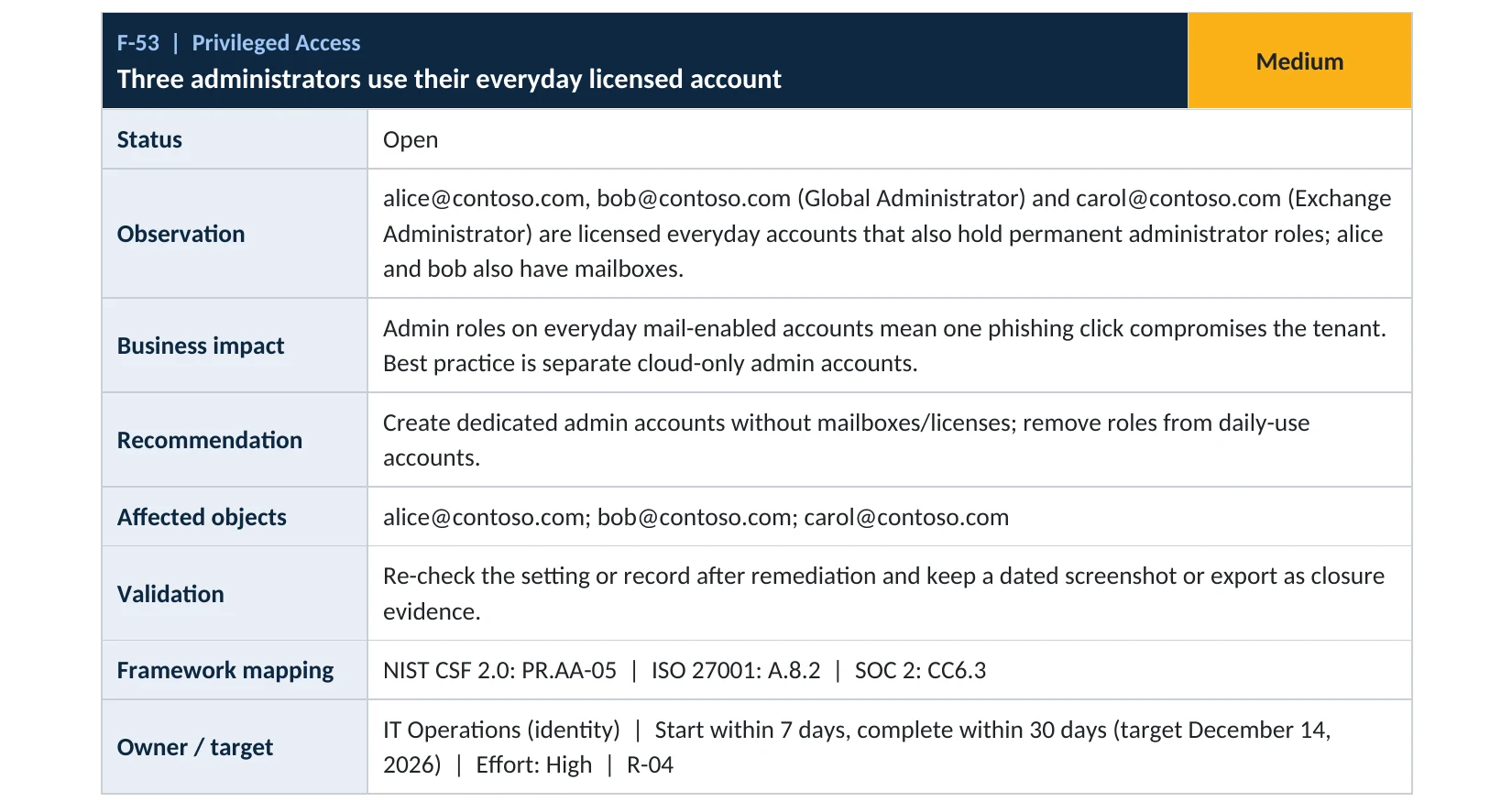
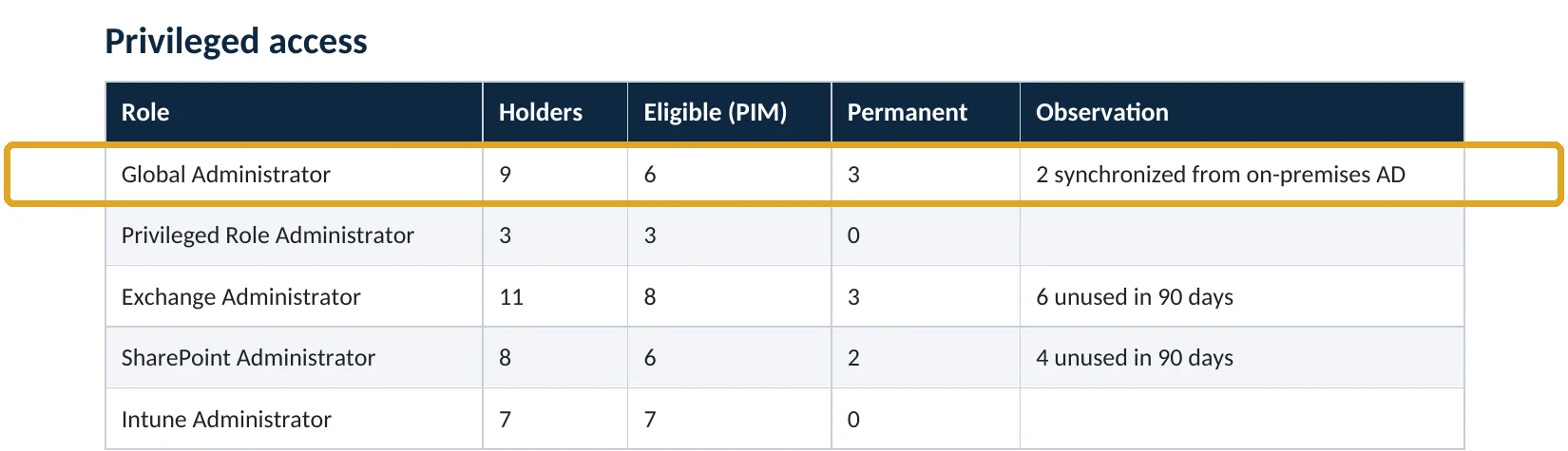
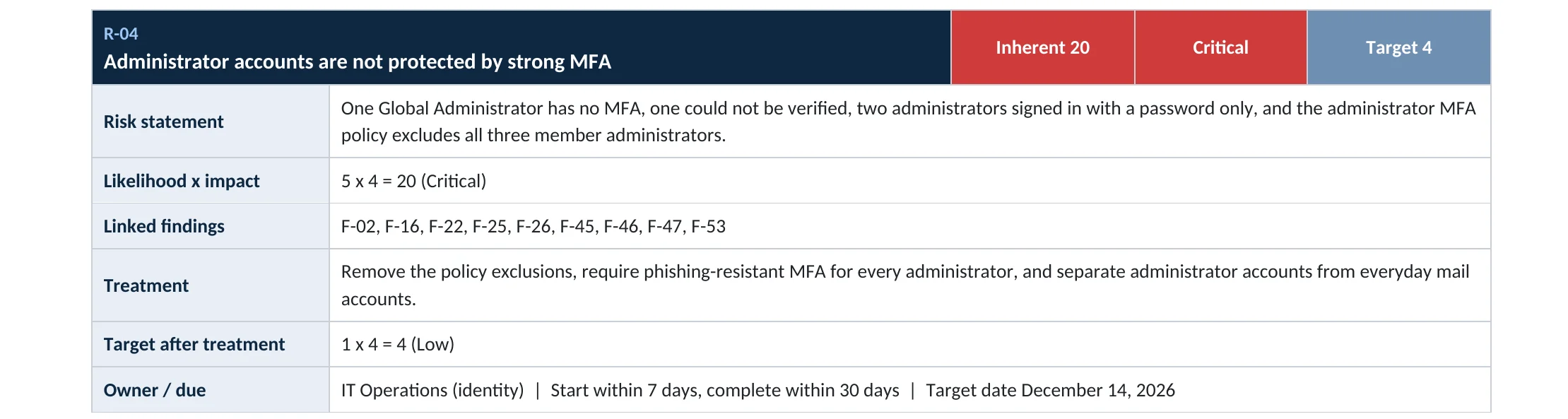
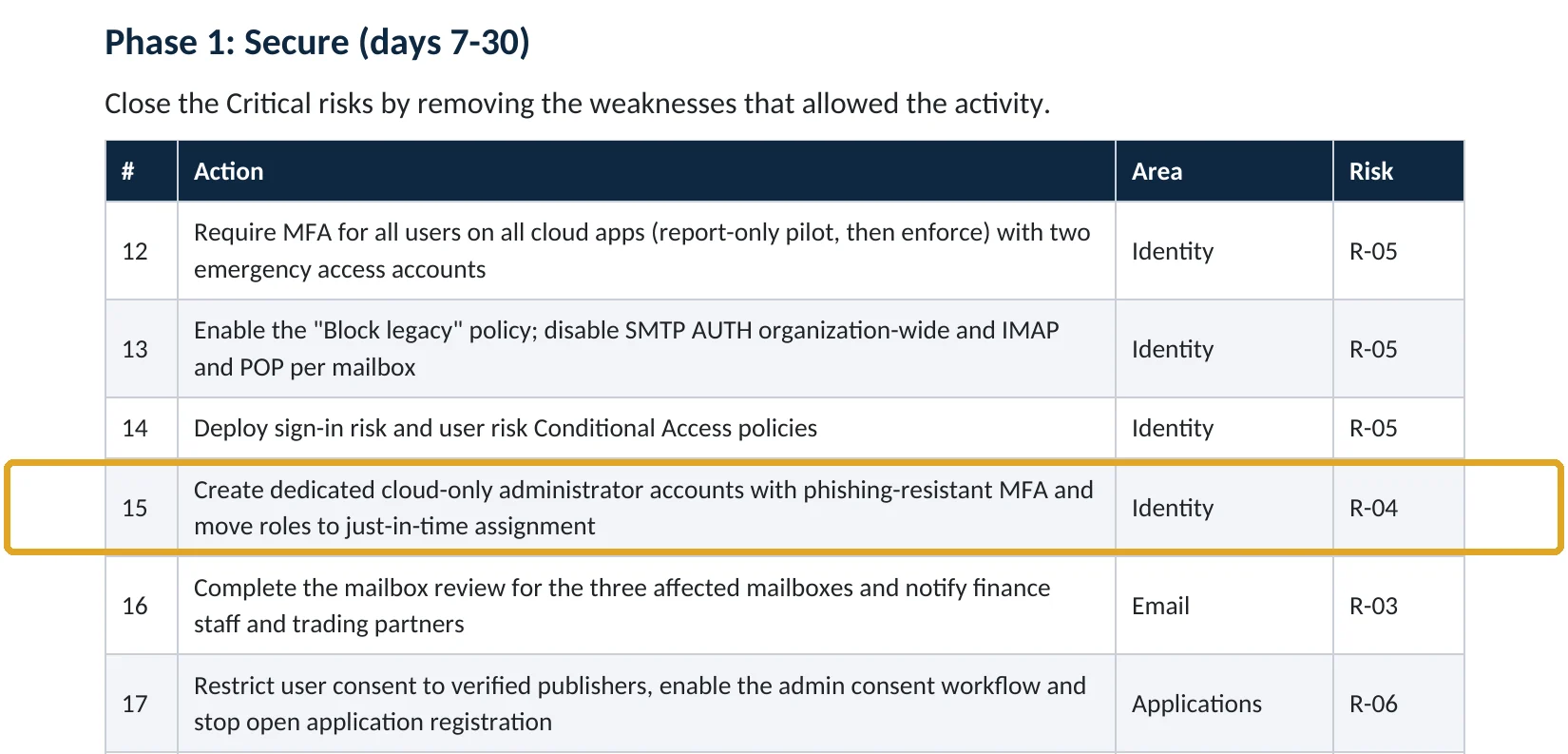
What this finding looks like in our audit reports
These are real pages from our published sample reports, written for fictional companies. Click any page to open it full size.
Your options
What each plan gives you
| Capability | All plans | Entra ID P1 | Entra ID P2 (E5 or add-on) |
|---|---|---|---|
| Separate cloud-only admin accounts | Yes | Yes | Yes |
| Phishing-resistant MFA methods | Yes | Yes | Yes |
| Require phishing-resistant MFA for admin roles (Conditional Access) | No | Yes | Yes |
| Just-in-time admin roles (PIM) | No | No | Yes |
How to check it yourself
Find admins on everyday accounts, without changing anything
For each holder, check whether the account also has a mailbox and an Office license. If it does, it’s an everyday account with an admin role.
Read-only PowerShell: admin role holders with licenses
Connect-MgGraph -Scopes "RoleManagement.Read.Directory","User.Read.All"
Get-MgDirectoryRole -All | ForEach-Object { $r = $_
  Get-MgDirectoryRoleMember -DirectoryRoleId $r.Id -All | ForEach-Object {
    $u = Get-MgUser -UserId $_.Id -Property UserPrincipalName,AssignedLicenses,OnPremisesSyncEnabled -ErrorAction SilentlyContinue
    if ($u) { [pscustomobject]@{Role=$r.DisplayName; User=$u.UserPrincipalName; Licensed=($u.AssignedLicenses.Count -gt 0); Synced=$u.OnPremisesSyncEnabled} } } }
The commands only read data. Any admin with Licensed True or Synced True needs a separate cloud-only admin account.
How to configure
How to move admins to separate accounts, step by step
All plans
Create the admin accounts
- For each admin, create a cloud-only account such as admin.name@yourtenant.onmicrosoft.com.
- Don’t assign an Office license; if mail is needed, forward it to the everyday mailbox.
- Register a passkey or FIDO2 security key on the new account.
- Assign only the roles that person needs (for example Exchange Administrator, not Global Administrator).
- Remove the admin roles from the everyday account once the new one works.
Entra ID P1 or P2
Lock them down further
- Create a Conditional Access policy requiring phishing-resistant MFA for all admin roles.
- With P2, make roles eligible in PIM so admins activate them only when needed.
- Keep two break-glass accounts excluded and monitored.
- Review admin role holders every quarter.
What your users will notice
Only admins notice: they sign in to admin centers with a second account, ideally in a separate browser profile.
How to undo it
Reassign the roles to the everyday account. We don’t recommend it.
Proof and questions
How to prove it is fixed, and what to ask your IT provider
Evidence it is fixed
- No everyday, licensed account holds an admin role (except break-glass by design).
- Every admin account is cloud-only.
- Admin accounts use passkeys or security keys.
- Admin roles are reviewed quarterly, or activated just in time.
Questions for your IT provider
- Do our admins use separate accounts for admin work?
- Are any admin accounts synced from on-premises Active Directory?
- Which MFA method do admin accounts use?
- Do admin accounts have mailboxes?
- Do we use just-in-time admin roles?
Signs it was already abused
If an admin account may already be compromised, look for these signs
Red flags
- New admin role assignments nobody requested.
- Admin sign-ins from unfamiliar locations or devices.
- New MFA methods registered on admin accounts.
- Changes to Conditional Access or mail flow by an admin who says it wasn’t them.
- New app registrations or consents by an admin account.
If you see these, use a break-glass account to secure the tenant and keep the logs. Our compromise investigation establishes what was changed, and the Microsoft 365 Evidence Clock shows how long the records are kept.
Framework mapping
Where separate admin accounts fit
| Framework | Where it fits |
|---|---|
| NIST CSF 2.0 | PR.AA-05: least privilege and separation of duties; PR.AA-03: authentication |
| ISO/IEC 27001:2022 | Annex A 8.2 Privileged access rights; 5.3 Segregation of duties |
| SOC 2 | CC6.1 logical access security; CC6.3 role-based access and least privilege |
Reviewed by
Written and reviewed by a practicing CISO

Ali Hassani, C|CISO, CISSP
Ali has more than 25 years of IT and cybersecurity experience and holds the Certified CISO and CISSP certifications along with Microsoft and Cisco credentials. He leads every OC Security Audit engagement from Irvine, on-site across Southern California and remotely nationwide. Every Microsoft 365 audit is read-only.
FAQ
Frequently asked questions about separate admin accounts
Why do admins need a separate account?
So the account that reads email and browses the web, where phishing happens, doesn't hold admin rights. Microsoft recommends dedicated admin accounts used only for admin tasks.
Does an admin account need a license?
Most admin roles don't need a license. Without one there's no mailbox to phish.
Should admin accounts be synced from Active Directory?
No. Microsoft recommends cloud-only accounts for Global Administrator and other privileged roles, so an on-premises breach can't reach them.
Is this a lot of extra work for admins?
A second sign-in for admin tasks. A separate browser profile makes it easy.
What about small companies with one IT person?
Still worth it: one everyday account, one admin account, and two break-glass accounts.
What is PIM?
Privileged Identity Management (Entra ID P2). Admins activate a role for a few hours when needed instead of holding it permanently.
Next step
Keep admin rights out of the inbox
Prevent
Microsoft 365 Security Audit
$3,500 fixed
About 200 read-only checks across admin roles, sign-in protection, email, sharing and devices, for any tenant size, with four reports and a remediation roadmap.
Respond
Microsoft 365 & Azure Compromise Investigation
From $3,500
For when an admin account may have been taken over: we establish what was changed.
Want to see the deliverables first? Open the Microsoft 365 audit sample report or browse all our sample reports.

Service
Microsoft 365 Security Audit
The fixed-price audit that checks this item and about 200 more.
See the audit ›
Service
Microsoft Entra ID Security Audit
A deeper look at identities, Conditional Access, roles and apps.
See the Entra ID audit ›
Service
Compromise Investigation
When an account or mailbox may already be in an attacker’s hands.
See the investigation ›Related reading: How many Global Administrators you should have · How to remove unused admin roles · How to set up break-glass accounts · How to replace SMS and voice MFA
Sources
Sources used on this page
- Microsoft Learn, Protect your Microsoft 365 privileged accounts
- Microsoft Learn, Securing privileged access for hybrid and cloud deployments
- Microsoft Learn, Azure identity management and access control best practices
- Microsoft Learn, Microsoft cloud security benchmark: Privileged access
- Microsoft Source, Microsoft releases 2025 Digital Defense Report
- CISA and FBI, Advisory AA23-320A Scattered Spider
This guide is general information, not a guarantee of protection or legal advice. Microsoft changes its admin centers often: menu names and steps were checked against Microsoft Learn on November 20, 2026. Drawings are simplified and are not screenshots of Microsoft products. Sample findings come from fictional companies. Incidents are described as reported by the cited sources; OC Security Audit was not involved in them. Questions? Call 949-777-5567 or email support@ocsecurityaudit.com.