

Microsoft 365 & Azure Compromise Investigation
CISO-led, read-only investigation when a Microsoft 365, Entra ID or Azure environment shows signs of compromise: what the records show, what changed and what to fix first.

Act while the evidence still exists
Sign-in, audit and activity records are kept for a limited time that depends on licensing. Exporting them early decides how much of the story can be reconstructed.

Clear answers for owners, counsel and IT
Plain-language reporting for leadership, technical detail for IT and your MSP, and a prioritized plan that starts with containment.
Signs your Microsoft 365 or Azure environment may be compromised
Most compromises are noticed by a person before any tool reports them: a customer asks about an invoice you never sent, or someone gets an MFA prompt they did not request.
- Customers or vendors receive payment-change requests from your mailbox
- Mail disappears, lands in RSS Feeds or Archive, or forwards to an outside address
- Unexpected MFA prompts, new MFA methods or password-reset notices
- Sign-ins from countries or networks nobody uses
- A new Global Administrator, guest account or application nobody approved
- Unusual file downloads or anonymous sharing links in SharePoint or OneDrive
- Unexpected virtual machines, role assignments or costs in Azure

What not to do in the first hours
Well-meant clean-up can remove the records that explain what happened. Contain the problem, but keep the evidence.
- Deleting the affected user, mailbox or guest account
- Removing inbox rules, forwarding or mail flow rules without exporting them first
- Wiping, reimaging or replacing laptops and phones
- Turning off audit logging or changing retention policies
- Emailing about the incident from an account that may be compromised
Containment steps such as resetting passwords and revoking sessions usually can and should happen early. Write down every change, who made it and when; that log becomes part of the timeline.
Investigations for the way Microsoft 365 is actually attacked
Every engagement is scoped around the question you need answered. These are the most common starting points.
Business email compromise
Hidden inbox rules, forwarding, mail flow rules, delegates and mail sent to outside parties, with a timeline for finance, your bank and counsel.
BEC investigation →Hacked account / account takeover
Sign-ins, risk detections, new MFA methods, legacy protocols, sessions and what the account did after the attacker got in.
Account takeover investigation →Entra ID identity compromise
New administrators, role-assignable groups, app registrations and secrets, Conditional Access changes, guest access and federation settings.
Azure subscription compromise
Activity log review of role assignments, new resources, storage and Key Vault access, network changes and Defender for Cloud alerts.
SharePoint, OneDrive and Teams access
Which files were viewed, downloaded, synchronized or shared through anonymous links in the review period, as input for counsel.
“Something feels wrong” assessment
No single trigger, just doubts. A compromise assessment checks the whole tenant for indicators and the weaknesses that would allow them.
Default retention decides what can still be reviewed
Microsoft documents these default retention periods. Upgrading a license later does not bring back records that have already expired.
Entra ID sign-in and audit logs on Entra ID Free (30 days on P1 or P2).
Microsoft Learn: Entra data retentionMicrosoft 365 audit records in Audit (Standard); one year for many E5 records.
Microsoft Learn: Purview audit retentionAzure Activity log, unless it is sent to Log Analytics or storage.
Microsoft Learn: Azure Monitor activity logA read-only process from scope to roadmap
Agree the question and the access
A short call, then a written scope: which accounts, mailboxes and subscriptions, the review period, read-only access and who receives the report.
Export the records that expire first
Sign-in logs, audit records, mailbox rules, role assignments and activity logs are exported before retention windows close.
Build the timeline
Events are correlated across identity, mail, applications, files and Azure into one timeline, with gaps stated where records are missing.
Confirm what is still active
We list remaining rules, sessions, consents, accounts and links that need action, so your team or IT provider can close them.
Findings, risks and a roadmap
Executive and technical reports, a risk register and a phased plan that starts with seven days of containment.

Where the answers come from
What can be reviewed depends on your licenses and settings at the time of the activity.
| Source | What it can show | Default retention |
|---|---|---|
| Entra ID sign-in logs | Who signed in, from which address and client, MFA result, risk level | 7 days (Free), 30 days (P1/P2) |
| Entra ID audit logs | New users, role changes, MFA method changes, app registrations and consents | 7 days (Free), 30 days (P1/P2) |
| Risky sign-ins | Sign-ins Microsoft flagged as risky | 7 (Free), 30 (P1), 90 days (P2) |
| Microsoft 365 audit log | Mailbox rules, forwarding, file access and sharing, admin actions, searches | 180 days (Audit Standard); 1 year for many E5 records |
| Mailbox configuration | Current inbox rules, forwarding, delegates and permissions | Current state only; export before changing |
| Azure Activity log | Role assignments, resource creation and changes in subscriptions | 90 days unless exported |
Sources: Microsoft Entra data retention, Microsoft Purview audit log retention, Azure Monitor activity log (Microsoft Learn, checked November 15, 2026).
What an investigation can and cannot do
What it can answer
- What the available records show about sign-ins, role changes, mail rules, applications and file access
- Which settings allowed the activity and how they compare with a security baseline
- What still needs to be closed, and in what order
- Which records were missing or expired, stated rather than guessed
What no one can promise
- That every unauthorized action was found when records are limited
- Who was behind the activity, or where they are
- Recovery of data, mail or funds
- Legal conclusions, notification decisions or insurance outcomes
See every page of a sample report
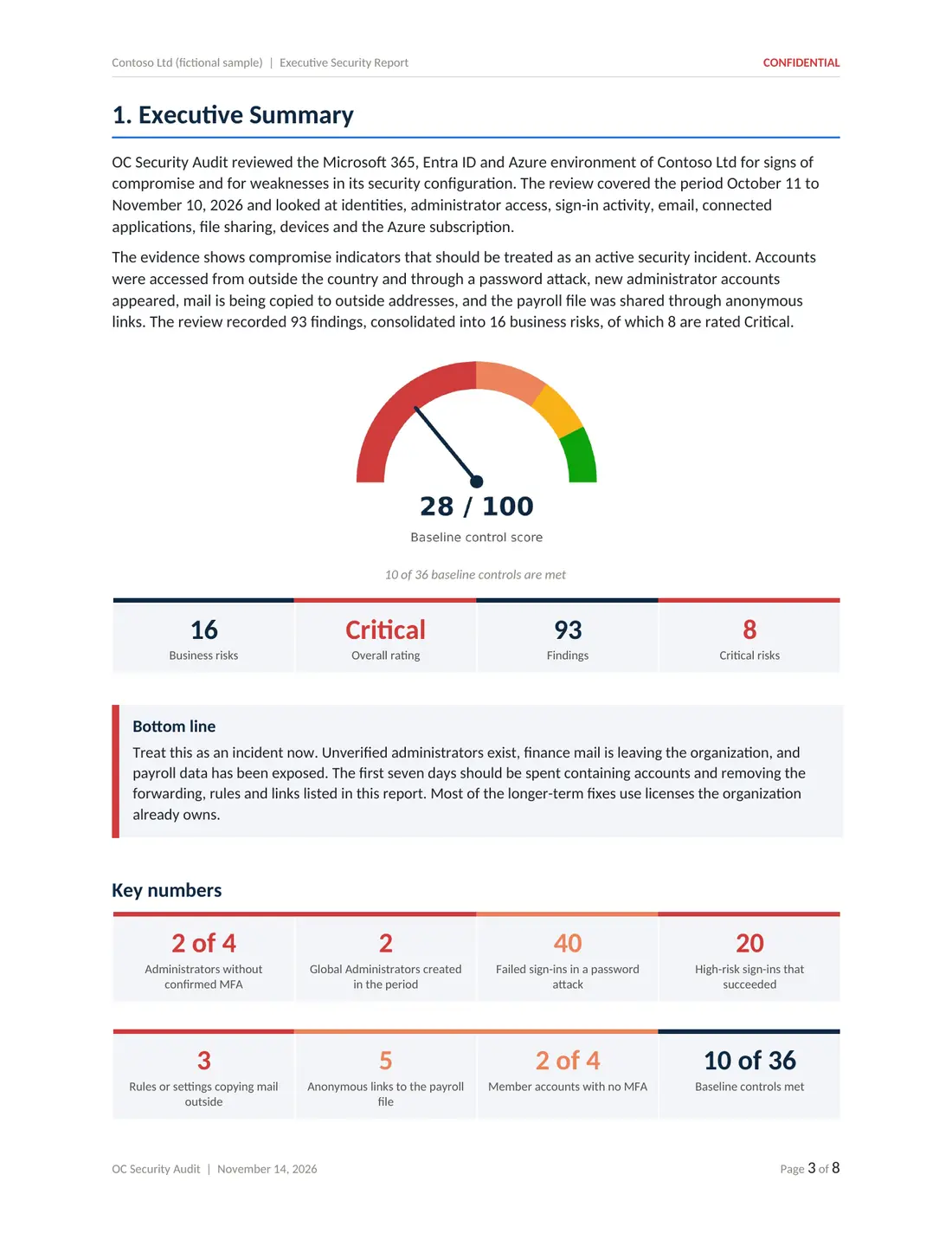
Five deliverables from a sample compromise assessment of a fictional company: executive report, technical report, risk register, 180-day roadmap and Excel workbook.

Built for small and mid-sized businesses on Microsoft 365
Most of our clients do not have an in-house security team. They need someone senior to read the records and explain them in plain language.
- Owners and executives who need to know what happened and what to decide
- Finance teams dealing with a redirected payment or fake invoice
- MSPs and IT providers who want an independent second set of eyes
- Law firms that need technical input for their client, at their direction
- Accounting, healthcare, real estate and professional services firms handling sensitive data

Led by Ali Hassani, CISO
Certified CISO (C|CISO) and CISSP with 25+ years in IT and cybersecurity and dozens of Microsoft certifications. Every investigation is scoped in writing, uses read-only access and is reported in language leadership and IT can act on.
We work with businesses in Irvine, across Orange County and Los Angeles County, and remotely nationwide.
Microsoft 365 and Azure compromise investigation questions
What is a Microsoft 365 compromise investigation?
It is a read-only review of the records and settings in your Microsoft 365, Entra ID and Azure environment to establish what the available evidence shows about suspected unauthorized activity: which accounts were used, what changed, which mail rules or applications were added and which files were reached, followed by a prioritized plan to close the gaps.
How quickly should we contact you?
As early as possible. Microsoft keeps many records for a limited time that depends on licensing, for example 7 days of Entra ID sign-in logs on Entra ID Free and 30 days on P1 or P2. Records that have expired cannot be reviewed. We do not promise a response time; timing is agreed when we scope the work.
Should we delete the compromised account or wipe the laptop?
Not before talking to whoever is coordinating the response. Deleting accounts, mailboxes, inbox rules or devices can remove records that explain what happened. Containment steps such as resetting a password or revoking sessions can usually happen at the same time as evidence is exported; write down what you change and when.
Do you need administrator access to our tenant?
The review uses read-only access agreed in writing, typically a reader or auditor role plus exports run by your administrator. We do not need permanent access, and access is removed when the work ends.
Can you tell us who hacked us or get our money back?
No. We describe what the available records show, such as addresses, times, accounts and changes. We do not identify or attribute attackers and cannot recover data or funds. For payment fraud, contact your bank right away and report it to the FBI at ic3.gov.
Do you work with our lawyer and insurer?
Yes, when you ask us to. Legal, notification and insurance decisions belong to your counsel and insurer. When legal matters are involved we recommend engaging counsel first and working at their direction. We provide technical findings, not legal advice.
What do we receive at the end?
Typically an executive report, a technical report with one card per finding, a risk register, a remediation roadmap and an Excel workbook of the evidence tables. You can see every page of a sample on our sample report page. The exact deliverables follow the written scope.
How much does an investigation cost?
Microsoft 365 and Azure compromise investigations start at $3,500. The final price depends on the number of accounts, mailboxes and subscriptions in scope and the questions to answer, and is confirmed in writing before work begins.
- OC Security Audit provides technical cybersecurity assessment, advisory and reporting services. We are not a law firm and do not provide legal advice, and we are not a private investigation agency.
- An investigation reviews the records and settings available at the time of the review. Log retention, licensing and configuration limit what can be reconstructed, so no investigation can guarantee that every unauthorized action has been identified.
- We do not identify or attribute attackers, recover data or funds, or make breach-notification, regulatory or insurance determinations. Those decisions belong to you, your legal counsel and your insurer.
- Our reports are technical observations, not legal conclusions, and we make no representation that they are suitable as evidence in any legal proceeding.
- We do not promise a response time. Scope, timing, price and deliverables are confirmed in a written agreement before any work begins. Investigations start at $3,500.
From findings to fixes
OC Security Audit stays independent and read-only. If you want hands-on containment or remediation, IT Perfection can implement the changes under a separate agreement.

Seeing signs of compromise in Microsoft 365 or Azure?
Keep the records, contain the problem and get a clear picture. Call 949-777-5567 or schedule a consultation, and we will discuss scope and timing with you.
Compromise investigations start at $3,500 · Headquarters in Irvine, California · Remote nationwide