

Business Email Compromise Investigation for Microsoft 365
A read-only review of the mailbox rules, forwarding, sign-ins and mail flow behind a fake invoice or redirected payment, with a timeline your bank, insurer and counsel can work from.

Call your bank first, then keep the records
If a payment went out, ask your bank to attempt a recall and report it to the FBI. Then keep the mailbox, rules and messages intact until they are exported.

Find the rules built to stay hidden
Attackers name rules with a single character, file replies in RSS Feeds and forward copies outside. We export every rule and forwarding path before anyone deletes them.
A redirected payment is rarely the whole story
By the time a vendor asks where their payment went, the attacker has usually been reading the mailbox for days or weeks, waiting for the right invoice.
A typical sequence: a phishing page captures a password or session, the attacker signs in, adds an inbox rule that hides replies about invoices, sets up forwarding to an outside address, and then sends a perfectly timed message with new bank details. Because the real conversation is hidden, nobody notices until money is missing.
- Vendors or customers ask about invoices you never sent
- Replies about payments go missing or appear as already read
- Mail forwarded to an outside address, or a rule nobody created
- Sign-ins to the mailbox from unfamiliar places or apps

If a payment has already gone out
Call your bank and report it
Ask your bank to attempt a recall of the transfer and report the fraud to the FBI at ic3.gov. Speed matters for any recall attempt; we cannot recover funds.
Contain without destroying records
Reset the password and revoke sessions as your IT provider advises, and write down every change. Do not delete the mailbox, the messages or the rules until they are exported.
- Deleting suspicious inbox rules, forwarding or mail flow rules
- Deleting the fraudulent emails or the conversation with the vendor
- Removing or converting the mailbox, or removing the license
- Discussing the incident by email from the affected mailbox
BEC remains one of the costliest reported crimes
Business email compromise losses reported to the FBI in 2025.
FBI IC3 2025 Internet Crime ReportTotal cybercrime losses reported to the FBI’s IC3 in 2025.
FBI IC3 2025 Internet Crime ReportDefault Microsoft 365 Audit (Standard) retention for most audit records.
Microsoft Learn: Purview audit retentionFigures as published by the FBI Internet Crime Complaint Center and Microsoft Learn.
Every path mail can take out of your tenant
The review covers the affected mailboxes and the tenant-wide settings an attacker can use to hide or copy mail.
Inbox rules
Rules that forward, delete, mark as read or move mail to RSS Feeds, Archive or other quiet folders, including rules with blank or one-character names.
Forwarding
Mailbox-level forwarding, SMTP forwarding and the outbound policy that decides whether automatic external forwarding is allowed.
Mail flow rules
Tenant-wide transport rules that blind-copy, redirect or allow-list mail, and when they were created or changed.
Delegates and permissions
Full Access, Send As and Send on Behalf permissions, shared mailbox access and recently added delegates.
Sign-ins and sessions
Sign-ins to the mailbox by address, country, client and protocol, including legacy protocols such as IMAP and POP where enabled.
Applications and searches
Apps granted mail permissions, content searches for words such as invoice or wire, and mail access events where licensing records them.
The questions finance and leadership ask, and where answers come from
| Question | Where the answer comes from | Limits |
|---|---|---|
| How did they get in? | Sign-in logs, risk detections, MFA method changes, app consents | Entra sign-in logs: 7 days (Free) or 30 days (P1/P2) |
| When did it start? | First suspicious sign-in, rule creation time, forwarding changes | Earlier activity may have expired |
| What did they set up? | Inbox rules, forwarding, mail flow rules, delegates, applications | Current state plus audit history |
| Which messages left? | Forwarding configuration, sent items, outbound messages to outside addresses | Depends on what was kept and logged |
| What did they read? | Mail access audit events where licensing and settings recorded them | Not available in every tenant |
| Are they still in? | Active sessions, remaining rules, consents and permissions | Checked at the time of review |
From fake invoice to a closed mailbox
Mailboxes, period and readers
We agree in writing which mailboxes and dates are in scope, the read-only access and who receives the report.
Rules, forwarding and logs
Current rules and permissions are exported first, then sign-in and audit records for the period.
One timeline across sign-ins and mail
From the first suspicious sign-in to the fraudulent message, with every rule and change in date order.
What is still open
Remaining rules, forwarding, sessions, apps and weak settings, listed for removal in priority order.
Executive and technical reports
Plain-language findings for leadership and counsel, technical detail for IT, and a 7-day containment plan.

Compromised mailbox or look-alike domain?
Both end in a fake invoice, but they need different fixes. The first part of every BEC review settles which one you are dealing with.
Your mailbox was compromised
- The fraudulent message is in your own Sent Items or was sent through your tenant
- Suspicious sign-ins, new inbox rules or forwarding on the account
- Fix: close the access, remove the rules, strengthen sign-in controls, review what else the account reached
Someone imitated your domain
- The message came from a similar domain or a spoofed address outside your tenant
- No matching sign-ins or rules in your environment
- Fix: email authentication (SPF, DKIM, DMARC enforcement), payment-verification procedures, and warning the vendors involved
It can also be the vendor’s mailbox that was compromised, not yours. In that case the review shows that your tenant was not the source, which is useful information for your bank, insurer and counsel.
Controls that make the next attempt harder
The roadmap in the report is specific to your tenant. These are the controls that most often appear in it after a BEC case.
Block automatic external forwarding
Outbound spam policy set so mailboxes cannot silently forward to outside addresses, with documented exceptions.
Phishing-resistant MFA
MFA enforced for every user through Conditional Access, stronger methods for finance and administrators, legacy protocols blocked.
DMARC enforcement
SPF and DKIM aligned and DMARC moved from monitoring to quarantine or reject, so outsiders cannot send as your domain.
Alerts on rule creation
Alert policies for new forwarding, suspicious inbox rules and mail flow rule changes, routed to someone who reads them.
Payment verification
A call-back procedure on a known phone number before any change to bank details, owned by finance, not IT.
Independent audit
A full Microsoft 365 security audit once the incident is closed, to find the weaknesses the attacker did not use yet.
Microsoft 365 security audit →See every page of a sample report
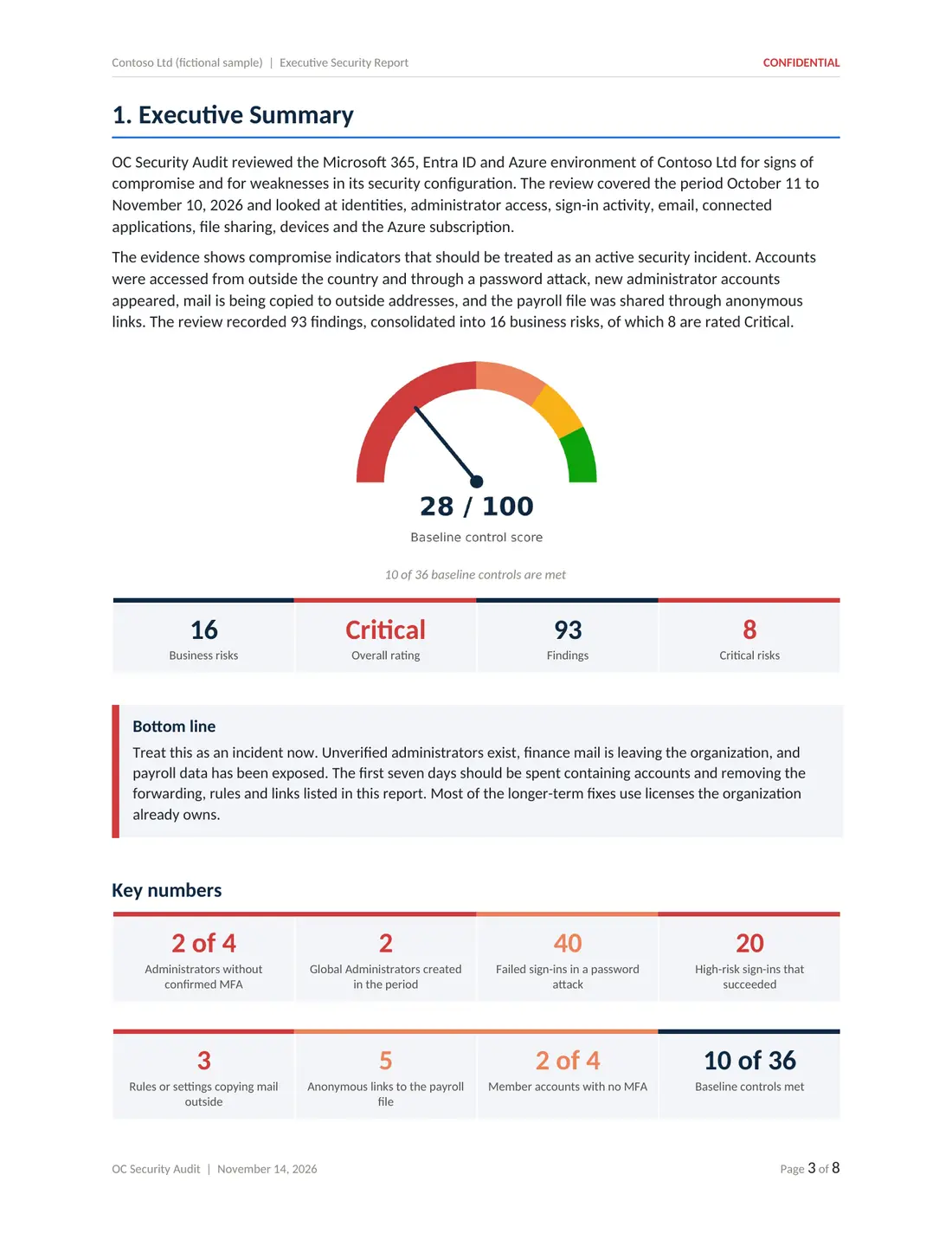
Five deliverables from a sample compromise assessment of a fictional company: executive report, technical report, risk register, 180-day roadmap and Excel workbook.
BEC often comes with other findings

Led by Ali Hassani, CISO
Certified CISO (C|CISO) and CISSP with 25+ years in IT and cybersecurity and dozens of Microsoft certifications. BEC reviews are read-only and written so finance, leadership and IT can act on the same facts.
We work with businesses in Irvine, across Orange County and Los Angeles County, and remotely nationwide.
Business email compromise investigation questions
What is business email compromise in Microsoft 365?
Business email compromise (BEC) is when someone uses a compromised or look-alike mailbox to trick people into paying, changing bank details or sharing data. In Microsoft 365 it often involves a hidden inbox rule, external forwarding or a mail flow rule that lets the attacker watch and intercept invoice and payment conversations.
We sent a payment to a fraudulent account. What first?
Call your bank immediately and ask them to attempt a recall, then report it to the FBI at ic3.gov. Keep the emails involved; do not delete them. After that, have the mailbox records reviewed so you know how the fraud happened and whether access is still open.
Can you tell whether the attacker read our emails?
Sometimes. Mail access events such as MailItemsAccessed are recorded only with certain licenses and settings, and only for the retention period. Where those records exist, the review can show which items were accessed; where they do not, the report states that the question cannot be answered from the available records.
Was it our mailbox or a look-alike domain?
That is one of the first questions the review answers. Message headers, sent items, sign-ins and rules show whether mail came from your tenant or from an outside domain that imitates yours. The answer changes what you need to fix.
Will you remove the malicious rules?
The review is read-only. We export and document the rules, forwarding and permissions, then list them for removal by your administrator or IT provider. IT Perfection can make the changes under a separate agreement if you prefer.
Does this replace notifying customers or regulators?
No. Whether and how to notify is a legal decision for you and your counsel. The report gives counsel technical facts such as which mailboxes and time periods were affected.
How much does a BEC investigation cost?
BEC investigations start at $3,500 for a defined set of mailboxes and review period, confirmed in writing before work begins.
- OC Security Audit provides technical cybersecurity assessment, advisory and reporting services. We are not a law firm and do not provide legal advice, and we are not a private investigation agency.
- An investigation reviews the records and settings available at the time of the review. Log retention, licensing and configuration limit what can be reconstructed, so no investigation can guarantee that every unauthorized action has been identified.
- We do not identify or attribute attackers, recover data or funds, or make breach-notification, regulatory or insurance determinations. Those decisions belong to you, your legal counsel and your insurer.
- Our reports are technical observations, not legal conclusions, and we make no representation that they are suitable as evidence in any legal proceeding.
- We do not promise a response time. Scope, timing, price and deliverables are confirmed in a written agreement before any work begins. Investigations start at $3,500.
From findings to fixes
OC Security Audit stays independent and read-only. If you want hands-on containment or remediation, IT Perfection can implement the changes under a separate agreement.

Fake invoice, redirected payment or strange mailbox rules?
Call your bank first if money moved. Then call 949-777-5567 or schedule a consultation, and we will discuss scope and timing with you.
Compromise investigations start at $3,500 · Headquarters in Irvine, California · Remote nationwide