

LIBRARY 1.14Microsoft 365 Security Library
How to Replace SMS and Voice MFA in Microsoft 365
Text-message and phone-call codes are the weakest MFA methods, and Microsoft is retiring its own SMS and voice delivery in 2027. Here is how to find who still uses them and move everyone to passkeys or the Authenticator app first.
Reviewed by Ali Hassani, C|CISO, CISSP · Last verified November 20, 2026
Every plan can change which MFA methods are allowed. Requiring a phishing-resistant strength for admins uses Conditional Access, which needs Entra ID P1 (Microsoft Learn).
In one minute
- Find everyone whose only MFA method is SMS or voice.
- Move administrators to passkeys or security keys first.
- Move everyone else to the Authenticator app or a passkey.
- Turn off SMS and voice once nobody depends on them.
MFA method strength is part of the identity checks in our Microsoft 365 Security Audit.
What it is
Why SMS and voice are the weakest MFA
A code sent by text message or read out by a phone call proves you have the phone number, not the phone. Anyone who takes over the number, through a SIM swap or by tricking the mobile carrier, gets the codes. Microsoft now says SMS and voice are no longer positioned as secure authentication methods, and recommends phishing-resistant methods such as passkeys, Windows Hello for Business and certificate-based authentication (Microsoft Learn, Microsoft Learn).
Microsoft’s retirement timeline
| Date | What happens |
|---|---|
| September 1, 2026 | Passkeys become the default; SMS and voice users are prompted to register one. |
| February 1, 2027 | Microsoft-provided SMS and voice retire for all users except Global Administrators and external users. Users with only SMS or voice must register a passkey to sign in. |
| July 1, 2027 | The same applies to Global Administrators and external users. |
Organizations that truly need SMS can contract a third-party telephony provider through the Microsoft Security Store (Microsoft Learn).
Why it matters
Attackers already know how to get the code
- Password stolenPhishing or a reused password.
- SIM swap or fake help deskAttacker gets the phone number.
- Phishing-resistant MFAThe code is no longer enough.
- Code interceptedWithout it: sign-in succeeds.
- Admin account taken overWhole tenant at risk.
Drawing: where phishing-resistant MFA breaks the path.
Microsoft-provided SMS and voice MFA retire for most users.
Source: Microsoft Learnthe same retirement for Global Administrators and external users.
Source: Microsoft Learnof SMS, voice or Authenticator push count as phishing-resistant in Microsoft’s authentication strengths; passkeys and Windows Hello do.
Source: Microsoft Learnphishing-resistant options most small businesses can use: passkeys in Authenticator, security keys, Windows Hello.
Source: Microsoft LearnMFA methods, weakest to strongest
| Method | Phishing-resistant? | Note |
|---|---|---|
| SMS or voice call | No | Open to SIM swap; retiring in 2027 |
| Authenticator push or code | No | Much better than SMS; can be phished or push-bombed |
| Passkey in Authenticator | Yes | Phone-based, works on most devices |
| FIDO2 security key | Yes | Best for admins and shared desks |
| Windows Hello for Business | Yes | Built into managed Windows PCs |
Documented incidents
Advisory · FBI and CISA, AA23-320A
Scattered Spider: SIM swaps and fake help desk calls
The FBI and CISA describe Scattered Spider using phishing, push bombing and SIM swap attacks to get credentials and bypass MFA, posing as IT staff to obtain one-time codes. Their first recommended action is phishing-resistant MFA.
Source: CISA advisory AA23-320A
Update · July 2025
New tactics: talking the help desk into moving MFA
A July 2025 update adds that the group posed as employees to get help desks to reset passwords and move MFA to devices the attackers controlled.
Source: Australian Cyber Security Centre
What we find in audits
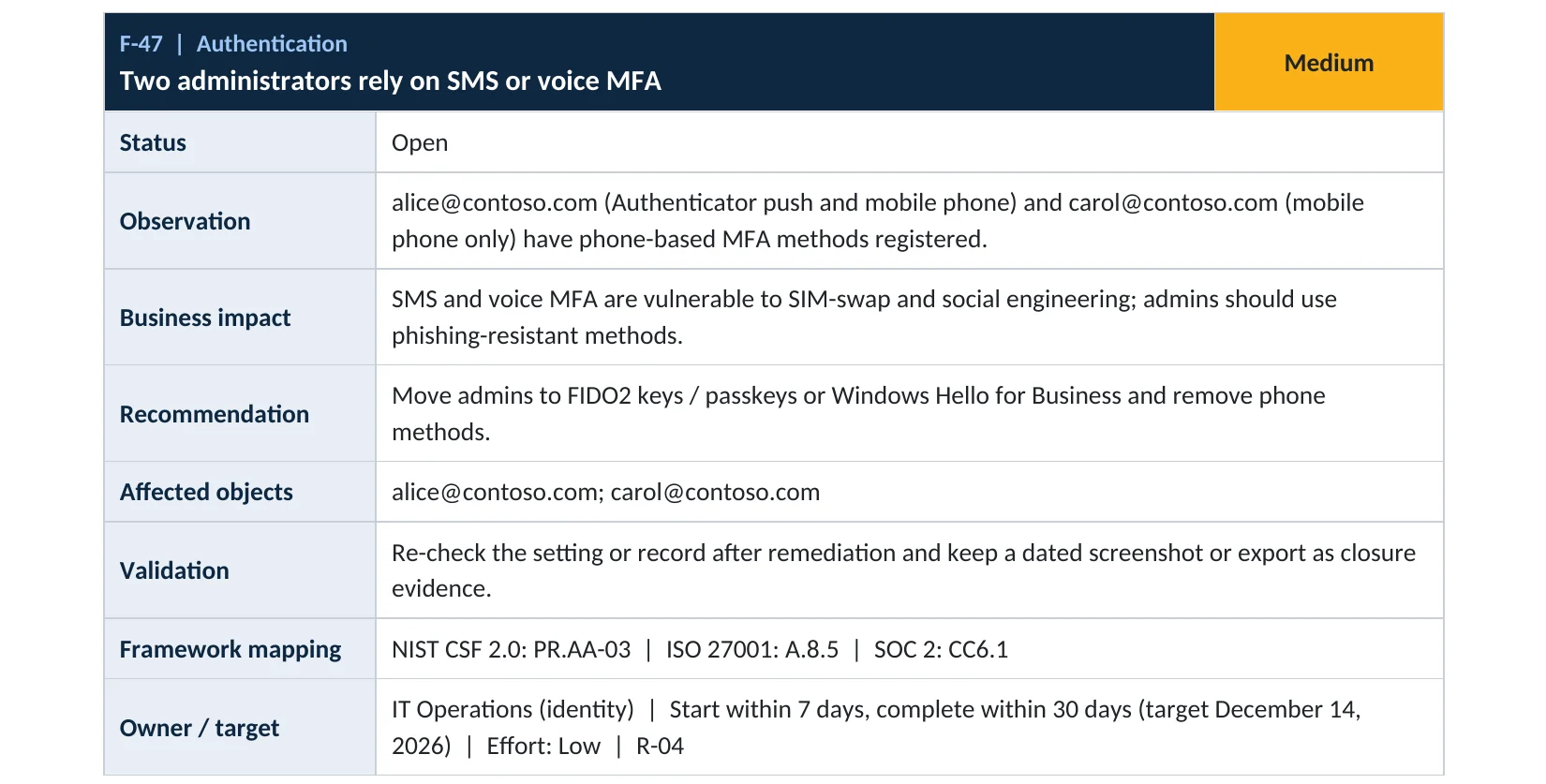
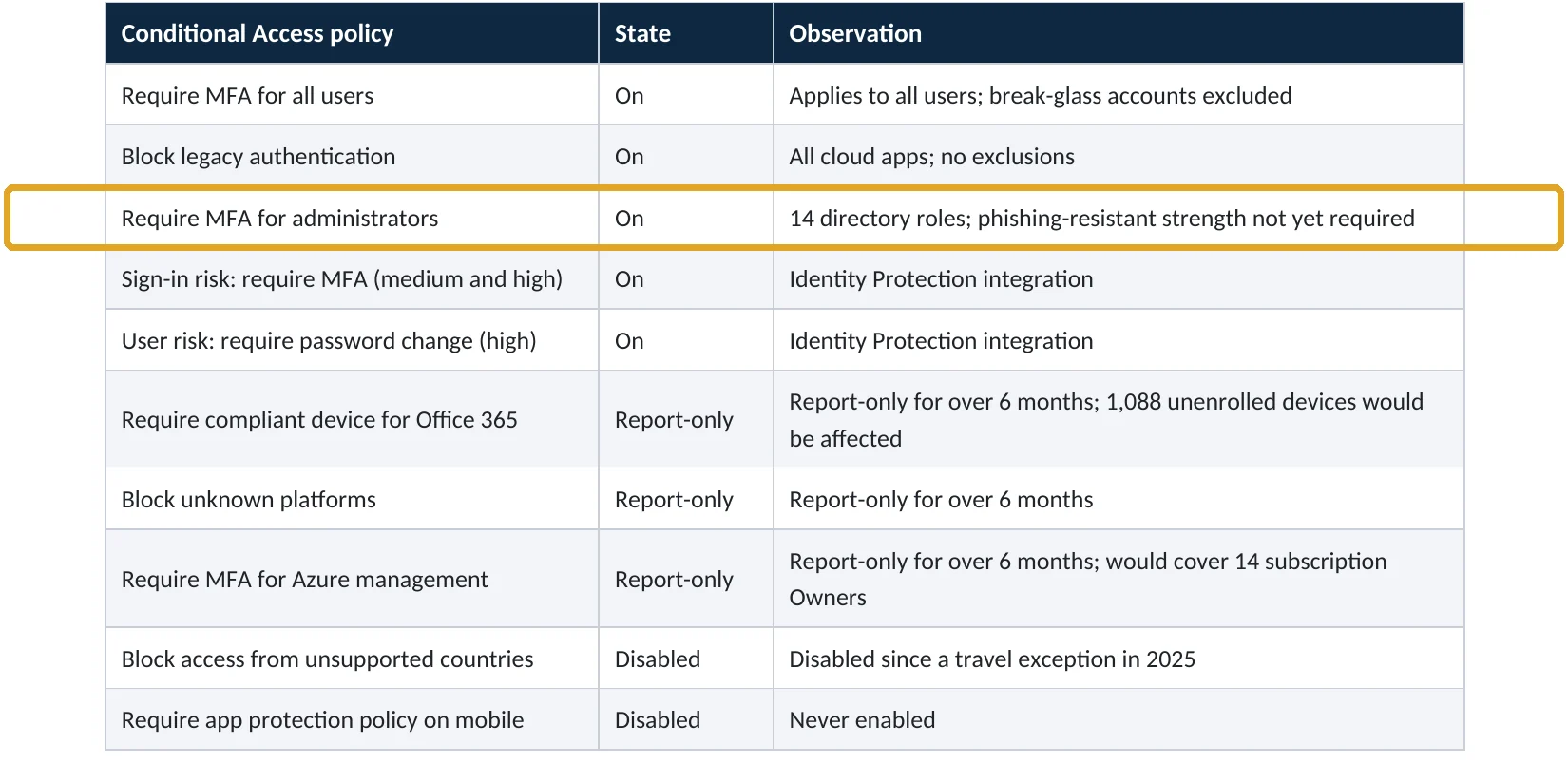
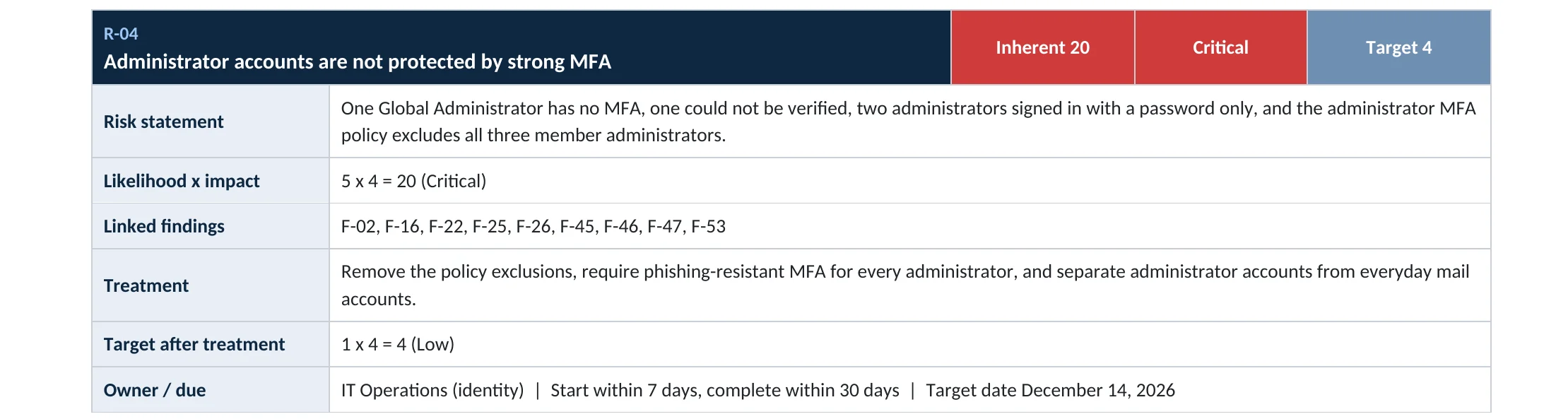
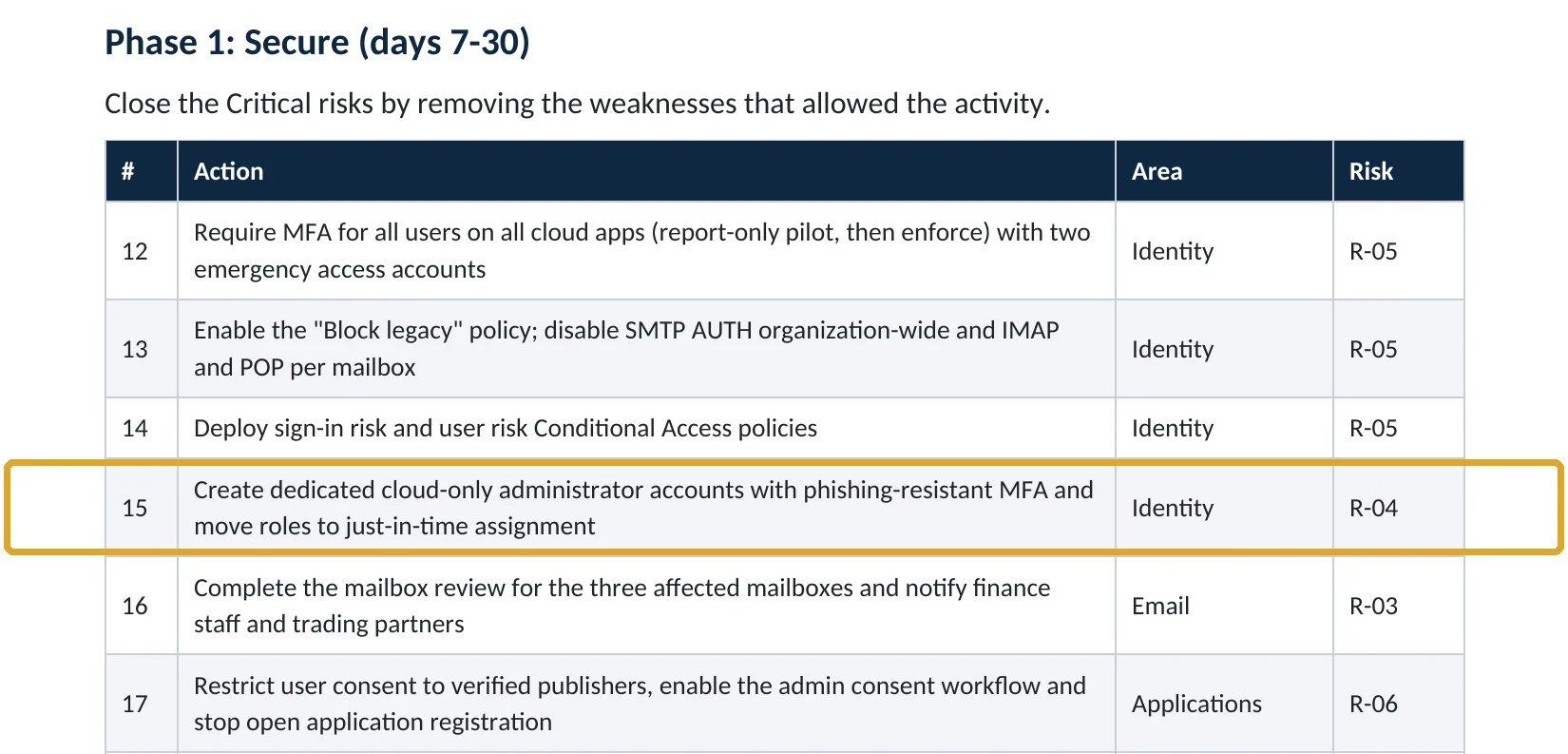
What this finding looks like in our audit reports
These are real pages from our published sample reports, written for fictional companies. Click any page to open it full size. The viewer shows the finding, how our Microsoft 365 audit reports MFA strength, the risk and the fix.
Your options
What each plan gives you
| Capability | Business Basic, Standard | Business Premium, E3, E5 |
|---|---|---|
| Choose allowed MFA methods (Authentication methods policy) | Yes | Yes |
| Passkeys, security keys, Authenticator | Yes | Yes |
| Registration campaigns to nudge users | Yes | Yes |
| Require phishing-resistant strength in Conditional Access | No | Yes |
How to check it yourself
Find who still uses SMS or voice, without changing anything
Filter Methods registered for Mobile phone and look for users with no other method, especially administrators. Then open Policies to see whether SMS and Voice call are enabled.
Read-only PowerShell: users whose only MFA is SMS or voice
Connect-MgGraph -Scopes "AuditLog.Read.All","UserAuthenticationMethod.Read.All"
Get-MgReportAuthenticationMethodUserRegistrationDetail -All |
  Where-Object { $_.MethodsRegistered -and
    -not ($_.MethodsRegistered | Where-Object { $_ -notin "mobilePhone","alternateMobilePhone","officePhone" }) } |
  Select-Object UserPrincipalName, IsAdmin, MethodsRegistered
The command only reads registration data. Anyone listed will be blocked at sign-in after the retirement date until they register a passkey.
How to configure
How to move users off SMS and voice, step by step
Administrators first
Phishing-resistant MFA for admins
- Give each admin a FIDO2 security key or a passkey in Microsoft Authenticator.
- In Authentication methods › Policies, enable Passkey (FIDO2) for admins.
- Create a Conditional Access policy for admin roles requiring the Phishing-resistant MFA strength, in report-only first.
- Exclude your break-glass accounts, check the report, then turn it on.
Everyone else
Move users and switch SMS off
- Enable Microsoft Authenticator and Passkey (FIDO2) for all users.
- Run a registration campaign so users are prompted to add Authenticator at sign-in.
- Re-run the check above until no user has only SMS or voice.
- Turn off SMS and Voice call in the Authentication methods policy, or keep them only for a small exception group.
- Tell your help desk never to move MFA to a new device without verifying the person.
If you use a custom authentication strength that allows SMS but not passkeys, add passkeys before the retirement date, or users will stay blocked even after registering one (Microsoft Learn).
What your users will notice
A one-time prompt to set up Microsoft Authenticator or a passkey, then a phone notification or face or fingerprint check at sign-in instead of a text message.
How to undo it
Re-enable SMS for a group in the Authentication methods policy. After February 2027 that requires a third-party telephony provider.
Proof and questions
How to prove it is fixed, and what to ask your IT provider
Evidence it is fixed
- No user has SMS or voice as their only MFA method.
- Every administrator uses a phishing-resistant method.
- Admin roles require the phishing-resistant strength in Conditional Access.
- SMS and voice are off, or limited to a named exception group.
Questions for your IT provider
- How many of our users still rely on text-message codes?
- Are we ready for the February 1, 2027 retirement?
- Which MFA method do our administrators use?
- How does the help desk verify someone before resetting MFA?
- Do any custom authentication strengths block passkeys?
Signs it was already abused
If an attacker may have bypassed MFA, look for these signs
Red flags
- A user suddenly losing mobile service, then a sign-in from a new location.
- New MFA methods registered on several accounts the same day.
- Help desk tickets to reset MFA that the user doesn’t remember.
- Successful sign-ins with SMS from countries you don’t operate in.
- Security information changes followed by new inbox rules.
If you see these, revoke sessions, reset MFA with in-person or video verification, and keep the logs. Our account takeover investigation establishes what the attacker did, and the Microsoft 365 Evidence Clock shows how long the records are kept.
Framework mapping
Where MFA strength fits
| Framework | Where it fits |
|---|---|
| NIST CSF 2.0 | PR.AA-03: users, services and hardware authenticated |
| ISO/IEC 27001:2022 | Annex A 8.5 Secure authentication; 5.17 Authentication information |
| SOC 2 | CC6.1 logical access security, including authentication |
Reviewed by
Written and reviewed by a practicing CISO

Ali Hassani, C|CISO, CISSP
Ali has more than 25 years of IT and cybersecurity experience and holds the Certified CISO and CISSP certifications along with Microsoft and Cisco credentials. He leads every OC Security Audit engagement from Irvine, on-site across Southern California and remotely nationwide. Every Microsoft 365 audit is read-only.
FAQ
Frequently asked questions about replacing SMS and voice MFA
Is SMS MFA still better than no MFA?
Yes, much better. But it's the weakest MFA method, and Microsoft is retiring its own SMS and voice delivery in 2027, so it's time to move.
When does Microsoft stop sending SMS and voice codes?
Microsoft says February 1, 2027 for most users and July 1, 2027 for Global Administrators and external users. Users whose only method is SMS or voice must then register a passkey to sign in.
What should replace SMS?
A passkey in Microsoft Authenticator for most users, and FIDO2 security keys or Windows Hello for administrators. The Authenticator app is a good step if passkeys aren't ready yet.
Can we keep SMS after 2027?
Only by contracting a third-party telephony provider through the Microsoft Security Store. Most companies are better off moving to passkeys.
What is phishing-resistant MFA?
A method that can't be tricked into signing in on a fake site, such as passkeys, security keys, Windows Hello and certificate-based authentication.
What about users without a smartphone?
Give them a FIDO2 security key. It works on a keyring and doesn't need a phone.
Next step
Move off text-message codes before 2027
Prevent
Microsoft 365 Security Audit
$3,500 fixed
About 200 read-only checks across sign-in protection, MFA strength, admin roles, email, sharing and devices, for any tenant size, with four reports and a remediation roadmap.
Respond
Microsoft 365 & Azure Compromise Investigation
From $3,500
For when an account was taken over despite MFA: we establish how and what the attacker reached.
Want to see the deliverables first? Open the Microsoft 365 audit sample report or browse all our sample reports.

Service
Microsoft 365 Security Audit
The fixed-price audit that checks this item and about 200 more.
See the audit ›
Service
Microsoft Entra ID Security Audit
A deeper look at identities, Conditional Access, roles and apps.
See the Entra ID audit ›
Service
Compromise Investigation
When an account or mailbox may already be in an attacker’s hands.
See the investigation ›Related reading: How to set up MFA in Microsoft 365 · How to turn on risk-based Conditional Access · How to set up break-glass accounts · Identity, MFA and Conditional Access guide
Sources
Sources used on this page
- Microsoft Learn, Passkeys by default and retirement of Microsoft-provided SMS and voice authentication
- Microsoft Learn, Frequently asked questions about SMS and voice retirement
- Microsoft Learn, What happens when Microsoft-provided SMS and voice retire
- Microsoft Learn, Conditional Access authentication strengths
- Microsoft Learn, Microsoft Entra authentication overview (phishing-resistant methods)
- Microsoft Learn, Passkeys (FIDO2) in Microsoft Entra ID
- CISA and FBI, Advisory AA23-320A Scattered Spider
- Australian Cyber Security Centre, Scattered Spider advisory (July 2025 update)
This guide is general information, not a guarantee of protection or legal advice. Microsoft changes its admin centers often: menu names and steps were checked against Microsoft Learn on November 20, 2026. Drawings are simplified and are not screenshots of Microsoft products. Sample findings come from fictional companies. Incidents are described as reported by the cited sources; OC Security Audit was not involved in them. Questions? Call 949-777-5567 or email support@ocsecurityaudit.com.