

LIBRARY 1.01Microsoft 365 Security Library
How to Set Up MFA in Microsoft 365, the Right Way
What multifactor authentication is, which method to choose, and the exact steps to turn it on for every user on Business Basic, Standard, Premium, E3 and E5.
Reviewed by Ali Hassani, C|CISO, CISSP · Last verified November 19, 2026

Green: MFA through security defaults, at no extra cost. Blue: plans that include Microsoft Entra ID P1 or P2 for finer control (Microsoft Learn).
In one minute
- Turn MFA on for every user, not just administrators.
- Business Basic or Standard: switch on security defaults. Business Premium, E3 or E5: create a Conditional Access policy for all users.
- Have people use Microsoft Authenticator or passkeys; keep text messages as a backup only.
- Check that nobody is quietly excluded and that old sign-in methods are blocked, or the protection has holes.
Not sure how your tenant is set today? MFA coverage is one of about 200 checks in our Microsoft 365 Security Audit.
What it is
What MFA is, in plain English
Multifactor authentication (MFA) asks for a second proof after the password: a tap on a phone, a fingerprint, a security key. A password is something you know. The second factor is something you have, such as your phone, or something you are, such as your face. A thief who has your password still does not have your phone.
Microsoft 365 calls the setup step registration: each person adds a method once at their Security info page, and from then on Microsoft asks for it when a sign-in needs it. MFA is not one switch. It is three things working together: who must use it, which methods are allowed, and whether the old sign-in protocols that cannot do MFA are blocked.
Why it matters
Stolen passwords are the cheapest way into Microsoft 365
Most Microsoft 365 break-ins do not need clever malware. The attacker gets a password from a fake sign-in page, a reused password from an old breach, or a guess, and signs in from their own computer. MFA puts a gate at that sign-in step.
- Password stolenPhishing page, info-stealer malware or a reused password from another breach.
- Sign-in from anywhereThe attacker signs in to Outlook on the web from their own device.
- MFA stops it hereNo phone, no key, no approval: the sign-in fails.
- Mailbox takeoverWithout MFA: hidden inbox rules, forwarding, reading invoices.
- Payment fraud or data theftFake invoices to your clients, wire fraud, stolen files.
Drawing: a typical account-takeover path. Steps 4 and 5 are covered in later items of this library.
lower risk of account compromise for accounts with MFA, in a study of Microsoft Entra accounts showing suspicious activity.
Source: Microsoft research, 2023lower risk even when the password had already leaked, the case most businesses worry about.
Source: Microsoft research, 2023reported lost to business email compromise in 2025, across 24,768 complaints to the FBI. Taken-over mailboxes are a common starting point.
Source: FBI IC3 2025 Internet Crime Reportof breaches began with phishing and 13% with stolen or abused credentials, in Verizon’s 2026 analysis.
Source: Verizon 2026 DBIR, via SC MediaMicrosoft also states that more than 99.9% of common identity attacks are stopped by MFA together with blocking legacy authentication (Microsoft Learn, security defaults). That is why both settings appear together in this guide.
Attacks MFA stops, and attacks it does not
| Attack | How it works | Does MFA stop it? |
|---|---|---|
| Password spray | One common password tried against many accounts, slowly, to avoid lockouts. | Yes |
| Credential stuffing | Username and password pairs from old breaches tried against Microsoft 365. | Yes |
| Phishing for the password | A fake Microsoft sign-in page collects the password only. | Yes |
| MFA fatigue | The attacker sends approval prompts until a tired user taps Approve. | Partly Number matching in Authenticator blocks blind approvals. |
| SIM swap | The attacker moves your phone number to their SIM card to receive SMS codes. | Partly Only when SMS is the method. Use Authenticator or passkeys. |
| Adversary-in-the-middle phishing | A fake page relays the real sign-in, including MFA, and steals the session cookie. | Not fully Phishing-resistant methods (passkeys, FIDO2 keys) stop it. |
CISA calls phishing-resistant MFA the most secure form of MFA and recommends number matching as the interim step for organizations still using push approvals (CISA fact sheet).
Real incidents where MFA was missing
Healthcare · February 2024
Change Healthcare
UnitedHealth Group’s chief executive testified that attackers used stolen credentials to sign in to a Change Healthcare remote access portal that did not have multifactor authentication. Ransomware followed nine days later.
Cloud data · 2024
Snowflake customer accounts
Mandiant reported that attackers used stolen credentials to reach customer accounts on the Snowflake platform, and that the affected accounts did not have MFA enabled. Mandiant and Snowflake notified about 165 potentially exposed organizations.
Source: Mandiant (Google Cloud) · Our briefing
Neither incident was a Microsoft 365 breach, and we were not involved in either. They show the same weakness this page is about: a valid password, and no second step.
What we find in audits
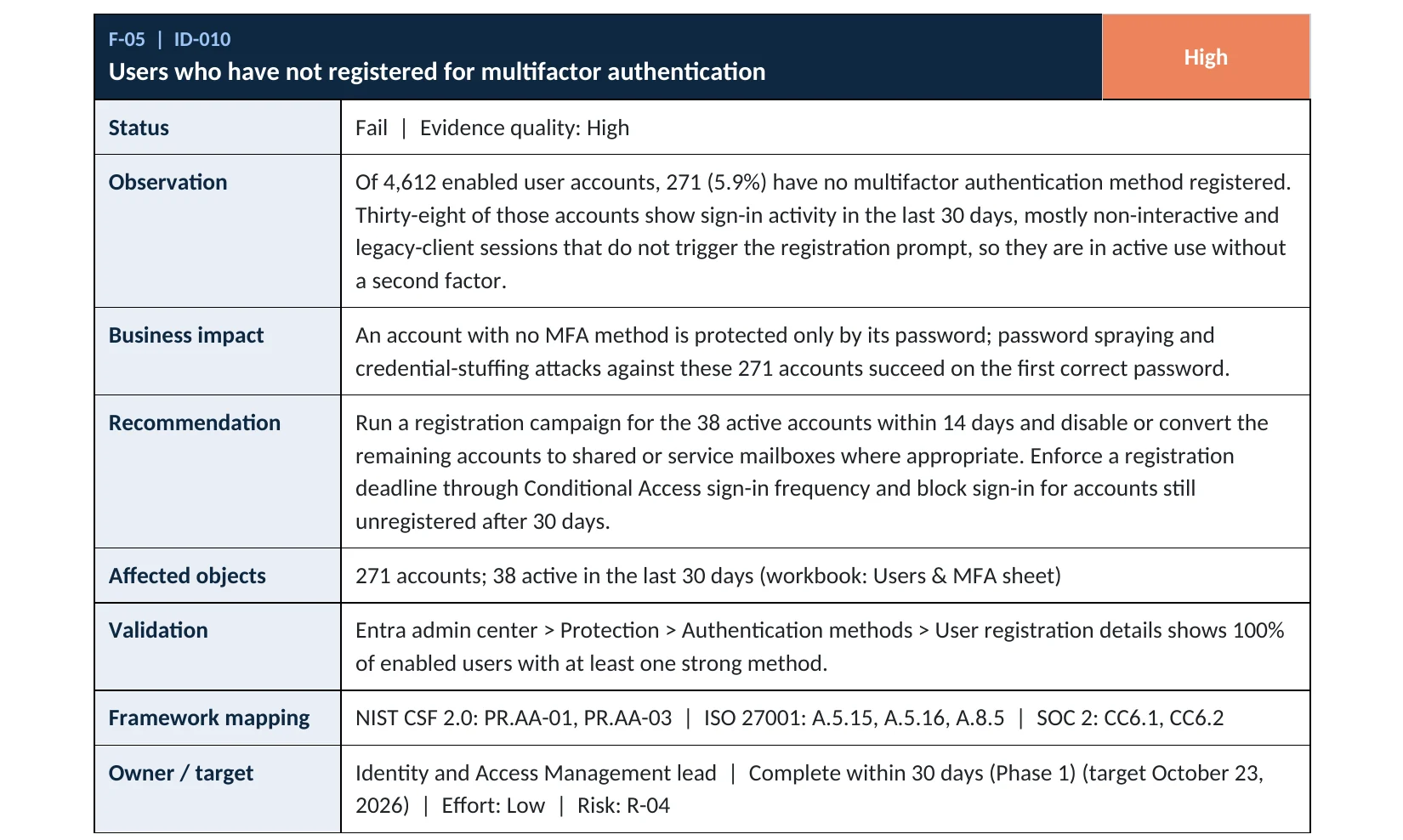
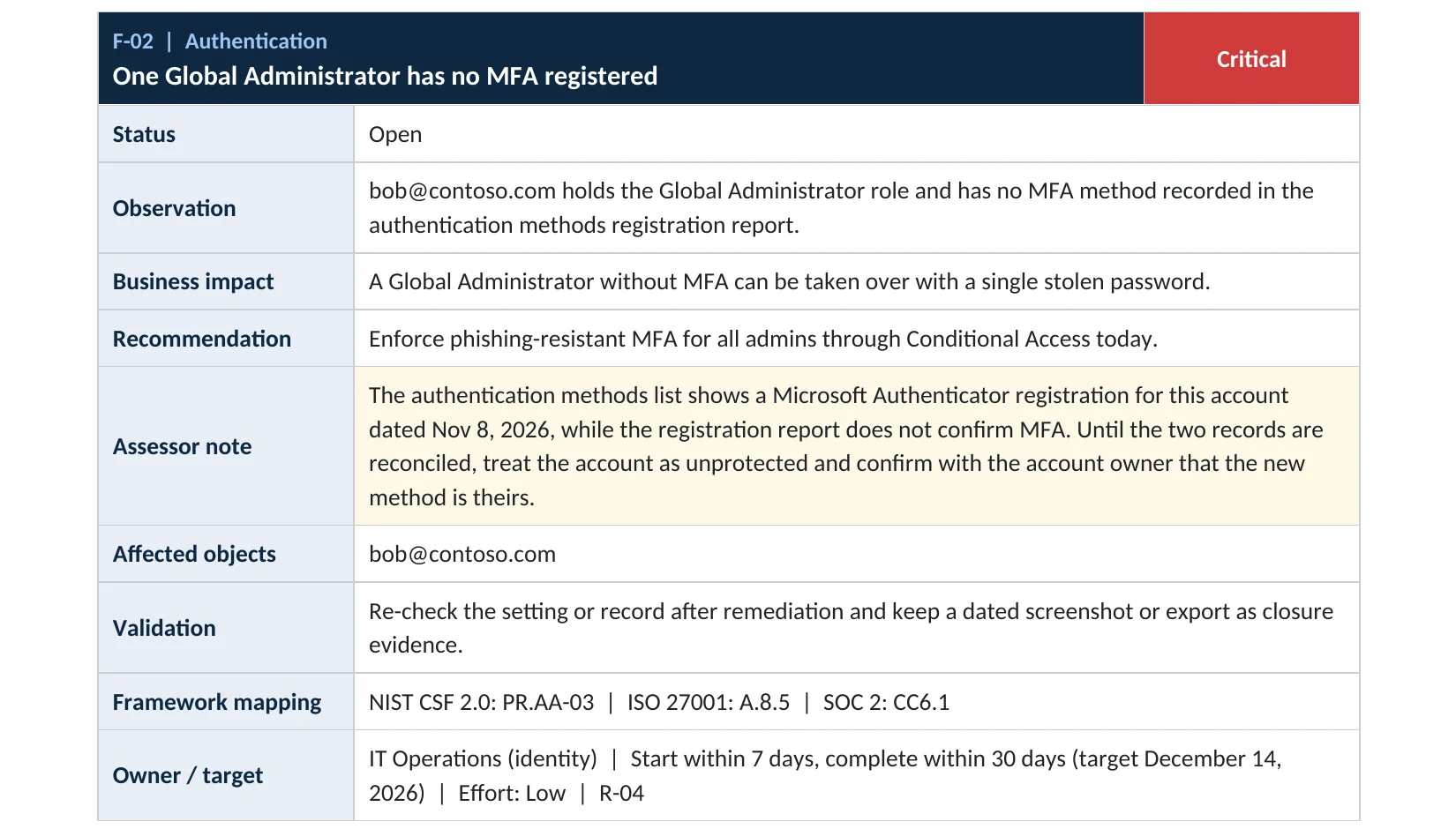
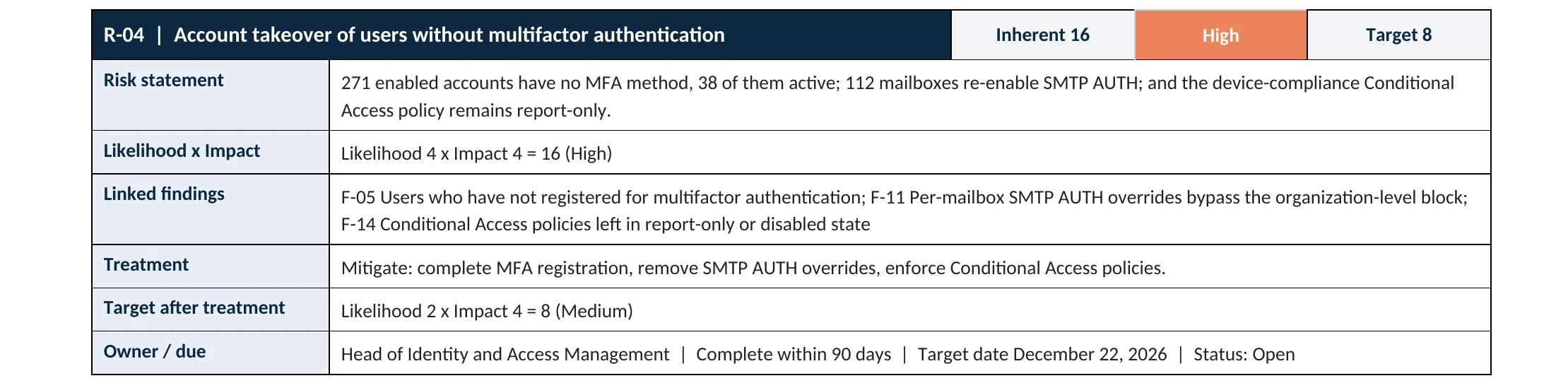
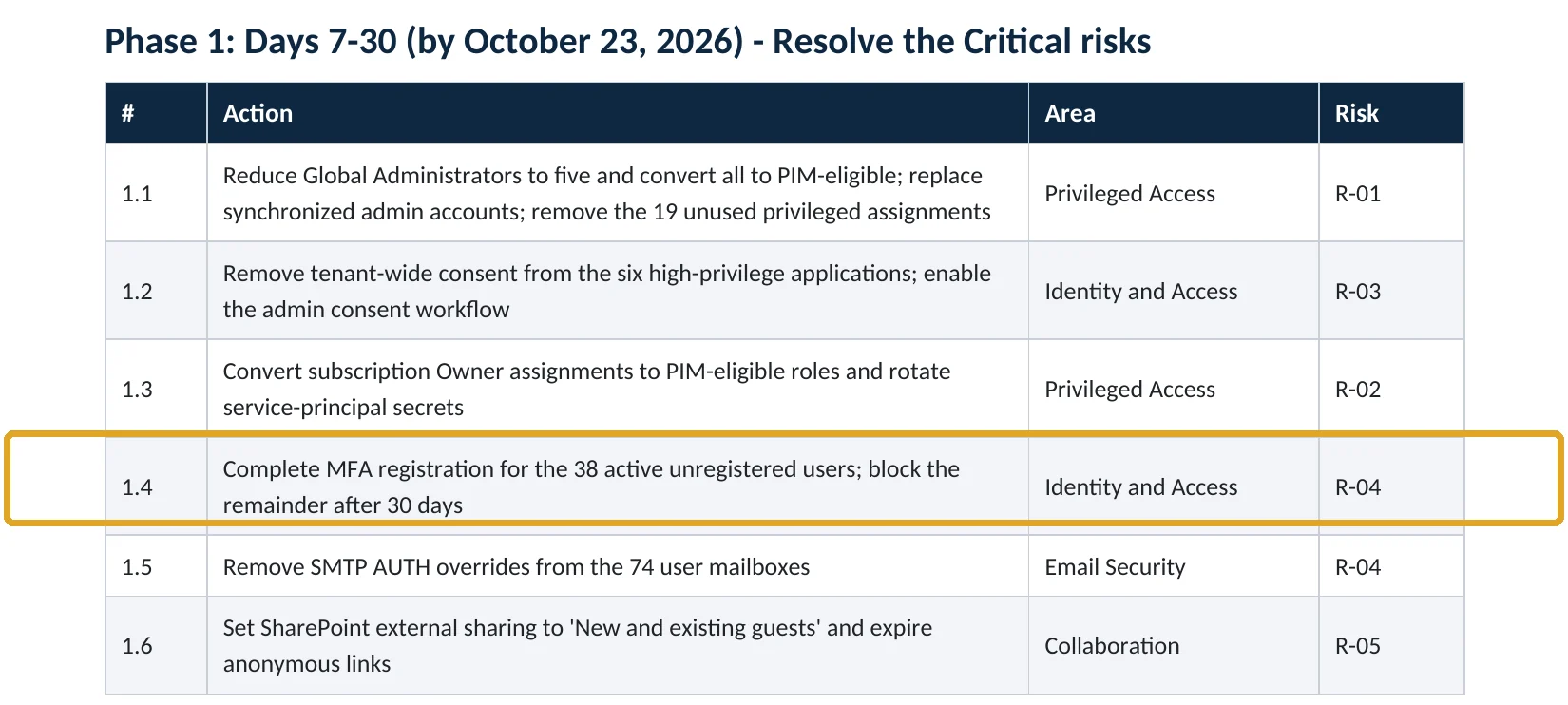
What this finding looks like in our audit reports
MFA coverage is item ID-010 in our Microsoft 365 Security Audit. The report pages below come from our published sample reports, which use fictional companies so you can see exactly how a finding is written.
Your options
Which MFA method should your people use?
All methods are far better than a password alone, but they are not equal. Microsoft’s study found that dedicated authenticator apps outperform text messages (Microsoft research), and CISA ranks phishing-resistant methods highest (CISA).
| Method | How it works | Phishing-resistant | Our take |
|---|---|---|---|
| Passkey (FIDO2 security key or passkey in Microsoft Authenticator) | A key tied to Microsoft’s real sign-in address, unlocked with a fingerprint, face or PIN. | Yes | Best choice, first for administrators. See our passkey deployment plan. |
| Windows Hello for Business | Face, fingerprint or PIN on a company Windows device. | Yes | Excellent on managed company PCs. |
| Microsoft Authenticator push with number matching | The user types the number shown on screen into the app. | No | Good default for all staff. Number matching blocks blind approvals. |
| Authenticator or other app code (OATH) | A 6-digit code that changes every 30 seconds. | No | Fine as a backup method. |
| Text message or voice call | A code sent to a phone number. | No | Weakest. Exposed to SIM swap. Backup only, never for admins. |
Three ways to switch it on
| Approach | License | Control | Use it when |
|---|---|---|---|
| Security defaults | All plans, no extra cost | On or off for everyone | You have Business Basic or Business Standard. |
| Conditional Access | Microsoft Entra ID P1 (Business Premium, E3, E5) | Who, which apps, which methods, report-only testing | You have a P1 license. Microsoft recommends it over security defaults. |
| Per-user MFA | All plans | One user at a time | Avoid for new setups. It is the legacy method; Microsoft points customers to security defaults or Conditional Access. |
Security defaults and Conditional Access cannot run at the same time: creating Conditional Access policies requires turning security defaults off first (Microsoft Learn).
How to check it yourself
Check your MFA setup in ten minutes, without changing anything
These checks only read settings. Sign in to the Microsoft Entra admin center with an account that has at least the Global Reader or Security Reader role.
1. Is security defaults on?
The panel shows Enabled or Disabled. If it says Disabled and you have no Conditional Access policy that requires MFA for all users, nobody is being made to use MFA except in the admin portals.
2. If you have Business Premium, E3 or E5: is there a policy for all users?
Look for an enabled policy that targets All users and All resources with the grant Require multifactor authentication or an authentication strength. Then open it and read the exclusions: an excluded group with dozens of members is a hole. A policy left in Report-only enforces nothing.
3. Which methods are allowed?
Microsoft Authenticator and passkeys should be enabled for all users. If SMS and voice call are enabled for everyone, plan to narrow them. Since September 30, 2025, methods can no longer be managed in the old MFA and password reset settings, so this page is where they live now (Microsoft Learn).
4. Who has not registered?
With Microsoft Entra ID P1 (Business Premium, E3, E5) open Authentication methods › User registration details and filter for users not registered for MFA (Microsoft Learn). On Business Basic or Standard, open each user under Users › select a user › Authentication methods, or use the read-only PowerShell below.
Read-only PowerShell: is security defaults on?
Connect-MgGraph -Scopes "Policy.Read.All"
(Get-MgPolicyIdentitySecurityDefaultEnforcementPolicy).IsEnabled
Read-only PowerShell: which methods does one user have?
Connect-MgGraph -Scopes "UserAuthenticationMethod.Read.All"
Get-MgUserAuthenticationMethod -UserId "user@contoso.com" |
  Select-Object Id, @{n="Method";e={$_.AdditionalProperties["@odata.type"]}}
Read-only PowerShell, needs Entra ID P1: everyone not registered for MFA
Connect-MgGraph -Scopes "AuditLog.Read.All"
Get-MgReportAuthenticationMethodUserRegistrationDetail -All |
  Where-Object { -not $_.IsMfaRegistered } |
  Select-Object UserPrincipalName, IsAdmin
Doing this across hundreds of accounts, exclusions, legacy protocols and admin roles is exactly what our audit automates. See what the Microsoft 365 Security Audit covers.
How to configure
How to turn on MFA for everyone, step by step
Before you start: list scanners, printers and line-of-business apps that send email with a username and password. Security defaults and Conditional Access block that kind of legacy sign-in. Move them first, using Microsoft’s guide for multifunction devices. Tell your staff the day it changes and where to register.
Business Basic or Standard
Turn on security defaults
- Sign in to the Microsoft Entra admin center as at least a Conditional Access Administrator.
- Go to Entra ID › Overview › Properties.
- Select Manage security defaults.
- Set Security defaults to Enabled.
- Select Save.
- Ask everyone to register at myprofile.microsoft.com › Security info, then revoke existing sessions so every user is prompted.
Business Premium, E3 or E5
Use Conditional Access
- Create two cloud-only emergency access accounts with passkeys or security keys, and keep them out of the policy.
- Go to Entra ID › Conditional Access and create a policy from the template Require multifactor authentication for all users.
- Exclude only the emergency accounts. Set the policy to Report-only.
- Check the sign-in logs for a week for anyone the policy would block.
- Turn security defaults off, then switch the policy to On.
- Add a second policy that requires a phishing-resistant authentication strength for administrator roles.
Then, under Authentication methods › Registration campaign, nudge users who still rely on SMS to set up Authenticator or a passkey (Microsoft Learn).
Want this done without guesswork? Our Conditional Access Policy Review checks every policy, exclusion and gap.
After step 6: revoke sessions for one user so they must sign in again and register
Connect-MgGraph -Scopes "User.RevokeSessions.All"
Revoke-MgUserSignInSession -UserId "user@contoso.com"
What your users will notice
Each person registers once, which takes a few minutes with a phone. After that, Microsoft asks for the second step when a sign-in needs it, such as a new device or a sensitive action. With security defaults, Microsoft decides when to ask; with Conditional Access, you do.
How to undo it, safely
Security defaults can be set back to Disabled from the same panel, and a Conditional Access policy can be switched to Report-only or Off. Turn protection off only to replace it with something equal or stronger, never to quiet complaints: an hour without MFA is enough for a password spray to succeed.
Proof and questions
How to prove it is fixed, and what to ask your IT provider
Evidence it is fixed
- Security defaults shows Enabled, or a Conditional Access policy for all users is On with only emergency accounts excluded.
- The registration report or PowerShell shows every enabled user with at least one strong method.
- No administrator relies on SMS or voice call.
- Sign-in logs show MFA satisfied on user sign-ins, and no successful legacy-protocol sign-ins.
Questions for your IT provider
- Is MFA required for every user, or only for administrators?
- Who is excluded from MFA today, and why?
- Which methods are allowed, and are administrators on phishing-resistant methods?
- Is legacy authentication blocked, and which devices still use it?
- Who reviews new MFA registrations for signs of an attacker?
Signs it was already abused
If MFA was missing, look for these signs of a takeover
Red flags in your logs
- A new MFA method, such as an unknown phone number or authenticator, registered for a user who did not add it.
- Successful sign-ins from countries, hosting providers or VPNs your company does not use, especially with password only.
- Users reporting MFA prompts they did not start.
- New inbox rules or forwarding created within hours of an unusual sign-in.
- Many failed sign-ins across several accounts from the same address: a password spray.
If you see any of these, change nothing in a hurry and preserve the logs first. Our Microsoft 365 & Azure Compromise Investigation works out what happened and what was accessed, and our account takeover investigation page explains how.
Framework mapping
Where MFA appears in common frameworks
| Framework | Where MFA fits |
|---|---|
| NIST CSF 2.0 | PR.AA-01 and PR.AA-03: identities managed and users authenticated |
| ISO/IEC 27001:2022 | Annex A 8.5 Secure authentication; 5.17 Authentication information |
| SOC 2 | CC6.1 logical access security |
| HIPAA Security Rule | 45 CFR 164.312(d) person or entity authentication |
| PCI DSS v4.0 | Requirement 8.4: MFA for access into the cardholder data environment |
| Cyber insurance | Most applications ask about MFA for email and remote access; see our insurance requirements guide |
Reviewed by
Written and reviewed by a practicing CISO

Ali Hassani, C|CISO, CISSP
Ali has more than 25 years of IT and cybersecurity experience and holds the Certified CISO and CISSP certifications along with Microsoft and Cisco credentials. He leads every OC Security Audit engagement from Irvine, on-site across Southern California and remotely nationwide. Every Microsoft 365 audit is read-only.
FAQ
Frequently asked questions about Microsoft 365 MFA
Is MFA free in Microsoft 365?
Yes. Every Microsoft 365 business plan includes Microsoft Entra ID Free, which gives you security defaults: MFA registration for all users, MFA for administrators and blocking of legacy sign-in, at no extra cost. Conditional Access, which lets you decide exactly who, when and from where, needs Microsoft Entra ID P1, included in Business Premium and Microsoft 365 E3 and E5.
Should I use security defaults or Conditional Access?
If you have Business Basic or Business Standard, turn on security defaults; it is the right control for that license. If you have Business Premium, E3 or E5, use Conditional Access instead, because it lets you exclude emergency accounts, require stronger methods for administrators and test policies in report-only mode first. The two cannot be on at the same time.
Is a text message (SMS) code good enough?
It is far better than a password alone, but it is the weakest option. Microsoft’s own study found that dedicated authenticator apps outperform SMS, and CISA calls phishing-resistant MFA, such as passkeys and FIDO2 security keys, the gold standard. Use Microsoft Authenticator or passkeys for everyone, and keep SMS only as a backup where you must.
Doesn’t Microsoft already force MFA?
Partly. Microsoft now requires MFA to sign in to its admin portals, including the Azure portal, the Microsoft Entra admin center and the Microsoft 365 admin center, where enforcement began rolling out in February 2025. That rule protects administration screens. It does not protect your users’ Outlook, Teams, SharePoint and OneDrive sign-ins; you still have to turn MFA on for everyone.
What happens to scanners, printers and old apps that send email?
Devices and apps that sign in with only a username and password use legacy authentication, which security defaults block. Before you switch MFA on, list those devices and move each one to a supported sending method from Microsoft’s guide for multifunction devices. That is the most common reason an MFA rollout breaks something.
Will MFA stop every account attack?
No. MFA stops most password attacks, but attackers also steal sign-in sessions through fake login pages, flood users with approval prompts and trick help desks into resetting methods. Phishing-resistant methods, number matching, Conditional Access and regular review of new MFA registrations close those gaps. Our Microsoft 365 Security Audit checks all of them.
Next step
Know exactly where your tenant stands
Prevent
Microsoft 365 Security Audit
$3,500 fixed
About 200 read-only checks across identity and MFA, admin roles, email, sharing, data protection, logging and devices, for any tenant size. You receive an executive report, a technical report, a risk register and a remediation roadmap.
Respond
Microsoft 365 & Azure Compromise Investigation
From $3,500
For when an account may already be taken over: we review sign-ins, MFA changes, inbox rules, forwarding and app consents, and report what we can and cannot confirm.

Service
Microsoft 365 Security Audit
The fixed-price audit that checks this item and about 200 more.
See the audit ›
Sample
Sample audit report
Every page of the five deliverables, with fictional data.
View the sample ›
Service
Microsoft Entra ID Security Audit
A deeper look at identities, Conditional Access, roles and apps.
See the Entra ID audit ›Want to see the deliverables first? Open the Microsoft 365 audit sample report or browse all our sample reports.
Related reading: Microsoft 365 MFA and Conditional Access guide · Microsoft Entra passkeys deployment plan · Change Healthcare briefing · Snowflake briefing
Sources
Sources used on this page
- Microsoft Research, “How effective is multifactor authentication at deterring cyberattacks?” (2023)
- Microsoft Learn, Security defaults in Microsoft Entra ID
- Microsoft Learn, What is Conditional Access? (license requirements)
- Microsoft Learn, Mandatory multifactor authentication for Azure and admin portals
- Microsoft Learn, Configure Microsoft Entra multifactor authentication settings
- Microsoft Learn, Migrate MFA and SSPR policy settings to the Authentication methods policy
- Microsoft Learn, Authentication methods activity (permissions and licenses)
- Microsoft Learn, Run a registration campaign
- Microsoft Learn, Microsoft 365 for business security overview
- Microsoft Learn, Set up a multifunction device or application to send email
- FBI Internet Crime Complaint Center, 2025 Internet Crime Report
- Verizon, 2026 Data Breach Investigations Report
- SC Media, Verizon DBIR 2026 coverage
- CISA, Implementing Phishing-Resistant MFA fact sheet
- CISA, More than a Password
- Healthcare Dive, Change Healthcare: compromised credentials, no MFA (testimony coverage)
- Mandiant (Google Cloud), UNC5537 targets Snowflake customer instances
This guide is general information, not a guarantee of protection or legal advice. Microsoft changes its admin centers often: menu names and steps were checked against Microsoft Learn on November 19, 2026. Drawings are simplified and are not screenshots of Microsoft products. Sample findings come from fictional companies. Incidents are described as reported by the cited sources; OC Security Audit was not involved in them. Questions? Call 949-777-5567 or email support@ocsecurityaudit.com.