

LIBRARY 3.31Microsoft 365 Security Library
How to Find Hidden Mailboxes in Microsoft 365
A mailbox hidden from the address book still receives mail, and nobody notices it in the company directory. Most hidden mailboxes are legitimate. Here is how to list them all and confirm every one has an owner and a reason.
Reviewed by Ali Hassani, C|CISO, CISSP · Last verified November 20, 2026
Any recipient can be hidden from address lists with the HiddenFromAddressListsEnabled setting, on every plan with Exchange Online (Microsoft Learn).
In one minute
- List every recipient hidden from address lists.
- Write down the owner and the reason for each one.
- Look hardest at hidden mailboxes created recently.
- Check who can open them and where their mail goes.
Hidden and newly created mailboxes are part of the email security checks in our Microsoft 365 Security Audit.
What it is
What hiding a mailbox does, and doesn’t do
Microsoft explains that hiding a recipient from address lists doesn’t stop it receiving email; it only stops people finding it in the address lists. A hidden recipient is hidden from all address lists and the global address list (Microsoft Learn).
Legitimate reasons, and the ones to question
| Hidden recipient | Usually | What to confirm |
|---|---|---|
| Service or app mailbox (scanner, notifications) | Legitimate | Which app uses it |
| Former employee mailbox kept for records | Legitimate | Who can open it |
| Shared mailbox for a back-office team | Legitimate | Members and Send As |
| New mailbox, no owner, no ticket | Question it | Investigate |
| Hidden mailbox receiving forwarded or copied mail | Question it | Investigate |
Why it matters
A drop box nobody looks for
- Admin account compromisedAttacker can create mailboxes.
- Hidden mailbox createdNot in the directory.
- Quarterly hidden-mailbox reviewNo owner, investigated.
- Rules copy mail to itWithout it: invoices collected quietly.
- Payment divertedBusiness email compromise.
Drawing: where a hidden-mailbox review breaks the path.
lost to business email compromise in 2024, the FBI reports.
Source: CyberScoop on FBI IC3business email compromise complaints to the FBI in 2024.
Source: Nacha on FBI IC3effect on receiving mail: a hidden mailbox still gets every message sent to it.
Source: Microsoft Learndays is a sensible review cycle for hidden mailboxes.
Source: Our recommendationWhat to check on each hidden mailbox
| Check | Where | Red flag |
|---|---|---|
| When it was created | WhenCreated property | Created during or after a suspected incident |
| Who can open it | Mailbox delegation | Full Access for an unexpected account |
| Where its mail comes from | Mail flow rules, forwarding, message trace | Copies of finance or executive mail |
| Who created or hid it | Audit log: New-Mailbox, Set-Mailbox | An admin who doesn’t recognize the change |
What we find in audits
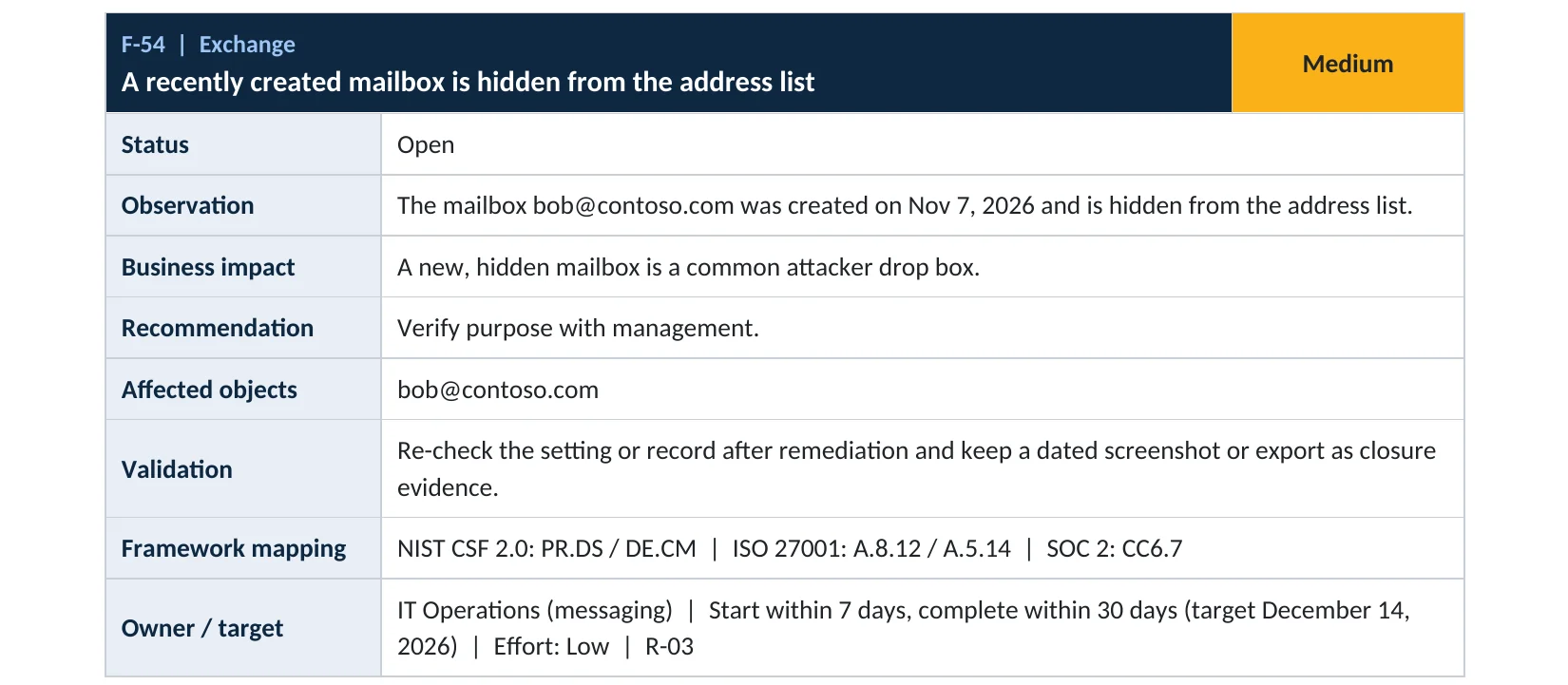
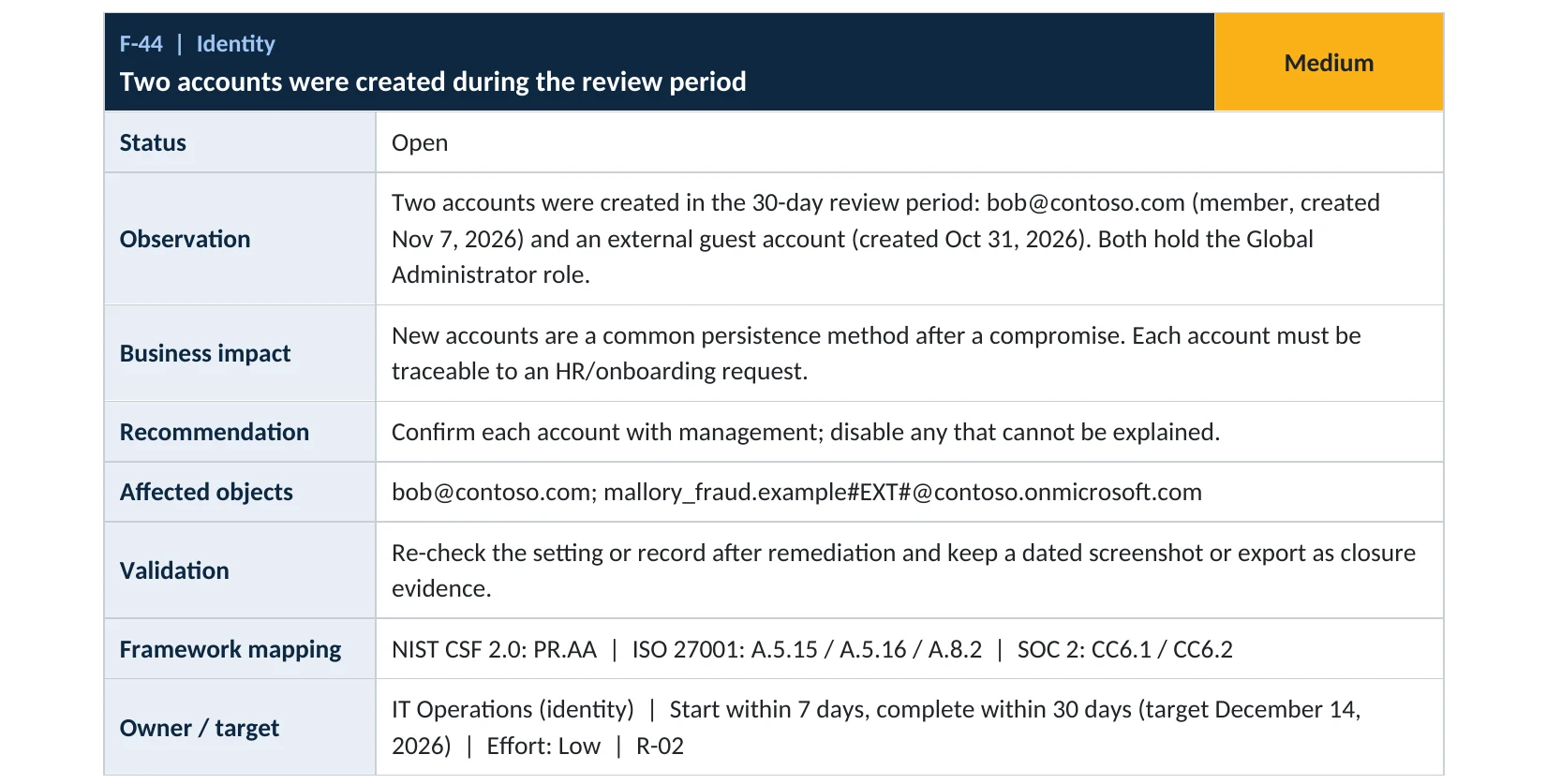
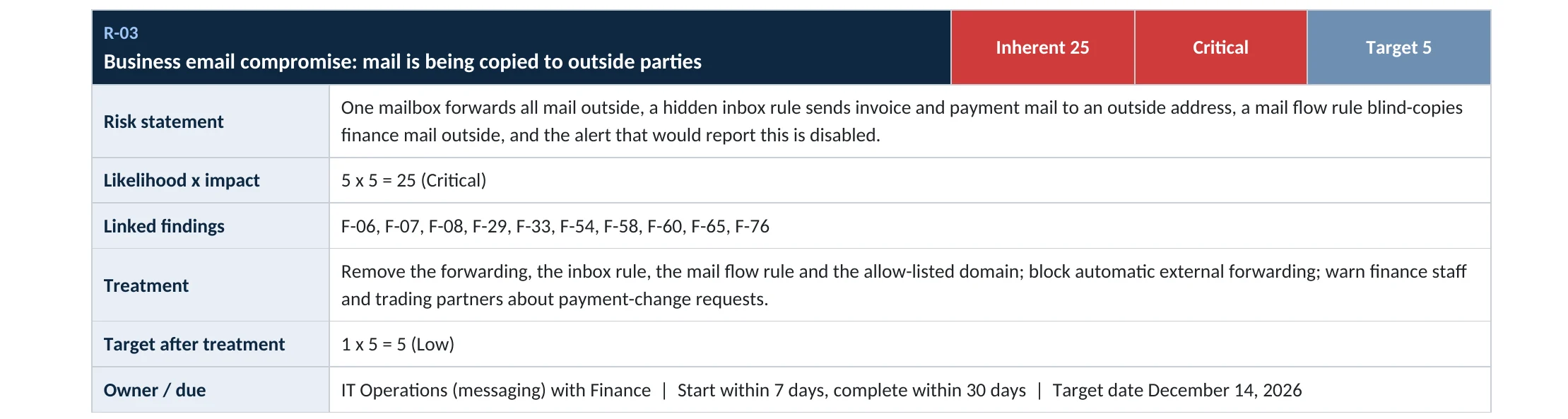
What this finding looks like in our audit reports
These are real pages from our published compromise assessment sample, written for a fictional company. Click any page to open it full size.

Your options
What each plan gives you
| Capability | All plans with Exchange Online |
|---|---|
| List hidden recipients in the Exchange admin center or PowerShell | Yes |
| Hide or unhide a recipient | Yes |
| Audit log records of mailbox creation and changes | Yes (retention depends on plan) |
| Message trace to see what a mailbox received | Yes |
See our audit log retention guide for how long the creation records are kept on your plan.
How to check it yourself
List every hidden mailbox, without changing anything
The admin center shows the setting per mailbox; PowerShell lists them all at once.
Read-only PowerShell: all hidden recipients, newest first
Connect-ExchangeOnline
Get-Recipient -ResultSize Unlimited -Filter 'HiddenFromAddressListsEnabled -eq $true' |
  Sort-Object WhenCreated -Descending |
  Select-Object Name, PrimarySmtpAddress, RecipientTypeDetails, WhenCreated
The command only reads data. Start with the newest entries and anything that isn’t a room, equipment or system mailbox.
How to configure
How to review hidden mailboxes, step by step
All plans
Review each one
- Export the list above to a spreadsheet.
- Add an owner and a reason for every hidden mailbox.
- For any without an owner, check who has Full Access and whether mail is being copied or forwarded to it.
- Search the audit log for who created or hid it.
- Unhide, convert or remove mailboxes that have no business reason, after keeping the evidence.
Keep it clean
Make it routine
- Require a ticket for every new mailbox and every hide request.
- Turn on an alert for new mailboxes created outside your normal process.
- Repeat the review every quarter and after any account compromise.
What your users will notice
Nothing. The review only reads settings; any change affects only the mailbox you change.
How to undo it
If you unhide a mailbox by mistake, turn Hide from global address list back on, or run Set-Mailbox with -HiddenFromAddressListsEnabled $true.
Proof and questions
How to prove it is fixed, and what to ask your IT provider
Evidence it is fixed
- A dated list of every hidden mailbox with an owner and reason.
- No hidden mailbox without an owner.
- Delegation on hidden mailboxes matches the owner list.
- A quarterly review on the calendar.
Questions for your IT provider
- How many hidden mailboxes do we have, and who owns each?
- Were any created in the last 90 days?
- Who can open them, and does any rule copy mail to them?
- Who is allowed to create or hide mailboxes?
- Would we be alerted to a new hidden mailbox?
Signs it was already abused
If a hidden mailbox may already have been used against you, look for these signs
Red flags
- A hidden mailbox created shortly before or during a suspected incident.
- Mail flow rules, inbox rules or forwarding that send copies to a hidden mailbox.
- Full Access to a hidden mailbox for an account nobody expects.
- Sign-ins to the hidden mailbox from unusual places.
- Audit records showing an admin created or hid it without a ticket.
If you see these, keep the evidence before you delete anything. Our business email compromise investigation establishes what was collected and sent, and the Microsoft 365 Evidence Clock shows how long the records are kept.
Framework mapping
Where hidden mailbox reviews fit
| Framework | Where it fits |
|---|---|
| NIST CSF 2.0 | PR.DS: data security; DE.CM: continuous monitoring |
| ISO/IEC 27001:2022 | Annex A 8.12 Data leakage prevention; 5.14 Information transfer |
| SOC 2 | CC6.7 restriction of data transmission |
Reviewed by
Written and reviewed by a practicing CISO

Ali Hassani, C|CISO, CISSP
Ali has more than 25 years of IT and cybersecurity experience and holds the Certified CISO and CISSP certifications along with Microsoft and Cisco credentials. He leads every OC Security Audit engagement from Irvine, on-site across Southern California and remotely nationwide. Every Microsoft 365 audit is read-only.
FAQ
Frequently asked questions about hidden mailboxes
What is a hidden mailbox in Microsoft 365?
A mailbox with HiddenFromAddressListsEnabled turned on. It doesn't appear in the address book, but it still receives email.
Are hidden mailboxes a security problem?
Not by themselves. Many are legitimate service or records mailboxes. The risk is a hidden mailbox nobody owns or can explain.
How do I list all hidden mailboxes?
In Exchange Online PowerShell, filter Get-Recipient on HiddenFromAddressListsEnabled equal to true.
Can I see who hid a mailbox?
Yes, if the change is still within your audit log retention: search for Set-Mailbox and New-Mailbox activity.
How often should we review them?
Every quarter, and after any suspected account compromise.
Which plans support this?
All Microsoft 365 plans with Exchange Online.
Next step
Know every mailbox you have
Prevent
Microsoft 365 Security Audit
$3,500 fixed
About 200 read-only checks across sign-in protection, email, sharing and devices, for any tenant size, with four reports and a remediation roadmap.
Respond
Microsoft 365 & Azure Compromise Investigation
From $3,500
For when a mailbox nobody recognizes turns up: we establish who created it and what it collected.
Want to see the deliverables first? Open the Microsoft 365 audit sample report or browse all our sample reports.

Service
Microsoft 365 Security Audit
The fixed-price audit that checks this item and about 200 more.
See the audit ›
Service
Microsoft 365 Email Security
Our review of Exchange Online and Defender email protection.
See email security ›
Service
Compromise Investigation
When an account or mailbox may already be in an attacker’s hands.
See the investigation ›Related reading: How to review mailbox permissions · How to find malicious inbox rules · How to find and disable inactive accounts
Sources
Sources used on this page
- Microsoft Learn, Manage address lists in Exchange Online: hide recipients
- Microsoft Learn, Filterable properties: HiddenFromAddressListsEnabled
- Microsoft Learn, Set-Mailbox
- Microsoft Learn, Audit log activities
- CyberScoop, FBI IC3 cybercrime report 2024 key statistics
- Nacha, FBI IC3 finds almost $8.5 billion lost to business email compromise in last three years
This guide is general information, not a guarantee of protection or legal advice. Microsoft changes its admin centers often: menu names and steps were checked against Microsoft Learn on November 20, 2026. Drawings are simplified and are not screenshots of Microsoft products. Sample findings come from fictional companies. Incidents are described as reported by the cited sources; OC Security Audit was not involved in them. Questions? Call 949-777-5567 or email support@ocsecurityaudit.com.