

LIBRARY 9.50Microsoft 365 Security Library
How Long Microsoft 365 Keeps Audit Logs, and How to Keep Them Longer
The audit log is the record of who signed in, who read which mailbox and who changed what. Here is how long Microsoft keeps it on each plan, how to check it’s on, and how to keep the records you’ll need after a breach.
Reviewed by Ali Hassani, C|CISO, CISSP · Last verified November 20, 2026
Green: Audit (Standard) is on by default and keeps records for 180 days. Blue: Audit (Premium), included in E5, keeps Entra ID, Exchange, OneDrive and SharePoint records for one year and lets you create retention policies; ten years needs an extra per-user add-on (Microsoft Learn).
In one minute
- Confirm the unified audit log is on and mailbox auditing hasn’t been turned off.
- Know your retention: 180 days on most plans, one year for E5 users’ core records.
- If you need longer, export the records you care about to storage you control, or use E5 retention policies.
- Write down who can search the log, so it’s ready before an incident, not during one.
Audit logging and retention is item LM-010 in our Microsoft 365 Security Audit.
What it is
What the Microsoft 365 audit log records
Microsoft Purview Audit, often called the unified audit log, records thousands of activities across Microsoft 365: sign-ins, mailbox access, inbox rules, file downloads, sharing, admin changes and more. It’s what an investigator reads to answer the questions that matter after an incident: how did they get in, what did they see, what did they change (Microsoft Learn).
How long records are kept
| Plan | Default retention | Can you change it? |
|---|---|---|
| Business Basic, Standard, Premium, E3 (Audit Standard) | 180 days (90 days for records created before October 17, 2023) | No retention policies; export to keep longer |
| E5 (Audit Premium) | 1 year for Entra ID, Exchange, OneDrive and SharePoint; 180 days for other services | Yes: retention policies up to 1 year |
| E5 + 10-Year Audit Log Retention add-on | Per your policy | Yes: up to 10 years, from the day the policy is created |
Sources: Microsoft Learn, audit log retention policies and search the audit log. Microsoft notes that a 10-year policy isn’t retroactive: it can’t keep records created before it existed.
Why it matters
No logs, no answers
- Attacker gets inPhished password or stolen token.
- Months passQuiet mailbox access and forwarding.
- Records keptInvestigators can see the first sign-in.
- Breach foundWithout them: the start is already deleted.
- No answersWho was affected? What was read?
Drawing: why retention decides what an investigation can prove.
days: default audit retention on plans without E5, up from 90 days for records created since October 17, 2023.
Source: Microsoft Learndefault retention for E5 users’ Entra ID, Exchange, OneDrive and SharePoint records under Audit (Premium).
Source: Microsoft Learnpossible only with a separate per-user add-on license, and only for records created after the policy.
Source: Microsoft Learnorganizations had email accessed by Storm-0558 in 2023; a US agency spotted it in its Microsoft 365 audit logs.
Source: The Hacker NewsWhat decides whether an investigation can answer the questions
| Factor | What it decides | Effect |
|---|---|---|
| Unified audit log on | Whether records exist at all. | Required |
| Mailbox auditing on | Whether mailbox access, rules and sends are recorded. | Required |
| Retention period | How far back you can look. | 180 days Longer with E5 or export |
| Exported copies | Whether evidence survives beyond Microsoft’s retention. | Your choice |
| Someone who can search it | Whether records are used in time. | Often missing |
Documented cases
Nation-state · CISA and FBI, 2023
Storm-0558 found through the audit log
CISA and the FBI reported that a federal agency spotted the intrusion by using enhanced logging, specifically MailItemsAccessed events, together with a baseline of normal Outlook activity. Microsoft attributed the activity to Storm-0558.
Source: CISA advisory AA23-193A
Logging change · Microsoft, 2023 to 2024
Microsoft expands audit logging after the breach
After the Storm-0558 disclosure, Microsoft expanded the free logging available to Audit (Standard) customers with E3-level licenses and above; events such as MailItemsAccessed had previously required premium licenses.
Source: BleepingComputer · The Hacker News
We were not involved in either case. The lesson for a small or mid-size company is the same: an investigation can only prove what the logs still hold.
What we find in audits
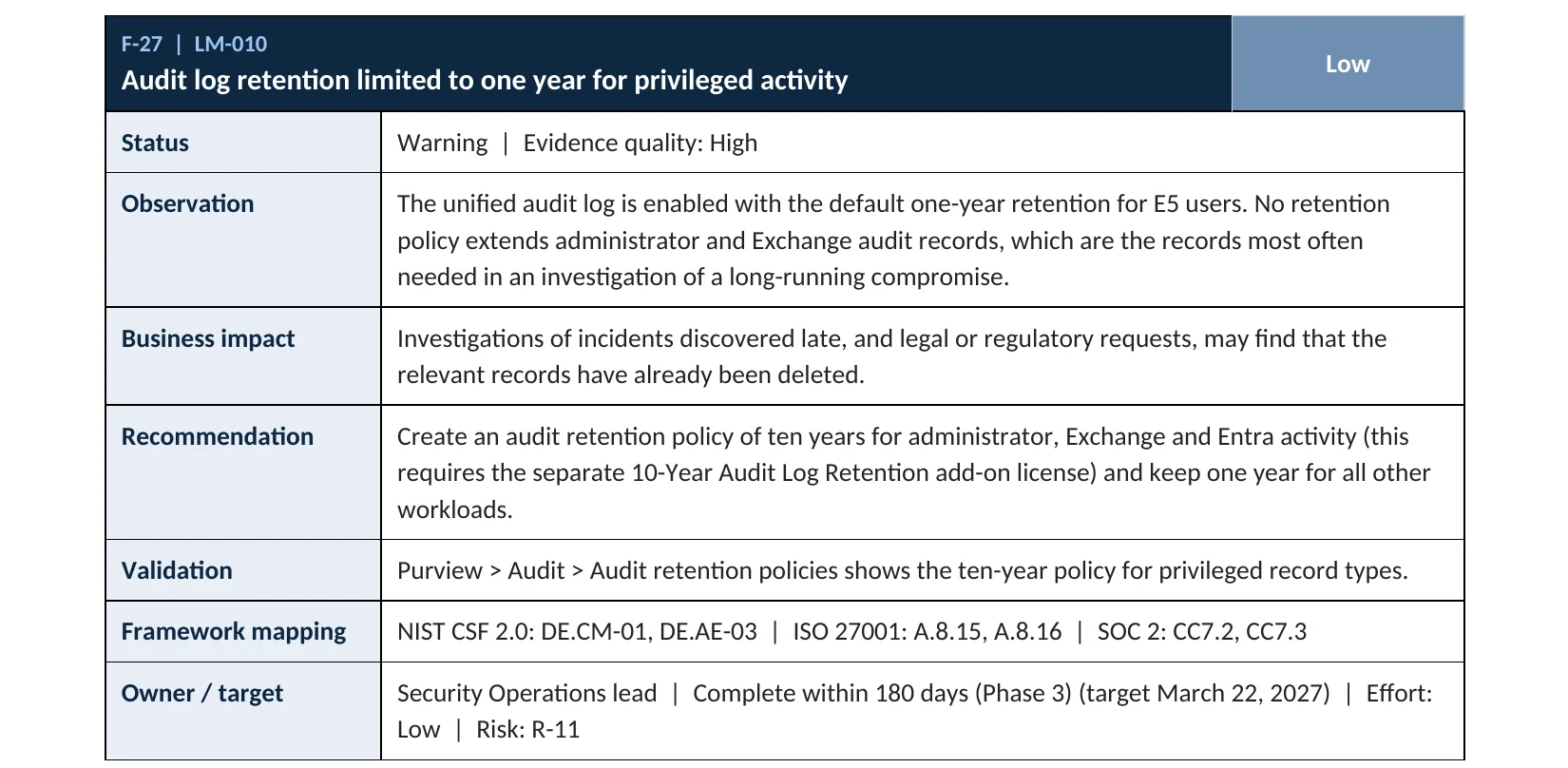
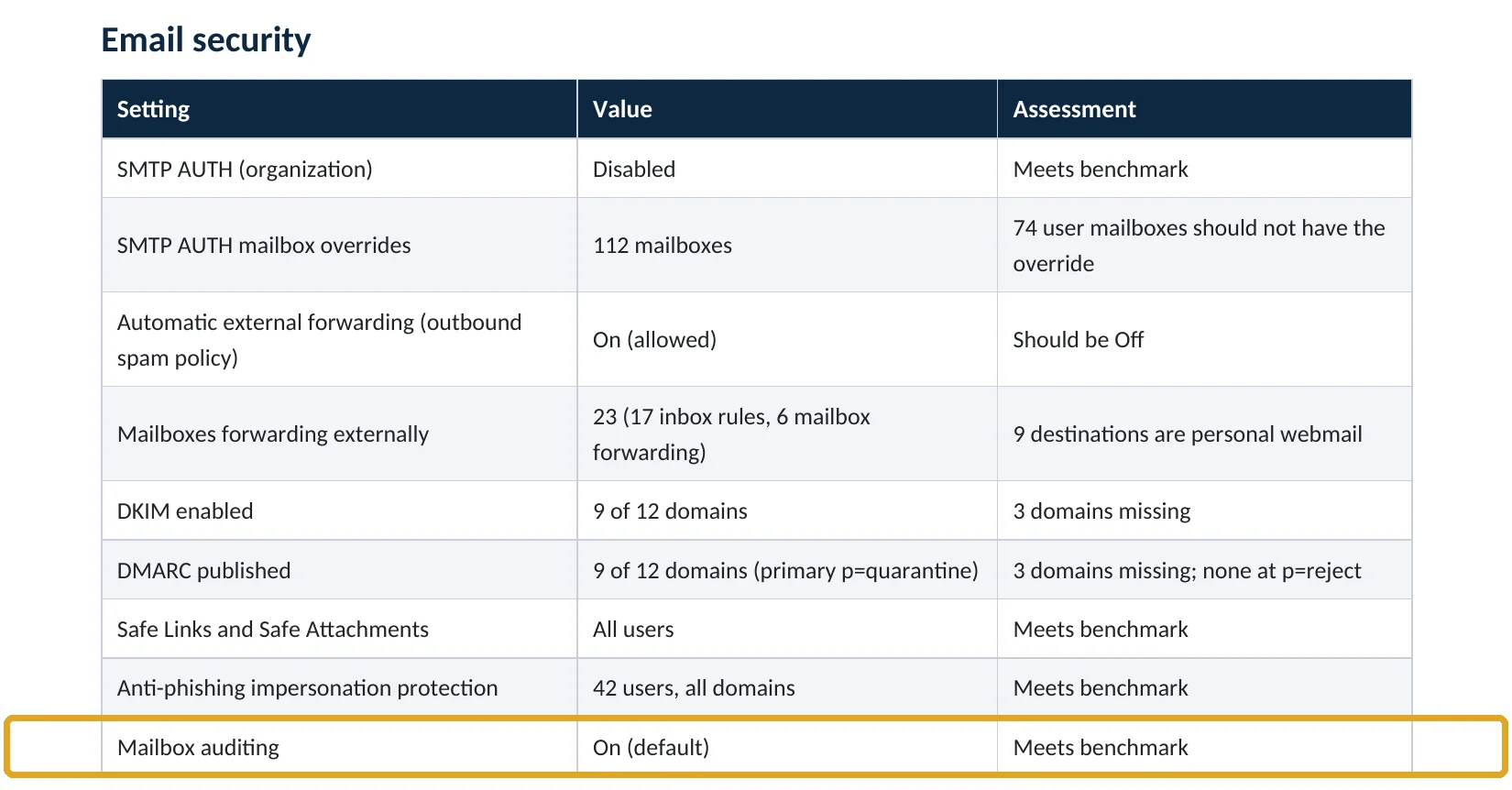
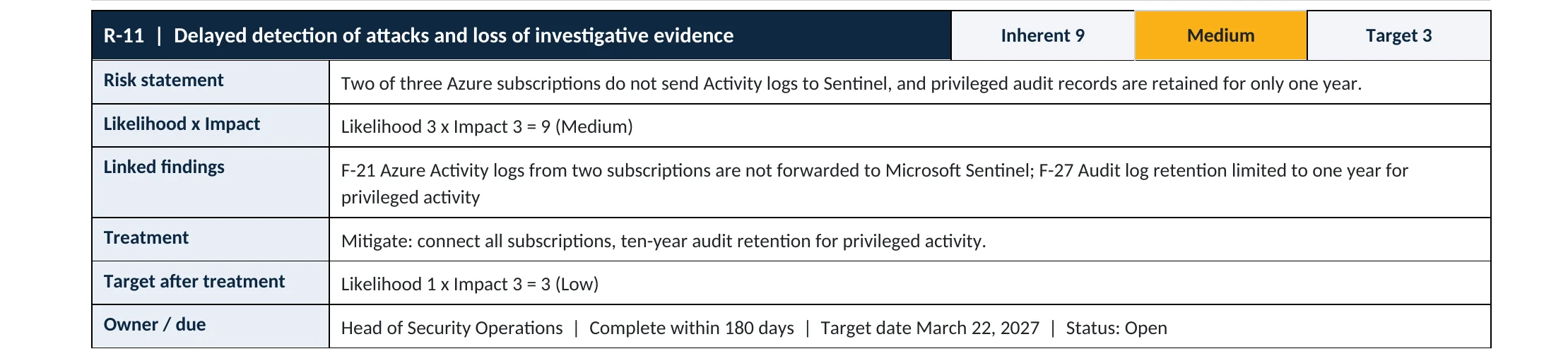
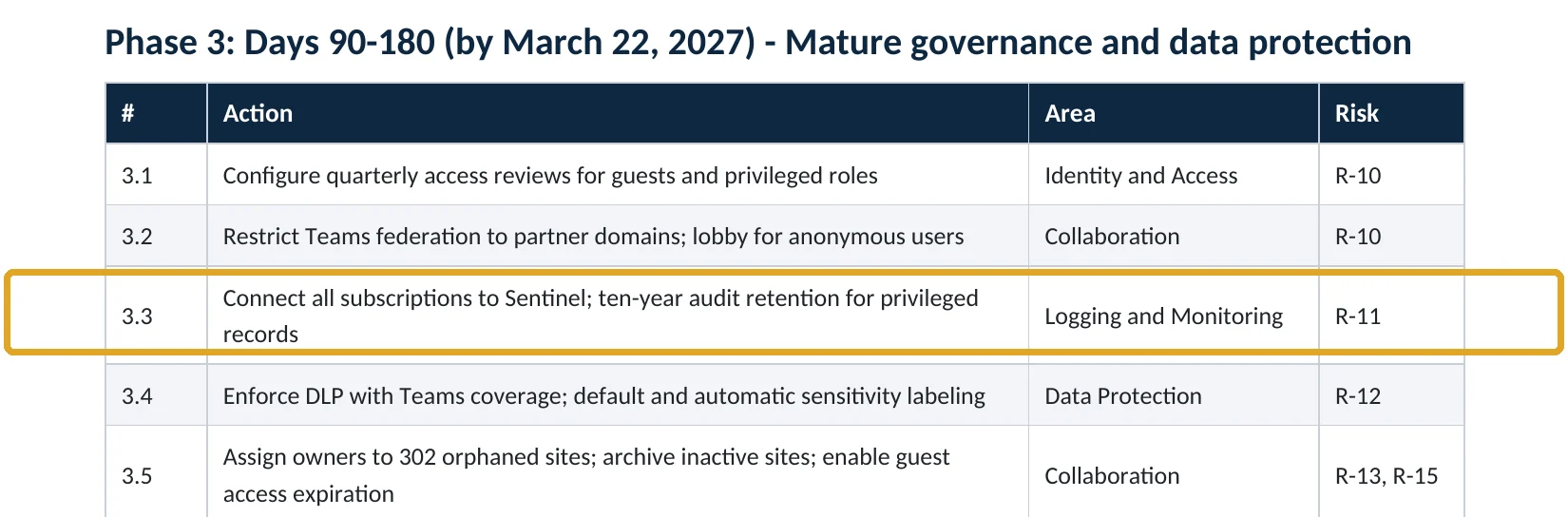
What this finding looks like in our audit reports
These are real pages from our published sample audit, written for a fictional company. Click any page to open it full size. The viewer follows the finding from the technical report to the risk register and the roadmap.
Your options
How to keep records longer on each plan
| Option | Plans | What it gives you |
|---|---|---|
| Default Audit (Standard) | All business plans and E3 | 180 days of searchable records |
| Regular export | All plans | Export audit searches to CSV, or stream them with the Management Activity API to storage or a SIEM you control |
| Audit (Premium) | E5, or the Purview add-ons for Business Premium | 1 year for core workloads, retention policies, intelligent insights |
| 10-Year Audit Log Retention | E5 plus a per-user add-on | Up to 10 years for the users and activities you choose |
For most small and mid-size companies, the practical step is a scheduled export of admin and mailbox records to storage you already pay for. Any add-on license or log storage service has a cost: check pricing before you turn one on.
How to check it yourself
Confirm the audit log is on and see what it keeps, without changing anything
1. Is audit logging on?
If you see a banner offering to Start recording user and admin activity, logging is off. If you can run a search, it’s on.
2. Are there retention policies (E5)?
Read-only PowerShell: audit log on, mailbox auditing on, retention policies
Connect-ExchangeOnline
Get-AdminAuditLogConfig | Format-List UnifiedAuditLogIngestionEnabled
Get-OrganizationConfig | Format-List AuditDisabled

Connect-IPPSSession
Get-UnifiedAuditLogRetentionPolicy | Format-Table Name, RecordTypes, RetentionDuration, Priority
UnifiedAuditLogIngestionEnabled should be True and AuditDisabled should be False. The commands only read settings; they change nothing. Microsoft notes that even with mailbox auditing on by default, some users’ mailbox events may be missing if their licenses or mailbox settings differ (Microsoft Learn).
How to configure
How to make sure the records are there when you need them, step by step
All plans
Turn it on and keep copies
- Open Microsoft Purview › Audit and select Start recording user and admin activity if it’s offered.
- Confirm mailbox auditing is on for the organization (AuditDisabled is False).
- Give one or two people the Audit Logs role so someone can search before an incident, not during one.
- Schedule a monthly export of admin activity, sign-ins and mailbox events to storage you control.
- Write down where the exports are kept and how long you keep them.
E5 (Audit Premium)
Set retention policies
- Open Microsoft Purview › Audit › Audit retention policies › New audit retention policy.
- Choose the record types that matter most in an investigation: Exchange, Entra ID and SharePoint admin activity.
- Set the duration to one year, or ten years for users who have the 10-Year add-on license.
- Give the policy a high priority so it wins over shorter policies.
- Remember the policy only keeps records created after it exists.
What your users will notice
Nothing. Auditing runs in the background and doesn’t change how anyone works.
How to undo it
Retention policies can be edited or deleted in Purview. Microsoft notes that changes only affect records created after the change (Microsoft Learn).
Proof and questions
How to prove it is fixed, and what to ask your IT provider
Evidence it is fixed
- An audit search returns results, and UnifiedAuditLogIngestionEnabled is True.
- Mailbox auditing is on for the organization.
- A written note of how long records are kept, and where exported copies are stored.
- Named people hold the Audit Logs role and have run a test search.
Questions for your IT provider
- Is our unified audit log on, and since when?
- How far back can we search today?
- Do we export audit records anywhere, and for how long?
- Who would search the log if we had an incident tonight?
- Would we know if someone turned auditing off?
Signs it was already abused
If someone may have tampered with logging, look for these signs
Red flags
- The unified audit log was turned off, or mailbox auditing was disabled for some users.
- Gaps in the audit log for days or weeks with normal business activity.
- Retention policies shortened or deleted without a reason.
- The Audit Logs role given to an account you don’t recognize.
- Admin changes made shortly before or after auditing was switched off.
If you see these, preserve what’s left right away: export the searches you can still run. Our compromise investigation works with whatever records remain, and the Microsoft 365 Evidence Clock shows how long each type of record is kept.
Framework mapping
Where audit logging and retention fit
| Framework | Where it fits |
|---|---|
| NIST CSF 2.0 | DE.CM-01: networks and services monitored; DE.AE-03: information correlated from multiple sources |
| ISO/IEC 27001:2022 | Annex A 8.15 Logging; 8.16 Monitoring activities |
| SOC 2 | CC7.2 monitoring for anomalies; CC7.3 evaluation of security events |
| MITRE ATT&CK | T1562.008 Impair Defenses: Disable or Modify Cloud Logs |
Reviewed by
Written and reviewed by a practicing CISO

Ali Hassani, C|CISO, CISSP
Ali has more than 25 years of IT and cybersecurity experience and holds the Certified CISO and CISSP certifications along with Microsoft and Cisco credentials. He leads every OC Security Audit engagement from Irvine, on-site across Southern California and remotely nationwide. Every Microsoft 365 audit is read-only.
FAQ
Frequently asked questions about audit log retention
Is the Microsoft 365 audit log on by default?
For most organizations, yes: Microsoft says Audit (Standard) is enabled by default. Check it anyway, because it can be turned off.
How long does Microsoft 365 keep audit logs?
180 days on most plans. For users with E5, Entra ID, Exchange, OneDrive and SharePoint records are kept for one year. Ten years needs a separate add-on license.
Can I keep logs longer without E5?
Yes, by exporting them. Run and export audit searches regularly, or use the Office 365 Management Activity API to send records to storage or a SIEM you control.
Does a new retention policy recover old records?
No. Microsoft notes that retention changes apply to records created after the change; records already deleted can't be brought back.
What is MailItemsAccessed?
An audit event that records when mail items are accessed. In 2023 it helped a US federal agency spot the Storm-0558 intrusion, and Microsoft later made more of this logging available beyond premium licenses.
Who should be able to search the audit log?
One or two named people with the Audit Logs role, plus your investigator during an incident. Keep the list short and reviewed.
Next step
Make sure the evidence will be there
Respond
Microsoft 365 & Azure Compromise Investigation
From $3,500
For when you need to know what happened, using whatever records your tenant still holds: we preserve evidence first, then reconstruct the activity.
Prevent
Microsoft 365 Security Audit
$3,500 fixed
About 200 read-only checks across sign-in protection, admin roles, email, sharing, data protection, logging and devices, for any tenant size, with four reports and a remediation roadmap.
Want to see the deliverables first? Open the Microsoft 365 audit sample report or browse all our sample reports.

Service
Microsoft 365 Security Audit
The fixed-price audit that checks this item and about 200 more.
See the audit ›
Service
Compromise Investigation
When an account or mailbox may already be in an attacker’s hands.
See the investigation ›
Sample
Compromise assessment sample
The reports we deliver after an investigation, with fictional data.
View the sample ›Related reading: How to find malicious inbox rules · How to block external email forwarding · How to remove unused admin roles · Microsoft 365 Evidence Clock
Sources
Sources used on this page
- Microsoft Learn, Learn about auditing solutions in Microsoft Purview
- Microsoft Learn, Manage audit log retention policies
- Microsoft Learn, Search the audit log
- Microsoft Learn, Get started with auditing solutions
- Microsoft Learn, Manage mailbox auditing
- Microsoft Learn, Turn auditing on or off
- CISA and FBI, AA23-193A Enhanced Monitoring to Detect APT Activity Targeting Outlook Online (July 2023)
- The Hacker News, Microsoft expands free logging capabilities (February 2024)
- BleepingComputer, CISA shares guidance for Microsoft expanded logging capabilities
This guide is general information, not a guarantee of protection or legal advice. Microsoft changes its admin centers often: menu names and steps were checked against Microsoft Learn on November 20, 2026. Drawings are simplified and are not screenshots of Microsoft products. Sample findings come from fictional companies. Incidents are described as reported by the cited sources; OC Security Audit was not involved in them. Questions? Call 949-777-5567 or email support@ocsecurityaudit.com.