

LIBRARY 3.24Microsoft 365 Security Library
How to Set Up Anti-Phishing Impersonation Protection in Microsoft 365
Fake emails that look like they come from your CEO, your controller or a trusted supplier are how most invoice fraud starts. Defender for Office 365 can spot them, but only after you tell it who to protect.
Reviewed by Ali Hassani, C|CISO, CISSP · Last verified November 20, 2026
Microsoft notes that anti-phishing for all cloud mailboxes doesn’t include impersonation protection; Defender for Office 365 does (Microsoft Learn).
In one minute
- List the people attackers would impersonate: owners, executives, finance, key suppliers.
- Add them as protected users and your domains as protected domains.
- Start with no action, review a week of detections, then quarantine.
- Turn on mailbox intelligence and its impersonation protection.
Impersonation protection is part of the email security checks in our Microsoft 365 Security Audit.
What it is
What impersonation protection does
Spoofing forges your exact address; DMARC handles that. Impersonation uses a lookalike, such as a display name copied from your CEO or a domain with one swapped letter. Microsoft points out that impersonation can pass SPF, DKIM and DMARC when the attacker registers a lookalike domain with valid DNS records, which is why Defender for Office 365 adds separate impersonation checks (Microsoft Learn).
The three impersonation checks
| Check | What it protects | Limit |
|---|---|---|
| User impersonation | Named people, inside or outside, such as the CEO or a supplier contact | Up to 350 users per policy |
| Domain impersonation | Your own domains and partner domains | Up to 50 custom domains per policy |
| Mailbox intelligence | Learns who each user normally emails and flags strangers posing as contacts | On by default; impersonation action off by default |
Microsoft notes that by default no senders or domains are configured for impersonation protection and the default action is to do nothing (Microsoft Learn).
Why it matters
Invoice fraud starts with a believable name
- Lookalike email“CEO” asks for an urgent wire.
- Passes authenticationAttacker owns the lookalike domain.
- Impersonation caughtQuarantined or flagged.
- Finance repliesWithout it: payment details changed.
- Money sentOften unrecoverable.
Drawing: where impersonation protection breaks the path.
lost to business email compromise in 2024, second only to investment fraud among the crimes the FBI tracks.
Source: CyberScoop on FBI IC3business email compromise complaints to the FBI in 2024.
Source: Nacha on FBI IC3users you can protect from impersonation in each anti-phishing policy.
Source: Microsoft Learncustom domains you can protect from impersonation in each policy.
Source: Microsoft LearnControls that work together
| Control | What it does | Effect |
|---|---|---|
| User and domain impersonation | Catches lookalike names and domains. | Stops BEC lures |
| Mailbox intelligence | Flags strangers posing as known contacts. | Fewer false alarms |
| DMARC at quarantine or reject | Stops exact spoofing of your domain. | Complements it |
| Payment-change call-back rule | Finance confirms bank changes by phone. | Last line |
| Default policy only | Spoof checks, no impersonation. | Gap |
Documented research
Report · FBI IC3, 2024
BEC remains a multi-billion-dollar crime
BEC was only the seventh most reported crime to the FBI in 2024 but second by losses, with close to $2.8 billion lost across 21,442 complaints.
Source: Nacha · CyberScoop
What we find in audits
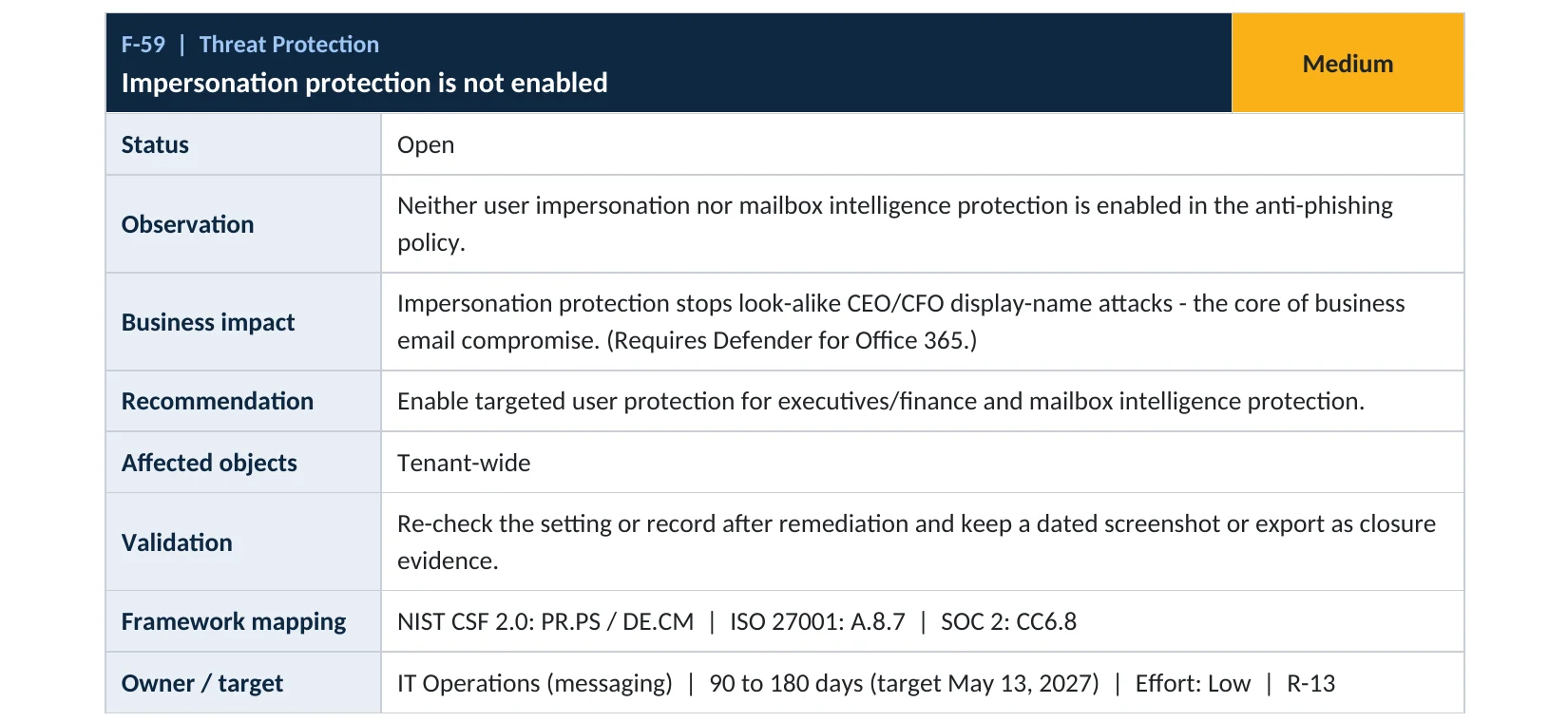
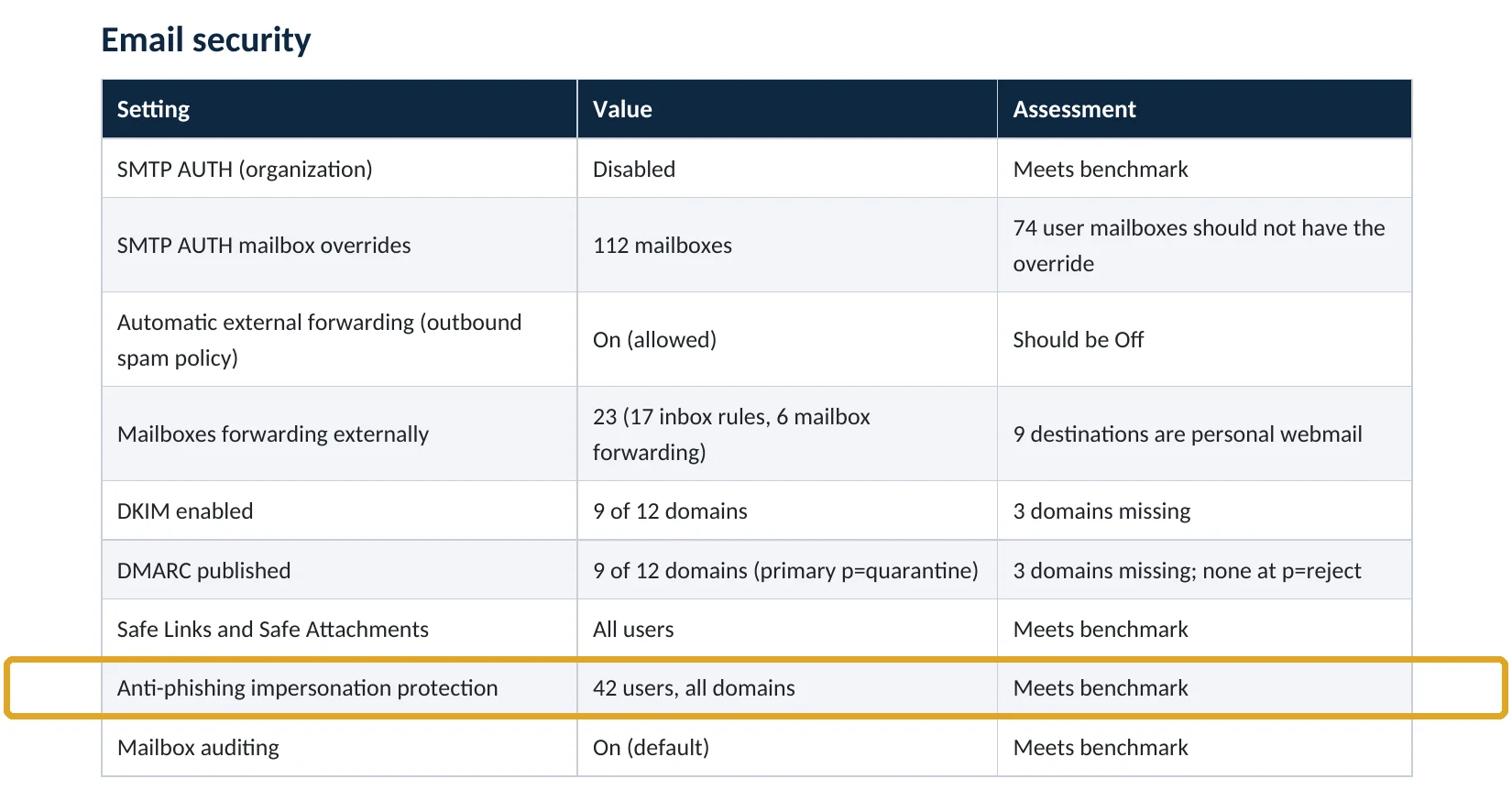
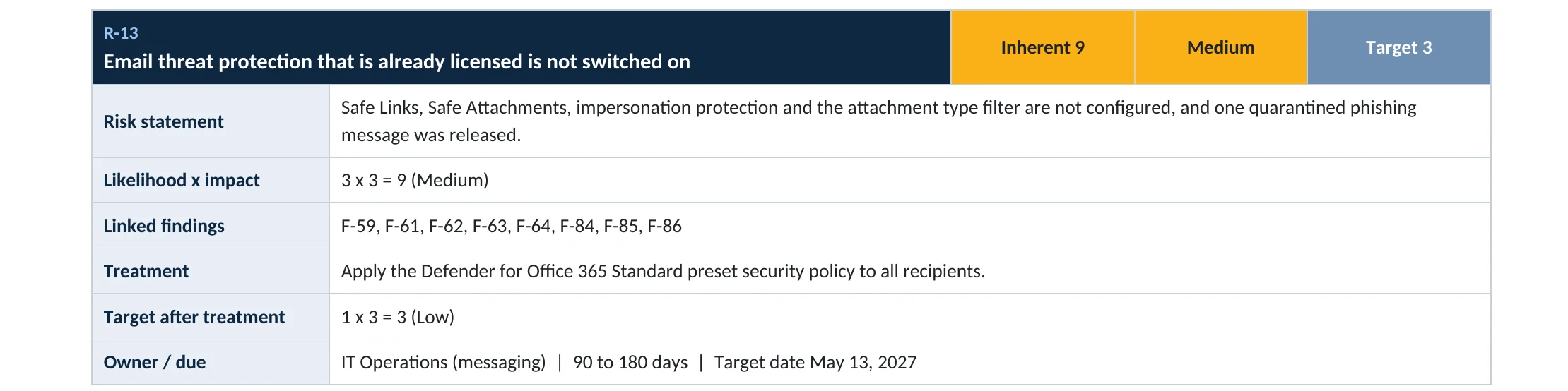
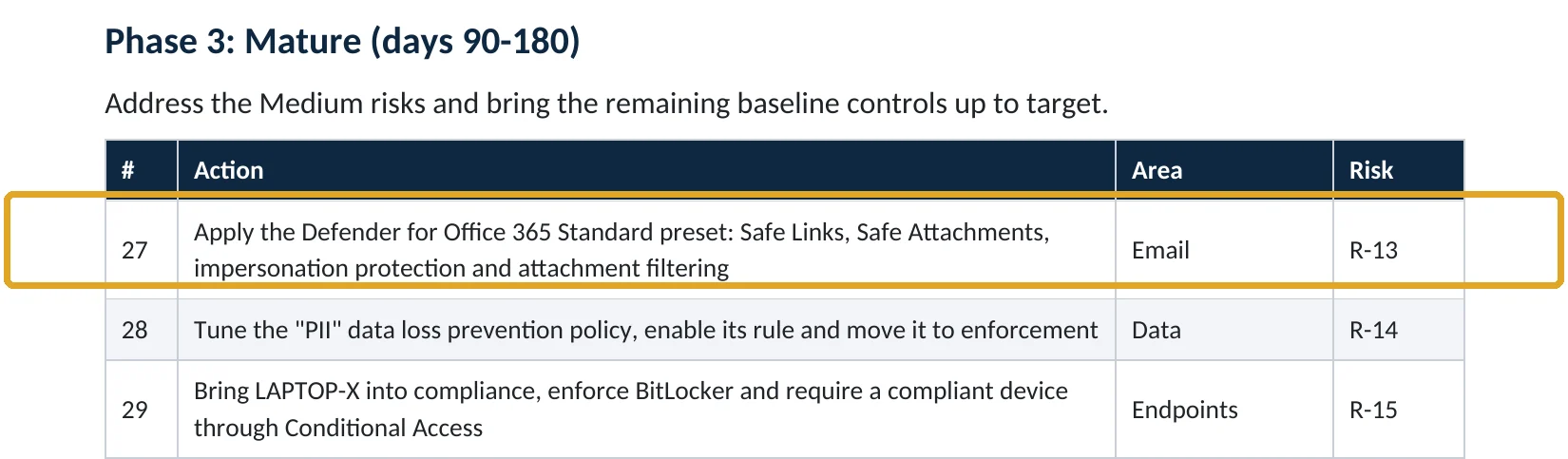
What this finding looks like in our audit reports
These are real pages from our published sample reports, written for fictional companies. Click any page to open it full size. The viewer shows the gap in one tenant, what good looks like in another, the risk and the fix.
Your options
What each plan gives you
| Capability | Business Basic, Standard, E3 | Business Premium | E5 |
|---|---|---|---|
| Spoof intelligence (SPF, DKIM, DMARC checks) | Yes | Yes | Yes |
| User and domain impersonation protection | Add-on | Yes | Yes |
| Mailbox intelligence impersonation protection | Add-on | Yes | Yes |
How to check it yourself
See who is protected, without changing anything
Open each policy and look at Phishing threshold & protection: Enable users to protect and Enable domains to protect should be on, with your key people listed. Then check Actions: Don’t apply any action means detections are ignored.
Read-only PowerShell: impersonation settings
Connect-ExchangeOnline
Get-AntiPhishPolicy | Select-Object Name, EnableTargetedUserProtection, TargetedUsersToProtect,
  EnableOrganizationDomainsProtection, TargetedUserProtectionAction,
  EnableMailboxIntelligenceProtection
The command only reads settings. NoAction as the user protection action means impersonation is detected but not acted on.
How to configure
How to turn on impersonation protection, step by step
Business Premium, E5 or Defender add-on
Protect your key people and domains
- Open Defender › Threat policies › Anti-phishing and edit the policy that covers all users (or use the Standard preset).
- Turn on Enable users to protect and add owners, executives, finance staff and key supplier contacts.
- Turn on Include domains I own and add key partner domains.
- Keep Enable mailbox intelligence on and turn on Enable intelligence for impersonation protection.
- Set actions to Don’t apply any action for a week, then change them to Quarantine the message.
After a week
Tune and enforce
- Review the impersonation insight for messages that would have been caught.
- Add trusted senders who were flagged by mistake.
- Switch user and domain impersonation to Quarantine the message; mailbox intelligence to Move to Junk.
- Add a finance rule: any change to bank details is confirmed by phone.
Microsoft’s own migration guidance follows this order: observe detections without action, then turn on quarantine for user and domain impersonation one at a time (Microsoft Learn).
What your users will notice
Very little. Some messages show a safety tip, and a few suspicious messages go to quarantine or Junk instead of the inbox.
How to undo it
Set the actions back to Don’t apply any action or remove protected users in the same policy.
Proof and questions
How to prove it is fixed, and what to ask your IT provider
Evidence it is fixed
- Key people and supplier contacts are listed as protected users.
- Your domains are protected from impersonation.
- Impersonation actions quarantine, not “no action”.
- Finance confirms bank-detail changes by phone.
Questions for your IT provider
- Which people are protected from impersonation?
- What happens to an email that impersonates our CEO?
- Is mailbox intelligence allowed to take action?
- How many impersonation attempts were caught last month?
- Do we also have DMARC at quarantine or reject?
Signs it was already abused
If an impersonation email may already have worked, look for these signs
Red flags
- A supplier “changed bank details” by email recently.
- Replies going to a lookalike domain with one letter different.
- Finance staff received urgent, secret wire requests from “the CEO”.
- New inbox rules hiding messages from a supplier or the bank.
- A payment that the supplier says they never received.
If money has moved, call your bank immediately and report it to the FBI’s IC3. Our business email compromise investigation establishes how it happened, and the Microsoft 365 Evidence Clock shows how long the records are kept.
Framework mapping
Where impersonation protection fits
| Framework | Where it fits |
|---|---|
| NIST CSF 2.0 | PR.AT-01: awareness of social engineering; DE.CM-01: networks and services monitored |
| ISO/IEC 27001:2022 | Annex A 8.7 Protection against malware; 5.14 Information transfer |
| SOC 2 | CC6.8 prevent or detect malicious software; CC7.2 monitor for anomalies |
Reviewed by
Written and reviewed by a practicing CISO

Ali Hassani, C|CISO, CISSP
Ali has more than 25 years of IT and cybersecurity experience and holds the Certified CISO and CISSP certifications along with Microsoft and Cisco credentials. He leads every OC Security Audit engagement from Irvine, on-site across Southern California and remotely nationwide. Every Microsoft 365 audit is read-only.
FAQ
Frequently asked questions about impersonation protection
What's the difference between spoofing and impersonation?
Spoofing forges your exact address and is stopped by SPF, DKIM and DMARC. Impersonation uses a lookalike name or domain, which can pass those checks, so Defender for Office 365 checks for it separately.
Is impersonation protection on by default?
No. The default anti-phishing policy has no protected users or domains, and the default action is to do nothing.
Who should we add as protected users?
Owners, executives, finance and payroll staff, IT admins, and the supplier contacts who send you invoices.
Will it block real emails?
Occasionally, at first. That's why Microsoft recommends watching detections without action for a while, then tuning before quarantining.
Which plans include impersonation protection?
Business Premium and E5 include Defender for Office 365. Other plans can add it.
Does this replace staff training?
No. Pair it with a simple rule: any request to change bank details or send an urgent payment is confirmed by phone.
Next step
Catch the lookalike before finance pays it
Prevent
Microsoft 365 Security Audit
$3,500 fixed
About 200 read-only checks across sign-in protection, email, sharing, data protection, logging and devices, for any tenant size, with four reports and a remediation roadmap.
Respond
Microsoft 365 & Azure Compromise Investigation
From $3,500
For when a fake invoice or payment request got through: we establish how and what else the attacker did.
Want to see the deliverables first? Open the Microsoft 365 audit sample report or browse all our sample reports.

Service
Microsoft 365 Security Audit
The fixed-price audit that checks this item and about 200 more.
See the audit ›
Service
Microsoft 365 Email Security
Our review of Exchange Online and Defender email protection.
See email security ›
Service
Compromise Investigation
When an account or mailbox may already be in an attacker’s hands.
See the investigation ›Related reading: How to turn on Safe Links and Safe Attachments · How to set up DMARC · How to find malicious inbox rules · Exchange Online and Defender email security guide
Sources
Sources used on this page
- Microsoft Learn, Anti-phishing policies in cloud organizations
- Microsoft Learn, Configure anti-phishing policies in Defender for Office 365
- Microsoft Learn, Recommended email and collaboration threat policy settings
- Microsoft Learn, Migrate to Defender for Office 365, Phase 3: Onboard (tuning impersonation)
- Microsoft Learn, Preset security policies
- CyberScoop, 10 key numbers from the 2024 FBI IC3 report
- Nacha, FBI’s IC3 finds almost $8.5 billion lost to business email compromise in last three years
This guide is general information, not a guarantee of protection or legal advice. Microsoft changes its admin centers often: menu names and steps were checked against Microsoft Learn on November 20, 2026. Drawings are simplified and are not screenshots of Microsoft products. Sample findings come from fictional companies. Incidents are described as reported by the cited sources; OC Security Audit was not involved in them. Questions? Call 949-777-5567 or email support@ocsecurityaudit.com.