

LIBRARY 3.29Microsoft 365 Security Library
How to Control Who Can Release Quarantined Email in Microsoft 365
Microsoft 365 quarantines phishing for a reason. If staff can release it themselves with one click, the filter’s work is undone. Here is how quarantine policies decide who can release what, and how to set them.
Reviewed by Ali Hassani, C|CISO, CISSP · Last verified November 20, 2026
Quarantine policies are part of Exchange Online Protection and apply to anti-spam, anti-phishing, anti-malware and Safe Attachments verdicts (Microsoft Learn).
In one minute
- List which quarantine policy each verdict uses.
- Keep malware and high confidence phishing on AdminOnlyAccessPolicy.
- Give phishing a policy where users can only request release.
- Review released messages every week.
Quarantine settings are part of the email security checks in our Microsoft 365 Security Audit.
What it is
What a quarantine policy controls
When Microsoft 365 quarantines a message, the quarantine policy assigned to that verdict decides what the recipient can do: nothing, preview, request release, or release it themselves, and whether they get a notification (Microsoft Learn).
The built-in quarantine policies
| Policy | What recipients can do | Use it for |
|---|---|---|
| AdminOnlyAccessPolicy | Nothing; only admins see and release | Malware, high confidence phishing |
| Custom: request release | Preview and request release; an admin approves | Phishing |
| DefaultFullAccessPolicy | Release their own messages | Spam and bulk |
| DefaultFullAccessWithNotificationPolicy | Same, plus a notification email | Spam and bulk |
Microsoft strongly recommends assigning malware and high confidence phishing to the admin-only policy, regular phishing to limited access with request release, and leaving spam and bulk with full access (Microsoft Learn).
Why it matters
Users release what looks urgent
- Phishing quarantinedFilter did its job.
- Notification: “Invoice due”Looks like a real vendor.
- Request release onlyAdmin reviews first.
- User releases itWithout it: phish delivered.
- Password or payment takenThe attack continues.
Drawing: where request-only release breaks the path.
phishing and spoofing complaints to the FBI in 2024, the most reported internet crime.
Source: FBI IC3 via Fox Businesslost to business email compromise in 2024, the FBI reports.
Source: CyberScoop on FBI IC3verdicts recipients can never release themselves: malware, Safe Attachments detections and high confidence phishing.
Source: Microsoft Learnpolicy change keeps regular phishing behind an admin review.
Source: Microsoft LearnWhat recipients can release, by verdict
| Verdict | Can recipients release it? | Our advice |
|---|---|---|
| Malware | Never; at most request release | Admin only |
| High confidence phishing | Never; at most request release | Admin only |
| Phishing | Depends on the quarantine policy | Check this one |
| Spam and bulk | Usually yes | Fine for most companies |
The first two rows are fixed by Microsoft regardless of policy settings (Microsoft Learn). Phishing is the verdict where the setting matters most.
What we find in audits
What this finding looks like in our audit reports
These are real pages from our published compromise assessment sample, written for a fictional company. Click any page to open it full size.
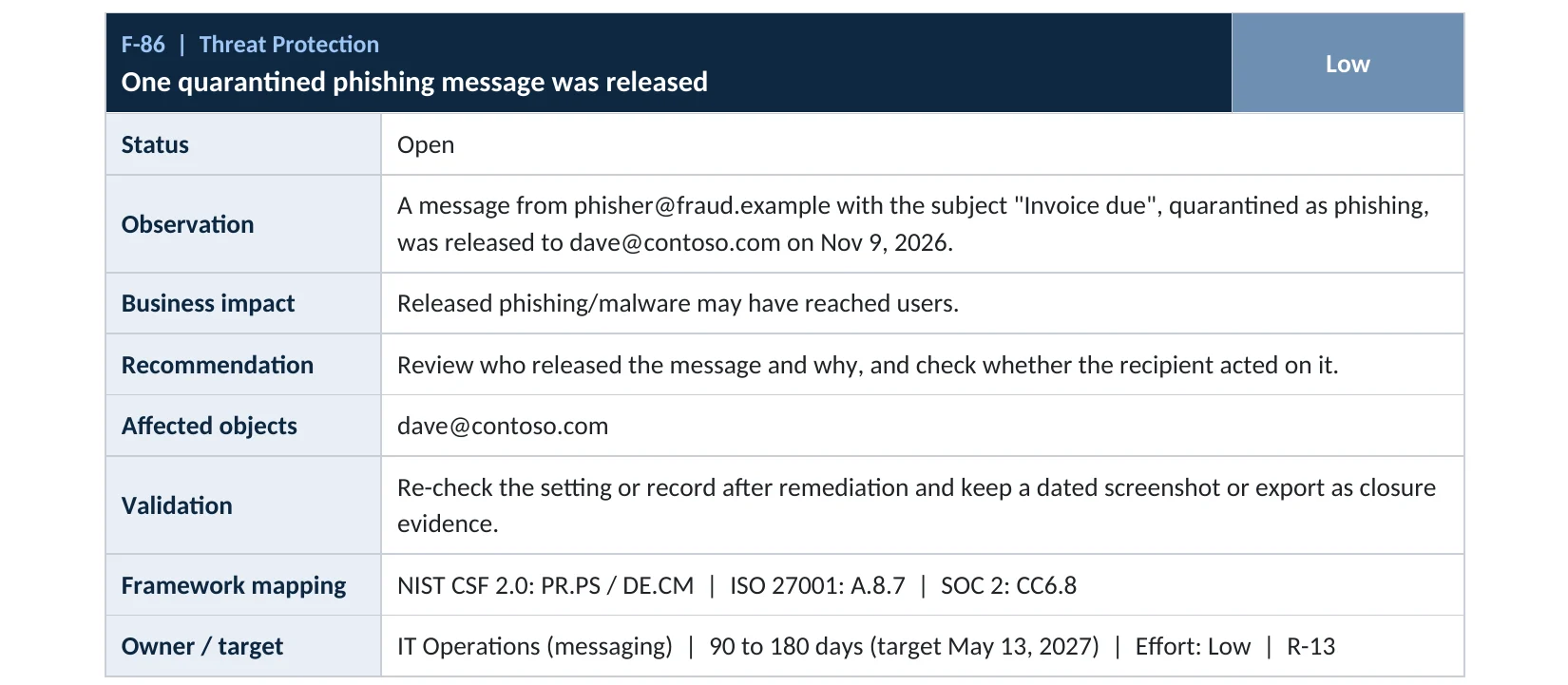
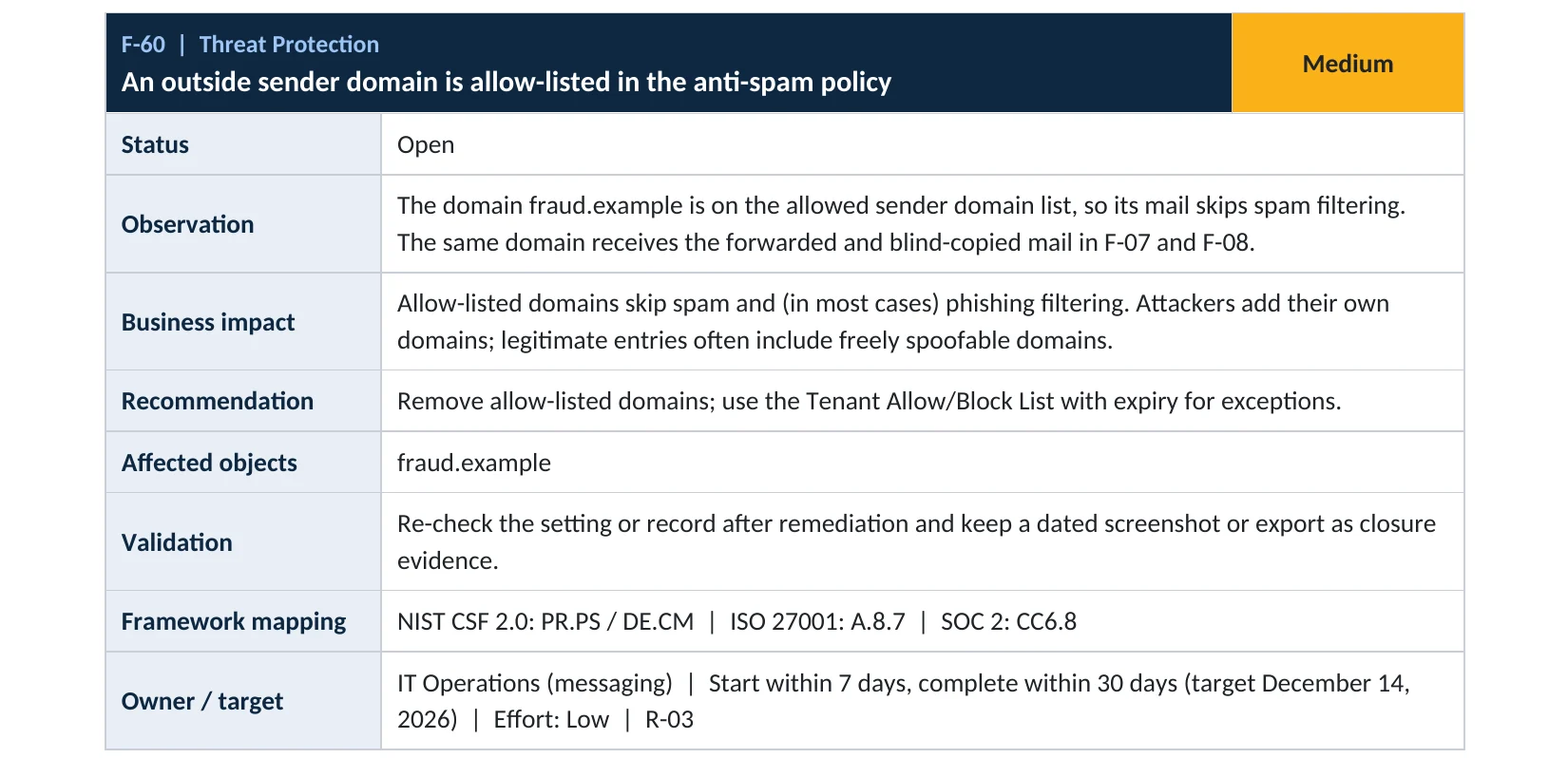
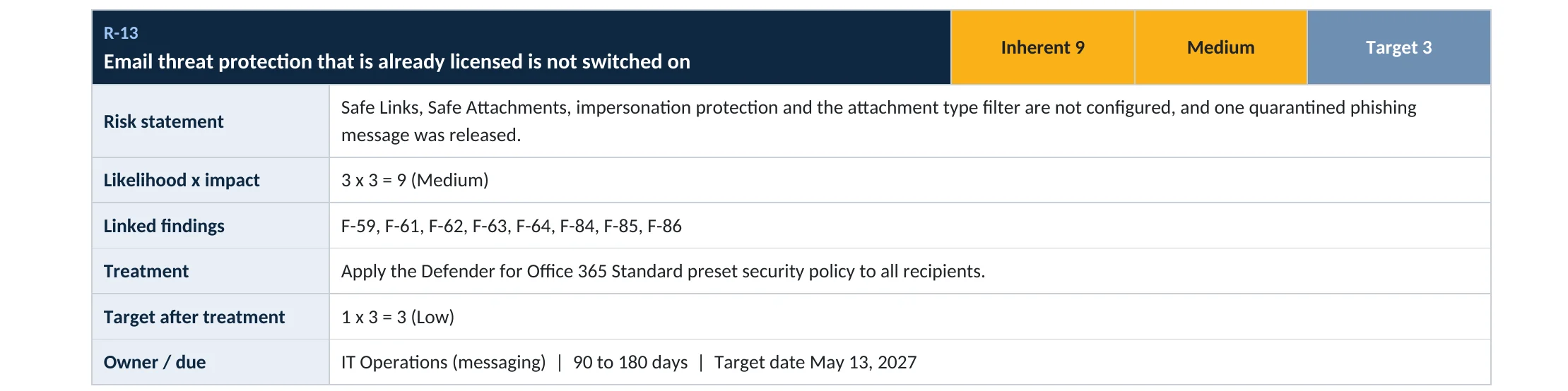
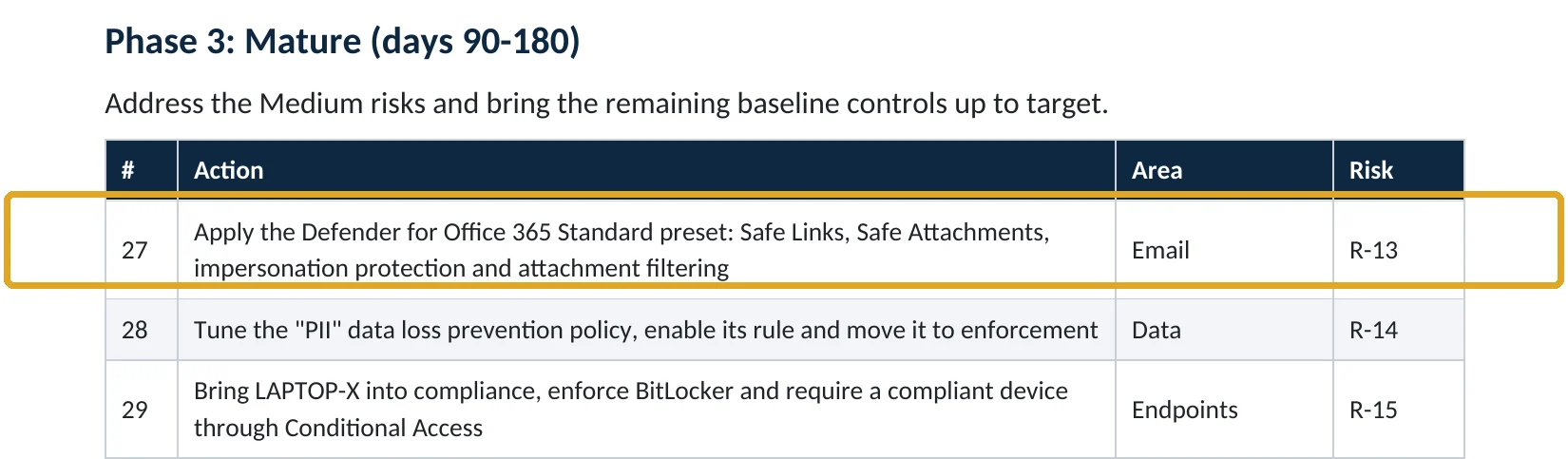
Your options
What each plan gives you
| Capability | All plans with Exchange Online | Defender for Office 365 |
|---|---|---|
| Built-in and custom quarantine policies | Yes | Yes |
| Approve or deny release requests | Yes | Yes |
| Quarantine for Safe Attachments detections | No | Yes |
| Standard and Strict presets (policies fixed by Microsoft) | Yes | Yes, with more protections |
Microsoft notes that quarantine policies can’t be customized inside the preset security policies (Microsoft Learn).
How to check it yourself
See who can release what, without changing anything
Then open Anti-spam and check which quarantine policy each verdict uses, especially Phishing.
Read-only PowerShell: quarantine policies and recent releases
Connect-ExchangeOnline
Get-HostedContentFilterPolicy |
  Select-Object Name, PhishSpamAction, PhishQuarantineTag, HighConfidencePhishQuarantineTag
Get-QuarantineMessage -ReleaseStatus Released |
  Select-Object ReceivedTime, SenderAddress, Subject, Type
The commands only read data. A phishing quarantine tag that allows release, or released phishing you can’t explain, needs attention.
How to configure
How to set quarantine policies, step by step
All plans
Limit what users can release
- Open Quarantine policies and create a policy with Limited access, which lets users preview and request release.
- Turn on quarantine notifications in that policy so users know to ask.
- In each anti-spam policy, set Phishing to Quarantine message and select your new policy.
- Confirm High confidence phishing and malware use AdminOnlyAccessPolicy.
- Save, and tell staff how release requests work.
Every week
Review releases
- In Review › Quarantine, filter for released messages and pending release requests.
- Approve requests only after checking the sender and links.
- If phishing was released, check whether the recipient clicked or replied.
- Report false positives to Microsoft instead of allowing the sender.
What your users will notice
For suspected phishing, they click Request release instead of Release and wait for an admin. Spam handling doesn’t change.
How to undo it
Set the anti-spam policy’s phishing quarantine policy back to the previous value.
Proof and questions
How to prove it is fixed, and what to ask your IT provider
Evidence it is fixed
- Phishing uses a request-release or admin-only quarantine policy.
- Malware and high confidence phishing use AdminOnlyAccessPolicy.
- A named person reviews release requests.
- A weekly list of released messages with a reason for each.
Questions for your IT provider
- Which quarantine policy does each verdict use?
- Can our staff release phishing themselves?
- Who approves release requests, and how fast?
- Which quarantined messages were released last month, and why?
- Do we use the Standard or Strict preset?
Signs it was already abused
If released phishing may already have been acted on, look for these signs
Red flags
- Released messages with subjects like invoice, payment, voicemail or password.
- Releases of mail from a domain that’s on an allow list.
- Sign-ins from new places shortly after a release.
- New inbox rules or forwarding on the recipient’s mailbox.
- Payment changes requested soon after a release.
If you see these, reset the password, revoke sessions and keep the logs. Our account takeover investigation establishes what was clicked, read or sent, and the Microsoft 365 Evidence Clock shows how long the records are kept.
Framework mapping
Where quarantine policies fit
| Framework | Where it fits |
|---|---|
| NIST CSF 2.0 | PR.PS-01: configuration management; DE.CM-09: monitoring of software and data |
| ISO/IEC 27001:2022 | Annex A 8.7 Protection against malware; 5.15 Access control |
| SOC 2 | CC6.8 prevention of unauthorized or malicious software |
Reviewed by
Written and reviewed by a practicing CISO

Ali Hassani, C|CISO, CISSP
Ali has more than 25 years of IT and cybersecurity experience and holds the Certified CISO and CISSP certifications along with Microsoft and Cisco credentials. He leads every OC Security Audit engagement from Irvine, on-site across Southern California and remotely nationwide. Every Microsoft 365 audit is read-only.
FAQ
Frequently asked questions about quarantine release
What is a quarantine policy?
A setting that decides what recipients can do with their quarantined messages: nothing, preview, request release or release, and whether they get notifications.
Can users release malware or high confidence phishing?
No. Microsoft blocks that regardless of the policy. At most, users can request release.
What about regular phishing?
It depends on the quarantine policy assigned. Microsoft recommends limited access with request release, so an admin checks first.
Who approves release requests?
Admins with quarantine permissions, such as Security Administrators, in the Defender portal.
Will this create a lot of work?
Usually a few requests a week for a small company. Spam can stay self-service.
Which plans include quarantine policies?
All Microsoft 365 plans with Exchange Online.
Next step
Keep quarantine closed
Prevent
Microsoft 365 Security Audit
$3,500 fixed
About 200 read-only checks across sign-in protection, email, sharing and devices, for any tenant size, with four reports and a remediation roadmap.
Respond
Microsoft 365 & Azure Compromise Investigation
From $3,500
For when released phishing was clicked: we establish what was entered, read and sent.
Want to see the deliverables first? Open the Microsoft 365 audit sample report or browse all our sample reports.

Service
Microsoft 365 Security Audit
The fixed-price audit that checks this item and about 200 more.
See the audit ›
Service
Microsoft 365 Email Security
Our review of Exchange Online and Defender email protection.
See email security ›
Service
Compromise Investigation
When an account or mailbox may already be in an attacker’s hands.
See the investigation ›Related reading: How to remove allowed sender domains · How to block dangerous attachment types · How to turn on Safe Links and Safe Attachments
Sources
Sources used on this page
- Microsoft Learn, Quarantine policies
- Microsoft Learn, Quarantined email messages in cloud organizations
- Microsoft Learn, How to configure quarantine permissions and policies
- Microsoft Learn, Recommended email and collaboration threat policy settings
- Microsoft Learn, Manage quarantined messages and files as an admin
- Microsoft Learn, Get-QuarantineMessage
- Fox Business, Online scammers stole a record $16.6B last year, FBI says
- CyberScoop, FBI IC3 cybercrime report 2024 key statistics
This guide is general information, not a guarantee of protection or legal advice. Microsoft changes its admin centers often: menu names and steps were checked against Microsoft Learn on November 20, 2026. Drawings are simplified and are not screenshots of Microsoft products. Sample findings come from fictional companies. Incidents are described as reported by the cited sources; OC Security Audit was not involved in them. Questions? Call 949-777-5567 or email support@ocsecurityaudit.com.