

LIBRARY 2.35Microsoft 365 Security Library
How to Review Your IT Partner’s Admin Access (GDAP) in Microsoft 365
If an IT provider or reseller manages your Microsoft 365, they may hold admin roles through a partner relationship, sometimes Global Administrator. Here is how to see exactly what they have and cut it to what they need.
Reviewed by Ali Hassani, C|CISO, CISSP · Last verified November 20, 2026
Partner relationships are visible to customers on the Partner relationships page of the Microsoft 365 admin center (Microsoft Learn).
In one minute
- List every partner relationship and the roles it grants.
- Ask your provider to replace Global Administrator with least-privileged roles.
- Remove relationships with providers you no longer use.
- Confirm your provider uses MFA and named technicians.
Partner access is part of the privileged access checks in our Microsoft 365 Security Audit.
What it is
DAP and GDAP, in plain language
DAP (delegated admin privileges) was the old way partners managed customer tenants: it gave the partner Global Administrator and Helpdesk Administrator, and it lasted until someone removed it (Microsoft Learn). GDAP (granular delegated admin privileges) replaces it: the partner asks for specific roles for a set period, and you approve them (Microsoft Learn).
What to look for
| Item | Good | Concern |
|---|---|---|
| Relationship type | GDAP | DAP still present |
| Roles | Specific roles for the work they do | Global Administrator |
| Duration | Set end date, renewed deliberately | Long relationships nobody reviews |
| Partner | Your current provider | A provider you no longer use |
Microsoft notes GDAP relationships can last from 1 to 730 days, and partners can’t auto-extend a GDAP relationship that includes Global Administrator (Microsoft Learn, Microsoft Learn).
Why it matters
Your provider’s security becomes your security
- Provider breachedTechnician account phished.
- Partner access usedReaches customer tenants.
- Least-privilege rolesOnly narrow, time-limited access.
- Global AdministratorWithout it: full control of your tenant.
- Many customers hitSupply-chain attack.
Drawing: where least-privilege partner access breaks the path.
resellers and service providers notified by Microsoft in 2021 after NOBELIUM targeted their delegated access.
Source: Microsoft On the Issuesdays: the longest a GDAP relationship can last.
Source: Microsoft Learnauto-extensions allowed for GDAP relationships that include Global Administrator.
Source: Microsoft Learnpage shows all partner access: Settings › Partner relationships.
Source: Microsoft LearnDocumented incidents
Nation-state · Microsoft, 2021
NOBELIUM goes after IT providers’ admin access
Microsoft reported that NOBELIUM targeted cloud service providers, MSPs and resellers to reach their customers through delegated administrative privileges, and recommended customers review and remove unneeded partner access.
What we find in audits
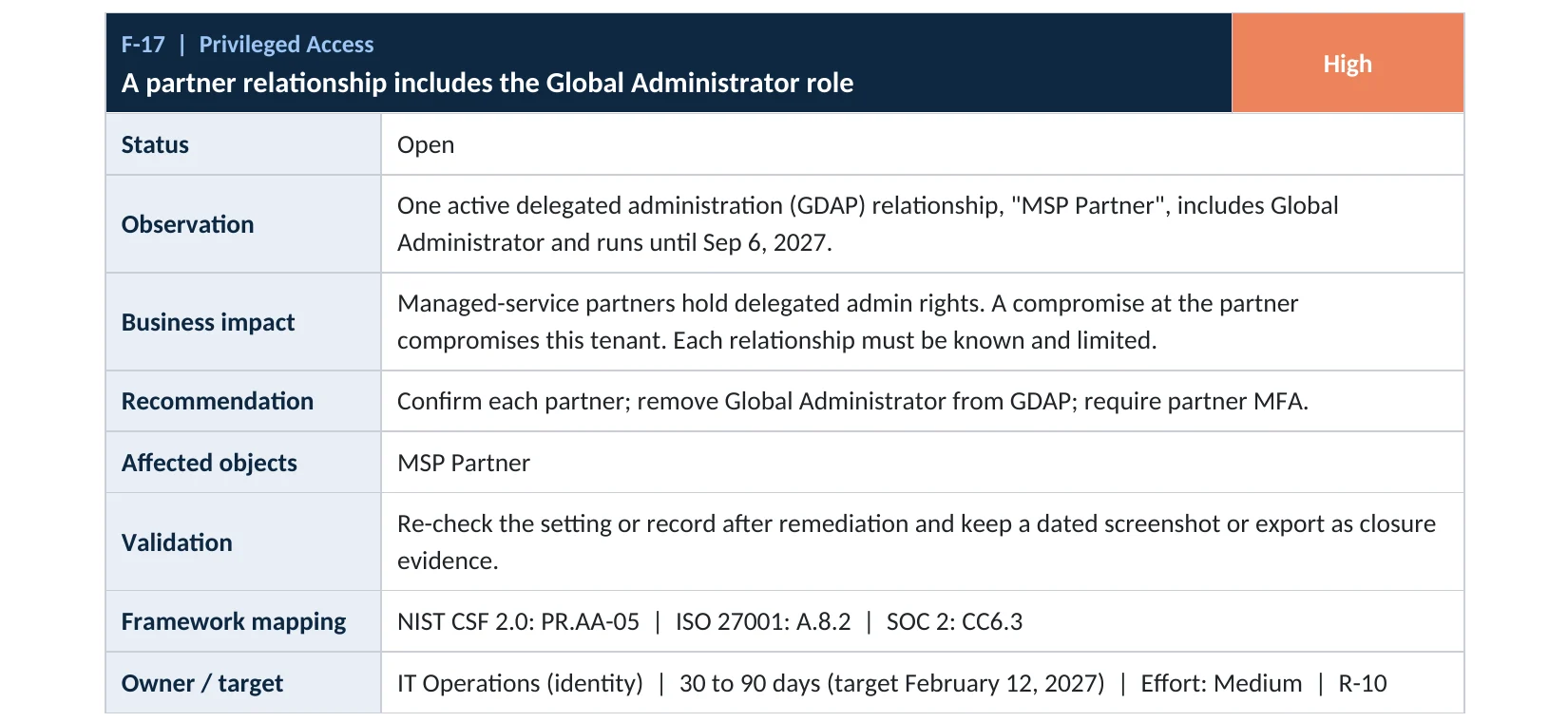
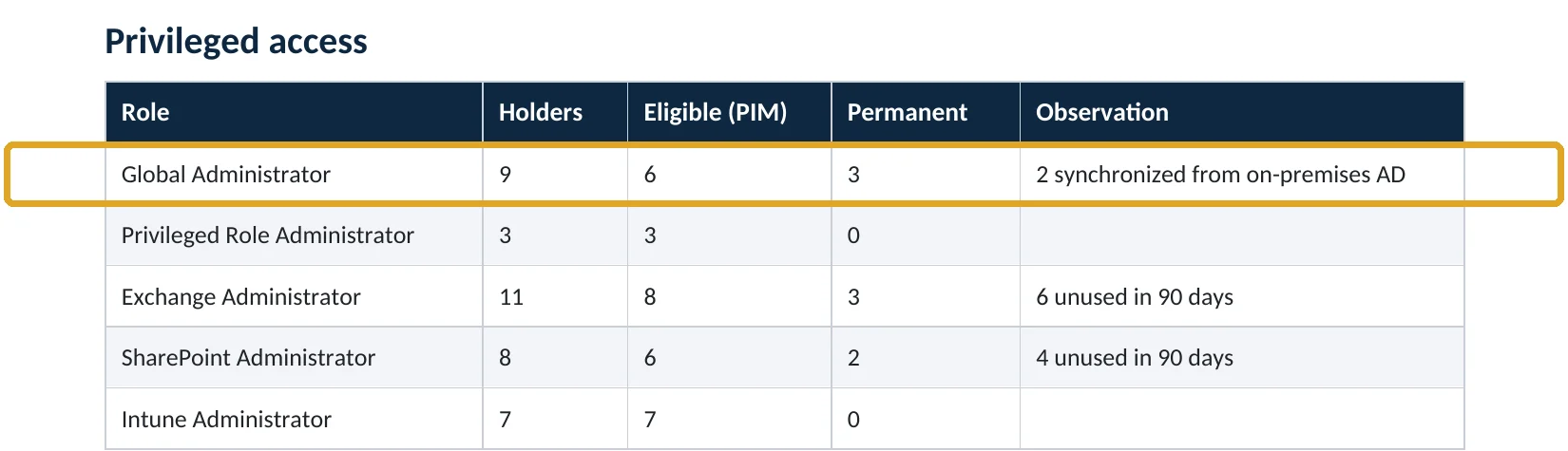
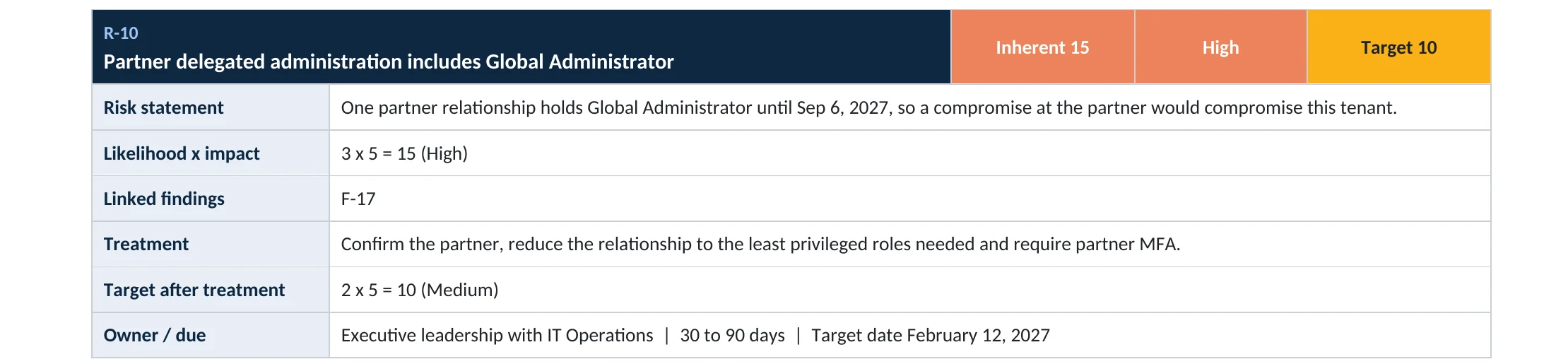
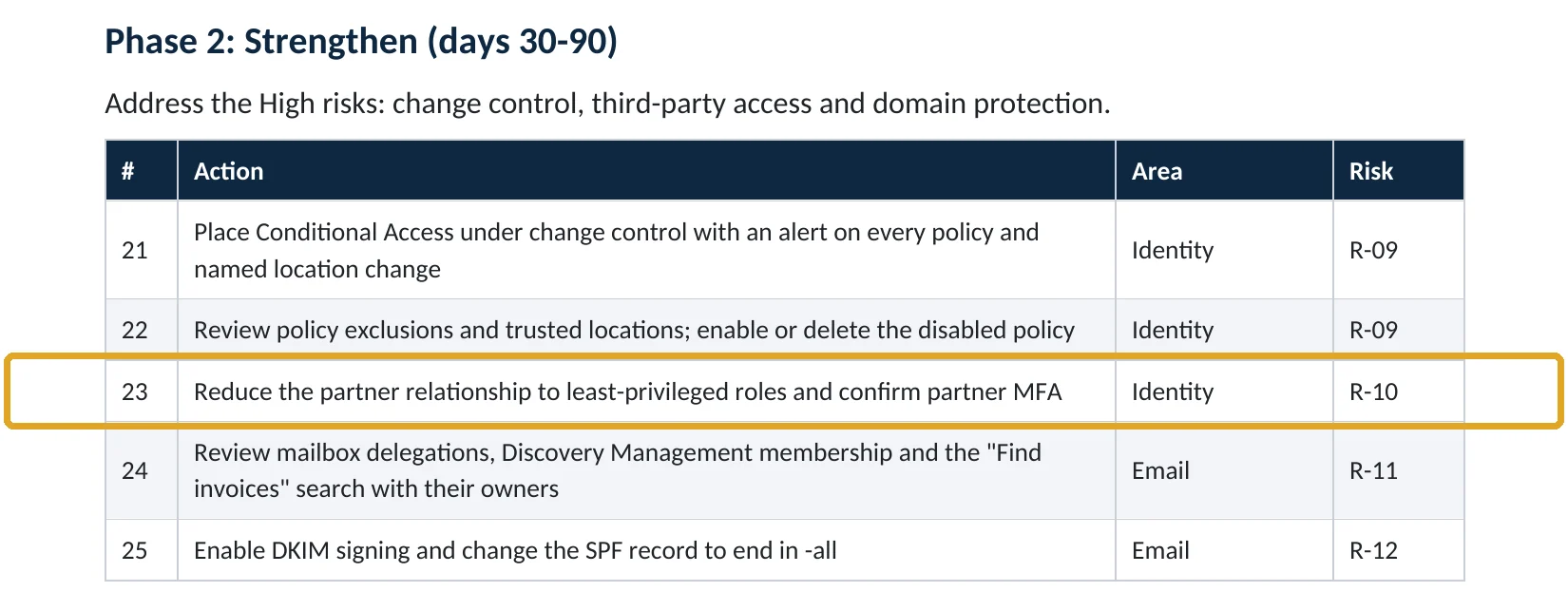
What this finding looks like in our audit reports
These are real pages from our published sample reports, written for fictional companies. Click any page to open it full size.
Your options
What you can do as the customer
| Action | Where | Effect |
|---|---|---|
| See all partner relationships | Microsoft 365 admin center › Settings › Partner relationships | Shows partners and their roles |
| Remove roles from a partner | Same page › select partner › Remove roles | Ends their admin access |
| Ask for narrower roles | Your provider, in Partner Center | New GDAP request for you to approve |
| Give the partner a lower-privilege account instead | Your tenant | Access you control directly |
Microsoft notes that even after Global Administrator is removed, a reseller may still be able to make purchases for you, and recommends asking them to remove that ability in Partner Center (Microsoft Learn).
How to check it yourself
See your partners’ access, without changing anything
Partners with old DAP show Global Administrator in the Roles column. Open each partner to see GDAP relationships, their roles and end dates.
Read-only PowerShell: delegated admin service principals in your tenant
Connect-MgGraph -Scopes "Application.Read.All"
Get-MgServicePrincipal -Filter "appId eq '2832473f-ec63-45fb-976f-5d45a7d4bb91' or appId eq 'a3475900-ccec-4a69-98f5-a65cd5dc5306'" |
  Select-Object DisplayName, AppId
The command only reads data. These two Microsoft service principals appear when a GDAP relationship has been accepted; Microsoft advises customers not to remove them and to manage relationships in the admin center instead (Microsoft Learn).
How to configure
How to bring partner access down to least privilege, step by step
All plans
Review and remove
- Open Settings › Partner relationships and list every partner.
- For partners you no longer use, select them and choose Remove roles.
- For your current provider, note every role and end date.
- Ask them in writing which tasks need which role.
With your provider
Move to least privilege
- Ask for a new GDAP request with the narrowest roles that cover their work.
- Approve it, then remove the old broad relationship.
- Ask them to confirm all technicians use MFA and named accounts.
- Set a reminder to review before the relationship’s end date.
What your users will notice
Nothing. Your provider may occasionally need to request a temporary extra role for a specific job.
How to undo it
Your provider can send a new GDAP request, which you approve again.
Proof and questions
How to prove it is fixed, and what to ask your IT provider
Evidence it is fixed
- No DAP relationships remain.
- No partner holds Global Administrator, or only time-limited with a documented reason.
- Every relationship belongs to a current provider and has an end date.
- The provider confirmed MFA for all technicians.
Questions for your IT provider
- Which admin roles do you hold in our tenant, and why?
- Do you still have Global Administrator?
- When does our GDAP relationship end?
- How many of your technicians can reach our tenant?
- How do you protect your own admin accounts?
Signs it was already abused
If partner access may already have been misused, look for these signs
Red flags
- Admin actions in the audit log from partner technicians you don’t recognize.
- A partner relationship you never approved.
- Changes made by a partner outside agreed maintenance times.
- A provider you stopped using still listed with roles.
- New apps or users created through partner access.
If you see these, remove the partner roles and keep the audit logs. Our compromise investigation establishes what was changed, and the Microsoft 365 Evidence Clock shows how long the records are kept.
Framework mapping
Where partner access fits
| Framework | Where it fits |
|---|---|
| NIST CSF 2.0 | GV.SC-07: supplier risks managed; PR.AA-05: least privilege |
| ISO/IEC 27001:2022 | Annex A 5.19 Supplier relationships; 5.20 Supplier agreements; 8.2 Privileged access rights |
| SOC 2 | CC9.2 vendor and partner risk; CC6.3 least privilege |
Reviewed by
Written and reviewed by a practicing CISO

Ali Hassani, C|CISO, CISSP
Ali has more than 25 years of IT and cybersecurity experience and holds the Certified CISO and CISSP certifications along with Microsoft and Cisco credentials. He leads every OC Security Audit engagement from Irvine, on-site across Southern California and remotely nationwide. Every Microsoft 365 audit is read-only.
FAQ
Frequently asked questions about partner admin access
What is GDAP?
Granular delegated admin privileges: the way Microsoft partners get specific, time-limited admin roles in a customer's tenant, which the customer approves.
What is DAP?
The older delegated admin model, which gave partners Global Administrator indefinitely. GDAP replaces it.
How do I see what my IT provider can do?
In the Microsoft 365 admin center, open Settings › Partner relationships.
Should my provider have Global Administrator?
Rarely, and only for a limited time. Most work can be done with narrower roles such as Helpdesk, User or Exchange Administrator.
Can I remove a partner's access myself?
Yes. Select the partner and choose Remove roles. Tell your provider first so service isn't interrupted.
Can a partner still buy things on our behalf after roles are removed?
Possibly. Microsoft recommends asking the reseller to remove that ability in Partner Center.
Next step
Know what your IT provider can do in your tenant
Prevent
Microsoft 365 Security Audit
$3,500 fixed
About 200 read-only checks across admin roles, partner access, sign-in protection, email and sharing, for any tenant size, with four reports and a remediation roadmap.
Respond
Microsoft 365 & Azure Compromise Investigation
From $3,500
For when partner access may have been used against you: we establish what was changed.
Want to see the deliverables first? Open the Microsoft 365 audit sample report or browse all our sample reports.

Service
Microsoft 365 Security Audit
The fixed-price audit that checks this item and about 200 more.
See the audit ›
Service
Microsoft Entra ID Security Audit
A deeper look at identities, Conditional Access, roles and apps.
See the Entra ID audit ›
Service
Compromise Investigation
When an account or mailbox may already be in an attacker’s hands.
See the investigation ›Related reading: How to remove unused admin roles · How many Global Administrators you should have · How to set up separate admin accounts
Sources
Sources used on this page
- Microsoft Learn, Review partner administrative privileges
- Microsoft Learn, Customer-led removal of a GDAP relationship
- Microsoft Learn, GDAP migration FAQ for customers
- Microsoft Learn, Extend granular delegated admin privileges
- Microsoft Learn, GDAP API overview
- Microsoft Learn, What is delegated administration?
- Microsoft Security Blog, NOBELIUM targeting delegated administrative privileges (October 2021)
- Microsoft On the Issues, New activity from Russian actor Nobelium (October 2021)
This guide is general information, not a guarantee of protection or legal advice. Microsoft changes its admin centers often: menu names and steps were checked against Microsoft Learn on November 20, 2026. Drawings are simplified and are not screenshots of Microsoft products. Sample findings come from fictional companies. Incidents are described as reported by the cited sources; OC Security Audit was not involved in them. Questions? Call 949-777-5567 or email support@ocsecurityaudit.com.