

LIBRARY 4.31Microsoft 365 Security Library
How to Set Up DKIM for Microsoft 365
DKIM adds a digital signature to every email you send, so receivers can tell it really came from you and wasn’t changed on the way. Microsoft 365 doesn’t sign with your own domain until you publish two DNS records and switch it on.
Reviewed by Ali Hassani, C|CISO, CISSP · Last verified November 20, 2026
DKIM signing for custom domains is configured in the Microsoft Defender portal or Exchange Online PowerShell on every plan (Microsoft Learn).
In one minute
- Get the two DKIM CNAME values for each domain from the Defender portal.
- Publish them at your DNS host.
- Turn on Sign messages for this domain with DKIM signatures.
- Fix SPF to end in -all, then move DMARC toward reject.
Email authentication is part of the email security checks in our Microsoft 365 Security Audit.
What it is
What DKIM does, and how it fits with SPF and DMARC
DKIM signs each outgoing message with a private key Microsoft holds for your domain. The matching public key sits in your DNS, published through two CNAME records called selectors. A receiver checks the signature, and Microsoft notes that the signature survives message forwarding, unlike SPF (Microsoft Learn).
The three records, in order
| Record | What it says | Microsoft 365 setting |
|---|---|---|
| SPF (TXT) | Which servers may send for the domain | Usually include:spf.protection.outlook.com ending in -all |
| DKIM (2 CNAMEs) | The public keys for message signatures | selector1 and selector2 values from the Defender portal |
| DMARC (TXT) | What receivers should do when checks fail | p=quarantine, then p=reject |
Microsoft recommends configuring SPF, DKIM and DMARC, in that order, for every custom domain, including parked domains (Microsoft Learn).
Why it matters
Without DKIM, your strongest email protection is fragile
- Attacker spoofs your domainFake invoice to a client.
- Receiver checks DMARCNeeds SPF or DKIM to pass.
- DKIM + DMARC rejectFake mail refused.
- Weak SPF, no DKIMWithout it: fake mail delivered.
- Client pays attackerYour name on the fraud.
Drawing: where DKIM and DMARC break the path.
phishing and spoofing complaints to the FBI in 2024, the most reported internet crime.
Source: FBI IC3 via Fox BusinessCNAME records per domain: selector1 and selector2.
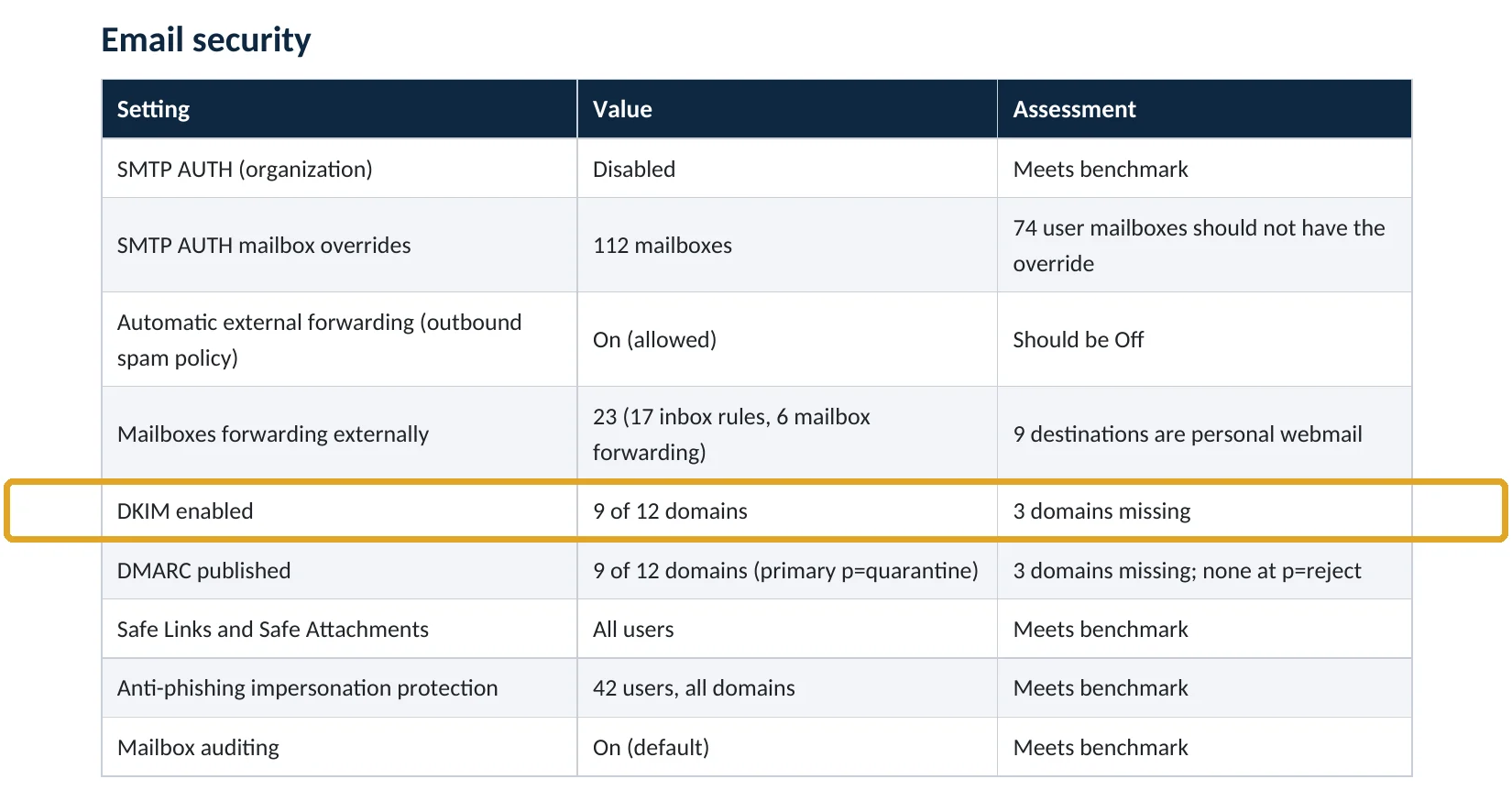
Source: Microsoft Learndomains in our Microsoft 365 audit sample had no DKIM signing (fictional company).
Source: Sample audit reportrecords to set, in order: SPF, DKIM, DMARC.
Source: Microsoft LearnCommon gaps
| Gap | What happens | Effect |
|---|---|---|
| DKIM off for a custom domain | Mail is signed with onmicrosoft.com, not your domain. | No alignment |
| SPF ends in ~all | Receivers are told not to reject forged mail. | Soft |
| DMARC at p=none | Reports only; nothing is blocked. | Monitoring only |
| Parked domains with no records | Unused domains can be spoofed. | Easy target |
| DKIM on, SPF -all, DMARC reject | Spoofed mail refused. | Protected |
What we find in audits
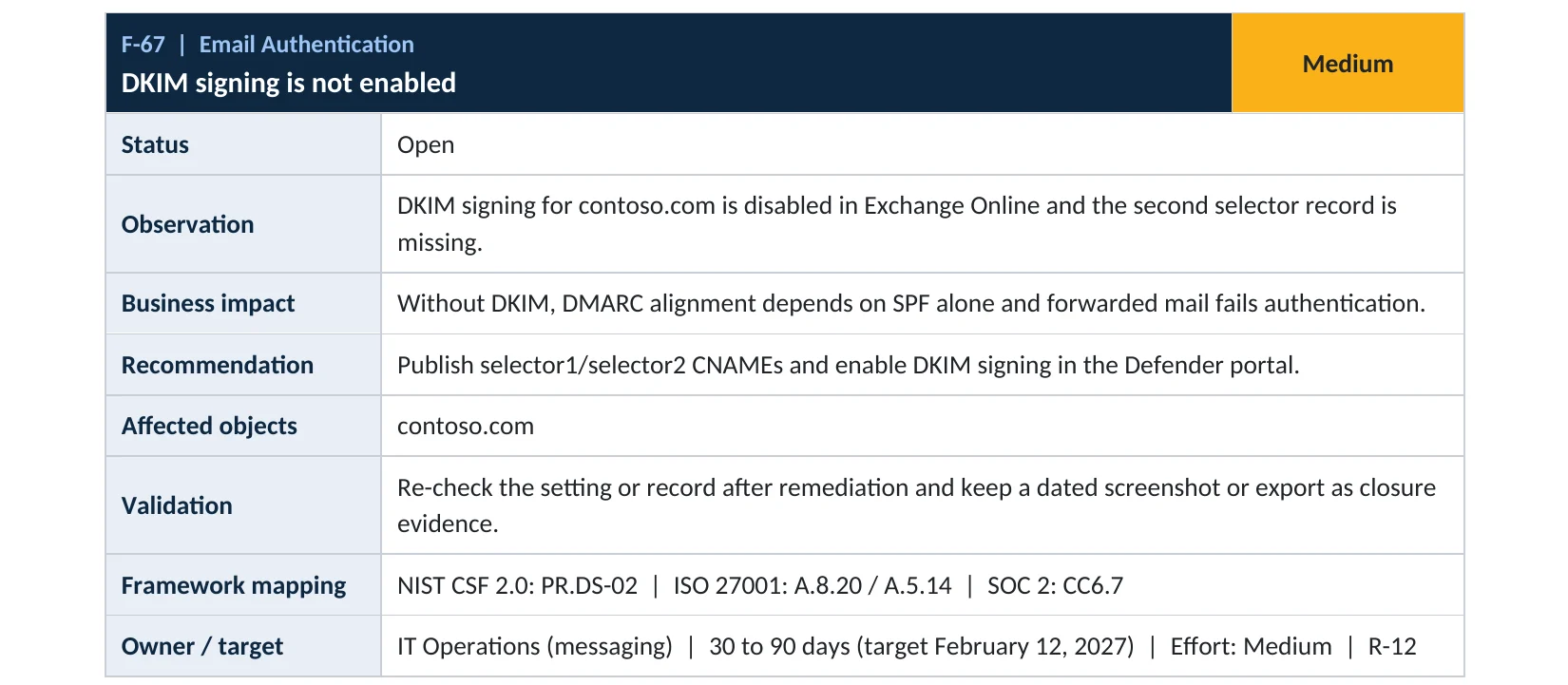
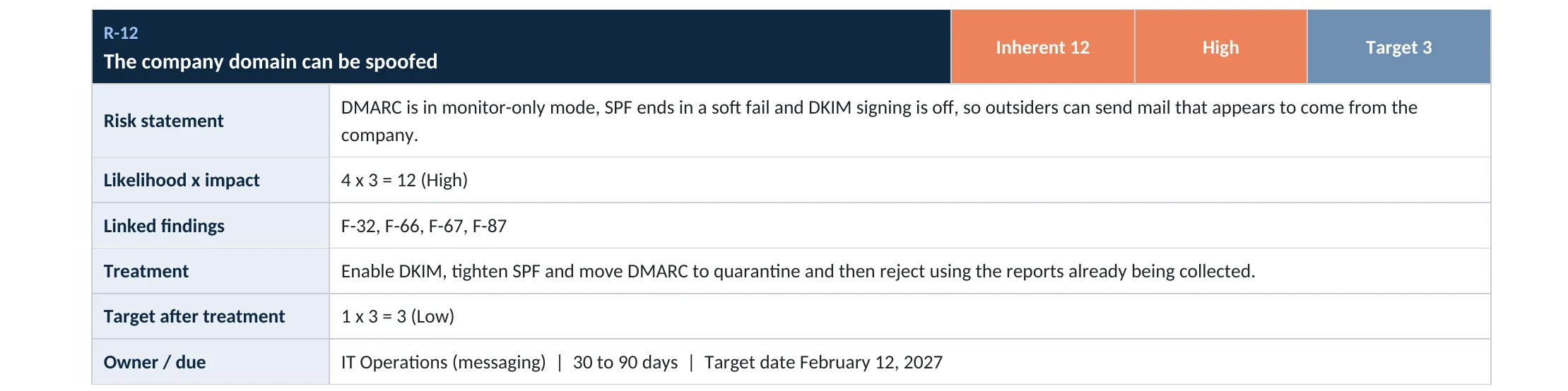
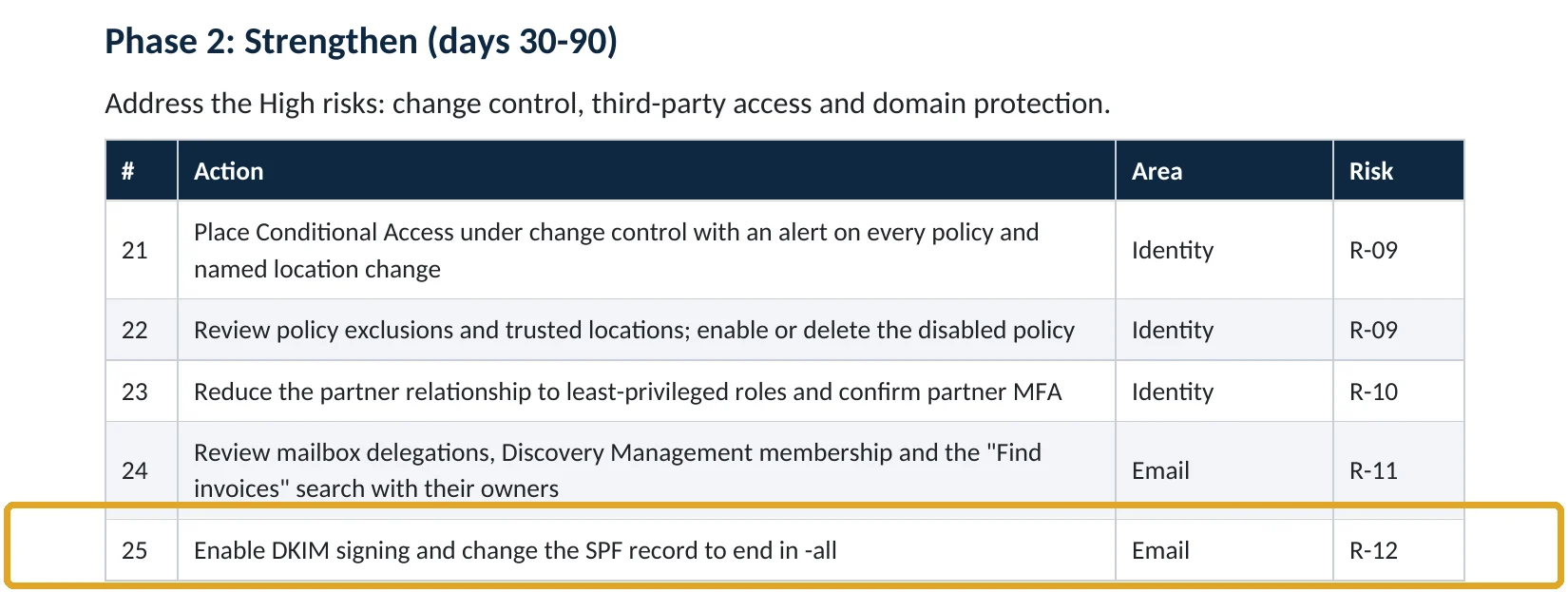
What this finding looks like in our audit reports
These are real pages from our published sample reports, written for fictional companies. Click any page to open it full size.
Your options
What each plan gives you
| Capability | All plans with Exchange Online |
|---|---|
| DKIM signing for custom domains | Yes |
| DKIM key rotation | Yes |
| Automatic DKIM signing for the onmicrosoft.com domain | Yes |
Microsoft also advises not publishing DKIM records for parked domains you never send from; protect those with SPF -all and DMARC reject instead (Microsoft Learn).
How to check it yourself
See which domains are signed, without changing anything
Each domain shows a Status and a Toggle. Disabled, NoDKIMKeys or CnameMissing means mail from that domain isn’t signed with it.
Read-only PowerShell: DKIM status for every domain
Connect-ExchangeOnline
Get-DkimSigningConfig | Format-List Name, Enabled, Status, Selector1CNAME, Selector2CNAME
The command only reads settings. Enabled : True and Status : Valid mean the domain is signing.
How to configure
How to turn on DKIM, step by step
All plans
Publish the records and turn it on
- Open Defender › Email authentication settings › DKIM and select the domain.
- Copy the two values under Publish CNAMEs.
- At your DNS host, create CNAMEs for selector1._domainkey and selector2._domainkey with those values.
- Wait for DNS to update, then switch on Sign messages for this domain with DKIM signatures.
- Repeat for every domain and subdomain you send from.
Finish the job
Tighten SPF and DMARC
- Change SPF from ~all to -all once all senders are listed.
- Check DMARC reports for a few weeks.
- Move DMARC to p=quarantine, then p=reject.
Microsoft notes that the exact CNAME values differ by domain and that you should take them from the Defender portal or PowerShell, not from examples (Microsoft Learn).
What your users will notice
Nothing. Receivers see a valid DKIM signature from your domain.
How to undo it
Switch the DKIM toggle off. Leave the CNAME records in DNS so you can switch it back on.
Proof and questions
How to prove it is fixed, and what to ask your IT provider
Evidence it is fixed
- Every sending domain shows DKIM Enabled and Valid.
- SPF ends in -all.
- DMARC is at quarantine or reject.
- Parked domains have SPF -all and DMARC reject.
Questions for your IT provider
- Is DKIM on for every domain we send from?
- Does our SPF end in -all or ~all?
- What is our DMARC policy, and who reads the reports?
- Are our unused domains protected?
- When were our DKIM keys last rotated?
Signs it was already abused
If your domain may already be spoofed, look for these signs
Red flags
- Clients receiving invoices or payment changes you never sent.
- DMARC reports showing mail from servers you don’t use.
- Bounce messages for mail you didn’t send.
- Your domain on a block list.
- Partners asking whether a message from you is real.
If clients received fraudulent mail, tell them and keep the evidence. Our business email compromise investigation establishes whether your mailboxes were involved, and the Microsoft 365 Evidence Clock shows how long the records are kept.
Framework mapping
Where DKIM fits
| Framework | Where it fits |
|---|---|
| NIST CSF 2.0 | PR.DS-02: data in transit protected; PR.PS-01: configuration management |
| ISO/IEC 27001:2022 | Annex A 5.14 Information transfer; 8.20 Network security; 8.21 Security of network services |
| SOC 2 | CC6.7 restricts transmission of information; CC6.6 protection against outside threats |
Reviewed by
Written and reviewed by a practicing CISO

Ali Hassani, C|CISO, CISSP
Ali has more than 25 years of IT and cybersecurity experience and holds the Certified CISO and CISSP certifications along with Microsoft and Cisco credentials. He leads every OC Security Audit engagement from Irvine, on-site across Southern California and remotely nationwide. Every Microsoft 365 audit is read-only.
FAQ
Frequently asked questions about DKIM
What is DKIM?
DomainKeys Identified Mail: a digital signature on outgoing email that proves it came from your domain and wasn't changed.
Is DKIM on by default in Microsoft 365?
Only for the onmicrosoft.com domain. For your own domain you publish two CNAME records and turn signing on.
Do we need DKIM if we have SPF?
Yes. SPF breaks when mail is forwarded; DKIM survives forwarding and keeps DMARC passing.
Will DKIM affect email delivery?
Only positively. Signed mail is more trusted by receivers.
What about domains we don't send from?
Don't publish DKIM for them. Use SPF -all and DMARC reject so nobody can send as them.
Do we need to rotate DKIM keys?
Periodically, yes. Microsoft 365 holds two selectors so you can rotate without interruption.
Next step
Sign every email you send
Prevent
Microsoft 365 Security Audit
$3,500 fixed
About 200 read-only checks across email authentication, threat protection, sign-in and sharing, for any tenant size, with four reports and a remediation roadmap.
Respond
Microsoft 365 & Azure Compromise Investigation
From $3,500
For when someone sent fraudulent email as your company: we establish whether your mailboxes were involved.
Want to see the deliverables first? Open the Microsoft 365 audit sample report or browse all our sample reports.

Service
Microsoft 365 Security Audit
The fixed-price audit that checks this item and about 200 more.
See the audit ›
Service
Microsoft 365 Email Security
Our review of Exchange Online and Defender email protection.
See email security ›
Service
Compromise Investigation
When an account or mailbox may already be in an attacker’s hands.
See the investigation ›Related reading: How to set up DMARC · How to set up MTA-STS and TLS reporting · How to set up impersonation protection · Exchange Online and Defender email security guide
Sources
Sources used on this page
- Microsoft Learn, Set up DKIM to sign mail from your cloud domain
- Microsoft Learn, Set up SPF for your custom cloud domains
- Microsoft Learn, Email authentication in Microsoft 365
- Microsoft Learn, Get started with Defender for Office 365 (email authentication step)
- Fox Business, Online scammers stole a record $16.6B last year, FBI says (2024 IC3 report)
This guide is general information, not a guarantee of protection or legal advice. Microsoft changes its admin centers often: menu names and steps were checked against Microsoft Learn on November 20, 2026. Drawings are simplified and are not screenshots of Microsoft products. Sample findings come from fictional companies. Incidents are described as reported by the cited sources; OC Security Audit was not involved in them. Questions? Call 949-777-5567 or email support@ocsecurityaudit.com.