

LIBRARY 1.15Microsoft 365 Security Library
How to Turn On Risk-Based Conditional Access in Microsoft 365
Microsoft scores every sign-in and every account for signs of attack, such as leaked passwords or sign-ins from known bad addresses. Risk-based policies act on that score automatically, asking for MFA or a secure password change.
Reviewed by Ali Hassani, C|CISO, CISSP · Last verified November 20, 2026
Microsoft says risk-based policies require Microsoft Entra ID P2 (Microsoft Learn). E5 includes it; Business Premium and E3 include P1 and need a P2 add-on or a suite that contains it (Microsoft Learn).
In one minute
- Make sure users are registered for MFA first.
- Create a sign-in risk policy: require MFA at medium and high risk.
- Create a user risk policy: require risk remediation at high risk.
- Run both in report-only for a week, then turn them on.
Risk-based access is part of the Conditional Access checks in our Microsoft 365 Security Audit.
What it is
What risk-based Conditional Access does
Microsoft Entra ID Protection gives two scores. Sign-in risk is the chance that a specific sign-in isn’t the real user, for example from an anonymous IP address or an unfamiliar location. User risk is the chance the account itself is compromised, for example because its password appeared in a leak. Conditional Access policies can then require MFA, a secure password change or block access (Microsoft Learn).
Microsoft’s recommended settings
| Policy | Condition | Action |
|---|---|---|
| Sign-in risk | Medium and high | Require MFA, so the real user can prove it’s them |
| User risk | High | Require risk remediation: a secure password change after MFA, or session revocation for passwordless users |
These are Microsoft’s recommendations; your organization can choose lower thresholds at the cost of more prompts (Microsoft Learn).
Why it matters
Microsoft already knows the sign-in is suspicious
- Password leaked or sprayedAttacker has a working password.
- Sign-in flagged riskyUnusual location or known bad address.
- Risk policy actsMFA or password change required.
- Signs in anywayWithout it: the flag is ignored.
- Mailbox and filesRead, forwarded, abused.
Drawing: where a risk policy breaks the path.
of identity attacks were large-scale password attacks in the first half of 2025.
Source: Microsoft Digital Defense Report 2025rise in identity-based attacks in the first half of 2025.
Source: Microsoftpolicies cover most of the value: sign-in risk and user risk.
Source: Microsoft Learnis the license needed for risk policies; E5 includes it.
Source: Microsoft LearnControls that work together
| Control | What it does | Effect |
|---|---|---|
| MFA for all users | Every sign-in needs a second factor. | Baseline |
| Sign-in risk policy | Extra proof when a sign-in looks wrong. | Stops stolen passwords |
| User risk policy | Forces a secure password change after a leak. | Fixes leaked accounts |
| Blocking legacy authentication | Closes sign-ins that skip MFA. | Removes a bypass |
| Risk detected, no policy | Reports are filled, nothing happens. | Missed warning |
Documented research
Report · Microsoft, 2025
Attackers log in rather than break in
Microsoft’s 2025 Digital Defense Report, covering July 2024 to June 2025, found attackers sought to steal data in 80% of the incidents its teams investigated, and that more than 97% of identity attacks were password attacks.
Source: Microsoft On the Issues · Microsoft Source
What we find in audits
What this finding looks like in our audit reports
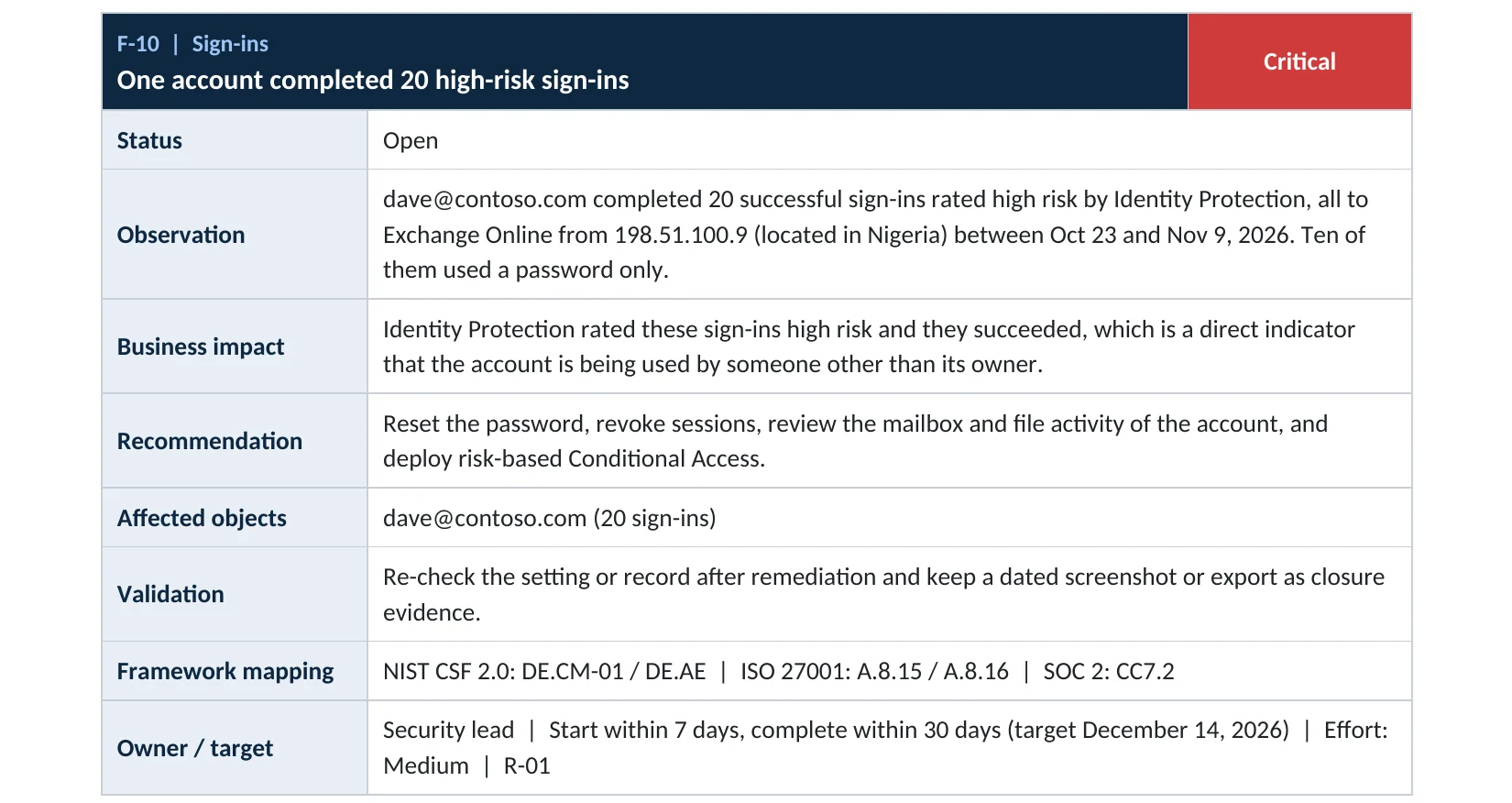
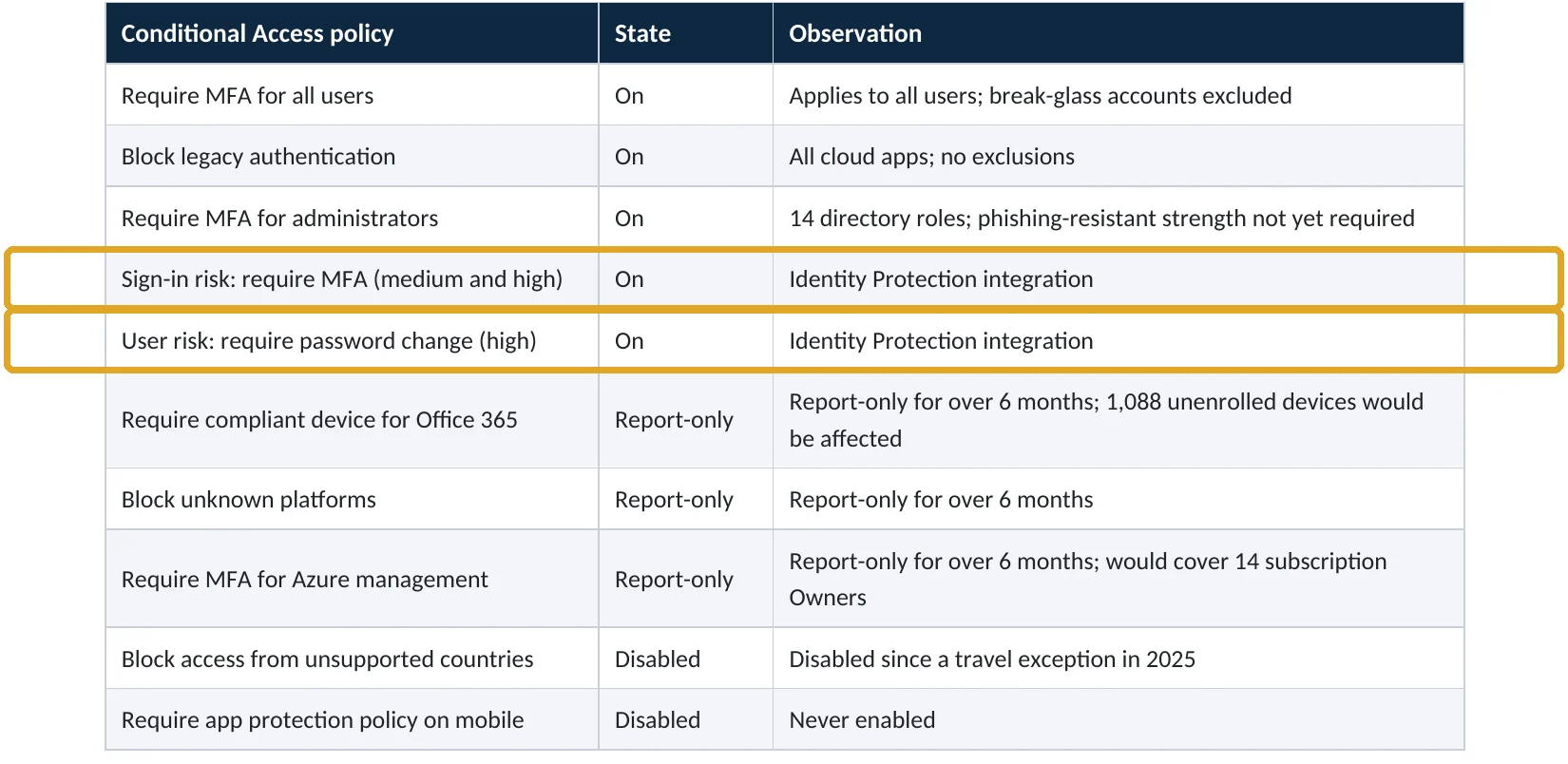
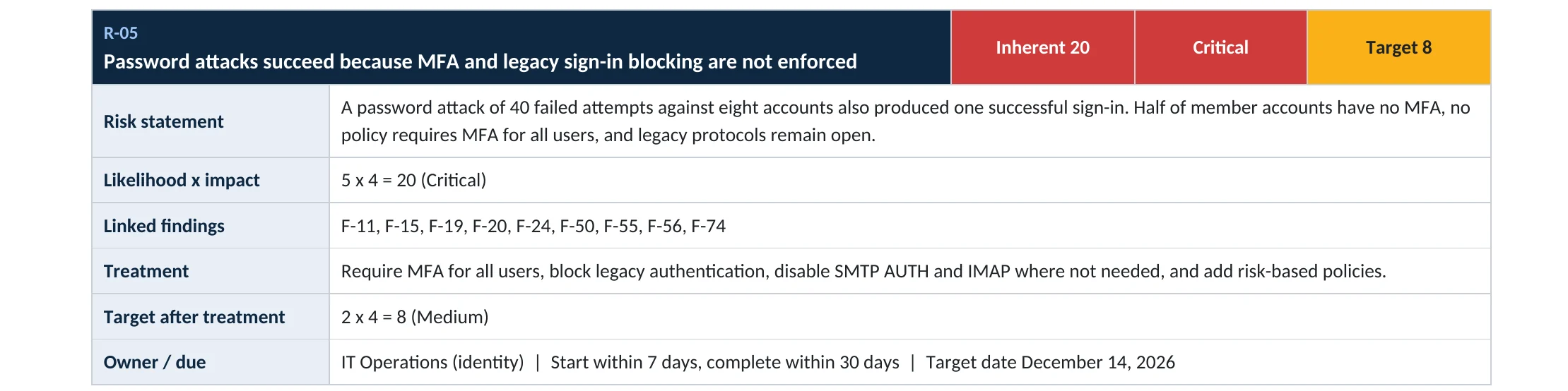
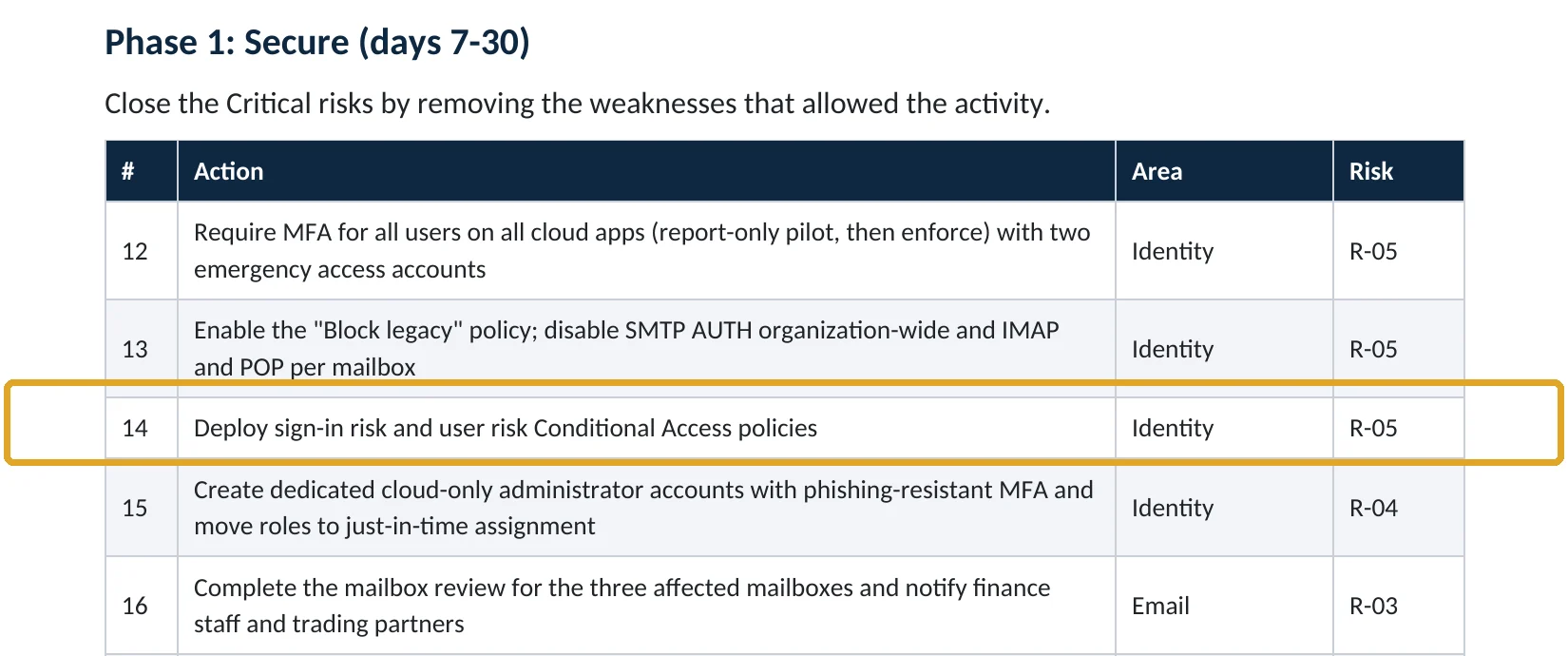
These are real pages from our published sample reports, written for fictional companies. Click any page to open it full size. The viewer shows risky sign-ins going unchallenged in one tenant, risk policies working in another, the risk and the fix.
Your options
What each plan gives you
| Capability | Business Basic, Standard | Business Premium, E3 (P1) | E5 or P2 add-on |
|---|---|---|---|
| Security defaults | Yes | Yes (if no Conditional Access) | Yes (if no Conditional Access) |
| Conditional Access | No | Yes | Yes |
| Risky users and sign-ins reports | Limited | Limited | Full |
| Sign-in risk and user risk policies | No | No | Yes |
Without P2, you can still require MFA for everyone, block legacy authentication and use the limited risky-user report to investigate. Risk policies themselves need P2 (Microsoft Learn).
How to check it yourself
See whether risk is being acted on, without changing anything
Look for policies with a Sign-in risk or User risk condition. Then open ID Protection › Risky users: high-risk users who were never remediated mean nobody is acting on the signal.
Read-only PowerShell: risk-based policies and risky users
Connect-MgGraph -Scopes "Policy.Read.All","IdentityRiskyUser.Read.All"
Get-MgIdentityConditionalAccessPolicy |
  Where-Object { $_.Conditions.SignInRiskLevels -or $_.Conditions.UserRiskLevels } |
  Select-Object DisplayName, State
Get-MgRiskyUser -Filter "riskState eq 'atRisk'" | Select-Object UserPrincipalName, RiskLevel
The commands only read data. No policies listed means risk detections aren’t enforced.
How to configure
How to turn on the two risk policies, step by step
Entra ID P2
Sign-in risk policy
- Open Entra ID › Conditional Access › New policy.
- Include All users; exclude your break-glass accounts.
- Target All resources; under Conditions › Sign-in risk, select High and Medium.
- Grant access with Require multifactor authentication; set Sign-in frequency › Every time.
- Set the policy to Report-only and create it.
Entra ID P2
User risk policy
- Create another policy for All users, excluding break-glass accounts.
- Under Conditions › User risk, select High.
- Grant access with Require risk remediation; Microsoft adds the authentication strength and sign-in frequency automatically.
- Start in Report-only, review for a week, then turn both policies On.
Users must be registered for MFA before a risk policy asks them to prove who they are; Microsoft warns that unregistered users are blocked and need an admin (Microsoft Learn).
What your users will notice
Usually nothing. A user signing in from somewhere unusual gets an extra MFA prompt, and a user whose password appeared in a leak is asked to change it after MFA.
How to undo it
Set either policy back to Report-only or Off in Conditional Access.
Proof and questions
How to prove it is fixed, and what to ask your IT provider
Evidence it is fixed
- A sign-in risk policy requires MFA at medium and high risk, and is on.
- A user risk policy requires remediation at high risk, and is on.
- Break-glass accounts are excluded and monitored.
- No high-risk users sit unremediated in Risky users.
Questions for your IT provider
- Do we have Entra ID P2, and for which users?
- Are sign-in and user risk policies on or only reporting?
- How many risky sign-ins were challenged last month?
- Who reviews the Risky users report, and how often?
- Is everyone registered for MFA so they can self-remediate?
Signs it was already abused
If a risky sign-in may already have succeeded, look for these signs
Red flags
- High-risk users in the Risky users report with successful sign-ins.
- Sign-ins from anonymous IP addresses or impossible travel.
- Leaked credentials detections that were never acted on.
- New inbox rules or MFA methods right after a risky sign-in.
- Risk dismissed by an admin without a note.
If you see these, revoke the user’s sessions, reset the password and keep the sign-in logs. Our account takeover investigation establishes what was accessed, and the Microsoft 365 Evidence Clock shows how long the records are kept.
Framework mapping
Where risk-based access fits
| Framework | Where it fits |
|---|---|
| NIST CSF 2.0 | PR.AA-03: authentication; DE.CM-03: personnel activity monitored; RS.MI-01: incidents contained |
| ISO/IEC 27001:2022 | Annex A 8.5 Secure authentication; 8.16 Monitoring activities |
| SOC 2 | CC6.1 logical access security; CC7.2 monitoring for anomalies |
Reviewed by
Written and reviewed by a practicing CISO

Ali Hassani, C|CISO, CISSP
Ali has more than 25 years of IT and cybersecurity experience and holds the Certified CISO and CISSP certifications along with Microsoft and Cisco credentials. He leads every OC Security Audit engagement from Irvine, on-site across Southern California and remotely nationwide. Every Microsoft 365 audit is read-only.
FAQ
Frequently asked questions about risk-based Conditional Access
What is risk-based Conditional Access?
Policies that use Microsoft's sign-in risk and user risk scores to require MFA, a secure password change or block access automatically.
Does Business Premium include risk-based policies?
No. Business Premium includes Entra ID P1. Risk-based policies need Entra ID P2, which comes with E5 or as an add-on.
What risk levels should we use?
Microsoft recommends requiring MFA for medium and high sign-in risk, and risk remediation for high user risk.
Will users be locked out?
Not if they're registered for MFA. Risky users can prove it's them and fix the risk themselves. Unregistered users are blocked until an admin helps.
Should we block risky sign-ins instead?
Blocking stops legitimate users too. Microsoft recommends letting users self-remediate with MFA or a secure password change.
What if we don't have P2?
Require MFA for everyone, block legacy authentication, and review the limited risky-user report regularly. Consider P2 for admins and finance at least.
Next step
Act on the warning Microsoft already gives you
Prevent
Microsoft 365 Security Audit
$3,500 fixed
About 200 read-only checks across sign-in protection, Conditional Access, admin roles, email, sharing and devices, for any tenant size, with four reports and a remediation roadmap.
Respond
Microsoft 365 & Azure Compromise Investigation
From $3,500
For when a risky sign-in already succeeded: we establish what the attacker reached.
Want to see the deliverables first? Open the Microsoft 365 audit sample report or browse all our sample reports.

Service
Microsoft 365 Security Audit
The fixed-price audit that checks this item and about 200 more.
See the audit ›
Service
Microsoft Entra ID Security Audit
A deeper look at identities, Conditional Access, roles and apps.
See the Entra ID audit ›
Service
Compromise Investigation
When an account or mailbox may already be in an attacker’s hands.
See the investigation ›Related reading: How to replace SMS and voice MFA · How to move Conditional Access from report-only to on · How to stop password spray attacks · Identity, MFA and Conditional Access guide
Sources
Sources used on this page
- Microsoft Learn, Risk-based access policies
- Microsoft Learn, Configure and enable risk policies
- Microsoft Learn, Use risk detections to trigger MFA or password changes
- Microsoft Learn, What is Microsoft Entra ID Protection? (license requirements)
- Microsoft Learn, Microsoft Entra licensing
- Microsoft Source, Microsoft releases 2025 Digital Defense Report
- Microsoft On the Issues, Extortion and ransomware drive over half of cyberattacks (MDDR 2025)
This guide is general information, not a guarantee of protection or legal advice. Microsoft changes its admin centers often: menu names and steps were checked against Microsoft Learn on November 20, 2026. Drawings are simplified and are not screenshots of Microsoft products. Sample findings come from fictional companies. Incidents are described as reported by the cited sources; OC Security Audit was not involved in them. Questions? Call 949-777-5567 or email support@ocsecurityaudit.com.