

LIBRARY 10.55Microsoft 365 Security Library
How to Stop Password Spray Attacks in Microsoft 365
Attackers try one common password against every account, slowly, so nobody gets locked out. Here is how to make those guesses fail, and how to tell if one already worked.
Reviewed by Ali Hassani, C|CISO, CISSP · Last verified November 20, 2026

Green: smart lockout and Microsoft’s global banned password list protect every tenant. Blue: plans with Microsoft Entra ID P1 can also add custom banned words and tune lockout (Microsoft Learn).
In one minute
- Require MFA for every account, so a guessed password alone is not enough.
- Block legacy authentication, the path most password sprays use.
- Add your company, product and city names to the custom banned password list (P1).
- Keep smart lockout at 10 attempts or fewer and 60 seconds or more, and watch for many failures from one address.
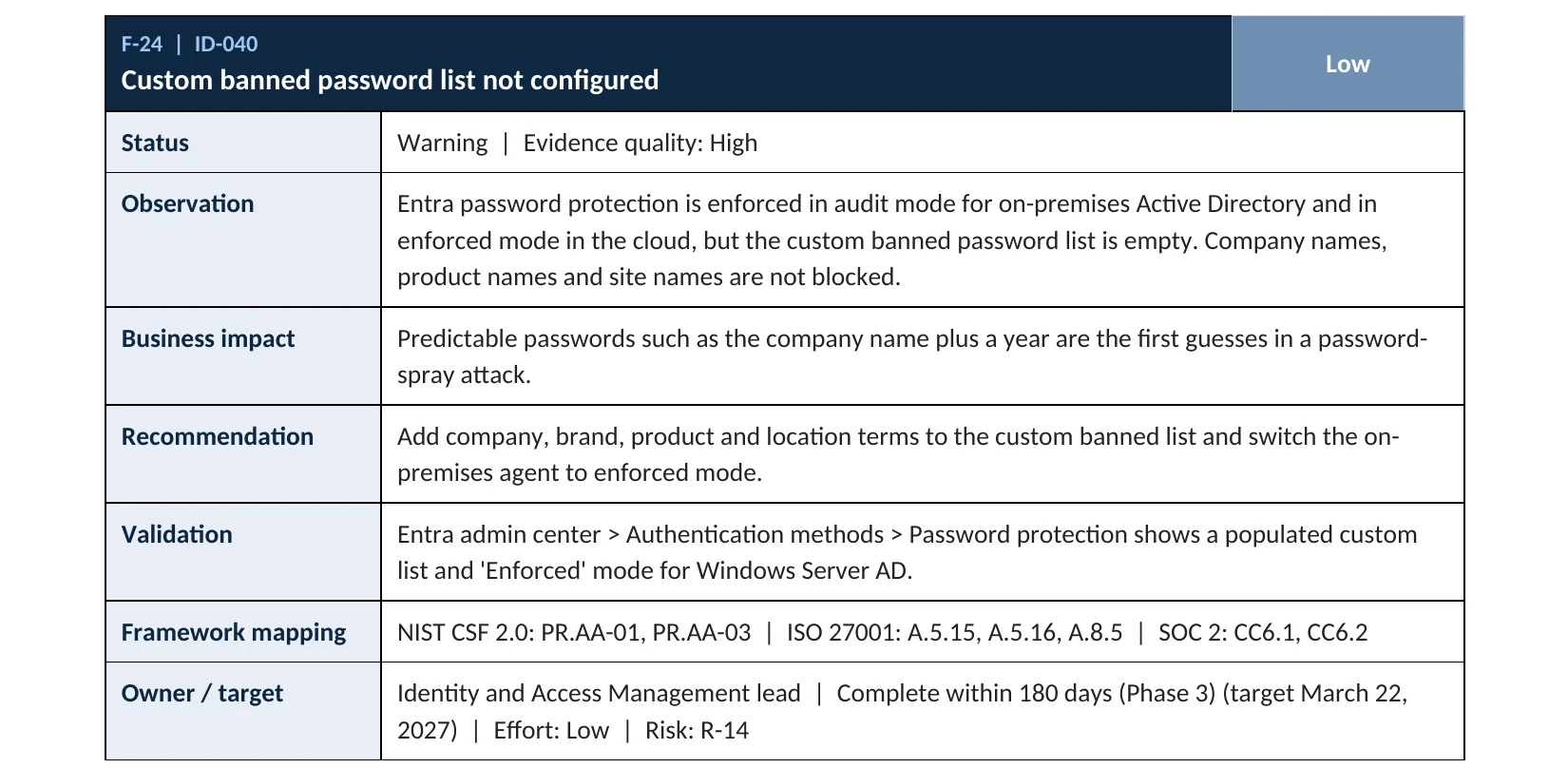
Password protection is item ID-040 in our Microsoft 365 Security Audit.
What it is
What a password spray is
A brute-force attack tries many passwords on one account and quickly triggers a lockout. A password spray turns that around: it tries one or two common passwords, such as a season and a year, against hundreds of accounts, then waits and tries again. Each account sees only a few failures, so nobody gets locked out and nobody notices (MITRE ATT&CK T1110.003).
Microsoft Entra ID fights back with smart lockout, which by default locks an account for one minute after 10 failed attempts and tells real users apart from attackers, and with a global banned password list that blocks weak passwords when people set them (Microsoft Learn). Neither stops a spray on its own if a password is already weak and MFA is missing.
Why it matters
One weak password is all a spray needs
- Account listNames from the website, LinkedIn or old leaks.
- Spray“Company2026!” tried slowly across all accounts.
- MFA and banned wordsThe guess is blocked, or the password could never be set.
- One account opensWithout them: a password works.
- TakeoverMail read, rules created, fraud begins.
Drawing: where MFA and banned passwords stop a spray.
password attacks blocked per second by Microsoft Entra, according to Microsoft’s Digital Defense Report 2024.
Source: ITPro on Microsoft MDDR 2024of password spray attacks use legacy authentication protocols, in Microsoft’s analysis.
Source: Microsoft Learnsign-in attempts in a June 2026 spray against Azure CLI sign-ins reported by Huntress, compromising at least 78 accounts in 64 organizations.
Source: TechRepublic on Huntressfailed attempts: smart lockout’s default before a one-minute lock. Microsoft advises keeping it at 10 or fewer and 60 seconds or more.
Source: Microsoft LearnDefenses, and what each one stops
| Defense | What it does against a spray | Effect |
|---|---|---|
| MFA for every user | A guessed password is not enough to sign in. | Strongest |
| Block legacy authentication | Closes the protocols most sprays use, where MFA can’t be asked. | Strong |
| Custom banned password list | Stops passwords built from your company, product or city names. | Strong P1 plans |
| Smart lockout | Locks attackers out after repeated failures, separately from real users. | Helps Sprays stay under the limit |
| Watching failed sign-ins | Spots many failures across accounts from one address. | Detects Does not prevent |
Documented cases
Nation-state · Microsoft, 2024
Midnight Blizzard starts with a password spray
Microsoft reported that Midnight Blizzard used password spray attacks that compromised a legacy, non-production test tenant account without MFA, the first step in an intrusion that reached senior leadership mailboxes.
Source: Microsoft Security Blog
Nation-state · Microsoft, 2023
Peach Sandstorm sprays thousands of organizations
Microsoft observed Peach Sandstorm running password spray attacks against thousands of organizations between February and July 2023, then using the valid credentials it found to persist and move inside some targets.
Source: Microsoft Security Blog
We were not involved in either case. Both started with nothing more than a password that could be guessed and an account without MFA.
What we find in audits
What this finding looks like in our reports
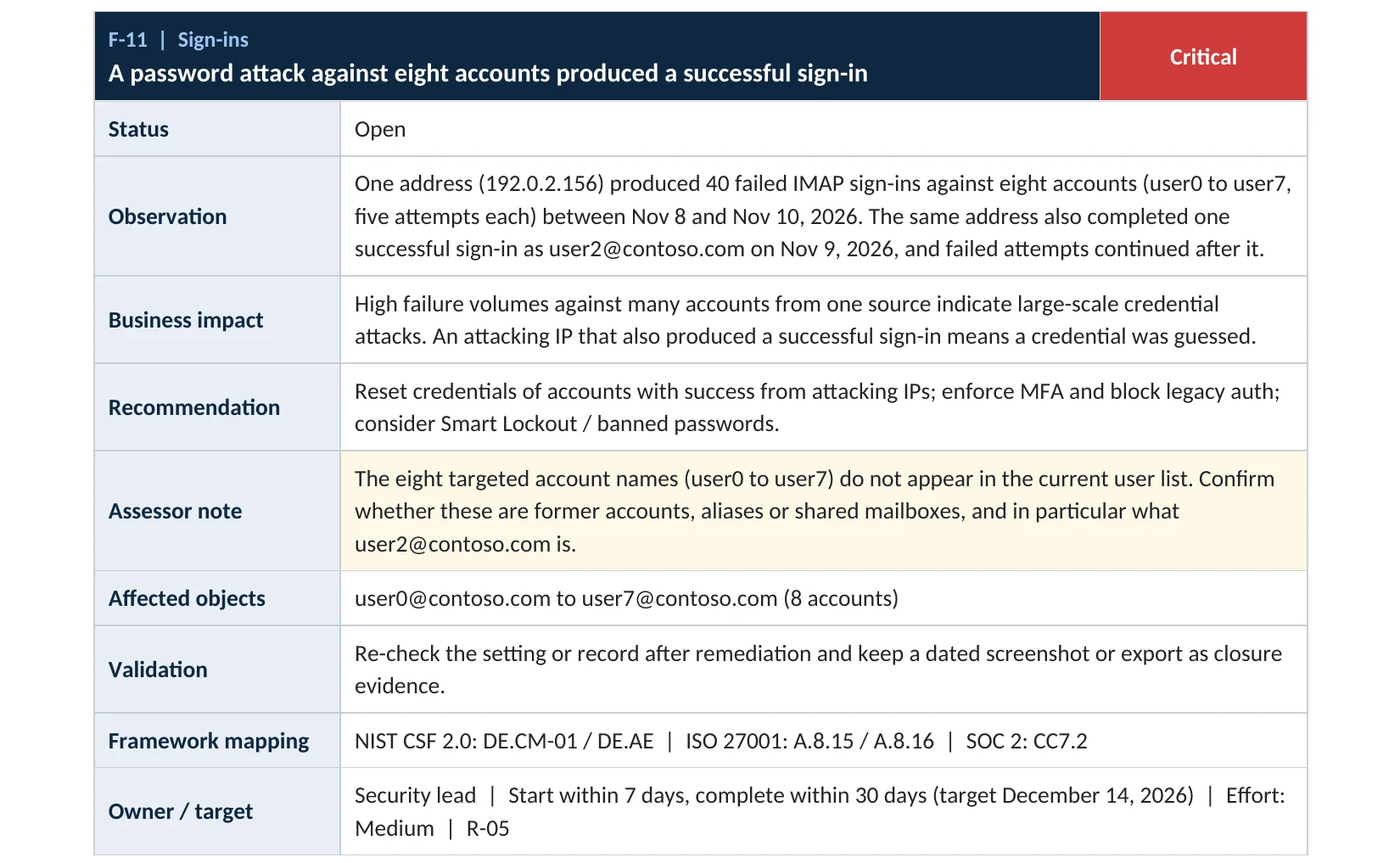
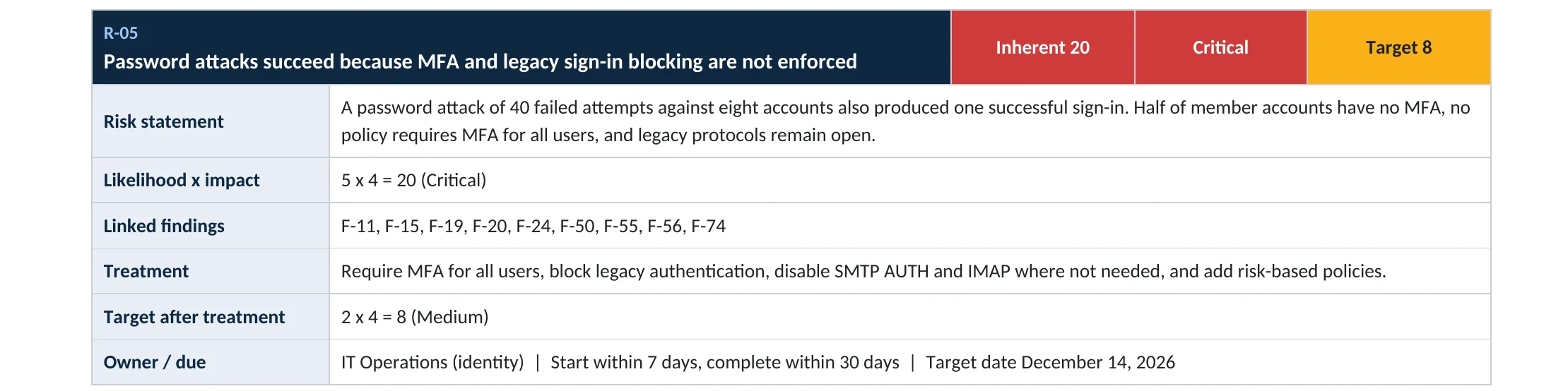
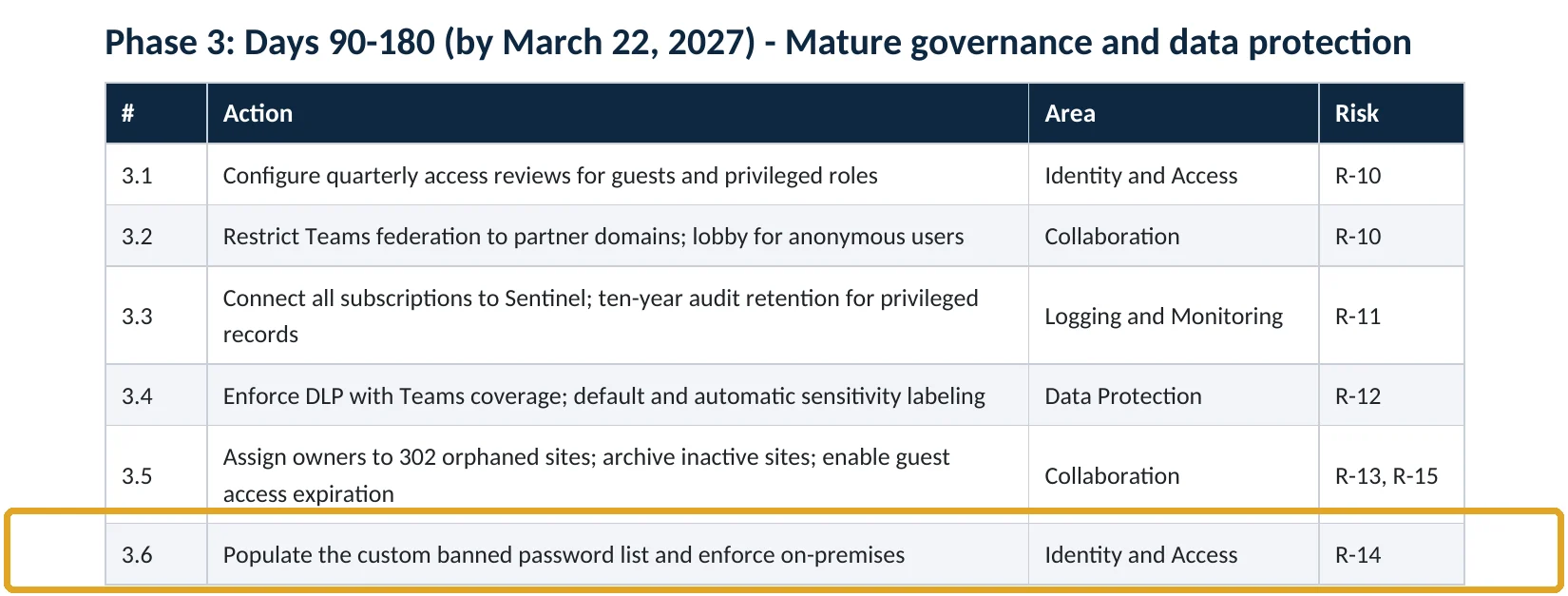
These are real pages from our published sample reports, written for fictional companies. Click any page to open it full size. The viewer follows the finding from the technical report to the risk register and the roadmap.
Your options
What each plan gives you
| Protection | Business Basic / Standard | Business Premium, E3, E5 (Entra ID P1) |
|---|---|---|
| Smart lockout | On, with Microsoft’s defaults | On, and you can set the threshold and duration |
| Global banned password list | On for everyone | On for everyone |
| Custom banned password list | Not available | Up to 1,000 of your own terms |
| MFA and legacy blocking | Security defaults | Conditional Access policies |
Microsoft’s global banned list is applied automatically. The custom list is for words specific to you, like your company name, brands, products and local places, which attackers try first (Microsoft Learn).
How to check it yourself
Look for spray activity and weak spots, without changing anything
1. Are sprays hitting you right now?
Group failures by IP address. Many usernames failing from the same address over hours or days is the signature of a spray. Check the non-interactive tab too.
2. What are your password protection settings?
On P1 plans this page shows the lockout threshold, duration and custom banned list.
Read-only PowerShell: failed sign-ins grouped by address (last 7 days)
Connect-MgGraph -Scopes "AuditLog.Read.All"
$since = (Get-Date).AddDays(-7).ToString("yyyy-MM-ddTHH:mm:ssZ")
Get-MgAuditLogSignIn -Filter "createdDateTime ge $since and status/errorCode ne 0" -All |
  Group-Object IpAddress | Sort-Object Count -Descending |
  Select-Object -First 20 Count, Name, @{n="Users";e={($_.Group.UserPrincipalName | Sort-Object -Unique).Count}}
An address with failures against many different users deserves a closer look, and any successful sign-in from that address means a password was guessed. Correlating these across the whole tenant is part of our compromise investigation.
How to configure
How to make password sprays fail, step by step
All plans
Close the doors
- Require MFA for every user (MFA setup guide).
- Block legacy authentication (legacy authentication guide).
- Make sure shared mailboxes and unused accounts are blocked from signing in.
- Remove or disable accounts of former staff and test accounts.
- Ask staff to use passphrases and never reuse their work password elsewhere.
Business Premium, E3, E5
Tune password protection
- Open Entra ID › Authentication methods › Password protection.
- Keep Lockout threshold at 10 or fewer and Lockout duration at 60 seconds or more.
- Turn Enforce custom list to Yes.
- Add your company name, brands, products, city and sports teams to the custom banned list.
- If you have on-premises Active Directory, set password protection there to Enforced.
What your users will notice
The banned list is checked when a password is changed or reset, so people with a password like the company name plus a year are asked to pick a new one at their next change. MFA adds an approval step at sign-in.
If a spray already worked
Microsoft’s password spray playbook starts with resetting the affected password, revoking sessions, blocking the attacker’s address where it makes sense, blocking legacy authentication and enabling MFA (Microsoft Learn). Then check what the account did after the successful sign-in.
Proof and questions
How to prove it is fixed, and what to ask your IT provider
Evidence it is fixed
- MFA is required for every user, and legacy authentication is blocked.
- Smart lockout is 10 attempts or fewer and 60 seconds or more (P1 plans).
- The custom banned password list contains your company-specific words and is enforced.
- No successful sign-in in the last 30 days came from an address that also produced many failures.
Questions for your IT provider
- How many failed sign-ins did we have last week, and from where?
- Is every account protected by MFA, including shared and service accounts?
- Is legacy authentication blocked?
- Have we added our company and product names to the banned password list?
- Who is alerted when many accounts fail from one address?
Signs it was already abused
If a spray may have worked, look for these signs
Red flags
- A successful sign-in from an address that also produced failures against other accounts.
- Successful sign-ins over IMAP, POP or SMTP, which cannot ask for MFA.
- Sign-ins to accounts that should not sign in, such as shared mailboxes or former staff.
- New inbox rules, forwarding or MFA methods soon after an unusual sign-in.
- Users reporting MFA prompts they did not start: their password is already known.
If you see these, keep the sign-in logs before they expire and reset the affected passwords. Our compromise investigation establishes which accounts were entered and what was done, and the Microsoft 365 Evidence Clock shows how long sign-in logs are kept.
Framework mapping
Where password spray defenses fit
| Framework | Where it fits |
|---|---|
| NIST CSF 2.0 | PR.AA-03: users and services authenticated; DE.CM-01: networks and services monitored |
| ISO/IEC 27001:2022 | Annex A 5.17 Authentication information; 8.5 Secure authentication |
| SOC 2 | CC6.1 logical access security; CC7.2 monitoring for anomalies |
| MITRE ATT&CK | T1110.003 Brute Force: Password Spraying; T1078.004 Valid Accounts: Cloud Accounts |
Reviewed by
Written and reviewed by a practicing CISO

Ali Hassani, C|CISO, CISSP
Ali has more than 25 years of IT and cybersecurity experience and holds the Certified CISO and CISSP certifications along with Microsoft and Cisco credentials. He leads every OC Security Audit engagement from Irvine, on-site across Southern California and remotely nationwide. Every Microsoft 365 audit is read-only.
FAQ
Frequently asked questions about password spraying
What is the difference between password spraying and brute force?
Brute force tries many passwords on one account. Password spraying tries a few common passwords on many accounts, slowly, so each account sees too few failures to be locked out.
Doesn't account lockout stop password spraying?
Not on its own. Sprays are designed to stay under the lockout limit. Smart lockout helps, but MFA, blocking legacy authentication and banning weak passwords are what make the guesses fail.
Do I need Entra ID P1 for protection?
No. Smart lockout and Microsoft's global banned password list protect every tenant, and security defaults add MFA and legacy blocking at no cost. P1 adds the custom banned list and adjustable lockout settings.
What words should go on the custom banned password list?
Your company name and abbreviations, brands, products, office cities, local sports teams and other words staff are likely to build a password from. Microsoft already combines these with common substitutions such as numbers and symbols.
How do I know if a password spray worked?
Look for a successful sign-in from an address that also produced failed sign-ins against other accounts, and for successful legacy-protocol sign-ins. Then check that account's activity after the sign-in.
Should we block the attacker's IP address?
It can help briefly, but spray attackers rotate through many addresses and proxies. MFA, legacy blocking and strong passwords protect you whatever address they use.
Next step
Seeing failed sign-ins, or want to be sure?
Respond
Microsoft 365 & Azure Compromise Investigation
From $3,500
For when the logs show a successful sign-in from an attacking address: we establish which accounts were entered and what was done.
Prevent
Microsoft 365 Security Audit
$3,500 fixed
About 200 read-only checks across sign-in protection, identity, admin roles, email, sharing, data protection, logging and devices, for any tenant size, with four reports and a remediation roadmap.
Want to see the deliverables first? Open the Microsoft 365 audit sample report or browse all our sample reports.

Service
Compromise Investigation
When an account or mailbox may already be in an attacker’s hands.
See the investigation ›
Service
Microsoft 365 Security Audit
The fixed-price audit that checks this item and about 200 more.
See the audit ›
Service
Microsoft Entra ID Security Audit
A deeper look at identities, Conditional Access, roles and apps.
See the Entra ID audit ›Related reading: How to set up MFA in Microsoft 365 · How to block legacy authentication · Microsoft Entra ID security guide
Sources
Sources used on this page
- Microsoft Learn, Protect user accounts from attacks with Microsoft Entra smart lockout
- Microsoft Learn, Eliminate bad passwords using Microsoft Entra Password Protection
- Microsoft Learn, Configure custom banned passwords
- Microsoft Learn, Configure Microsoft Entra for Zero Trust: Protect identities and secrets
- Microsoft Learn, Password spray investigation playbook
- Microsoft Learn, Block legacy authentication with Conditional Access
- ITPro, Microsoft logs 600 million identity attacks per day (Microsoft Digital Defense Report 2024)
- Microsoft Security Blog, Midnight Blizzard: Guidance for responders on nation-state attack (January 2024)
- Microsoft Security Blog, Peach Sandstorm password spray campaigns (September 2023)
- TechRepublic, Azure CLI password spray attack exposes Microsoft 365 MFA gap (July 2026)
- MITRE ATT&CK, T1110.003 Brute Force: Password Spraying
This guide is general information, not a guarantee of protection or legal advice. Microsoft changes its admin centers often: menu names and steps were checked against Microsoft Learn on November 20, 2026. Drawings are simplified and are not screenshots of Microsoft products. Sample findings come from fictional companies. Incidents are described as reported by the cited sources; OC Security Audit was not involved in them. Questions? Call 949-777-5567 or email support@ocsecurityaudit.com.