

LIBRARY 6.42Microsoft 365 Security Library
How to Make SharePoint Guest Access Expire in Microsoft 365
When someone shares a file or a site with an outside person, that access usually stays in place long after the project ends. One SharePoint setting makes guest access end on its own unless an owner renews it.
Reviewed by Ali Hassani, C|CISO, CISSP · Last verified November 20, 2026
The setting is part of SharePoint’s standard sharing settings, and Microsoft says the feature is available to all tenants (Microsoft Support).
In one minute
- Turn on guest access expiration in the SharePoint admin center (60 days is a common choice).
- Remember it only applies to access granted after you turn it on.
- Review the guests who already have access, separately.
- Tell site owners about the reminder banner and how to renew a guest.
Guest access expiration is item SP-012 in our Microsoft 365 Security Audit.
What it is
What guest access expiration does
When an admin sets a guest expiration period, each guest invited to a site, or given access to individual files and folders, gets access for that number of days. When the period ends, access ends unless someone extends it (Microsoft Support). Microsoft lists it among the main controls for external sharing, alongside domain restrictions and verification-code reauthentication (Microsoft Learn).
What it does and doesn’t cover
| Situation | Covered? | Detail |
|---|---|---|
| Guest invited to a site or given a file or folder | Yes | Access ends after the set number of days unless renewed. |
| Access granted before you turned it on | No | Microsoft says only access granted after the policy is turned on is affected. |
| Guest members of a Team or Microsoft 365 group | No | Group membership is managed separately; review those guests in Entra ID. |
| The guest’s account itself | No | Expiry removes site access; the guest account stays in your directory. |
Those last three are why expiry works best together with a regular guest account review.
Why it matters
Old shares are invisible until someone uses them
- File sharedContract, price list or design file.
- Project endsNobody removes the guest.
- Access expiresThe share closes on its own.
- Account misusedWithout it: the guest’s mailbox is breached, or they join a competitor.
- Data exposedYour files are still one click away.
Drawing: where expiry breaks the path.
of organizations have cloud data exposed to anonymous users, according to Varonis’s review of 1,000 real environments.
Source: Varonisof organizations have exposed sensitive cloud data, in the same Varonis study.
Source: Varonisweeks before a guest expires, site admins see a banner and get a weekly email listing who is about to expire.
Source: Microsoft Supportclicks for an owner to renew a guest who still needs access: Site permissions, Guest Expiration.
Source: Microsoft SupportWays to keep guest access short
| Control | What it does | Effect |
|---|---|---|
| Guest access expiration | File, folder and site access ends unless renewed. | Limits it all plans |
| Anyone links with expiry or off | Links that need no sign-in end or aren’t allowed. | Limits it |
| Guest account reviews | Old guest accounts are removed from the directory. | Removes it |
| Site owners | Someone gets the reminders and decides. | Makes it work |
| No end date | Shares stay open until someone notices. | Grows the risk |
Documented research
Research · Varonis, 2025
Exposed cloud data is the norm
Varonis analyzed 1,000 real IT environments: 90% had exposed sensitive cloud data and 66% had cloud data exposed to anonymous users. Access without an end date is one of the ways that exposure builds up.
This is research, not a breach report. It shows how common lingering access is in real tenants.
What we find in audits
What this finding looks like in our audit reports
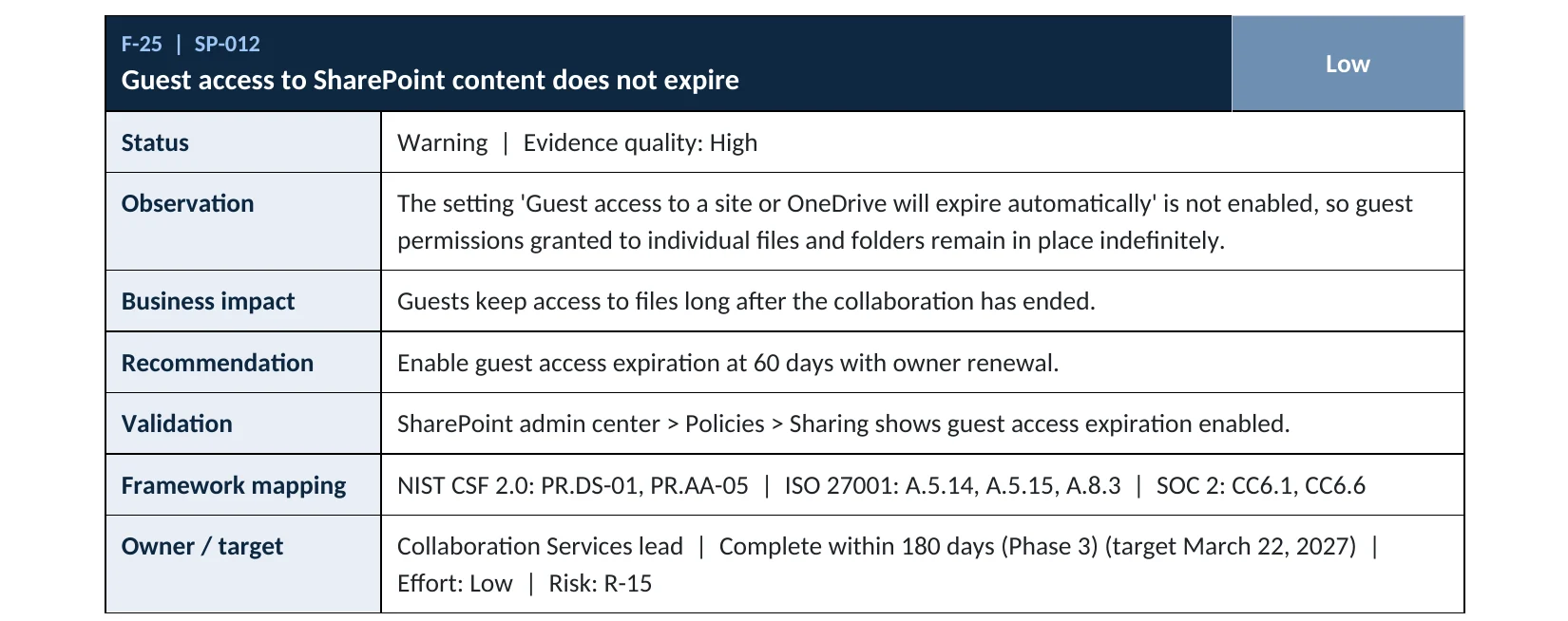
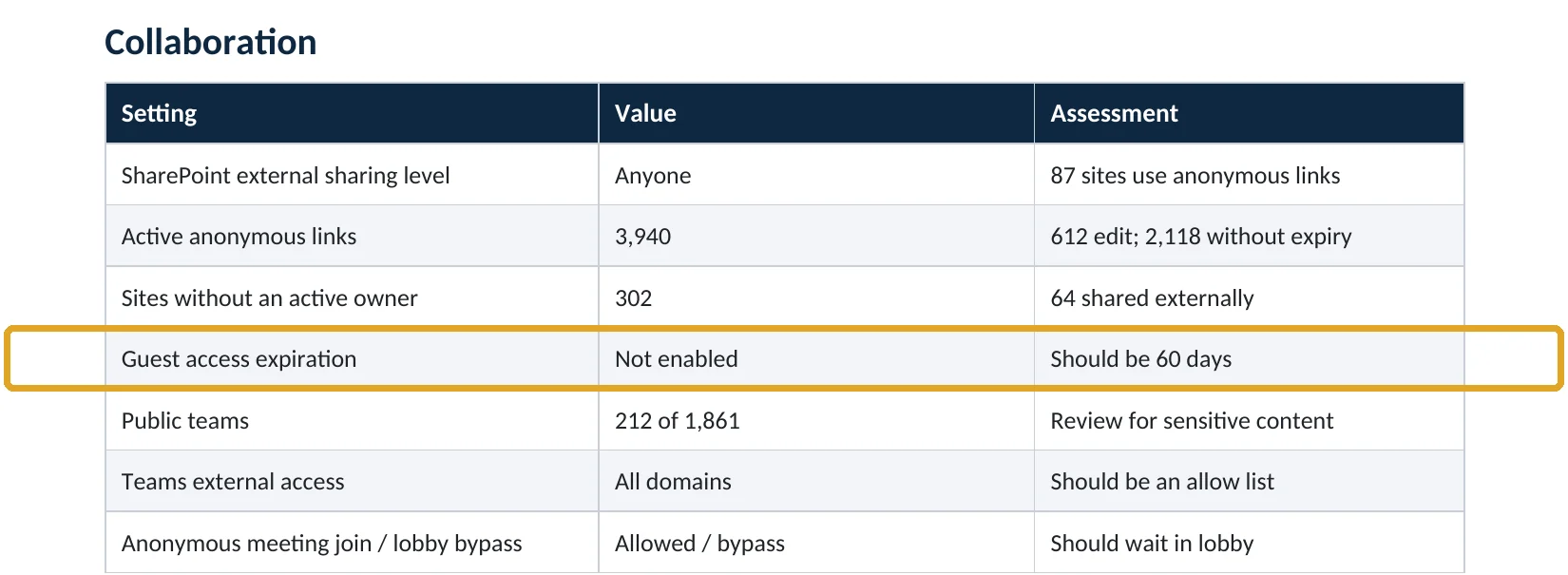
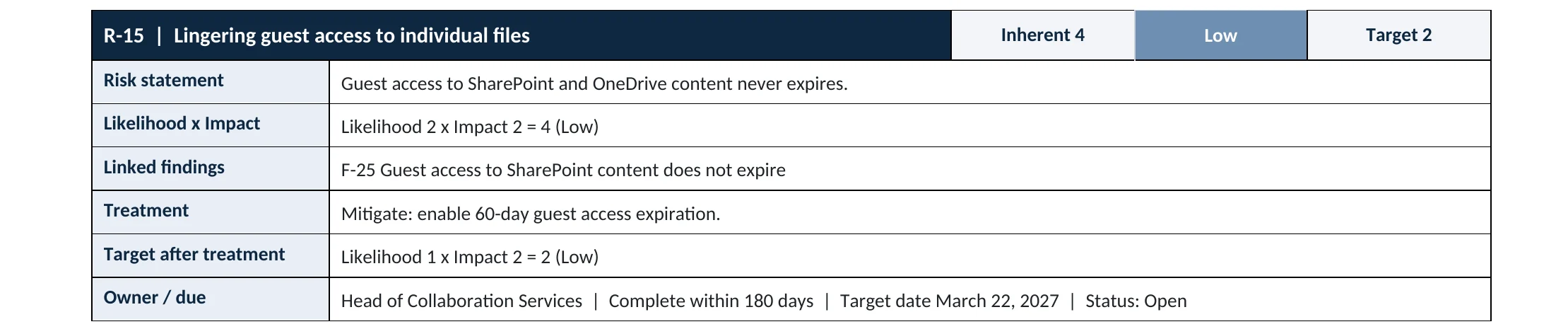
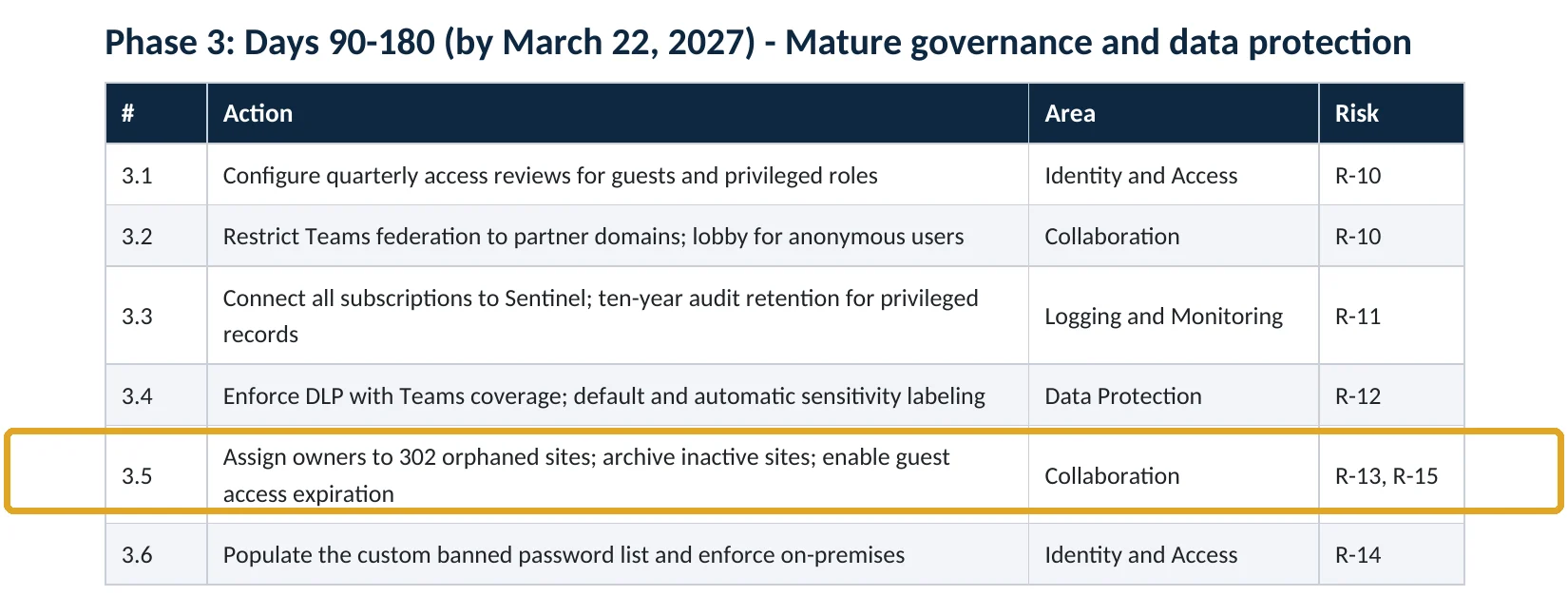
These are real pages from our published sample audit, written for a fictional company. Click any page to open it full size. The viewer follows the finding from the technical report to the risk register and the roadmap.
Your options
Choosing the number of days
| Period | Fits | Trade-off |
|---|---|---|
| 30 days | Short projects, regulated data | More renewals for owners |
| 60 days | Most small and mid-size companies | Balanced: our sample report’s benchmark |
| 90 to 180 days | Long engagements with the same partners | Access stays open longer |
Microsoft doesn’t prescribe a number. Whatever you choose, owners can extend a guest who still needs access, and the extension lasts the same number of days (Microsoft Support).
How to check it yourself
See whether it’s on, without changing anything
Look for Guest access to a site or OneDrive will expire automatically after this many days (Microsoft Learn). If the box is unchecked, guest access never ends on its own.
Read-only PowerShell: the tenant setting
Connect-SPOService -Url https://<tenant>-admin.sharepoint.com
Get-SPOTenant | Select-Object ExternalUserExpirationRequired, ExternalUserExpireInDays
The command only reads settings. Sites can override the tenant value, so also check the sites shared outside most.
How to configure
How to turn on guest access expiration, step by step
All plans
Turn it on
- Open the SharePoint admin center › Policies › Sharing.
- Expand More external sharing settings.
- Check Guest access to a site or OneDrive will expire automatically after this many days and enter a number, such as 60.
- Select Save.
- Tell site owners: a banner appears 2 to 3 weeks before a guest expires, and they renew under Settings › Site permissions › Guest Expiration › Manage.
Existing guests
Deal with access granted before today
- Remember the setting doesn’t touch access that already exists.
- List guests with access to your most sensitive sites and ask owners which still need it.
- Remove the rest, or review guest accounts in Entra ID with an access review.
- Repeat the review each quarter until the old access has aged out.
What your users will notice
Nothing, until a guest nears the end date: site admins see a banner and get a weekly email listing guests who will expire in the next 2 to 3 weeks (Microsoft Support). Sharing links stay in place, but a guest whose access expired can no longer open them.
How to undo it
Uncheck the setting in the same page. Microsoft notes that owners can then clear existing expiration dates so guests keep access indefinitely.
Proof and questions
How to prove it is fixed, and what to ask your IT provider
Evidence it is fixed
- The guest access expiration setting is checked, with a number of days.
- Sites shared outside don’t override it with “never”.
- Guests from before the change were reviewed.
- Site owners know how to renew a guest.
Questions for your IT provider
- Does guest access to our SharePoint and OneDrive ever expire?
- How many days, and who decides on renewals?
- What about guests who were given access before it was turned on?
- Which sites are shared with the most outside people?
- Who reviews guest accounts in Entra ID, and how often?
Signs it was already abused
If old guest access may have been misused, look for these signs
Red flags
- A guest from a finished project opening or downloading files.
- Guest sign-ins from unusual countries or at unusual times.
- Large downloads from a site by an external account.
- A guest whose company was in the news for a breach still active on your sites.
- Files shared onward by a guest to new outside people.
If you see these, remove the guest’s access first, then keep the audit logs. Our compromise investigation establishes what was accessed, and the Microsoft 365 Evidence Clock shows how long the records are kept.
Framework mapping
Where guest access expiration fits
| Framework | Where it fits |
|---|---|
| NIST CSF 2.0 | PR.DS-01: data at rest protected; PR.AA-05: access permissions managed and reviewed |
| ISO/IEC 27001:2022 | Annex A 5.14 Information transfer; 5.15 Access control; 8.3 Information access restriction |
| SOC 2 | CC6.1 logical access security; CC6.6 protection against outside threats |
Reviewed by
Written and reviewed by a practicing CISO

Ali Hassani, C|CISO, CISSP
Ali has more than 25 years of IT and cybersecurity experience and holds the Certified CISO and CISSP certifications along with Microsoft and Cisco credentials. He leads every OC Security Audit engagement from Irvine, on-site across Southern California and remotely nationwide. Every Microsoft 365 audit is read-only.
FAQ
Frequently asked questions about guest access expiration
Does guest expiration delete the guest's account?
No. It ends their access to the site, files and folders. The guest account stays in Microsoft Entra ID until you remove it.
Does it apply to guests who already have access?
No. Microsoft says it applies only to access granted after the setting is turned on. Review older guests separately.
What happens to sharing links?
The links stay, but a guest whose access expired can't open them anymore unless an owner extends the guest.
How many days should we choose?
Many small and mid-size companies use 60 days. Shorter suits regulated data; longer suits long partnerships. Owners can always extend.
Does it cover guests in Microsoft Teams?
Not their team membership. Guests in a Team or Microsoft 365 group are managed at the group level, so review those guests in Entra ID.
Which plans include it?
All Microsoft 365 plans that include SharePoint. Microsoft says the feature is available to all tenants.
Next step
Make outside access end when the work does
Prevent
Microsoft 365 Security Audit
$3,500 fixed
About 200 read-only checks across sign-in protection, SharePoint and Teams sharing, guests, admin roles, email, data protection, logging and devices, for any tenant size, with four reports and a remediation roadmap.
Respond
Microsoft 365 & Azure Compromise Investigation
From $3,500
For when an outside account opened files it shouldn’t have: we establish what was accessed and shared.
Want to see the deliverables first? Open the Microsoft 365 audit sample report or browse all our sample reports.

Service
Microsoft 365 Security Audit
The fixed-price audit that checks this item and about 200 more.
See the audit ›
Sample
Sample audit report
Every page of the five deliverables, with fictional data.
View the sample ›
Service
Compromise Investigation
When an account or mailbox may already be in an attacker’s hands.
See the investigation ›Related reading: How to find SharePoint sites without an owner · How to review and remove guest accounts · How to turn off Anyone links · SharePoint, OneDrive and Teams security guide
Sources
Sources used on this page
- Microsoft Support, Manage guest expiration for a site
- Microsoft Learn, Manage sharing settings for SharePoint and OneDrive
- Microsoft Learn, Plan sharing and collaboration options in SharePoint and OneDrive
- Microsoft Learn, Set-SPOTenant (ExternalUserExpireInDays)
- Microsoft Learn, Set-SPOSite (ExternalUserExpirationInDays)
- Varonis, 2025 State of Data Security Report
- Varonis blog, Data security report reveals 99% of orgs have sensitive information exposed to AI
This guide is general information, not a guarantee of protection or legal advice. Microsoft changes its admin centers often: menu names and steps were checked against Microsoft Learn on November 20, 2026. Drawings are simplified and are not screenshots of Microsoft products. Sample findings come from fictional companies. Incidents are described as reported by the cited sources; OC Security Audit was not involved in them. Questions? Call 949-777-5567 or email support@ocsecurityaudit.com.