

LIBRARY 6.41Microsoft 365 Security Library
How to Find and Fix SharePoint Sites Without an Owner
When the person who created a Team or SharePoint site leaves, the site keeps its files, members and sharing links, but nobody is in charge of them anymore. Here is how to find ownerless sites and give each one an accountable owner.
Reviewed by Ali Hassani, C|CISO, CISSP · Last verified November 20, 2026
Green: every plan can list groups and sites and assign owners by hand. Blue: the ownerless group policy, which asks active members to take ownership, needs Business Premium, E3 or E5 (Microsoft Learn). Site ownership policies are part of SharePoint Advanced Management, included with Microsoft 365 Copilot or sold as an add-on (Microsoft Learn).
In one minute
- List every Team and group site with no owner, or whose owner’s account is disabled.
- Give each one two owners from the people who use it.
- Archive or delete sites nobody uses or claims, after checking what’s in them.
- Turn on the ownerless group policy so it doesn’t happen again.
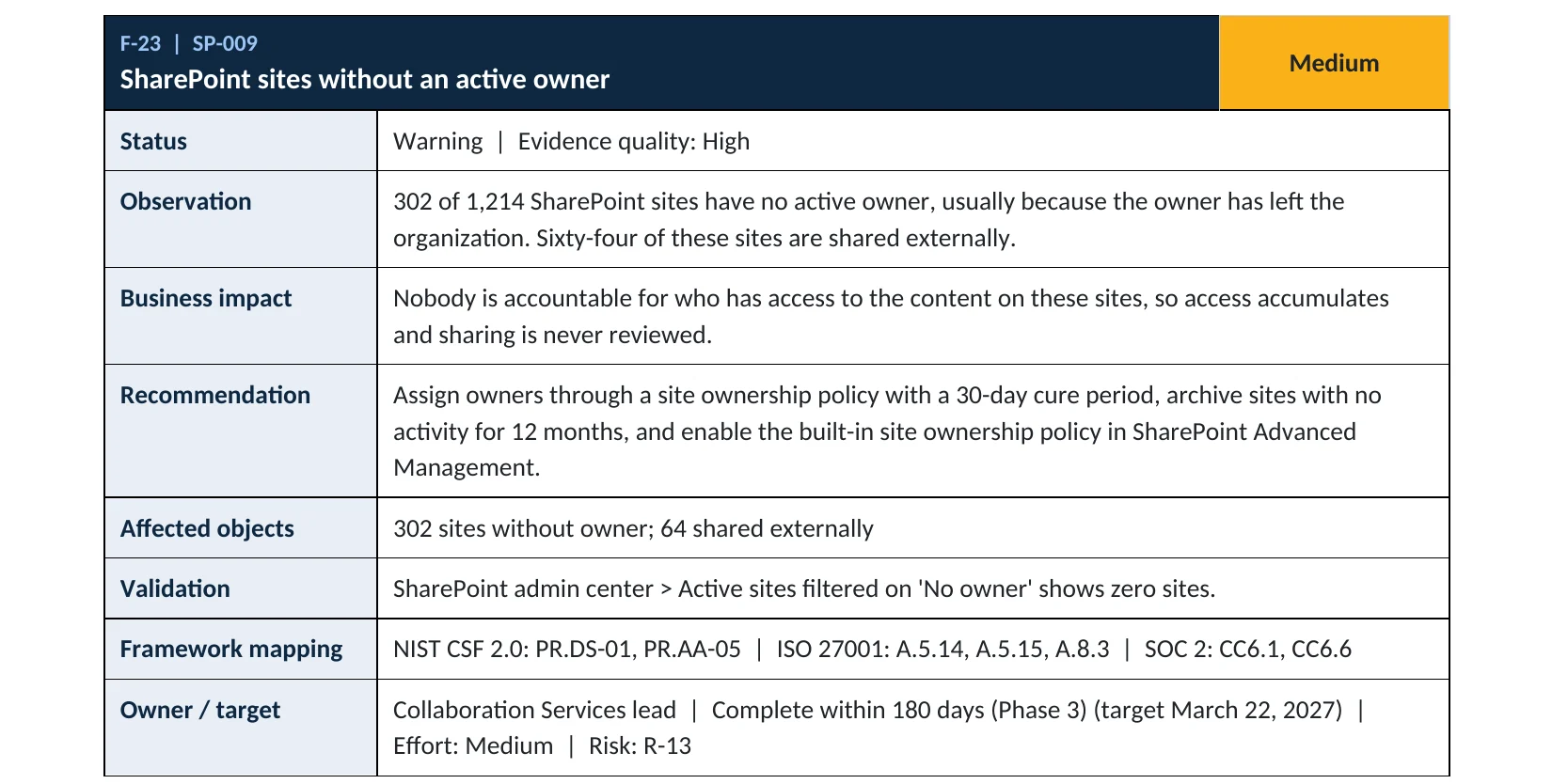
Site ownership is item SP-009 in our Microsoft 365 Security Audit.
What it is
What an ownerless site is
Every Team and most SharePoint sites are backed by a Microsoft 365 group. The group’s owners decide who gets in, approve sharing and clean up when a project ends. Microsoft explains that a team or group becomes ownerless when its owner’s account is deleted, and that groups need an owner to add or remove members and change settings (Microsoft Learn).
Nothing breaks when a site loses its owner, which is exactly why it goes unnoticed. The files stay, the members stay, guests stay, and sharing links keep working. Microsoft recommends at least two owners per group for continuity (Microsoft Learn).
Ways sites end up without an owner
| How it happens | Example | What’s left behind |
|---|---|---|
| Owner leaves the company | Their account is disabled or deleted | A site with members, guests and links, but no one to manage them |
| Only one owner | The creator was the only owner | Ownerless the day that person leaves |
| Project ends | A client or deal site nobody needs anymore | Old files still shared with people outside |
Why it matters
Access that nobody is responsible for keeps growing
- Owner leavesSite keeps its members and links.
- Months passGuests and links never reviewed.
- Owner assignedSomeone reviews and trims access.
- Old access usedWithout it: a former contractor or attacker gets in.
- Data exposedClient, finance or HR files.
Drawing: where an accountable owner breaks the path.
of organizations have stale but still-enabled “ghost” accounts, according to Varonis’s review of 1,000 real environments.
Source: Varonisof organizations have cloud data exposed to anonymous users, in the same Varonis study.
Source: Varonisowners per group: Microsoft’s recommendation, so a group stays managed when one owner leaves.
Source: Microsoft Learnmonthly notices from a site ownership policy before an ownerless site can be made read-only or archived.
Source: Microsoft LearnWays to keep sites owned
| Control | What it does | Effect |
|---|---|---|
| Two owners per site | One person leaving doesn’t orphan the site. | Prevents it |
| Ownerless group policy | Asks the most active members to accept ownership. | Fixes it automatically Premium, E3, E5 |
| Leaver checklist | Owner roles are handed over before an account is disabled. | Prevents it |
| Site ownership policy | Monthly checks, notices, then read-only or archive for ownerless sites. | Enforces it SharePoint Advanced Management |
| Leaving it alone | Sites and access accumulate. | Grows the risk |
Documented research
Research · Varonis, 2025
Stale access is the norm, not the exception
Varonis analyzed 1,000 real IT environments and found exposed sensitive cloud data in 90% of organizations and stale but enabled user accounts in 88%. Ownerless sites are one of the places that access is never reviewed.
Copilot readiness · Microsoft
Old content also feeds AI answers
Microsoft positions site ownership, inactive site and attestation policies as part of getting ready for Microsoft 365 Copilot, and notes that archived sites aren’t used by Copilot.
Source: Microsoft Learn
Neither is a breach report. They show why accountable owners matter for both security and AI tools that read your files.
What we find in audits
What this finding looks like in our audit reports
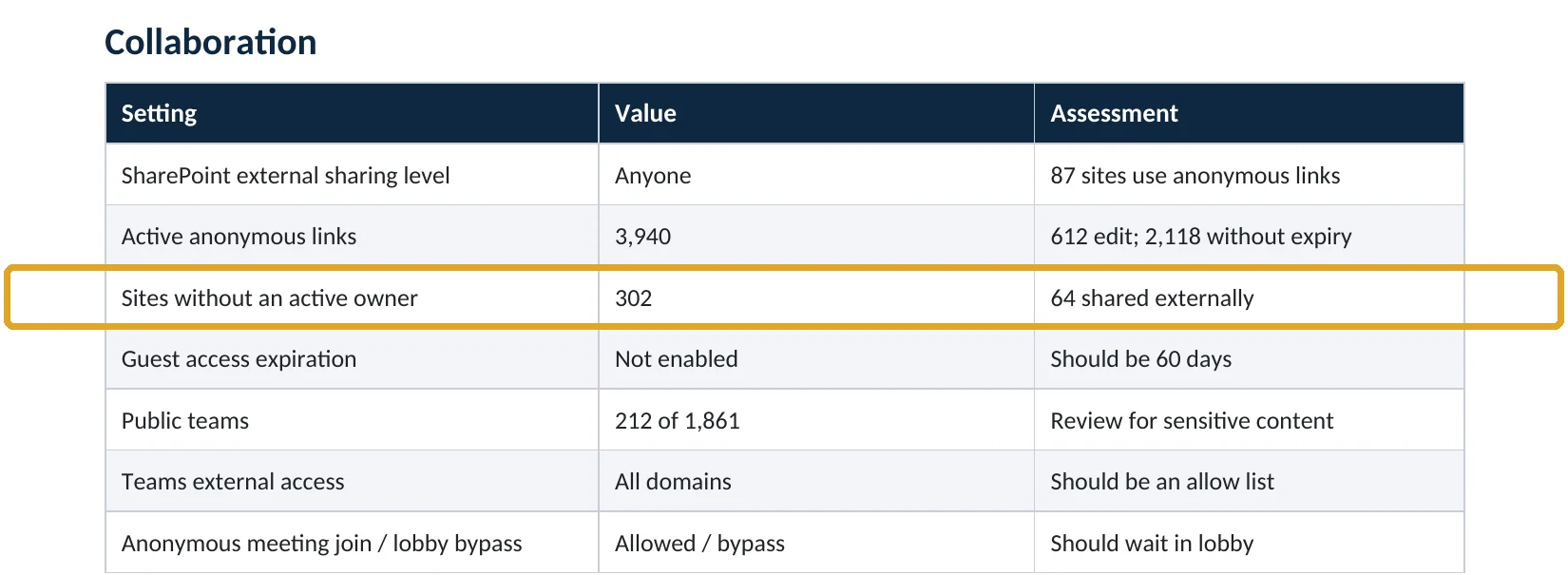
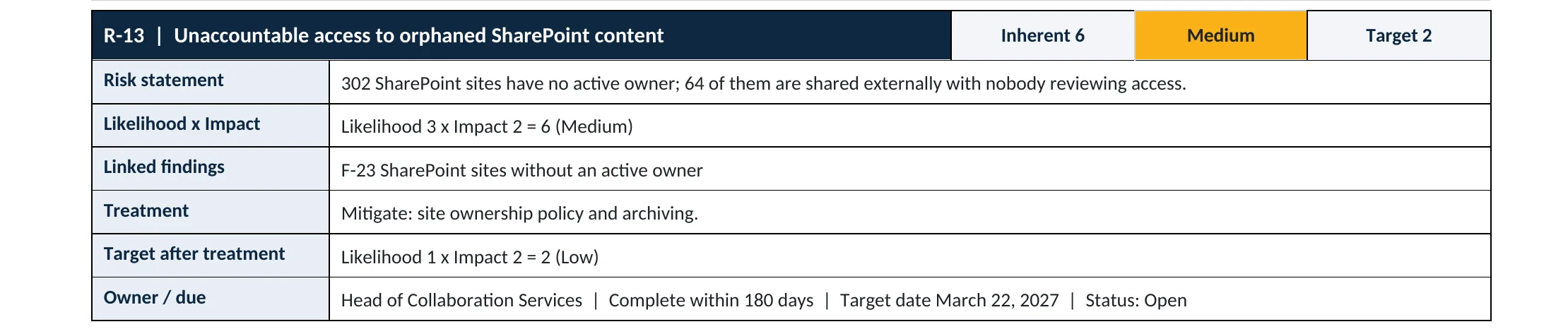
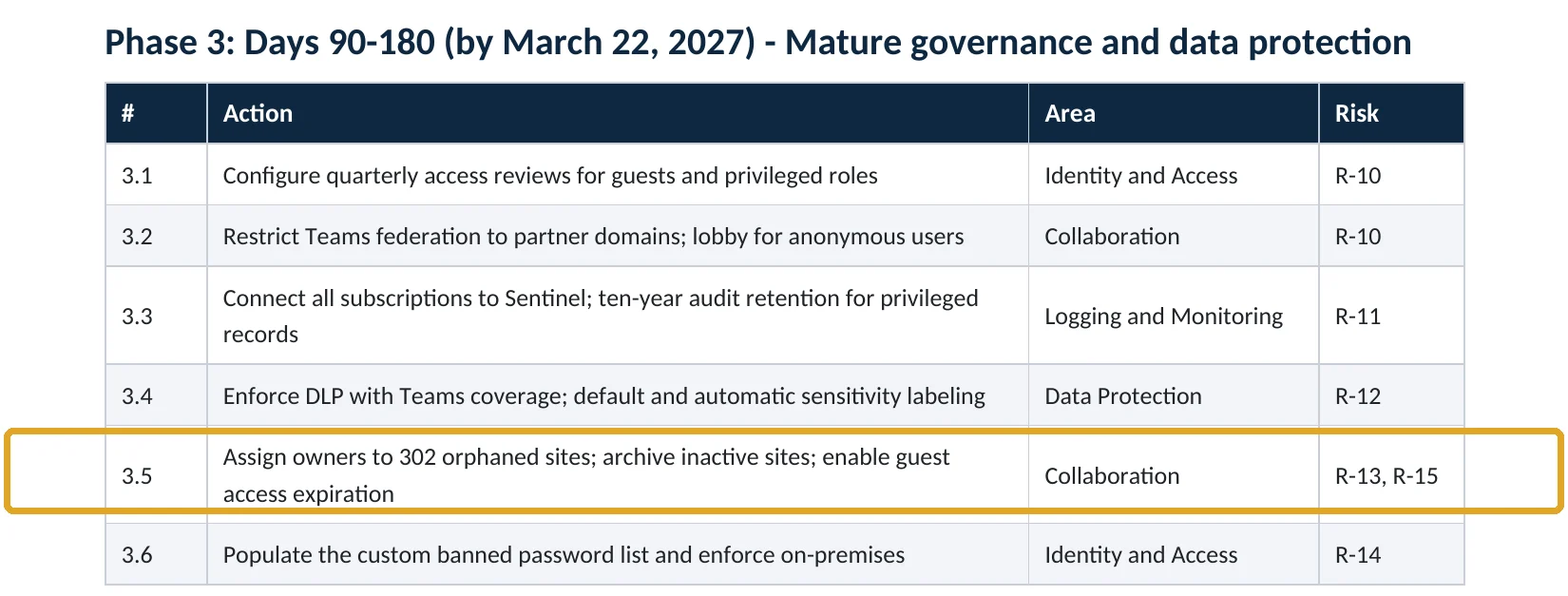
These are real pages from our published sample audit, written for a fictional company. Click any page to open it full size. The viewer follows the finding from the technical report to the risk register and the roadmap.
Your options
What each plan gives you
| Capability | Business Basic, Standard | Business Premium, E3, E5 | With SharePoint Advanced Management |
|---|---|---|---|
| Find ownerless groups and assign owners | Yes | Yes | Yes |
| Ownerless group policy (asks members to take over) | No | Yes | Yes |
| Site ownership policy with read-only and archive | No | No | Yes |
| Inactive site and site attestation policies | No | No | Yes |
SharePoint Advanced Management is included with Microsoft 365 Copilot licenses or available as a paid add-on (Microsoft Learn). Most small and mid-size companies can handle ownerless sites by hand plus the ownerless group policy.
How to check it yourself
Find ownerless sites, without changing anything
1. Ownerless groups and Teams
Microsoft added an Ownerless groups filter for exactly this (Microsoft Learn). Also look for groups whose only owner has a disabled account: they don’t show as ownerless, but nobody is managing them.
2. Sites shared outside
Read-only PowerShell: Microsoft 365 groups with no owners
Connect-MgGraph -Scopes "Group.Read.All"
Get-MgGroup -Filter "groupTypes/any(c:c eq 'Unified')" -All -ExpandProperty Owners |
  Where-Object { $_.Owners.Count -eq 0 } |
  Select-Object DisplayName, Mail, CreatedDateTime |
  Sort-Object CreatedDateTime
The command only reads groups; it changes nothing. Cross-check the list with your leavers: a group whose only owner left is ownerless in practice even if the account still exists.
How to configure
How to give every site an owner and keep it that way, step by step
All plans
Clean up ownerless sites
- Export the ownerless list and sort it by whether the site is shared externally: those come first.
- For each site, ask the department that uses it to name two owners.
- Add them in Teams & groups › Active teams & groups › the group › Owners.
- For sites nobody claims, check the content with the department head, then archive or delete them.
- Add “hand over site ownership” to your leaver checklist.
Business Premium, E3, E5
Turn on the ownerless group policy
- Open Microsoft 365 admin center › Settings › Org settings › Services › Microsoft 365 Groups.
- Select When there’s no owner, email and ask active group members to become an owner.
- Use Configure policy to choose how many active members to ask and for how many weeks.
- Pick the sender and customize the message, then target all groups or specific ones.
- Check back after the notification period: groups nobody claimed still need an owner from you.
What your users will notice
New owners get a notice and, with the policy on, active members may get weekly emails asking them to accept ownership. Microsoft notes that up to two members can accept, and notifications stop once someone does (Microsoft Learn).
How to undo it
Owners can be removed or changed at any time, and the policy can be switched off in the same settings page. Deleted Microsoft 365 groups can be restored within 30 days.
Proof and questions
How to prove it is fixed, and what to ask your IT provider
Evidence it is fixed
- The Ownerless groups filter shows no results.
- Every site shared externally has at least two active owners.
- The ownerless group policy is on (Business Premium, E3, E5).
- The leaver checklist includes handing over site and group ownership.
Questions for your IT provider
- How many of our Teams and SharePoint sites have no active owner?
- Which of those are shared with people outside the company?
- What happens to someone’s sites when they leave?
- Is the ownerless group policy turned on?
- When did we last archive sites nobody uses?
Signs it was already abused
If an ownerless site may have been misused, look for these signs
Red flags
- New guests or sharing links on a site whose owner left months ago.
- Large downloads or file access by a former employee’s or contractor’s account.
- A member suddenly made owner of a sensitive site without a request.
- Anonymous links on finance, HR or legal sites with no owner.
- Activity on a site nobody in the company says they use.
If you see these, remove the suspicious access first, then keep the audit logs. Our compromise investigation establishes what was accessed, and the Microsoft 365 Evidence Clock shows how long the records are kept.
Framework mapping
Where site ownership fits
| Framework | Where it fits |
|---|---|
| NIST CSF 2.0 | PR.DS-01: data at rest protected; PR.AA-05: access permissions managed and reviewed |
| ISO/IEC 27001:2022 | Annex A 5.9 Inventory of information and assets (with owners); 5.15 Access control; 8.3 Information access restriction |
| SOC 2 | CC6.1 logical access security; CC6.6 protection against outside threats |
Reviewed by
Written and reviewed by a practicing CISO

Ali Hassani, C|CISO, CISSP
Ali has more than 25 years of IT and cybersecurity experience and holds the Certified CISO and CISSP certifications along with Microsoft and Cisco credentials. He leads every OC Security Audit engagement from Irvine, on-site across Southern California and remotely nationwide. Every Microsoft 365 audit is read-only.
FAQ
Frequently asked questions about ownerless sites
What happens to a Team when its owner leaves?
It keeps working. Members can still chat and open files, but nobody can add or remove members or change settings, and nobody is reviewing who has access.
How many owners should a site have?
At least two. Microsoft recommends two owners per group so the group stays managed when one person leaves.
Can Microsoft 365 fix ownerless groups automatically?
Partly. The ownerless group policy (Business Premium, E3, E5) emails the most active members and asks them to accept ownership. If nobody accepts, an admin still has to assign one.
Should we just delete ownerless sites?
Not without checking. Some hold records you must keep. Ask the department that used the site, then archive or delete it.
What is SharePoint Advanced Management?
A set of SharePoint governance tools, including site ownership, inactive site and attestation policies. It's included with Microsoft 365 Copilot or sold as an add-on.
Does this matter for Copilot?
Yes. Copilot can surface content users can access. Microsoft recommends site lifecycle policies as part of getting ready for Copilot, and archived sites aren't used by it.
Next step
Know who’s responsible for every site
Prevent
Microsoft 365 Security Audit
$3,500 fixed
About 200 read-only checks across sign-in protection, SharePoint and Teams sharing, guests, admin roles, email, data protection, logging and devices, for any tenant size, with four reports and a remediation roadmap.
Respond
Microsoft 365 & Azure Compromise Investigation
From $3,500
For when someone accessed files through a site nobody was watching: we establish what was opened and shared.
Want to see the deliverables first? Open the Microsoft 365 audit sample report or browse all our sample reports.

Service
Microsoft 365 Security Audit
The fixed-price audit that checks this item and about 200 more.
See the audit ›
Sample
Sample audit report
Every page of the five deliverables, with fictional data.
View the sample ›
Service
Compromise Investigation
When an account or mailbox may already be in an attacker’s hands.
See the investigation ›Related reading: How to turn off Anyone links · How to review and remove guest accounts · How to make SharePoint guest access expire · SharePoint, OneDrive and Teams security guide
Sources
Sources used on this page
- Microsoft Learn, Manage ownerless Microsoft 365 groups and teams
- Microsoft Learn, Manage groups in Microsoft Graph (group ownership)
- Microsoft Learn, SharePoint site lifecycle management
- Microsoft Learn, Create a SharePoint site ownership policy
- Microsoft Learn, What is SharePoint Advanced Management?
- Microsoft Learn, SharePoint service description (SharePoint Advanced Management)
- Microsoft Learn, Get ready for Microsoft 365 Copilot with SharePoint Advanced Management
- Varonis, 2025 State of Data Security Report
- Varonis blog, Data security report reveals 99% of orgs have sensitive information exposed to AI
This guide is general information, not a guarantee of protection or legal advice. Microsoft changes its admin centers often: menu names and steps were checked against Microsoft Learn on November 20, 2026. Drawings are simplified and are not screenshots of Microsoft products. Sample findings come from fictional companies. Incidents are described as reported by the cited sources; OC Security Audit was not involved in them. Questions? Call 949-777-5567 or email support@ocsecurityaudit.com.