

LIBRARY 1.13Microsoft 365 Security Library
How to Review and Remove Guest Accounts in Microsoft 365
Every partner, contractor and client you share a Team or a file with becomes a guest in your tenant, and most of them never leave. Here is how to find the stale ones, remove them safely and keep it that way.
Reviewed by Ali Hassani, C|CISO, CISSP · Last verified November 20, 2026

Green: every plan can limit who invites guests, restrict what guests see, and list and remove guests by hand. Blue: recurring access reviews that remove inactive guests automatically need Microsoft Entra ID P2 or Microsoft Entra ID Governance (Microsoft Learn).
In one minute
- Limit who can invite guests to admins and the Guest Inviter role.
- List every guest with their last sign-in date and who invited them.
- Remove guests who never accepted or haven’t signed in for 90 days or more, after a quick check with the owner.
- Repeat every quarter, by hand or with an automatic access review.
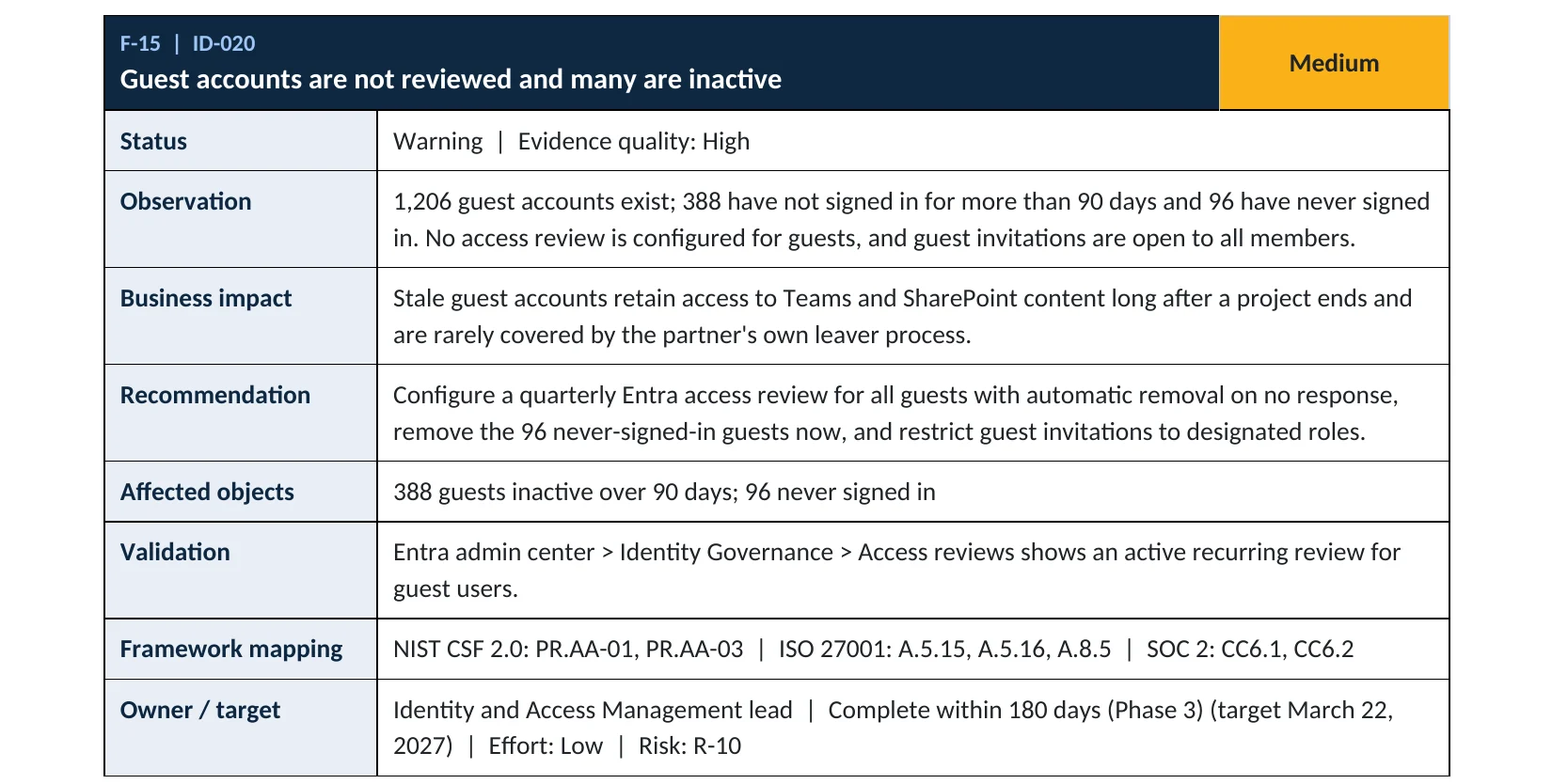
Guest account review is item ID-020 in our Microsoft 365 Security Audit.
What it is
What a guest account is, and why they pile up
When someone shares a Team, a SharePoint site or a file with a person outside your company, Microsoft 365 creates a guest account (a Microsoft Entra B2B user) in your tenant. The guest signs in with their own company or personal account, and your tenant keeps a record of them with whatever access they were given.
The problem is the second row. Microsoft notes that guest accounts become stale when collaboration ends and nobody cleans them up (Microsoft Learn). An invitation doesn’t expire (Microsoft Learn), and the partner’s own leaver process never touches the guest account in your tenant. Whoever controls that outside mailbox next, including an attacker, inherits the access.
Two settings decide how fast guests pile up
| Setting | Default | Safer choice |
|---|---|---|
| Guest invite settings (who can invite) | Anyone in the organization can invite guests, including guests and non-admins | Only admins and users with the Guest Inviter role |
| Guest user access (what guests can see) | Limited access to properties and memberships of directory objects | Restricted to their own directory object |
Sources: Microsoft Learn, external collaboration settings and default user permissions.
Why it matters
A forgotten guest is a door you no longer watch
- Partner mailboxPhished, or the person left their company.
- Guest sign-inStill valid in your tenant.
- Quarterly reviewThe stale guest is removed before this happens.
- Teams and filesWithout it: old projects are readable.
- Invite more guestsIf anyone can invite, the attacker adds friends.
Drawing: where a guest review breaks the path.
can invite guests by default, including guests themselves, unless you change the guest invite settings.
Source: Microsoft Learnon guest invitations: Microsoft states that an invitation of a user doesn’t expire.
Source: Microsoft Learndays of inactivity: the threshold in Microsoft’s example multi-stage guest review, with the option to block and then delete guests who don’t respond.
Source: Microsoft Learndays: an inactive guest removed by an access review is blocked for 30 days, then deleted, and can be restored for 30 days after deletion.
Source: Microsoft LearnWays to keep guests under control
| Control | What it does | Effect |
|---|---|---|
| Restrict who can invite | Only admins and the Guest Inviter role can add guests. | Stops growth |
| Quarterly review | Guests who no longer need access are found and removed. | Removes stale access |
| Restrict guest directory access | Guests see only their own profile, not your staff list. | Limits reconnaissance |
| Sharing link and site expiry | Guest access to files and sites ends after a set time. | Helps Covers files, not the account |
| Leaving it to project owners | Owners remove guests when they remember. | Rarely happens |
Documented research
Research · BeyondTrust, 2025
“Restless Guests” in Microsoft Entra
BeyondTrust researchers showed that a guest with the right billing role in their own tenant can create Azure subscriptions inside the tenant they were invited to and become Owner of them, without any explicit permission there. Microsoft described the behavior as intended.
Source: BeyondTrust · CSO Online · Hackread
We were not involved in this research. Its first recommendation matches the advice on this page: review guest accounts regularly and remove the ones you don’t need.
What we find in audits
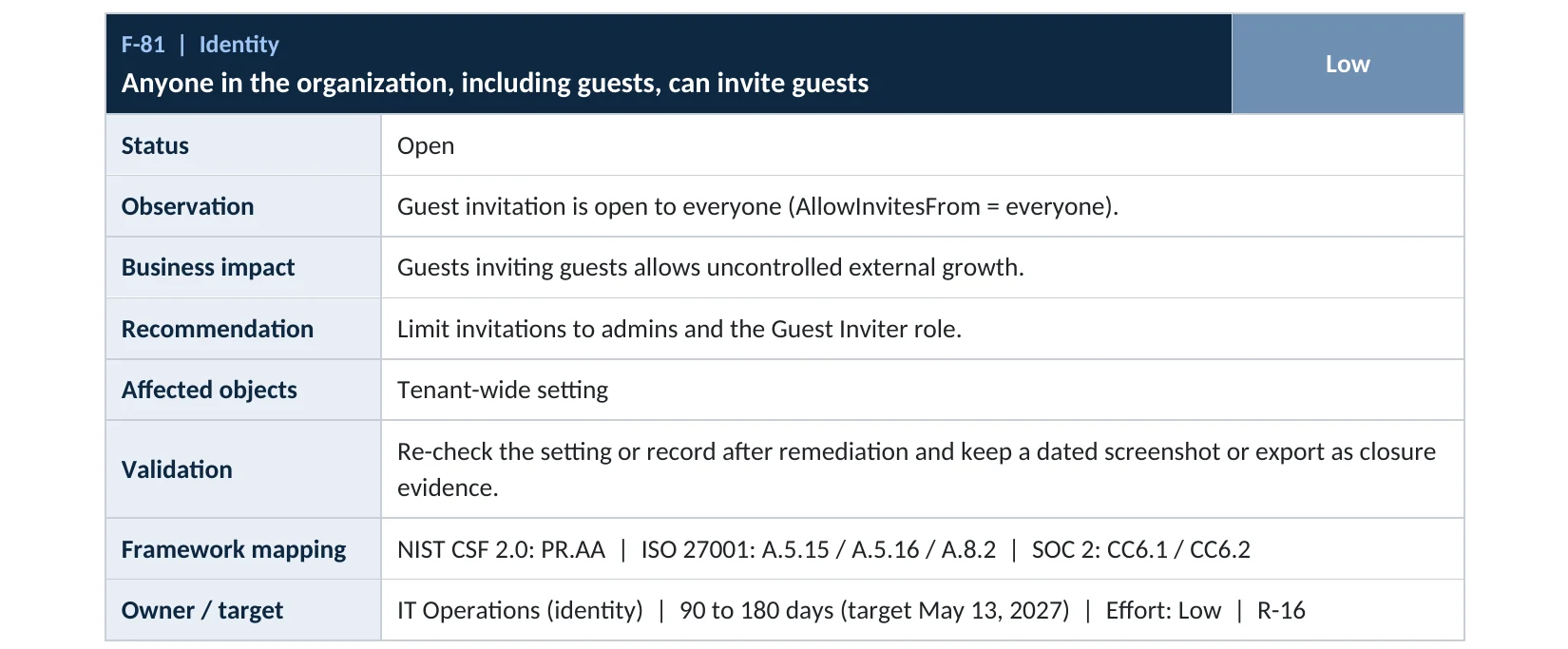
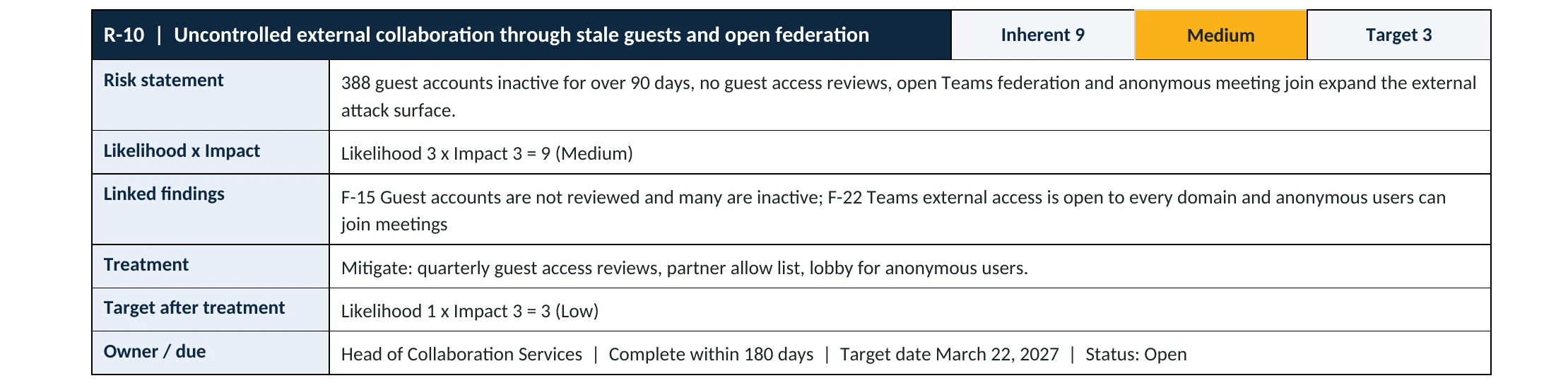
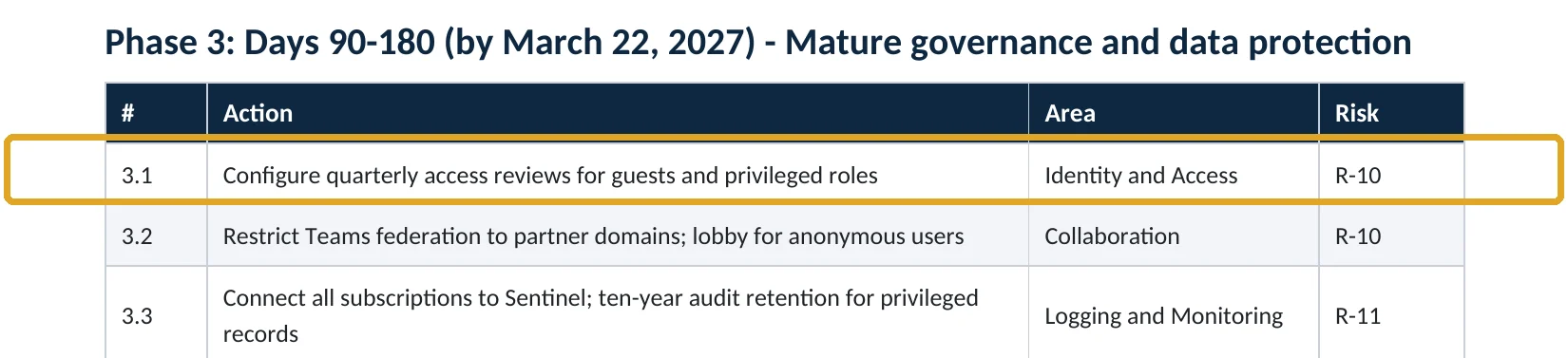
What this finding looks like in our audit reports
These are real pages from our published sample reports, written for fictional companies. Click any page to open it full size. The viewer follows the finding from the technical report to the risk register and the roadmap.
Your options
What each plan gives you
| Capability | Business Basic, Standard, Premium, E3 | E5 or Entra ID P2 / ID Governance |
|---|---|---|
| Restrict who can invite guests | Yes | Yes |
| Restrict guest directory access | Yes | Yes |
| List guests and remove them by hand | Yes | Yes |
| Last sign-in date for each guest | Sign-in activity needs Entra ID P1 (Business Premium, E3) | Yes |
| Recurring access reviews with automatic removal | No | Yes |
Without automatic reviews, a manual quarterly review works fine for most small and mid-size companies: export the guest list, ask each owner about the guests on their projects, and remove the rest.
How to check it yourself
Count your guests and see who can invite, without changing anything
1. Who can invite guests today?
Look at Guest invite settings. If it says Anyone in the organization can invite guest users including guests and non-admins, anyone can add guests.
2. How many guests do you have, and when did they last sign in?
Add the Created date and Last sign-in columns, then download the list. Look for guests who never accepted the invitation, and guests with no sign-in for 90 days or more.
Read-only PowerShell: guests with last sign-in and creation date
Connect-MgGraph -Scopes "User.Read.All","AuditLog.Read.All"
Get-MgUser -Filter "userType eq 'Guest'" -All -Property DisplayName,Mail,CreatedDateTime,ExternalUserState,SignInActivity |
  Select-Object DisplayName, Mail, CreatedDateTime, ExternalUserState,
    @{n="LastSignIn";e={$_.SignInActivity.LastSignInDateTime}} |
  Sort-Object LastSignIn |
  Export-Csv .\guests.csv -NoTypeInformation
The command only reads accounts; it changes nothing. ExternalUserState shows PendingAcceptance for guests who never accepted. Reading sign-in activity requires Microsoft Entra ID P1 or higher.
How to configure
How to clean up guests and keep it that way, step by step
All plans
Limit invitations and remove stale guests
- Open Entra ID › External Identities › External collaboration settings.
- Set Guest invite settings to Only users assigned to specific admin roles can invite guest users, and give the Guest Inviter role to the people who manage partners.
- Set Guest user access to Guest user access is restricted to properties and memberships of their own directory objects.
- Send each project owner the list of their guests and ask: keep or remove?
- Block sign-in for the guests marked remove, wait two weeks for complaints, then delete them.
E5, Entra ID P2 or ID Governance
Automate the quarterly review
- Open Identity Governance › Access reviews › New access review.
- Review Teams + Groups, scope Guest users only, and tick Inactive users (on tenant level) only with your threshold, for example 90 days.
- Set the recurrence to quarterly and the reviewers to group owners.
- Under completion settings, choose Auto apply results, If reviewers don’t respond: Remove access, and Block user from signing in for 30 days, then remove user from the tenant.
- Run the first review and read the results before the next one is applied.
What your users will notice
Staff who used to invite partners on their own now ask an admin or a Guest Inviter. Active partners notice nothing. A guest removed by mistake can be invited again, or restored within 30 days of deletion.
How to undo it
Set the guest invite setting back, or restore a deleted guest from Entra ID › Users › Deleted users within 30 days. A guest whose sign-in you blocked can be unblocked at any time.
Proof and questions
How to prove it is fixed, and what to ask your IT provider
Evidence it is fixed
- Guest invitations are limited to admins and the Guest Inviter role.
- Guests can see only their own directory object.
- No guest has gone more than 90 days without signing in, unless an owner approved it.
- A dated record (or an access review) shows the last quarterly guest review.
Questions for your IT provider
- How many guest accounts do we have, and how many haven’t signed in for 90 days?
- Who is allowed to invite guests today?
- When did we last remove guests, and who decided?
- Do any guests hold admin roles or Azure access?
- Who is told when a guest is added?
Signs it was already abused
If a guest account may have been misused, look for these signs
Red flags
- A guest that was inactive for months suddenly signs in, especially from an unfamiliar country.
- Guests inviting other guests, or a burst of new guest invitations from one account.
- A guest holding an admin role, or owning an Azure subscription you didn’t create.
- Large downloads from SharePoint or OneDrive by a guest account.
- Guests added to Teams or groups that hold finance, HR or legal files.
If you see these, block the guest’s sign-in first, then keep the audit and sign-in logs before they expire. Our compromise investigation establishes what the account accessed, and the Microsoft 365 Evidence Clock shows how long those logs are kept.
Framework mapping
Where guest account reviews fit
| Framework | Where it fits |
|---|---|
| NIST CSF 2.0 | PR.AA-01: identities and credentials managed; PR.AA-05: access permissions managed and reviewed |
| ISO/IEC 27001:2022 | Annex A 5.15 Access control; 5.16 Identity management; 5.18 Access rights |
| SOC 2 | CC6.1 logical access security; CC6.2 user registration and removal |
| CISA SCuBA (Entra ID) | MS.AAD.8: guest access restricted; only the Guest Inviter role invites guests |
Reviewed by
Written and reviewed by a practicing CISO

Ali Hassani, C|CISO, CISSP
Ali has more than 25 years of IT and cybersecurity experience and holds the Certified CISO and CISSP certifications along with Microsoft and Cisco credentials. He leads every OC Security Audit engagement from Irvine, on-site across Southern California and remotely nationwide. Every Microsoft 365 audit is read-only.
FAQ
Frequently asked questions about guest accounts
Do guest accounts cost money?
Most guest use is covered at no charge, but some Microsoft Entra ID features for guests are billed by monthly active users. Removing guests you don't need is good hygiene either way.
Will removing a guest delete the files they shared with us?
No. Files a guest uploaded to your Teams or SharePoint stay where they are. The guest simply loses access.
How often should we review guests?
Quarterly is a good default. Microsoft's example multi-stage review uses 180 days of inactivity; many companies use 90 days.
What about guests who never accepted the invitation?
They are the easiest to remove: they never used the access. In Microsoft Graph they show as PendingAcceptance.
Do I need Entra ID P2 to review guests?
Only for automatic, recurring access reviews. Every plan can restrict invitations and remove guests by hand.
Can a guest be an administrator?
Yes, Microsoft notes that guests can still be added to admin roles. Check that none of your guests hold one unless there is a documented reason.
Next step
Know who outside your company can get in
Prevent
Microsoft 365 Security Audit
$3,500 fixed
About 200 read-only checks across sign-in protection, identity, guests, admin roles, email, sharing, data protection, logging and devices, for any tenant size, with four reports and a remediation roadmap.
Respond
Microsoft 365 & Azure Compromise Investigation
From $3,500
For when a guest account was used in ways you can’t explain: we establish what it accessed and what it changed.
Want to see the deliverables first? Open the Microsoft 365 audit sample report or browse all our sample reports.

Service
Microsoft 365 Security Audit
The fixed-price audit that checks this item and about 200 more.
See the audit ›
Service
Microsoft Entra ID Security Audit
A deeper look at identities, Conditional Access, roles and apps.
See the Entra ID audit ›
Service
Compromise Investigation
When an account or mailbox may already be in an attacker’s hands.
See the investigation ›Related reading: How to turn off Anyone links · How to restrict user consent to apps · How many Global Administrators you should have · Microsoft 365 identity, MFA and Conditional Access guide
Sources
Sources used on this page
- Microsoft Learn, Monitor and clean up stale guest accounts using access reviews
- Microsoft Learn, Configure external collaboration settings for B2B
- Microsoft Learn, Add and manage B2B collaboration users
- Microsoft Learn, Default user permissions in Microsoft Entra ID
- Microsoft Learn, How to detect and investigate inactive user accounts
- Microsoft Learn, Manage guest access with access reviews
- Microsoft Learn, Using multi-stage access reviews
- CISA, M365 Secure Configuration Baseline for Microsoft Entra ID (SCuBA)
- BeyondTrust, Restless Guests: the true Entra B2B guest threat model (2025)
- CSO Online, Microsoft Entra’s billing roles pose privilege escalation risks in Azure (2025)
- Hackread, Microsoft Entra design lets guest users gain Azure control (2025)
This guide is general information, not a guarantee of protection or legal advice. Microsoft changes its admin centers often: menu names and steps were checked against Microsoft Learn on November 20, 2026. Drawings are simplified and are not screenshots of Microsoft products. Sample findings come from fictional companies. Incidents are described as reported by the cited sources; OC Security Audit was not involved in them. Questions? Call 949-777-5567 or email support@ocsecurityaudit.com.