

LIBRARY 1.9Microsoft 365 Security Library
How to Move Conditional Access Policies from Report-Only to On
A policy in report-only mode only watches. It never asks for MFA and never blocks anyone. Here is how to read what it saw, switch it on safely and keep it on.
Reviewed by Ali Hassani, C|CISO, CISSP · Last verified November 20, 2026

Conditional Access, and with it report-only mode, needs Microsoft Entra ID P1, included in Microsoft 365 Business Premium, E3 and E5. Business Basic and Business Standard use security defaults instead, which are either on or off (Microsoft Learn).
In one minute
- List every policy that is in report-only or off, and how long it has been that way.
- Read each one’s results for the last month: who would have been blocked or prompted, and why.
- Fix the exclusions, then switch it on for a pilot group, then for everyone.
- Delete or document every policy left off, and watch the audit log for policies switched back.
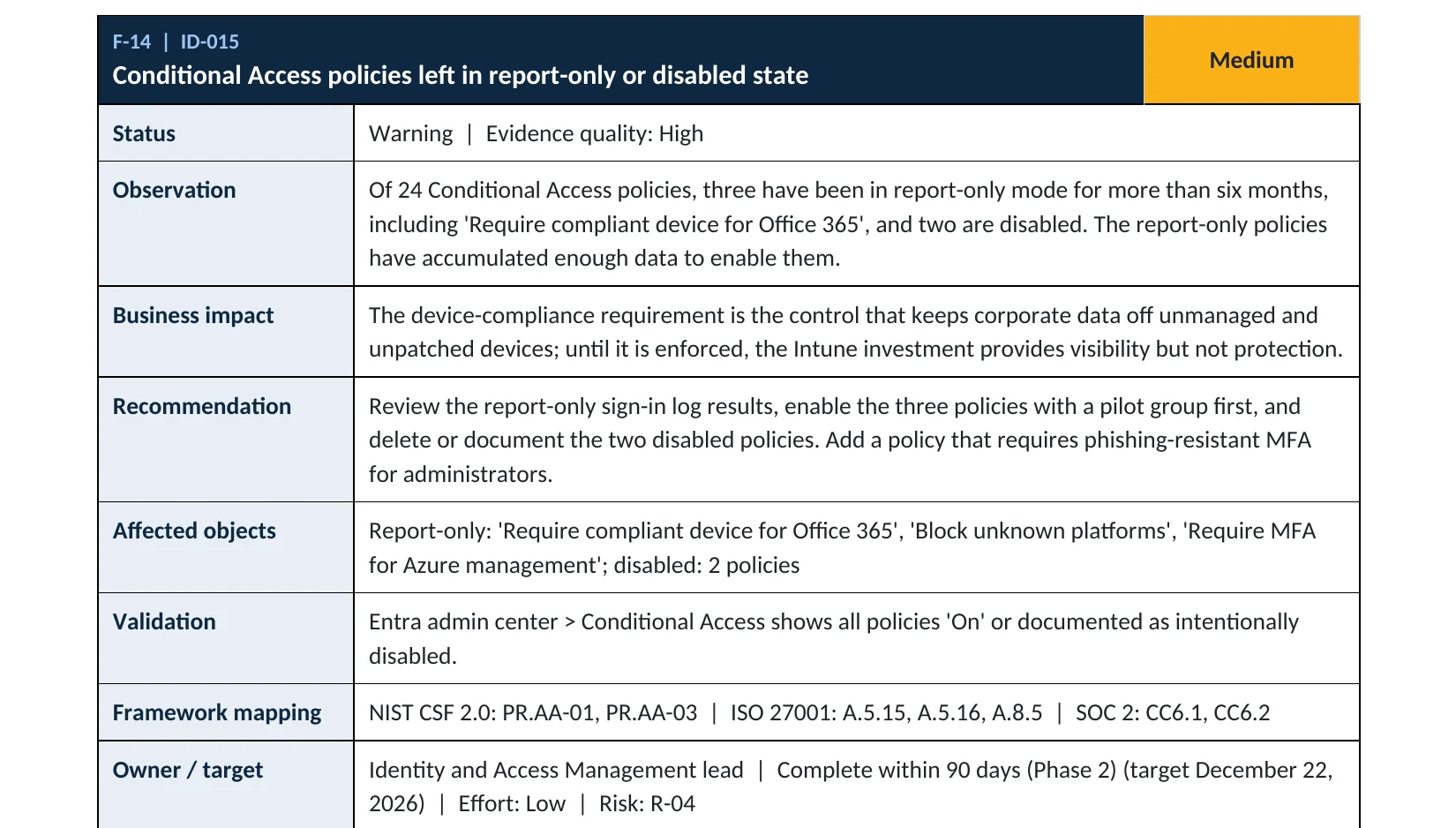
Conditional Access policy state is item ID-015 in our Microsoft 365 Security Audit.
What it is
What report-only mode does, and what it doesn’t
Every Conditional Access policy has one of three states: On, Off or Report-only. In report-only mode, Microsoft Entra ID evaluates the policy at every sign-in and writes down what it would have done, but it doesn’t enforce it. Users are not asked for MFA, devices are not checked and nobody is blocked (Microsoft Learn).
That makes report-only the right way to test a policy before switching it on. CISA’s secure configuration baseline for Microsoft Entra ID recommends exactly that: start new policies in report-only, test them, then enforce them (CISA SCuBA). The problem is a test that never ends. A policy that stays in report-only for months looks finished in the admin center while giving no protection at all.
The four results a report-only policy can log
| Result | What it means |
|---|---|
| Report-only: Success | The sign-in already met the policy, for example MFA was already done. |
| Report-only: Failure | The policy would have blocked this sign-in, for example a non-compliant device. |
| Report-only: User action required | The user would have been prompted, for example for MFA or terms of use. |
| Report-only: Not applied | The policy didn’t apply, for example the user was excluded. |
Why it matters
A policy that is never switched on is a gap, not a control
- Password stolenPhishing, a spray or an old leak.
- Sign-inFrom a personal laptop in another country.
- Policy OnMFA is required, or the device is blocked.
- Report-onlyThe sign-in is only logged, then allowed.
- Mailbox and filesRead, forwarded, downloaded.
Drawing: the same attack against an enforced policy and a report-only policy.
reduction in the risk of compromise from requiring MFA, according to Microsoft. A report-only MFA policy gives none of it.
Source: Microsoft Learnidentity attacks per day seen by Microsoft, according to its Digital Defense Report 2024.
Source: ITPro on Microsoft MDDR 2024days: the earliest Microsoft switches on its own Microsoft-managed policies if they are left in report-only, with notice two weeks before.
Source: Microsoft Learndays between the first sign-in and ransomware at Change Healthcare, through a remote access portal without MFA.
Source: Healthcare DivePolicy states, and what each one protects
| State | What happens at sign-in | Protection |
|---|---|---|
| On | The policy is enforced: MFA is asked, devices are checked, access is blocked when conditions are not met. | Protects |
| Report-only | The policy is evaluated and logged. Nothing is enforced. | None For testing only |
| Off | The policy is ignored. | None |
Documented cases
Ransomware · Healthcare, 2024
A required control that wasn’t in place
UnitedHealth Group’s CEO testified that attackers used stolen credentials to sign in to a Change Healthcare remote access portal that did not have MFA, then moved through the network; ransomware followed nine days later. Our Change Healthcare briefing covers the lessons.
Source: Healthcare Dive
Nation-state · Microsoft, 2024
One account outside the enforced policies
Microsoft reported that Midnight Blizzard got in through a legacy, non-production test tenant account that did not have MFA enabled, and from there reached a small number of corporate mailboxes, including senior leadership.
Source: Microsoft Security Blog
We were not involved in either case. Neither involved a report-only policy. Both show what happens when a protection everyone assumes is in place isn’t enforced on the account the attacker uses.
What we find in audits
What this finding looks like in our audit reports
These are real pages from our published Microsoft 365 sample audit, written for a fictional company. Click any page to open it full size. The same finding shows up in four places, because each report answers a different question.
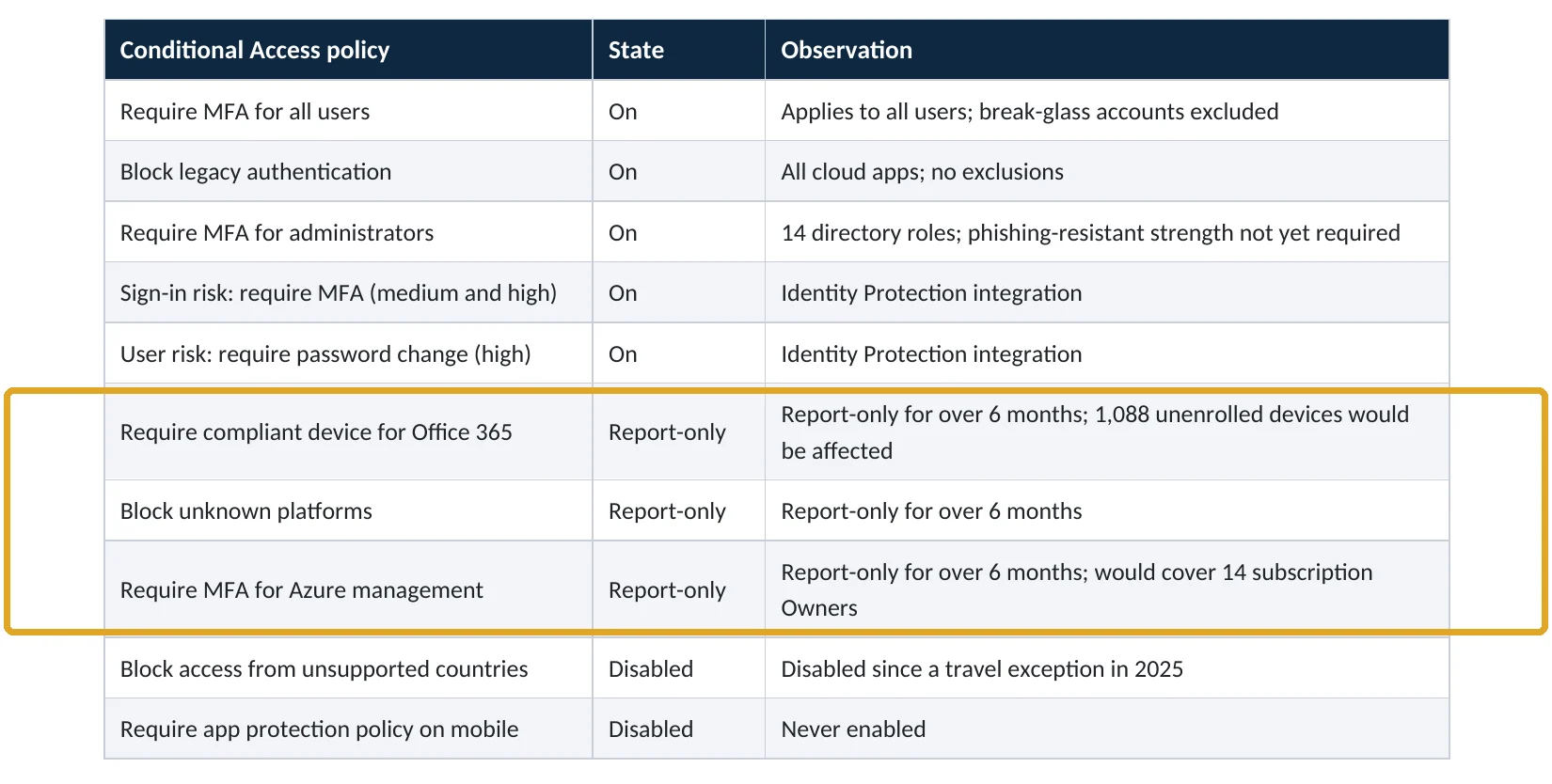
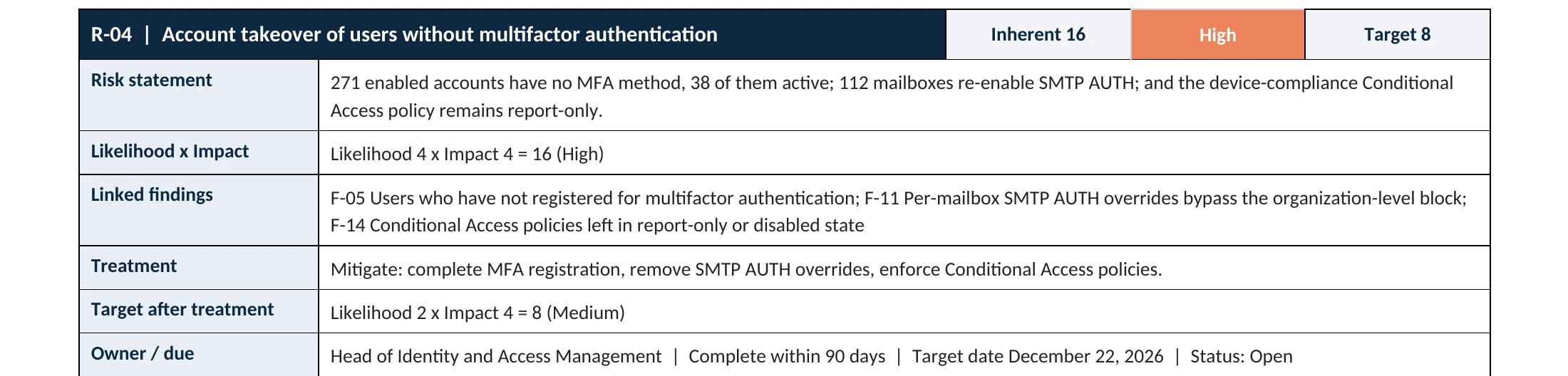
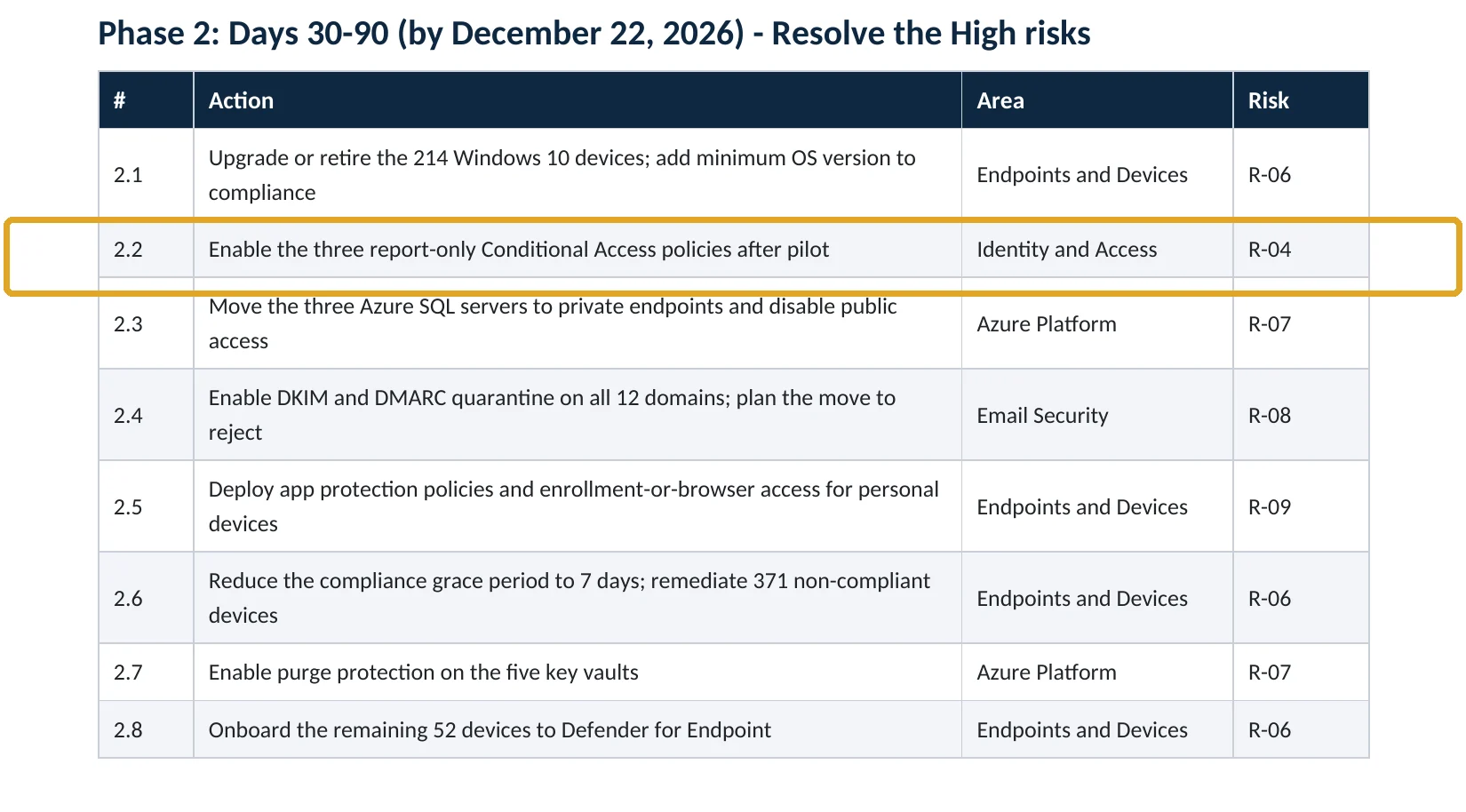
Checking every policy’s state, exclusions and gaps is also the core of our Conditional Access policy review.
Your options
What each plan gives you
| What you need | Business Basic / Standard | Business Premium, Microsoft 365 E3, E5 |
|---|---|---|
| Conditional Access policies | Not available; security defaults instead | Available (Entra ID P1) |
| Report-only mode and policy impact | Not available | Available in the Entra admin center |
| What If tool | Not available | Available |
| Insights and reporting workbook | Not available | Needs a Log Analytics workspace (Azure usage charges may apply) |
| Microsoft-managed policies | Not created | Created in report-only, switched on by Microsoft later |
If you have Business Standard and want report-only testing, the honest answer is that you are choosing between security defaults (on for everyone, no exceptions) and an upgrade to Business Premium. Security defaults with no exceptions are better than Conditional Access policies that are never switched on.
How to check it yourself
Find every policy that isn’t on, without changing anything
1. Which policies are report-only or off?
Filter by Report-only, then by Off. Note each policy’s name and its Modified date. A policy unchanged in report-only for more than a month or two usually has enough data to decide. Policies with Microsoft in the Created by column are Microsoft-managed (Microsoft Learn).
2. What would each policy have done?
The policy impact view shows how many interactive sign-ins the policy would have blocked or prompted, with sample sign-ins. You can also open any sign-in in Monitoring & health › Sign-in logs and read its Report-only tab (Microsoft Learn).
Read-only PowerShell: every policy that is not on
Connect-MgGraph -Scopes "Policy.Read.All"
Get-MgIdentityConditionalAccessPolicy -All |
  Where-Object { $_.State -ne "enabled" } |
  Sort-Object ModifiedDateTime |
  Select-Object DisplayName, State, CreatedDateTime, ModifiedDateTime
In Microsoft Graph, report-only shows as enabledForReportingButNotEnforced and off as disabled. The command only reads policies; it changes nothing.
How to configure
How to switch a report-only policy on, step by step
Before you switch
Read the results and fix the gaps
- Confirm your two emergency access (break-glass) accounts are excluded from the policy (Microsoft Learn).
- Open Policy impact for the last month and list every user with Failure or User action required.
- Sort them: real people who need to register MFA or enroll a device, service accounts that need their own policy, and sign-ins that should be blocked.
- For device-compliance policies, enroll or fix the non-compliant devices first, and exclude macOS, iOS and Android while the policy stays in report-only, as Microsoft advises.
- Use the What If tool to test a few named users, such as an executive and a shared device.
Switch on
Pilot first, then everyone
- Tell the pilot group what they will see: an MFA prompt, a device check or a block.
- Duplicate the policy, scope the copy to a pilot group (IT staff first), and set it to On.
- Watch the sign-in logs for that group for about a week and fix what fails.
- Open the original policy and move Enable policy from Report-only to On, then save.
- Delete the pilot copy, then delete or document every policy left Off.
What your users will notice
Whatever the policy requires: an MFA prompt, a request to use a managed or compliant device, or a block from an unsupported platform or location. The report-only results tell you in advance who those people are, so the help desk can call them first.
How to undo it
If a policy blocks people it shouldn’t, move it back to Report-only and save. New sign-ins are then only logged again. Fix the exclusion and try again with the pilot group.
Proof and questions
How to prove it is fixed, and what to ask your IT provider
Evidence it is fixed
- Every Conditional Access policy is On, or its Off or report-only state is documented with an owner and an end date.
- No policy has been in report-only for more than about a month without a decision.
- Sign-in logs show the policy as Success or Failure, not report-only, for normal users.
- Emergency access accounts are excluded from every policy and monitored.
Questions for your IT provider
- Which of our Conditional Access policies are not on, and since when?
- What did the report-only results show, and what is stopping us from switching them on?
- Who is notified if a policy is turned off or moved back to report-only?
- Are Microsoft-managed policies scheduled to switch on in our tenant, and are we ready?
- Which accounts are excluded from our policies, and why?
Signs it was already abused
If an attacker used the gap, look for these signs
Red flags
- Report-only: Failure results for sign-ins from unfamiliar countries, devices or apps: the policy would have blocked them, and they got in.
- Successful sign-ins from unmanaged devices to accounts with access to finance or sensitive files.
- Audit log entries where a policy was switched from On to Report-only or Off, or an exclusion was added, by someone you can’t account for.
- New inbox rules, forwarding or MFA methods soon after one of those sign-ins.
- Users reporting MFA prompts or sign-in alerts they did not start.
To see changes to policies, open Entra ID › Monitoring & health › Audit logs and set Service to Conditional Access. If you find these signs, keep the logs before they expire. Our compromise investigation establishes which accounts were entered and what was done, and the Microsoft 365 Evidence Clock shows how long sign-in and audit logs are kept.
Framework mapping
Where Conditional Access enforcement fits
| Framework | Where it fits |
|---|---|
| NIST CSF 2.0 | PR.AA-01: identities and credentials managed; PR.AA-03: users, services and hardware authenticated |
| ISO/IEC 27001:2022 | Annex A 5.15 Access control; 5.16 Identity management; 8.5 Secure authentication |
| SOC 2 | CC6.1 logical access security; CC6.2 user registration and authorization |
| CISA SCuBA (Entra ID) | Conditional Access common guidance: test in report-only, then enforce |
Reviewed by
Written and reviewed by a practicing CISO

Ali Hassani, C|CISO, CISSP
Ali has more than 25 years of IT and cybersecurity experience and holds the Certified CISO and CISSP certifications along with Microsoft and Cisco credentials. He leads every OC Security Audit engagement from Irvine, on-site across Southern California and remotely nationwide. Every Microsoft 365 audit is read-only.
FAQ
Frequently asked questions about report-only mode
Does report-only mode protect my users?
No. Microsoft evaluates report-only policies at sign-in and logs what they would have done, but it doesn't enforce them. Users are not prompted for MFA and are not blocked.
How long should a policy stay in report-only?
Long enough to see normal use, usually one to four weeks, including month-end and travel. Microsoft gives its own managed policies at least 30 days before switching them on. A policy left for months is a decision that hasn't been made.
Can a report-only policy affect users at all?
Yes, in one case. Microsoft warns that report-only policies that require a compliant device can prompt users on macOS, iOS and Android to pick a device certificate. Exclude those platforms while the policy stays in report-only.
Why did a new policy appear in our tenant that we didn't create?
Microsoft creates Microsoft-managed Conditional Access policies in eligible tenants in report-only mode, then switches them on no sooner than 30 days later, with notice in the message center. You can turn them on sooner or set them to off, but you can't rename or delete them.
Do I need Business Premium for Conditional Access?
You need Microsoft Entra ID P1, which is included in Microsoft 365 Business Premium, E3 and E5. Business Basic and Business Standard use security defaults instead.
What should we do with policies that are off?
Decide. Either delete them, or document why they exist, who owns them and when they will be reviewed. An undocumented disabled policy confuses the next administrator and auditors alike.
Next step
Know which of your policies are really on
Prevent
Microsoft 365 Security Audit
$3,500 fixed
About 200 read-only checks across sign-in protection, Conditional Access, admin roles, email, sharing, data protection, logging and devices, for any tenant size, with four reports and a remediation roadmap.
Respond
Microsoft 365 & Azure Compromise Investigation
From $3,500
For when the report-only results show sign-ins the policy would have blocked: we establish which accounts were entered and what was done.
Want to see the deliverables first? Open the Microsoft 365 audit sample report or browse all our sample reports.

Service
Microsoft 365 Security Audit
The fixed-price audit that checks this item and about 200 more.
See the audit ›
Service
Microsoft Entra ID Security Audit
A deeper look at identities, Conditional Access, roles and apps.
See the Entra ID audit ›
Service
Compromise Investigation
When an account or mailbox may already be in an attacker’s hands.
See the investigation ›Related reading: How to set up MFA in Microsoft 365 · How to block legacy authentication · How to stop password spray attacks · Microsoft 365 identity, MFA and Conditional Access guide
Sources
Sources used on this page
- Microsoft Learn, Analyze Conditional Access policy impact (report-only mode)
- Microsoft Learn, Microsoft-managed Conditional Access policies
- Microsoft Learn, Conditional Access What If tool
- Microsoft Learn, Conditional Access insights and reporting workbook
- Microsoft Learn, Plan a Conditional Access deployment
- Microsoft Learn, Manage emergency access accounts in Microsoft Entra ID
- CISA, M365 Secure Configuration Baseline for Microsoft Entra ID (SCuBA)
- ITPro, Microsoft logs 600 million identity attacks per day (Microsoft Digital Defense Report 2024)
- Healthcare Dive, Change Healthcare hacked using compromised credentials, no MFA (April 2024)
- Microsoft Security Blog, Midnight Blizzard: Guidance for responders on nation-state attack (January 2024)
This guide is general information, not a guarantee of protection or legal advice. Microsoft changes its admin centers often: menu names and steps were checked against Microsoft Learn on November 20, 2026. Drawings are simplified and are not screenshots of Microsoft products. Sample findings come from fictional companies. Incidents are described as reported by the cited sources; OC Security Audit was not involved in them. Questions? Call 949-777-5567 or email support@ocsecurityaudit.com.