

LIBRARY 3.21Microsoft 365 Security Library
How to Find Malicious Inbox Rules in Microsoft 365
A rule named with a single dot can hide every reply about a fake invoice. Here is how to list every inbox rule, spot the dangerous ones and remove them safely.
Reviewed by Ali Hassani, C|CISO, CISSP · Last verified November 19, 2026

Listing inbox rules uses Exchange Online PowerShell, which every plan includes. Alert policies and automatic alerts depend on the plan (Microsoft Learn).
In one minute
- List every inbox rule in every mailbox, not only the mailboxes that look suspicious.
- Flag rules that delete mail, mark it read, move it to RSS Feeds, Archive or Conversation History, or forward it outside.
- Treat a dangerous rule as a sign of account takeover: preserve evidence, then reset, revoke and remove.
- Block external forwarding and turn on alerts so the next rule is caught the same day.
Inbox rules are reviewed in our Microsoft 365 Security Audit and in every compromise investigation.
What it is
What a malicious inbox rule is, and why users never see it
Inbox rules are the automatic sorting rules people set up in Outlook: move newsletters to a folder, flag mail from the boss. Each rule has conditions (sender, words in the subject or body) and actions (move, delete, mark as read, forward). Rules live in the mailbox itself, so they work on every device and keep working with Outlook closed.
An attacker who signs in to a mailbox uses exactly the same feature. MITRE ATT&CK tracks two techniques for it: email hiding rules (T1564.008), which bury or delete mail inside the mailbox, and email forwarding rules (T1114.003), which send it out. Microsoft’s own playbook says malicious inbox rules are common during business email compromise and phishing campaigns and should be monitored consistently (Microsoft Learn).
Why it matters
The rule that hides the fraud while it happens
A hiding rule is what lets payment fraud run for days. The attacker sends a fake invoice or changed bank details from the real mailbox, and the rule makes sure the owner never sees the confused replies, the bounce messages or the security warnings.
- Mailbox taken overPhishing, a reused password or a stolen session.
- Hiding rule createdDeletes or moves mail with words like invoice, bank, payroll, hacked.
- Rule found and removedA tenant-wide rule review catches it the same day.
- Fraud email sentWithout the review: fake invoice from the real address.
- Replies buriedQuestions from the customer go to RSS Feeds; money moves.
Drawing: where a rule review breaks the fraud chain.
of compromised user accounts Proofpoint studied in Q4 2025 had at least one malicious mailbox rule created shortly after the takeover.
Source: Proofpoint, April 2026the fastest time Proofpoint saw between account takeover and the first malicious rule: this is automated, not manual.
Source: Proofpoint, April 2026the most common rule name Proofpoint saw (16% of rules), followed by “…” and “..”. Names are kept blank on purpose.
Source: Proofpoint, April 2026of Red Canary’s customers were affected by email hiding rules, ranking the technique #9 in its threat detection report.
Source: Red Canary Threat Detection ReportWhat attacker rules do, and what removing them achieves
| Rule pattern | What it hides | Effect of a tenant-wide review |
|---|---|---|
| Delete or mark as read on words like invoice, payment, bank, payroll | Customer and vendor replies that would expose payment fraud | Found Keyword rules stand out in a full export. |
| Move to RSS Feeds, RSS Subscriptions, Archive or Conversation History | Mail the owner rarely opens; attackers read it there | Found Odd target folders are a strong signal. |
| Delete security words such as hacked, phish, suspicious | Warnings from colleagues and security tools | Found MITRE documents this exact pattern. |
| Forward or redirect to an outside address | Copies of every matching email leave the company | Found Also blocked by the forwarding policy. |
| Rules hidden from Outlook through low-level mailbox APIs | The rule does not appear in the Outlook rules screen | Partly Needs PowerShell and audit logs, not only Outlook. |
| The attacker still signed in | No rule needed while the session lives | No Revoke sessions and require MFA. |
Documented cases
Payroll fraud · Proofpoint, 2026
Two hidden rules, one payroll redirect
Proofpoint describes an accounting specialist’s account given a rule named “…” that archived replies to a fake payment-receipt email sent to 45 colleagues. A second account taken over through that email got its own rule for payroll enrollment mail, and a fraudulent payroll change request followed while the rules hid the replies.
Source: Proofpoint Threat Insight
Threat groups · MITRE ATT&CK
FIN4 and Scattered Spider
MITRE records FIN4 creating Outlook rules that automatically deleted emails containing words such as hacked, phish and malware, and Scattered Spider creating rules in security staff mailboxes that deleted emails from security vendor products.
Source: MITRE ATT&CK T1564.008
We were not involved in any of these cases. They show why rules are reviewed in every mailbox, not only after someone complains.
What we find in investigations
What this finding looks like in our reports
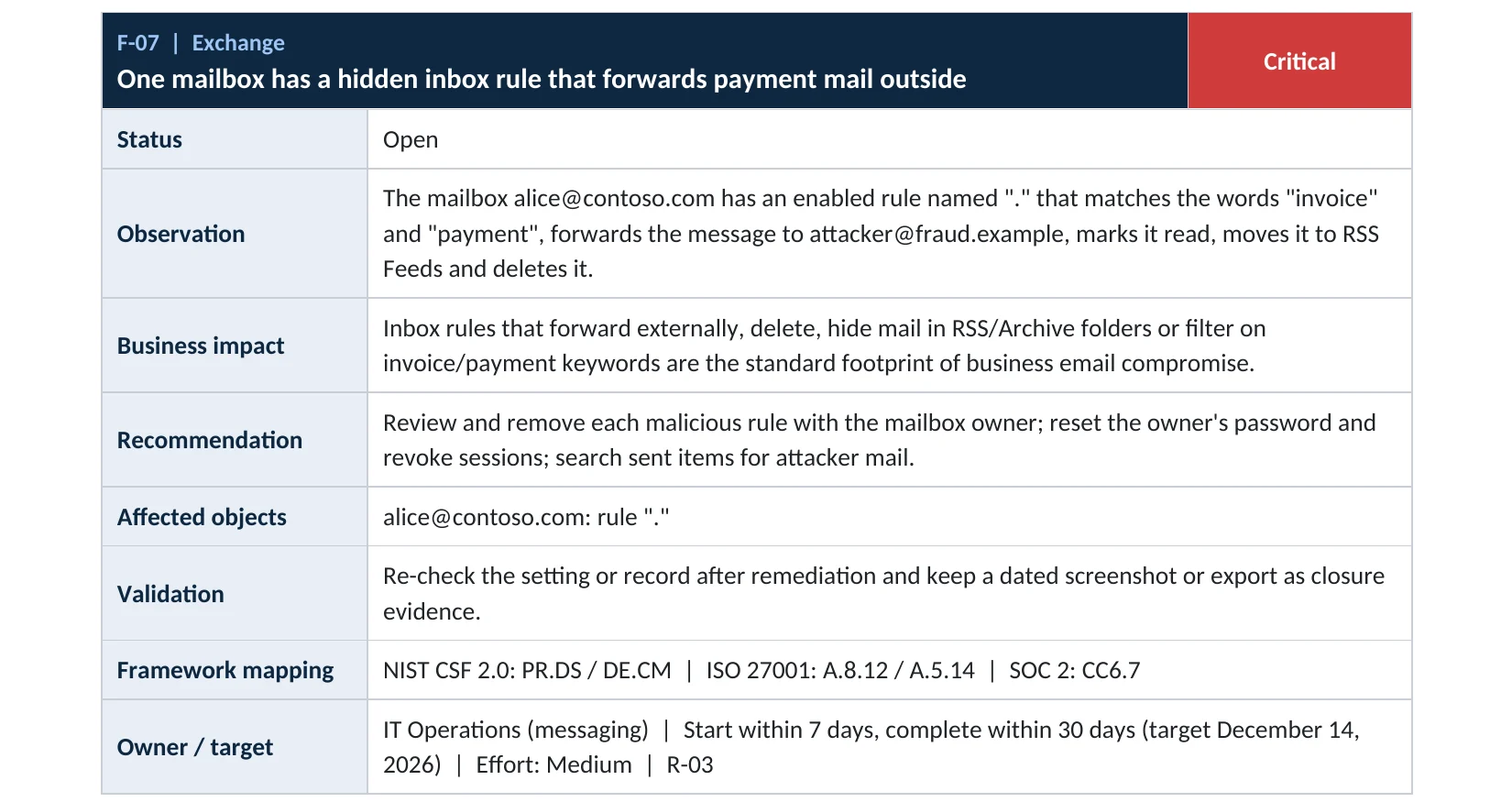
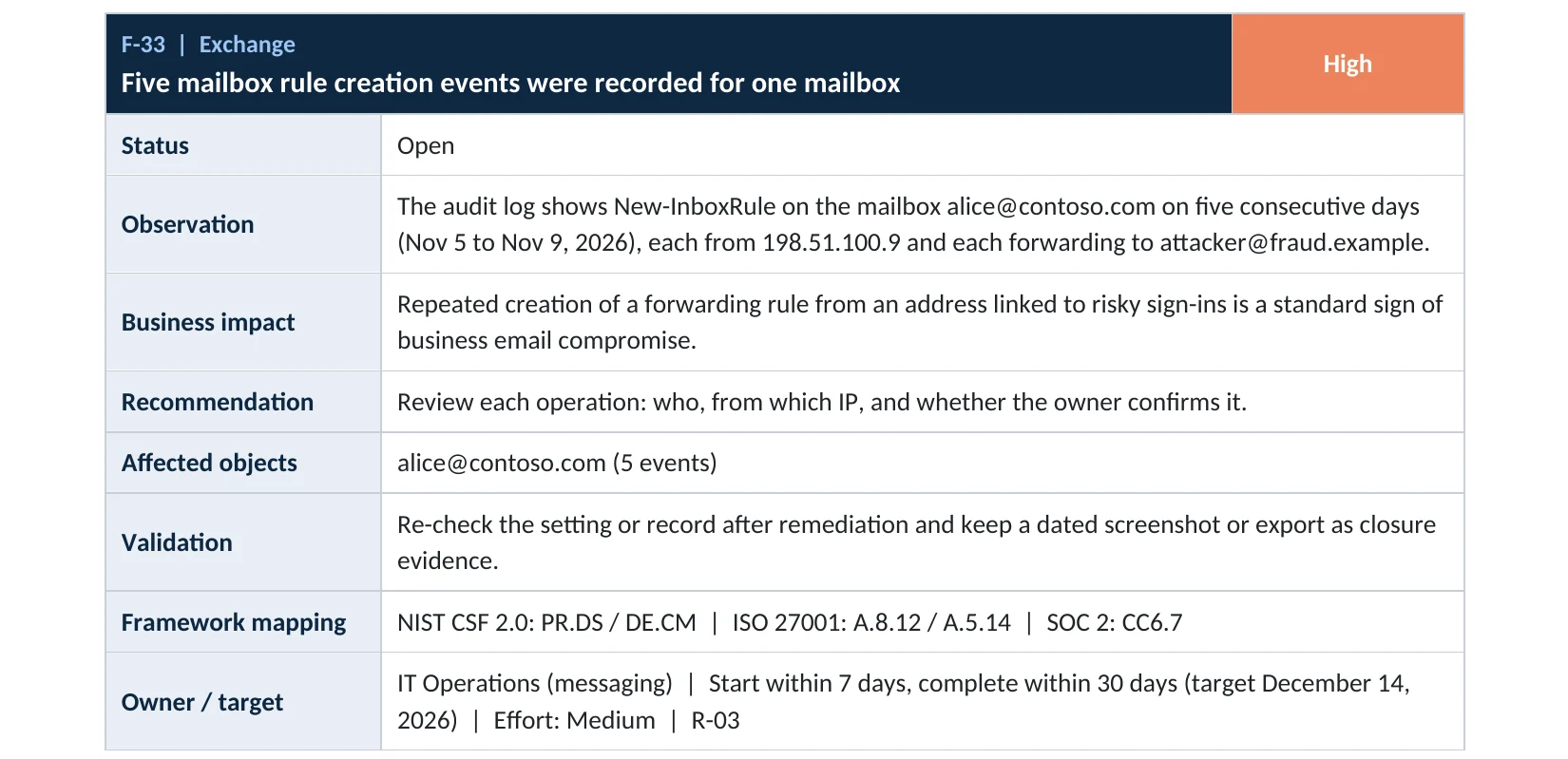
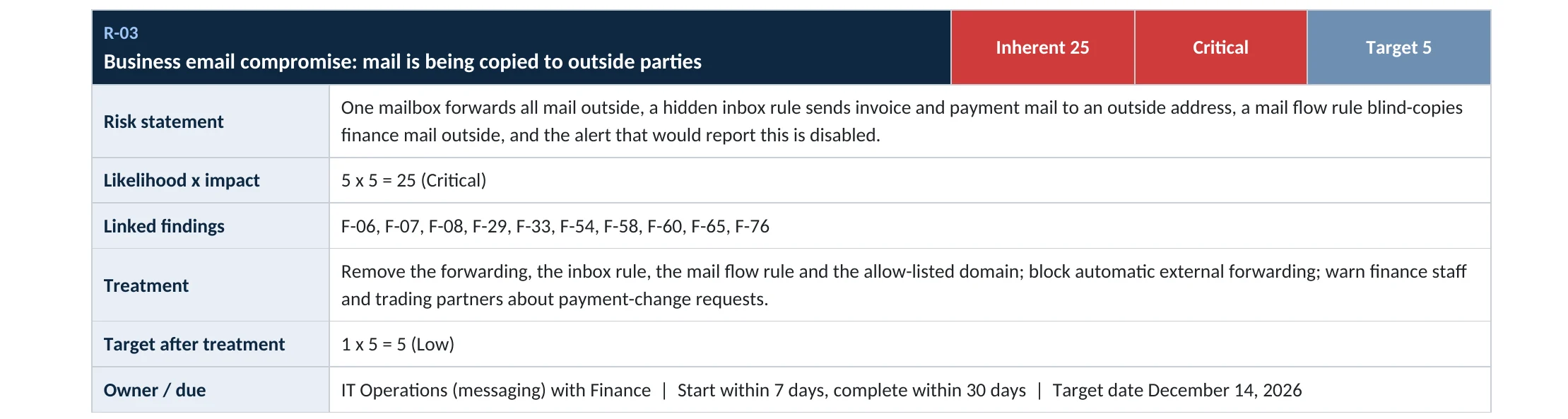
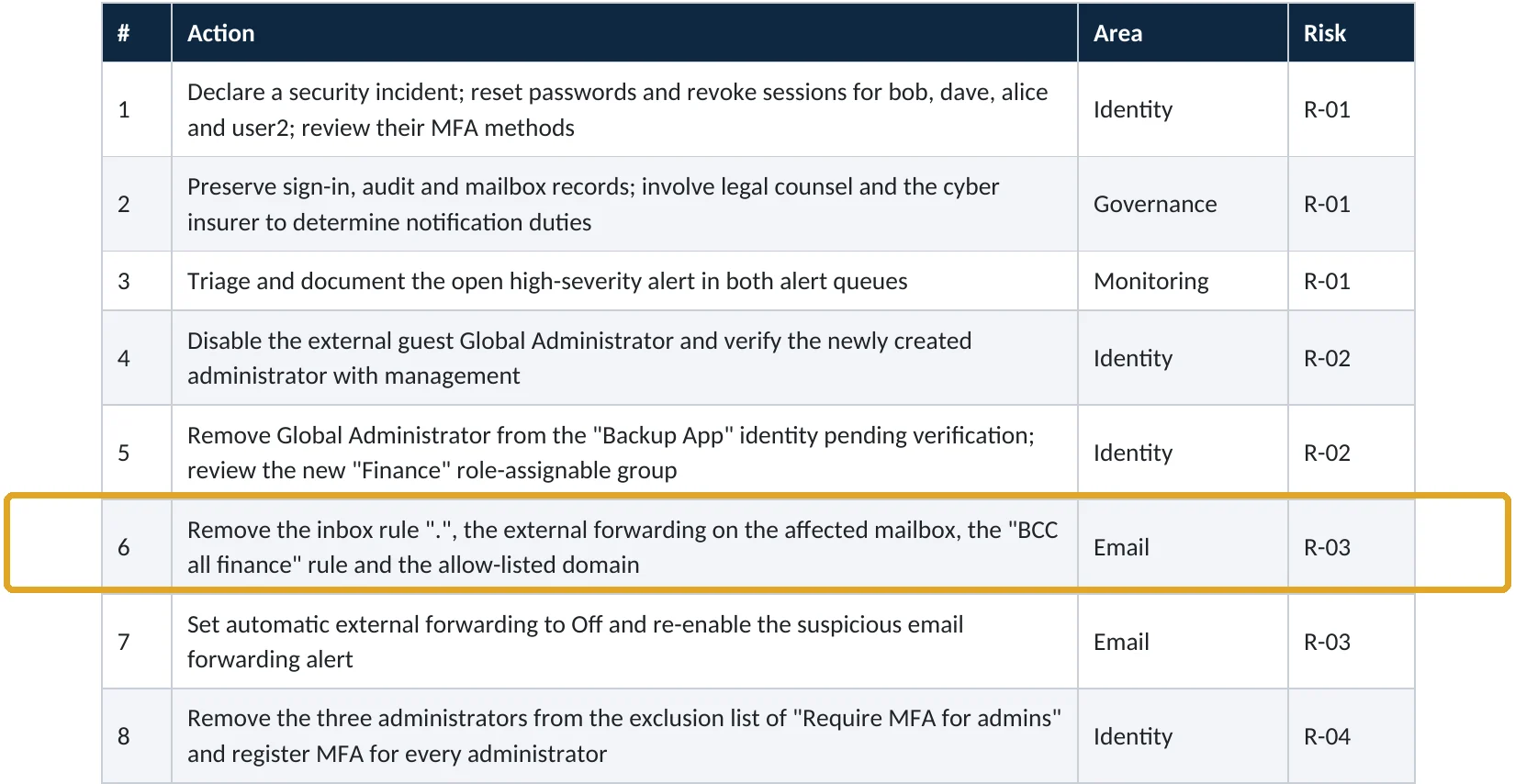
These are real pages from our published compromise assessment sample, written for a fictional company. Click any page to open it full size. The viewer follows the finding from the technical report to the risk register and the roadmap.
Your options
Four ways to review inbox rules
| Method | Covers | Good for | Limits |
|---|---|---|---|
| Outlook rules screen, mailbox by mailbox | One mailbox | Checking with the owner beside you | Slow; rules hidden through mailbox APIs may not show |
| Exchange Online PowerShell (Get-InboxRule) | Every mailbox | A full export you can sort and filter | Needs an Exchange role; large tenants take time |
| Audit log search for New-InboxRule and Set-InboxRule | Who created or changed a rule, when and from where | Linking a rule to a suspicious sign-in | Only as far back as your audit retention |
| Alert policies in the Microsoft Defender portal | New forwarding or redirect rules | Hearing about the next one quickly | The built-in rule alert only covers forwarding and redirects created in Outlook on the web or PowerShell |
Microsoft’s built-in alert Creation of forwarding/redirect rule is informational and only tracks rules created in Outlook on the web or Exchange Online PowerShell (Microsoft Learn). It will not see a rule that only deletes or moves mail, which is why a periodic full review still matters.
How to check it yourself
List every inbox rule without changing anything
These commands only read. You need an Exchange role that can view mailboxes, such as View-Only Organization Management.
Read-only PowerShell: export every inbox rule to a CSV file
Connect-ExchangeOnline
Get-Mailbox -ResultSize Unlimited | ForEach-Object {
  Get-InboxRule -Mailbox $_.UserPrincipalName |
    Select-Object MailboxOwnerId, Name, Enabled, Priority, From, SubjectContainsWords, SubjectOrBodyContainsWords,
      MoveToFolder, DeleteMessage, MarkAsRead, ForwardTo, ForwardAsAttachmentTo, RedirectTo
} | Export-Csv .\inbox-rules.csv -NoTypeInformation
What to look for in the export
| Column | Suspicious when | Why |
|---|---|---|
| Name | A dot, several dots, a semicolon, or one or two random letters | Proofpoint’s most common malicious names were “.”, “…” and “..” |
| SubjectOrBodyContainsWords | invoice, payment, wire, bank, ACH, payroll, direct deposit, hacked, phish | Money words hide fraud replies; security words hide warnings |
| MoveToFolder | RSS Feeds, RSS Subscriptions, Conversation History, Archive, Deleted Items | Folders the owner rarely opens |
| DeleteMessage / MarkAsRead | True, especially together with a keyword condition | The owner never notices the message arrived |
| ForwardTo / RedirectTo | Any outside address, above all personal webmail | Copies leave the company |
Read-only PowerShell: who created rules recently, and from where
Search-UnifiedAuditLog -StartDate (Get-Date).AddDays(-30) -EndDate (Get-Date) `
  -Operations New-InboxRule,Set-InboxRule,UpdateInboxRules -ResultSize 5000 |
  Select-Object CreationDate, UserIds, Operations, AuditData
The audit record includes the client IP address. A rule created from an address that also appears in risky sign-ins is a strong sign of takeover. Our compromise investigation correlates rules, sign-ins and mail activity across the whole tenant.
How to remove them
How to remove a malicious rule without destroying evidence
Order matters. Deleting the rule first can leave the attacker signed in, and loses the details you will need for your insurer, your bank or a lawyer.
If a rule looks malicious
Contain, then clean
- Export the rule details and the audit records for that mailbox (commands above) and save them.
- Reset the user’s password and require MFA registration.
- Revoke the user’s sessions in the Microsoft Entra admin center so stolen sessions stop working.
- Disable the rule first with Disable-InboxRule, confirm with the owner, then remove it.
- Check the mailbox’s sent items and the other mailboxes the attacker could reach.
To catch the next one
Prevent and alert
- Set external forwarding to Off in the outbound spam policy (step-by-step guide).
- Require MFA for every user, so a stolen password alone cannot open a mailbox.
- In the Microsoft Defender portal, check that the default alert policies are on and that alert emails reach someone who reads them.
- Repeat the full rule export every quarter and keep the CSV as evidence.
- Teach finance staff to confirm any bank-detail change by phone, using a number they already have.
Disable, then remove, a rule after the owner confirms
Disable-InboxRule -Mailbox "user@contoso.com" -Identity "Rule name"
Remove-InboxRule  -Mailbox "user@contoso.com" -Identity "Rule name"
Microsoft’s own guidance for these attacks also covers rules and custom forms that start programs on the user’s computer, and notes that current, patched Outlook blocks that behavior (Microsoft Learn).
Proof and questions
How to prove mailboxes are clean, and what to ask your IT provider
Evidence it is clean
- A dated export of every inbox rule in every mailbox, reviewed and signed off.
- No rule deletes, marks read or moves mail to RSS, Archive or Conversation History on money or security keywords.
- No rule forwards or redirects to an outside address without written approval.
- Audit log search shows no unexplained rule changes in the last 30 days.
Questions for your IT provider
- When did someone last export inbox rules for every mailbox?
- Who receives the alert when a forwarding rule is created?
- How long is our audit log kept, and could we see rule changes from three months ago?
- If you found a dot-named rule tomorrow, what would you do first?
- Is external forwarding Off in the outbound spam policy?
Signs it was already abused
If you find one malicious rule, look for these too
Red flags
- The same rule appearing again after it was deleted: the attacker still has access.
- Sign-ins to that mailbox from countries, hosting providers or VPNs the owner does not use.
- Sent items the owner did not write, especially invoices or bank-detail changes.
- Customers or vendors saying they paid a new account, or asking about an email they received from you.
- New MFA methods, app consents or mailbox permissions added around the same time.
One malicious rule is rarely the whole story. Our business email compromise investigation establishes what the attacker read, sent and changed, and the Microsoft 365 Evidence Clock shows how quickly the logs you need expire.
Framework mapping
Where inbox rule reviews fit in common frameworks
| Framework | Where it fits |
|---|---|
| NIST CSF 2.0 | DE.CM-03: personnel activity monitored; DE.AE-02: adverse events analyzed; RS.AN: incident analysis |
| ISO/IEC 27001:2022 | Annex A 8.16 Monitoring activities; 5.25 Assessment of information security events |
| SOC 2 | CC7.2 monitors system components for anomalies; CC7.3 evaluates security events |
| MITRE ATT&CK | T1564.008 Email Hiding Rules; T1114.003 Email Forwarding Rule |
Reviewed by
Written and reviewed by a practicing CISO

Ali Hassani, C|CISO, CISSP
Ali has more than 25 years of IT and cybersecurity experience and holds the Certified CISO and CISSP certifications along with Microsoft and Cisco credentials. He leads every OC Security Audit engagement from Irvine, on-site across Southern California and remotely nationwide. Every Microsoft 365 audit is read-only.
FAQ
Frequently asked questions about inbox rules
Can a user see a malicious inbox rule in Outlook?
Usually yes, under Rules, but many people never look, and rules created through low-level mailbox interfaces may not appear in Outlook at all. A PowerShell export of every mailbox is the reliable way to see them.
Is every rule that moves mail to RSS Feeds malicious?
Not every one, but very few people use RSS Feeds on purpose. Treat any rule that moves mail there, especially on money or security keywords, as suspicious until the owner confirms it.
Does blocking external forwarding stop malicious rules?
It stops rules from sending mail outside the company. It does not stop rules that delete, mark as read or hide mail inside the mailbox, which are the rules that keep payment fraud invisible.
We found a rule nobody recognizes. Should we delete it right away?
Disable it, save its details and the audit records first, then reset the password and revoke sessions before removing it. Deleting first can leave the attacker signed in and destroys evidence you may need.
How often should inbox rules be reviewed?
At least every quarter for the whole tenant, and immediately for any mailbox involved in a suspicious sign-in, an MFA prompt the user did not start or a payment question from a customer.
Do I need extra licenses to find inbox rules?
No. Exporting inbox rules works with Exchange Online PowerShell on every Microsoft 365 business plan. Some automatic alerts and longer audit retention depend on higher plans.
Next step
Found something odd, or want to be sure?
Respond
Microsoft 365 & Azure Compromise Investigation
From $3,500
For when a rule you do not recognize is already there: we establish what was read, sent and changed, and report what we can and cannot confirm.
Prevent
Microsoft 365 Security Audit
$3,500 fixed
About 200 read-only checks across identity, admin roles, email rules and forwarding, sharing, data protection, logging and devices, for any tenant size, with four reports and a remediation roadmap.
Want to see the deliverables first? Open the Microsoft 365 audit sample report or browse all our sample reports.

Service
Compromise Investigation
When an account or mailbox may already be in an attacker’s hands.
See the investigation ›
Sample
Compromise assessment sample
The reports we deliver after an investigation, with fictional data.
View the sample ›
Service
Microsoft 365 Security Audit
The fixed-price audit that checks this item and about 200 more.
See the audit ›Related reading: How to block external email forwarding in Microsoft 365 · How to set up MFA in Microsoft 365 · Exchange Online and Defender email security guide
Sources
Sources used on this page
- Microsoft Learn, Detect and remediate Outlook rules and custom forms injection attacks
- Microsoft Learn, Alert grading for suspicious inbox manipulation rules
- Microsoft Learn, Alert policies in the Microsoft Defender portal
- Microsoft Learn, Get-InboxRule
- Microsoft Learn, Respond to a compromised email account
- MITRE ATT&CK, T1564.008 Hide Artifacts: Email Hiding Rules
- MITRE ATT&CK, T1114.003 Email Collection: Email Forwarding Rule
- Proofpoint Threat Insight, Mailbox rules as a post-exploitation tactic in cloud account takeover (2026)
- Red Canary Threat Detection Report, Email Hiding Rules
This guide is general information, not a guarantee of protection or legal advice. Microsoft changes its admin centers often: menu names and steps were checked against Microsoft Learn on November 19, 2026. Drawings are simplified and are not screenshots of Microsoft products. Sample findings come from fictional companies. Incidents are described as reported by the cited sources; OC Security Audit was not involved in them. Questions? Call 949-777-5567 or email support@ocsecurityaudit.com.