

LIBRARY 3.20Microsoft 365 Security Library
How to Block External Email Forwarding in Microsoft 365
Attackers forward a hacked mailbox to their own address and keep reading it after you reset the password. Here is how to find every forward and switch them off.
Reviewed by Ali Hassani, C|CISO, CISSP · Last verified November 19, 2026

The forwarding control lives in the outbound spam policy of Exchange Online Protection, which every Microsoft 365 business plan includes (Microsoft Learn).
In one minute
- Set automatic forwarding to Off in the outbound spam policy. Do not leave it on Automatic.
- Find and review every mailbox forward and every inbox rule that sends mail outside the company.
- Allow only the few business forwards you approve, through a separate policy or mail flow rule.
- Turn on an alert so you hear about the next external forward the day it is created.
External forwarding is item EX-011 in our Microsoft 365 Security Audit.
What it is
What external email forwarding is, and where it hides
Automatic forwarding sends a copy of incoming email to another address without anyone pressing Forward. Inside a company that can be useful, for example a shared inbox copying a manager. Sent to an address outside the company, it means your mail is leaving your control, permanently, every day.
Microsoft 365 has three places where external forwarding can be set up, and an audit has to check all three (Microsoft Learn):
| Where | Who sets it | How it shows up |
|---|---|---|
| Inbox rules | The user, or an attacker signed in as the user | A rule with Forward to, Forward as attachment or Redirect to an outside address |
| Mailbox forwarding (SMTP forwarding) | An administrator, or an attacker with admin rights | The mailbox’s forwarding address, with or without a copy kept |
| Mail flow rules (transport rules) | An Exchange administrator | A tenant-wide rule that copies or redirects mail. Covered in a later item of this library |
One setting controls the first two for the whole company: the automatic forwarding rules option in the outbound spam filter policy.
Why it matters
Forwarding is how a mailbox stays hacked
After an attacker gets into a mailbox, the first thing they usually do is make sure they never lose it. A forwarding rule does that quietly: every email keeps arriving in their own inbox, even after you reset the password and turn on MFA.
- Mailbox taken overA phished or reused password, often without MFA.
- Forward createdAn inbox rule or mailbox forward to an outside address.
- Policy blocks itWith forwarding Off, the forward fails and the sender gets a bounce.
- Invoice watchingWithout the block: the attacker reads every payment email.
- Payment redirectedA reply from a look-alike address with new bank details.
Drawing: how a forwarding rule turns one stolen password into payment fraud.
reported lost to business email compromise in 2025 across 24,768 complaints to the FBI. Taken-over mailboxes are a common starting point.
Source: FBI IC3 2025 Internet Crime Reportbusiness email compromise attempts a day, on average, detected by Microsoft between April 2022 and April 2023: 35 million in total.
Source: Microsoft Cyber Signals, 2023MITRE ATT&CK email collection technique; sub-technique .003 covers forwarding rules. MITRE notes they let attackers keep reading mail after credentials are reset.
Source: MITRE ATT&CKthe bounce code a sender receives when your policy blocks an automatic external forward. Seeing it means the block is working.
Source: Microsoft LearnAttacks this setting stops, and what it does not
| Attack | How it works | Does blocking forwarding stop it? |
|---|---|---|
| Silent mailbox monitoring | Every message is copied to the attacker’s outside address. | Yes Automatic external forwards fail. |
| Persistence after a password reset | The rule keeps working after the account is cleaned up. | Yes Existing inbox-rule and mailbox forwards stop too. |
| Invoice and payment interception | Rules filter on words like invoice and payment and send them out. | Yes For external forwards. |
| Hidden rules that delete or move mail | A rule hides replies in RSS Feeds or deletes warnings, with no forwarding. | No See the inbox rules item of this library. |
| Tenant-wide copy rules | An admin-level mail flow rule BCCs mail outside. | Partly Mail flow rules need their own review. |
| Attacker reading mail while signed in | No forward needed while the attacker still has a session. | No MFA and session revocation stop that. |
Groups documented using forwarding rules
Threat groups · MITRE ATT&CK
Scattered Spider, Kimsuky, Star Blizzard
MITRE’s entry for email forwarding rules records Scattered Spider redirecting emails that warned users about suspicious account activity, Kimsuky setting auto-forward rules on victims’ accounts, and Star Blizzard abusing forwarding rules to monitor victims.
Source: MITRE ATT&CK T1114.003
Tenant-wide · MITRE ATT&CK
LAPSUS$
MITRE records that the LAPSUS$ group set an Office 365 tenant-level mail transport rule to send all mail in and out of a targeted organization to an account it had created.
Source: MITRE ATT&CK T1114.003
We were not involved in any of these cases. They show why forwarding is checked in every mailbox, not only in the ones that look suspicious.
What we find in audits
What this finding looks like in our audit reports
These are real pages from our published sample reports, written for fictional companies. Click any page to open it full size. The viewer follows the finding from the technical report to the risk register and the roadmap.
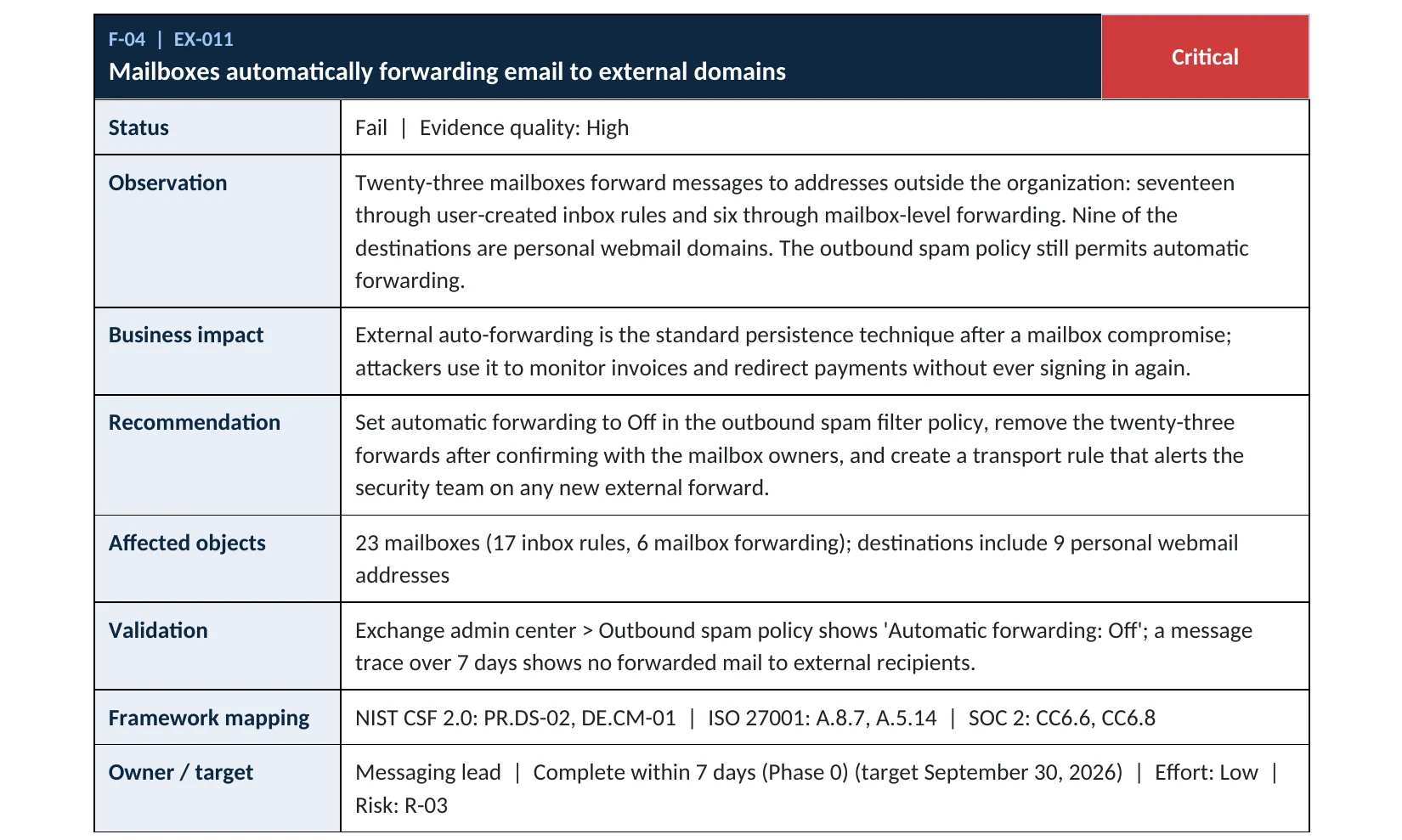
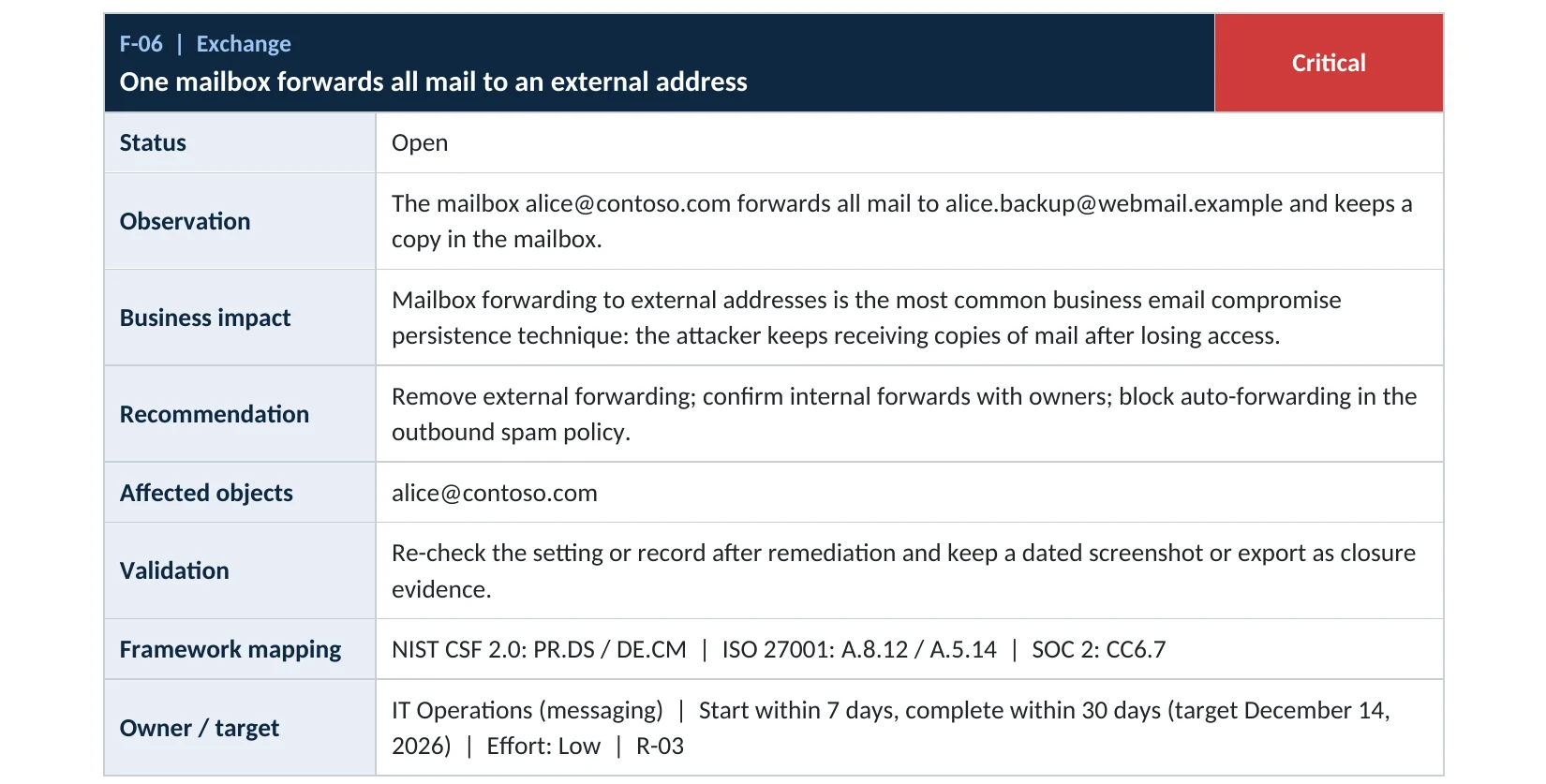
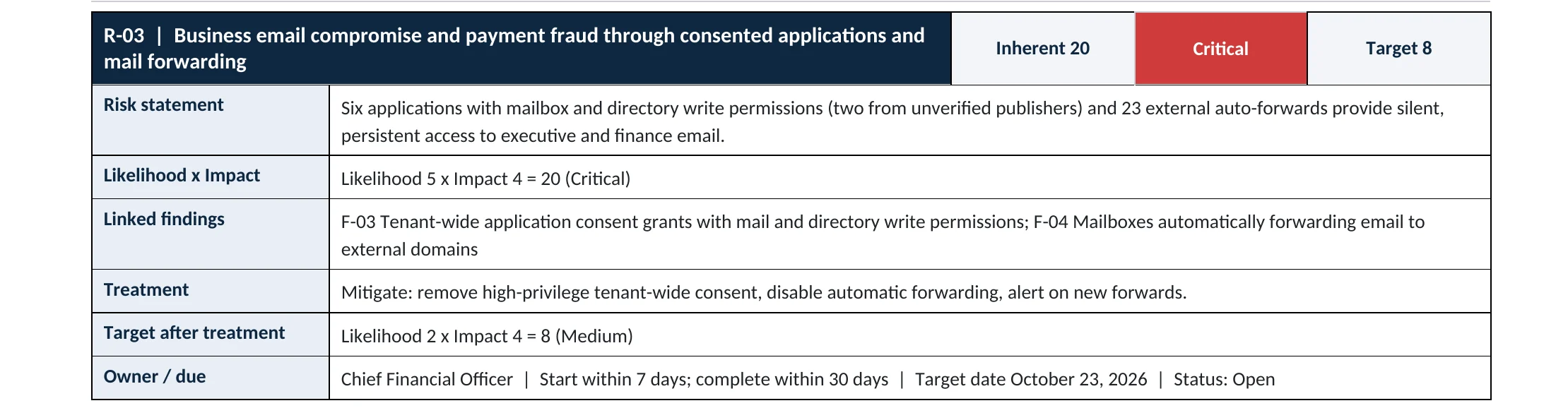
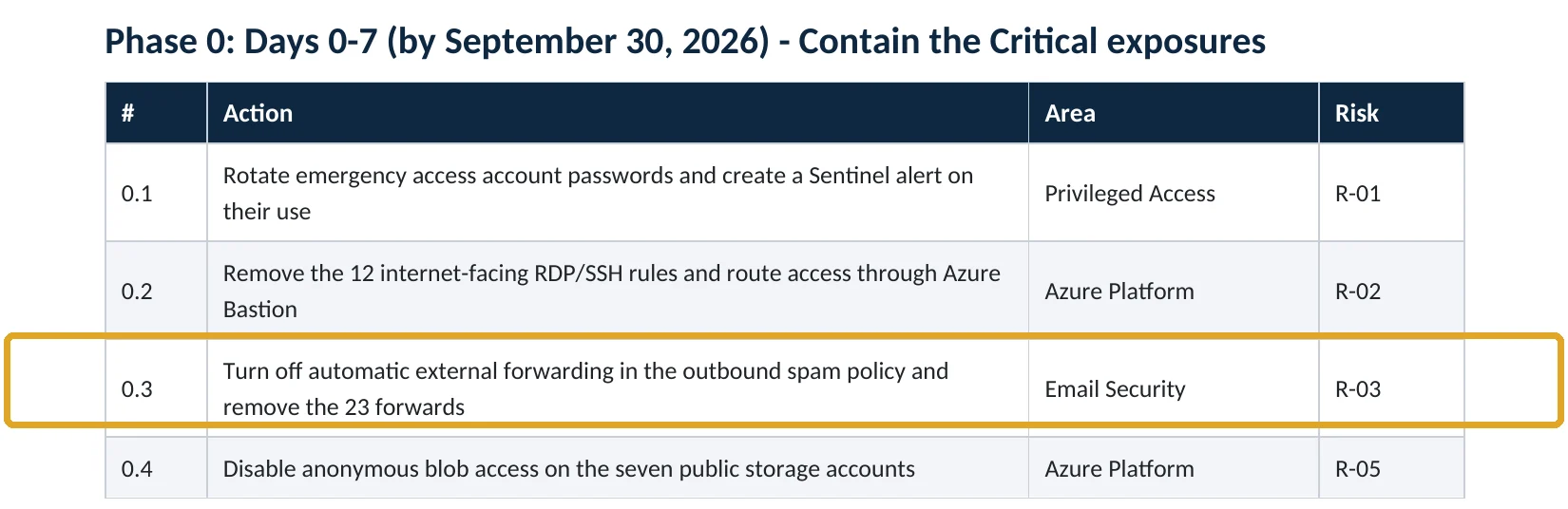
Your options
Off, On or Automatic: which setting to use
The outbound spam filter policy offers three values for automatic forwarding (Microsoft Learn):
| Setting | What it does | Our take |
|---|---|---|
| Off – Forwarding is disabled | Blocks automatic forwards to outside addresses; the sender gets a bounce. | Use this The default for every company. |
| Automatic – System-controlled | Microsoft’s default. Since 2021 it behaves as Off for new organizations, but may still behave as On in older ones. | Avoid Microsoft itself recommends choosing On or Off explicitly. |
| On – Forwarding is enabled | Allows every automatic external forward. | Only in a separate policy for named users with an approved business need. |
Need one or two people to forward? Keep the default policy on Off and create a custom outbound policy set to On that applies only to those users. When two settings disagree, Microsoft applies the block (Microsoft Learn).
How to check it yourself
Find every external forward without changing anything
These checks only read settings. You need an Exchange or security reader role, or Global Reader.
1. What is the policy set to?
Look at Automatic forwarding rules under protection settings. Off is what you want. Automatic may still allow forwarding in your tenant.
2. Who is forwarding today?
The auto forwarded messages report shows which mailboxes sent automatic forwards outside the company and to which domains.
Read-only PowerShell: the policy setting
Connect-ExchangeOnline
Get-HostedOutboundSpamFilterPolicy | Format-Table Name, AutoForwardingMode
Read-only PowerShell: mailboxes with a forwarding address
Get-Mailbox -ResultSize Unlimited |
  Where-Object { $_.ForwardingSmtpAddress -or $_.ForwardingAddress } |
  Select-Object DisplayName, ForwardingSmtpAddress, ForwardingAddress, DeliverToMailboxAndForward
Read-only PowerShell: inbox rules that forward or redirect
Get-Mailbox -ResultSize Unlimited | ForEach-Object {
  Get-InboxRule -Mailbox $_.UserPrincipalName |
    Where-Object { $_.ForwardTo -or $_.ForwardAsAttachmentTo -or $_.RedirectTo } |
    Select-Object MailboxOwnerId, Name, Enabled, ForwardTo, ForwardAsAttachmentTo, RedirectTo
}
Large tenants take a while with the last command. Checking every mailbox, every rule and every mail flow rule is exactly what our Microsoft 365 Security Audit automates.
How to configure
How to block external forwarding, step by step
Before you start: send the list from the checks above to each mailbox owner. A forward the owner does not recognize is a sign of compromise: do not just delete it, start with the signs in the section below.
All Microsoft 365 plans
Turn forwarding off
- Open the Microsoft Defender portal at security.microsoft.com.
- Go to Email & collaboration › Policies & rules › Threat policies › Anti-spam.
- Select Anti-spam outbound policy (Default), then Edit protection settings.
- Set Automatic forwarding rules to Off – Forwarding is disabled.
- Select Save.
Approved exceptions
Allow only what you approve
- In the same Anti-spam page, select Create policy › Outbound.
- Name it for its purpose, for example Approved external forwarding.
- Add only the users or group that have a documented business need.
- Set Automatic forwarding rules to On in this policy only.
- Review the members every quarter.
To limit forwarding to certain partner domains instead, Microsoft documents using remote domains alongside the policy.
Set the default policy to Off with PowerShell
Connect-ExchangeOnline
Set-HostedOutboundSpamFilterPolicy -Identity Default -AutoForwardingMode Off
Remove a mailbox-level forward after the owner confirms
Set-Mailbox -Identity "user@contoso.com" -ForwardingSmtpAddress $null -ForwardingAddress $null -DeliverToMailboxAndForward $false
What your users will notice
Most people notice nothing. Anyone who had a rule forwarding to a personal address will find that it stops, and the original sender receives a bounce with code 5.7.520. Internal forwarding between colleagues keeps working.
How to undo it, safely
Set the policy back to On from the same panel, or better, add the person to your approved-forwarding policy. Avoid switching the whole company back to On to fix one complaint.
Proof and questions
How to prove it is fixed, and what to ask your IT provider
Evidence it is fixed
- The default outbound policy shows AutoForwardingMode Off.
- Any policy set to On applies to a short, named list of users.
- The mailbox and inbox-rule checks return no unexpected outside addresses.
- A test forward to an outside address bounces with code 5.7.520.
Questions for your IT provider
- Is automatic forwarding Off, or still on Automatic?
- Who is allowed to forward outside, and who approved it?
- When did someone last review inbox rules across all mailboxes?
- Do we get an alert when a new external forward is created?
- Are mail flow rules that copy mail outside reviewed too?
Signs it was already abused
If forwarding was allowed, look for these signs
Red flags
- A forward or inbox rule to a personal webmail address the mailbox owner does not recognize.
- Rules that filter on words such as invoice, payment, wire or bank.
- Rules named with a single character, such as a dot, or that also move mail to RSS Feeds or delete it.
- Inbox rules created right after a sign-in from an unusual country or a hosting provider.
- Customers or vendors saying they received changed bank details from your domain.
If you see any of these, preserve the evidence before deleting anything: the rule, the audit log entry that created it and the sign-in that came before it. Our business email compromise investigation establishes what was read and forwarded, and the Microsoft 365 Evidence Clock shows how long the logs are kept.
Framework mapping
Where external forwarding control fits in common frameworks
| Framework | Where it fits |
|---|---|
| NIST CSF 2.0 | PR.DS-02: data in transit protected; DE.CM-01: networks and services monitored |
| ISO/IEC 27001:2022 | Annex A 5.14 Information transfer; 8.12 Data leakage prevention |
| SOC 2 | CC6.7 restricts the transmission of information to authorized parties |
| HIPAA Security Rule | 45 CFR 164.312(e)(1) transmission security, where email holds patient information |
| MITRE ATT&CK | T1114.003 Email Collection: Email Forwarding Rule |
Reviewed by
Written and reviewed by a practicing CISO

Ali Hassani, C|CISO, CISSP
Ali has more than 25 years of IT and cybersecurity experience and holds the Certified CISO and CISSP certifications along with Microsoft and Cisco credentials. He leads every OC Security Audit engagement from Irvine, on-site across Southern California and remotely nationwide. Every Microsoft 365 audit is read-only.
FAQ
Frequently asked questions about email forwarding
Does turning off forwarding stop people forwarding emails by hand?
No. The setting blocks automatic forwarding by inbox rules and mailbox forwarding. A person can still open an email and press Forward. Data loss prevention and sensitivity labels control what people send by hand.
Will internal forwarding between employees still work?
Yes. The outbound spam policy only affects forwards to recipients outside your organization. Rules that forward to a colleague or a shared mailbox keep working.
Our setting says Automatic. Isn't that safe?
Not necessarily. Microsoft changed Automatic to behave as Off in 2021 for new organizations, but in older organizations that were already using it, it can still behave as On. Microsoft recommends choosing On or Off explicitly, and Off is the safe default.
A manager needs email copied to an assistant outside the company. What now?
Keep the default policy on Off and create a separate outbound policy set to On that applies only to that mailbox. Document who approved it and review it every quarter.
We found a forward nobody recognizes. Should we delete it?
Not first. Treat it as a possible account takeover: preserve the rule details and the audit log entry, reset the password, revoke sessions, check other inbox rules and sign-ins, and then remove the forward. Deleting it first can destroy the evidence you need.
Does this need Business Premium or Defender for Office 365?
No. The outbound spam policy is part of Exchange Online Protection, which is included in every Microsoft 365 business plan, including Business Basic and Business Standard.
Next step
Know exactly where your tenant stands
Prevent
Microsoft 365 Security Audit
$3,500 fixed
About 200 read-only checks across identity, admin roles, email forwarding and rules, sharing, data protection, logging and devices, for any tenant size, with four reports and a remediation roadmap.
Respond
Microsoft 365 & Azure Compromise Investigation
From $3,500
For when a forward or rule you do not recognize is already there: we establish what was read, forwarded and changed, and report what we can and cannot confirm.
Want to see the deliverables first? Open the Microsoft 365 audit sample report or browse all our sample reports.

Service
Microsoft 365 Security Audit
The fixed-price audit that checks this item and about 200 more.
See the audit ›
Sample
Sample audit report
Every page of the five deliverables, with fictional data.
View the sample ›
Service
Compromise Investigation
When an account or mailbox may already be in an attacker’s hands.
See the investigation ›Related reading: How to set up MFA in Microsoft 365 · Exchange Online and Defender email security guide · Microsoft 365 email security
Sources
Sources used on this page
- Microsoft Learn, Control automatic external email forwarding from cloud mailboxes
- Microsoft Learn, Configure outbound spam filtering
- Microsoft Learn, Auto forwarded messages report
- Microsoft Learn, Remote domains
- Microsoft Learn, Configure email forwarding for a mailbox
- Microsoft Tech Community, All you need to know about automatic email forwarding in Exchange Online
- Microsoft Learn, Microsoft 365 for business security overview
- MITRE ATT&CK, T1114.003 Email Collection: Email Forwarding Rule
- Microsoft Security, Cyber Signals: Shifting tactics fuel surge in business email compromise (2023)
- FBI Internet Crime Complaint Center, 2025 Internet Crime Report
This guide is general information, not a guarantee of protection or legal advice. Microsoft changes its admin centers often: menu names and steps were checked against Microsoft Learn on November 19, 2026. Drawings are simplified and are not screenshots of Microsoft products. Sample findings come from fictional companies. Incidents are described as reported by the cited sources; OC Security Audit was not involved in them. Questions? Call 949-777-5567 or email support@ocsecurityaudit.com.