

LIBRARY 1.16Microsoft 365 Security Library
How to Restrict Guest Access and Invitations in Microsoft 365
Two settings decide what outside guests can see in your directory and who can invite more of them. On many tenants both are wide open. Here is how to tighten them without stopping collaboration.
Reviewed by Ali Hassani, C|CISO, CISSP · Last verified November 20, 2026
Both settings live in Microsoft Entra External collaboration settings and are available on every plan (Microsoft Learn).
In one minute
- Set guest user access to the most restrictive option, or at least the default limited one.
- Allow only admins and the Guest Inviter role to invite guests.
- Give the Guest Inviter role to the few people who really need it.
- Review guests every quarter.
Guest settings are part of the identity checks in our Microsoft 365 Security Audit.
What it is
The two guest settings that matter
Guest user access decides what a guest can see in your directory. At the most open level, guests get the same directory access as employees. At the most restrictive, guests can see only their own profile, not other users, groups or memberships (Microsoft Learn).
Guest invite settings decide who can bring new guests in. Microsoft notes that by default all users, including guests themselves, can invite external users (Microsoft Learn).
The options, from most open to most restrictive
| Setting | Option | Our advice |
|---|---|---|
| Guest user access | Same access as members | Avoid |
| Limited access to properties and memberships (default) | Acceptable | |
| Restricted to their own directory objects | Best for most | |
| Who can invite | Anyone, including guests | Avoid |
| Members and admins | Acceptable for small teams | |
| Only admins and the Guest Inviter role | Best for most |
Why it matters
A guest who can see your directory can map your company
- Guest account compromisedPartner’s mailbox breached.
- Lists your usersNames, titles, groups.
- Restricted accessGuest sees only itself.
- Targets financeWithout it: tailored phishing.
- Invites more guestsAttacker adds their own accounts.
Drawing: where restricted guest access breaks the path.
of organizations have stale but still-enabled “ghost” accounts, according to Varonis.
Source: Varonisinvite options, from “anyone including guests” to “no one”.
Source: Microsoft Learnguest access levels; the most restrictive shows guests only their own profile.
Source: Microsoft Learnminutes is a realistic time to change both settings.
Source: Our estimateDocumented incidents
Research · Varonis, 2025
Stale access is the norm
Varonis analyzed 1,000 real environments and found stale but enabled user accounts in 88% of them and exposed sensitive cloud data in 90%.
Microsoft also notes that guests can still be added to admin roles whatever these settings say, so check role assignments too (Microsoft Learn).
What we find in audits
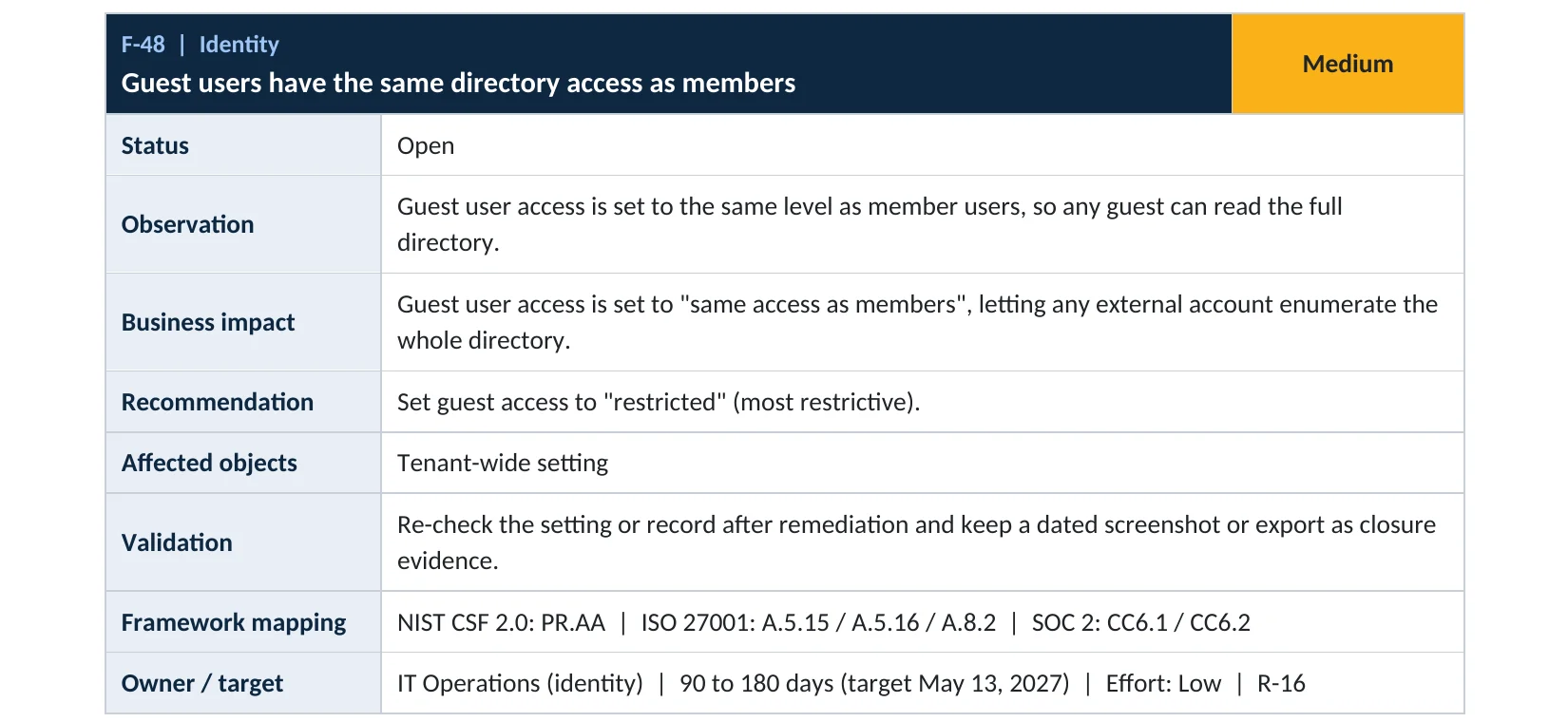
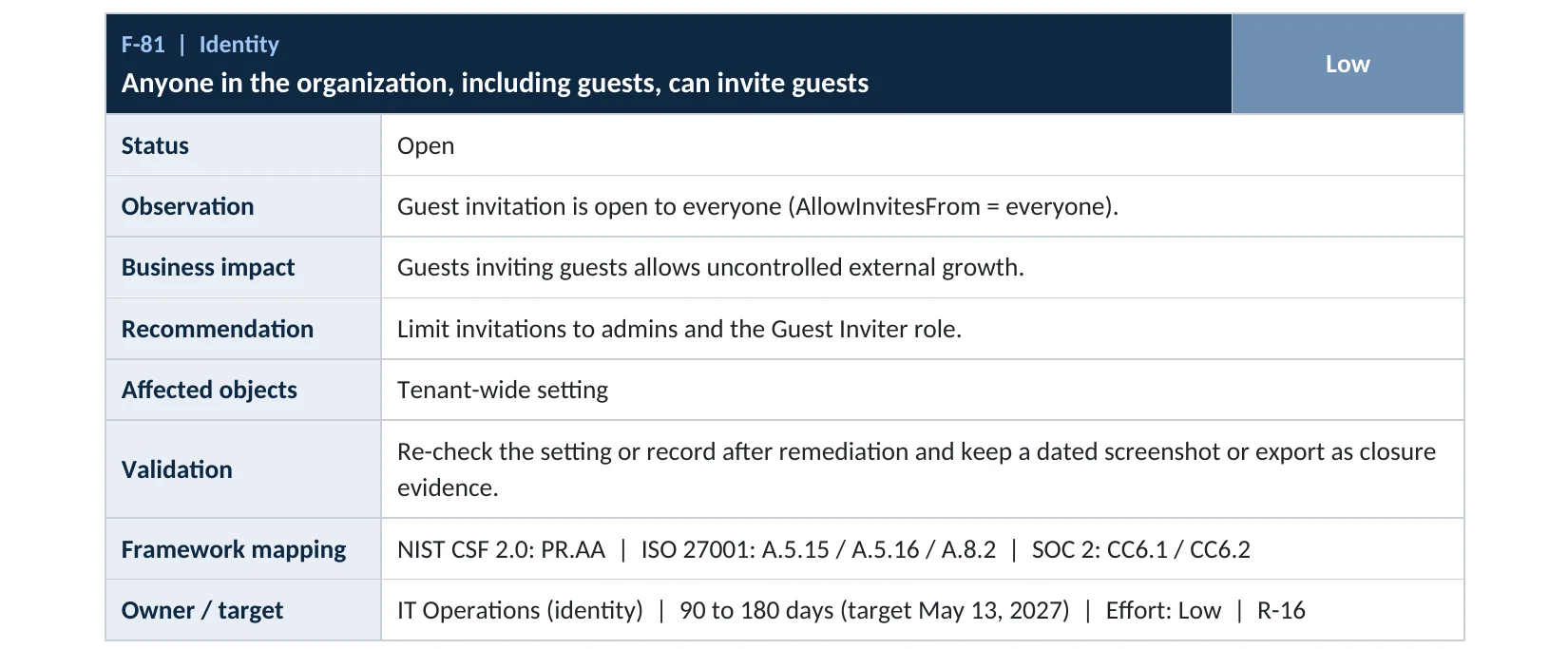
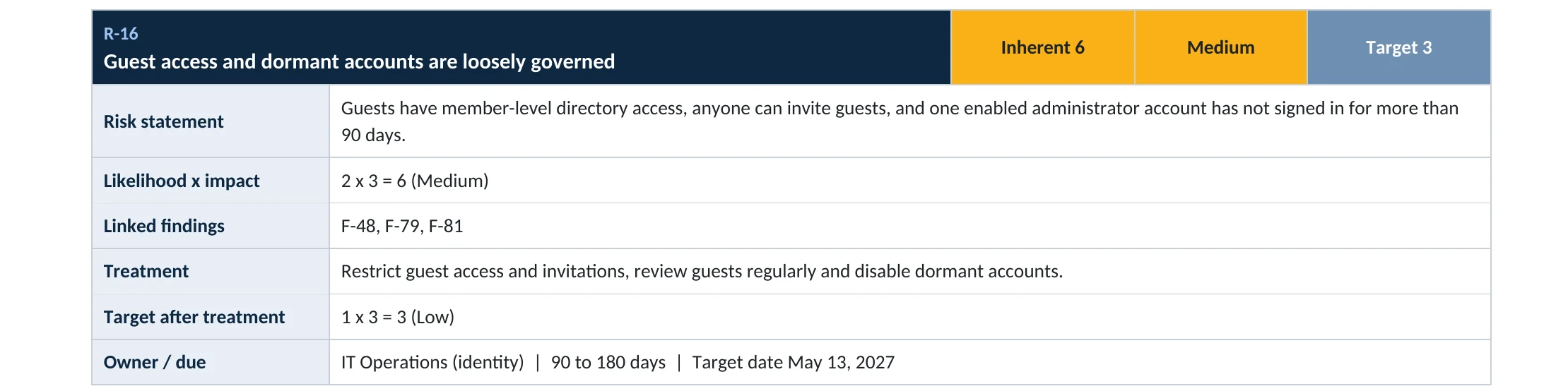
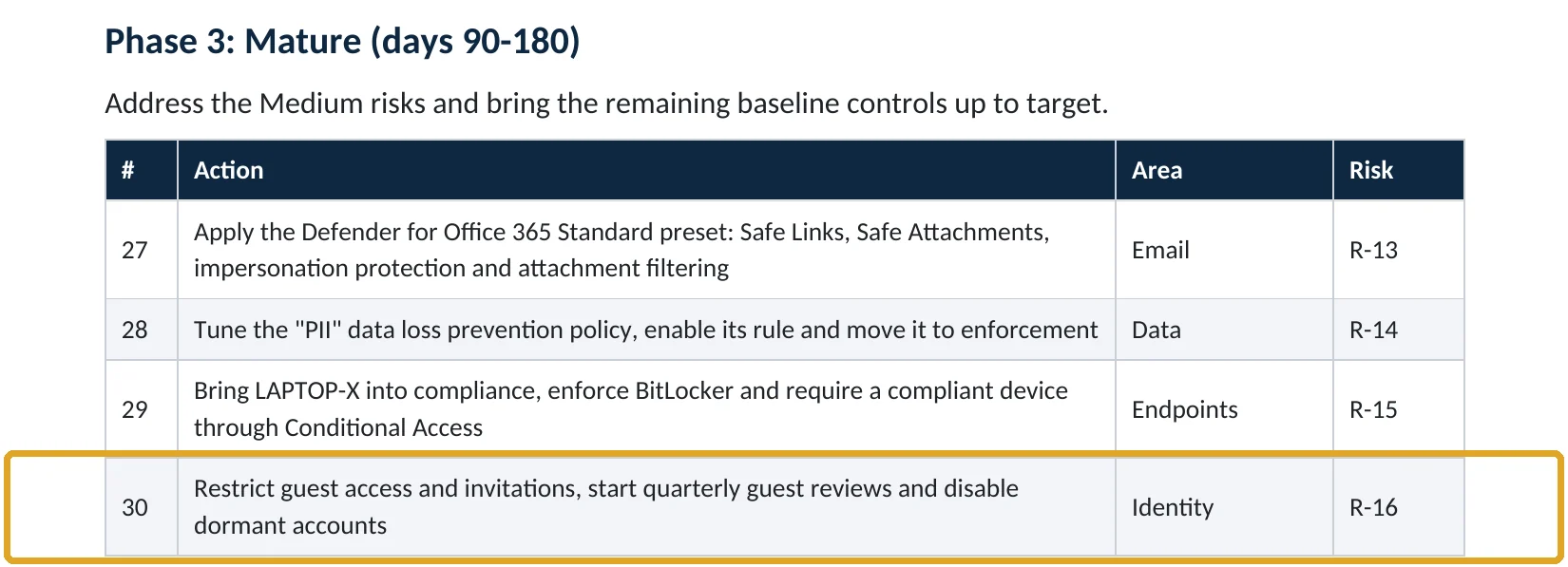
What this finding looks like in our audit reports
These are real pages from our published compromise assessment sample, written for a fictional company. Click any page to open it full size.
Your options
What each plan gives you
| Capability | All plans | Entra ID P1 or P2 |
|---|---|---|
| Guest user access restrictions | Yes | Yes |
| Guest invite settings and Guest Inviter role | Yes | Yes |
| Allow or block invitations to specific domains | Yes | Yes |
| Access reviews for guests | No | P2 (or Entra ID Governance) |
How to check it yourself
See your current guest settings, without changing anything
Look at Guest user access and Guest invite settings. If you see “same access as members” or “anyone in the organization can invite guest users including guests”, both are wide open.
Read-only PowerShell: guest settings
Connect-MgGraph -Scopes "Policy.Read.All"
Get-MgPolicyAuthorizationPolicy | Select-Object AllowInvitesFrom, GuestUserRoleId
The command only reads settings. AllowInvitesFrom of everyone means guests can invite guests. A GuestUserRoleId of 2af84b1e-32c8-42b7-82bc-daa82404023b is the most restrictive level.
How to configure
How to restrict guest access and invitations, step by step
All plans
Tighten both settings
- Open Entra ID › External Identities › External collaboration settings.
- Under Guest user access, select Guest user access is restricted to properties and memberships of their own directory objects.
- Under Guest invite settings, select Only users assigned to specific admin roles can invite guest users.
- Optionally, under Collaboration restrictions, allow invitations only to partner domains you work with.
- Select Save.
Keep collaboration working
Delegate invitations safely
- Give the Guest Inviter role to team leads who regularly work with outside partners.
- Tell staff how to request a guest: who to ask and what information to give.
- Review guests quarterly and remove the ones no longer needed.
Microsoft notes that the Guest Inviter role can still invite guests when only admin roles are allowed, without giving a higher admin role (Microsoft Learn).
What your users will notice
Most users won’t notice. Guests may no longer see full member lists in some places, and staff who invited guests themselves now ask an admin or a Guest Inviter. Teams guests keep access to the teams they joined.
How to undo it
Change either setting back on the same page. Changes apply within minutes.
Proof and questions
How to prove it is fixed, and what to ask your IT provider
Evidence it is fixed
- Guest user access is set to the most restrictive or default limited level.
- Only admins and Guest Inviters can invite guests.
- The Guest Inviter role has a short, named list of holders.
- Guests were reviewed in the last quarter.
Questions for your IT provider
- What can a guest see in our directory today?
- Who is allowed to invite new guests?
- How many guests do we have, and when were they last reviewed?
- Does any guest hold an admin role?
- Do we limit invitations to partner domains?
Signs it was already abused
If guest access may already have been misused, look for these signs
Red flags
- Guests invited by other guests.
- Guest accounts with admin roles.
- Many guests invited in a short time by one account.
- Guests from free email domains on sensitive teams.
- Guest sign-ins long after the project ended.
If you see these, remove the suspicious guests and keep the audit logs. Our compromise investigation establishes what they accessed, and the Microsoft 365 Evidence Clock shows how long the records are kept.
Framework mapping
Where guest settings fit
| Framework | Where it fits |
|---|---|
| NIST CSF 2.0 | PR.AA-01: identities managed; PR.AA-05: access permissions managed |
| ISO/IEC 27001:2022 | Annex A 5.15 Access control; 5.16 Identity management; 5.19 Information security in supplier relationships |
| SOC 2 | CC6.1 logical access security; CC6.2 user registration and authorization |
Reviewed by
Written and reviewed by a practicing CISO

Ali Hassani, C|CISO, CISSP
Ali has more than 25 years of IT and cybersecurity experience and holds the Certified CISO and CISSP certifications along with Microsoft and Cisco credentials. He leads every OC Security Audit engagement from Irvine, on-site across Southern California and remotely nationwide. Every Microsoft 365 audit is read-only.
FAQ
Frequently asked questions about guest settings
What can guests see in our directory by default?
By default, guests have limited access: they can't list all users and groups, but they can see membership of non-hidden groups. Some tenants were changed to give guests the same access as members.
Who can invite guests by default?
Everyone in the organization, including guests themselves. Microsoft lets you restrict this to admins and the Guest Inviter role, or turn it off.
Will restricting guests break Teams?
No. Guests keep access to teams they've joined. They just can't browse your directory.
What is the Guest Inviter role?
A Microsoft Entra role that lets a person invite guests without being an admin. It's the safe way to delegate invitations.
Do these settings cost extra?
No. They're available on every Microsoft 365 plan.
Can a guest be an admin?
Yes, unfortunately. Guests can still be added to admin roles whatever these settings say, so check role assignments too.
Next step
Decide who your guests are and what they see
Prevent
Microsoft 365 Security Audit
$3,500 fixed
About 200 read-only checks across sign-in protection, guests, admin roles, email, sharing and devices, for any tenant size, with four reports and a remediation roadmap.
Respond
Microsoft 365 & Azure Compromise Investigation
From $3,500
For when a guest account may have been used against you: we establish what it accessed.
Want to see the deliverables first? Open the Microsoft 365 audit sample report or browse all our sample reports.

Service
Microsoft 365 Security Audit
The fixed-price audit that checks this item and about 200 more.
See the audit ›
Service
Microsoft Entra ID Security Audit
A deeper look at identities, Conditional Access, roles and apps.
See the Entra ID audit ›
Service
Compromise Investigation
When an account or mailbox may already be in an attacker’s hands.
See the investigation ›Related reading: How to review and remove guest accounts · How to make SharePoint guest access expire · Identity, MFA and Conditional Access guide
Sources
Sources used on this page
- Microsoft Learn, Configure external collaboration settings
- Microsoft Learn, What are the default user permissions in Microsoft Entra ID?
- Microsoft Learn, Restrict guest access permissions in Microsoft Entra ID
- Microsoft Learn, Transition to governed collaboration with Microsoft Entra B2B
- Varonis, 2025 State of Data Security Report
This guide is general information, not a guarantee of protection or legal advice. Microsoft changes its admin centers often: menu names and steps were checked against Microsoft Learn on November 20, 2026. Drawings are simplified and are not screenshots of Microsoft products. Sample findings come from fictional companies. Incidents are described as reported by the cited sources; OC Security Audit was not involved in them. Questions? Call 949-777-5567 or email support@ocsecurityaudit.com.