

LIBRARY 11.74Microsoft 365 Security Library
How to Require BitLocker Encryption with Intune
A lost or stolen laptop without encryption gives away every file and cached password on it. Intune can turn on BitLocker silently, keep the recovery keys in Microsoft Entra, and block unencrypted laptops from company data.
Reviewed by Ali Hassani, C|CISO, CISSP · Last verified November 20, 2026
BitLocker policies are managed in Intune endpoint security, which is included in Business Premium, E3 and E5 (Microsoft Learn).
In one minute
- Create an Intune Disk encryption › BitLocker policy with silent encryption.
- Make sure recovery keys are backed up to Microsoft Entra.
- Require BitLocker in your Windows compliance policy.
- Check the encryption report until every device shows encrypted.
Device encryption is part of the endpoint checks in our Microsoft 365 Security Audit.
What it is
What BitLocker and silent encryption do
BitLocker encrypts the whole Windows drive, so a thief who removes the disk or boots another system can’t read it. Intune can turn it on silently, without asking the user, and Microsoft notes that recovery keys are then backed up to Microsoft Entra ID automatically (Microsoft Learn).
What a device needs for silent encryption
| Requirement | Detail |
|---|---|
| TPM | Version 1.2 or later |
| Firmware | Native UEFI mode, Secure Boot on |
| Recovery environment | Windows Recovery Environment (WinRE) available |
| Join type | Microsoft Entra joined or Microsoft Entra hybrid joined |
| Windows | Windows 11, or Windows 10 1809+ for standard users |
These are Microsoft’s listed prerequisites for silent BitLocker (Microsoft Learn).
Why it matters
Laptops leave the office every day
- Laptop lost or stolenCar, airport, coffee shop.
- Drive removedRead on another computer.
- BitLocker onData unreadable without the key.
- Files and browser dataWithout it: client files and saved sessions.
- Breach to reportNotification, cost and trust.
Drawing: where BitLocker breaks the path.
average cost of a U.S. data breach in 2025, according to IBM.
Source: IBMBitLocker recovery keys Microsoft Entra ID can store per device.
Source: Microsoft Learnsettings turn on silent encryption: Require Device Encryption and Allow Warning For Other Disk Encryption = Disabled.
Source: Microsoft Learnreport shows every device’s status: Devices › Monitor › Encryption report.
Source: Microsoft LearnControls that work together
| Control | What it does | Effect |
|---|---|---|
| BitLocker disk encryption policy | Encrypts Windows drives silently. | Protects data at rest |
| Recovery keys in Entra ID | IT can unlock a device the user can’t. | No lockouts |
| Compliance: Require BitLocker | Unencrypted devices are marked non-compliant. | Finds the gaps |
| Require compliant device (Conditional Access) | Unencrypted devices can’t reach company data. | Enforces it |
| Encryption left to users | Some laptops never get encrypted. | Inconsistent |
What we find in audits
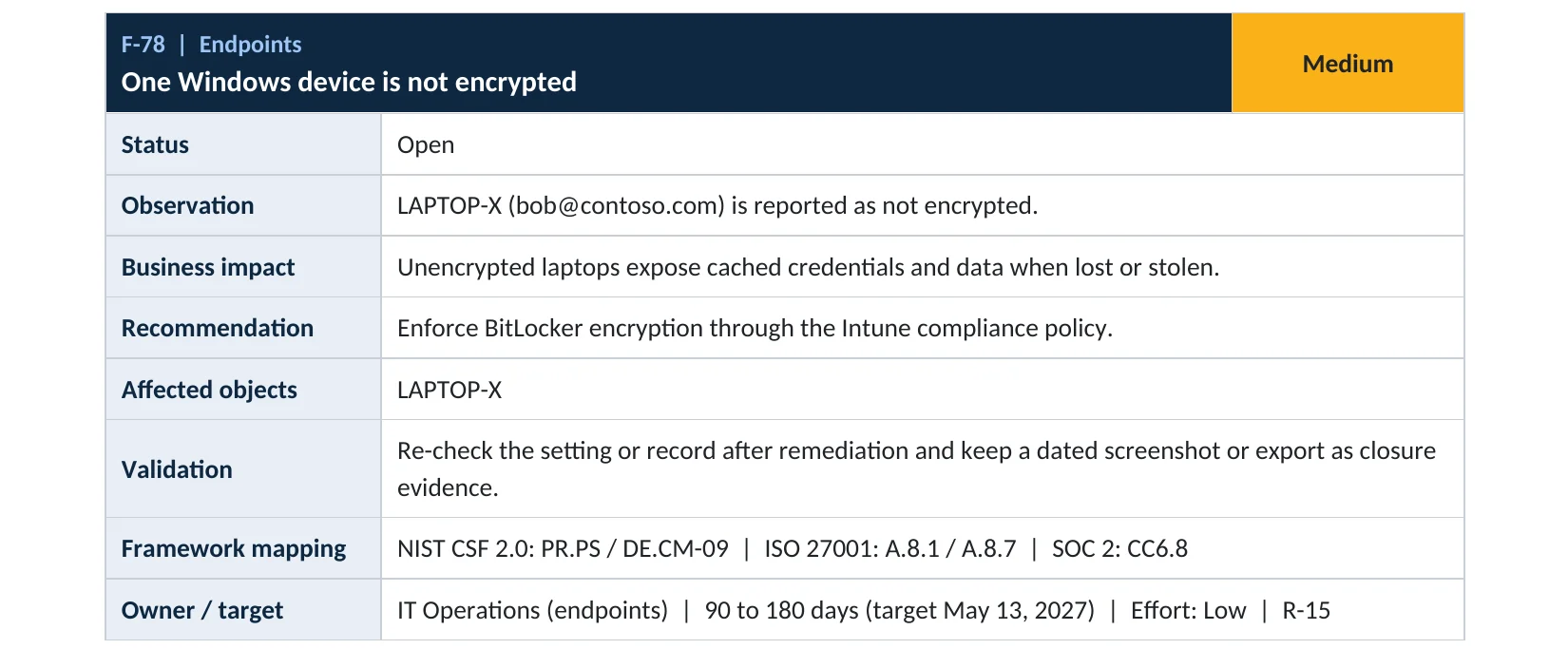
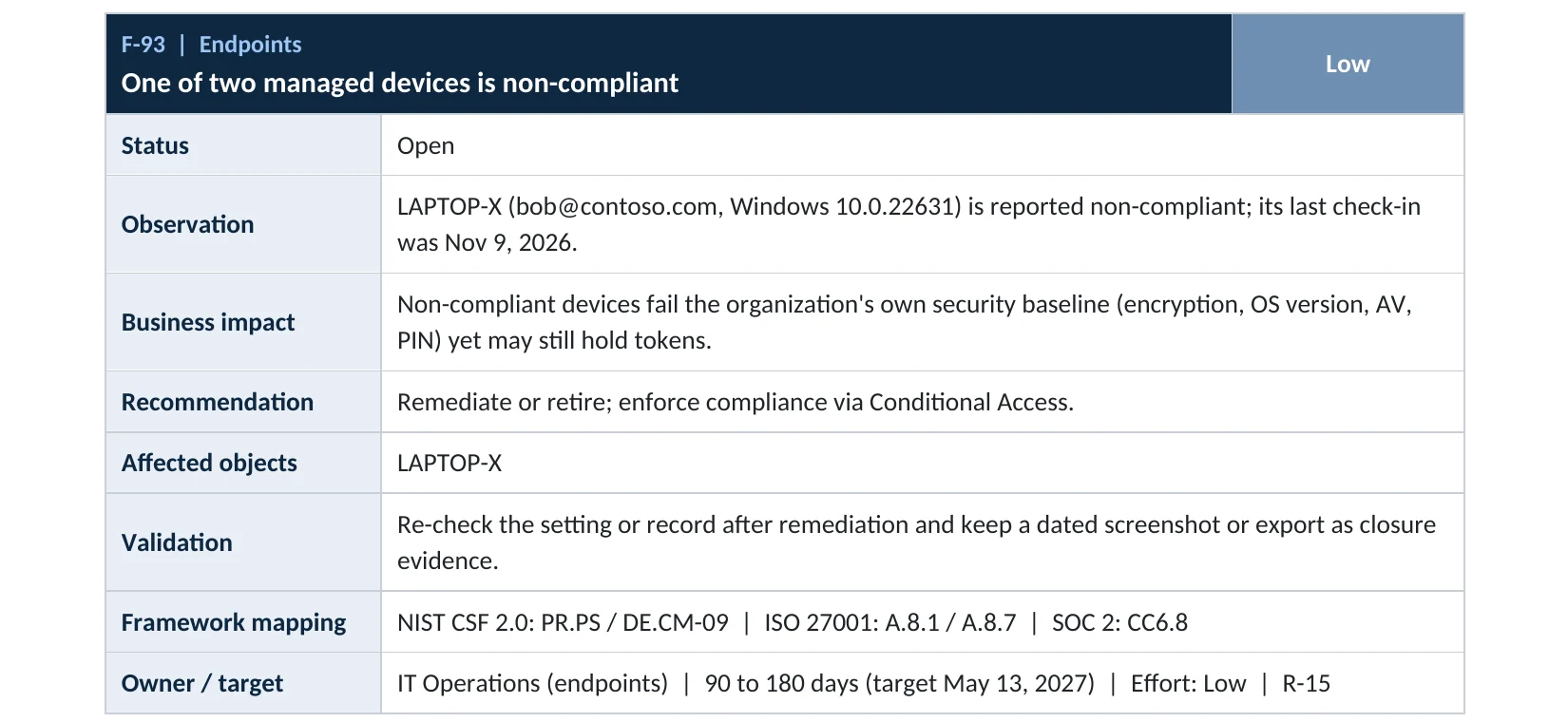
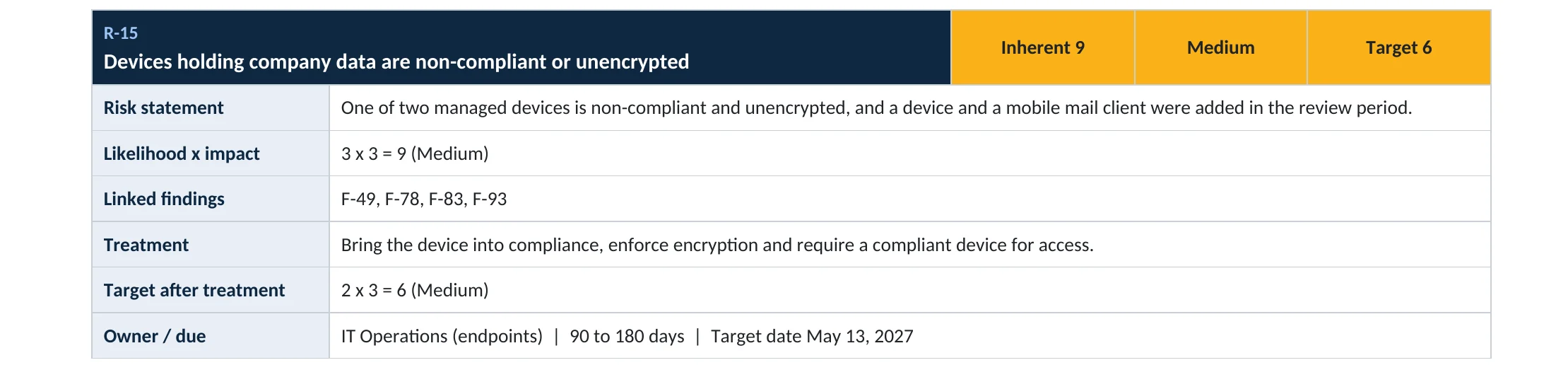
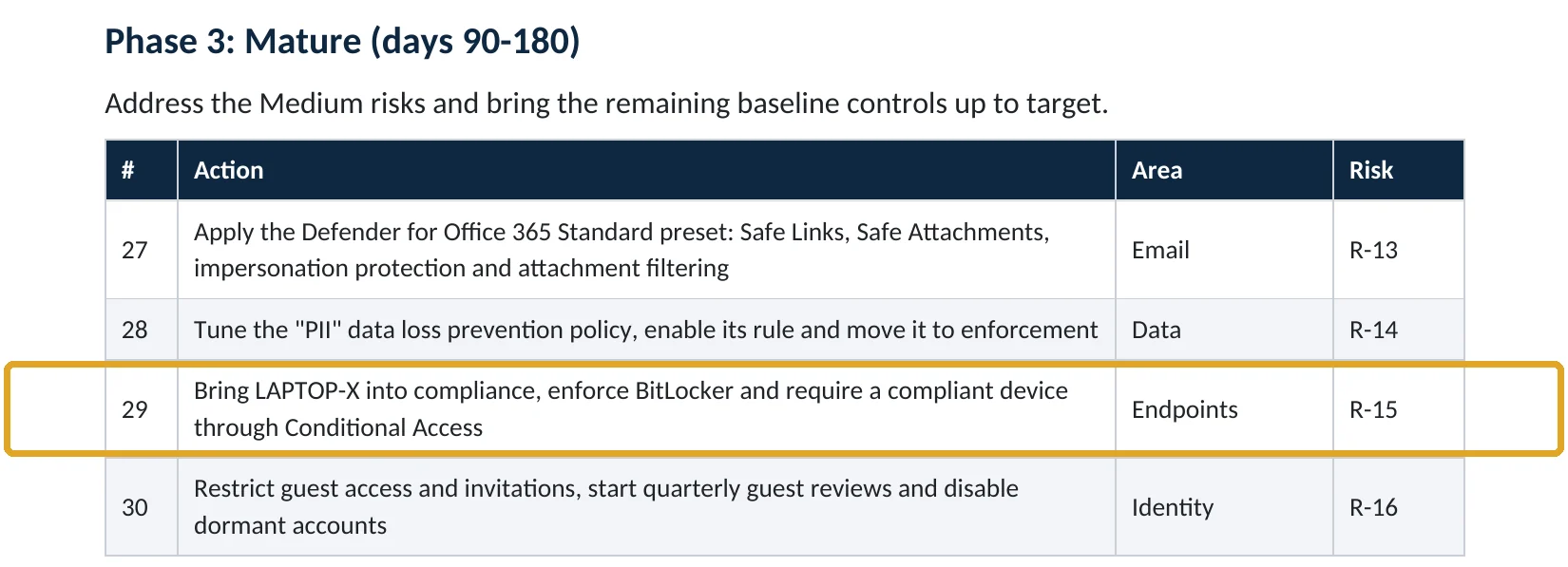
What this finding looks like in our audit reports
These are real pages from our published compromise assessment sample, written for a fictional company. Click any page to open it full size.
Your options
What each plan gives you
| Capability | Business Basic, Standard | Business Premium, E3, E5 |
|---|---|---|
| BitLocker on the device (Windows Pro or higher) | Manual only | Managed by Intune |
| Silent encryption policy | No | Yes |
| Recovery keys in Entra ID, viewable in Intune | Not through Intune | Yes |
| Encryption report and compliance check | No | Yes |
How to check it yourself
See which devices are encrypted, without changing anything
The report lists each Windows device and whether it’s encrypted. Then check Devices › All devices › a device › Recovery keys to confirm a key is stored.
Read-only PowerShell on a Windows device
Get-BitLockerVolume -MountPoint C: | Select-Object MountPoint, VolumeStatus, ProtectionStatus, EncryptionPercentage
The command only reads status. FullyEncrypted and On mean the drive is protected.
How to configure
How to require BitLocker with Intune, step by step
Business Premium, E3, E5
Turn on silent BitLocker
- Open Intune › Endpoint security › Disk encryption › Create policy, platform Windows, profile BitLocker.
- Set Require Device Encryption to Enabled.
- Set Allow Warning For Other Disk Encryption to Disabled, then Allow Standard User Encryption to Enabled.
- Turn on recovery password rotation and backup to Microsoft Entra ID.
- Assign to a pilot group, check the encryption report, then all Windows devices.
Make it stick
Require it for access
- In your Windows compliance policy, set Require BitLocker.
- Turn on the Conditional Access policy that requires a compliant device.
- Fix devices that fail: check TPM, UEFI, Secure Boot and WinRE.
Microsoft warns that disabling the warning for other disk encryption lets BitLocker proceed even if third-party encryption is present, so check for other encryption software first (Microsoft Learn).
What your users will notice
Usually nothing. Encryption runs in the background. A user who changes hardware or firmware may occasionally be asked for a recovery key, which IT can read from Intune.
How to undo it
Unassign the policy; existing encryption stays until someone turns BitLocker off on the device. We don’t recommend decrypting.
Proof and questions
How to prove it is fixed, and what to ask your IT provider
Evidence it is fixed
- The encryption report shows every Windows device encrypted.
- Every device has a recovery key in Microsoft Entra.
- Compliance policies require BitLocker.
- Unencrypted devices can’t reach company data.
Questions for your IT provider
- Are all our laptops encrypted, and can you show me the report?
- Where are the recovery keys kept, and who can see them?
- What happens when a laptop is lost?
- Do unencrypted devices still get company email?
- How are Macs encrypted (FileVault)?
Signs of a problem
Signs a device may be exposed
Red flags
- A lost or stolen laptop that shows as not encrypted.
- Devices stuck at “encryption pending” for weeks.
- Recovery keys viewed by someone who shouldn’t need them (audited under KeyManagement).
- BitLocker suspended on a device and never resumed.
- Devices with no recovery key stored.
If an unencrypted device was lost, revoke the user’s sessions, wipe it remotely if possible and keep the records. Our compromise investigation establishes what may have been exposed.
Framework mapping
Where device encryption fits
| Framework | Where it fits |
|---|---|
| NIST CSF 2.0 | PR.DS-01: data at rest protected |
| ISO/IEC 27001:2022 | Annex A 8.1 User end point devices; 8.24 Use of cryptography; 7.9 Security of assets off-premises |
| SOC 2 | CC6.1 logical access security (encryption of data at rest); CC6.7 protection of data on devices |
Reviewed by
Written and reviewed by a practicing CISO

Ali Hassani, C|CISO, CISSP
Ali has more than 25 years of IT and cybersecurity experience and holds the Certified CISO and CISSP certifications along with Microsoft and Cisco credentials. He leads every OC Security Audit engagement from Irvine, on-site across Southern California and remotely nationwide. Every Microsoft 365 audit is read-only.
FAQ
Frequently asked questions about BitLocker with Intune
What does BitLocker protect against?
Someone reading the drive of a lost or stolen Windows device. Without the key, the data is unreadable.
Can Intune turn BitLocker on without users doing anything?
Yes, on devices that meet the prerequisites (TPM, UEFI, Secure Boot, WinRE, Entra joined).
Where are the recovery keys stored?
With silent encryption, recovery keys are backed up to Microsoft Entra ID and can be viewed in Intune by authorized admins. Every view is audited.
Which plans include it?
Intune is in Business Premium, E3 and E5. BitLocker itself needs Windows Pro, Enterprise or Education.
Does BitLocker slow laptops down?
On modern devices the impact is negligible.
What about Macs?
Use Intune's FileVault policy for macOS. The same principle applies: encrypt, escrow the key, require it in compliance.
Next step
Make a lost laptop just a lost laptop
Prevent
Microsoft 365 Security Audit
$3,500 fixed
About 200 read-only checks across devices, sign-in protection, email, sharing and logging, for any tenant size, with four reports and a remediation roadmap.
Respond
Microsoft 365 & Azure Compromise Investigation
From $3,500
For when a laptop with company data was lost or stolen: we establish what may have been exposed.
Want to see the deliverables first? Open the Microsoft 365 audit sample report or browse all our sample reports.

Service
Microsoft 365 Security Audit
The fixed-price audit that checks this item and about 200 more.
See the audit ›
Sample
Sample audit report
Every page of the five deliverables, with fictional data.
View the sample ›
Service
Compromise Investigation
When an account or mailbox may already be in an attacker’s hands.
See the investigation ›Related reading: How to require compliant devices · How to onboard devices to Defender for Endpoint · How to find Windows 10 devices after end of support
Sources
Sources used on this page
- Microsoft Learn, Encrypt Windows devices with BitLocker using Intune
- Microsoft Learn, Troubleshooting BitLocker with the Intune encryption report
- Microsoft Learn, Windows compliance settings in Intune
- IBM newsroom, Cost of a Data Breach Report 2025
This guide is general information, not a guarantee of protection or legal advice. Microsoft changes its admin centers often: menu names and steps were checked against Microsoft Learn on November 20, 2026. Drawings are simplified and are not screenshots of Microsoft products. Sample findings come from fictional companies. Incidents are described as reported by the cited sources; OC Security Audit was not involved in them. Questions? Call 949-777-5567 or email support@ocsecurityaudit.com.