

LIBRARY 11.73Microsoft 365 Security Library
How to Onboard Devices to Microsoft Defender for Endpoint
Endpoint detection and response watches every laptop for attacker behavior and lets you isolate a device remotely. It only works on devices that are onboarded, and many tenants have gaps they don’t know about.
Reviewed by Ali Hassani, C|CISO, CISSP · Last verified November 20, 2026
Business Premium includes Microsoft Defender for Business, built on Defender for Endpoint (Microsoft Learn). Full endpoint detection and response is in Defender for Business and Defender for Endpoint Plan 2.
In one minute
- Connect Intune to Microsoft Defender.
- Deploy the preconfigured EDR policy to all Windows devices.
- Onboard Macs and phones with their own profiles.
- Check the EDR Onboarding Status report until nothing is left.
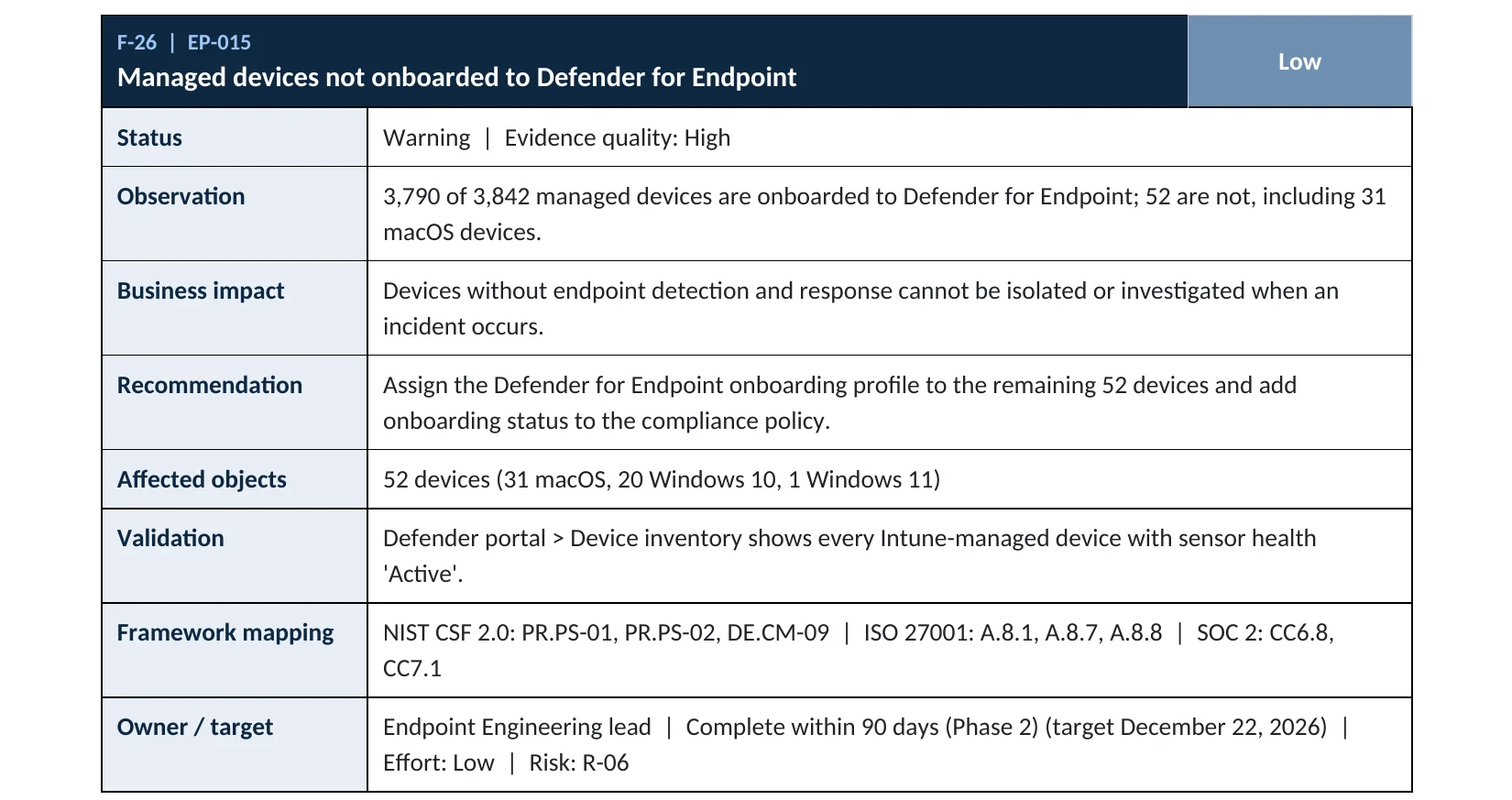
Defender onboarding is item EP-015 in our Microsoft 365 Security Audit.
What it is
What onboarding to Defender for Endpoint means
Onboarding installs or turns on the Defender for Endpoint sensor and connects the device to your Defender tenant. Microsoft says onboarding configures devices to send security telemetry to Defender for Endpoint, enabling threat detection, investigation and response (Microsoft Learn). Antivirus alone isn’t the same: an onboarded device can be investigated, isolated and fed into Intune compliance by risk level.
Onboarding by platform
| Platform | How | Note |
|---|---|---|
| Windows | Intune EDR policy, onboarding package filled automatically | Preconfigured policy available |
| macOS | Intune profiles plus the Defender app | Manual configuration required |
| iOS and Android | Defender app deployed through Intune | Manual configuration required |
| Servers | Defender for Servers or local script | Licensed separately |
Microsoft notes that Windows uses an automatic onboarding package, while macOS, Android and iOS need manual configuration (Microsoft Learn). That’s why Macs are the most common gap we find.
Why it matters
The device you don’t watch is the one they use
- Phishing or exploitMalware lands on a laptop.
- Attacker moves quietlySteals tokens, spreads.
- EDR detectsAlert, investigation, isolation.
- No sensorWithout it: nobody notices.
- RansomwareFiles encrypted, data stolen.
Drawing: where endpoint detection breaks the path.
new malware attempts blocked by Microsoft each day.
Source: Microsoft Digital Defense Report 2025of enterprise ransomware attacks were stopped before encryption in 2025, up from 22% in 2023, in Sophos’s survey.
Source: Sophosminutes: how long a newly onboarded device typically takes to appear in the Defender device inventory.
Source: Microsoft Learnan onboarded device from the network remotely while you investigate.
Source: Microsoft LearnControls that work together
| Control | What it does | Effect |
|---|---|---|
| EDR onboarding on every device | Detection and response everywhere. | Full coverage |
| Defender risk in compliance | High-risk devices lose access automatically. | Contains attacks |
| Tamper protection | Attackers can’t switch Defender off. | Keeps it on |
| Antivirus only | Known malware blocked, no investigation. | Partial |
| Not onboarded | Invisible to the security team. | Blind spot |
What we find in audits
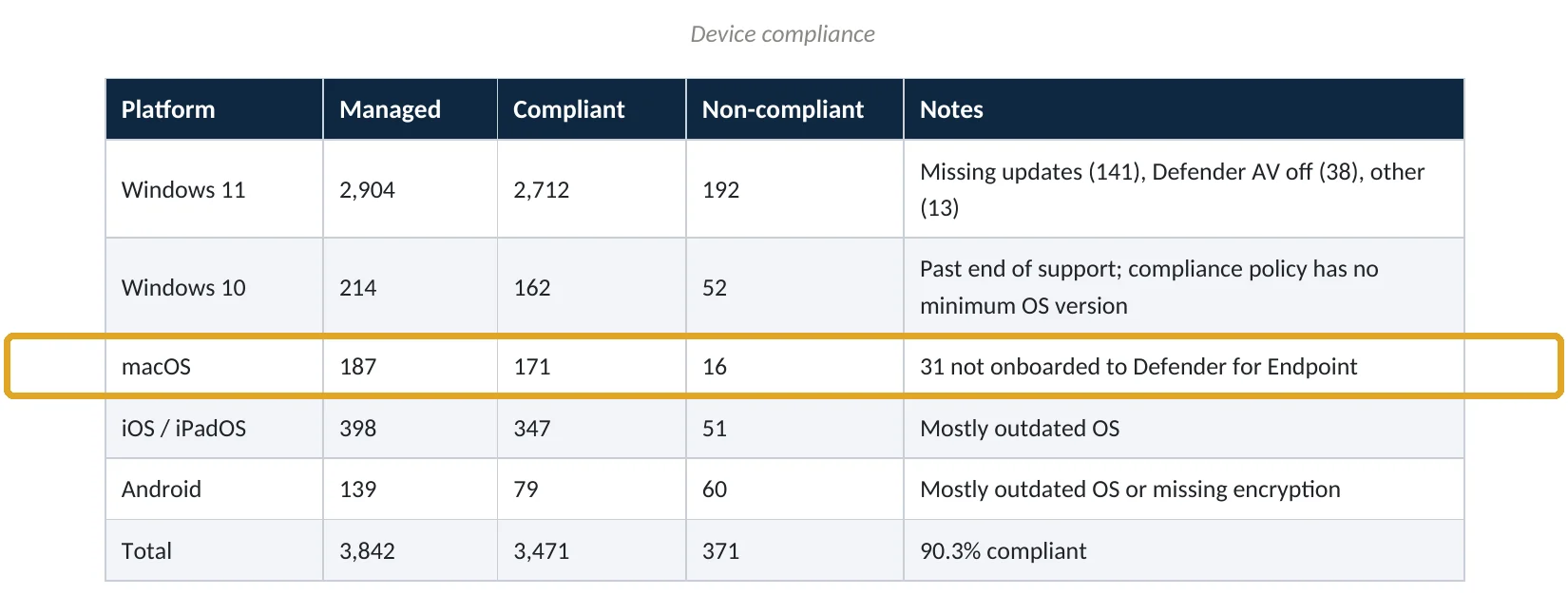
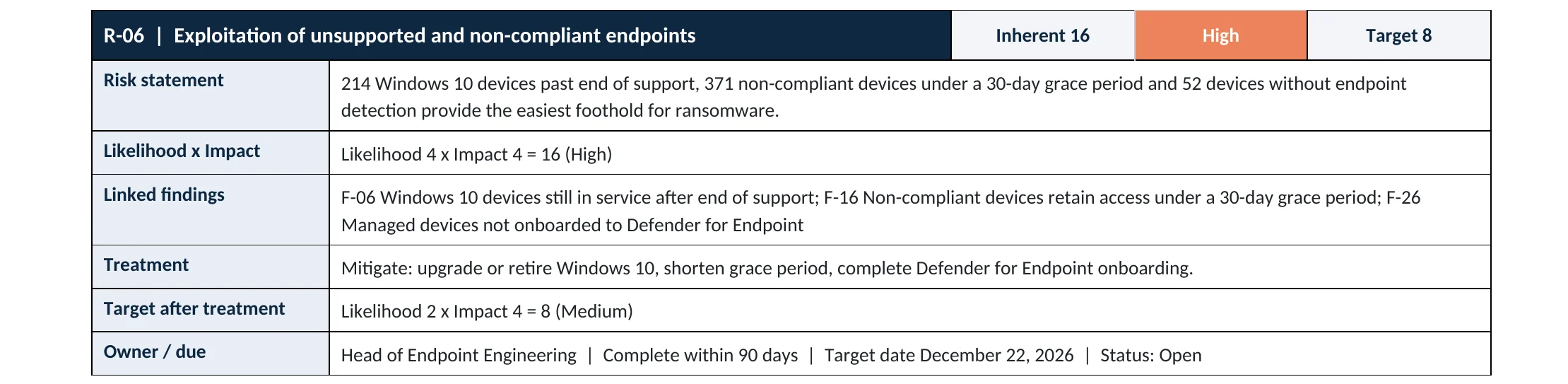
What this finding looks like in our audit reports
These are real pages from our published sample audit, written for a fictional company. Click any page to open it full size. The viewer follows the finding from the technical report to the device table, the risk register and the roadmap.

Your options
What each plan gives you
| Capability | Business Basic, Standard | Business Premium | E3 | E5 |
|---|---|---|---|---|
| Next-generation antivirus | Windows built-in | Yes | Yes | Yes |
| Endpoint detection and response | No | Defender for Business | No (Plan 1) | Yes (Plan 2) |
| Device isolation (manual response) | No | Yes | Yes | Yes |
| Onboarding through Intune | No | Yes | Yes | Yes |
Business Premium customers can also add Defender for Endpoint Plan 1 or Plan 2 (Microsoft Learn).
How to check it yourself
See which devices are covered, without changing anything
The report shows how many Windows devices are onboarded and lists each device’s sensor state: Active, Inactive or Impaired (Microsoft Learn). Then compare security.microsoft.com › Assets › Devices with your Intune device count, including Macs and phones.
Read-only PowerShell on a Windows device: is the Defender for Endpoint sensor running?
Get-Service "Sense" | Format-List Status, Name, DisplayName
The command only reads the service state. Running means the device is onboarded; Stopped means it isn’t.
How to configure
How to onboard every device, step by step
Windows
Use the preconfigured EDR policy
- In Defender › Settings › Endpoints › Advanced features, turn on the Microsoft Intune connection.
- In Intune, check Tenant administration › Connectors and tokens › Microsoft Defender for Endpoint shows Connected.
- Open Endpoint security › Endpoint detection and response › EDR Onboarding Status.
- Select Deploy preconfigured policy, choose Windows, and create it.
- Recheck the report after a day for devices still Not onboarded or Impaired.
Mac, iPhone and Android
Close the gaps
- For macOS, deploy the Defender app and the required system extension and privacy profiles through Intune.
- For iOS and Android, deploy the Microsoft Defender app as a required app.
- Turn on tamper protection in Defender.
- Add Require the device to be at or under the machine risk score to compliance policies.
What your users will notice
Nothing on Windows. On Mac and mobile, a Defender app appears and may ask for permissions once.
How to undo it
Offboarding uses a separate offboarding package from the Defender portal. We don’t recommend it except when retiring a device.
Proof and questions
How to prove it is fixed, and what to ask your IT provider
Evidence it is fixed
- The EDR Onboarding Status report shows every Windows device onboarded and active.
- Macs and phones appear in the Defender device inventory.
- Tamper protection is on.
- Compliance policies use the Defender machine risk score.
Questions for your IT provider
- How many of our devices are onboarded to Defender, and which aren’t?
- Are our Macs covered?
- Do we have full EDR (Defender for Business or Plan 2) or only antivirus?
- Who watches the alerts, and how quickly?
- Can you isolate a device remotely today?
Signs it was already abused
If a device outside Defender’s view may be compromised, look for these signs
Red flags
- A device whose sensor went Inactive without explanation.
- Defender turned off or tamper protection disabled.
- Unknown remote access or file-transfer tools on a PC.
- Sign-ins from a user’s device after it was supposedly retired.
- Open high-severity alerts nobody has looked at.
If you see these, isolate the device and keep the evidence. Our compromise investigation establishes what the attacker did, and the Microsoft 365 Evidence Clock shows how long the records are kept.
Framework mapping
Where endpoint detection fits
| Framework | Where it fits |
|---|---|
| NIST CSF 2.0 | DE.CM-09: computing hardware and software monitored; RS.MI-01: incidents contained |
| ISO/IEC 27001:2022 | Annex A 8.7 Protection against malware; 8.16 Monitoring activities |
| SOC 2 | CC6.8 prevent or detect malicious software; CC7.2 monitor for anomalies |
Reviewed by
Written and reviewed by a practicing CISO

Ali Hassani, C|CISO, CISSP
Ali has more than 25 years of IT and cybersecurity experience and holds the Certified CISO and CISSP certifications along with Microsoft and Cisco credentials. He leads every OC Security Audit engagement from Irvine, on-site across Southern California and remotely nationwide. Every Microsoft 365 audit is read-only.
FAQ
Frequently asked questions about Defender for Endpoint onboarding
What does onboarding to Defender for Endpoint do?
It connects a device's Defender sensor to your tenant, so the device sends security telemetry for detection, investigation and response.
Is Defender for Endpoint included in Business Premium?
Business Premium includes Microsoft Defender for Business, which is built on Defender for Endpoint and includes endpoint detection and response. Defender for Endpoint Plan 1 or 2 can be added.
Isn't Windows Defender antivirus enough?
Antivirus blocks known threats. Onboarding adds detection of attacker behavior, investigation and one-click isolation.
How do I know which devices aren't onboarded?
Intune's EDR Onboarding Status report lists each Windows device and its sensor state. Compare the Defender device inventory with Intune for Macs and phones.
Why are Macs often missed?
Windows onboarding is automatic through Intune; macOS needs the Defender app and extra profiles configured manually.
Does onboarding slow devices down?
The sensor is built into Windows and runs in the background. Most users don't notice it.
Next step
See every device an attacker could use
Prevent
Microsoft 365 Security Audit
$3,500 fixed
About 200 read-only checks across devices, sign-in protection, email, sharing and logging, for any tenant size, with four reports and a remediation roadmap.
Respond
Microsoft 365 & Azure Compromise Investigation
From $3,500
For when a device may already be compromised: we establish what happened and what was reached.
Want to see the deliverables first? Open the Microsoft 365 audit sample report or browse all our sample reports.

Service
Microsoft 365 Security Audit
The fixed-price audit that checks this item and about 200 more.
See the audit ›
Sample
Sample audit report
Every page of the five deliverables, with fictional data.
View the sample ›
Service
Compromise Investigation
When an account or mailbox may already be in an attacker’s hands.
See the investigation ›Related reading: How to require compliant devices · How to find Windows 10 devices after end of support · Identity, MFA and Conditional Access guide
Sources
Sources used on this page
- Microsoft Learn, Deploy endpoint detection and response policy with Intune
- Microsoft Learn, Configure Microsoft Defender for Endpoint with Intune and onboard devices
- Microsoft Learn, Monitor device status for Defender for Endpoint with Intune
- Microsoft Learn, Onboard Windows devices to Defender for Endpoint using Intune (validate)
- Microsoft Learn, Onboard Windows devices to Defender for Endpoint by using Intune
- Microsoft Learn, Take response actions on a device
- Microsoft Learn, Microsoft 365 Business Premium security FAQ
- Microsoft, Digital Defense Report 2025 announcement
- Sophos, The State of Ransomware in Enterprise 2025
This guide is general information, not a guarantee of protection or legal advice. Microsoft changes its admin centers often: menu names and steps were checked against Microsoft Learn on November 20, 2026. Drawings are simplified and are not screenshots of Microsoft products. Sample findings come from fictional companies. Incidents are described as reported by the cited sources; OC Security Audit was not involved in them. Questions? Call 949-777-5567 or email support@ocsecurityaudit.com.