

LIBRARY 5.33Microsoft 365 Security Library
How to Lock Down App Registrations and Secrets in Microsoft 365
App registrations let software sign in to your tenant on its own, often with a password-like secret. By default any user can create one, and secrets can last two years. Here is how to restrict who creates apps and keep their credentials short-lived.
Reviewed by Ali Hassani, C|CISO, CISSP · Last verified November 20, 2026
The Users can register applications setting and app credentials are managed in Microsoft Entra on every plan (Microsoft Learn).
In one minute
- Set Users can register applications to No.
- Give the Application Developer role only to people who build apps.
- List every app secret and certificate with its expiry date.
- Replace long-lived secrets with certificates or secrets under 12 months.
App registrations and credentials are part of the application checks in our Microsoft 365 Security Audit.
What it is
What app registrations and secrets are
An app registration is an identity for software, such as a backup tool, a reporting script or an integration. To sign in on its own, the app uses a credential: a certificate, a federated credential, or a client secret, which is essentially a long password. Microsoft notes that by default all users in a directory can register applications (Microsoft Learn).
Credential types, strongest first
| Credential | Microsoft’s guidance | Use for |
|---|---|---|
| Federated credential | No secret to store or leak | Apps running in Azure, GitHub Actions and similar |
| Certificate | Recommended credential type; more secure than secrets | Production apps and scripts |
| Client secret | Max 24 months; recommend under 12; avoid in production | Testing only, or short-lived where nothing else works |
Microsoft states that client secrets are less secure than certificates or federated credentials and shouldn’t be used in production (Microsoft Learn).
Why it matters
Apps keep access after people leave
- User or attacker registers an appGrants it mail or file permissions.
- Secret createdValid for two years.
- Registration restrictedOnly approved developers.
- Secret stolen from a scriptWithout it: signs in with no MFA.
- Data read for monthsMail, files, directory.
Drawing: where locking down app registrations breaks the path.
the longest a client secret can last in Microsoft Entra.
Source: Microsoft Learnmonths: Microsoft’s recommended maximum for a secret’s expiry.
Source: Microsoft Learncan register applications by default.
Source: Microsoft Learnsetting turns that off: Users can register applications = No.
Source: Microsoft LearnDocumented incidents
Nation-state · Microsoft, 2021
Attackers abuse trusted access paths
Microsoft reported NOBELIUM targeting cloud service providers and resellers to reach customers through trusted, privileged access. App identities with broad permissions are one of those paths.
Source: Microsoft Security Blog
What we find in audits
What this finding looks like in our audit reports
These are real pages from our published compromise assessment sample, written for a fictional company. Click any page to open it full size.
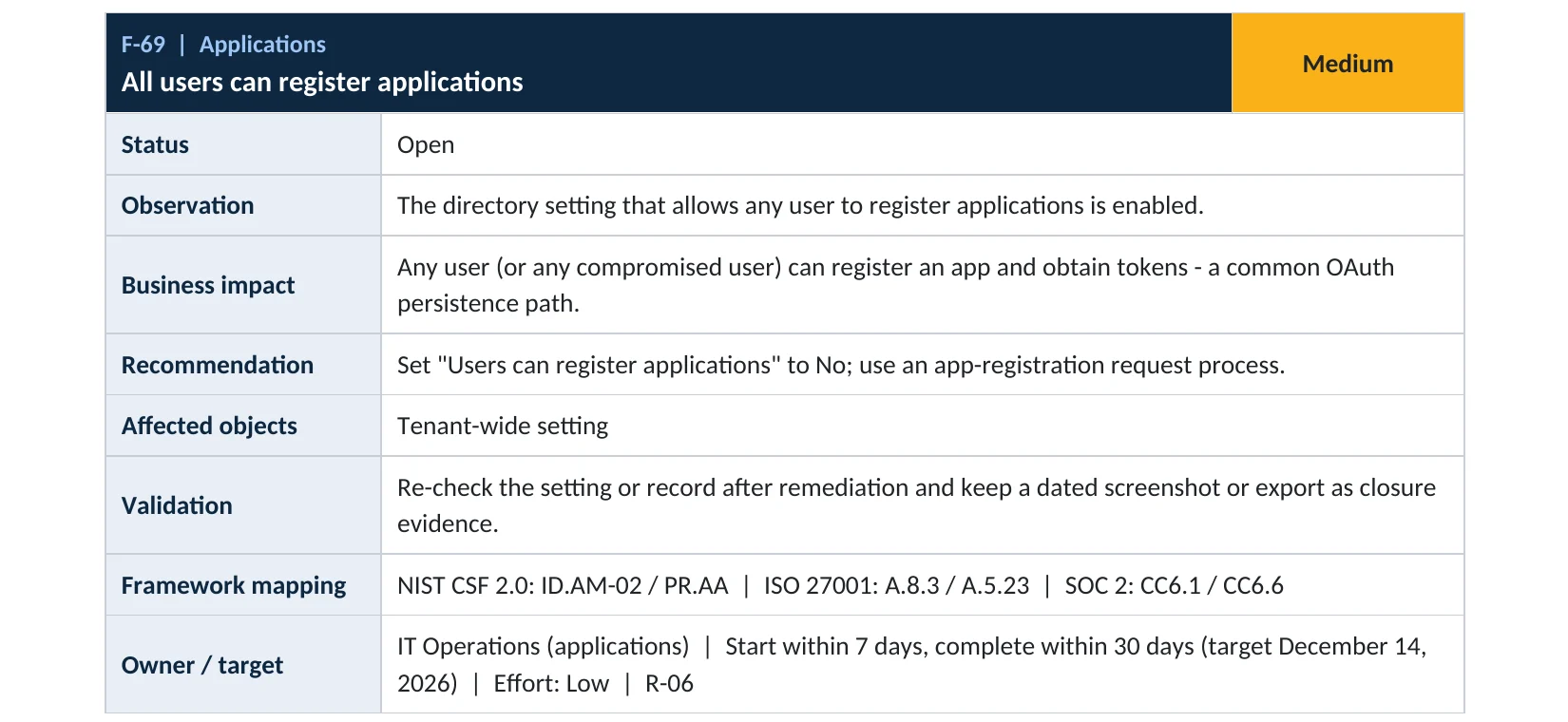
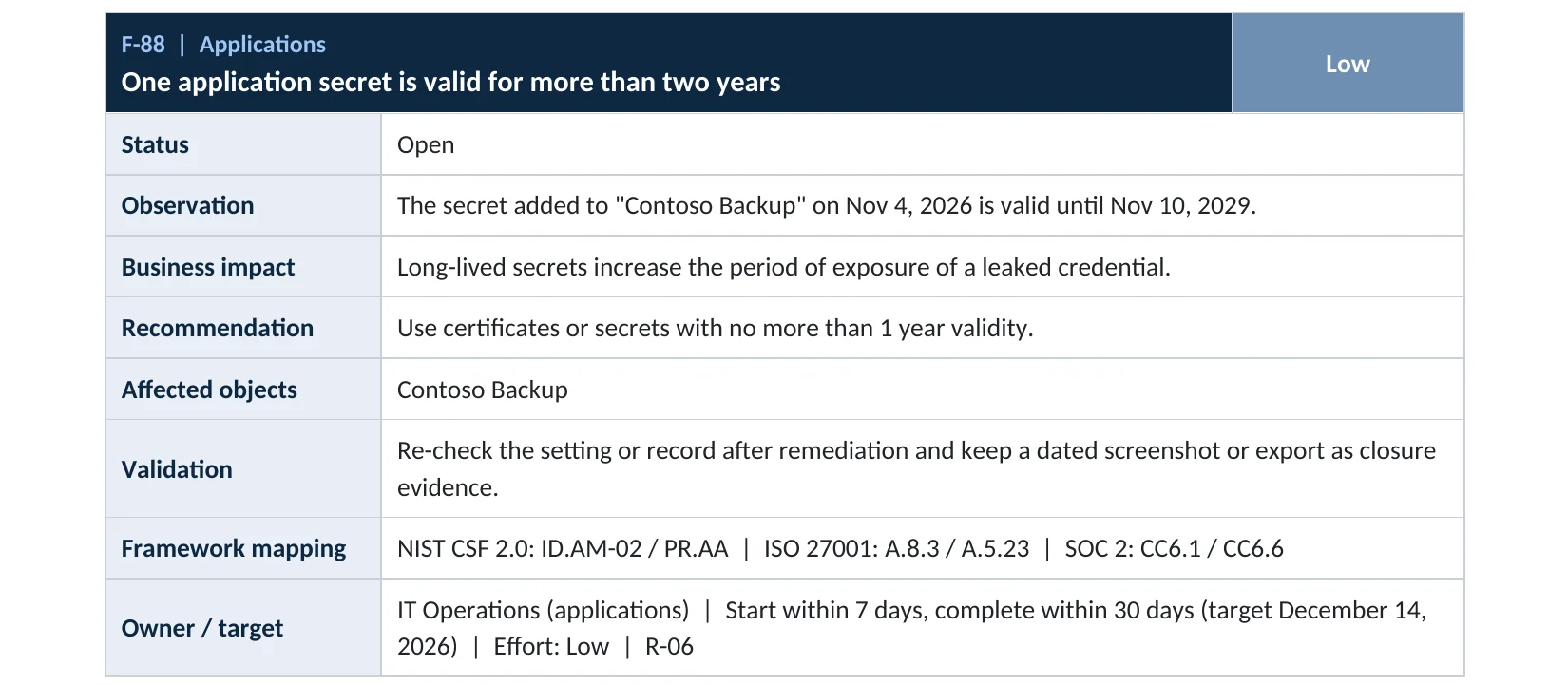
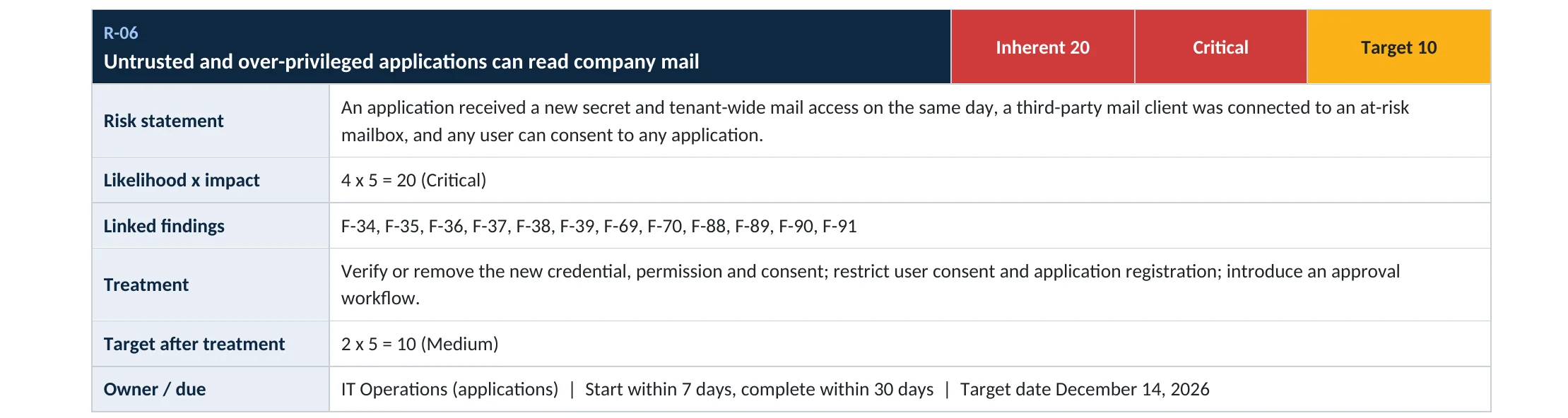
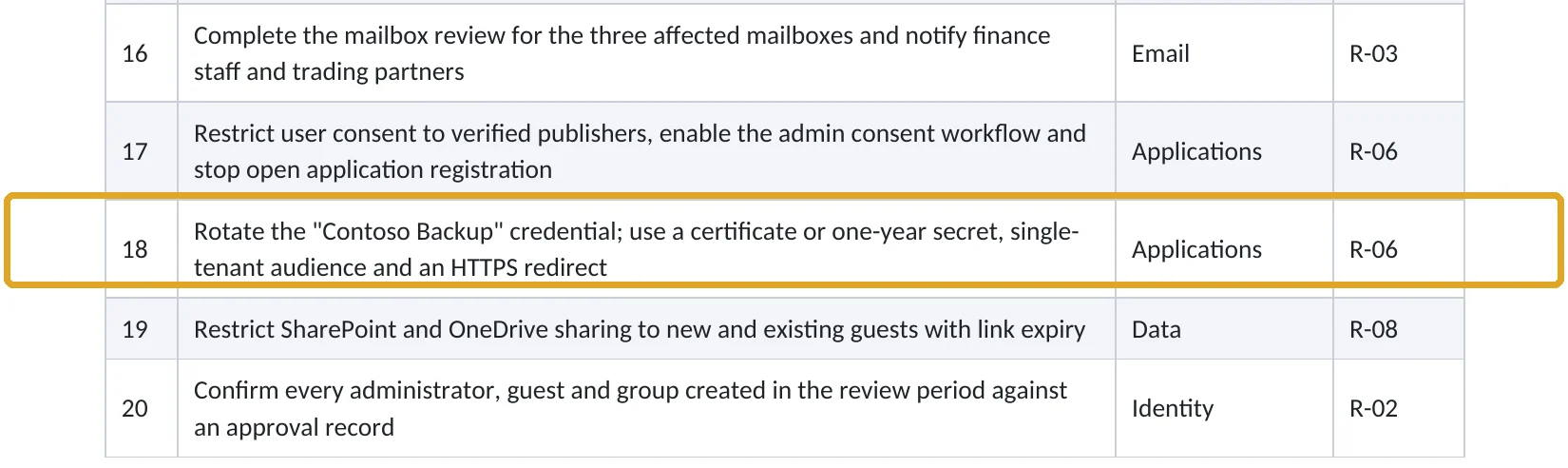
Your options
What each plan gives you
| Capability | All plans | Entra Workload ID Premium |
|---|---|---|
| Turn off user app registration | Yes | Yes |
| Application Developer role for named people | Yes | Yes |
| Certificates and federated credentials | Yes | Yes |
| App management policies (e.g. block long secrets) | No | Yes |
How to check it yourself
Find open registration and long secrets, without changing anything
Read-only PowerShell: registration setting and secrets expiring far in the future
Connect-MgGraph -Scopes "Policy.Read.All","Application.Read.All"
(Get-MgPolicyAuthorizationPolicy).DefaultUserRolePermissions.AllowedToCreateApps
Get-MgApplication -All | ForEach-Object { $a = $_
  $a.PasswordCredentials | Where-Object { $_.EndDateTime -gt (Get-Date).AddMonths(12) } |
  Select-Object @{n="App";e={$a.DisplayName}}, DisplayName, EndDateTime }
The commands only read data. True means any user can register apps; any secret listed is valid for more than 12 more months.
How to configure
How to lock down app registrations and secrets, step by step
All plans
Restrict who registers apps
- Open Entra ID › Users › User settings.
- Set Users can register applications to No and save.
- Assign the Application Developer role to the few people who build apps.
- Review existing app registrations and delete the ones nobody owns.
All plans
Shorten and replace secrets
- For each app, open Certificates & secrets and note every secret’s expiry.
- Replace secrets with a certificate, or a federated credential where supported.
- Where a secret is unavoidable, create a new one valid for under 12 months.
- Update the app or script, test, then delete the old secret.
- Add expiring credentials to a calendar so nothing breaks unexpectedly.
Microsoft notes that turning off app registration doesn’t stop admins or people with the Application Developer role from registering apps (Microsoft Learn).
What your users will notice
Most won’t. Anyone who tries to register an app will be told they don’t have permission and can ask IT.
How to undo it
Set Users can register applications back to Yes. Rotated secrets can’t be restored; create a new one if needed.
Proof and questions
How to prove it is fixed, and what to ask your IT provider
Evidence it is fixed
- Users can register applications is set to No.
- Only named people hold the Application Developer role.
- No app secret is valid for more than 12 months.
- Every app registration has an owner and a purpose.
Questions for your IT provider
- Can any user in our tenant register an app?
- How many app registrations do we have, and who owns them?
- Which apps use secrets, and when do they expire?
- Which apps can read all mail or all files?
- Do we get alerted when a new secret is added?
Signs it was already abused
If an app identity may already have been misused, look for these signs
Red flags
- New secrets added to an existing app, especially by an unfamiliar account.
- App registrations created by ordinary users.
- Apps with Mail.Read or Files.Read.All application permissions nobody recognizes.
- Service principal sign-ins from unusual IP addresses.
- Apps accepting sign-ins from any tenant with insecure redirect addresses.
If you see these, remove the new credentials, disable the app and keep the logs. Our compromise investigation establishes what the app accessed, and the Microsoft 365 Evidence Clock shows how long the records are kept.
Framework mapping
Where app registration controls fit
| Framework | Where it fits |
|---|---|
| NIST CSF 2.0 | PR.AA-01: identities and credentials managed (including services); PR.AA-05: least privilege |
| ISO/IEC 27001:2022 | Annex A 5.17 Authentication information; 8.2 Privileged access rights; 8.25 Secure development life cycle |
| SOC 2 | CC6.1 logical access security; CC6.2 credential issuance and removal |
Reviewed by
Written and reviewed by a practicing CISO

Ali Hassani, C|CISO, CISSP
Ali has more than 25 years of IT and cybersecurity experience and holds the Certified CISO and CISSP certifications along with Microsoft and Cisco credentials. He leads every OC Security Audit engagement from Irvine, on-site across Southern California and remotely nationwide. Every Microsoft 365 audit is read-only.
FAQ
Frequently asked questions about app registrations and secrets
What is an app registration?
An identity for software in Microsoft Entra, so an app or script can sign in and access data with the permissions you grant it.
Can ordinary users register apps?
Yes, by default. Microsoft lets you set Users can register applications to No and give the Application Developer role to the people who need it.
What's wrong with client secrets?
They're long-lived passwords for apps, often stored in scripts. Microsoft recommends certificates or federated credentials in production and secrets under 12 months.
How long can a secret last?
Up to 24 months. Microsoft recommends setting expiry to less than 12.
Will rotating a secret break the app?
Only if you delete the old one before updating the app. Add the new credential, update, test, then remove the old one.
How is this different from user consent?
User consent controls which outside apps users can grant access to. App registration controls who can create new app identities in your tenant. Lock down both.
Next step
Control which software can sign in to your tenant
Prevent
Microsoft 365 Security Audit
$3,500 fixed
About 200 read-only checks across applications and OAuth, sign-in protection, admin roles, email and sharing, for any tenant size, with four reports and a remediation roadmap.
Respond
Microsoft 365 & Azure Compromise Investigation
From $3,500
For when an app identity may have been used to read your data: we establish what it accessed.
Want to see the deliverables first? Open the Microsoft 365 audit sample report or browse all our sample reports.

Service
Microsoft 365 Security Audit
The fixed-price audit that checks this item and about 200 more.
See the audit ›
Service
Microsoft Entra ID Security Audit
A deeper look at identities, Conditional Access, roles and apps.
See the Entra ID audit ›
Service
Compromise Investigation
When an account or mailbox may already be in an attacker’s hands.
See the investigation ›Related reading: How to restrict user consent to apps · How to remove unused admin roles · Identity, MFA and Conditional Access guide
Sources
Sources used on this page
- Microsoft Learn, What are the default user permissions in Microsoft Entra ID?
- Microsoft Learn, Add and manage application credentials in Microsoft Entra ID
- Microsoft Learn, Register an application with the Microsoft identity platform
- Microsoft Learn, Migrate applications away from secret-based authentication
- Microsoft Learn, Register applications (Zero Trust)
- Microsoft Security Blog, NOBELIUM targeting delegated administrative privileges (October 2021)
This guide is general information, not a guarantee of protection or legal advice. Microsoft changes its admin centers often: menu names and steps were checked against Microsoft Learn on November 20, 2026. Drawings are simplified and are not screenshots of Microsoft products. Sample findings come from fictional companies. Incidents are described as reported by the cited sources; OC Security Audit was not involved in them. Questions? Call 949-777-5567 or email support@ocsecurityaudit.com.