

LIBRARY 3.25Microsoft 365 Security Library
How to Turn Off IMAP, POP and SMTP AUTH in Microsoft 365
IMAP, POP and SMTP AUTH are old mail protocols that almost nobody needs anymore, and they’re a favorite way for attackers to download mailboxes and send spam. Here is how to switch them off and keep the few printers or apps that still need them working.
Reviewed by Ali Hassani, C|CISO, CISSP · Last verified November 20, 2026
Microsoft notes that virtually all modern email clients connecting to Exchange Online don’t use SMTP AUTH, and recommends disabling it and enabling it only for mailboxes that still need it (Microsoft Learn).
In one minute
- List which mailboxes, printers and apps use IMAP, POP or SMTP AUTH.
- Turn SMTP AUTH off for the organization.
- Turn IMAP and POP off on every mailbox, and in the default for new ones.
- Allow SMTP AUTH only on the one mailbox your scanner or app needs.
Legacy mail protocols are part of the email security checks in our Microsoft 365 Security Audit.
What it is
What IMAP, POP and SMTP AUTH are
IMAP and POP let a mail program download a mailbox. SMTP AUTH lets a device or app send mail by signing in. Microsoft explains that POP and IMAP clients use SMTP AUTH to send, as do applications, reporting servers and multifunction printers (Microsoft Learn). Outlook, Outlook on the web and Outlook for iOS and Android don’t need any of them.
Where each setting lives
| Protocol | Organization setting | Per mailbox |
|---|---|---|
| SMTP AUTH | Exchange admin center › Settings › Mail flow | Mailbox › Email apps › Authenticated SMTP |
| IMAP | Default for new mailboxes (CAS mailbox plan) | Mailbox › Email apps › IMAP |
| POP | Default for new mailboxes (CAS mailbox plan) | Mailbox › Email apps › POP |
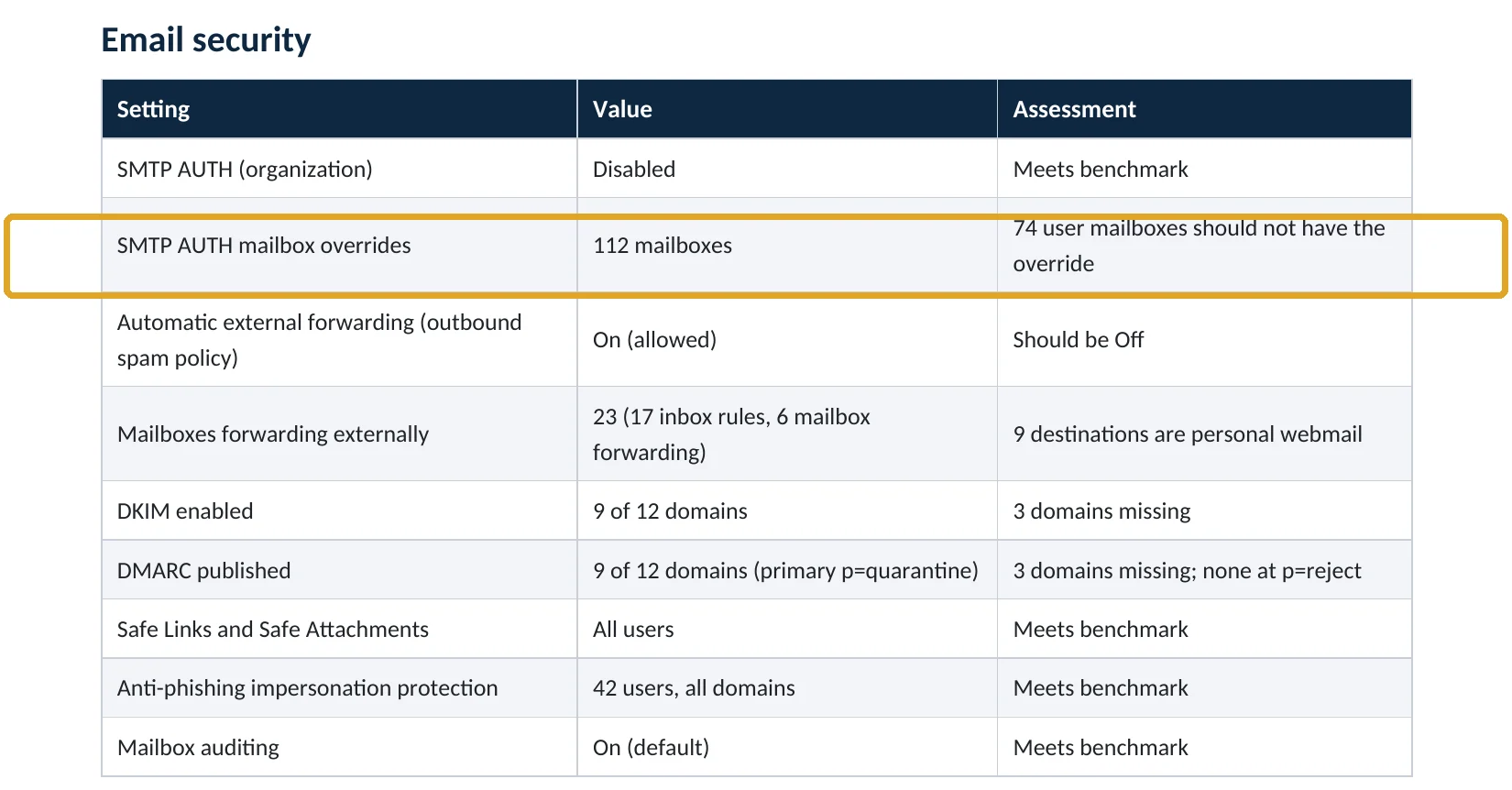
A per-mailbox SMTP AUTH setting overrides the organization setting, so a tenant can look “off” while dozens of mailboxes have it switched back on (Microsoft Learn).
Why it matters
Attackers prefer the protocols you forgot about
- Password stolenPhishing, spray or reuse.
- IMAP or SMTP sign-inBypasses the modern sign-in page.
- Protocol disabledSign-in has nothing to reach.
- Mailbox downloadedWithout it: years of mail copied.
- Spam or fraud sentFrom your real address.
Drawing: where turning the protocols off breaks the path.
of identity attacks were password attacks in the first half of 2025.
Source: Microsoft Digital Defense Report 2025mailboxes in our Microsoft 365 audit sample had SMTP AUTH switched back on individually (fictional company).
Source: Sample audit reportvalues for the per-mailbox SMTP AUTH setting: on, off, or follow the organization.
Source: Microsoft Learnof Outlook, Outlook on the web or Outlook mobile need these protocols.
Source: Microsoft LearnWays to close the old protocols
| Control | What it does | Effect |
|---|---|---|
| SMTP AUTH off for the organization | No device or app can send by password unless allowed. | Closes spam route |
| IMAP and POP off per mailbox | Mail programs can’t download mailboxes. | Closes download route |
| Block legacy authentication (Conditional Access) | Stops password-only sign-ins across Microsoft 365. | Backstop |
| One exception mailbox for printers | Scan-to-email keeps working. | Keeps business running |
| Per-mailbox overrides nobody tracks | Org setting looks off; mailboxes are on. | Hidden gap |
What we find in audits
What this finding looks like in our audit reports
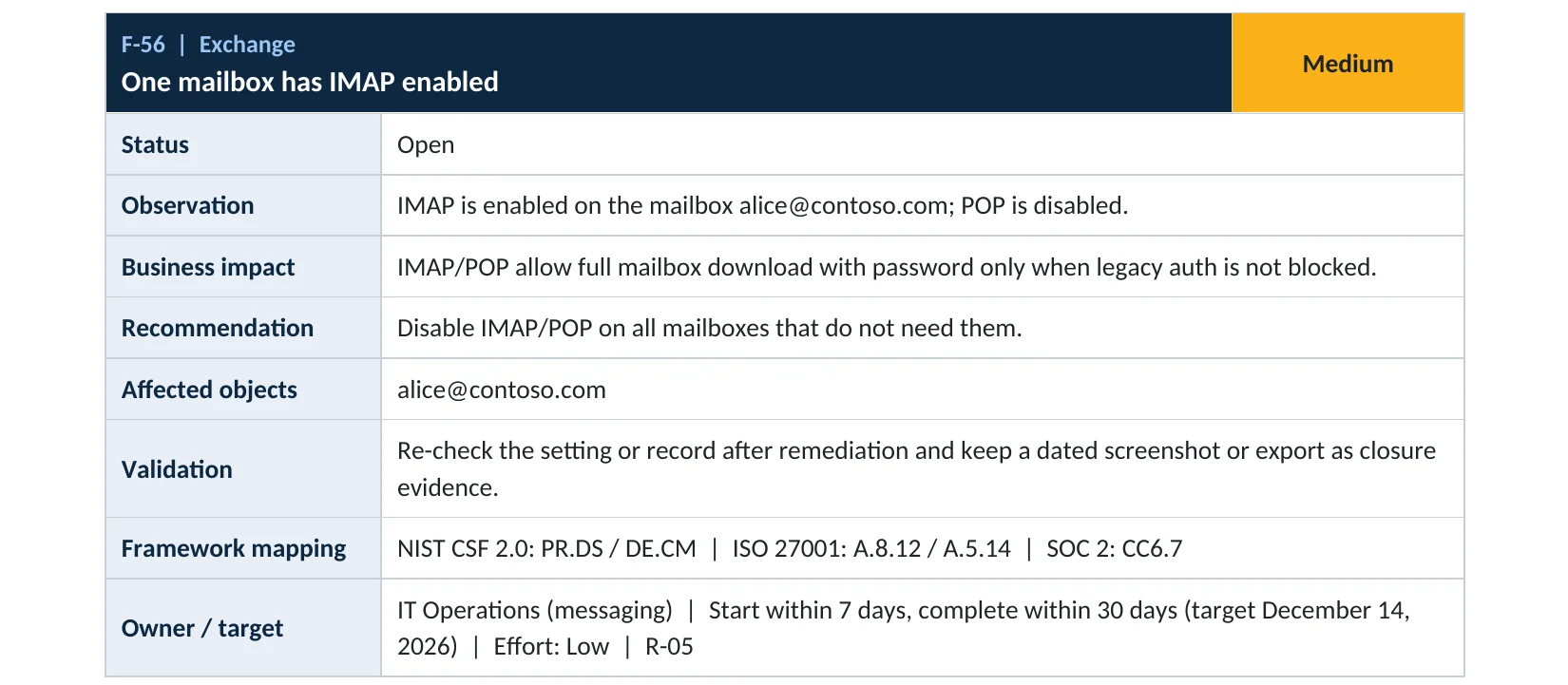
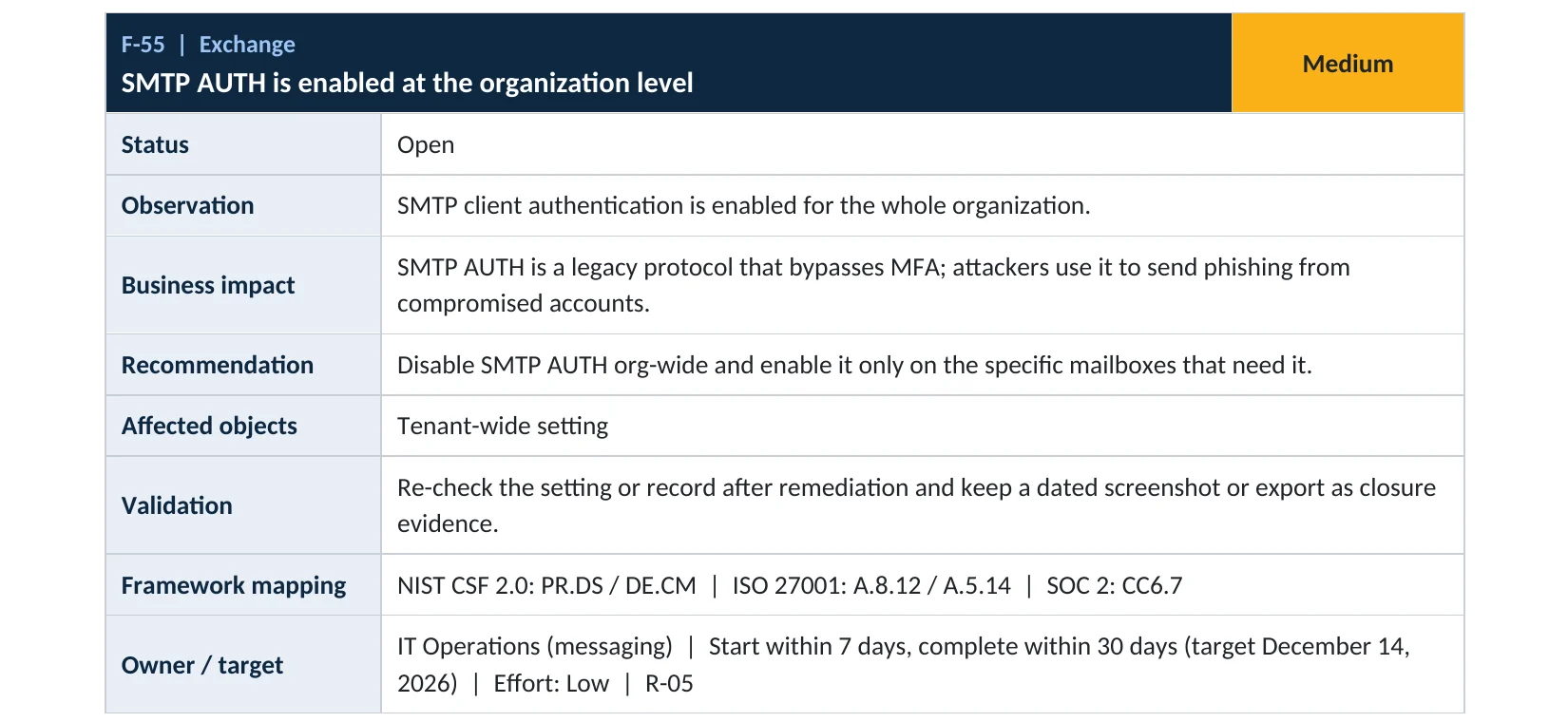
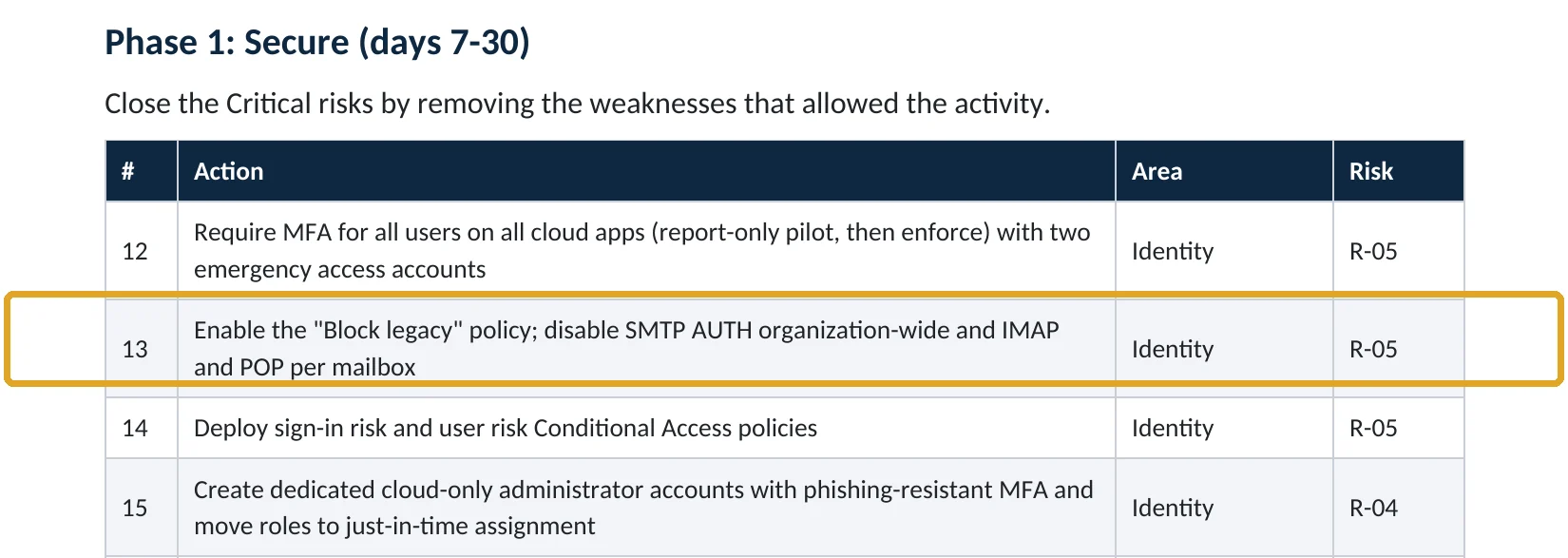
These are real pages from our published sample reports, written for fictional companies. Click any page to open it full size.
Your options
What each plan gives you
| Capability | All plans with Exchange Online |
|---|---|
| Turn off SMTP AUTH for the organization | Yes |
| Turn off IMAP and POP per mailbox and for new mailboxes | Yes |
| Allow SMTP AUTH for one mailbox only | Yes |
| Block legacy authentication with Conditional Access | Business Premium, E3, E5 (Entra ID P1) |
Microsoft also notes that if security defaults is on, SMTP AUTH is already disabled (Microsoft Learn).
How to check it yourself
See who can use these protocols, without changing anything
Read-only PowerShell: SMTP AUTH, IMAP and POP status
Connect-ExchangeOnline
Get-TransportConfig | Format-List SmtpClientAuthenticationDisabled
Get-CASMailbox -ResultSize Unlimited |
  Where-Object { $_.ImapEnabled -or $_.PopEnabled -or $_.SmtpClientAuthenticationDisabled -eq $false } |
  Select-Object Name, ImapEnabled, PopEnabled, SmtpClientAuthenticationDisabled
The commands only read settings. Any mailbox listed can still use at least one of these protocols.
How to configure
How to turn the old protocols off, step by step
All plans
Turn them off
- Check sign-in logs for IMAP, POP and SMTP clients to find printers and apps that still use them.
- In the Exchange admin center › Settings › Mail flow, turn on Turn off SMTP AUTH protocol for your organization.
- Turn off IMAP and POP on all mailboxes with Set-CASMailbox -ImapEnabled $false -PopEnabled $false.
- Set the same defaults for new mailboxes with Set-CASMailboxPlan.
- Reset any per-mailbox SMTP AUTH overrides to follow the organization setting.
Printers and apps
Keep scan-to-email working
- Use one dedicated mailbox for the scanner or app.
- Allow SMTP AUTH on that mailbox only, or switch the device to an SMTP relay connector.
- Give that mailbox a long random password and use it for nothing else.
- Block legacy authentication for everyone else with Conditional Access.
What your users will notice
Nothing, if they use Outlook or the web. Anyone using an old mail program with IMAP or POP will need to switch to Outlook.
How to undo it
Re-enable a protocol per mailbox in Users › Active users › Mail › Manage email apps, or with Set-CASMailbox.
Proof and questions
How to prove it is fixed, and what to ask your IT provider
Evidence it is fixed
- SMTP AUTH is off for the organization.
- No mailbox has IMAP or POP on, except documented exceptions.
- Per-mailbox SMTP AUTH overrides are limited to named devices.
- Sign-in logs show no IMAP, POP or SMTP sign-ins from people.
Questions for your IT provider
- Is SMTP AUTH off for the organization, and which mailboxes override it?
- Which mailboxes still allow IMAP or POP, and why?
- How does our scanner send email?
- Do we block legacy authentication with Conditional Access?
- Have we seen IMAP sign-ins from unusual locations?
Signs it was already abused
If these protocols may already have been used against you, look for these signs
Red flags
- IMAP or POP sign-ins from countries you don’t operate in.
- Successful sign-ins with a client such as an old mail program on a mailbox nobody uses that way.
- Outbound spam from one of your mailboxes or a sending restriction from Microsoft.
- Large mailbox downloads overnight.
- Password spray patterns against many accounts.
If you see these, reset the password, revoke sessions and keep the logs. Our account takeover investigation establishes what was read or sent, and the Microsoft 365 Evidence Clock shows how long the records are kept.
Framework mapping
Where legacy mail protocols fit
| Framework | Where it fits |
|---|---|
| NIST CSF 2.0 | PR.AA-03: authentication; PR.PS-01: configuration management (disable unneeded services) |
| ISO/IEC 27001:2022 | Annex A 8.5 Secure authentication; 8.9 Configuration management; 8.20 Network security |
| SOC 2 | CC6.1 logical access security; CC6.6 protection against outside threats |
Reviewed by
Written and reviewed by a practicing CISO

Ali Hassani, C|CISO, CISSP
Ali has more than 25 years of IT and cybersecurity experience and holds the Certified CISO and CISSP certifications along with Microsoft and Cisco credentials. He leads every OC Security Audit engagement from Irvine, on-site across Southern California and remotely nationwide. Every Microsoft 365 audit is read-only.
FAQ
Frequently asked questions about IMAP, POP and SMTP AUTH
Do we need IMAP or POP in Microsoft 365?
Almost never. Outlook, Outlook on the web and Outlook mobile don't use them. Only old mail programs do.
What is SMTP AUTH used for?
Printers, scanners and apps that send email, and IMAP or POP clients that need to send. Microsoft recommends turning it off and allowing it only for mailboxes that still need it.
Will turning off SMTP AUTH break our scanner?
It can, if the scanner sends through Microsoft 365 with a username and password. Allow SMTP AUTH on that one mailbox, or move the scanner to an SMTP relay connector.
Isn't blocking legacy authentication enough?
It's an important backstop, but per-mailbox protocol settings and Conditional Access exclusions often leave gaps. Turn the protocols off as well.
Does security defaults turn SMTP AUTH off?
Yes. Microsoft notes SMTP AUTH is already disabled when security defaults is enabled.
Which plans include these settings?
All plans with Exchange Online.
Next step
Close the doors nobody uses
Prevent
Microsoft 365 Security Audit
$3,500 fixed
About 200 read-only checks across sign-in protection, email, sharing and devices, for any tenant size, with four reports and a remediation roadmap.
Respond
Microsoft 365 & Azure Compromise Investigation
From $3,500
For when a mailbox was downloaded or used to send spam: we establish what was taken and sent.
Want to see the deliverables first? Open the Microsoft 365 audit sample report or browse all our sample reports.

Service
Microsoft 365 Security Audit
The fixed-price audit that checks this item and about 200 more.
See the audit ›
Service
Microsoft 365 Email Security
Our review of Exchange Online and Defender email protection.
See email security ›
Service
Compromise Investigation
When an account or mailbox may already be in an attacker’s hands.
See the investigation ›Related reading: How to block legacy authentication · How to stop password spray attacks · Exchange Online and Defender email security guide
Sources
Sources used on this page
- Microsoft Learn, Enable or disable authenticated client SMTP submission (SMTP AUTH)
- Microsoft Learn, Enable or disable POP3 or IMAP4 access for a user
- Microsoft Learn, Set-CASMailbox
- Microsoft Source, Microsoft releases 2025 Digital Defense Report
This guide is general information, not a guarantee of protection or legal advice. Microsoft changes its admin centers often: menu names and steps were checked against Microsoft Learn on November 20, 2026. Drawings are simplified and are not screenshots of Microsoft products. Sample findings come from fictional companies. Incidents are described as reported by the cited sources; OC Security Audit was not involved in them. Questions? Call 949-777-5567 or email support@ocsecurityaudit.com.