

LIBRARY 8.60Microsoft 365 Security Library
How to Set Up Data Loss Prevention (DLP) in Microsoft 365
Data loss prevention spots card numbers, Social Security numbers and other sensitive data in email and files, and warns or blocks before it leaves the company. Here is how to set it up and move it out of test mode.
Reviewed by Ali Hassani, C|CISO, CISSP · Last verified November 20, 2026
Microsoft says E3 includes DLP for SharePoint, OneDrive and Exchange, while DLP in Teams chats needs an E5 license (Microsoft Learn). Business Premium includes the same email and file DLP as E3; check the Purview service description for your exact plan.
In one minute
- Decide which data matters most: card numbers, Social Security numbers, health or client data.
- Create a policy from a Microsoft template for that data.
- Run it in simulation mode for one to two weeks and review the matches.
- Turn on policy tips, then move it to enforcement.
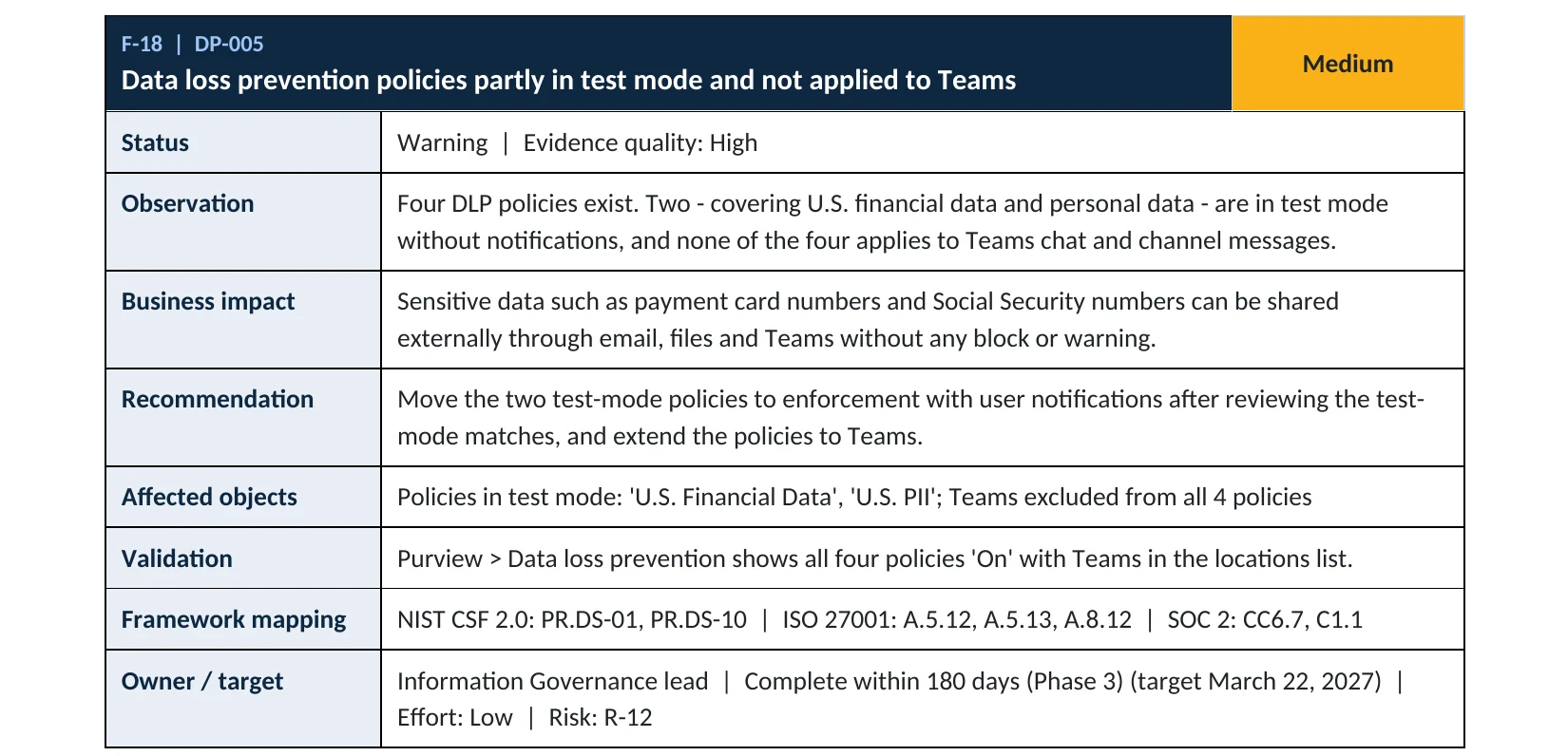
Data loss prevention is item DP-005 in our Microsoft 365 Security Audit.
What it is
What data loss prevention does
Microsoft Purview Data Loss Prevention (DLP) looks inside email, documents and chats for sensitive information, such as payment card numbers or Social Security numbers. When it finds a match, it can show the user a tip, notify an admin, or block the message or sharing link. Microsoft lists Exchange email, SharePoint sites, OneDrive accounts and Teams chat and channel messages among the places a policy can cover (Microsoft Learn).
The three policy states
| State | What happens | Use it for |
|---|---|---|
| Simulation mode | Matches are reported; nothing is blocked. | Testing a new policy and tuning false alarms |
| Simulation with policy tips | Users see a tip; nothing is blocked. | Teaching users before enforcement |
| On (enforced) | Actions apply: block, block with override, notify. | Production |
Microsoft recommends deploying new policies in simulation mode and checking their impact before switching to more restrictive modes (Microsoft Learn). The risk is leaving them there: a policy in simulation mode protects nothing.
Why it matters
Most data leaves by mistake, not by hacking
- Sensitive filePayroll, client or card data.
- Sent or sharedWrong recipient, personal email or open link.
- DLP matchTip, block or override with a reason.
- Leaves the companyWithout it: nothing stops the file.
- Breach to reportNotification, cost and trust.
Drawing: where an enforced DLP policy breaks the path.
average cost of a data breach for U.S. companies in 2025, a record, according to IBM.
Source: IBMglobal average cost of a breach in the same IBM study, the first decline in five years.
Source: IBMdays: how long a DLP simulation can run, so results cover real activity, not a snapshot.
Source: Microsoft Learndays: how long Microsoft keeps simulation results for you to review.
Source: Microsoft LearnControls that work together
| Control | What it does | Effect |
|---|---|---|
| DLP for email and files | Finds sensitive data in Exchange, SharePoint and OneDrive. | Stops leaks Premium, E3, E5 |
| DLP for Teams chats | Same checks inside chat and channel messages. | Closes the gap E5 |
| Sensitivity labels | Mark and protect documents by sensitivity. | Adds context |
| Blocking external forwarding | Stops mailboxes from quietly forwarding outside. | Removes a route |
| Policy left in simulation | Reports matches, blocks nothing. | No protection |
Documented research
Research · IBM and Ponemon, 2025
U.S. breach costs hit a record
IBM’s 2025 report, based on breaches studied by the Ponemon Institute, put the U.S. average cost at $10.22 million even as the global average fell to $4.44 million.
Source: IBM newsroom · IBM X-Force
This is cost research, not a DLP study. It shows why catching a leak before it happens is worth an hour of setup.
What we find in audits
What this finding looks like in our audit reports
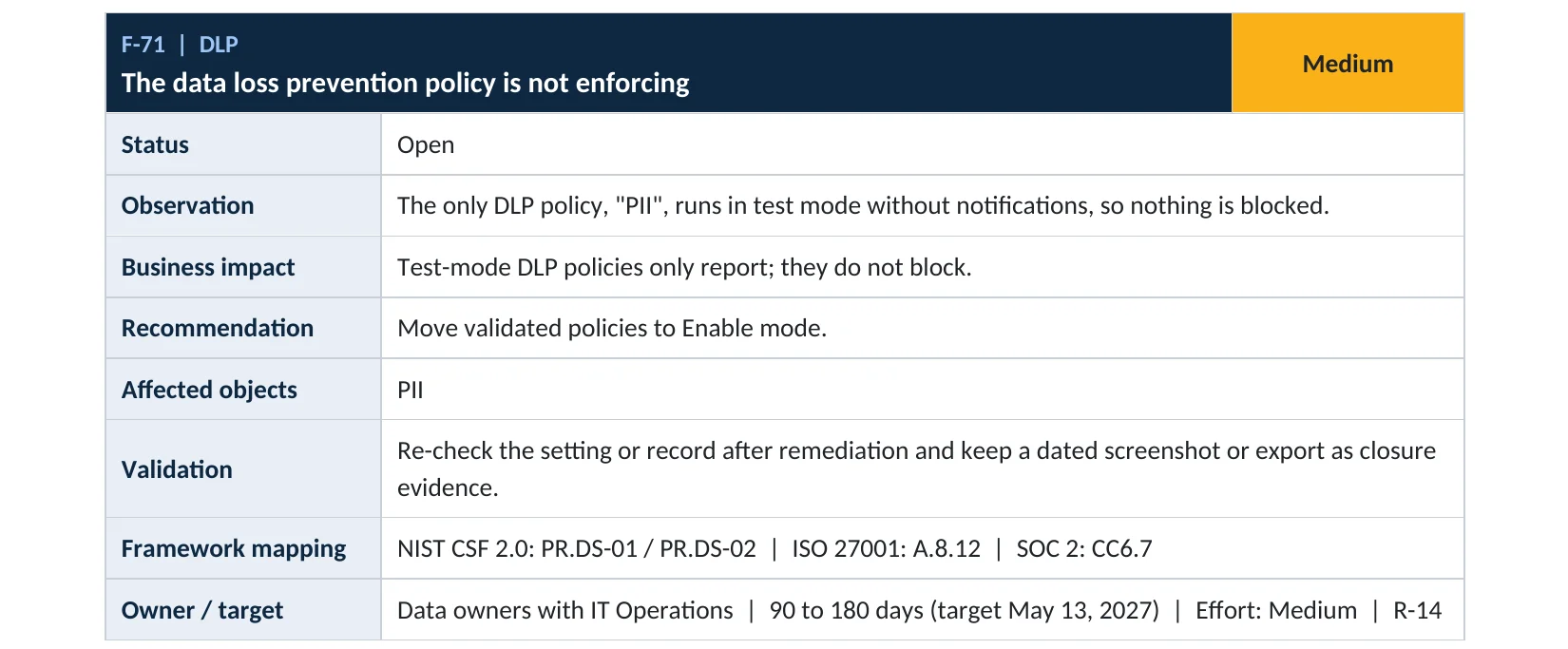
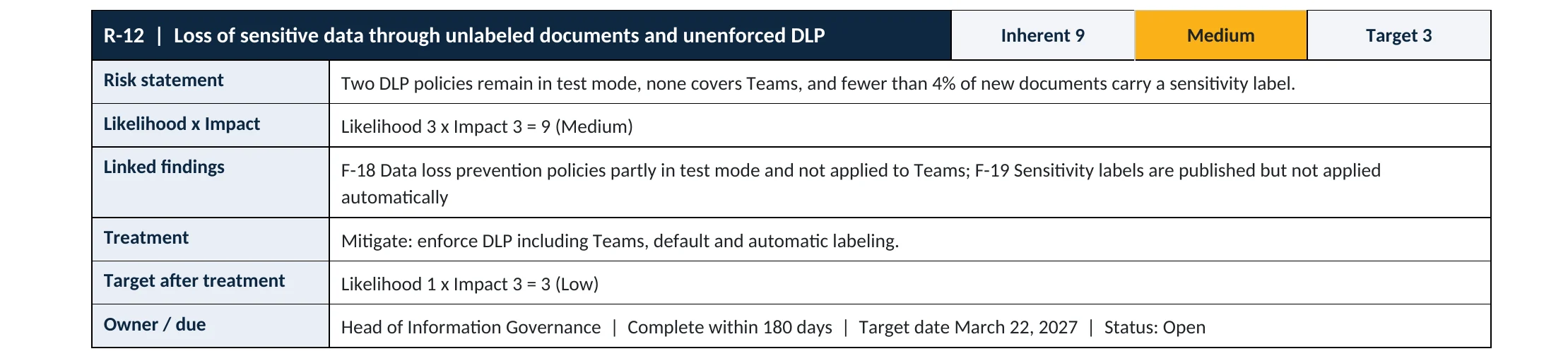
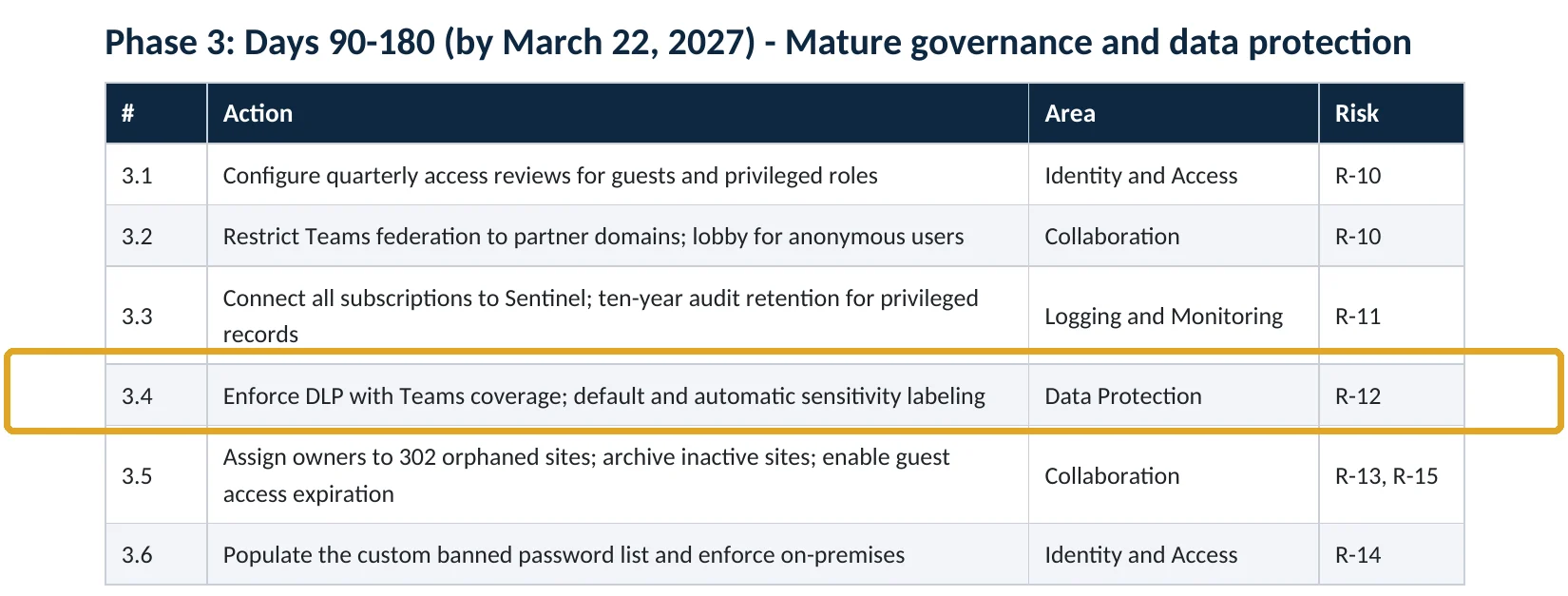
These are real pages from our published sample reports, written for fictional companies. Click any page to open it full size. The viewer follows the finding from the technical report to the risk register and the roadmap, with the same gap in a second tenant.
Your options
What each plan gives you
| Capability | Business Basic, Standard | Business Premium, E3 | E5 or E5 compliance add-on |
|---|---|---|---|
| DLP for Exchange email | No | Yes | Yes |
| DLP for SharePoint and OneDrive | No | Yes | Yes |
| DLP for Teams chat and channel messages | No | No | Yes |
| Endpoint DLP on Windows and Mac devices | No | No | Yes |
Files shared in Teams are stored in SharePoint and OneDrive, so E3-level DLP still covers them; the chat text itself needs E5 (Microsoft Learn).
How to check it yourself
See what’s protected, without changing anything
For each policy, look at the Status column. In simulation means it only reports. Open a policy and check its Locations: if Teams chat and channel messages is missing and you have E5, chats aren’t covered.
Read-only PowerShell: DLP policies, their mode and locations
Connect-IPPSSession
Get-DlpCompliancePolicy |
  Select-Object Name, Mode, ExchangeLocation, SharePointLocation, OneDriveLocation, TeamsLocation
The command only reads settings. Mode shows Enable for enforced policies and a test or simulation value for the rest.
How to configure
How to set up DLP and move it to enforcement, step by step
Business Premium, E3, E5
Create and test a policy
- Open Microsoft Purview › Data loss prevention › Policies › Create policy.
- Pick a template that matches your data, such as U.S. Financial Data or U.S. Personally Identifiable Information.
- Choose locations: Exchange email, SharePoint sites and OneDrive accounts (and Teams chats with E5).
- Set actions: block sharing outside the company, allow an override with a business reason, and notify the user.
- On the last page, select Run the policy in simulation mode with Show policy tips.
After 1 to 2 weeks
Move it to enforcement
- Open the policy and select View simulation to review matched items and alerts.
- Tune conditions that matched by mistake, for example raise the instance count.
- Tell staff what the tips mean and how to override with a reason.
- Edit the policy and choose Turn it on right away.
- Review DLP alerts weekly for the first month.
What your users will notice
A short policy tip in Outlook, Word or the browser when they handle sensitive data, and occasionally a blocked email or sharing link with an option to override with a reason.
How to undo it
Edit the policy and set it back to simulation mode or turn it off. Changes take effect within about an hour.
Proof and questions
How to prove it is fixed, and what to ask your IT provider
Evidence it is fixed
- Every DLP policy shows On, not In simulation.
- Email, SharePoint and OneDrive are in scope (and Teams with E5).
- Simulation results were reviewed and tuned before enforcement.
- Someone reviews DLP alerts on a schedule.
Questions for your IT provider
- Which DLP policies do we have, and are they enforcing?
- Do they cover Teams chats, or only email and files?
- Which sensitive data types are we protecting?
- Who gets the alerts, and how often are they reviewed?
- How many overrides did users make last month?
Signs it was already abused
If sensitive data may already have left, look for these signs
Red flags
- DLP simulation matches for card or Social Security numbers sent to personal email addresses.
- Many overrides by one user, especially with empty or repeated reasons.
- Sensitive files shared with anonymous links or outside domains.
- Large exports of client lists just before an employee leaves.
- A DLP policy switched off or back to test mode without a ticket.
If you see these, keep the audit logs and DLP alerts before changing anything. Our compromise investigation establishes what left and where, and the Microsoft 365 Evidence Clock shows how long the records are kept.
Framework mapping
Where DLP fits
| Framework | Where it fits |
|---|---|
| NIST CSF 2.0 | PR.DS-01 and PR.DS-02: data at rest and in transit protected; PR.DS-10: data in use protected |
| ISO/IEC 27001:2022 | Annex A 8.12 Data leakage prevention; 5.12 Classification of information; 5.14 Information transfer |
| SOC 2 | CC6.7 restricts the transmission and movement of information; C1.1 confidential information protected |
Reviewed by
Written and reviewed by a practicing CISO

Ali Hassani, C|CISO, CISSP
Ali has more than 25 years of IT and cybersecurity experience and holds the Certified CISO and CISSP certifications along with Microsoft and Cisco credentials. He leads every OC Security Audit engagement from Irvine, on-site across Southern California and remotely nationwide. Every Microsoft 365 audit is read-only.
FAQ
Frequently asked questions about data loss prevention
What is data loss prevention in Microsoft 365?
A Microsoft Purview feature that finds sensitive information such as card numbers in email, files and chats, and warns, blocks or notifies before it's shared where it shouldn't be.
Is DLP included in Business Premium?
DLP for Exchange email, SharePoint and OneDrive is included with Business Premium and E3. DLP for Teams chat messages needs an E5 license or an E5 compliance add-on.
Will DLP block my staff from working?
Not if you test first. Run the policy in simulation mode with policy tips for one to two weeks, tune it, and allow overrides with a business reason.
What's the difference between simulation mode and on?
In simulation mode the policy only reports matches. When it's on, the actions you chose, such as blocking, actually apply.
Does DLP cover files shared in Teams?
Yes. Files shared in Teams are stored in SharePoint and OneDrive, which E3-level DLP covers. The chat text itself needs E5.
Do we need sensitivity labels too?
They work well together. Labels mark how sensitive a document is, and DLP can use labels as a condition. Many companies start with DLP templates, then add labels.
Next step
Stop sensitive data before it leaves
Prevent
Microsoft 365 Security Audit
$3,500 fixed
About 200 read-only checks across sign-in protection, email, sharing, data protection, logging and devices, for any tenant size, with four reports and a remediation roadmap.
Respond
Microsoft 365 & Azure Compromise Investigation
From $3,500
For when sensitive data may already have left: we establish what was sent, shared or downloaded.
Want to see the deliverables first? Open the Microsoft 365 audit sample report or browse all our sample reports.

Service
Microsoft 365 Security Audit
The fixed-price audit that checks this item and about 200 more.
See the audit ›
Sample
Sample audit report
Every page of the five deliverables, with fictional data.
View the sample ›
Service
Compromise Investigation
When an account or mailbox may already be in an attacker’s hands.
See the investigation ›Related reading: How to apply sensitivity labels automatically · How to turn off Anyone links · How to block external email forwarding · SharePoint, OneDrive and Teams security guide
Sources
Sources used on this page
- Microsoft Learn, Learn about data loss prevention
- Microsoft Learn, Learn about data loss prevention simulation mode
- Microsoft Learn, Get started with the data loss prevention simulation mode
- Microsoft Learn, Data loss prevention and Microsoft Teams (licensing)
- Microsoft Learn, Microsoft Purview service description
- IBM newsroom, Cost of a Data Breach Report 2025
- IBM X-Force, 2025 Cost of a Data Breach Report: Navigating the AI rush
This guide is general information, not a guarantee of protection or legal advice. Microsoft changes its admin centers often: menu names and steps were checked against Microsoft Learn on November 20, 2026. Drawings are simplified and are not screenshots of Microsoft products. Sample findings come from fictional companies. Incidents are described as reported by the cited sources; OC Security Audit was not involved in them. Questions? Call 949-777-5567 or email support@ocsecurityaudit.com.