

LIBRARY 8.61Microsoft 365 Security Library
How to Apply Sensitivity Labels Automatically in Microsoft 365
Sensitivity labels mark documents and emails as Public, General or Confidential, and can encrypt them. Published labels that nobody applies protect nothing. Here is how to set a default label and label files automatically.
Reviewed by Ali Hassani, C|CISO, CISSP · Last verified November 20, 2026
Microsoft says Business Premium and E3 include sensitivity labels and manual labeling, while automatic labeling of files and emails needs an E5-level license (Microsoft Learn).
In one minute
- Keep a short label set: Public, General, Confidential, Highly Confidential.
- Set General as the default label in your label policy.
- With E5, add auto-labeling for card, Social Security and client data.
- Run auto-labeling in simulation, review, then turn it on.
Sensitivity labeling is item DP-008 in our Microsoft 365 Security Audit.
What it is
What sensitivity labels do
A sensitivity label is a tag such as Confidential that stays with a document or email wherever it goes. Depending on how you set it up, a label can add a header or watermark, encrypt the file so only certain people can open it, and give DLP rules something to act on. Admins create labels and publish them to users; users or automatic rules then apply them (Microsoft Learn).
Three ways a label gets applied
| Method | How it works | License |
|---|---|---|
| Manual | The user picks a label in Word, Excel, PowerPoint or Outlook. | Business Premium, E3, E5 |
| Default label | Every new document or email starts with a label you choose. | Business Premium, E3, E5 |
| Automatic | Office apps or the service detect sensitive data and apply or recommend a label. | E5 or E5 compliance add-on |
Why it matters
Protection that depends on every user remembering doesn’t scale
- Sensitive file createdPricing, payroll or client data.
- Never labeledUser forgets or doesn’t know.
- Label appliedEncryption follows the file.
- File forwardedWithout it: anyone can open the copy.
- Data exposedOutside the company, for good.
Drawing: where a label breaks the path.
companies in Varonis’s study of 1,000 environments had labeled files.
Source: Varonisof organizations had exposed sensitive cloud data, in the same Varonis study.
Source: Varonisdays: a default auto-labeling policy turns itself on this many days after simulation if you don’t edit it.
Source: Microsoft Learnlabels is plenty for most small and mid-size companies: Public, General, Confidential, Highly Confidential.
Source: Our recommendationControls that work together
| Control | What it does | Effect |
|---|---|---|
| Default label | Nothing starts unlabeled. | Raises coverage |
| Automatic labeling | Sensitive content gets the right label without asking. | Finds what users miss E5 |
| Encryption on Confidential labels | Only the right people can open the file, wherever it goes. | Protects copies |
| DLP using labels | Blocks sharing of Highly Confidential files outside. | Enforces it |
| Labels published only | Users rarely apply them. | Little protection |
Documented research
Research · Varonis, 2025
Labeling is the exception, not the rule
Varonis analyzed nearly 10 billion files across 1,000 real environments and found only one in ten companies had labeled files, while 99% had sensitive data exposed to AI tools.
Source: Varonis
This matters more with Copilot: labels and the permissions behind them decide what an AI assistant can surface to whom.
What we find in audits
What this finding looks like in our audit reports
These are real pages from our published sample audit, written for a fictional company. Click any page to open it full size. The viewer follows the finding from the technical report to the findings summary, the risk register and the roadmap.
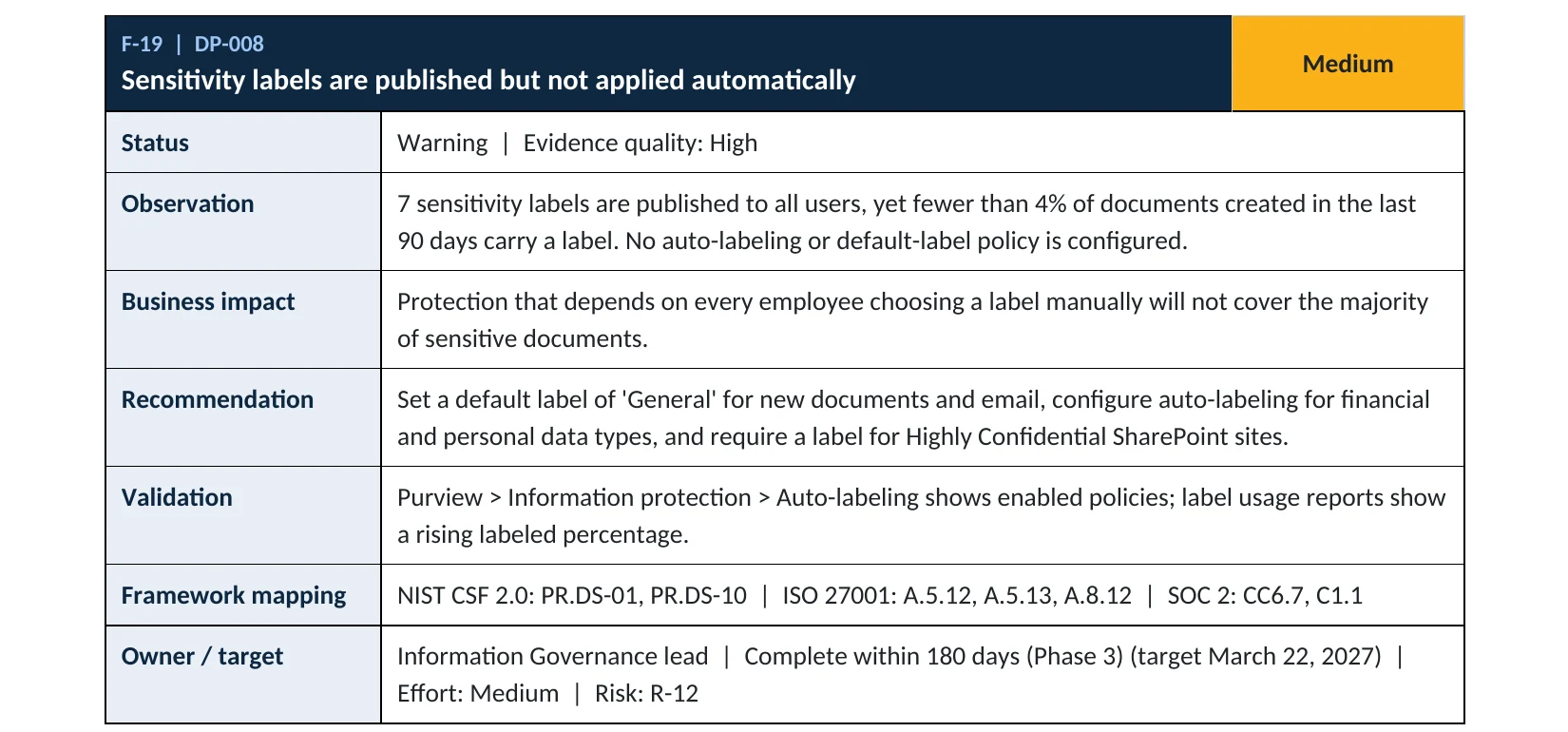

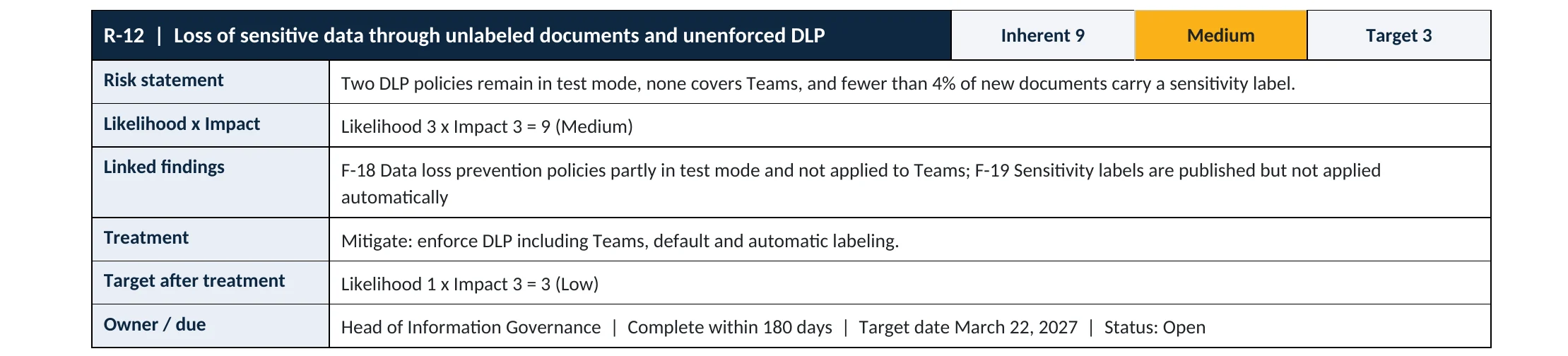
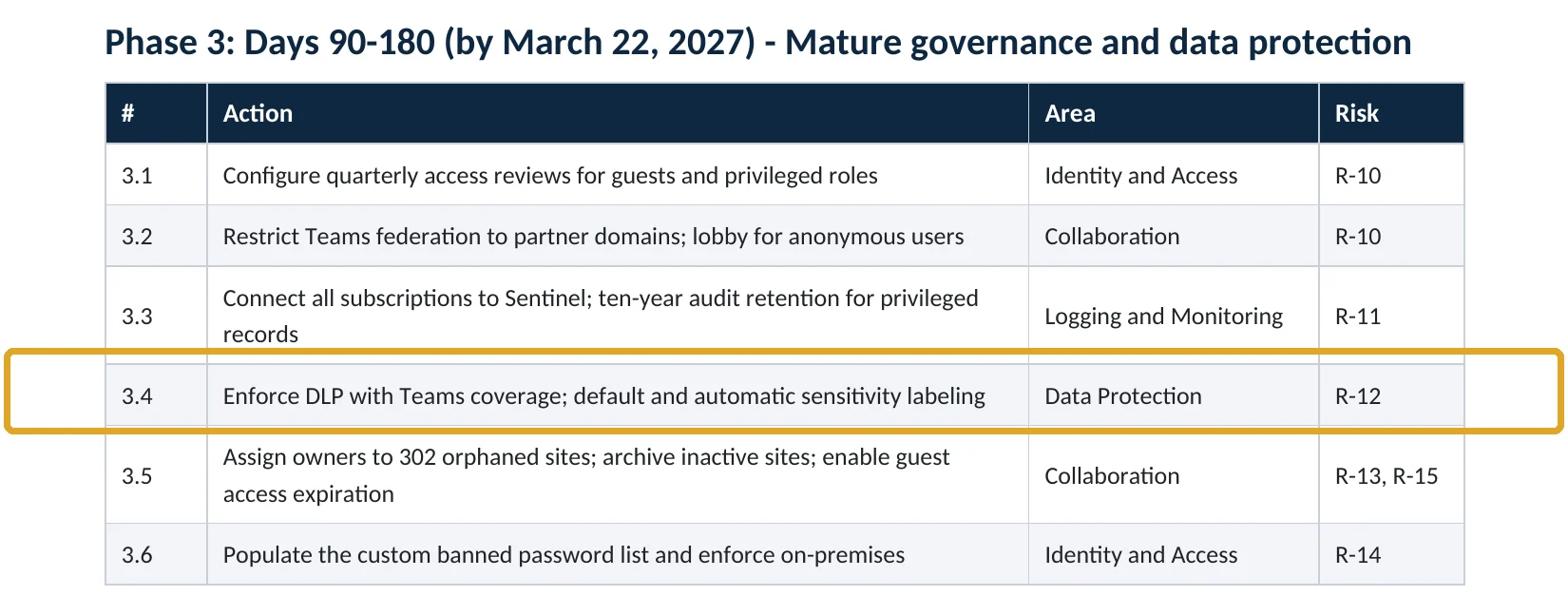
Your options
What each plan gives you
| Capability | Business Basic, Standard | Business Premium, E3 | E5 or E5 compliance add-on |
|---|---|---|---|
| Create and publish labels; manual labeling | No | Yes | Yes |
| Default label in the label policy | No | Yes | Yes |
| Automatic labeling in Office apps | No | No | Yes |
| Auto-labeling policies for SharePoint, OneDrive and Exchange | No | No | Yes |
Microsoft notes that with E3 or Business Premium, labels and manual labeling are included but automatic labeling needs an E5-level add-on (Microsoft Learn). Start with a default label; it costs nothing extra and lifts coverage the same day.
How to check it yourself
See how labels are used, without changing anything
Open each policy and look for Default label for documents and Default label for emails. None means new files start unlabeled. Then open Auto-labeling policies to see whether any are turned on or still in simulation.
Read-only PowerShell: label policies and auto-labeling
Connect-IPPSSession
Get-LabelPolicy | Select-Object Name, Labels, Settings
Get-AutoSensitivityLabelPolicy | Select-Object Name, Mode, ApplySensitivityLabel
The commands only read settings. In the label policy Settings, a defaultlabelid entry shows a default label is set.
How to configure
How to set a default label and label files automatically, step by step
Business Premium, E3, E5
Set a default label
- Open Microsoft Purview › Information protection › Label policies and edit your policy.
- On Default settings for documents, choose General as the default label.
- Do the same for emails, and consider Require users to apply a label.
- Turn on Require users to provide justification to remove a label or lower its classification.
- Save, and allow up to 24 hours for apps to pick up the change.
E5 or E5 compliance add-on
Label sensitive files automatically
- Edit the Confidential label and turn on Auto-labeling for files and emails for card and Social Security numbers.
- Start with Recommend that the user applies the label.
- Create an Auto-labeling policy for SharePoint, OneDrive and Exchange in simulation mode.
- Review the simulation results, adjust conditions, then turn the policy on.
What your users will notice
A label bar in Office apps showing General on new files, a prompt to justify lowering a label, and sometimes a recommendation to apply Confidential. Encrypted files may ask outside recipients to sign in to open them.
How to undo it
Set the default back to None or turn off the auto-labeling policy. Labels already applied stay on files until someone changes them.
Proof and questions
How to prove it is fixed, and what to ask your IT provider
Evidence it is fixed
- Label policies have a default label for documents and emails.
- Lowering a label requires a justification.
- Auto-labeling policies are on, not just simulating (E5).
- The share of labeled documents is rising month over month.
Questions for your IT provider
- What share of our documents carry a label today?
- Do new files start with a default label?
- Which labels encrypt files, and who can open them?
- Do our DLP rules use labels?
- Is anything labeled automatically, or is it all up to users?
Signs it was already abused
If labeled data may have been misused, look for these signs
Red flags
- Many labels lowered or removed by one user in a short time.
- Highly Confidential files shared outside the company.
- Encrypted files opened from unfamiliar accounts or countries.
- Label policies changed without a ticket.
- Bulk downloads of Confidential files just before someone leaves.
If you see these, keep the audit logs first. Our compromise investigation establishes what was opened and shared, and the Microsoft 365 Evidence Clock shows how long the records are kept.
Framework mapping
Where sensitivity labeling fits
| Framework | Where it fits |
|---|---|
| NIST CSF 2.0 | ID.AM-07: data inventoried and classified; PR.DS-01: data at rest protected |
| ISO/IEC 27001:2022 | Annex A 5.12 Classification of information; 5.13 Labelling of information; 8.12 Data leakage prevention |
| SOC 2 | C1.1 confidential information identified and protected; CC6.1 logical access security |
Reviewed by
Written and reviewed by a practicing CISO

Ali Hassani, C|CISO, CISSP
Ali has more than 25 years of IT and cybersecurity experience and holds the Certified CISO and CISSP certifications along with Microsoft and Cisco credentials. He leads every OC Security Audit engagement from Irvine, on-site across Southern California and remotely nationwide. Every Microsoft 365 audit is read-only.
FAQ
Frequently asked questions about sensitivity labels
What is a sensitivity label?
A tag such as Confidential that stays with a document or email. It can add markings, encrypt the file and tell DLP rules how to treat it.
Can we apply labels automatically with Business Premium?
Not fully. Business Premium and E3 include labels, manual labeling and a default label. Automatic labeling based on content needs E5 or an E5 compliance add-on.
What should the default label be?
Usually General, meaning internal and not public. It ensures nothing starts unlabeled without encrypting everyday files.
Will encryption stop partners from opening our files?
Only for labels you configure with encryption. Give those labels to the right people or domains, and keep General unencrypted.
How many labels should we have?
Four is enough for most companies: Public, General, Confidential and Highly Confidential. More labels confuse users.
Do labels matter for Copilot?
Yes. Copilot respects labels and permissions, so labeled, encrypted content is only surfaced to people allowed to open it.
Next step
Make protection follow the file
Prevent
Microsoft 365 Security Audit
$3,500 fixed
About 200 read-only checks across sign-in protection, email, sharing, data protection, logging and devices, for any tenant size, with four reports and a remediation roadmap.
Respond
Microsoft 365 & Azure Compromise Investigation
From $3,500
For when confidential files may have reached the wrong people: we establish what was opened and shared.
Want to see the deliverables first? Open the Microsoft 365 audit sample report or browse all our sample reports.

Service
Microsoft 365 Security Audit
The fixed-price audit that checks this item and about 200 more.
See the audit ›
Sample
Sample audit report
Every page of the five deliverables, with fictional data.
View the sample ›
Service
Compromise Investigation
When an account or mailbox may already be in an attacker’s hands.
See the investigation ›Related reading: How to set up data loss prevention · How to turn off Anyone links · SharePoint, OneDrive and Teams security guide
Sources
Sources used on this page
- Microsoft Learn, Get started with sensitivity labels
- Microsoft Learn, Automatically apply a sensitivity label to Microsoft 365 data
- Microsoft Learn, Default sensitivity labels and policies
- Microsoft Learn, Microsoft Purview service description
- Varonis blog, Data security report reveals 99% of orgs have sensitive information exposed to AI
- Varonis, 2025 State of Data Security Report
This guide is general information, not a guarantee of protection or legal advice. Microsoft changes its admin centers often: menu names and steps were checked against Microsoft Learn on November 20, 2026. Drawings are simplified and are not screenshots of Microsoft products. Sample findings come from fictional companies. Incidents are described as reported by the cited sources; OC Security Audit was not involved in them. Questions? Call 949-777-5567 or email support@ocsecurityaudit.com.