

LIBRARY 3.22Microsoft 365 Security Library
How to Review Mail Flow Rules in Microsoft 365
One mail flow rule can copy every email your company sends to an outside address, or wave attacker mail past the spam filter. Here is how to list them and spot the dangerous ones.
Reviewed by Ali Hassani, C|CISO, CISSP · Last verified November 20, 2026

Mail flow rules are part of Exchange Online on every plan (Microsoft Learn).
In one minute
- List every mail flow rule, including disabled ones, with who created it and when.
- Flag rules that BCC, redirect or forward mail to outside addresses.
- Flag rules that bypass spam filtering or set a low spam level for outside senders.
- Give every remaining rule an owner and a reason, and remove the rest after preserving evidence.
Mail flow rules are reviewed in our Microsoft 365 Security Audit and in every compromise investigation.
What it is
What mail flow rules are
Mail flow rules (also called transport rules) act on email while it travels through Exchange Online, before it reaches any mailbox. Microsoft compares them to inbox rules, with the key difference that they act on messages in transit and have a richer set of conditions and actions (Microsoft Learn). Companies use them for disclaimers, routing, encryption and blocking.
Creating them needs Exchange admin rights, so they rarely appear by accident. That is also why attackers who reach an admin account like them: a rule keeps working silently for every mailbox, and most companies never look at the list again.
Why it matters
The rule that copies, redirects or lets mail through
- Admin account takenPhishing or a reused password, no MFA.
- Rule createdBCC finance mail out, or skip spam filtering for attacker domains.
- Rule reviewedAn unexplained rule is found and traced.
- Mail copied for weeksWithout review: every invoice and payment thread.
- Fraud and phishingAttackers act on what they read.
Drawing: a regular mail flow rule review cuts off a tenant-wide leak.
reported lost to business email compromise in 2025 across 24,768 complaints to the FBI. Reading payment mail is how these schemes are timed.
Source: FBI IC3 2025 Internet Crime Reportbusiness email compromise attempts a day detected by Microsoft between April 2022 and April 2023.
Source: Microsoft Cyber Signals, 2023is enough: MITRE ATT&CK records a tenant-level transport rule that sent all mail in and out of an organization to an attacker’s account.
Source: MITRE ATT&CKexternal addresses placed in distribution groups by attackers after they took over admin rights and changed mail flow, in a 2025 case described by Varonis.
Source: Varonis Threat LabsDangerous rule patterns, and what a review catches
| Rule pattern | Why it is dangerous | Caught by a review? |
|---|---|---|
| BCC or copy to an outside address | Every matching message leaves the company silently. | Yes Shows in the rule’s actions. |
| Redirect to an outside address | The real recipient never sees the message. | Yes |
| Bypass spam filtering (SCL -1) for outside senders | Attacker mail skips most spam checks. | Yes Microsoft warns to use more than a sender domain as the condition. |
| Delete or quarantine security notices | Warnings never reach the people they are for. | Yes |
| Malicious inbound connectors | Mail from an attacker’s server is treated as trusted. | Partly Connectors need their own review. |
| Inbox rules in single mailboxes | Hiding and forwarding inside one mailbox. | No Covered by the inbox rules item. |
Documented cases
Threat group · MITRE ATT&CK
LAPSUS$ copies all mail with one transport rule
MITRE ATT&CK records that LAPSUS$ set an Office 365 tenant-level mail transport rule to send all mail in and out of the targeted organization to a newly created account.
Source: MITRE ATT&CK T1114.003
BEC · Varonis Threat Labs, 2025
Admin takeover and mail flow changes
Varonis described attackers who took over a Microsoft 365 account with admin rights and no MFA, created a backdoor Global Administrator, added an inbound connector to bypass email filtering and built distribution groups with about 250,000 outside addresses. When the connector was not removed in time, they came back.
Source: Varonis
We were not involved in either case. Both show why mail flow settings are reviewed after any suspected admin compromise.
What we find in investigations
What this finding looks like in our reports
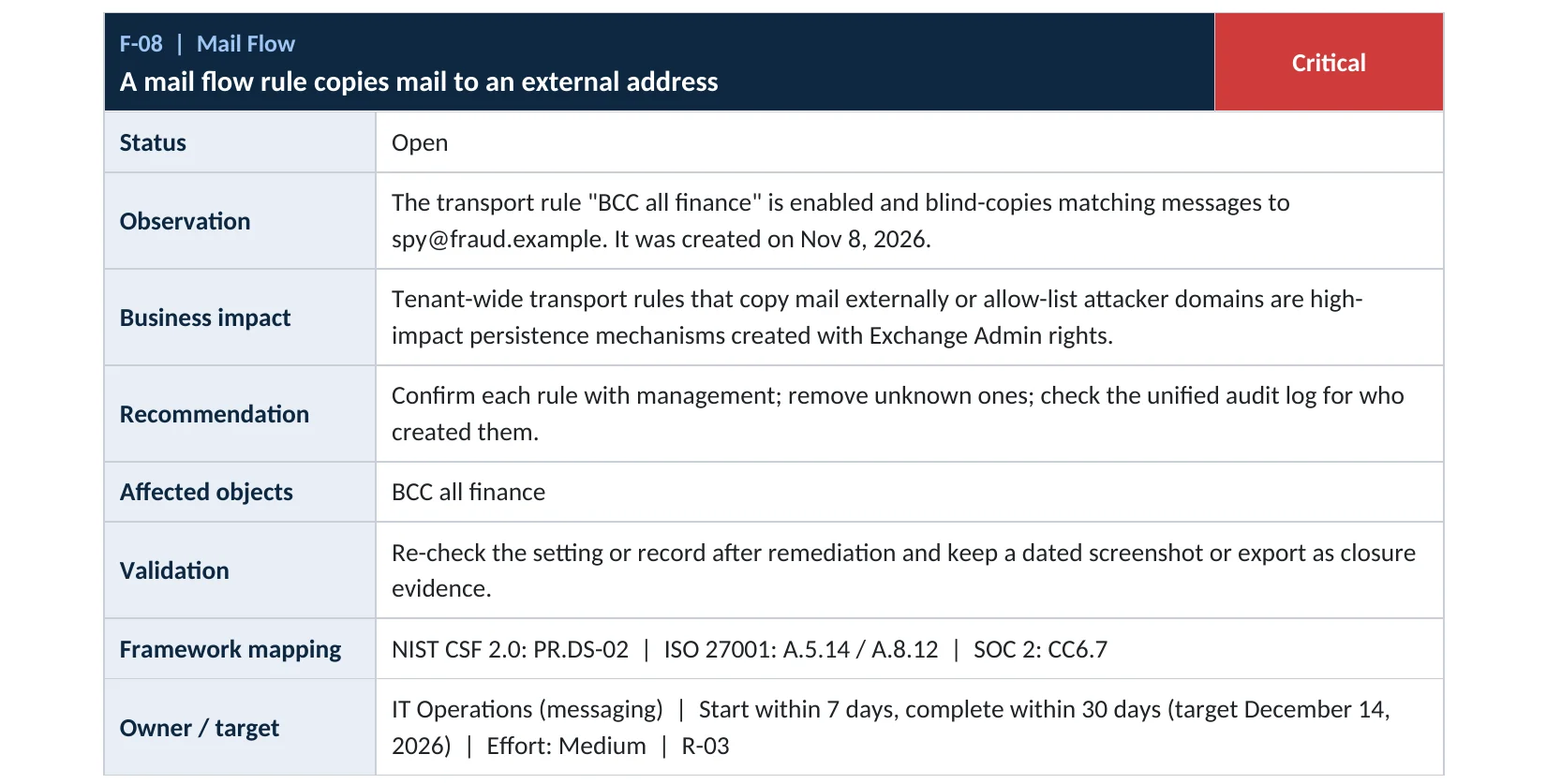
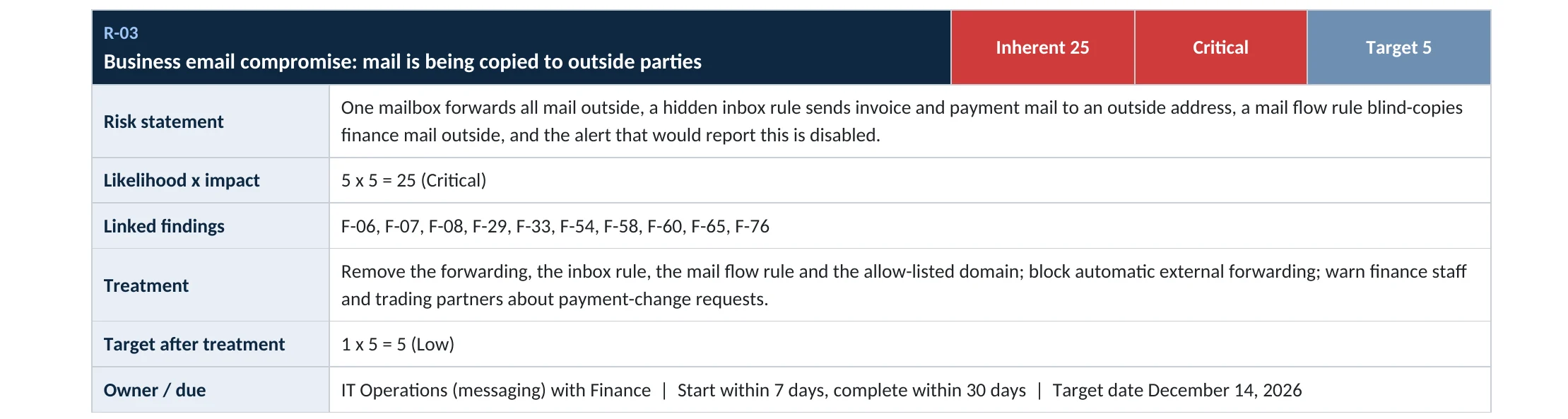
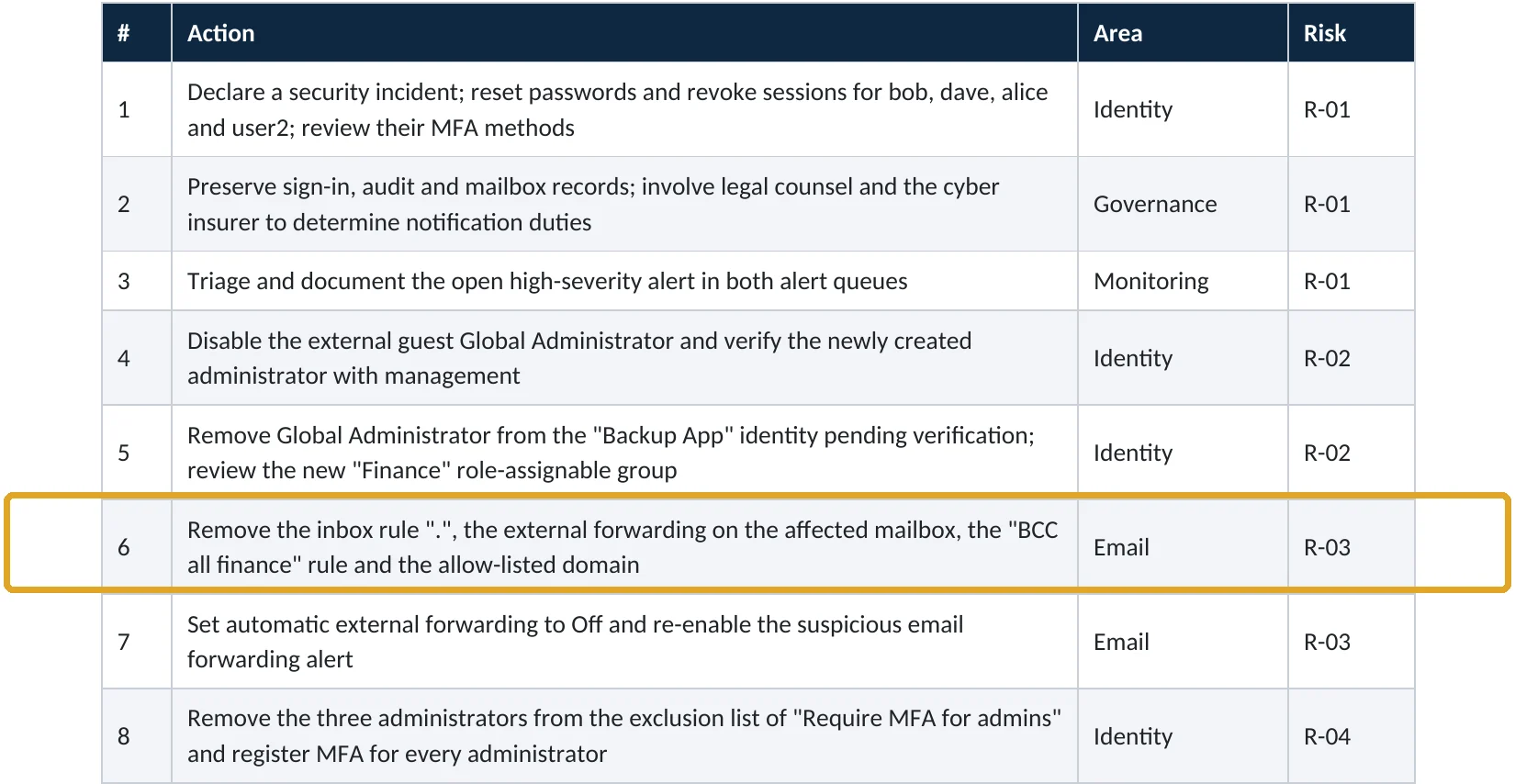
These are real pages from our published compromise assessment sample, written for a fictional company. Click any page to open it full size. The viewer follows the finding from the technical report to the risk register and the roadmap.
Your options
What a healthy rule list looks like
| Rule type | Usually fine | Needs a closer look |
|---|---|---|
| Disclaimers and banners | Adds a footer or an “external sender” warning | Removes warnings for certain senders |
| Encryption | Applies encryption to sensitive mail | Removes encryption |
| Blocking | Blocks risky attachments or senders | Deletes messages silently |
| Spam filtering | Raises the spam level for bulk mail | Bypass spam filtering (SCL -1) based only on a sender domain |
| Copying and routing | Journaling to an approved archive | BCC, redirect or forward to any outside address |
Microsoft cautions that rules allowing messages to skip spam filtering should use more conditions than just the sender’s email address or domain (Microsoft Learn). Every rule should have a name that explains its purpose, a known owner and a creation record.
How to check it yourself
List every mail flow rule, without changing anything
Open each rule and read its conditions and actions. Sort by state and look at disabled rules too: an attacker may switch one on later.
Read-only PowerShell: all rules with their key actions
Connect-ExchangeOnline
Get-TransportRule | Select-Object Name, State, Priority, WhenChanged,
  BlindCopyTo, RedirectMessageTo, CopyTo, AddToRecipients, SetSCL, DeleteMessage | Format-List
Read-only PowerShell: who created or changed rules recently
Search-UnifiedAuditLog -StartDate (Get-Date).AddDays(-90) -EndDate (Get-Date) `
  -Operations New-TransportRule,Set-TransportRule,Enable-TransportRule -ResultSize 5000 |
  Select-Object CreationDate, UserIds, Operations, AuditData
Read-only PowerShell: inbound connectors
Get-InboundConnector | Select-Object Name, Enabled, ConnectorType, SenderDomains, SenderIPAddresses, WhenChanged
Any rule with an outside address in BlindCopyTo, RedirectMessageTo, CopyTo or AddToRecipients, or with SetSCL -1, needs a named owner and a reason. Linking every rule change to the admin sign-in behind it is part of our compromise investigation.
How to configure
How to clean up mail flow rules safely
If a rule looks malicious
Contain, then clean
- Export the rule (Get-TransportRule -Identity “name” | Format-List) and the audit records showing who created it.
- Disable the rule rather than deleting it, so the evidence stays.
- Treat the admin account that created it as compromised: reset, revoke sessions, check MFA.
- Look for other changes by that account: new admins, connectors, apps, forwarding.
- Remove the rule after the investigation records are saved.
Prevent and monitor
Keep the list clean
- Set external forwarding to Off in the outbound spam policy (step-by-step guide).
- Limit Exchange Administrator and Global Administrator to a few named, MFA-protected accounts.
- Document every rule: purpose, owner, date, ticket.
- Review the rule list and inbound connectors every quarter, and after any admin compromise.
- Alert on New-TransportRule and Set-TransportRule in the audit log if your tools allow it.
Disable, then later remove, a rule after review
Disable-TransportRule -Identity "Rule name" -Confirm:$false
Remove-TransportRule  -Identity "Rule name"
Microsoft notes that when one setting allows external forwarding and another blocks it, the block typically wins, so a forwarding block in the outbound spam policy adds a second layer against copy-out rules (Microsoft Learn).
Proof and questions
How to prove it is clean, and what to ask your IT provider
Evidence it is clean
- A dated export of every mail flow rule and inbound connector, with an owner for each.
- No rule copies, redirects or forwards to an outside address without written approval.
- No rule bypasses spam filtering based only on a sender domain.
- Audit log search shows no unexplained rule changes in the last 90 days.
Questions for your IT provider
- How many mail flow rules do we have, and what does each one do?
- Who can create or change them?
- When were they last reviewed?
- Are any inbound connectors set up, and for which services?
- Would we be told if someone created a rule tomorrow?
Signs it was already abused
If an admin account was ever compromised, look for these signs
Red flags
- Rules with vague names (a dot, “test”, “update”) or names that imitate Microsoft.
- Rules created outside business hours or by an account that does not normally manage Exchange.
- Outside addresses in BCC, redirect or add-recipient actions.
- New inbound connectors, especially from unknown IP addresses or domains.
- Large distribution groups or contacts with outside addresses you did not create.
If you see any of these, preserve the audit records before changing anything. Our business email compromise investigation establishes what was copied and for how long, and the Microsoft 365 Evidence Clock shows how long those records are kept.
Framework mapping
Where mail flow rule reviews fit
| Framework | Where it fits |
|---|---|
| NIST CSF 2.0 | PR.DS-02: data in transit protected; DE.CM-03: personnel activity monitored |
| ISO/IEC 27001:2022 | Annex A 5.14 Information transfer; 8.9 Configuration management; 8.12 Data leakage prevention |
| SOC 2 | CC6.7 restricts transmission of information; CC8.1 change management |
| MITRE ATT&CK | T1114.003 Email Forwarding Rule; T1564.008 Email Hiding Rules |
Reviewed by
Written and reviewed by a practicing CISO

Ali Hassani, C|CISO, CISSP
Ali has more than 25 years of IT and cybersecurity experience and holds the Certified CISO and CISSP certifications along with Microsoft and Cisco credentials. He leads every OC Security Audit engagement from Irvine, on-site across Southern California and remotely nationwide. Every Microsoft 365 audit is read-only.
FAQ
Frequently asked questions about mail flow rules
What is the difference between a mail flow rule and an inbox rule?
An inbox rule is set in one mailbox and acts after mail is delivered. A mail flow rule is set by an Exchange administrator, acts on mail in transit and can apply to every message in the company.
Who can create mail flow rules?
Accounts with the Transport Rules role, which is part of the Exchange Administrator and Global Administrator roles and the Organization Management and Compliance Management role groups.
Is a rule that bypasses spam filtering always bad?
Not always; some companies use it for trusted partners. Microsoft warns to use more conditions than a sender address or domain, because sender addresses are easy to fake. Any such rule needs a documented reason.
We found a rule nobody recognizes. Should we delete it?
Disable it first and export its details and the audit log entry that created it. Then treat the account that created it as compromised and check what else it changed before removing the rule.
Does blocking external forwarding stop BCC rules?
Microsoft's outbound forwarding block targets automatic forwarding by inbox rules and mailbox forwarding. Mail flow rules that copy mail outside still need their own review.
How often should we review mail flow rules?
Every quarter, whenever an admin account may have been compromised, and before any audit or insurance renewal.
Next step
Found something odd, or want to be sure?
Respond
Microsoft 365 & Azure Compromise Investigation
From $3,500
For when a rule or connector nobody recognizes is already there: we establish what was copied, for how long, and by which account.
Prevent
Microsoft 365 Security Audit
$3,500 fixed
About 200 read-only checks across mail flow, email rules and forwarding, identity, admin roles, sharing, data protection, logging and devices, with four reports and a remediation roadmap.
Want to see the deliverables first? Open the Microsoft 365 audit sample report or browse all our sample reports.

Service
Compromise Investigation
When an account or mailbox may already be in an attacker’s hands.
See the investigation ›
Sample
Compromise assessment sample
The reports we deliver after an investigation, with fictional data.
View the sample ›
Service
Microsoft 365 Security Audit
The fixed-price audit that checks this item and about 200 more.
See the audit ›Related reading: How to block external email forwarding · How to find malicious inbox rules · Exchange Online and Defender email security guide
Sources
Sources used on this page
- Microsoft Learn, Mail flow rules (transport rules) in Exchange Online
- Microsoft Learn, Mail flow rule actions in Exchange Online
- Microsoft Learn, Manage mail flow rules in Exchange Online
- Microsoft Learn, Use mail flow rules to set the spam confidence level (SCL)
- Microsoft Learn, Control automatic external email forwarding
- MITRE ATT&CK, T1114.003 Email Collection: Email Forwarding Rule
- Varonis Threat Labs, Anatomy of a resilient Microsoft 365 BEC attack leveraging inbound connectors (July 2025)
- FBI Internet Crime Complaint Center, 2025 Internet Crime Report
- Microsoft Security, Cyber Signals: Shifting tactics fuel surge in business email compromise (2023)
This guide is general information, not a guarantee of protection or legal advice. Microsoft changes its admin centers often: menu names and steps were checked against Microsoft Learn on November 20, 2026. Drawings are simplified and are not screenshots of Microsoft products. Sample findings come from fictional companies. Incidents are described as reported by the cited sources; OC Security Audit was not involved in them. Questions? Call 949-777-5567 or email support@ocsecurityaudit.com.