

LIBRARY 5.32Microsoft 365 Security Library
How to Restrict User Consent to Apps in Microsoft 365
One click on “Accept” can give an outside app lasting access to a mailbox, with no password needed afterward. Here is how to limit who can approve apps, and how to review the ones already approved.
Reviewed by Ali Hassani, C|CISO, CISSP · Last verified November 20, 2026

User consent settings are part of Microsoft Entra ID, available on every plan (Microsoft Learn).
In one minute
- Set user consent to verified publishers, selected permissions, or turn it off.
- Turn on the admin consent workflow so people can request apps instead of working around the block.
- Review every enterprise app that already has access, starting with mail, files and directory permissions.
- Remove apps nobody can explain, and check sign-in and mail activity before you do.
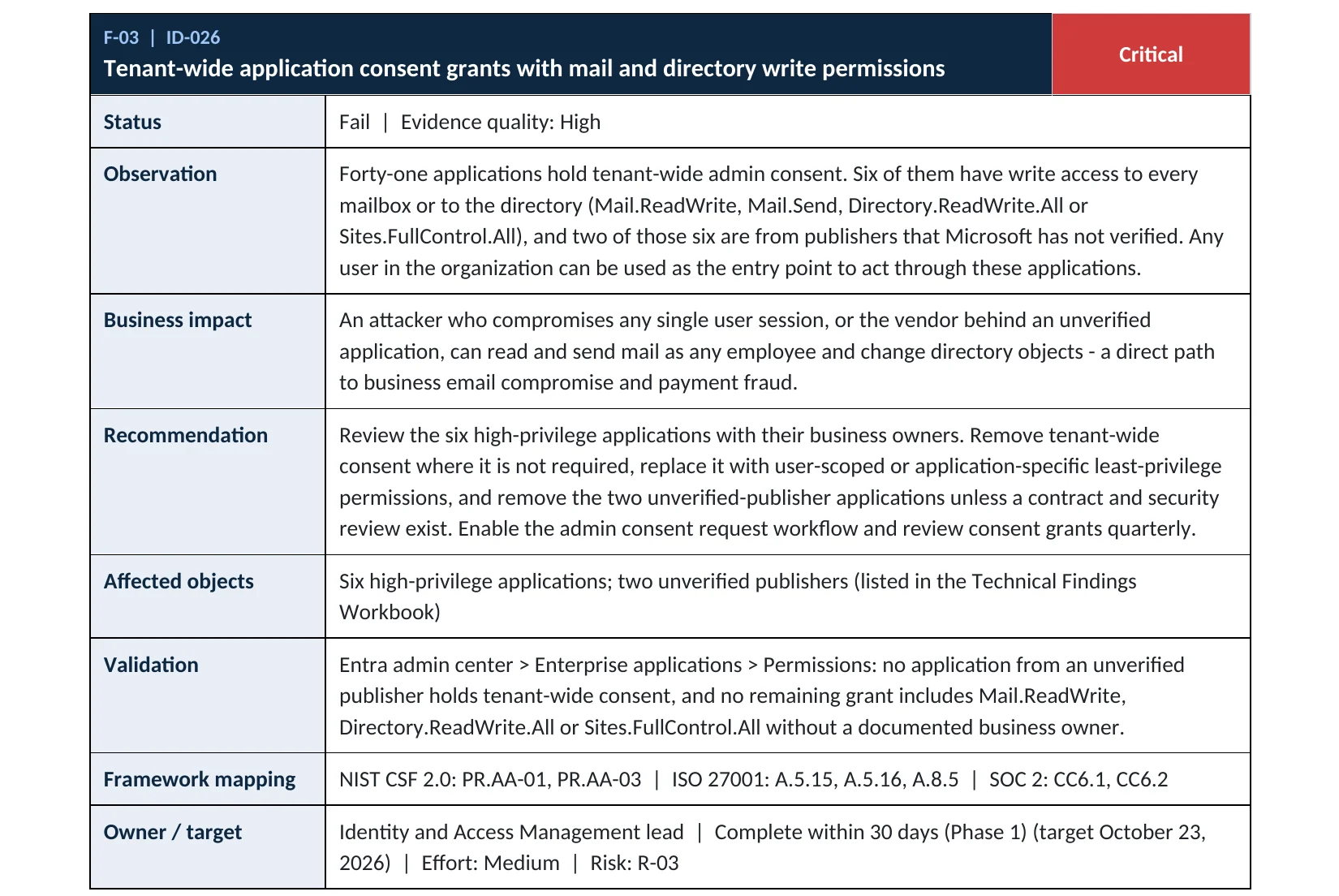
App consent is item ID-026 in our Microsoft 365 Security Audit.
What it is
What app consent is, and why attackers want it
Many apps connect to Microsoft 365: scheduling tools, e-signature, CRMs, email add-ons. To read your mail or files, an app asks for permission, and someone clicks Accept. That click is called consent, and it gives the app a token to act as you, often for months, without asking for your password again (Microsoft Learn).
Microsoft’s own default allows users to consent to apps for permissions that don’t require an administrator, such as access to their own mailbox. Microsoft recommends allowing user consent only for apps from verified publishers (Microsoft Learn). In 2025 Microsoft also announced default changes requiring admin consent for more third-party app access (The Hacker News); check what your tenant is actually set to rather than assuming.
Why it matters
A consented app is a key that MFA does not check
Once an app holds a consent grant, it uses its own token. Resetting the user’s password does not remove it, and MFA is not asked again. That is why Microsoft’s response playbook treats app consent grants as a separate thing to investigate (Microsoft Learn).
- Lure email“Review the shared document in DocuSign.”
- Consent screenA real Microsoft page for a fake app.
- Consent restrictedUsers cannot approve an unverified app; the request goes to an admin.
- Mail and files readWithout it: the app works through the API.
- Fraud and spreadInvoices, contacts, internal phishing.
Drawing: where restricting user consent breaks a consent-phishing attack.
user accounts in more than 900 Microsoft 365 environments targeted through fake OAuth apps in 2025, per Proofpoint.
Source: The Hacker News on Proofpointdistinct fake apps impersonating brands such as Adobe, DocuSign, RingCentral and SharePoint in the same Proofpoint research.
Source: Proofpointis all consent needs: the attacker never sees the password, so password resets do not revoke the app’s access.
Source: Microsoft LearnMITRE ATT&CK technique ID for stealing application access tokens, which is the goal of consent phishing.
Source: MITRE ATT&CKAttacks this stops, and what it does not
| Attack | How it works | Does restricting user consent stop it? |
|---|---|---|
| Consent phishing | A user approves a malicious app that reads mail or files. | Yes The user cannot approve an unverified app. |
| Fake “email client” apps | An app asks for Mail.ReadWrite and offline access. | Yes High-impact permissions need an admin. |
| Abandoned apps nobody owns | Old integrations keep tenant-wide access. | Partly Only a review of existing grants finds them. |
| A compromised trusted vendor | A legitimate, verified app is abused through its publisher. | Partly Least-privilege permissions limit the damage. |
| An admin approving a bad app | An administrator grants tenant-wide consent. | No Needs an admin review process. |
Documented cases
Nation-state · Microsoft, 2024
Midnight Blizzard and an over-privileged OAuth app
Microsoft reported that Midnight Blizzard used a password spray to compromise a legacy test tenant account without MFA, then a legacy test OAuth application with elevated access to Microsoft’s corporate environment. The group created more OAuth apps and used the test app to grant them the Exchange Online full_access_as_app role, which allows access to mailboxes.
Source: Microsoft Security Blog
Phishing campaign · Proofpoint, 2025
Fake Microsoft 365 apps as a gateway to MFA phishing
Proofpoint described fake Microsoft OAuth apps impersonating RingCentral, SharePoint, Adobe and DocuSign. The consent screen requested minimal permissions, then redirected users to attacker-in-the-middle phishing pages that captured credentials and MFA sessions.
Source: Proofpoint Threat Insight
We were not involved in either case. Both show that app permissions are as important to review as passwords.
What we find in audits
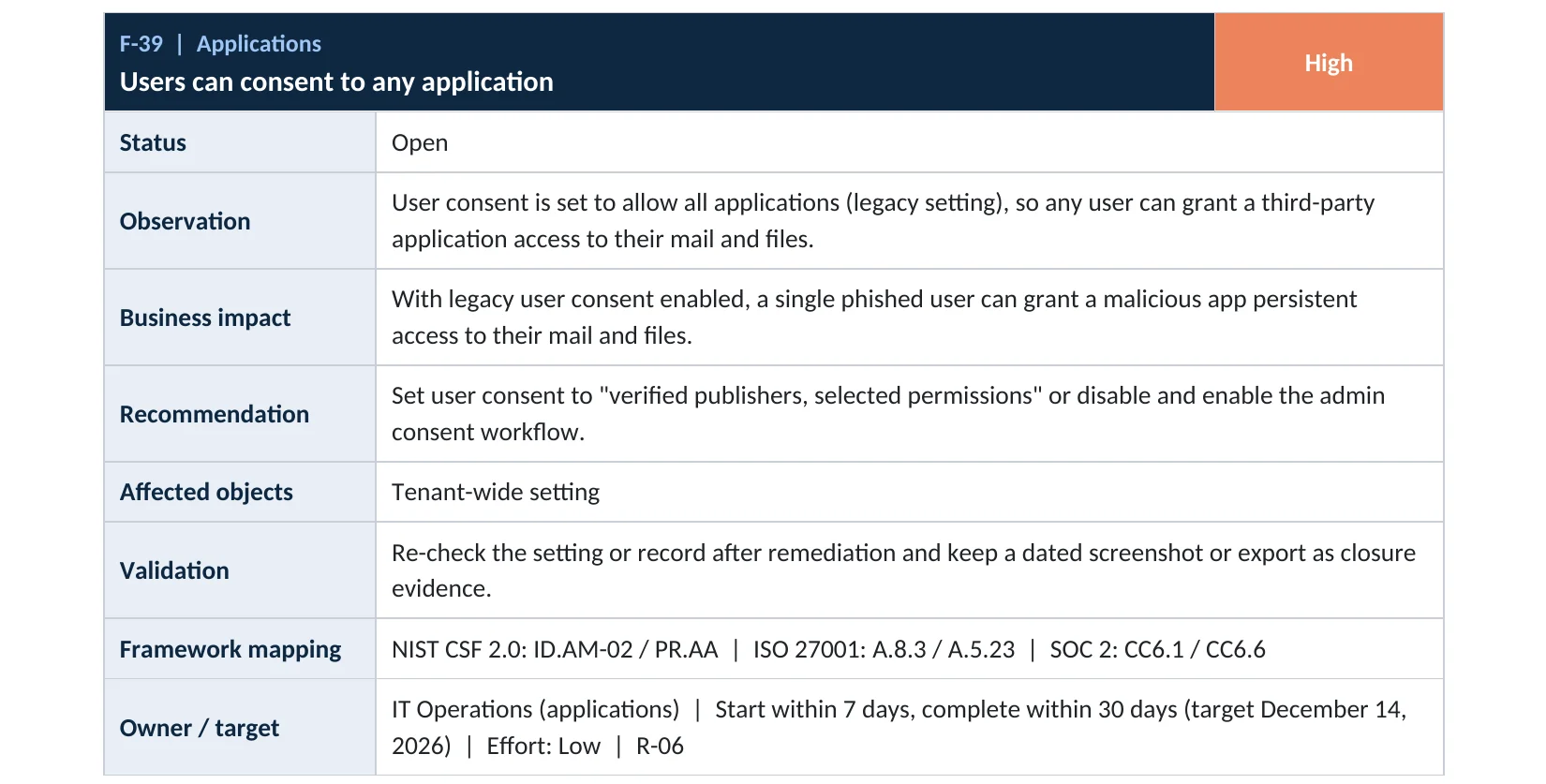
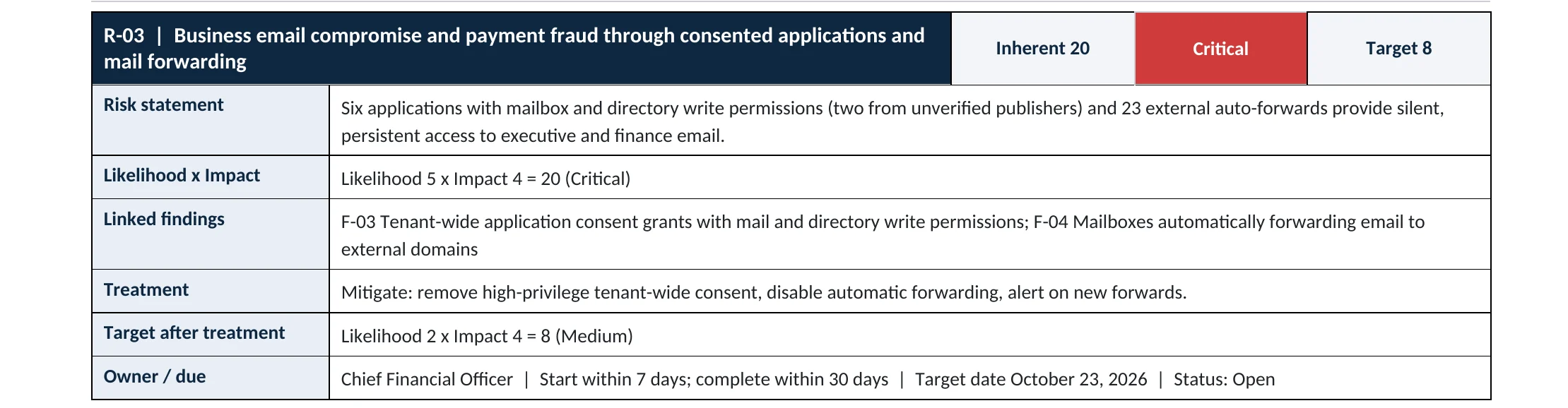
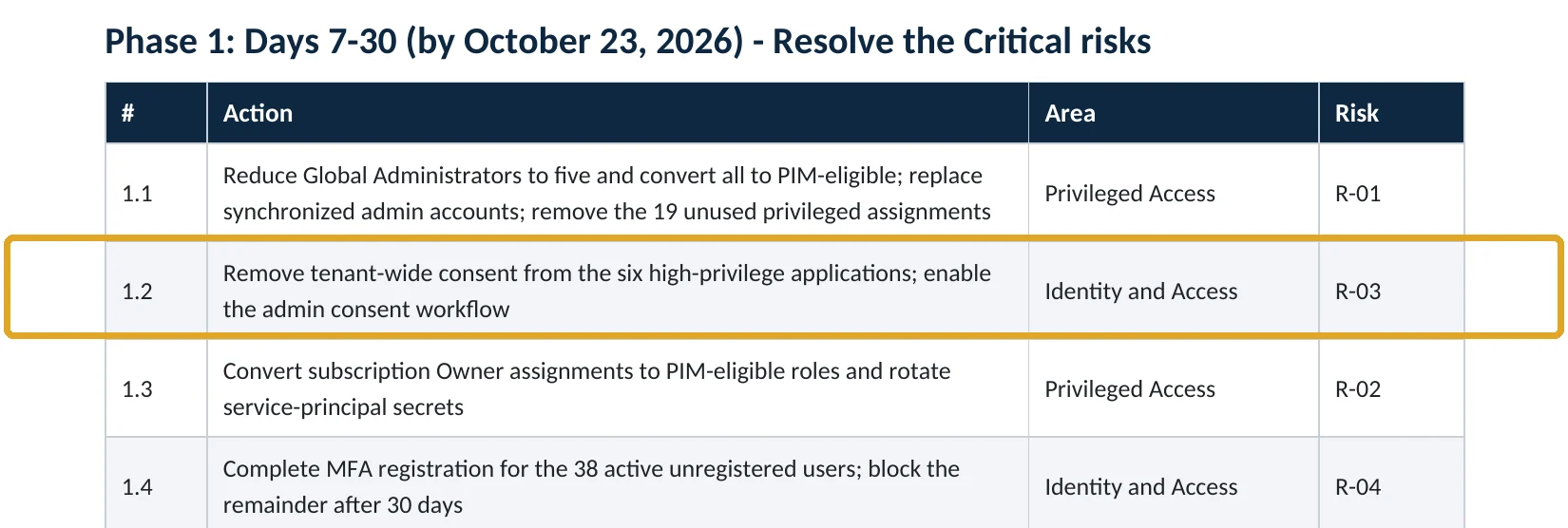
What this finding looks like in our audit reports
These are real pages from our published sample reports, written for fictional companies. Click any page to open it full size. The viewer follows the finding from the technical report to the risk register and the roadmap.
Your options
Which user consent setting to choose
| Setting | What users can do | Our take |
|---|---|---|
| Do not allow user consent | Nothing; every new app goes to an admin | Strongest Best with the admin consent workflow on. |
| Allow user consent for apps from verified publishers, for selected permissions | Approve verified apps for low-impact permissions you choose | Recommended Microsoft’s recommended balance. |
| Allow user consent for apps (legacy) | Approve any app for any permission that doesn’t need an admin | Avoid This is what consent phishing relies on. |
With the middle option you also classify permissions: mark a few basic ones, such as sign-in and reading the user’s profile, as low impact (Microsoft Learn). Anything more, such as mail or files, then needs an administrator.
How to check it yourself
See your consent setting and app grants, without changing anything
Note which of the three options is selected, and under Admin consent settings whether users can request admin consent.
For each app, the Permissions page shows admin-granted and user-granted permissions. Look first for Mail.ReadWrite, Mail.Send, Files.ReadWrite.All, Sites.FullControl.All and Directory.ReadWrite.All, and for apps marked as unverified.
Read-only PowerShell: delegated permission grants (who consented to what)
Connect-MgGraph -Scopes "Directory.Read.All"
Get-MgOauth2PermissionGrant -All |
  Select-Object ClientId, ConsentType, PrincipalId, Scope | Format-Table -AutoSize
ConsentType AllPrincipals means an admin granted it for everyone; Principal means one user consented for themselves. Matching each ClientId to an app name, publisher and last sign-in across the whole tenant is part of our Microsoft 365 Security Audit.
How to configure
How to restrict user consent, step by step
All plans
Restrict consent
- Sign in to entra.microsoft.com as a Privileged Role Administrator or Global Administrator.
- Go to Entra ID › Enterprise apps › Consent and permissions › User consent settings.
- Select Allow user consent for apps from verified publishers, for selected permissions, or Do not allow user consent.
- Under Permission classifications, mark only basic sign-in and profile permissions as low impact.
- Select Save.
All plans
Admin workflow and cleanup
- Under Admin consent settings, set Users can request admin consent to Yes and choose reviewers.
- Agree with reviewers on what to check: publisher, permissions requested, business owner, contract.
- In All applications, review apps with mail, files or directory permissions.
- For apps nobody can explain, preserve their sign-in and audit logs, then remove permissions or delete the app.
- Repeat the review every quarter.
Microsoft notes that changing the consent setting only affects future consent; existing grants stay until you remove them (Microsoft Learn).
What your users will notice
When someone tries a new app that needs more than basic access, they see an Approval required screen and can send a request with a reason. Apps already approved keep working.
How to undo it, safely
Approve specific apps through the admin consent workflow rather than switching user consent back on for everyone.
Proof and questions
How to prove it is fixed, and what to ask your IT provider
Evidence it is fixed
- User consent is set to verified publishers with selected permissions, or disabled.
- The admin consent workflow is on, with named reviewers.
- Every app with mail, files or directory access has a business owner on record.
- No unverified-publisher app holds high-impact permissions without a documented review.
Questions for your IT provider
- Can our users approve apps by themselves today?
- Which apps can read or send mail as any user?
- Who approves new apps, and how?
- When did someone last review enterprise apps and their permissions?
- Would we notice if a user consented to an unknown app tomorrow?
Signs it was already abused
If users could consent freely, look for these signs
Red flags
- Apps with names that imitate Microsoft, Adobe, DocuSign or “Mail client”, from unverified publishers.
- One user consenting to an app with Mail.ReadWrite or offline_access that nobody else uses.
- App sign-ins from hosting providers or countries your company does not use.
- Mail sent by the API that users did not write, or bulk downloads through an app.
- Consent grants created shortly after a suspicious email or sign-in.
If you find a suspicious app, do not just delete it: export its permissions, sign-in and audit records first, so you can tell what it read. Our compromise investigation covers app consent abuse, and the Microsoft 365 Evidence Clock shows how long those logs last.
Framework mapping
Where app consent controls fit
| Framework | Where it fits |
|---|---|
| NIST CSF 2.0 | ID.AM-02: software and services inventoried; PR.AA-05: access permissions managed |
| ISO/IEC 27001:2022 | Annex A 5.23 Information security for cloud services; 8.3 Information access restriction |
| SOC 2 | CC6.1 logical access; CC6.6 protects against threats from outside |
| MITRE ATT&CK | T1528 Steal Application Access Token; T1566.002 Spearphishing Link |
Reviewed by
Written and reviewed by a practicing CISO

Ali Hassani, C|CISO, CISSP
Ali has more than 25 years of IT and cybersecurity experience and holds the Certified CISO and CISSP certifications along with Microsoft and Cisco credentials. He leads every OC Security Audit engagement from Irvine, on-site across Southern California and remotely nationwide. Every Microsoft 365 audit is read-only.
FAQ
Frequently asked questions about app consent
What is consent phishing?
It is a phishing attack that asks you to approve an app instead of typing a password. The consent screen is a real Microsoft page, but the app belongs to the attacker. Once approved, the app can read mail or files through Microsoft's API until the consent is removed.
Does resetting the user's password remove a malicious app?
No. The app holds its own token from the consent grant. You must remove the app's permissions or delete the app, in addition to resetting the password and revoking sessions.
Will restricting consent stop my staff from using Zoom or DocuSign?
No. Apps already approved keep working, and verified apps asking only for basic permissions can still be approved by users if you choose that option. Anything more goes to an administrator through the request workflow.
What is a verified publisher?
A publisher whose Microsoft partner account has been verified by Microsoft and linked to the app. It shows as a blue verified badge on the consent screen. It proves who published the app, not that the app is safe.
Didn't Microsoft change the default already?
Microsoft announced changes in 2025 requiring admin consent for more third-party app access. Defaults vary by tenant and change over time, so check the User consent settings page in your own tenant.
Does this need Entra ID P1 or P2?
No. User consent settings, the admin consent workflow and the enterprise apps list are available on every Microsoft 365 plan. Some advanced app governance features need higher plans.
Next step
Know exactly where your tenant stands
Prevent
Microsoft 365 Security Audit
$3,500 fixed
About 200 read-only checks across app consent, identity, admin roles, email, sharing, data protection, logging and devices, for any tenant size, with four reports and a remediation roadmap.
Respond
Microsoft 365 & Azure Compromise Investigation
From $3,500
For when an app nobody recognizes already has access: we establish what it read and sent, and report what we can confirm.
Want to see the deliverables first? Open the Microsoft 365 audit sample report or browse all our sample reports.

Service
Microsoft 365 Security Audit
The fixed-price audit that checks this item and about 200 more.
See the audit ›
Service
Microsoft Entra ID Security Audit
A deeper look at identities, Conditional Access, roles and apps.
See the Entra ID audit ›
Service
Compromise Investigation
When an account or mailbox may already be in an attacker’s hands.
See the investigation ›Related reading: App consent and guest access review · How to set up MFA in Microsoft 365 · Microsoft Entra ID security guide
Sources
Sources used on this page
- Microsoft Learn, Configure how users consent to applications
- Microsoft Learn, Overview of user and admin consent
- Microsoft Learn, Configure the admin consent workflow
- Microsoft Learn, Configure permission classifications
- Microsoft Learn, Review permissions granted to enterprise applications
- Microsoft Learn, App consent grant investigation playbook
- Microsoft Learn, Publisher verification
- Microsoft Security Blog, Midnight Blizzard: Guidance for responders on nation-state attack (January 2024)
- Proofpoint, Microsoft OAuth app impersonation campaign leads to MFA phishing (2025)
- The Hacker News, Attackers use fake OAuth apps with Tycoon kit to breach Microsoft 365 accounts (August 2025)
- MITRE ATT&CK, T1528 Steal Application Access Token
This guide is general information, not a guarantee of protection or legal advice. Microsoft changes its admin centers often: menu names and steps were checked against Microsoft Learn on November 20, 2026. Drawings are simplified and are not screenshots of Microsoft products. Sample findings come from fictional companies. Incidents are described as reported by the cited sources; OC Security Audit was not involved in them. Questions? Call 949-777-5567 or email support@ocsecurityaudit.com.