

LIBRARY 1.05Microsoft 365 Security Library
How to Block Legacy Authentication in Microsoft 365
Old sign-in protocols accept a password and nothing else, so MFA never gets a chance to stop the attacker. Here is how to find what still uses them and switch them off.
Reviewed by Ali Hassani, C|CISO, CISSP · Last verified November 20, 2026

Green: blocked through security defaults at no extra cost. Blue: plans that include Microsoft Entra ID P1, which adds a Conditional Access policy with exceptions (Microsoft Learn).
In one minute
- Find what still signs in with legacy protocols: the sign-in logs show it by client app.
- Block legacy authentication for everyone: security defaults, or a Conditional Access policy on P1 plans.
- Turn off SMTP AUTH for the organization and remove mailbox-level overrides that turn it back on.
- Move printers, scanners and apps that send mail to OAuth or a supported relay.
Legacy authentication is checked in our Microsoft 365 Security Audit, including every per-mailbox SMTP AUTH override.
What it is
What legacy authentication is
Modern authentication signs you in through a Microsoft sign-in page that can ask for a second step: an approval on your phone, a passkey, a fingerprint. Legacy authentication (also called basic authentication) is older: the app sends the user name and password with each request, and there is no place to ask for anything else.
Microsoft lists the usual sources: older Office clients that do not use modern authentication, such as Office 2010, and apps that use mail protocols such as IMAP, POP and SMTP (Microsoft Learn). Microsoft has already switched basic authentication off in Exchange Online for most protocols, including IMAP, POP and ActiveSync (Microsoft Learn). The big exception still open in many tenants is SMTP AUTH, the protocol printers, scanners and business apps use to send mail.
The SMTP AUTH timeline
| When | What Microsoft says happens |
|---|---|
| Now to December 2026 | SMTP AUTH basic authentication keeps working as it does today. |
| End of December 2026 | Disabled by default for existing tenants; administrators can still turn it back on. |
| Tenants created after December 2026 | Not available by default; OAuth is the supported method. |
Source: the Exchange Team’s updated timeline of January 27, 2026 (Microsoft Tech Community). Microsoft has changed this date several times, so do not wait for it: the safer move is to turn SMTP AUTH off now and allow it only where it is still needed.
Why it matters
Legacy sign-in is the side door around MFA
Password spraying tries one common password against many accounts. It works best where there is no second step, which is exactly what legacy protocols offer. A company can have MFA switched on and still be exposed if one old protocol is left open.
- Password listCommon passwords and leaked pairs.
- Spray over SMTP or IMAPSlow, spread across many accounts.
- Legacy sign-in blockedThe request is refused before the password even matters.
- Mailbox openedWithout the block: password alone is enough.
- Fraud and spamMail sent from a trusted address.
Drawing: where blocking legacy authentication stops a password spray.
of password spray attacks use legacy authentication protocols, according to Microsoft’s analysis.
Source: Microsoft Learnof credential stuffing attacks use legacy authentication, in the same Microsoft analysis.
Source: Microsoft Learndrop in successful compromise that Microsoft reported in 2020 for organizations that disabled legacy authentication.
Source: SecurityWeekcompromised devices in a botnet that sprayed Microsoft 365 accounts through non-interactive basic-authentication sign-ins, reported by SecurityScorecard in 2025.
Source: ITProAttacks this stops, and what it does not
| Attack | How it works | Does blocking legacy authentication stop it? |
|---|---|---|
| Password spray | One common password tried across many accounts. | Yes For the legacy path attackers prefer. |
| Credential stuffing | Leaked user name and password pairs replayed. | Yes The password alone no longer opens the account. |
| MFA bypass through an old protocol | Signing in where MFA cannot be asked. | Yes That door is closed. |
| Spam from a hacked mailbox over SMTP | A stolen password used to send mail from a printer-style connection. | Yes When SMTP AUTH is off for that mailbox. |
| Phishing for the password and MFA code | A fake sign-in page relays everything. | No Phishing-resistant MFA is needed. |
| Spray against modern sign-in | Attackers target modern endpoints instead. | Partly MFA and Smart Lockout cover that path. |
Documented campaigns
Study · Proofpoint, 2019
IMAP password spraying across cloud tenants
Proofpoint reported that about 60 percent of the Microsoft 365 and G Suite tenants it studied were targeted by password spraying over IMAP, and about 25 percent of them were breached. Shared mailboxes and service accounts, where MFA was not used, were the most exposed.
Source: SecurityWeek on Proofpoint
Botnet · SecurityScorecard, 2025
Spraying through non-interactive sign-ins
SecurityScorecard described a botnet of about 130,000 devices spraying Microsoft 365 accounts through non-interactive sign-ins that use basic authentication, a path that can avoid MFA prompts and may be missed by teams that only watch interactive sign-ins.
Source: ITPro
We were not involved in either campaign. Both show the same gap: a password that works on its own, somewhere in the tenant.
What we find in audits
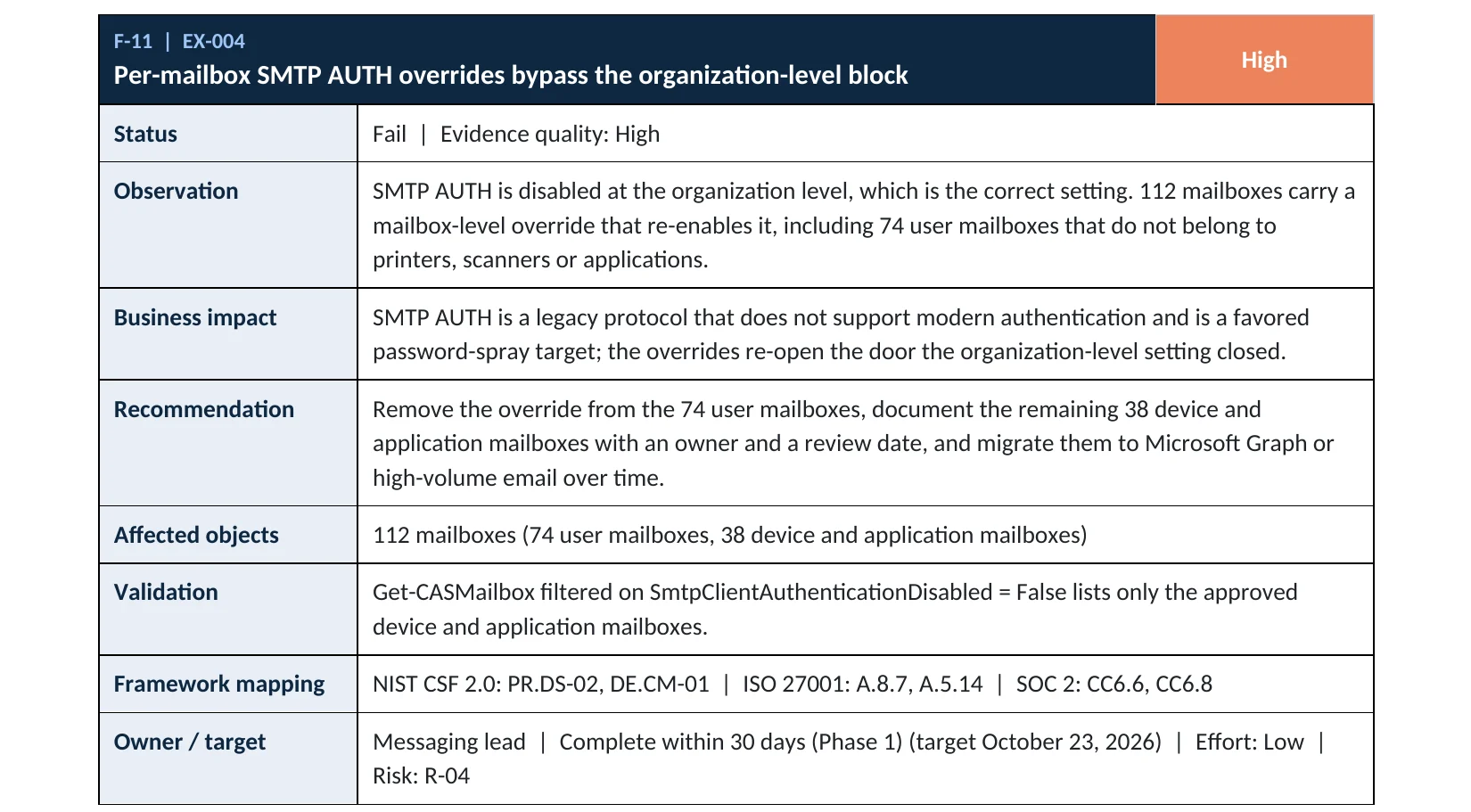
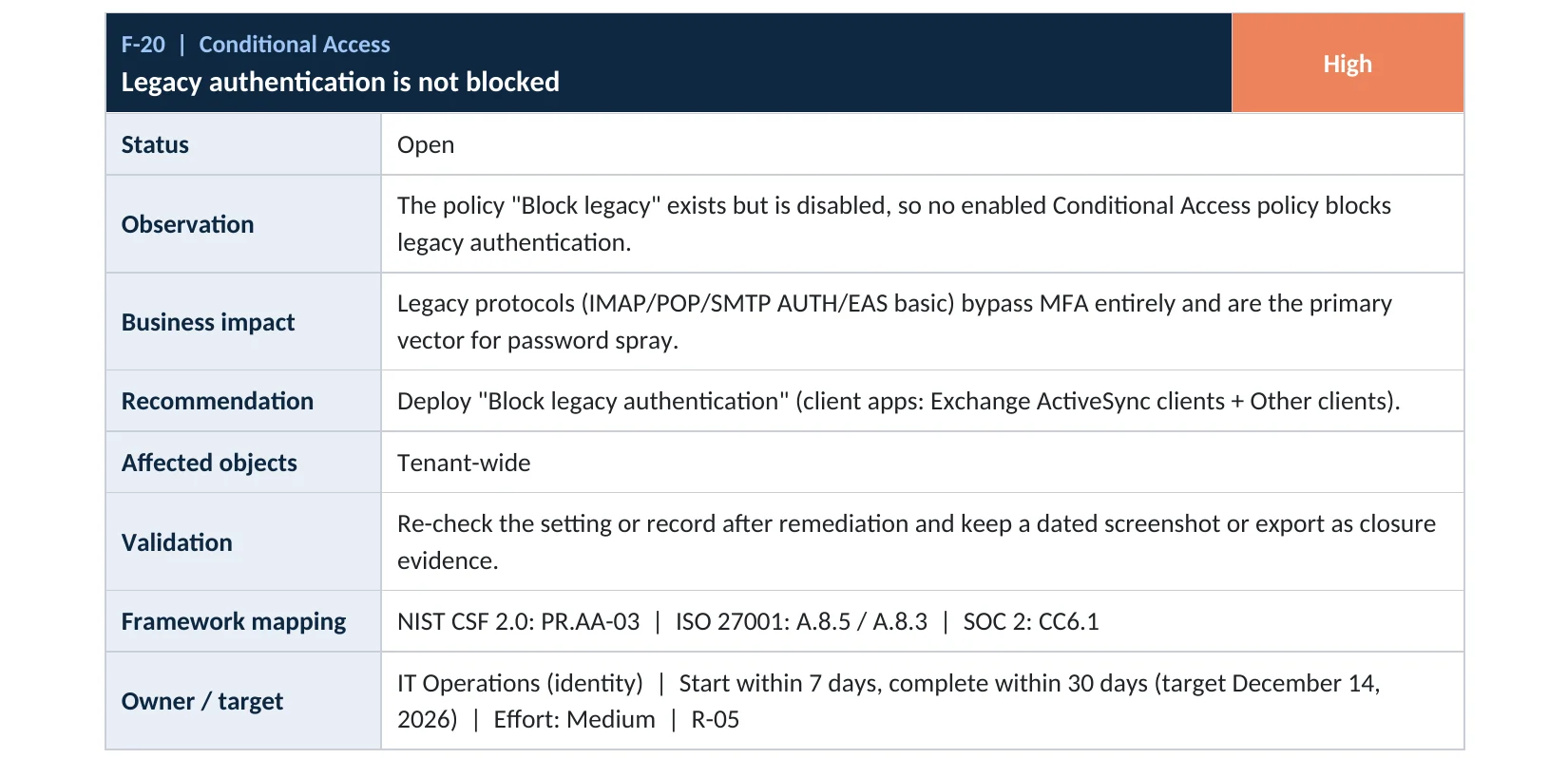
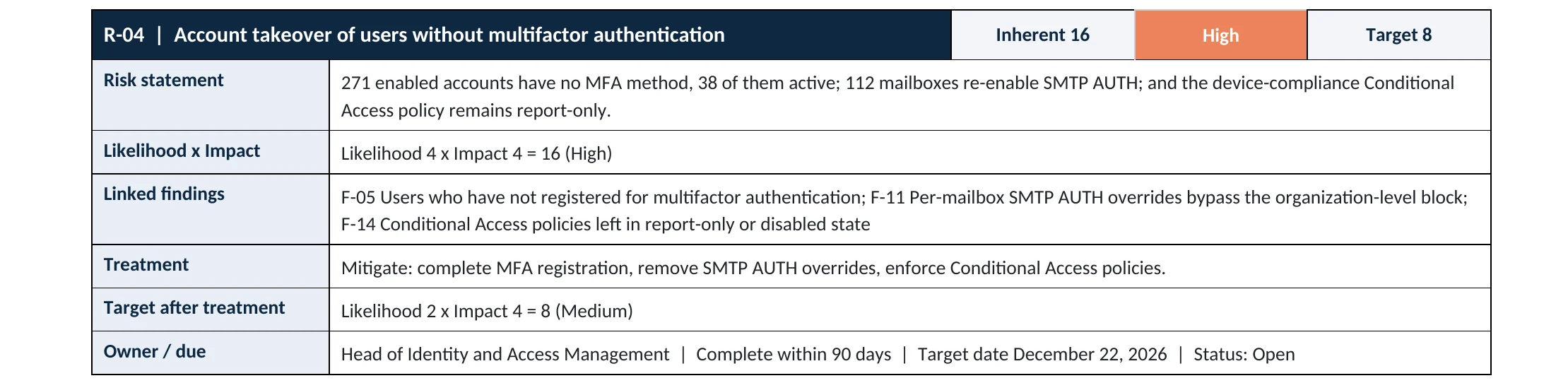
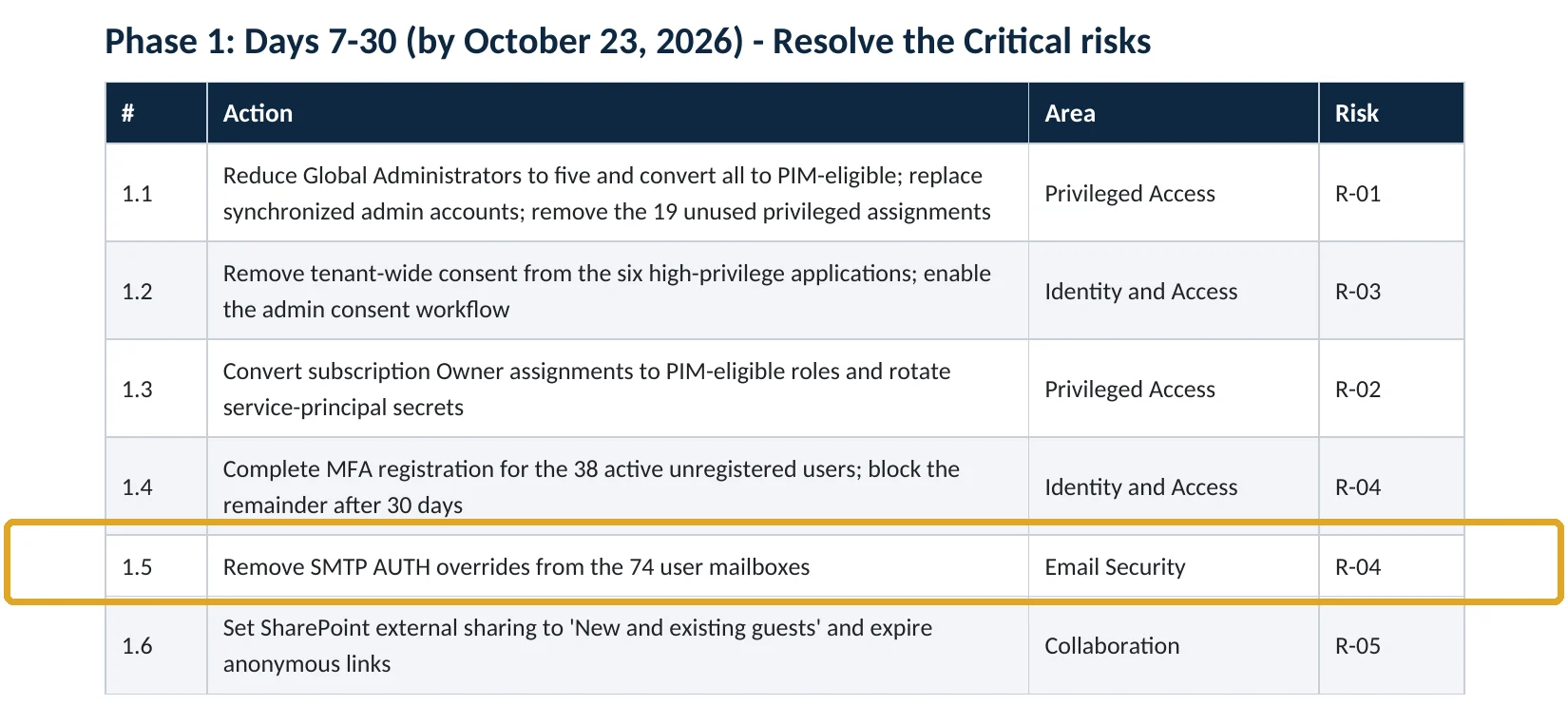
What this finding looks like in our audit reports
These are real pages from our published sample reports, written for fictional companies. Click any page to open it full size. The viewer follows the finding from the technical report to the risk register and the roadmap.
Your options
Three ways to block it, by license
| Approach | License | What it blocks | Use it when |
|---|---|---|---|
| Security defaults | All plans, no extra cost | Legacy authentication for everyone, together with MFA | You have Business Basic or Business Standard |
| Conditional Access: Block legacy authentication | Microsoft Entra ID P1 (Business Premium, E3, E5) | Legacy sign-ins for all users, with named exceptions | You need a documented exception for a device or app |
| SMTP AUTH off at the organization | All plans | Basic and OAuth SMTP submission, except mailboxes you enable | Always, as a second layer |
Security defaults turns SMTP AUTH off in Exchange Online as well (Microsoft Learn). Microsoft recommends disabling SMTP AUTH for the organization and enabling it only for the mailboxes that still need it; a mailbox-level setting always overrides the organization setting, which is why overrides must be reviewed.
How to check it yourself
Find what still uses legacy sign-in, without changing anything
1. Who signs in with legacy protocols?
Check both the User sign-ins (interactive) and User sign-ins (non-interactive) tabs. Microsoft also offers a sign-ins using legacy authentication workbook to summarize the results.
2. Is SMTP AUTH off for the organization?
Read-only PowerShell: organization setting
Connect-ExchangeOnline
Get-TransportConfig | Format-List SmtpClientAuthenticationDisabled
Read-only PowerShell: mailboxes that override it and turn SMTP AUTH on
Get-CASMailbox -ResultSize Unlimited |
  Where-Object { $_.SmtpClientAuthenticationDisabled -eq $false } |
  Select-Object Name, PrimarySmtpAddress, SmtpClientAuthenticationDisabled
True at the organization level is what you want. Any mailbox returned by the second command has SMTP AUTH turned back on; each one needs an owner and a reason. A blank value means the mailbox follows the organization setting.
3. Is a block actually enforced?
On P1 plans, also open Conditional Access › Policies and confirm the legacy-blocking policy is On, not Report-only or Off.
How to configure
How to block legacy authentication, step by step
Before you start: list every printer, scanner and app that sends mail, using the sign-in logs and the SMTP AUTH mailbox list above. Each one needs a new method before you switch the old one off.
Business Premium, E3, E5
Conditional Access policy
- Sign in to entra.microsoft.com as a Conditional Access Administrator.
- Go to Entra ID › Conditional Access › Policies and select New policy.
- Users: include All users; exclude your emergency access accounts.
- Target resources: All resources. Conditions › Client apps: select only Exchange ActiveSync clients and Other clients.
- Grant: Block access. Start in Report-only, check the results, then switch to On.
All plans
Security defaults and SMTP AUTH
- If you have no Conditional Access policies, turn on security defaults in Entra ID › Overview › Properties.
- In the Exchange admin center, go to Settings › Mail flow and turn off SMTP AUTH for the organization.
- Clear the per-mailbox overrides on user mailboxes (command below).
- Move printers and apps to OAuth, High Volume Email for internal mail, or Azure Communication Services Email, as Microsoft recommends.
- Re-run the read-only checks and keep the output as evidence.
Microsoft lists the supported options for devices and apps that send mail in its multifunction device guide.
Turn SMTP AUTH off for the organization
Set-TransportConfig -SmtpClientAuthenticationDisabled $true
Return a user mailbox to the organization setting
Set-CASMailbox -Identity "user@contoso.com" -SmtpClientAuthenticationDisabled $null
What your users will notice
People on current Outlook, Outlook on the web and the Outlook mobile app notice nothing. An old mail app, an old phone mail setup or a scan-to-email printer that still uses a password will stop working until it is moved to a supported method.
How to undo it, safely
Switch the Conditional Access policy back to Report-only, or add a named exception for one device account. For SMTP AUTH, enable it on the single mailbox that needs it rather than for the whole organization.
Proof and questions
How to prove it is fixed, and what to ask your IT provider
Evidence it is fixed
- Security defaults is Enabled, or a legacy-blocking Conditional Access policy is On.
- SmtpClientAuthenticationDisabled is True for the organization.
- Only documented device or app mailboxes have SMTP AUTH turned back on, each with an owner.
- Sign-in logs show no successful legacy-protocol sign-ins in the last 30 days.
Questions for your IT provider
- Is legacy authentication blocked for every user, or only for some?
- Which mailboxes have SMTP AUTH enabled, and why?
- Which printers and apps still send mail with a password?
- What is our plan for the end of December 2026 SMTP AUTH change?
- Who watches the non-interactive sign-in logs?
Signs it was already abused
If legacy sign-in was open, look for these signs
Red flags
- Many failed IMAP, POP or SMTP sign-ins across several accounts from the same address.
- A successful legacy sign-in from an address that also produced failures: a password was guessed.
- Users or mailboxes sending spam or phishing they did not write.
- Sign-ins for accounts that should not sign in at all, such as shared mailboxes.
- New inbox rules or forwarding created soon after a legacy sign-in.
If you see these, preserve the sign-in logs before they expire and reset the affected passwords. Our compromise investigation establishes which accounts were entered and what was done with them; the Microsoft 365 Evidence Clock shows how long each log is kept.
Framework mapping
Where blocking legacy authentication fits
| Framework | Where it fits |
|---|---|
| NIST CSF 2.0 | PR.AA-03: users, services and hardware are authenticated |
| ISO/IEC 27001:2022 | Annex A 8.5 Secure authentication |
| SOC 2 | CC6.1 logical access security measures |
| HIPAA Security Rule | 45 CFR 164.312(d) person or entity authentication |
| MITRE ATT&CK | T1110.003 Password Spraying; T1078.004 Valid Accounts: Cloud Accounts |
Reviewed by
Written and reviewed by a practicing CISO

Ali Hassani, C|CISO, CISSP
Ali has more than 25 years of IT and cybersecurity experience and holds the Certified CISO and CISSP certifications along with Microsoft and Cisco credentials. He leads every OC Security Audit engagement from Irvine, on-site across Southern California and remotely nationwide. Every Microsoft 365 audit is read-only.
FAQ
Frequently asked questions about legacy authentication
Didn't Microsoft already turn off basic authentication?
For most Exchange Online protocols, yes: Microsoft disabled basic authentication for IMAP, POP, ActiveSync, Exchange Web Services and others. SMTP AUTH is the main exception and, per Microsoft's January 2026 timeline, becomes disabled by default for existing tenants at the end of December 2026, with administrators still able to turn it back on.
We have MFA. Do we still need to block legacy authentication?
Yes. Legacy protocols cannot ask for MFA, so an account with MFA can still be opened with its password alone over a legacy protocol if that path is left open.
Will blocking legacy authentication break our scanners?
It can, if a scanner or printer sends email with a mailbox password. List those devices first in the sign-in logs and SMTP AUTH report, then move them to OAuth, High Volume Email or Azure Communication Services Email before enforcing the block.
Is security defaults enough for a small business?
For blocking legacy authentication, yes: security defaults blocks it for everyone at no extra cost. Its limit is that it allows no exceptions, so a device that truly needs a legacy protocol needs a different solution.
What are the Exchange ActiveSync clients and Other clients options?
They are the two client app conditions in Conditional Access that cover legacy authentication. Other clients includes IMAP, POP, SMTP and older Office clients. Microsoft's template for blocking legacy authentication selects exactly these two.
Should the policy start in Report-only?
Yes. Microsoft's own steps create the policy in Report-only first, so you can see which sign-ins it would block before switching it On.
Next step
Know exactly where your tenant stands
Prevent
Microsoft 365 Security Audit
$3,500 fixed
About 200 read-only checks across identity, legacy sign-in, admin roles, email, sharing, data protection, logging and devices, for any tenant size, with four reports and a remediation roadmap.
Respond
Microsoft 365 & Azure Compromise Investigation
From $3,500
For when the sign-in logs already show a password spray or a successful legacy sign-in: we establish which accounts were entered and what was done.
Want to see the deliverables first? Open the Microsoft 365 audit sample report or browse all our sample reports.

Service
Microsoft 365 Security Audit
The fixed-price audit that checks this item and about 200 more.
See the audit ›
Service
Microsoft Entra ID Security Audit
A deeper look at identities, Conditional Access, roles and apps.
See the Entra ID audit ›
Service
Compromise Investigation
When an account or mailbox may already be in an attacker’s hands.
See the investigation ›Related reading: How to set up MFA in Microsoft 365 · Microsoft Entra ID, MFA and Conditional Access security guide · Conditional Access review
Sources
Sources used on this page
- Microsoft Learn, Block legacy authentication with Conditional Access
- Microsoft Learn, Security defaults in Microsoft Entra ID
- Microsoft Learn, Enable or disable authenticated client SMTP submission (SMTP AUTH) in Exchange Online
- Microsoft Learn, Deprecation of Basic authentication in Exchange Online
- Microsoft Tech Community, Updated Exchange Online SMTP AUTH Basic Authentication Deprecation Timeline (January 27, 2026)
- Microsoft Learn, How to set up a multifunction device or application to send email
- Microsoft Learn, Sign-ins using legacy authentication workbook
- Microsoft Learn, Microsoft Entra authentication operations reference guide
- SecurityWeek, CISA calls for expedited adoption of modern authentication (cites Microsoft, 2020)
- SecurityWeek, Hackers bypass MFA on cloud accounts via IMAP protocol (Proofpoint study, 2019)
- ITPro, Botnet password spraying campaign against Microsoft 365 (SecurityScorecard, 2025)
This guide is general information, not a guarantee of protection or legal advice. Microsoft changes its admin centers often: menu names and steps were checked against Microsoft Learn on November 20, 2026. Drawings are simplified and are not screenshots of Microsoft products. Sample findings come from fictional companies. Incidents are described as reported by the cited sources; OC Security Audit was not involved in them. Questions? Call 949-777-5567 or email support@ocsecurityaudit.com.