Network administrator with a laptop reviewing a firewall rack in a data center
Sample report

Palo Alto Firewall Audit Sample Report

Real pages from all seven deliverables of a Palo Alto firewall audit, shown on a fictional logistics company: six reports and an Excel workbook.

Network operations room with analysts monitoring security dashboards
Executive report

A score your owner can follow

Score by area, top business risks and what to fund first, in plain language.

Security engineer with a laptop in a server room during a firewall review
Technical report

Evidence your firewall admin can act on

Every finding with the rule, interface or setting behind it, and the exact fix.

25+ yearsIT & cybersecurity experience
Certified expertsCISSP · C|CISO · Microsoft · Cisco
Southern CaliforniaLocal and on-site, based in Irvine
NationwideRemote audits & advisory
What you receive

Six reports and an Excel workbook

141 controls in 13 areas, each finding mapped to NIST CSF 2.0 and ISO/IEC 27001:2022. The audit is read-only and includes a review of the last 7 days of firewall logs.

DeliverableWhat it containsWho uses it
Executive Security ReportScore, top business risks, score by area, what works, priority actions and decisions, in plain languageOwner, CEO, board
Technical Security & Configuration ReportEvery control with its result and evidence, detailed findings with the exact fix, framework mappingFirewall administrators, MSP
Firewall Rulebase ReviewEvery security rule in order with zones, applications, profiles, hit counts and the issues foundFirewall administrators
Log Review & Threat ActivitySeven days of administrator sign-ins, configuration changes and threat detectionsIT manager, security operations
Risk RegisterBusiness risks rated by likelihood and impact, with treatment, owner and the findings behind eachCompliance, insurance, auditors
Next Steps & Security RoadmapFour phases from 7-day containment to 180-day governance, grouped into projectsIT manager, vCISO
Technical Findings Workbook (Excel)Findings, risks and actions to track, plus evidence tabs for rules, NAT, administrators, advisories and threatsFirewall administrators, MSP
The sample company

A fictional logistics company with one PA-3410

Every number in the pages below comes from a made-up company and illustrates the format only. Your report uses the evidence read from your own firewalls.

SAMPLE · Veltrana Logistics (fictional company) · illustrative data
Company
Veltrana Logistics (fictional company)
Firewall
VLT-HQ-FW01: PA-3410 on PAN-OS 11.1.4-h7, single virtual system
Rule base
20 security rules (1 disabled) and 5 NAT rules across 5 zones; untrust is the internet-facing zone
Review
August 3, 2026: read-only, from the live configuration, with the last 7 days of system, configuration and threat logs
Result
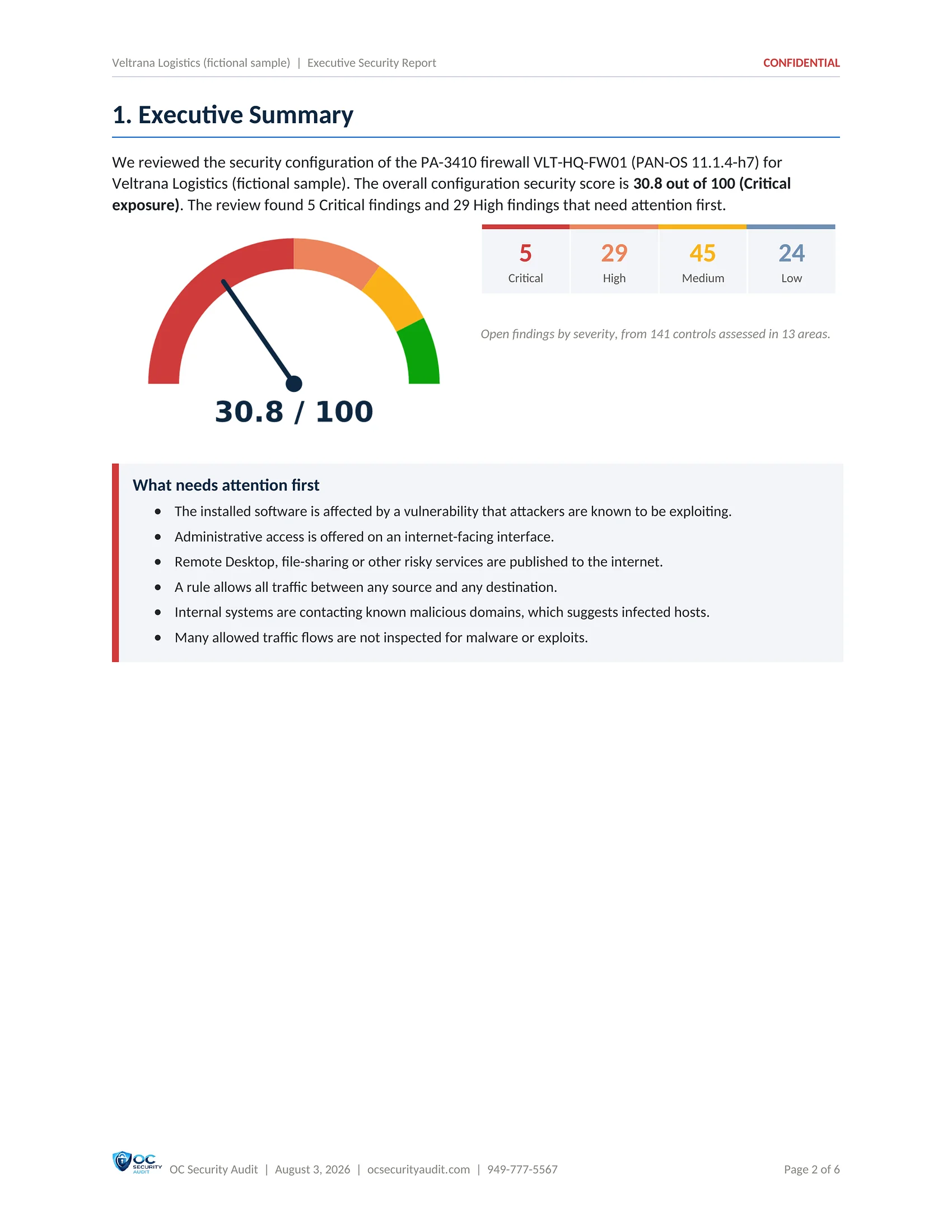
Score 30.8 out of 100 (Critical exposure): 5 Critical, 29 High, 45 Medium and 24 Low open findings from 141 controls in 13 areas, rolled up into 10 business risks and 103 roadmap actions

Two professionals using a laptop in an office

Our deliverables

Six reports and an Excel workbook, shown page by page

These are real pages from the deliverables of a Palo Alto firewall audit, run on a fictional company. Each section below shows one deliverable: what it contains, who uses it and 59 sample pages in total that you can step through and open full size.

SAMPLE. Veltrana Logistics is a fictional company and every name, address and number in these pages is illustrative. Your reports use the evidence read, read-only, from your own firewalls.

Deliverable 1 of 7 · PDF · 6 pages

Executive Security Report

A short, plain-language report for the people who decide and pay. It gives one score for the firewall, the business risks behind it, how each area compares with the target, and the few actions to fund first.

Who uses it

Owner, CEO, board, cyber insurer

What is included

  • Overall score and rating out of 100
  • Open findings by severity
  • Top business risks with target ratings
  • Score for each of the 13 areas against a target of 85
  • What is already working well
  • Priority recommendations tied to findings
  • Decisions requested from leadership
  • Scope, method and limits of the review
SAMPLE · Veltrana Logistics (fictional company) · Executive Security Report1 / 6
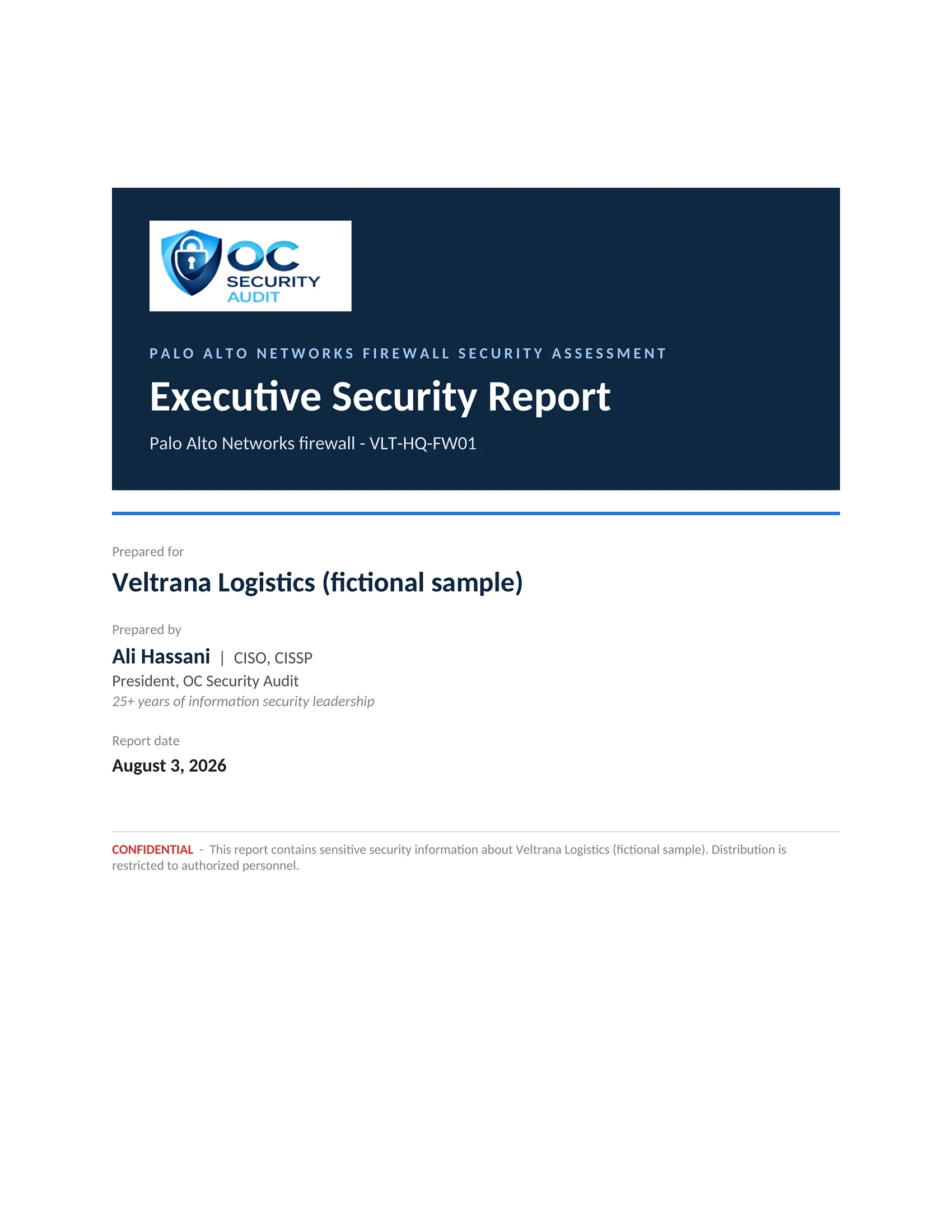
Executive Security Report sample, page 1 of 6: Cover (fictional company, illustrative data)
1 / 6CoverThe report cover for the PA-3410 firewall VLT-HQ-FW01 at Veltrana Logistics (fictional sample), dated August 3, 2026.
Executive Security Report sample, page 2 of 6: Executive summary and score (fictional company, illustrative data)
2 / 6Executive summary and scoreA 30.8 out of 100 score (Critical exposure) from 141 controls in 13 areas: 5 Critical, 29 High, 45 Medium and 24 Low open findings, and what needs attention first.
Executive Security Report sample, page 3 of 6: Top business risks (fictional company, illustrative data)
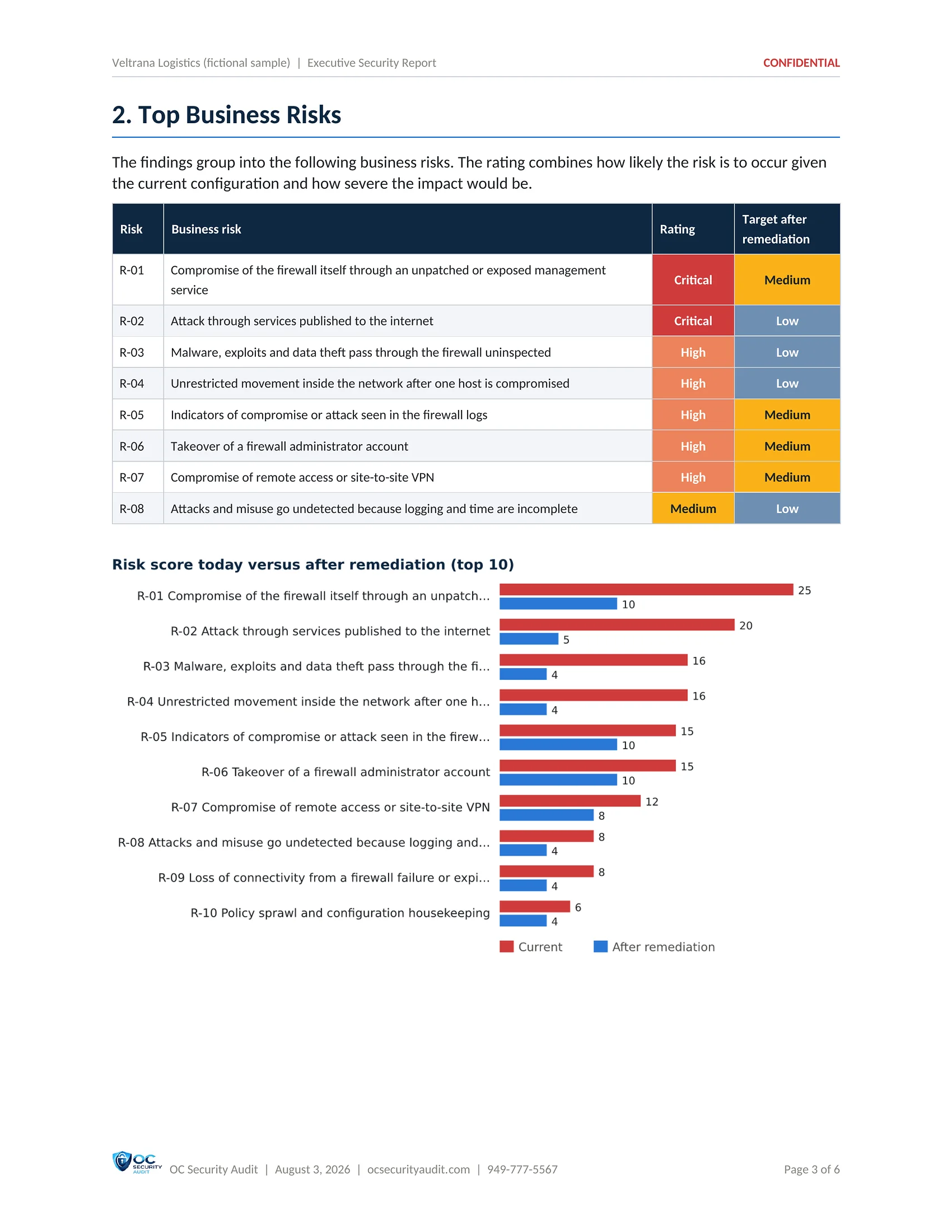
3 / 6Top business risksThe business risks the findings roll up into, each with today's rating and the target after remediation, plus a chart of risk scores before and after.
Executive Security Report sample, page 4 of 6: Security posture by area (fictional company, illustrative data)
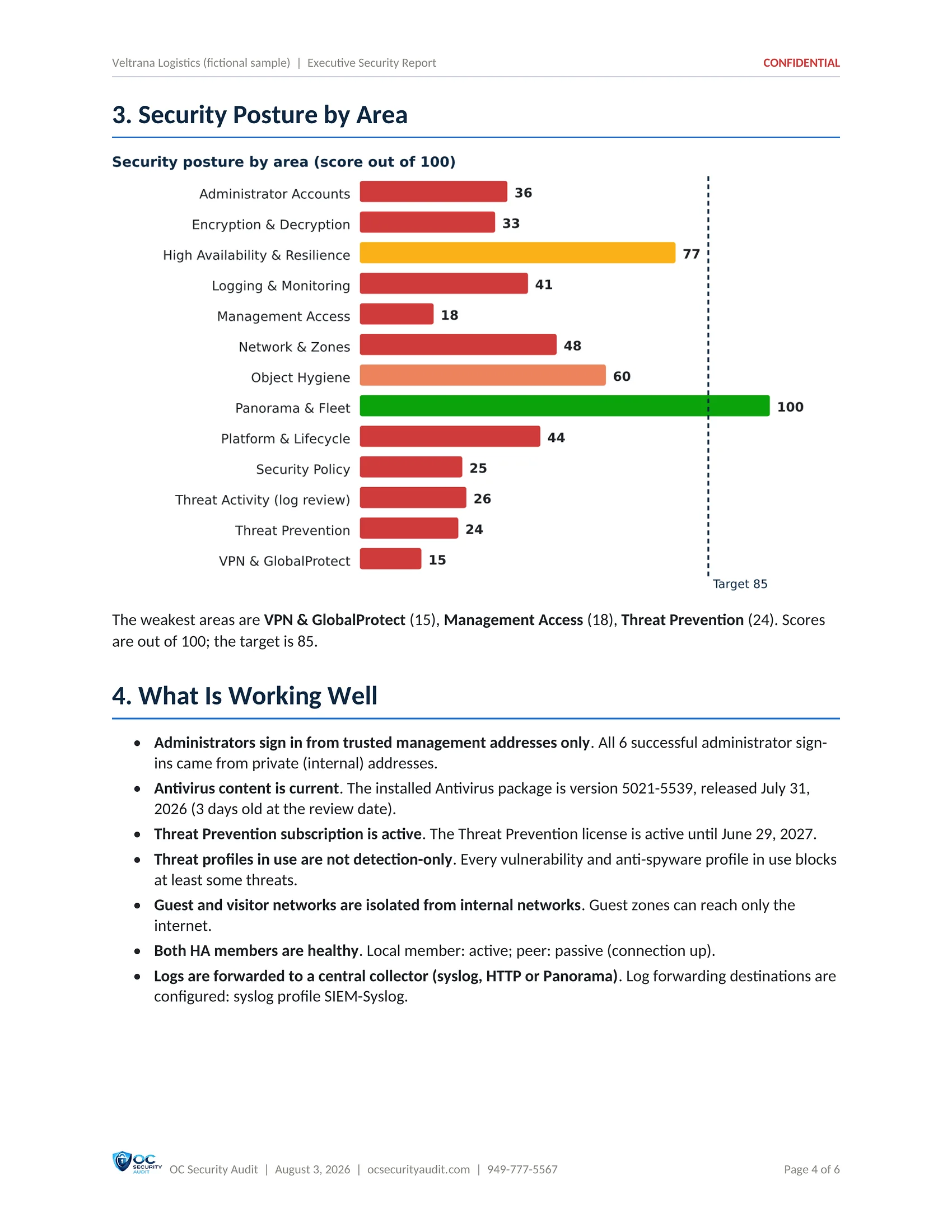
4 / 6Security posture by areaA score out of 100 for each of the 13 areas against a target of 85, the three weakest areas, and the controls that are already working well.
Executive Security Report sample, page 5 of 6: Priority recommendations and decisions (fictional company, illustrative data)
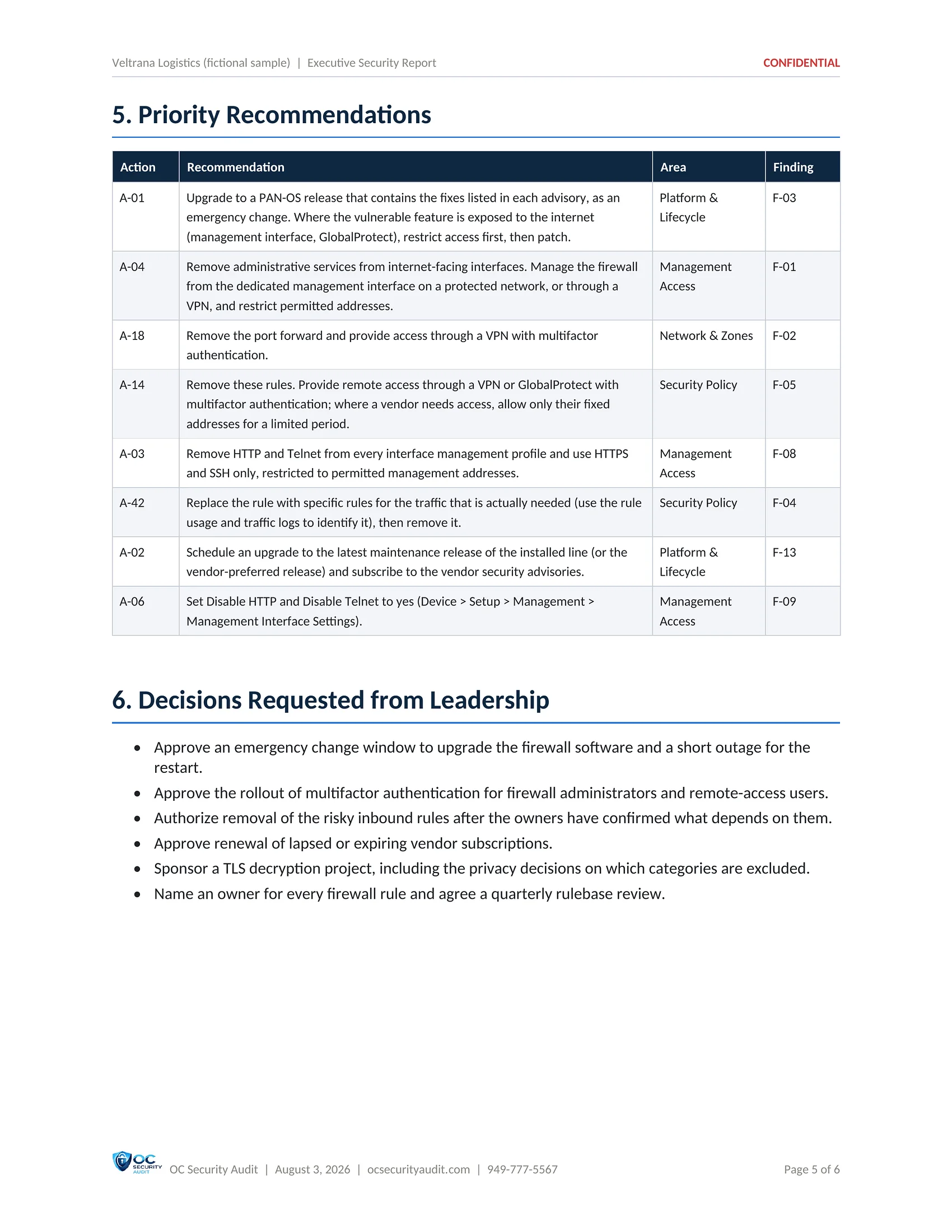
5 / 6Priority recommendations and decisionsThe first actions to fund, each tied to its finding, and the decisions leadership is asked to make.
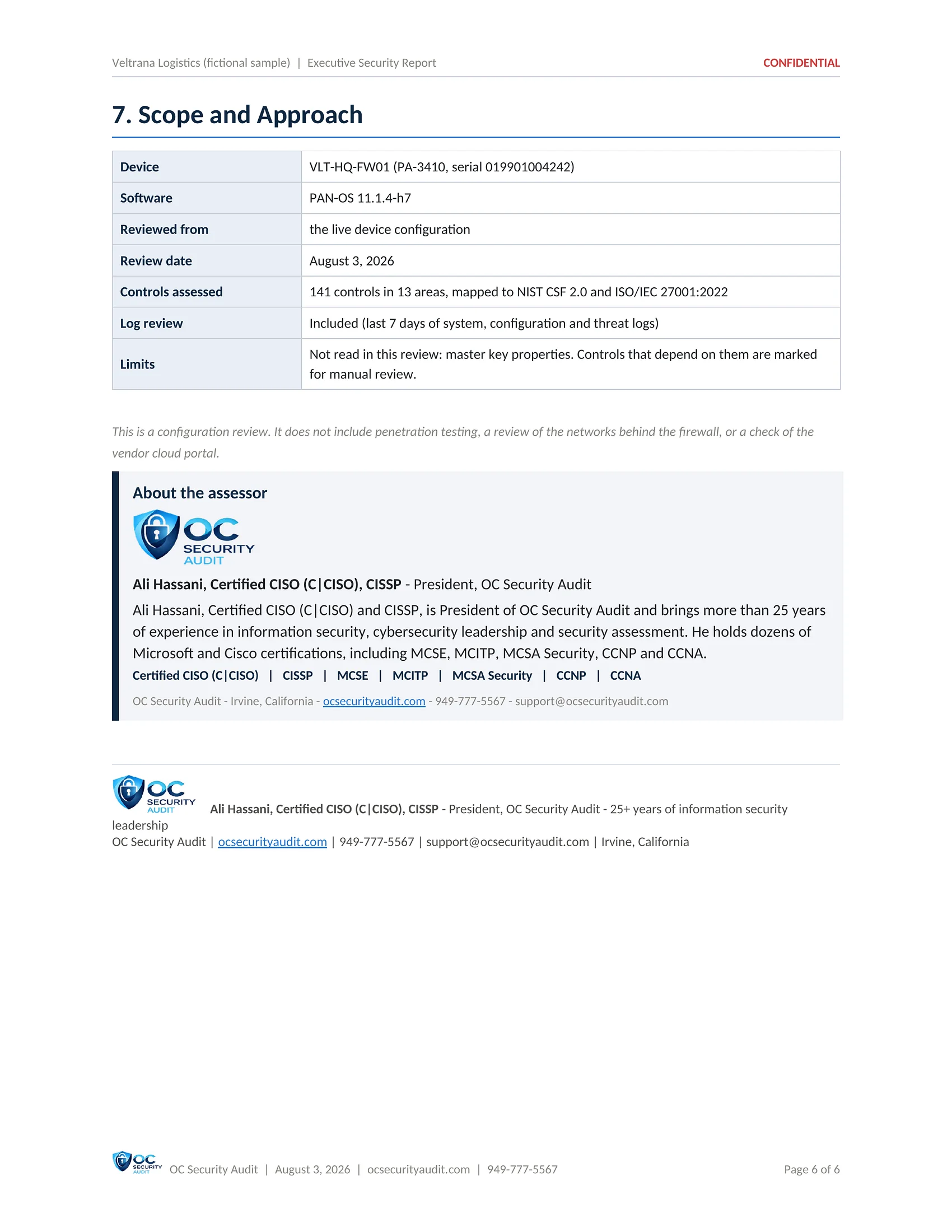
Executive Security Report sample, page 6 of 6: Scope and approach (fictional company, illustrative data)
6 / 6Scope and approachThe device, PAN-OS release, review date, the 141 controls in 13 areas mapped to NIST CSF 2.0 and ISO/IEC 27001:2022, the 7-day log review and the limits of the review.

Click the centre page to open it full size. Use the arrows, the thumbnails or your arrow keys to move between pages.

Deliverable 2 of 7 · PDF · 69 pages

Technical Security & Configuration Report

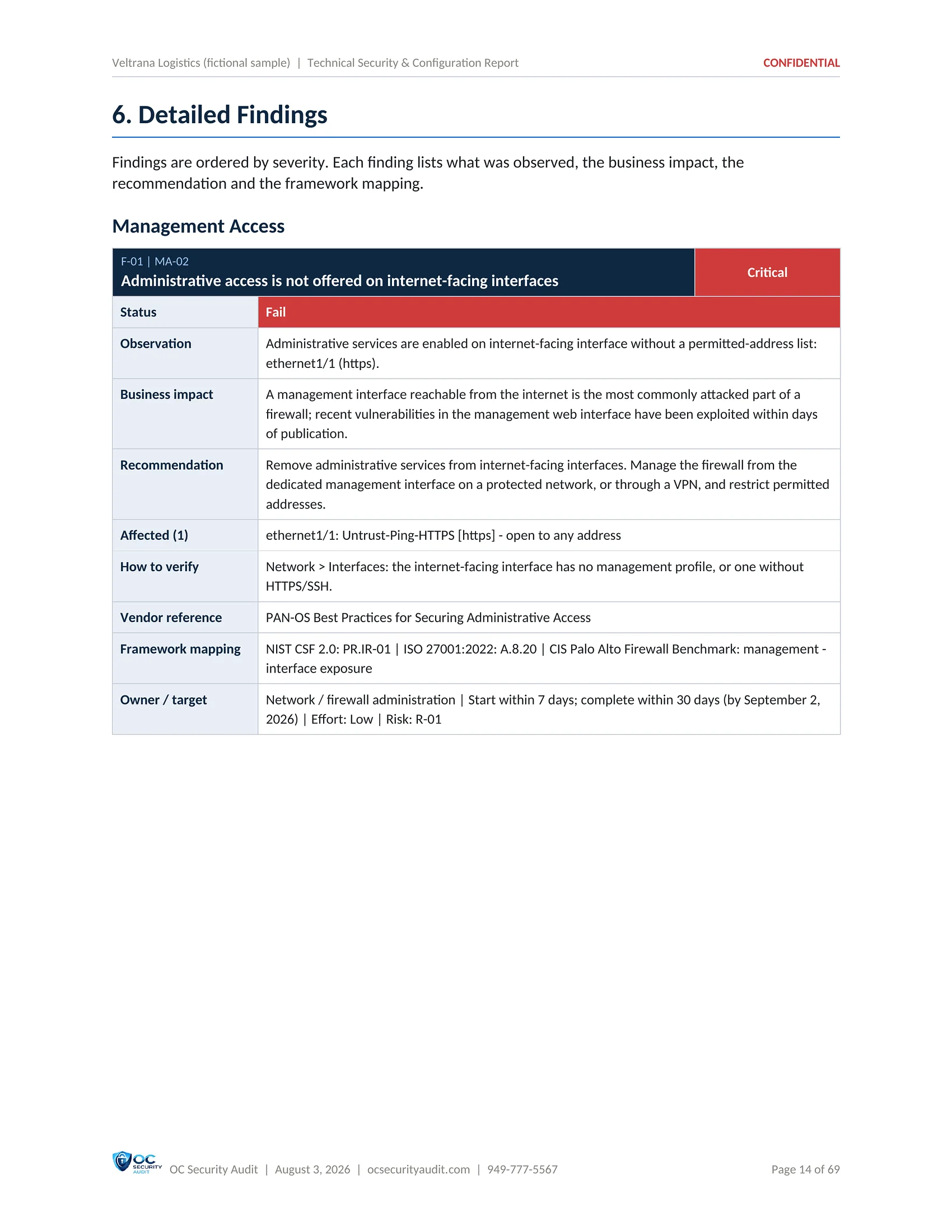
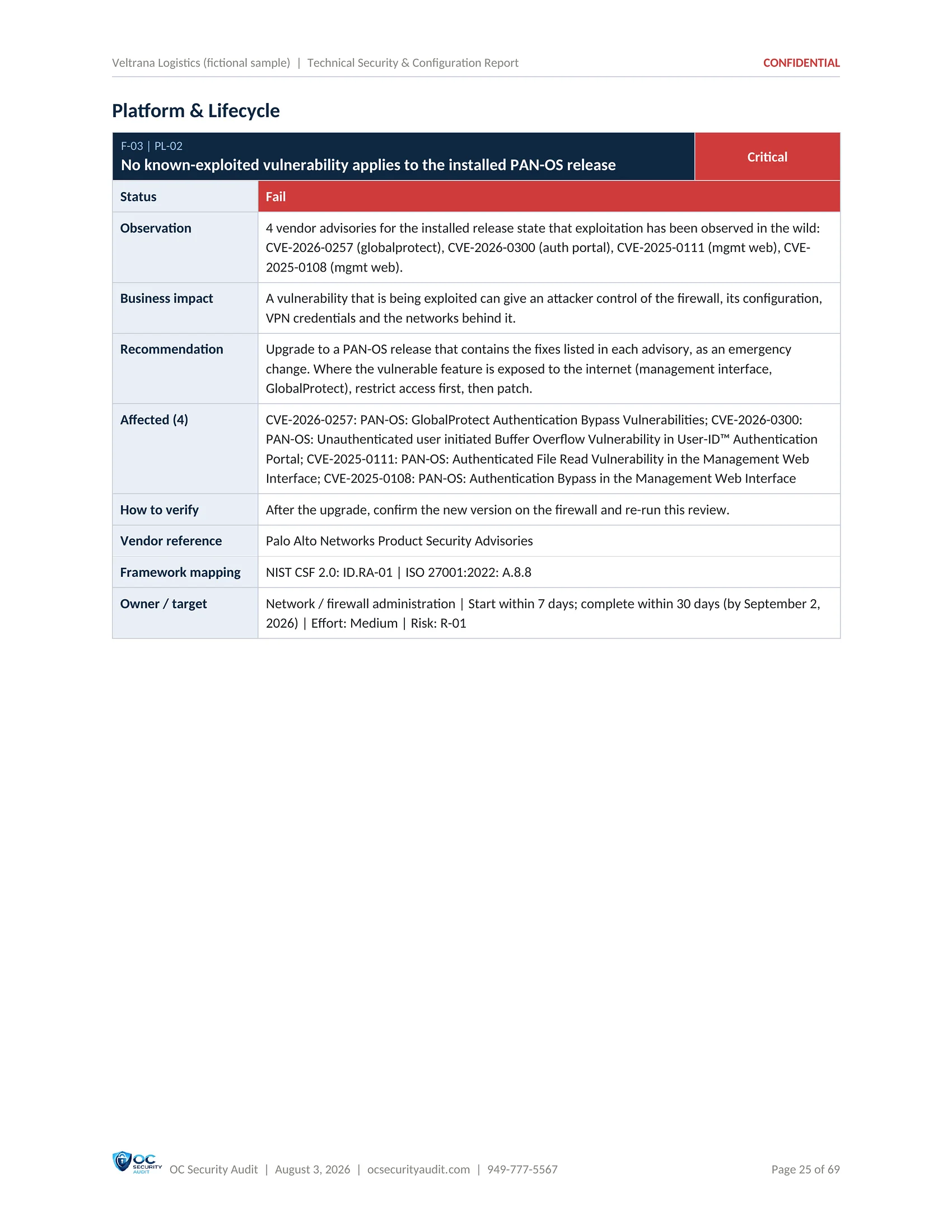
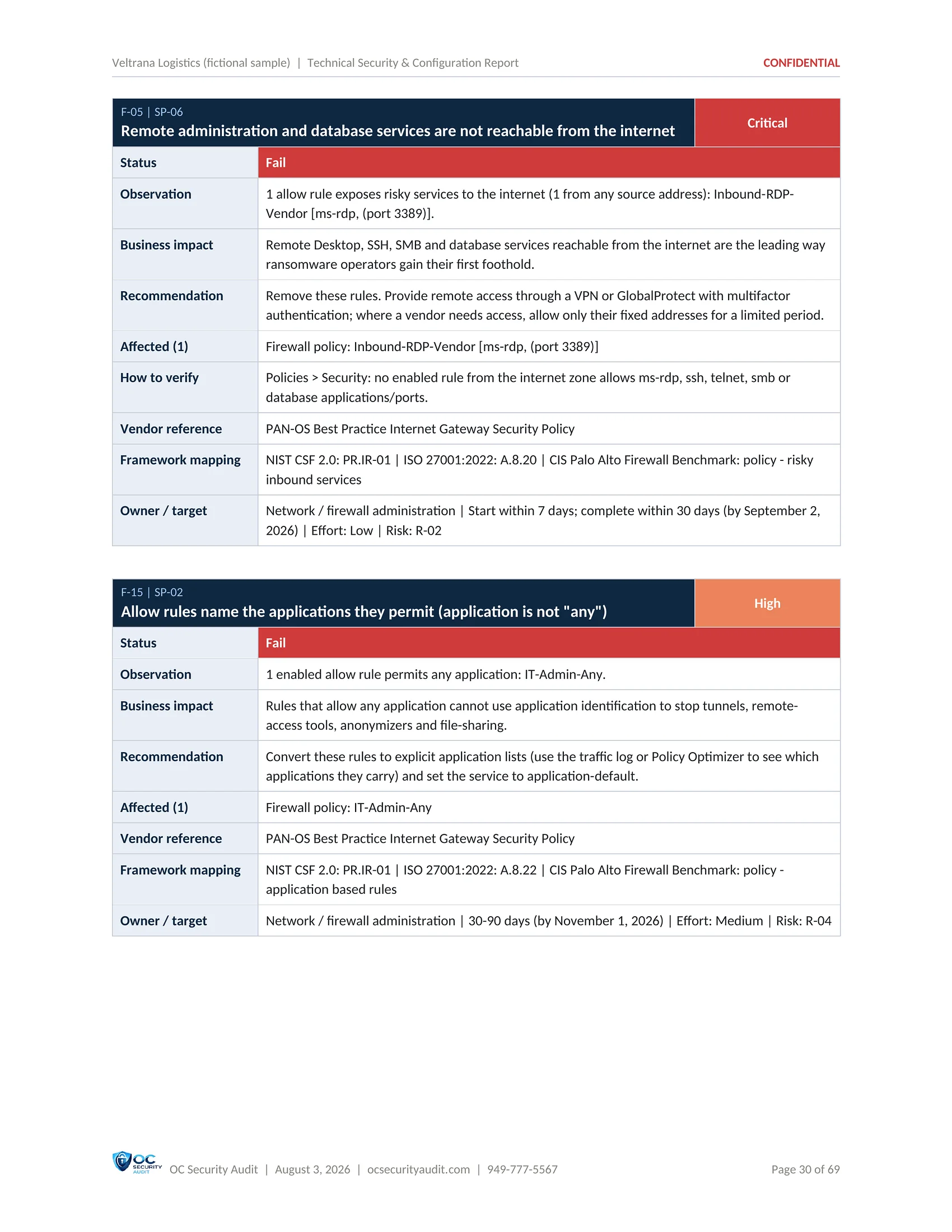
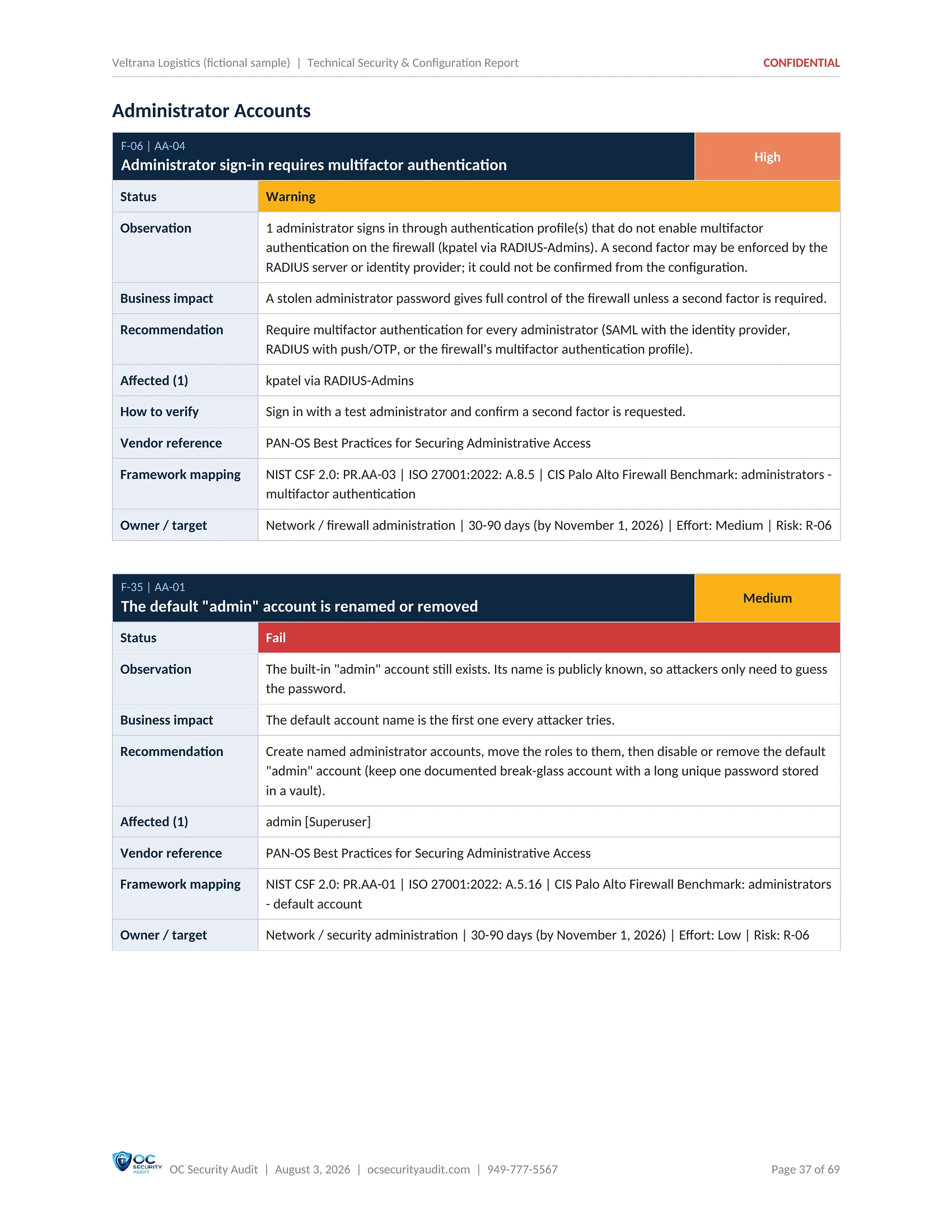
The full evidence for your firewall administrator or MSP. Every control is listed with its result, and every finding comes with what was observed, why it matters, the exact fix, the rules or settings affected and the framework reference.

Each area is explained on its own page: management interface security, PAN-OS end of life and vulnerabilities, security policy and NAT, security profiles, SSL/TLS decryption, GlobalProtect and IPsec VPN, zone protection, logging, HA and Panorama.

Who uses it

Firewall administrators, MSP, IT manager

What is included

  • Environment overview read from the firewall
  • Results by area with pass, fail and warning counts
  • Subscriptions, content versions and vendor advisories
  • Interfaces, zones and management profiles
  • Key observations for each area
  • Detailed finding cards ordered by severity
  • Controls that already meet the benchmark
  • NIST CSF 2.0 and ISO/IEC 27001:2022 mapping
SAMPLE · Veltrana Logistics (fictional company) · Technical Security & Configuration Report1 / 17
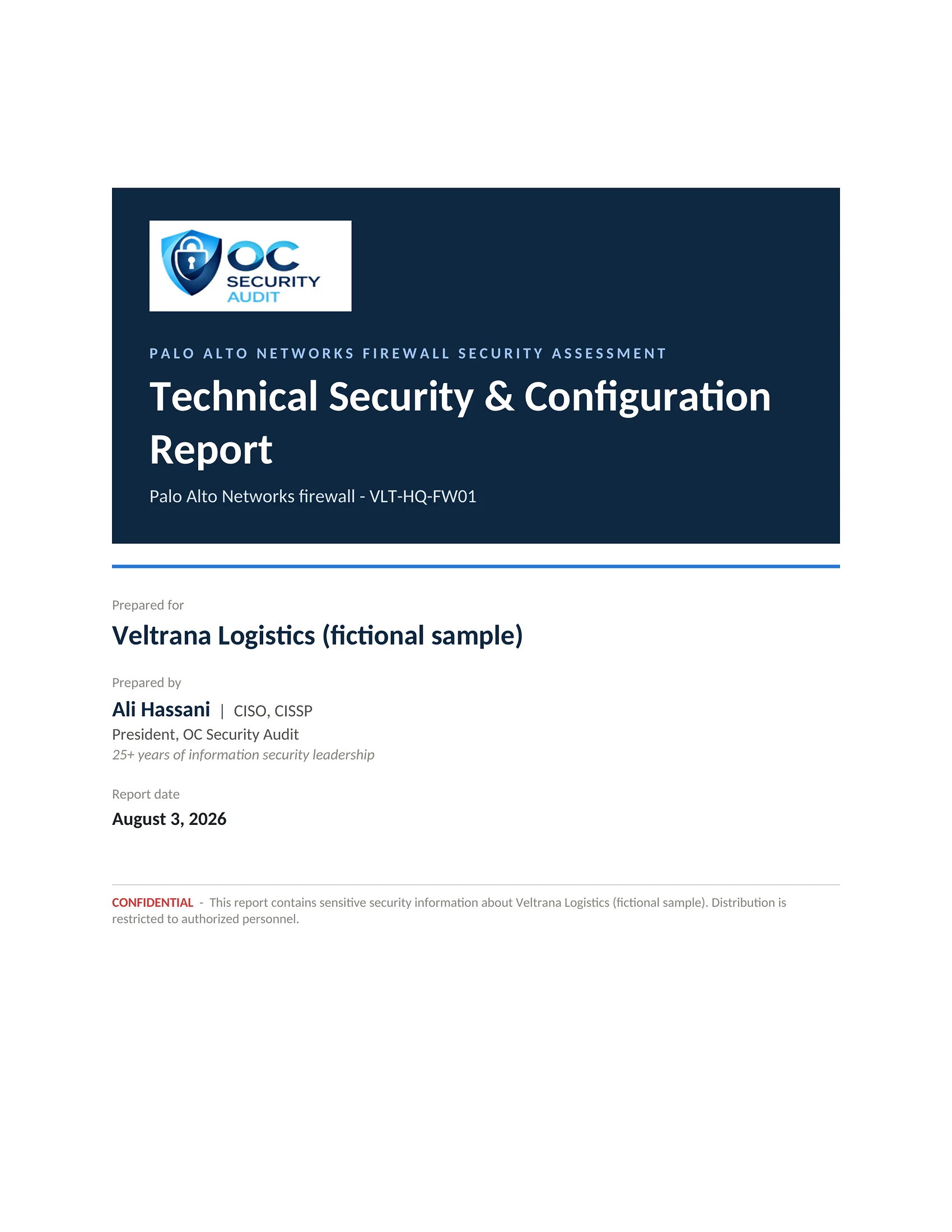
Technical Security & Configuration Report sample, page 1 of 17: Cover (fictional company, illustrative data)
1 / 17CoverThe cover of the 69-page technical report for VLT-HQ-FW01 (fictional sample).
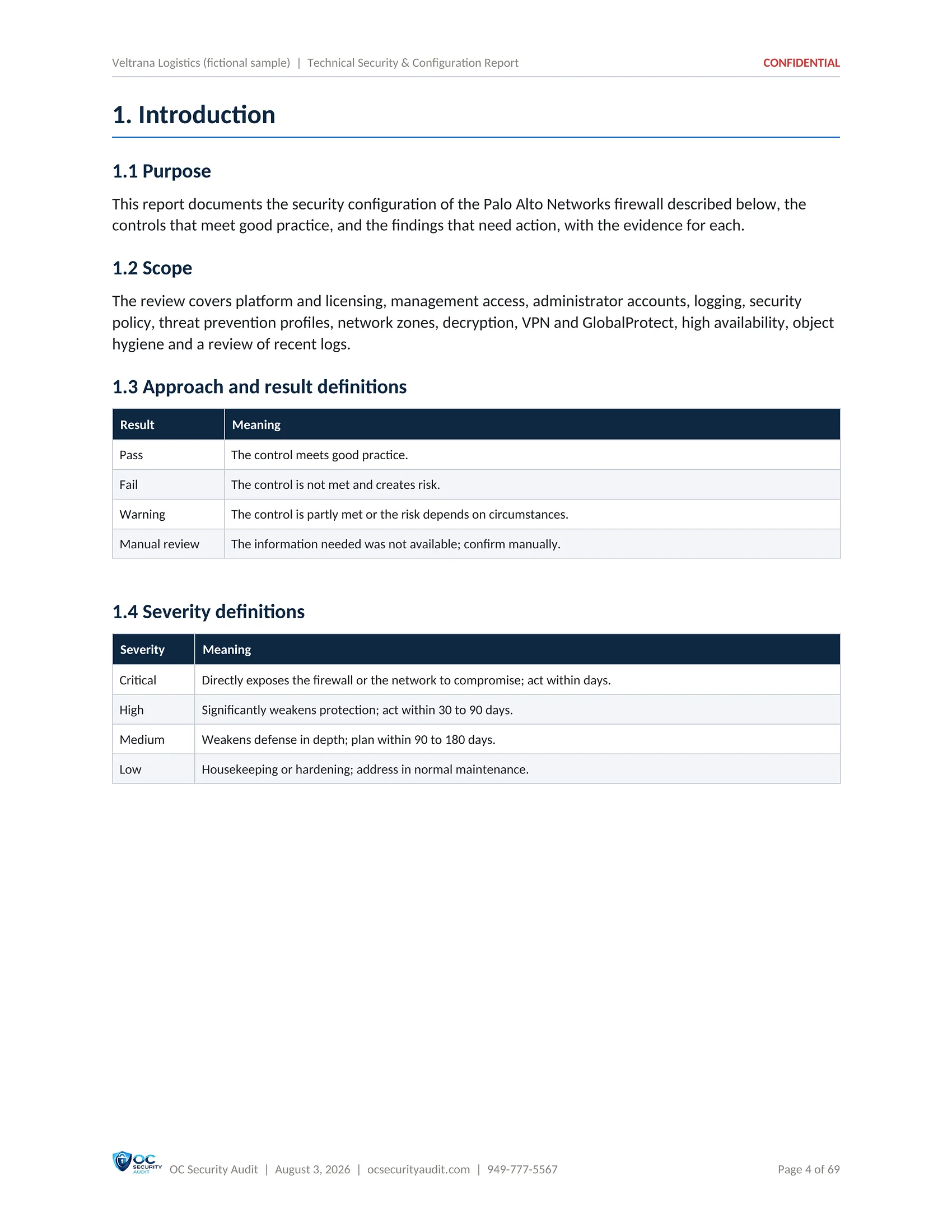
Technical Security & Configuration Report sample, page 2 of 17: Purpose, scope and severity definitions (fictional company, illustrative data)
2 / 17Purpose, scope and severity definitionsWhat the report covers, how each control result is graded, including Manual review where the information was not available, and what each severity level means.
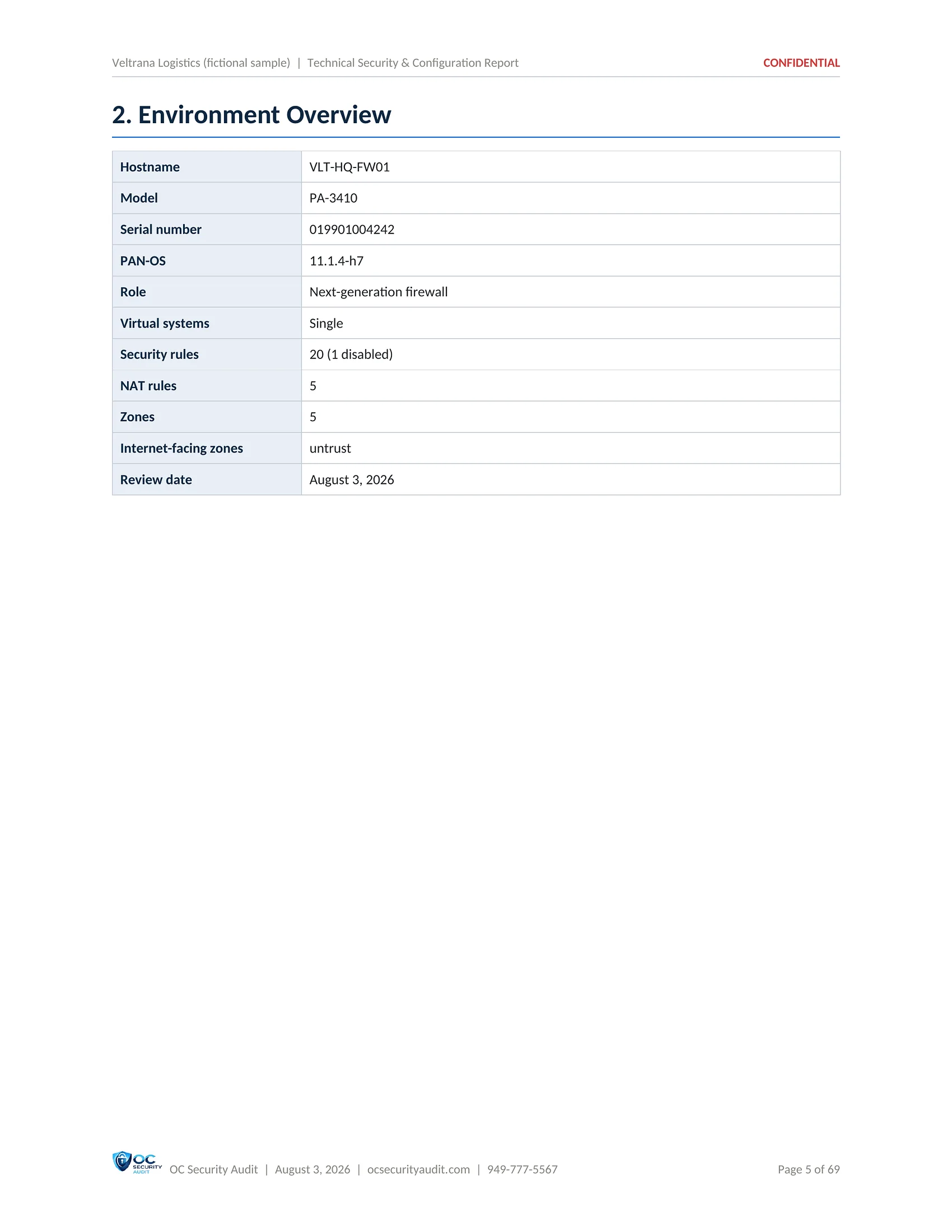
Technical Security & Configuration Report sample, page 3 of 17: Environment overview (fictional company, illustrative data)
3 / 17Environment overviewHostname, model, serial number, PAN-OS release, role, rule and zone counts and the internet-facing zone, as read from the firewall.
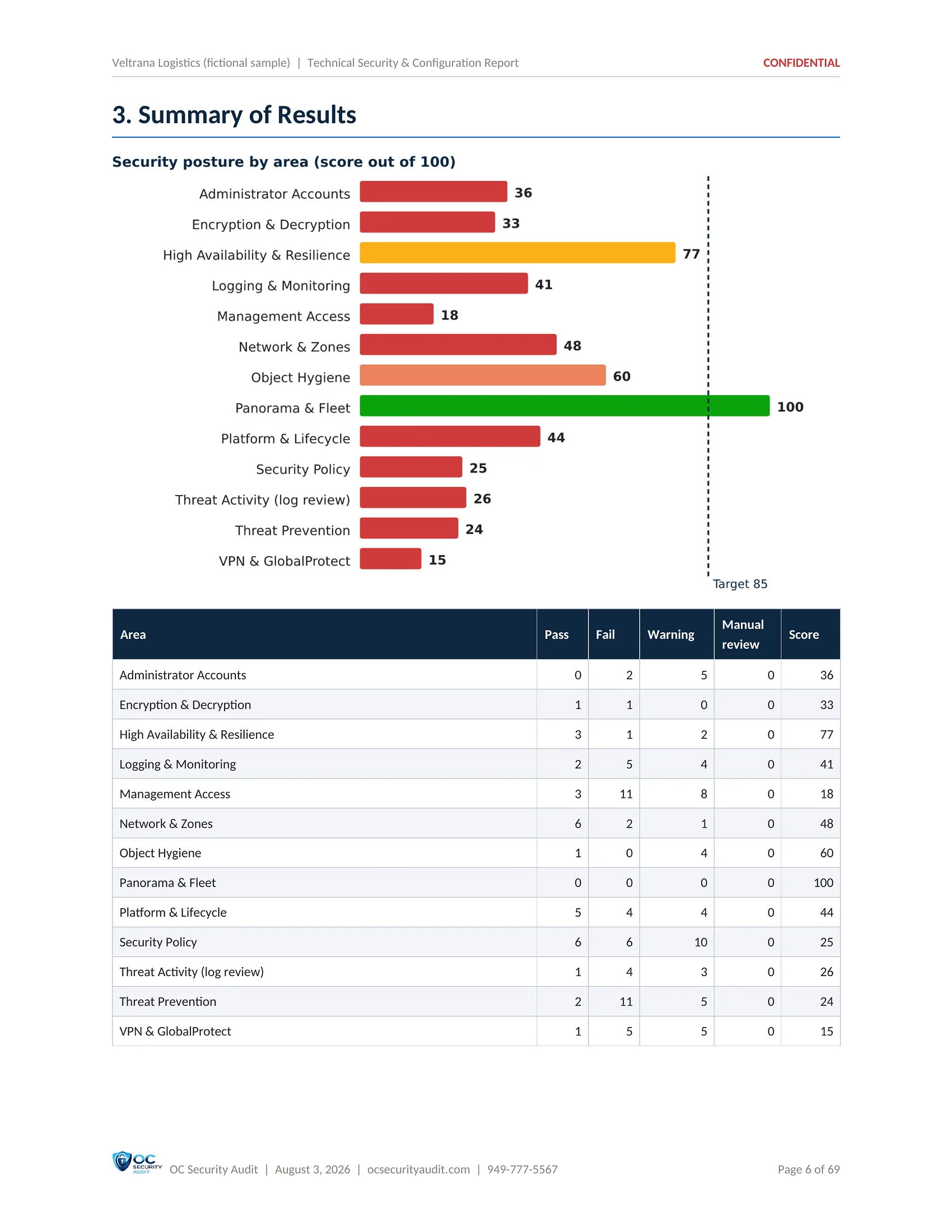
Technical Security & Configuration Report sample, page 4 of 17: Summary of results by area (fictional company, illustrative data)
4 / 17Summary of results by areaThe score for each area and a table of pass, fail and warning counts per area.
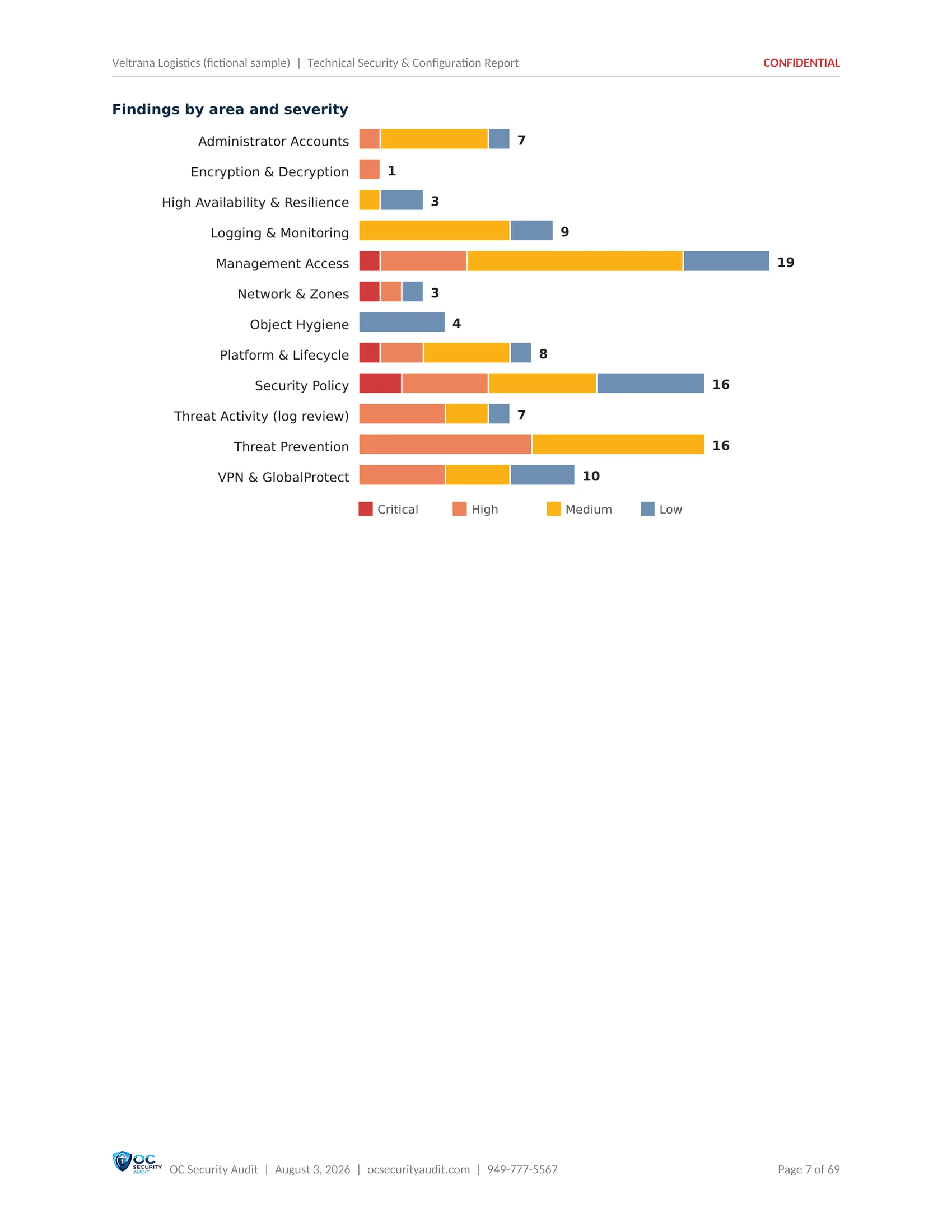
Technical Security & Configuration Report sample, page 5 of 17: Findings by area and severity (fictional company, illustrative data)
5 / 17Findings by area and severityA chart of open findings in each area, split by Critical, High, Medium and Low.
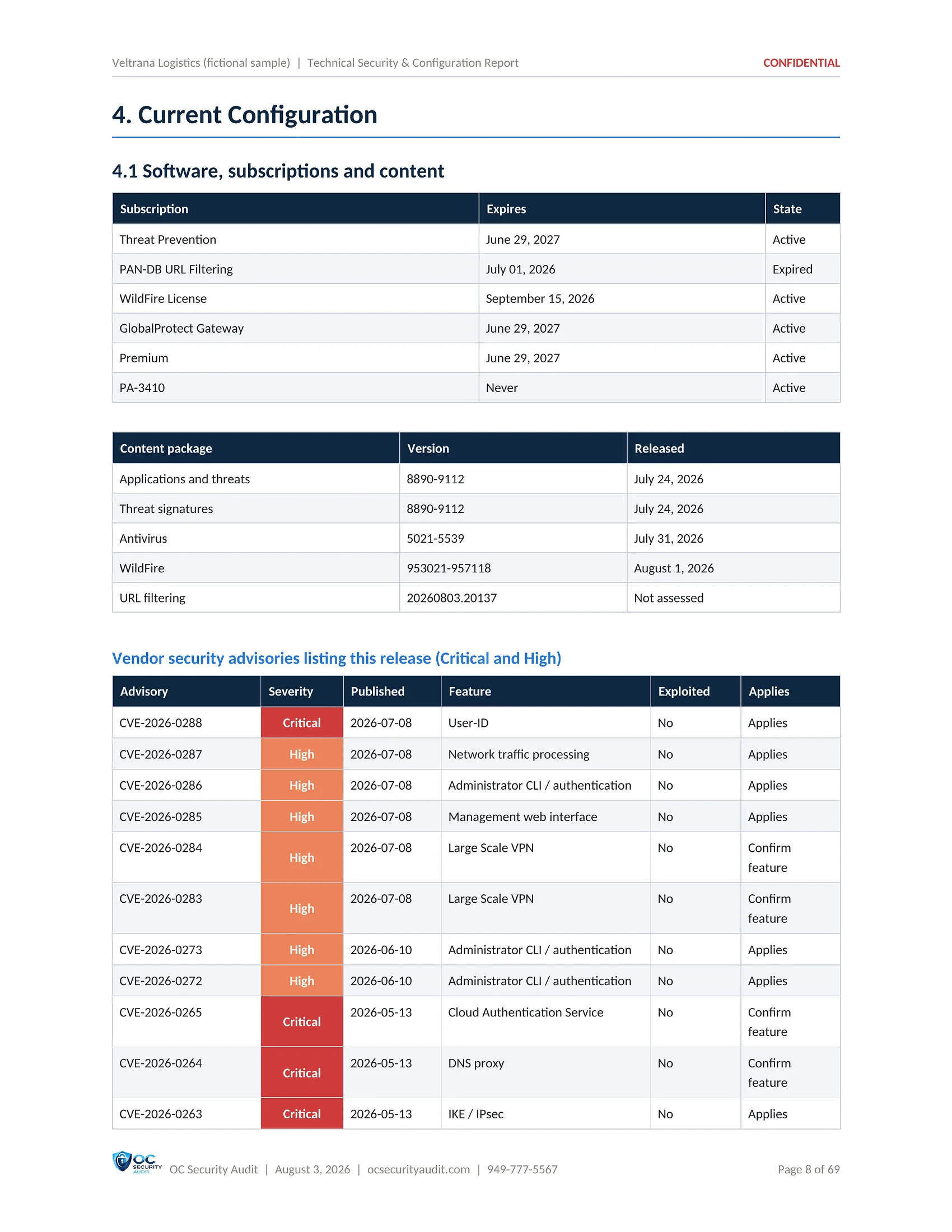
Technical Security & Configuration Report sample, page 6 of 17: Current configuration (fictional company, illustrative data)
6 / 17Current configurationSubscriptions and their expiry dates, content versions and the vendor security advisories that apply to the installed release.
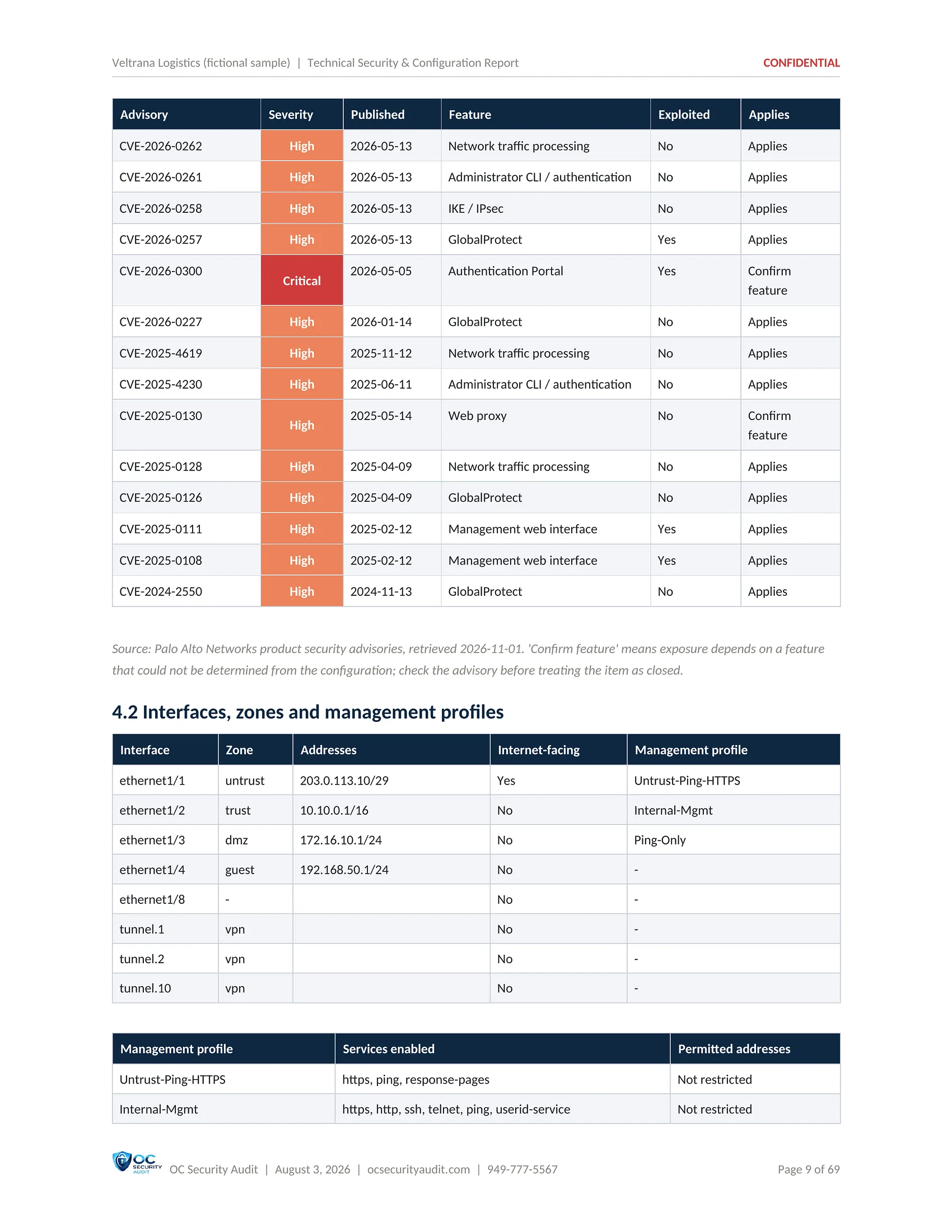
Technical Security & Configuration Report sample, page 7 of 17: Vendor advisories for the installed release (fictional company, illustrative data)
7 / 17Vendor advisories for the installed releaseEach advisory with its severity, publication date, affected feature, whether it is exploited and whether it applies, then the interfaces, zones and management profiles.
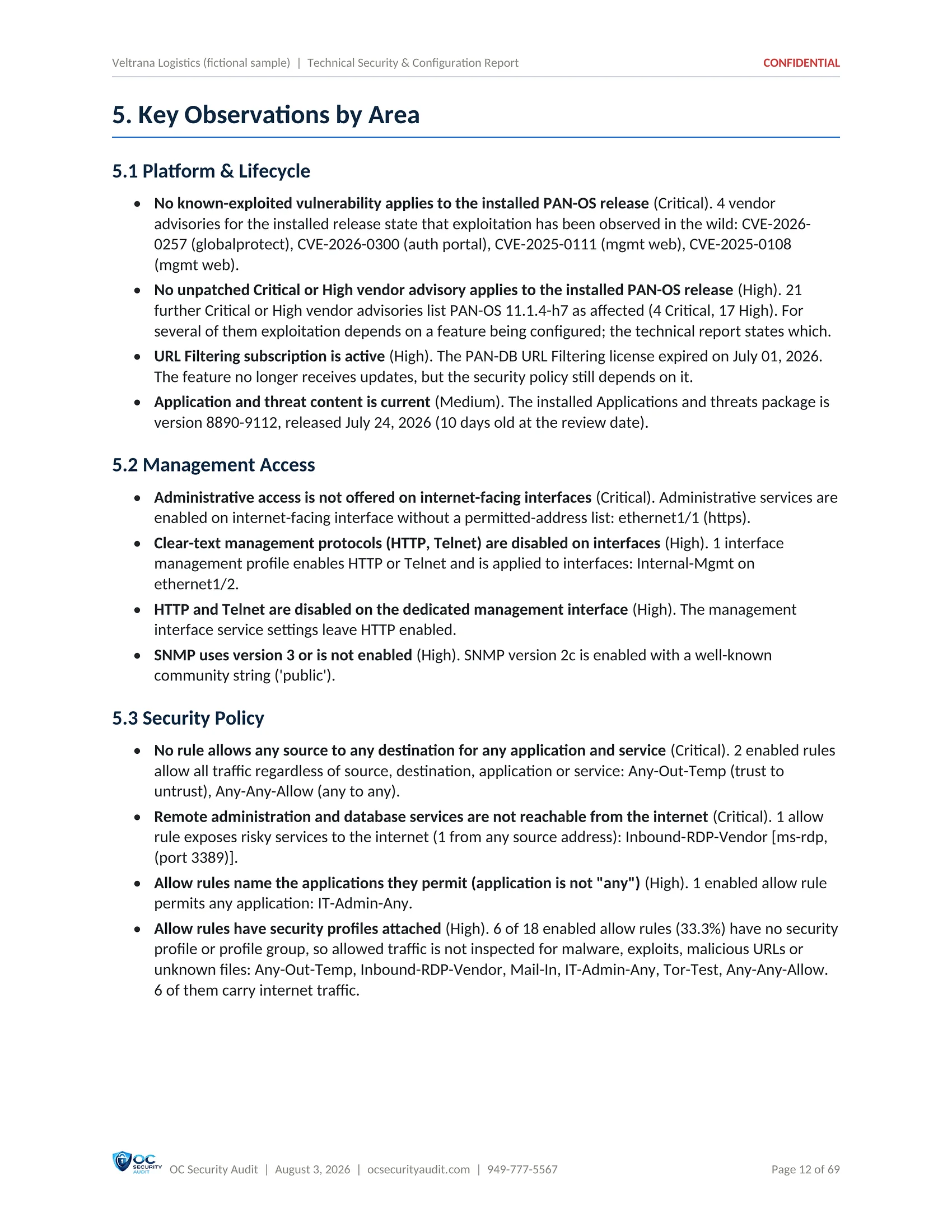
Technical Security & Configuration Report sample, page 8 of 17: Key observations by area (fictional company, illustrative data)
8 / 17Key observations by areaA short summary of what was found in each area, starting with Platform and Lifecycle and Management Access.
Technical Security & Configuration Report sample, page 9 of 17: Detailed findings: management access (fictional company, illustrative data)
9 / 17Detailed findings: management accessThe first finding cards, ordered by severity: observation, business impact, recommendation, affected items and framework mapping.
Technical Security & Configuration Report sample, page 10 of 17: Finding: known-exploited vulnerabilities (fictional company, illustrative data)
10 / 17Finding: known-exploited vulnerabilitiesA Critical finding card: vendor advisories with exploitation observed in the wild apply to the installed PAN-OS release.
Technical Security & Configuration Report sample, page 11 of 17: Finding: risky services reachable from the internet (fictional company, illustrative data)
11 / 17Finding: risky services reachable from the internetA Critical finding card: an allow rule exposes remote desktop to the internet, with the rule named and the fix.
Technical Security & Configuration Report sample, page 12 of 17: Finding: administrator multifactor authentication (fictional company, illustrative data)
12 / 17Finding: administrator multifactor authenticationA High finding card on administrator sign-in, with the evidence and the steps to require multifactor authentication.
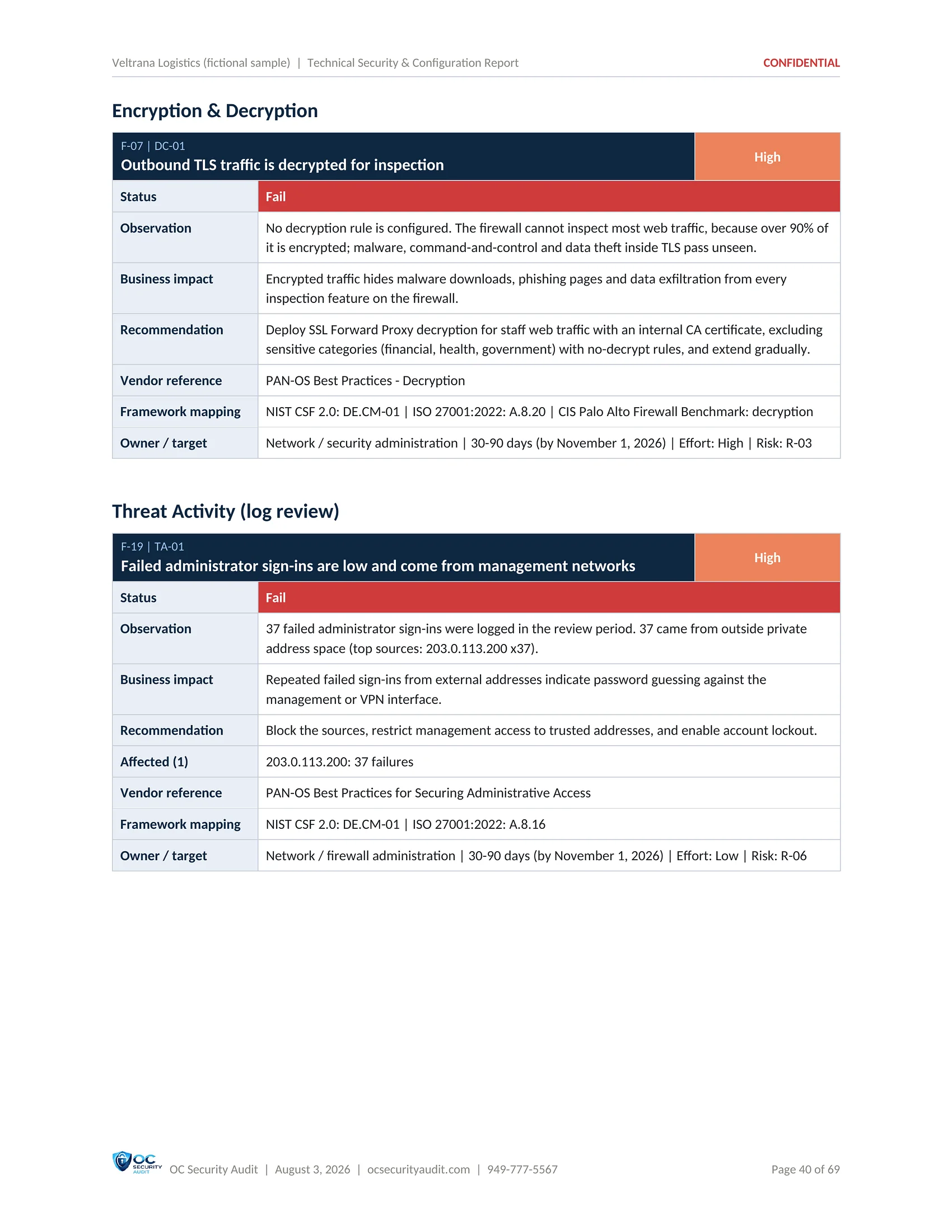
Technical Security & Configuration Report sample, page 13 of 17: Finding: outbound TLS decryption (fictional company, illustrative data)
13 / 17Finding: outbound TLS decryptionA High finding card: no decryption rule is configured, so encrypted traffic passes uninspected.
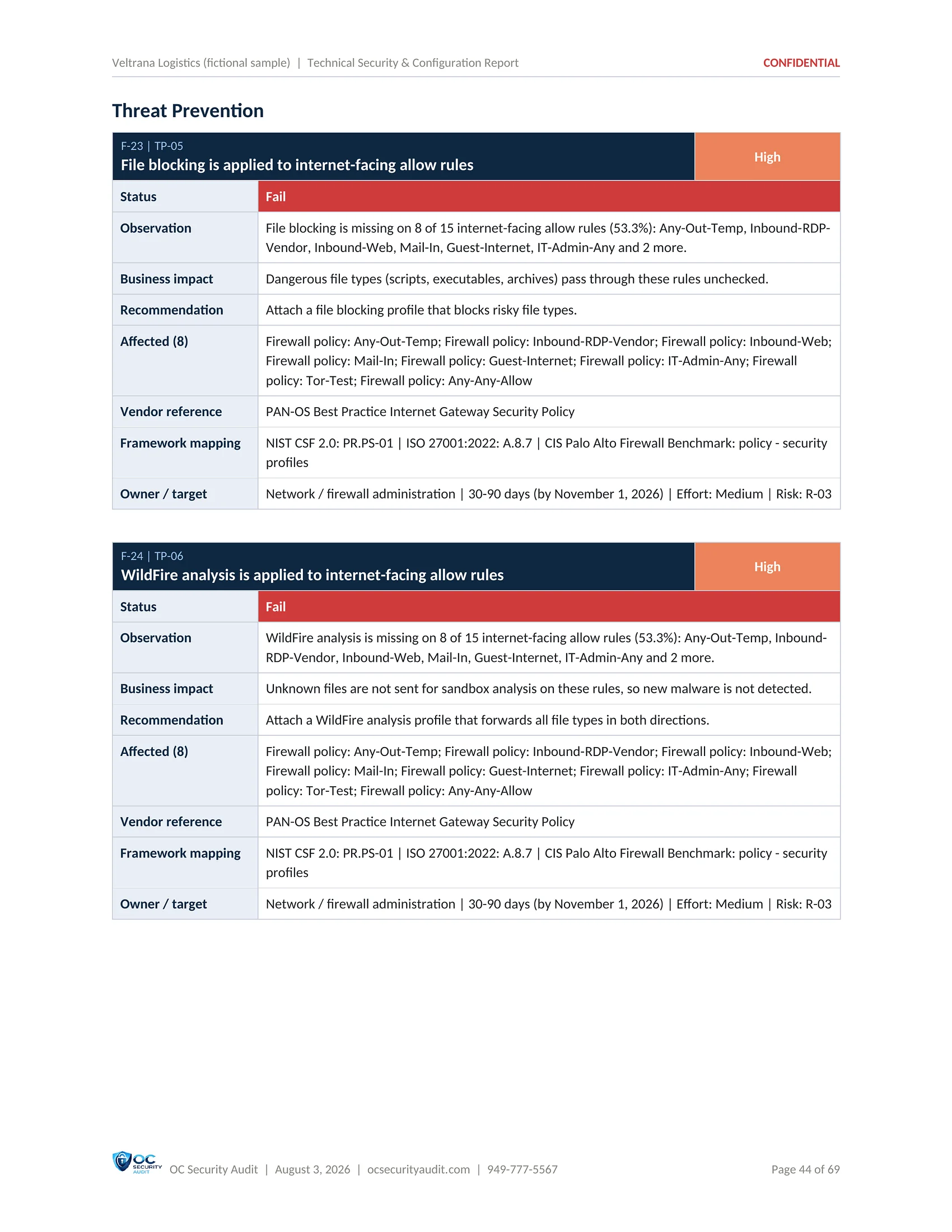
Technical Security & Configuration Report sample, page 14 of 17: Finding: file blocking on internet-facing rules (fictional company, illustrative data)
14 / 17Finding: file blocking on internet-facing rulesA High finding card from Threat Prevention: file blocking is missing on internet-facing allow rules.
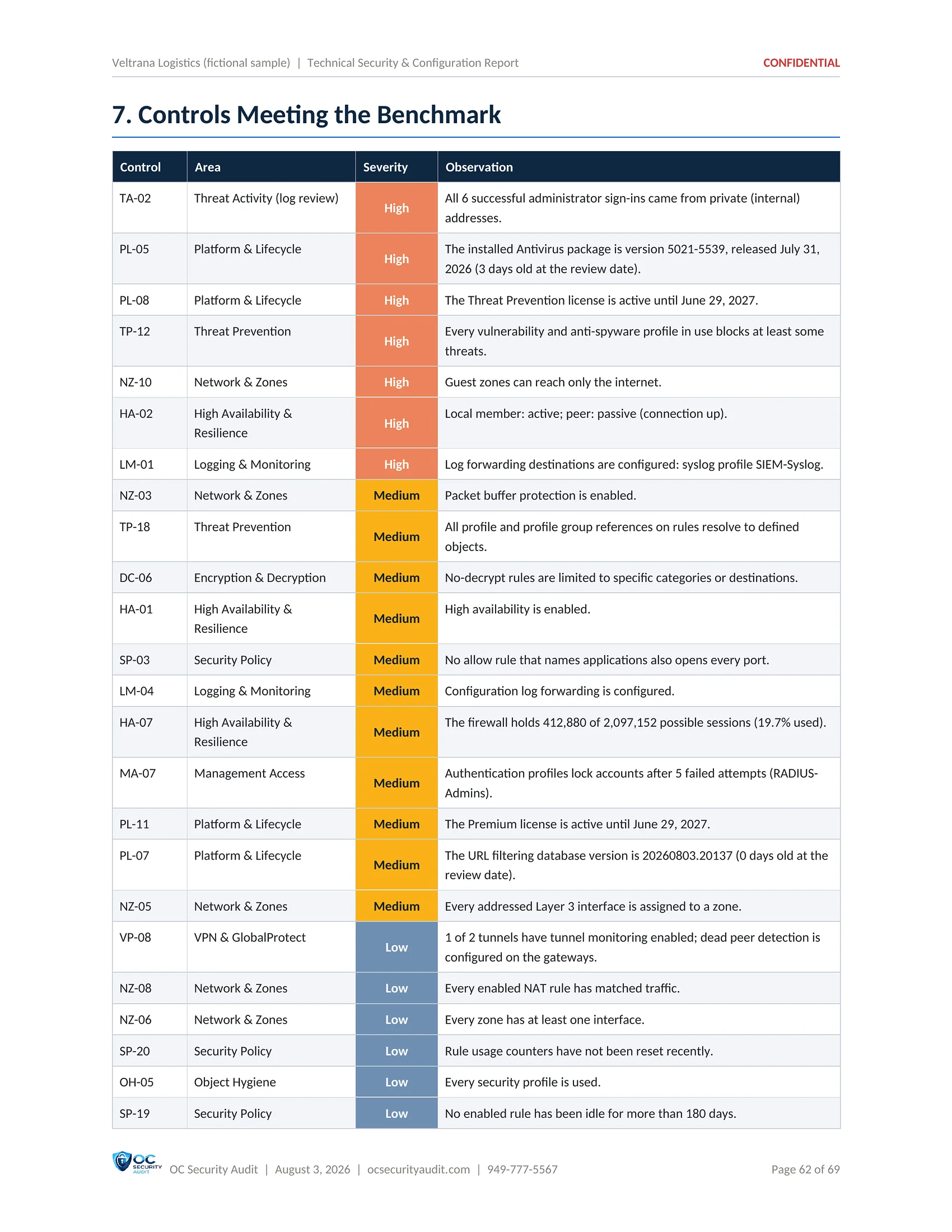
Technical Security & Configuration Report sample, page 15 of 17: Controls meeting the benchmark (fictional company, illustrative data)
15 / 17Controls meeting the benchmarkThe controls that passed, with the evidence for each, so you can see what is already done well.
Technical Security & Configuration Report sample, page 16 of 17: Appendix: framework reference (fictional company, illustrative data)
16 / 17Appendix: framework referenceHow every finding maps to NIST CSF 2.0 and ISO/IEC 27001:2022 Annex A, and which vendor sources the recommendations draw on.
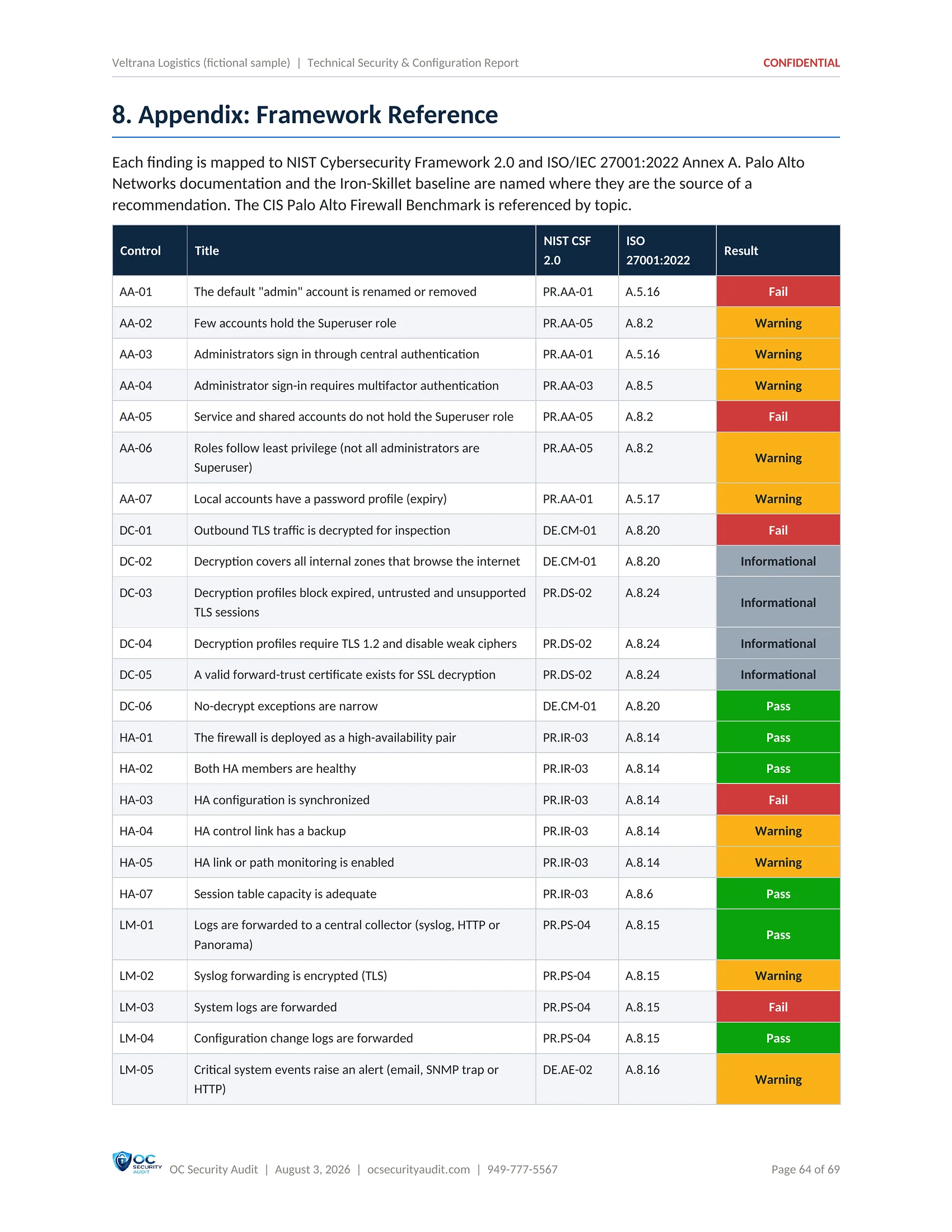
Technical Security & Configuration Report sample, page 17 of 17: Control-by-control mapping (fictional company, illustrative data)
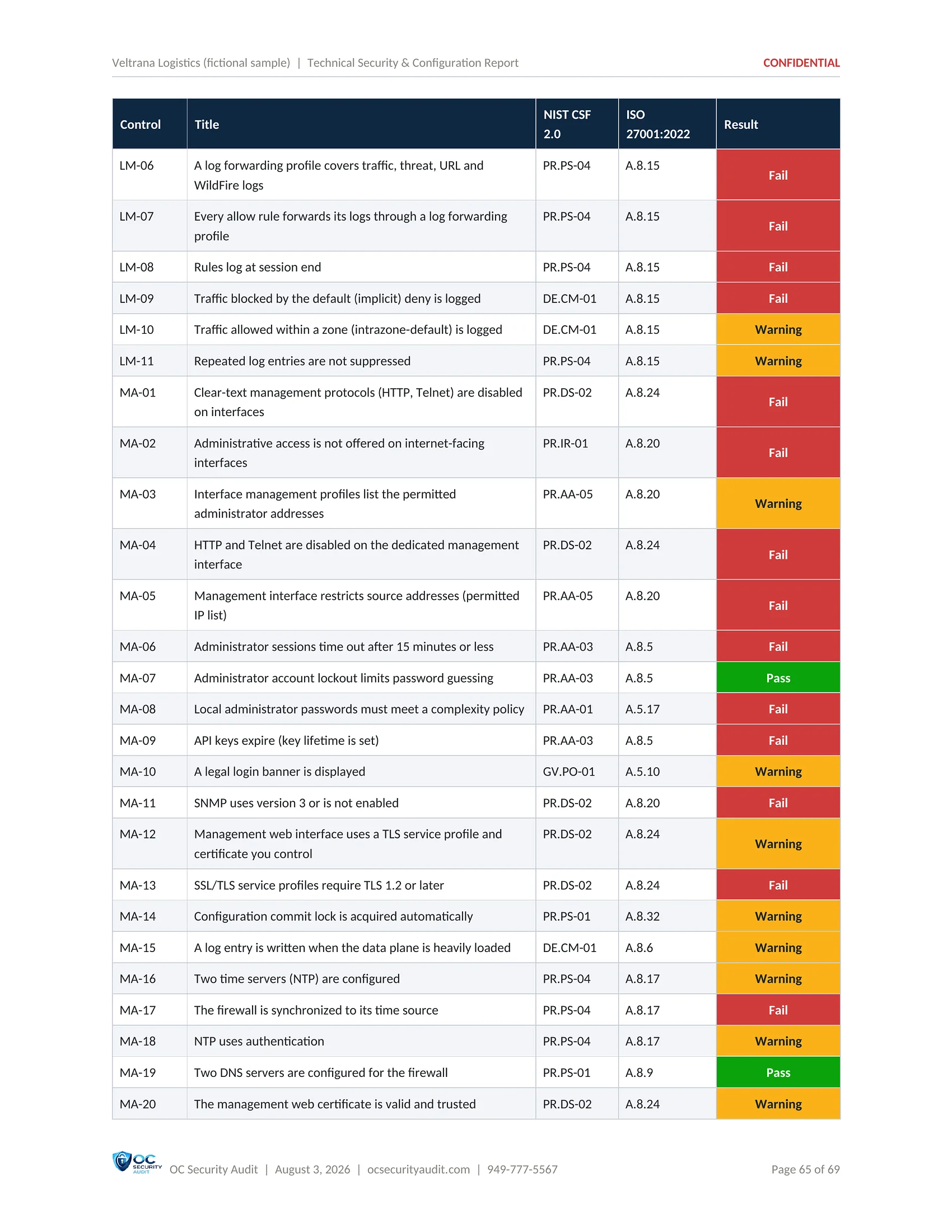
17 / 17Control-by-control mappingA table of each control with its NIST CSF 2.0 and ISO/IEC 27001:2022 references and its result.

Click the centre page to open it full size. Use the arrows, the thumbnails or your arrow keys to move between pages.

Deliverable 3 of 7 · PDF, landscape · 6 pages

Firewall Rulebase Review

Every security rule in the order the firewall evaluates it, with the issues found on each one. This is the list your administrator works through to remove risky, unused and shadowed rules without guessing.

Who uses it

Firewall administrators, change advisory board

What is included

  • Rule counts: total, enabled, allow everything, no profiles, with issues
  • Chart of rules by issue type
  • Zones, source, destination, application and service per rule
  • Action, security profiles and hit counts
  • Flags such as shadowed, never used, no description, open to the internet
  • NAT rules
  • Decryption rules
SAMPLE · Veltrana Logistics (fictional company) · Firewall Rulebase Review1 / 5
Firewall Rulebase Review sample, page 1 of 5: Cover (fictional company, illustrative data)
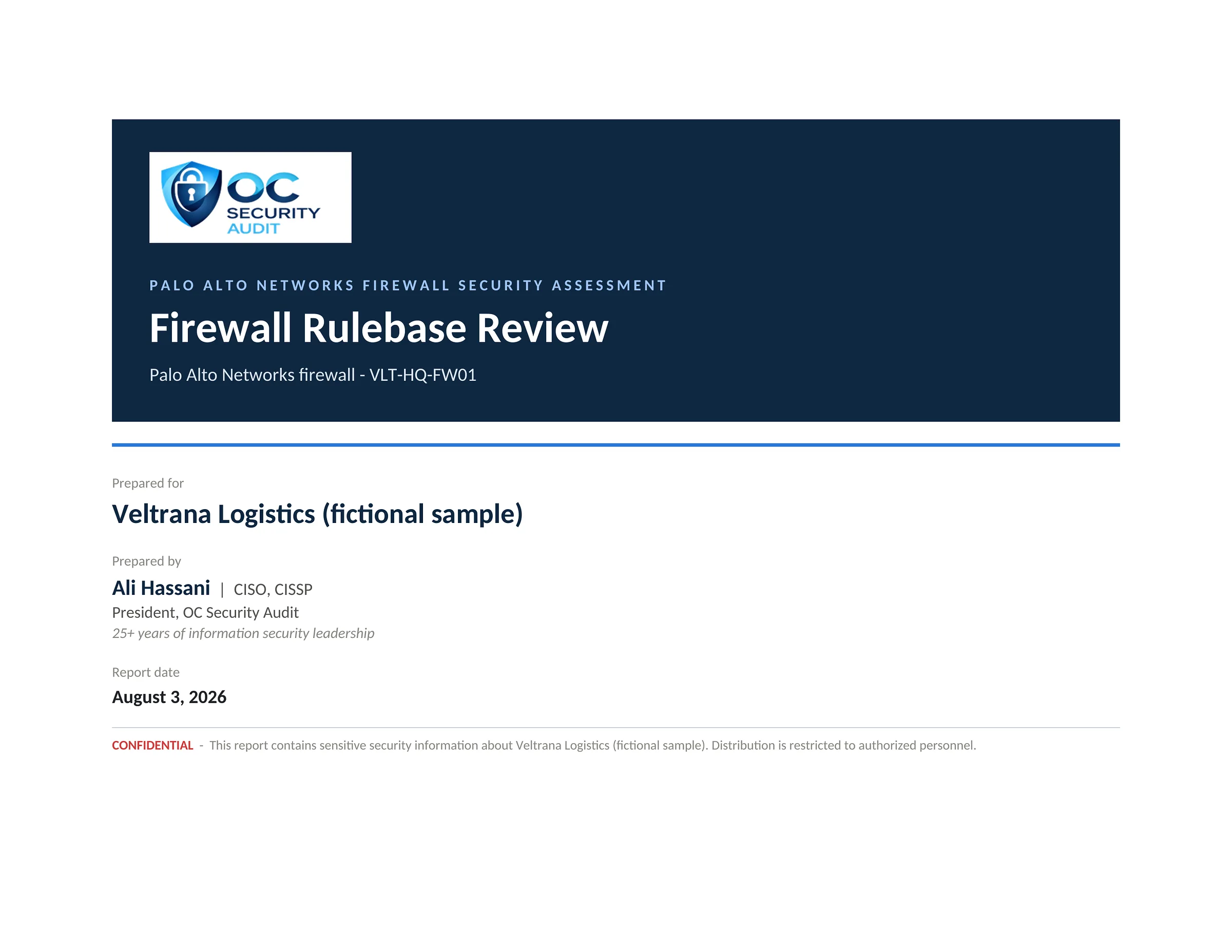
1 / 5CoverThe cover of the Firewall Rulebase Review for VLT-HQ-FW01 (fictional sample).
Firewall Rulebase Review sample, page 2 of 5: Rulebase summary (fictional company, illustrative data)
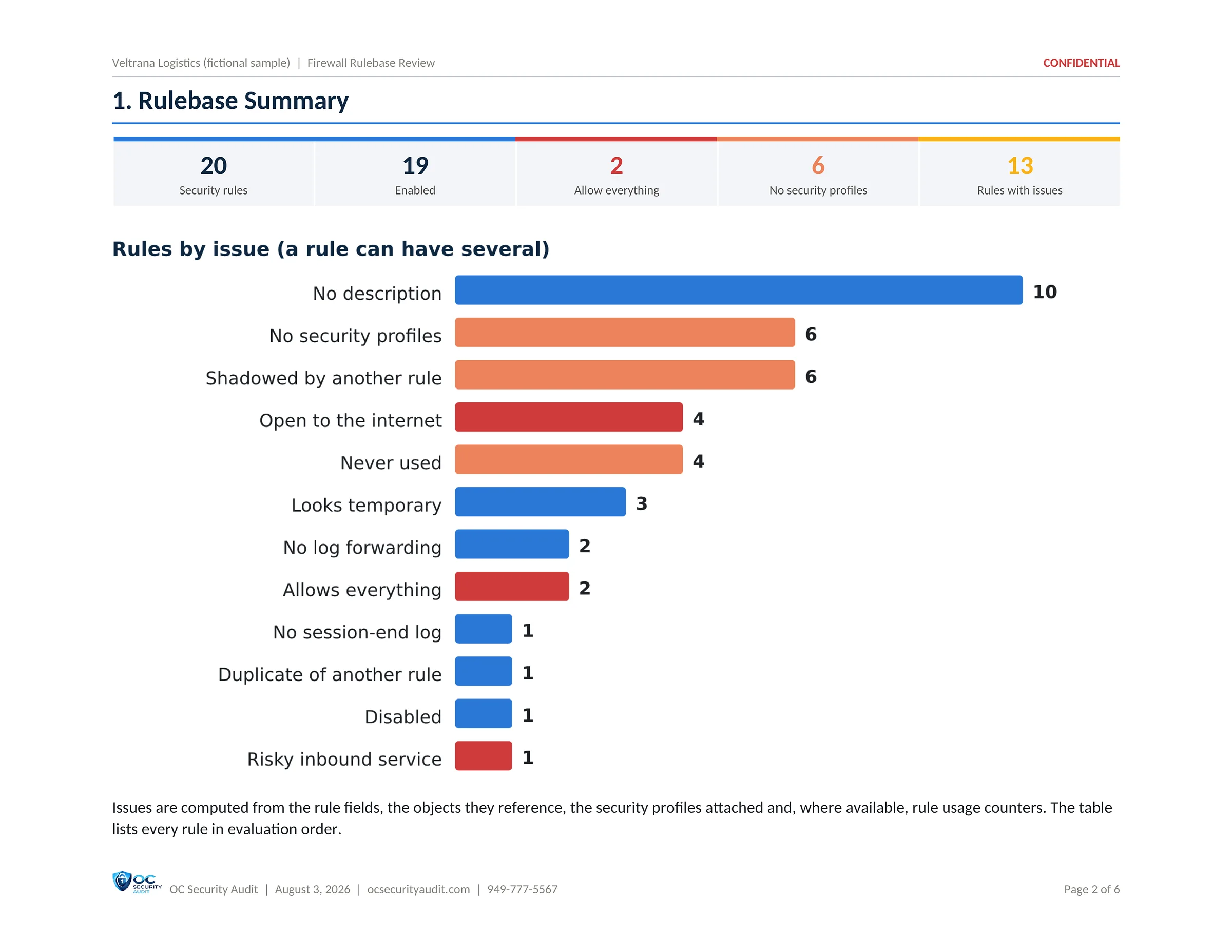
2 / 5Rulebase summary20 security rules, 19 enabled, 2 that allow everything, 6 without security profiles and 13 with issues, with a chart of rules by issue type.
Firewall Rulebase Review sample, page 3 of 5: Every security rule in order (fictional company, illustrative data)
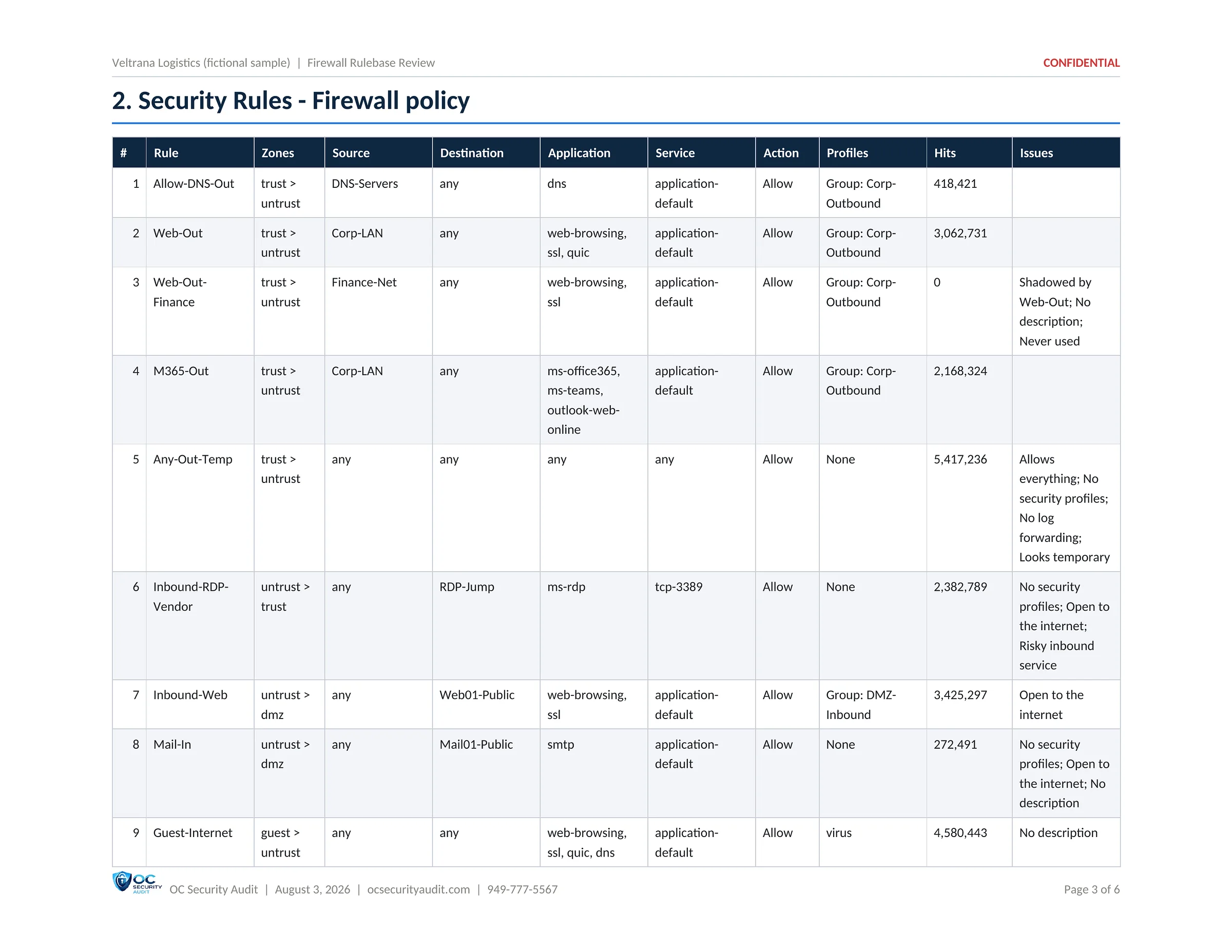
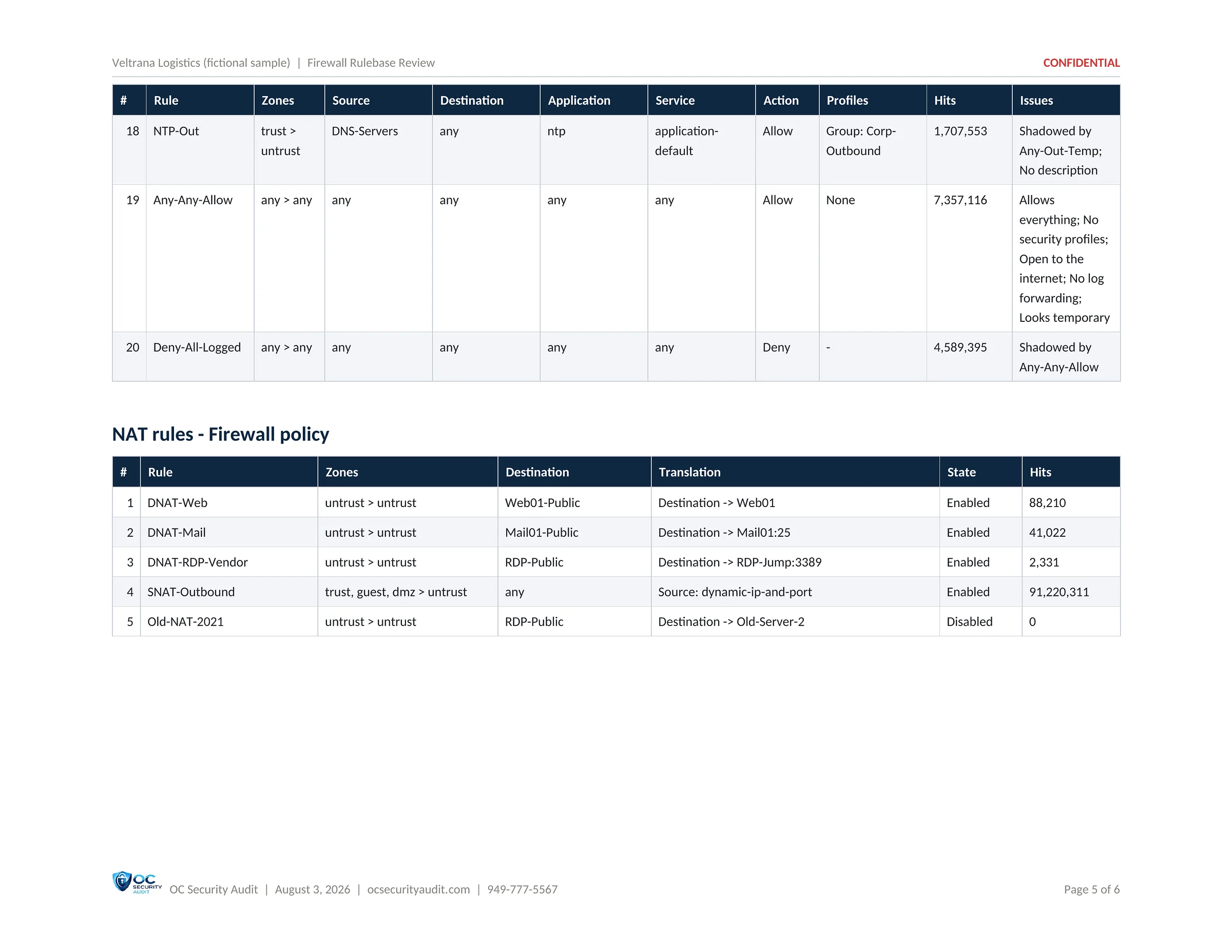
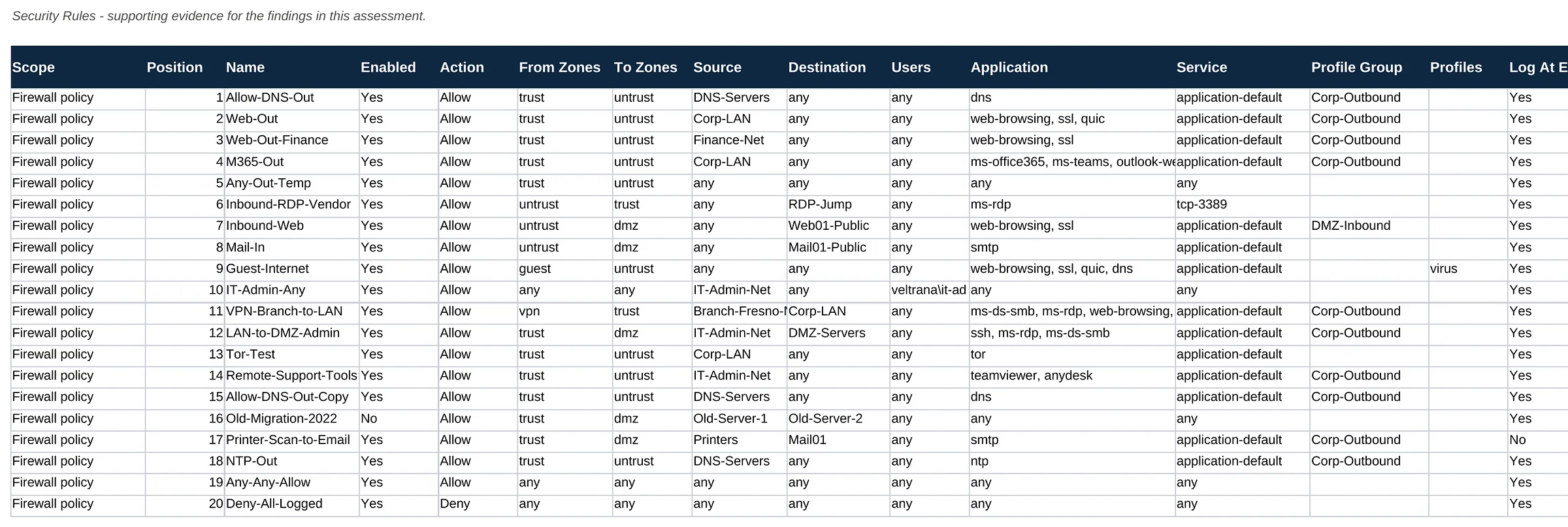
3 / 5Every security rule in orderEach rule in evaluation order with zones, source, destination, application, service, action, profiles, hit count and the issues found.
Firewall Rulebase Review sample, page 4 of 5: Allow-everything rule and NAT rules (fictional company, illustrative data)
4 / 5Allow-everything rule and NAT rulesThe last security rules, including an any-to-any allow rule with no profiles and millions of hits, followed by the NAT rules.
Firewall Rulebase Review sample, page 5 of 5: Decryption rules (fictional company, illustrative data)
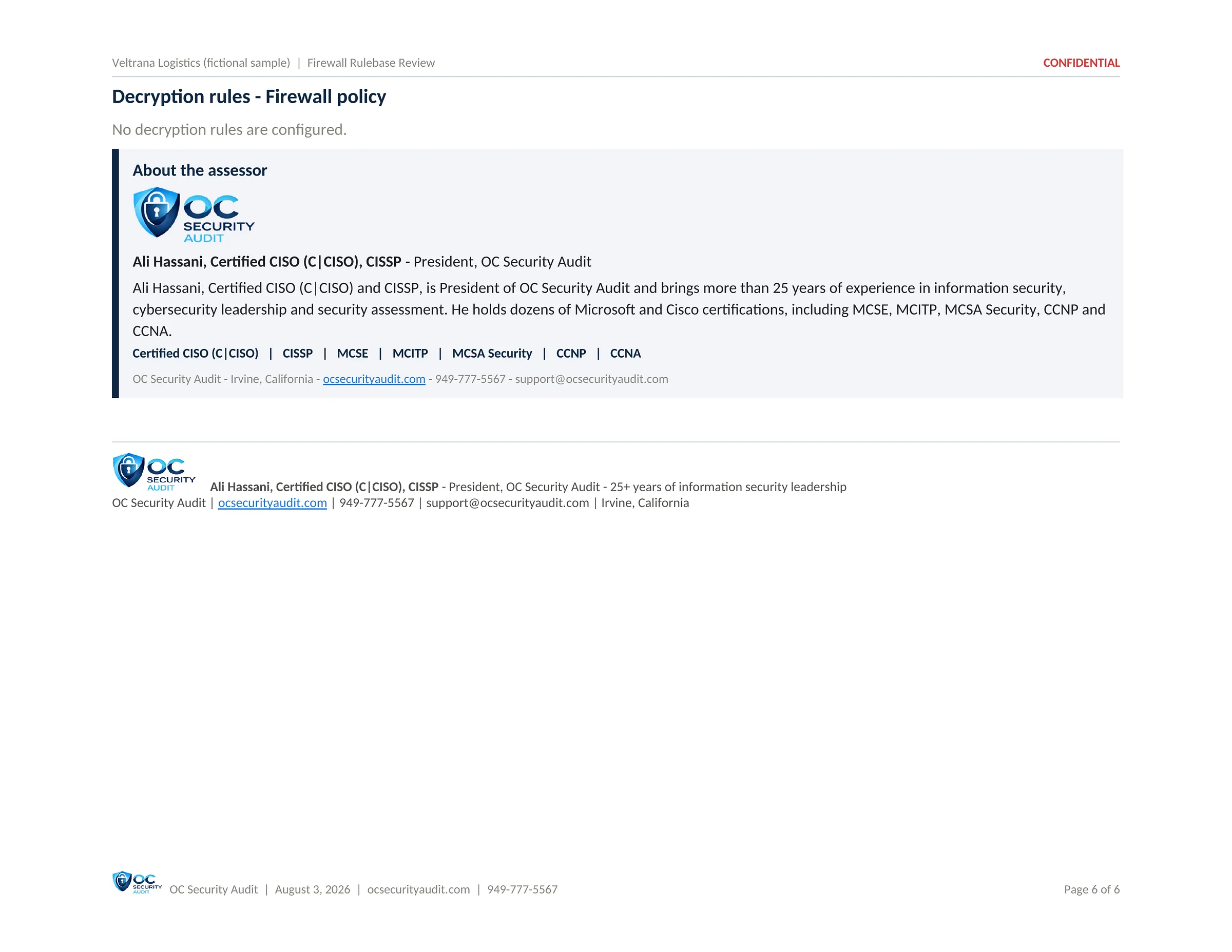
5 / 5Decryption rulesThe decryption policy section, which shows that no decryption rules are configured.

Click the centre page to open it full size. Use the arrows, the thumbnails or your arrow keys to move between pages.

Deliverable 4 of 7 · PDF · 5 pages

Log Review & Threat Activity

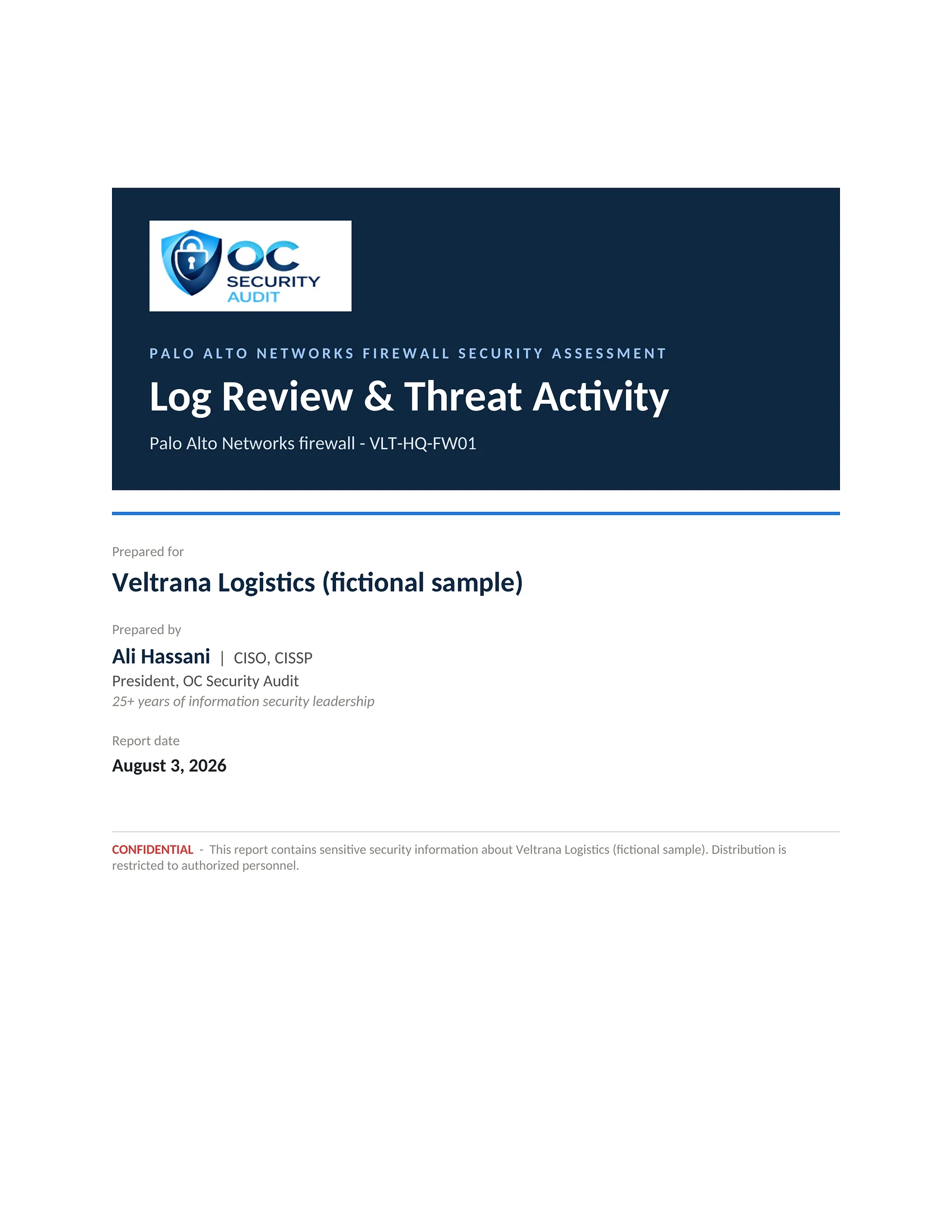
What the firewall itself recorded over the last 7 days: who signed in and from where, what was changed, and which threats were detected and what the firewall did about them.

Who uses it

IT manager, security operations, incident response

What is included

  • Seven-day summary of sign-ins, changes and threats
  • Failed administrator sign-ins by source address
  • Successful sign-ins and their sources
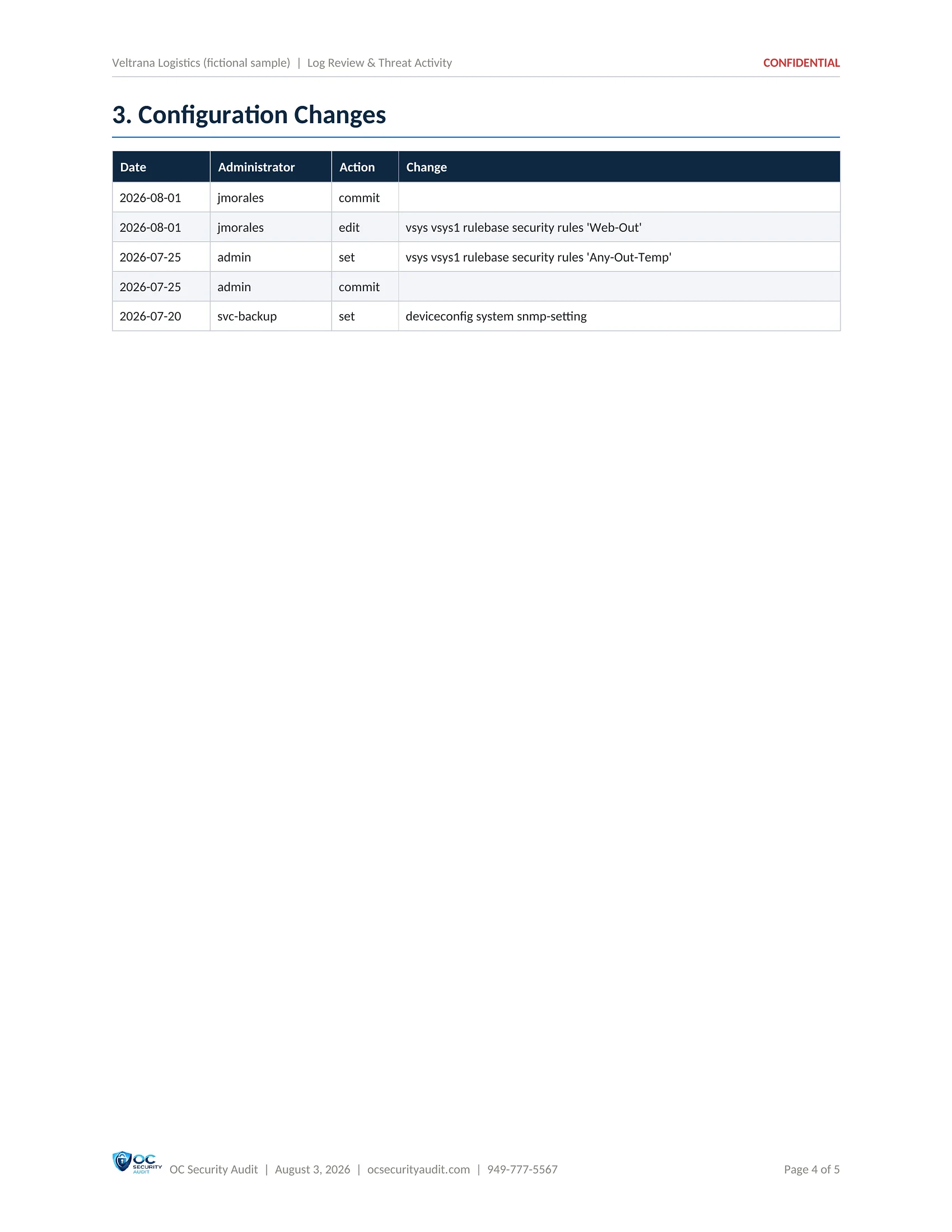
  • Configuration changes by date and administrator
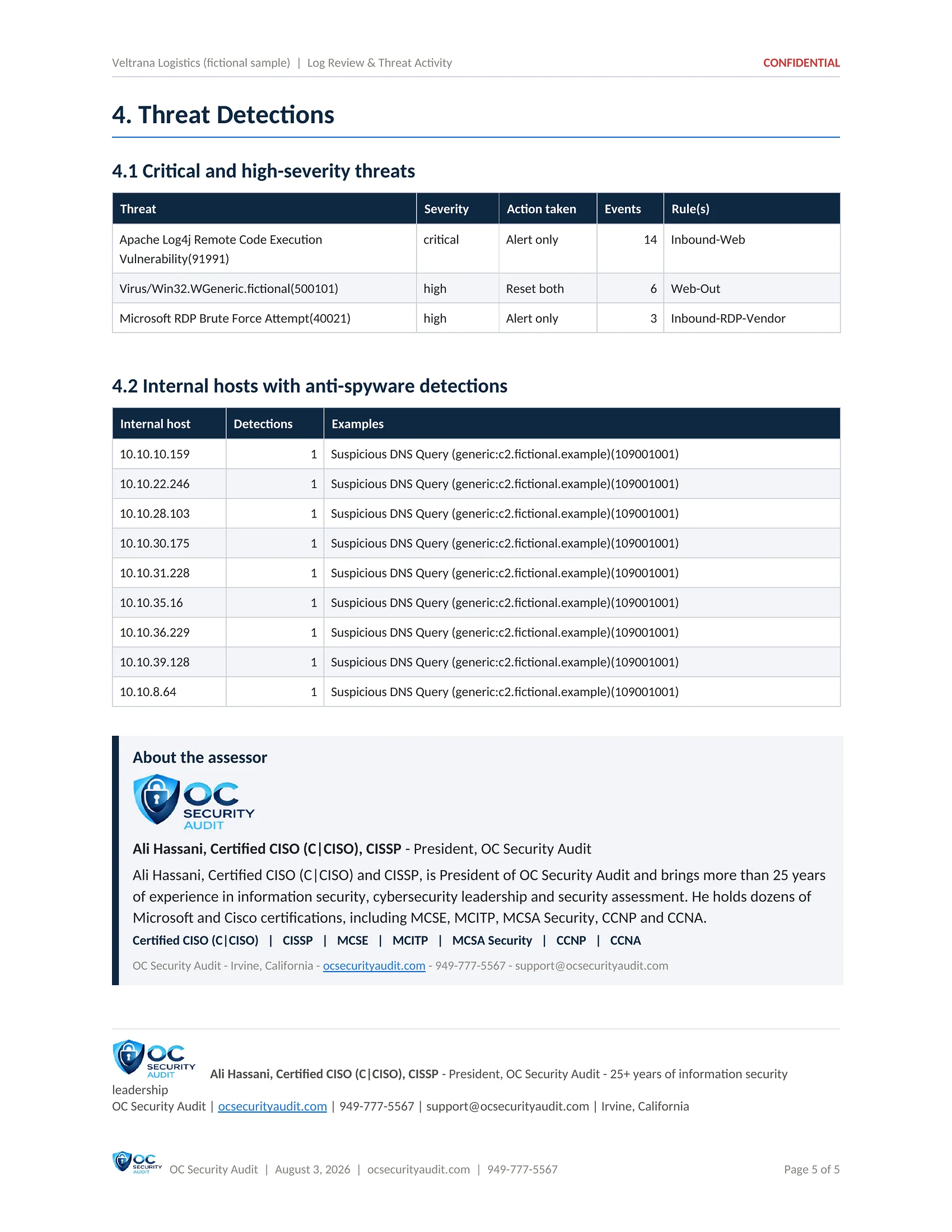
  • Critical and High threats with the action taken
  • Internal hosts with anti-spyware detections
SAMPLE · Veltrana Logistics (fictional company) · Log Review & Threat Activity1 / 5
Log Review & Threat Activity sample, page 1 of 5: Cover (fictional company, illustrative data)
1 / 5CoverThe cover of the Log Review and Threat Activity report (fictional sample).
Log Review & Threat Activity sample, page 2 of 5: Seven-day log summary (fictional company, illustrative data)
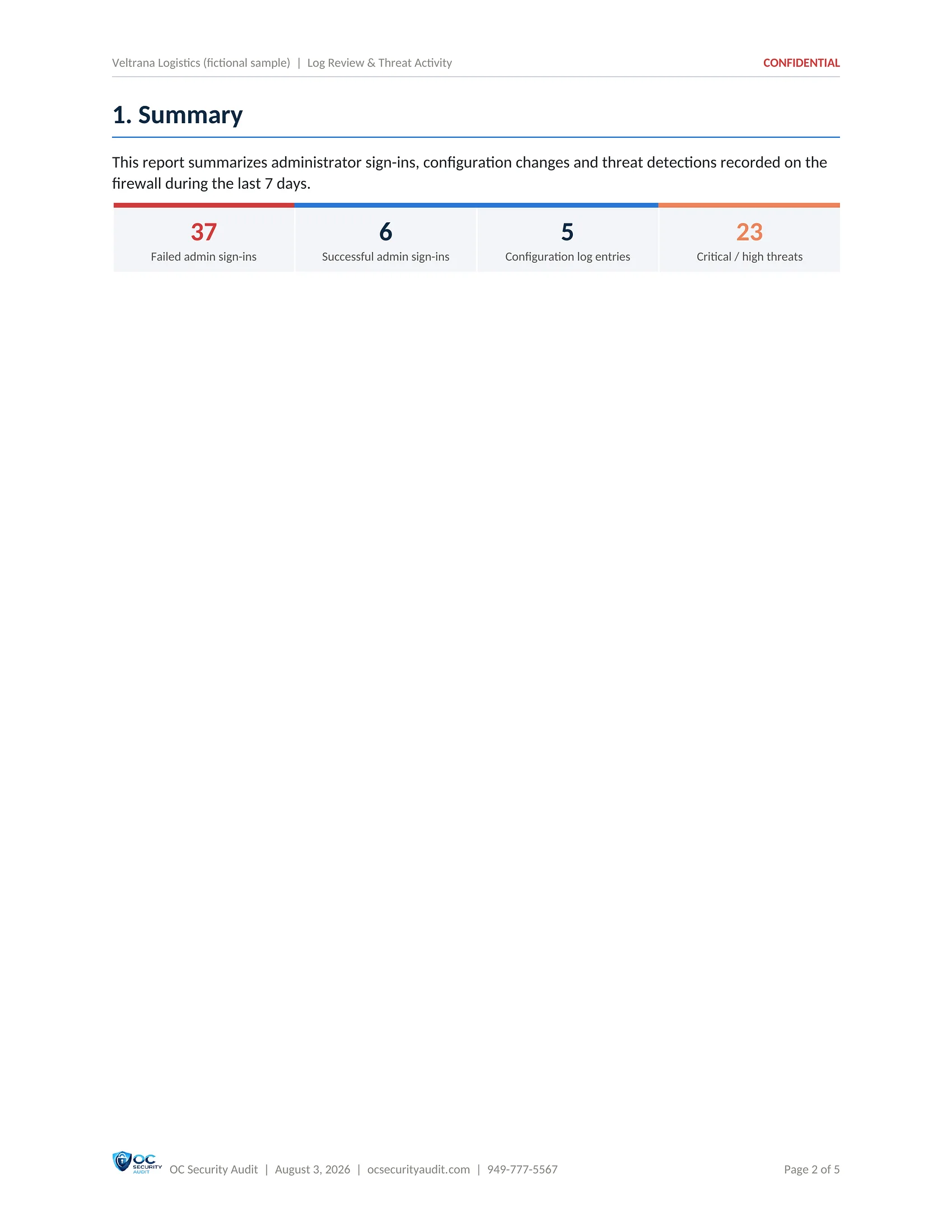
2 / 5Seven-day log summary37 failed and 6 successful administrator sign-ins, 5 configuration log entries and 23 Critical or High threats in the last 7 days.
Log Review & Threat Activity sample, page 3 of 5: Administrator sign-ins (fictional company, illustrative data)
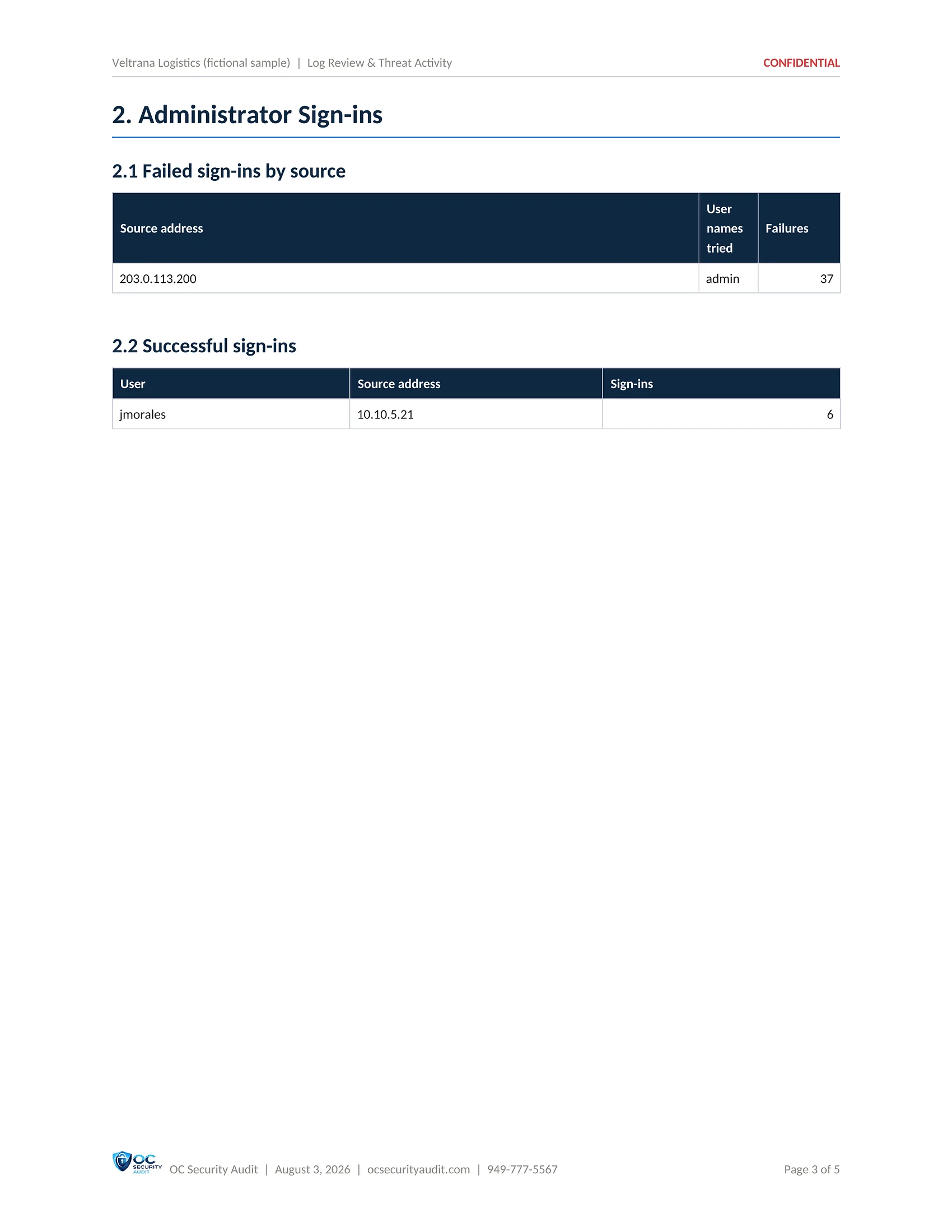
3 / 5Administrator sign-insFailed sign-ins by source address and user name tried, and the successful sign-ins with their source addresses.
Log Review & Threat Activity sample, page 4 of 5: Configuration changes (fictional company, illustrative data)
4 / 5Configuration changesEach change with its date, administrator, action and the rule or setting changed.
Log Review & Threat Activity sample, page 5 of 5: Threat detections (fictional company, illustrative data)
5 / 5Threat detectionsCritical and High threats with the action taken, event count and rule, and the internal hosts with anti-spyware detections.

Click the centre page to open it full size. Use the arrows, the thumbnails or your arrow keys to move between pages.

Deliverable 5 of 7 · PDF · 12 pages

Risk Register

The findings rolled up into business risks that leadership, auditors and insurers understand. Each risk is scored by likelihood and impact, has a treatment and an owner, and is traceable to the findings behind it.

Who uses it

Owner, compliance, auditors, insurer

What is included

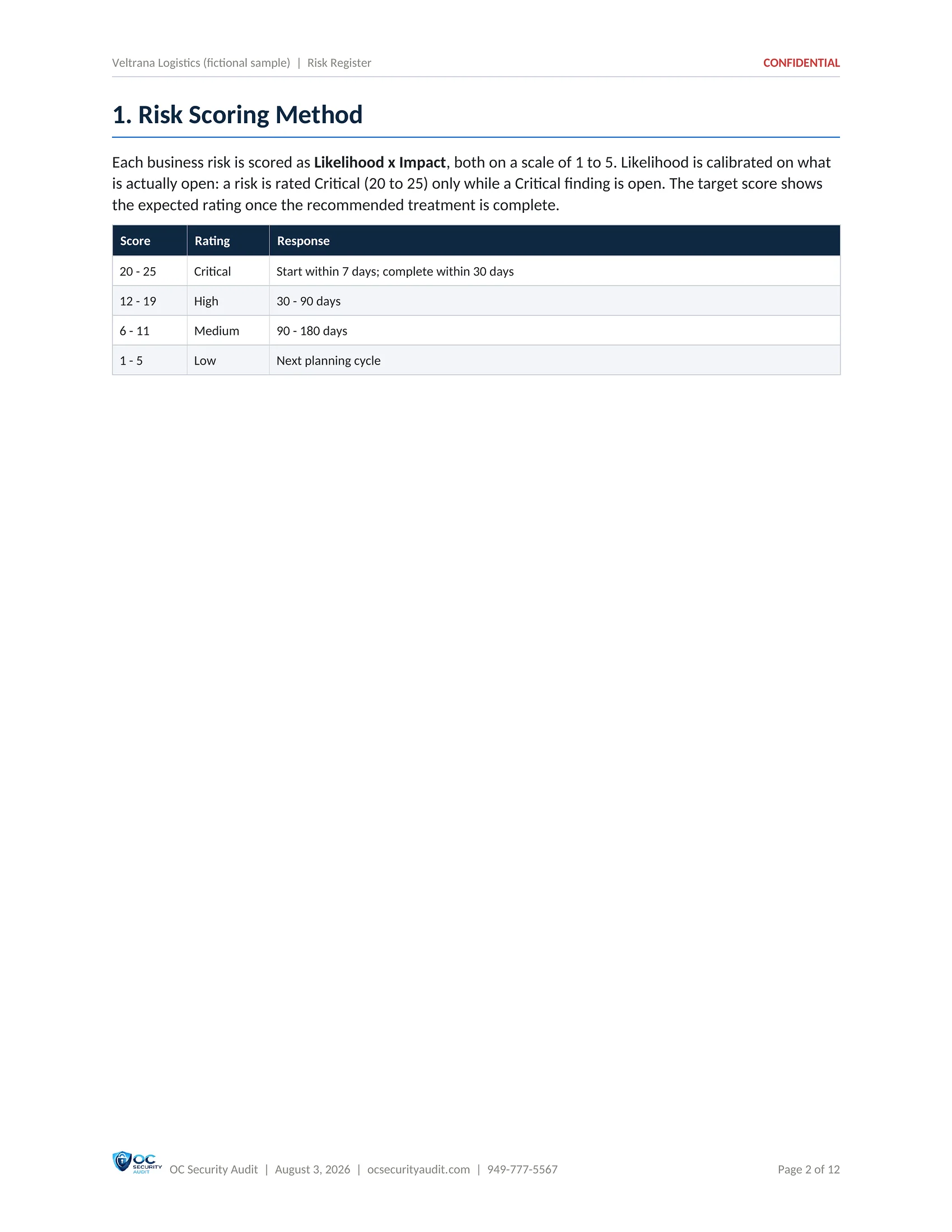
  • Scoring method: likelihood times impact, 1 to 5
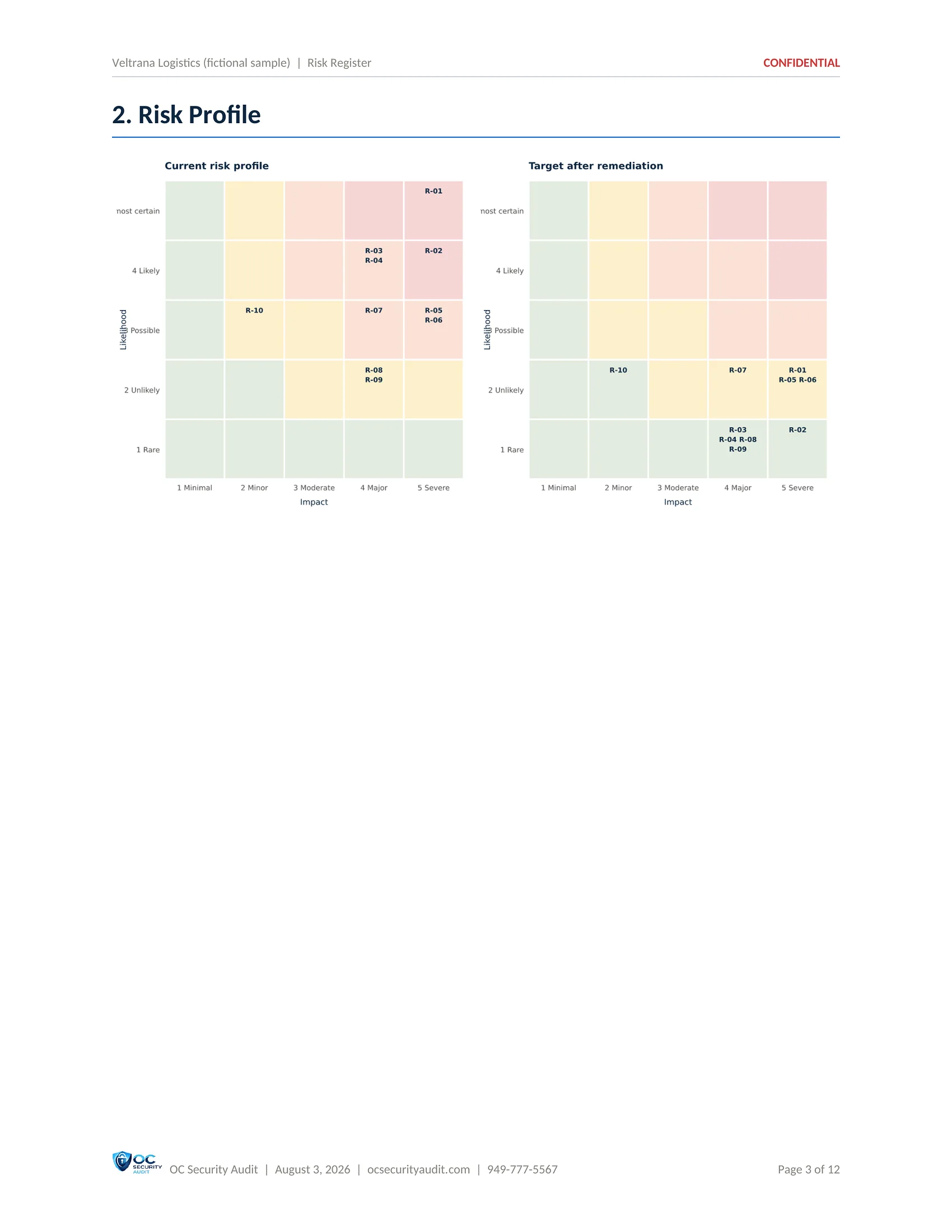
  • Heat maps today and after remediation
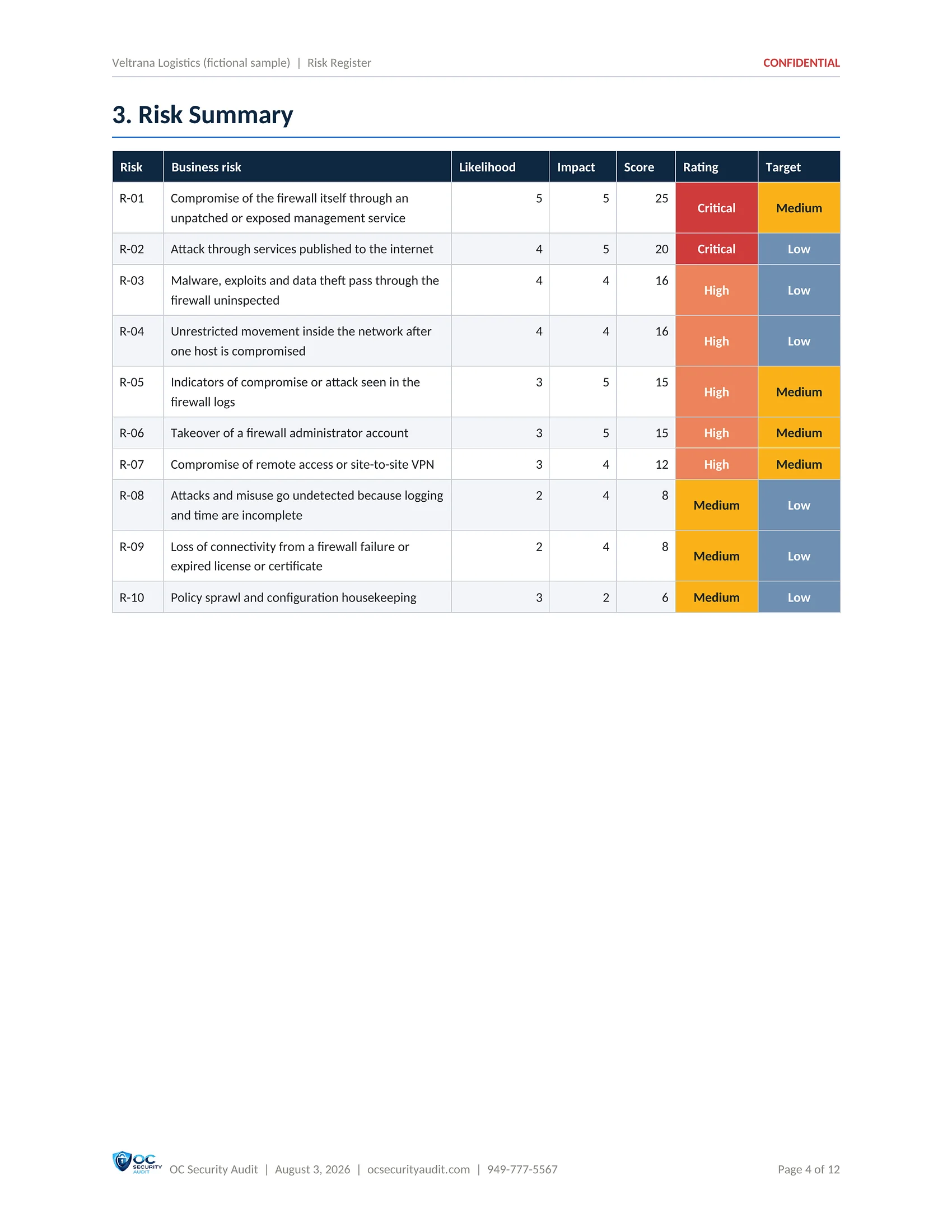
  • Summary of the business risks with target ratings
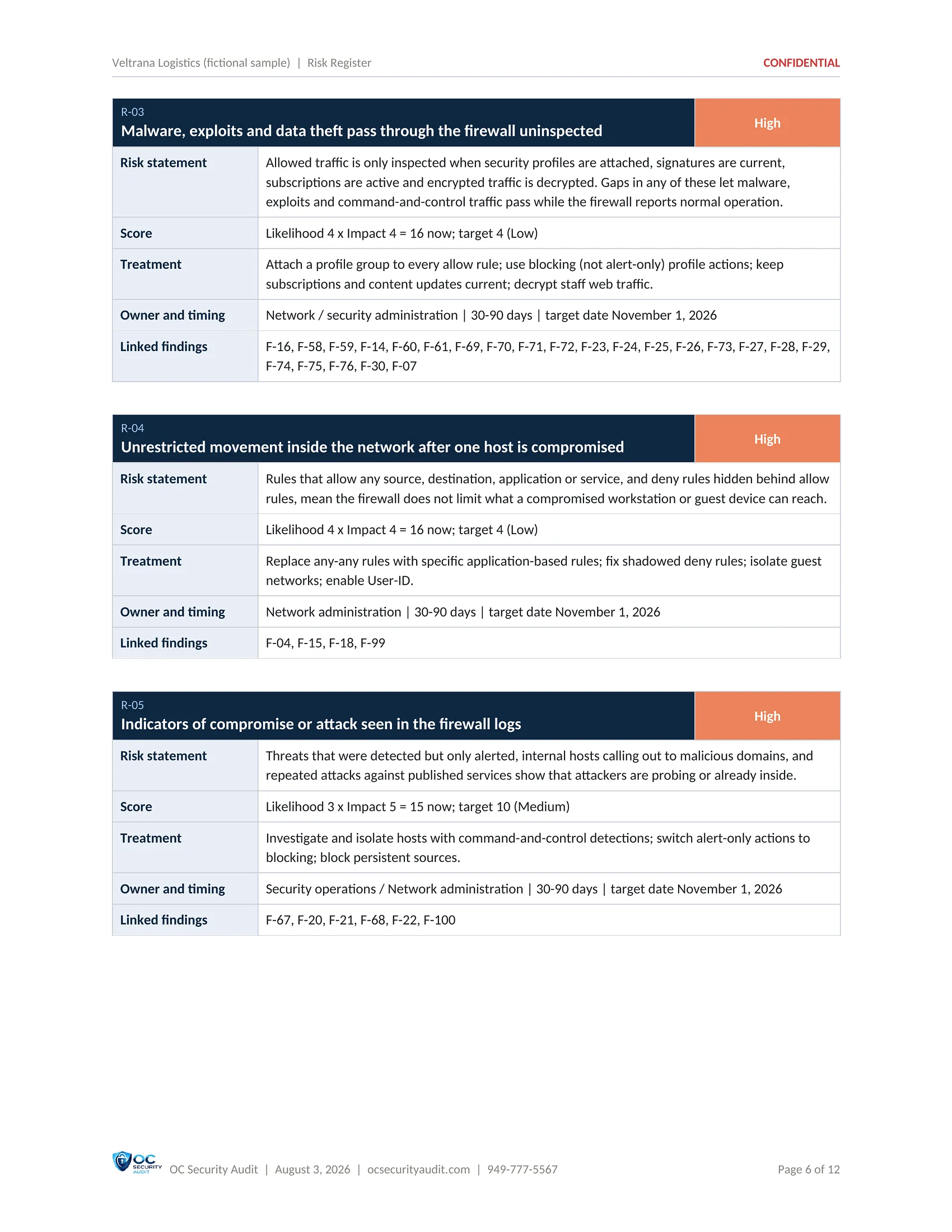
  • Risk statement, treatment, owner and timing
  • Findings linked to each risk
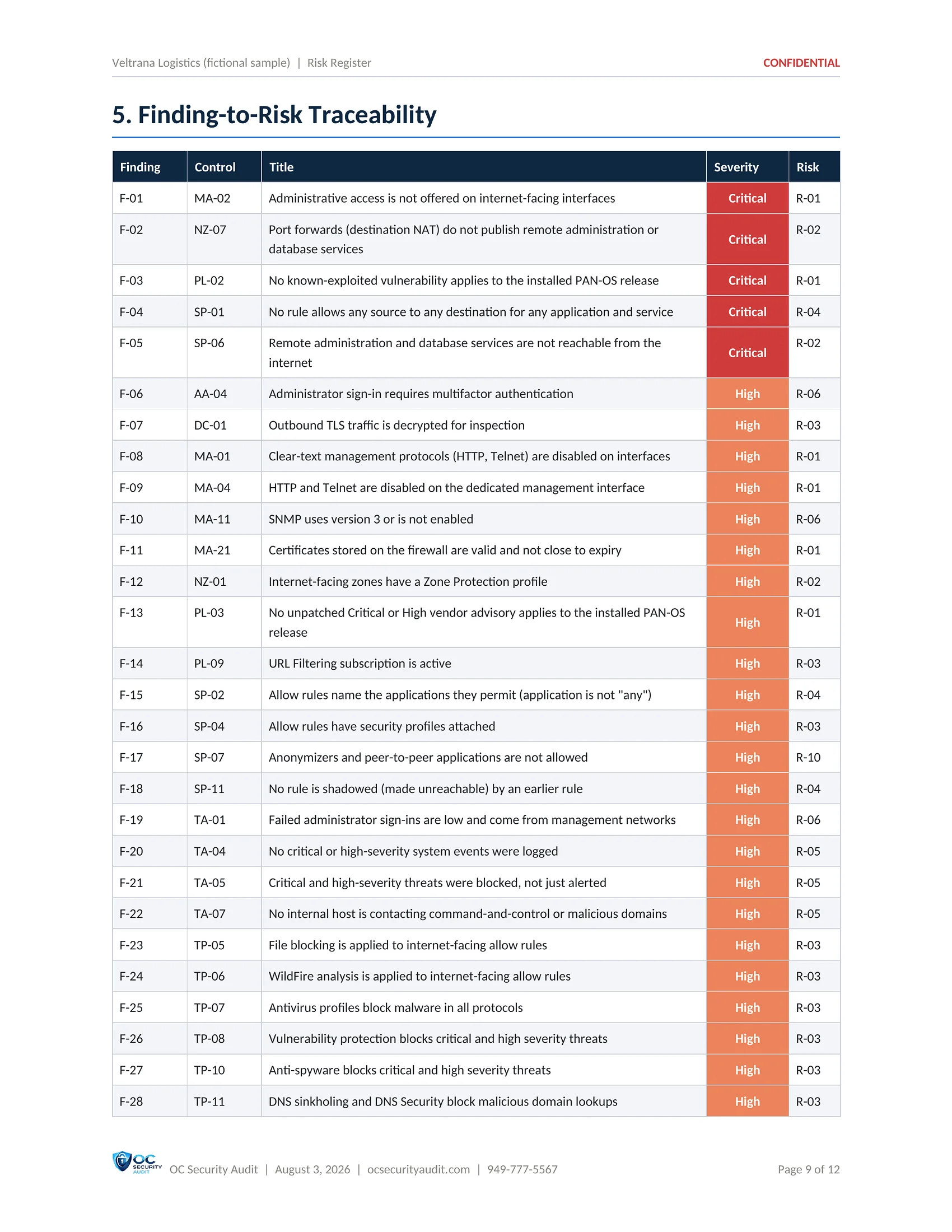
  • Finding-to-risk traceability table
SAMPLE · Veltrana Logistics (fictional company) · Risk Register1 / 7
Risk Register sample, page 1 of 7: Cover (fictional company, illustrative data)
1 / 7CoverThe cover of the Risk Register (fictional sample).
Risk Register sample, page 2 of 7: Risk scoring method (fictional company, illustrative data)
2 / 7Risk scoring methodHow each business risk is scored as likelihood times impact on a 1 to 5 scale, and what each rating band means.
Risk Register sample, page 3 of 7: Risk profile heat map (fictional company, illustrative data)
3 / 7Risk profile heat mapTwo heat maps that place each of the 10 risks by likelihood and impact: the current profile and the target after remediation.
Risk Register sample, page 4 of 7: Risk summary (fictional company, illustrative data)
4 / 7Risk summaryThe 10 business risks with likelihood, impact, score, rating and target rating.
Risk Register sample, page 5 of 7: Risk details (fictional company, illustrative data)
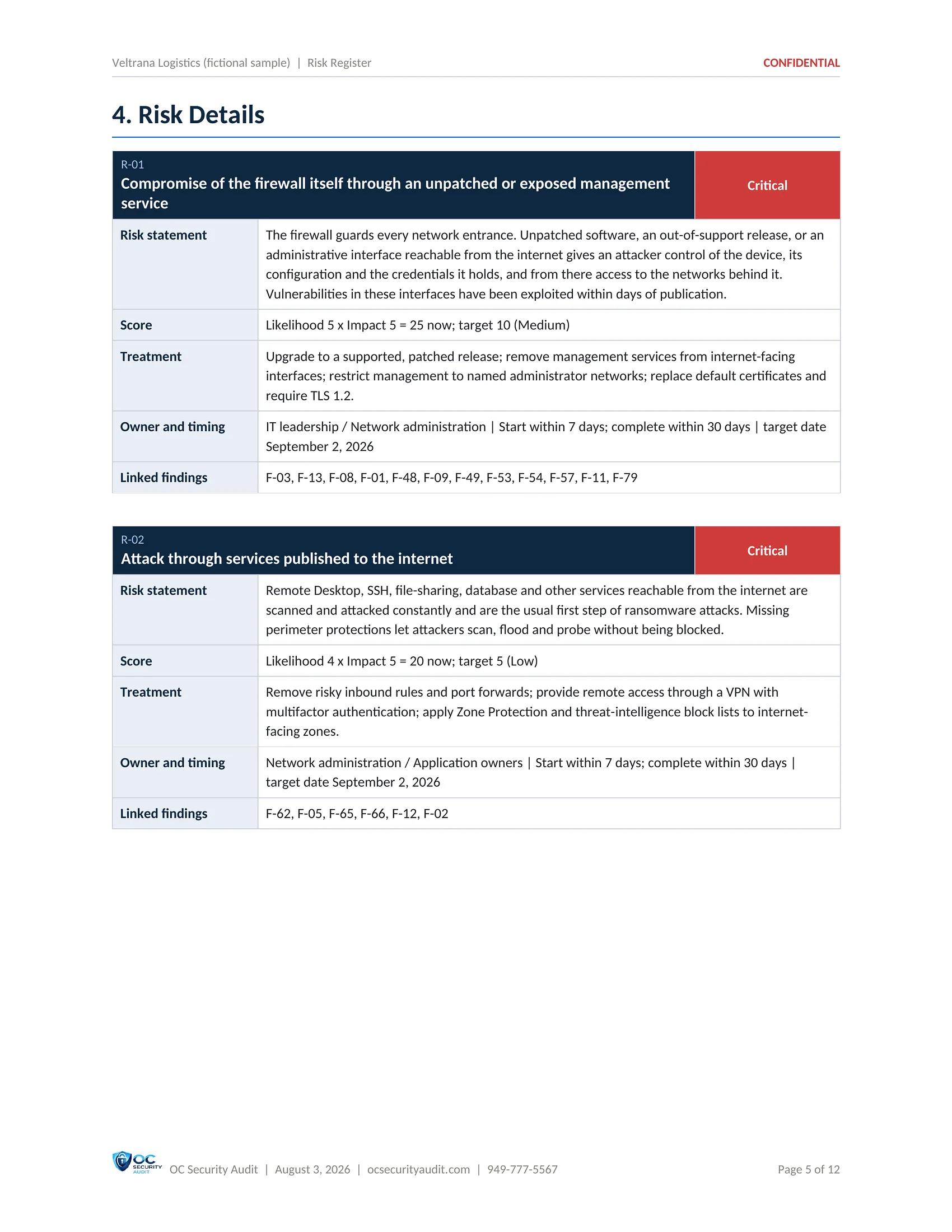
5 / 7Risk detailsEach risk with its statement, score, treatment, owner and timing, and the findings linked to it.
Risk Register sample, page 6 of 7: Risk details, continued (fictional company, illustrative data)
6 / 7Risk details, continuedMore risk cards, including malware and data theft through uninspected traffic, with the target score after treatment.
Risk Register sample, page 7 of 7: Finding-to-risk traceability (fictional company, illustrative data)
7 / 7Finding-to-risk traceabilityEvery finding mapped to the business risk it belongs to, so each fix can be traced to the risk it lowers.

Click the centre page to open it full size. Use the arrows, the thumbnails or your arrow keys to move between pages.

Deliverable 6 of 7 · PDF · 18 pages

Next Steps & Security Roadmap

The plan that turns findings into work. Actions are ordered by risk into four phases, from the first 7 days to 180 days, and grouped into projects with an objective, activities and effort.

Who uses it

IT manager, vCISO, MSP, project lead

What is included

  • Score today against the target
  • Phase 0: contain and quick wins (7 days)
  • Phase 1: critical remediation (30 days)
  • Phase 2: high-priority hardening (90 days)
  • Phase 3: governance and maturity (180 days)
  • Recommended projects with activities and effort
  • Expected outcome and future goals
  • Governance and operating rhythm
SAMPLE · Veltrana Logistics (fictional company) · Next Steps & Security Roadmap1 / 8
Next Steps & Security Roadmap sample, page 1 of 8: Cover (fictional company, illustrative data)
1 / 8CoverThe cover of the Next Steps and Security Roadmap (fictional sample).
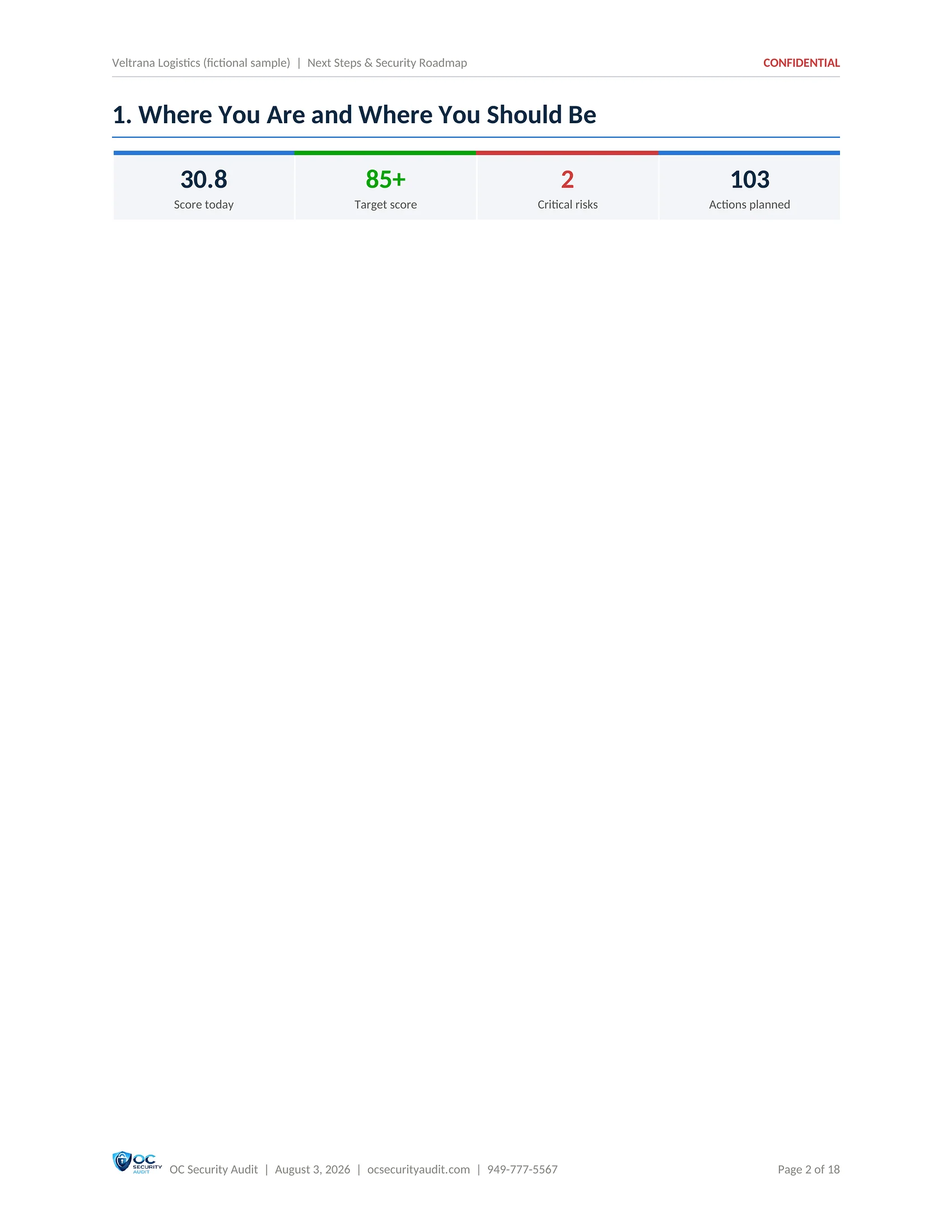
Next Steps & Security Roadmap sample, page 2 of 8: Where you are and where you should be (fictional company, illustrative data)
2 / 8Where you are and where you should beScore today 30.8, target 85 or more, 2 Critical risks and 103 planned actions.
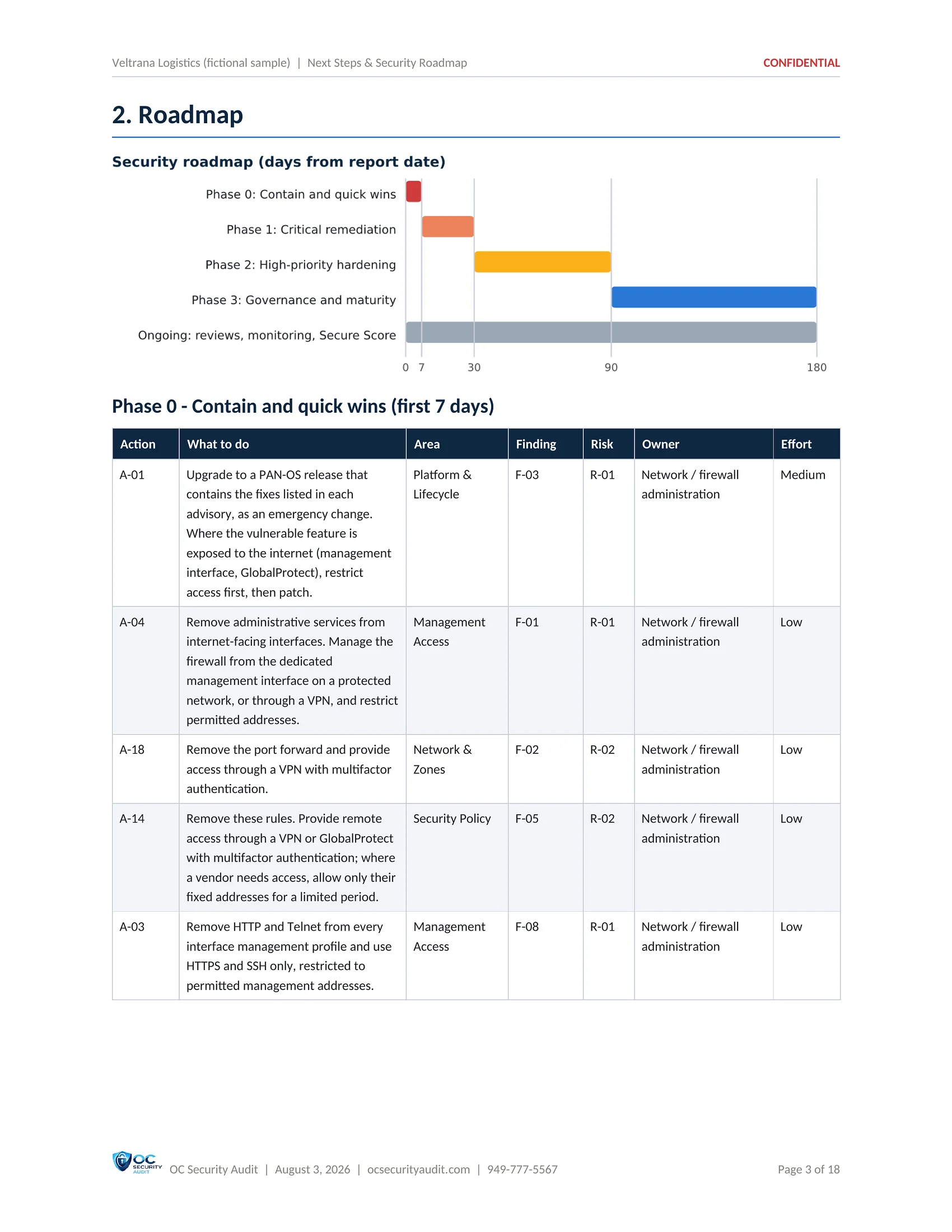
Next Steps & Security Roadmap sample, page 3 of 8: Roadmap and Phase 0 (fictional company, illustrative data)
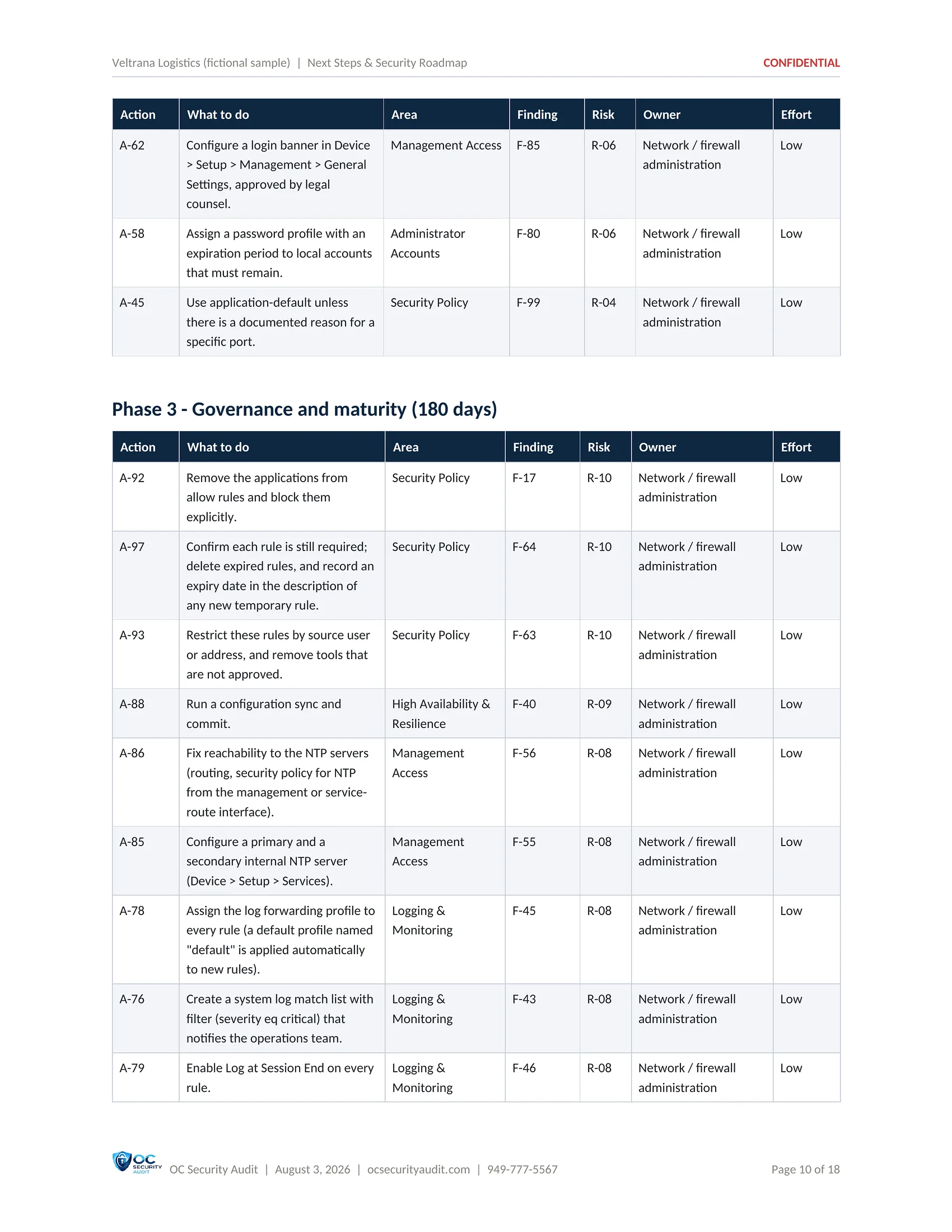
3 / 8Roadmap and Phase 0A timeline of the four phases, then the first-7-days containment actions with area, finding, risk, owner and effort.
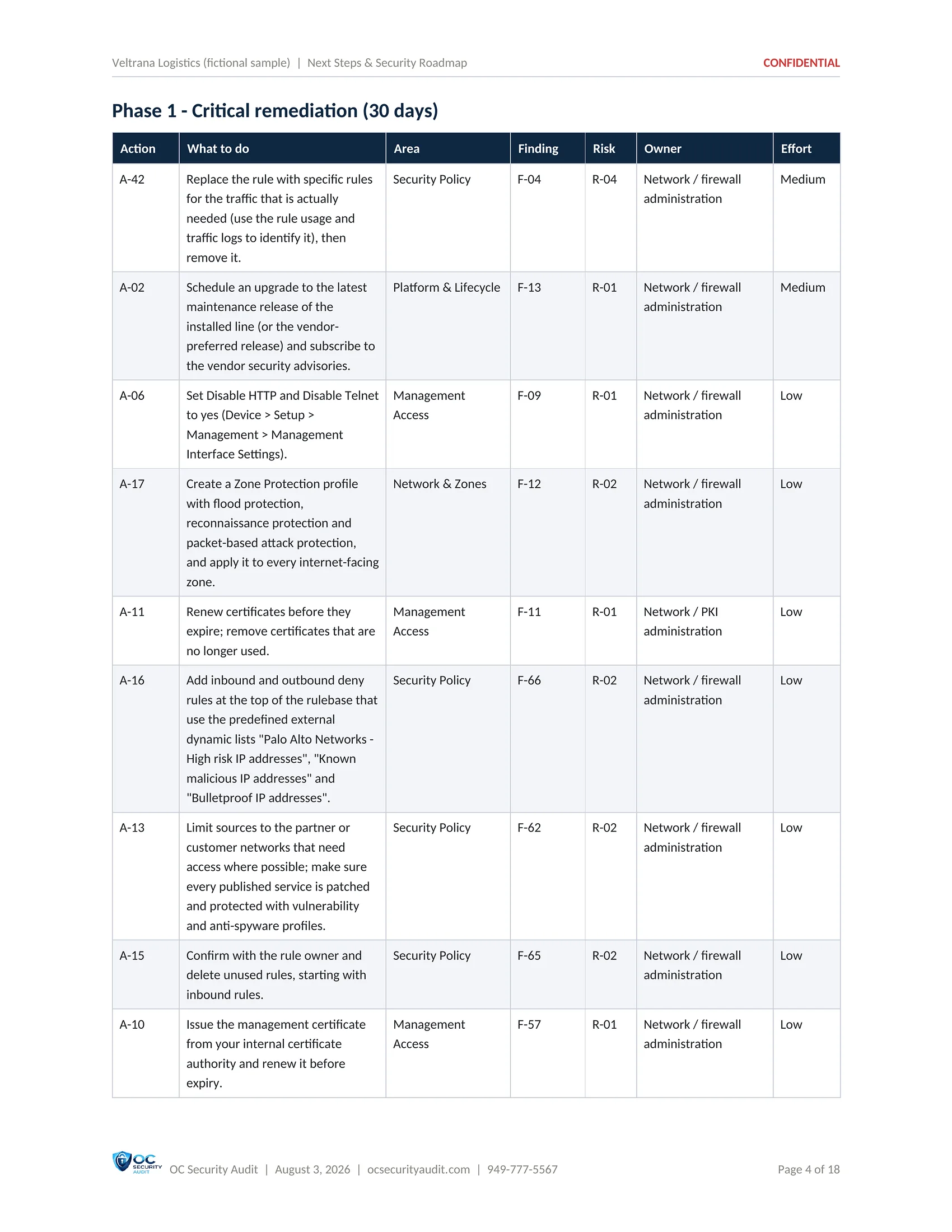
Next Steps & Security Roadmap sample, page 4 of 8: Phase 1: critical remediation (fictional company, illustrative data)
4 / 8Phase 1: critical remediationThe 30-day actions that close the Critical findings, each linked to its finding and risk.
Next Steps & Security Roadmap sample, page 5 of 8: End of Phase 2, start of Phase 3 (fictional company, illustrative data)
5 / 8End of Phase 2, start of Phase 3The last high-priority hardening actions, then Phase 3: the 180-day governance and maturity actions.
Next Steps & Security Roadmap sample, page 6 of 8: Recommended security projects (fictional company, illustrative data)
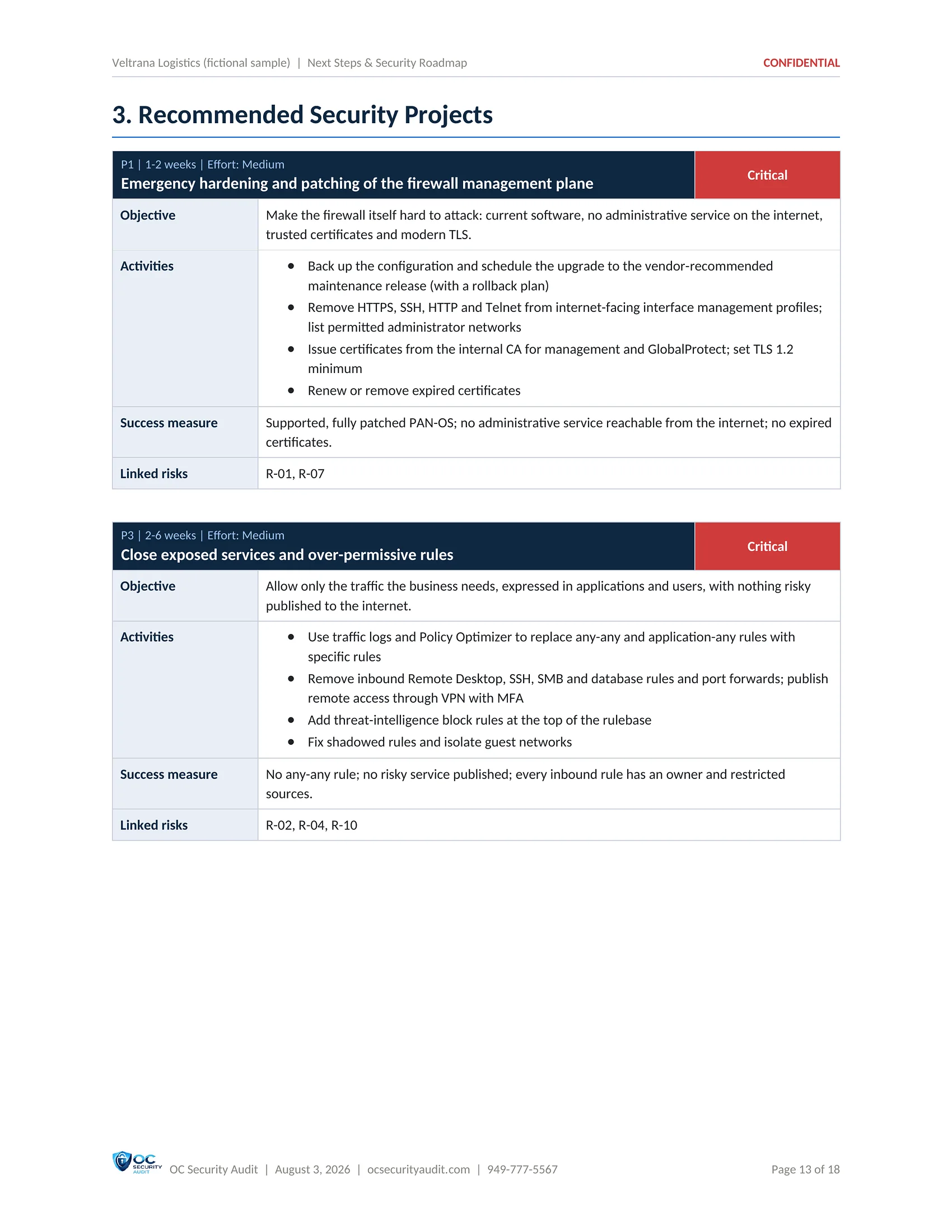
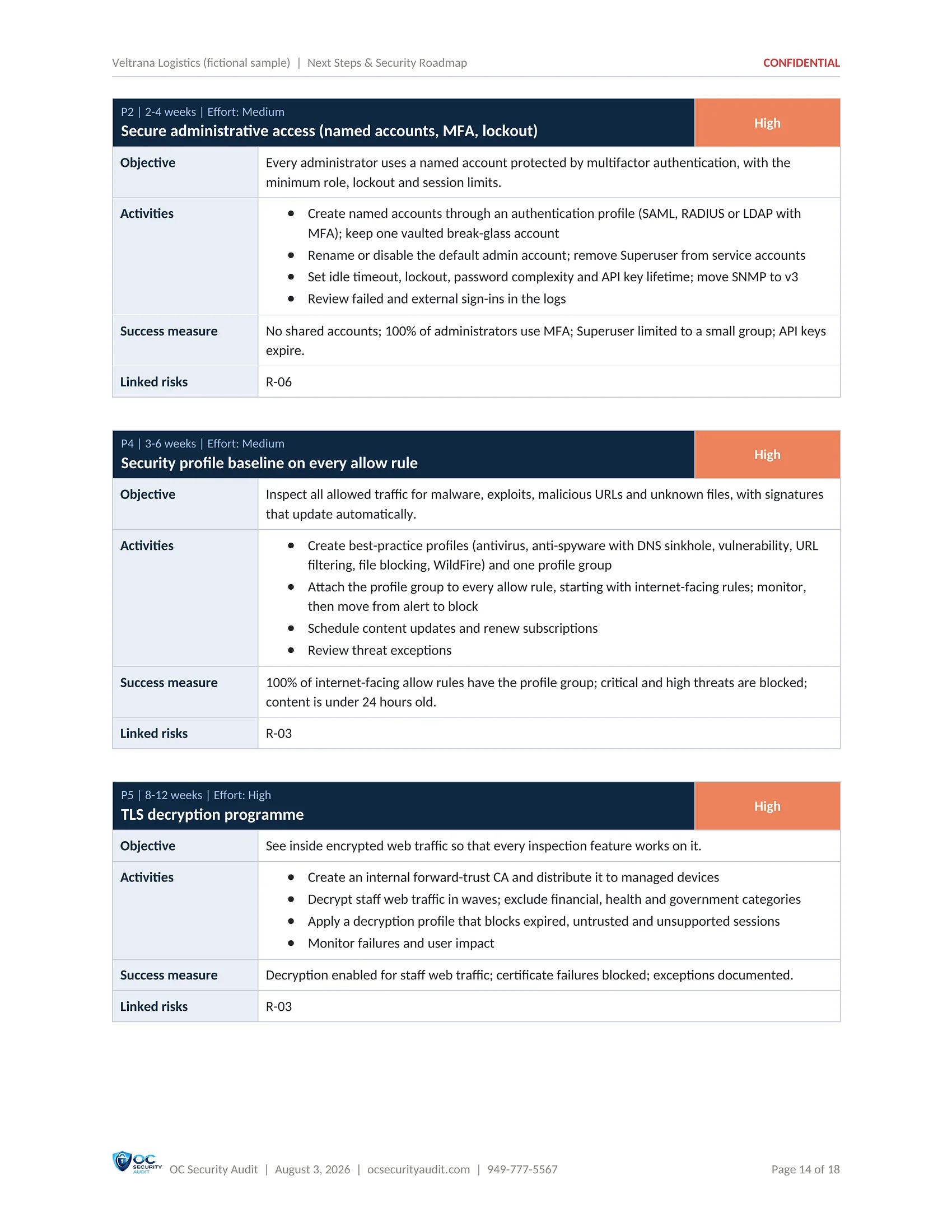
6 / 8Recommended security projectsActions grouped into projects with an objective, activities, duration and effort, starting with hardening and patching the management plane.
Next Steps & Security Roadmap sample, page 7 of 8: Project: secure administrative access (fictional company, illustrative data)
7 / 8Project: secure administrative accessNamed accounts, multifactor authentication, lockout and session limits, with the activities listed step by step.
Next Steps & Security Roadmap sample, page 8 of 8: Expected outcome and future goals (fictional company, illustrative data)
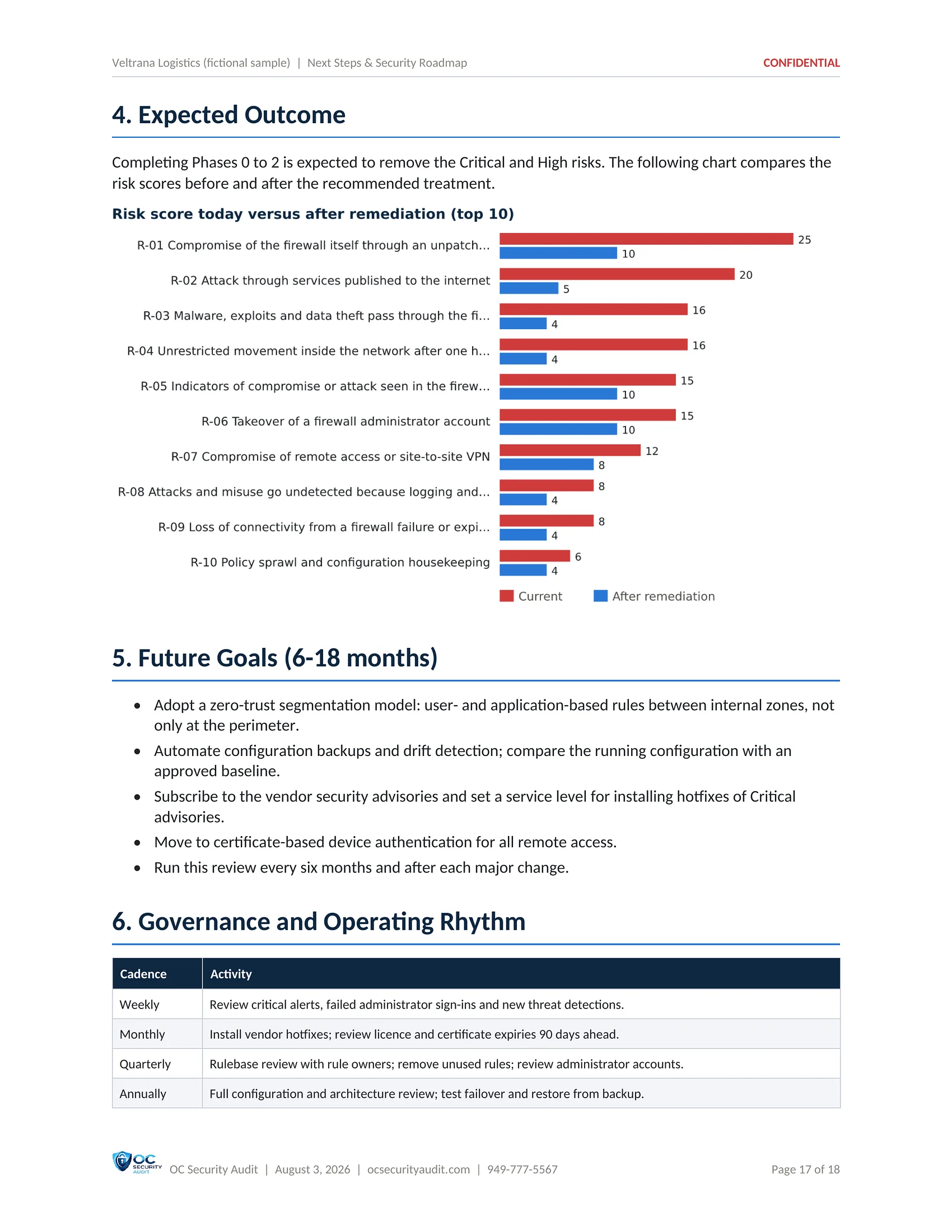
8 / 8Expected outcome and future goalsRisk scores before and after Phases 0 to 2, goals for the next 6 to 18 months, and a governance rhythm.

Click the centre page to open it full size. Use the arrows, the thumbnails or your arrow keys to move between pages.

Deliverable 7 of 7 · Excel · 26 tabs

Technical Findings Workbook

The working file your team tracks the fixes in. It holds every finding, risk and roadmap action with columns for owner, status, due date and evidence, plus the configuration evidence read from the firewall, one tab per topic.

Who uses it

Firewall administrators, MSP, project manager

What is included

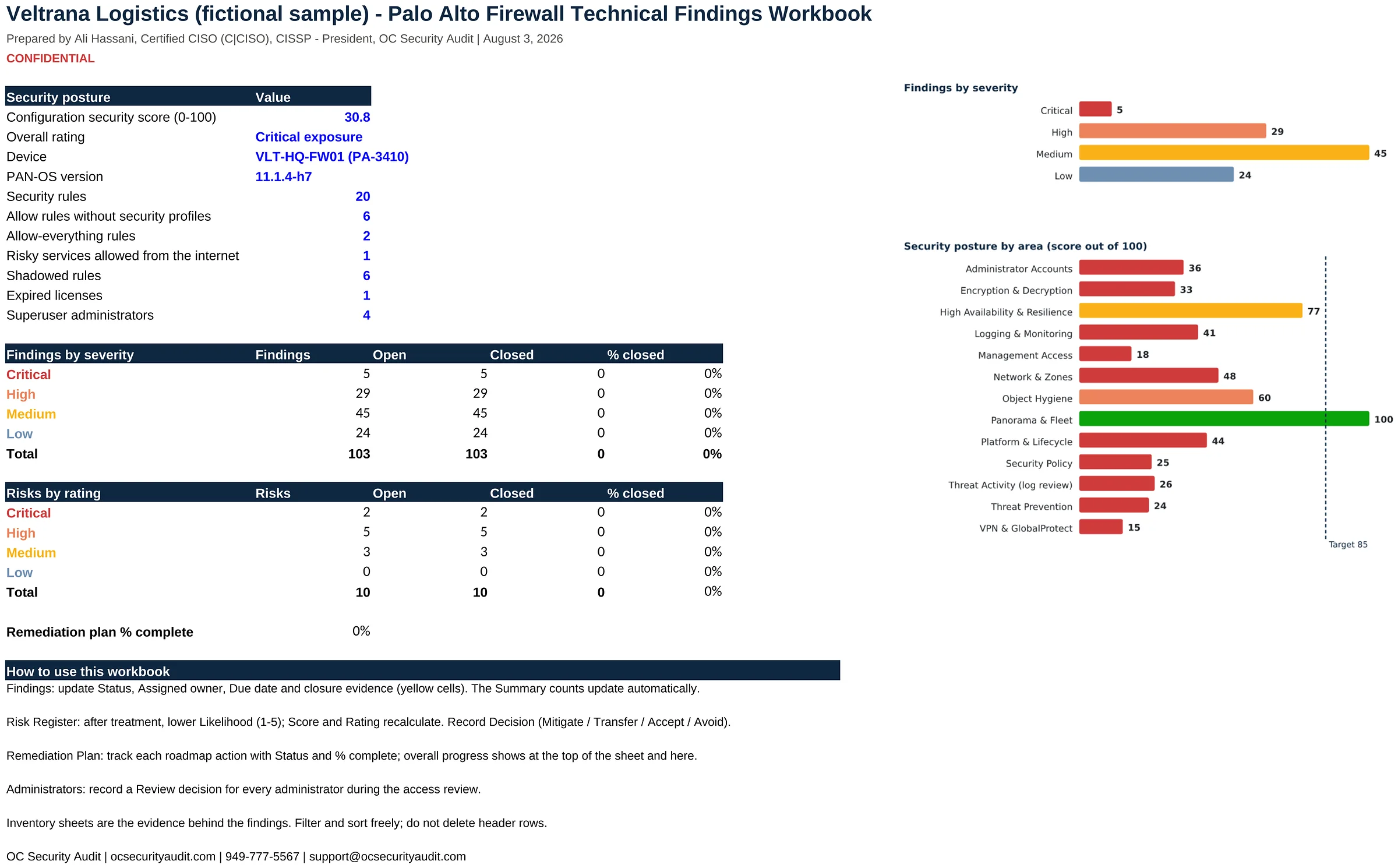
  • Summary with formulas that update as findings close
  • Findings tracker with status, owner, due date and evidence
  • Risk register with likelihood and impact inputs
  • Remediation plan and projects
  • All controls, pass or fail
  • Evidence tabs: rules, NAT, interfaces, zones, administrators, certificates, licenses, advisories, VPN, GlobalProtect, threats
  • Domain scores and strengths
SAMPLE · Veltrana Logistics (fictional company) · Technical Findings Workbook1 / 11
Technical Findings Workbook sample, slide 1 of 11: Summary tab (fictional company, illustrative data)
1 / 11Summary tabThe score, device, release, rule counts and findings by severity, with formulas that update as your team closes findings.
Technical Findings Workbook sample, slide 2 of 11: Findings tab (fictional company, illustrative data)
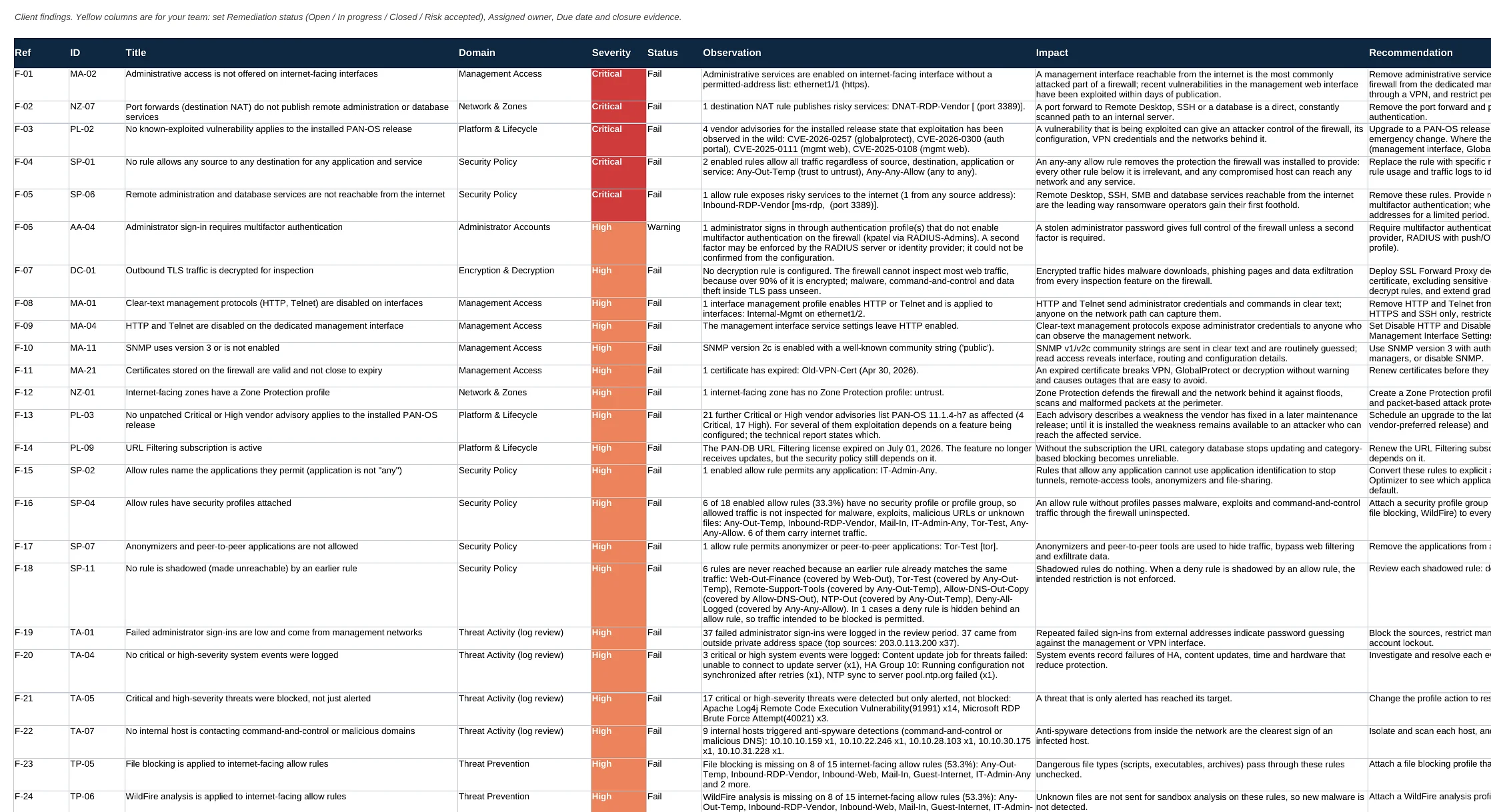
2 / 11Findings tabEvery finding with its reference, control, title, domain, severity, status and observation, plus columns for your team to track the fix.
Technical Findings Workbook sample, slide 3 of 11: Risk Register tab (fictional company, illustrative data)
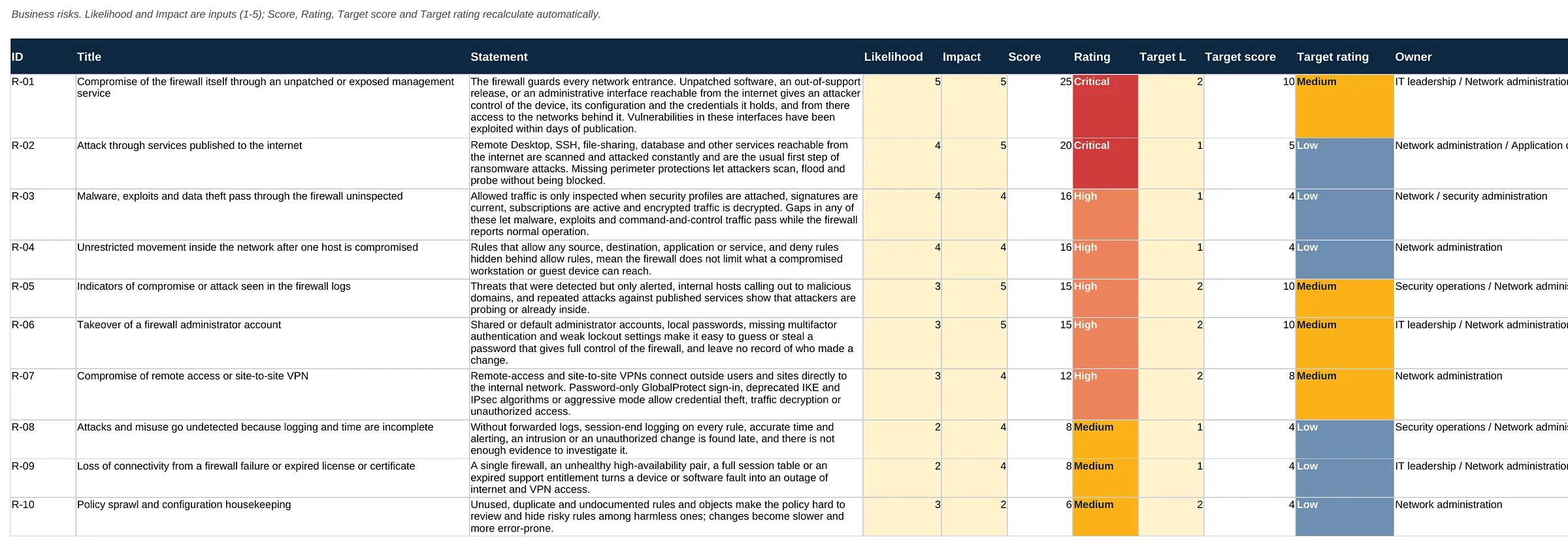
3 / 11Risk Register tabThe 10 business risks with likelihood and impact as inputs, so scores and ratings recalculate as risks are treated.
Technical Findings Workbook sample, slide 4 of 11: Remediation Plan tab (fictional company, illustrative data)
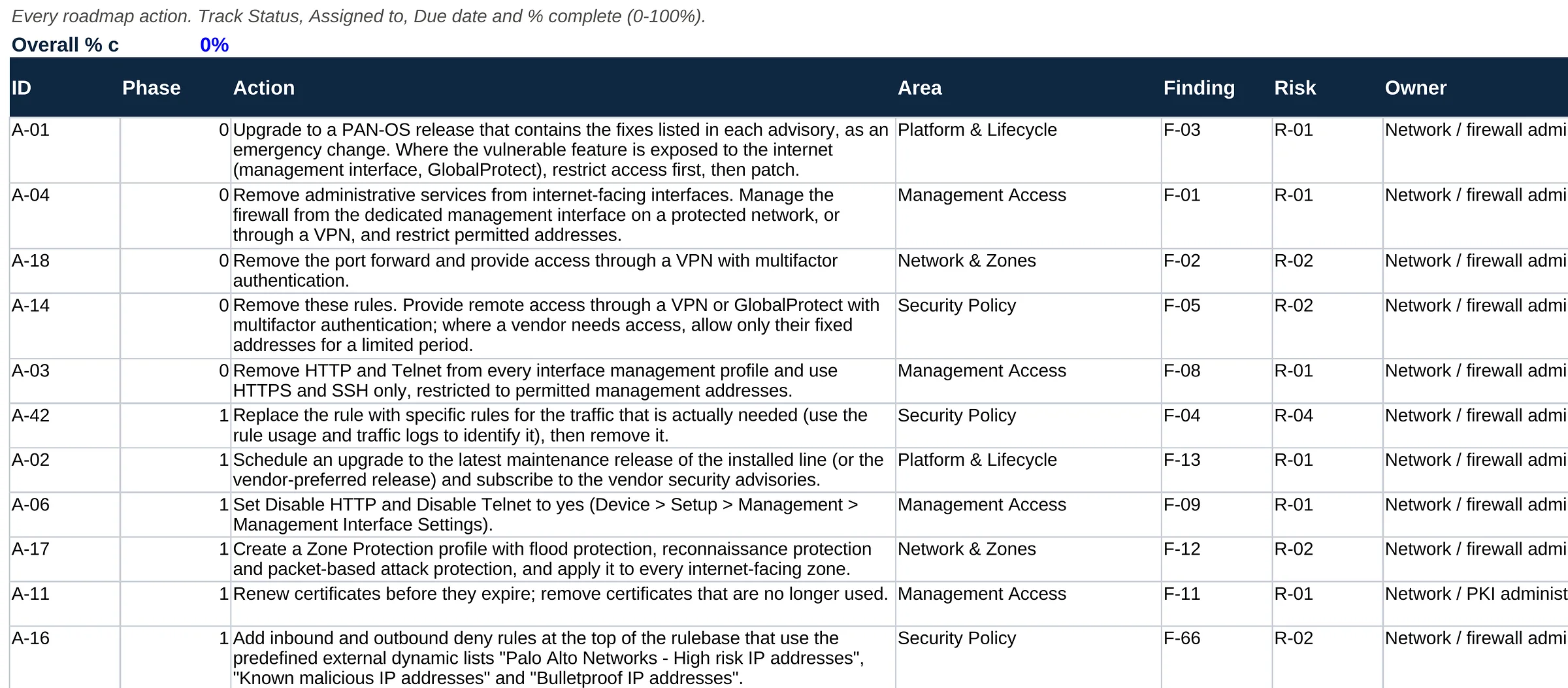
4 / 11Remediation Plan tabEvery roadmap action with phase, area, finding, risk, owner, effort and severity, and columns for status, assignee, due date and percent complete.
Technical Findings Workbook sample, slide 5 of 11: All Controls tab (fictional company, illustrative data)
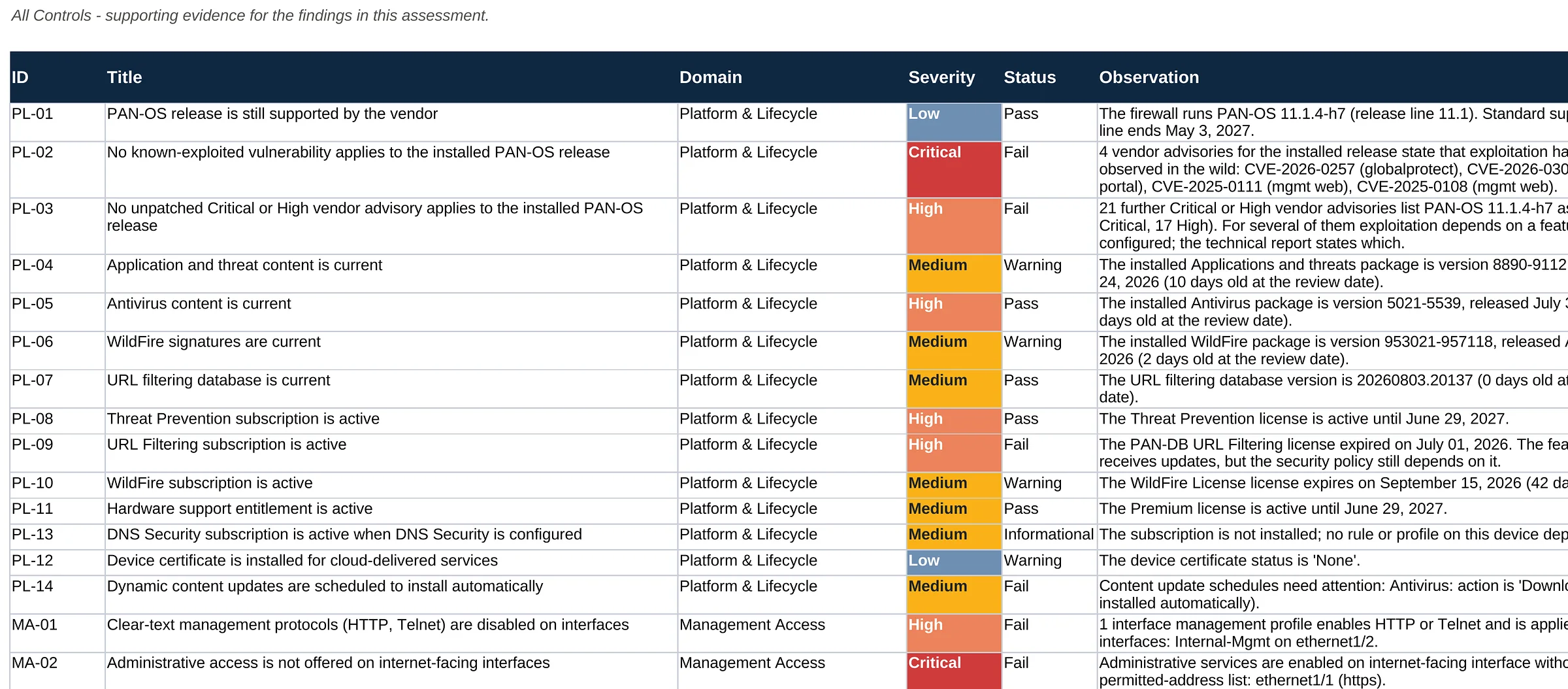
5 / 11All Controls tabAll controls with domain, severity, status and observation, whether they passed or failed.
Technical Findings Workbook sample, slide 6 of 11: Security Rules tab (fictional company, illustrative data)
6 / 11Security Rules tabEach security rule with its position, zones, source, destination and action, read from the firewall.
Technical Findings Workbook sample, slide 7 of 11: NAT Rules and Administrators tabs (fictional company, illustrative data)
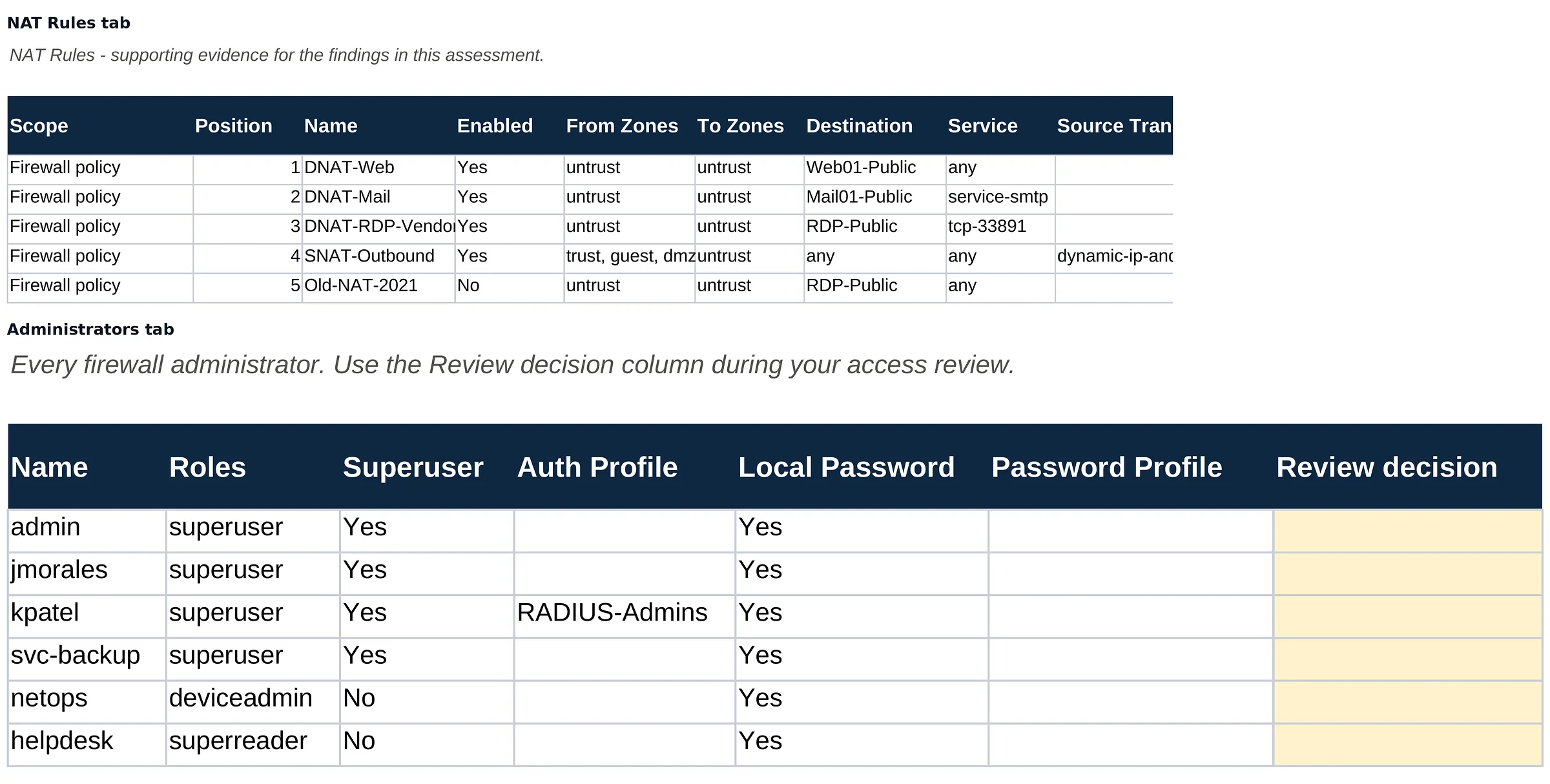
7 / 11NAT Rules and Administrators tabsThe NAT rules, and every firewall administrator with role, authentication profile and a column for your access-review decision.
Technical Findings Workbook sample, slide 8 of 11: Advisories tab (fictional company, illustrative data)
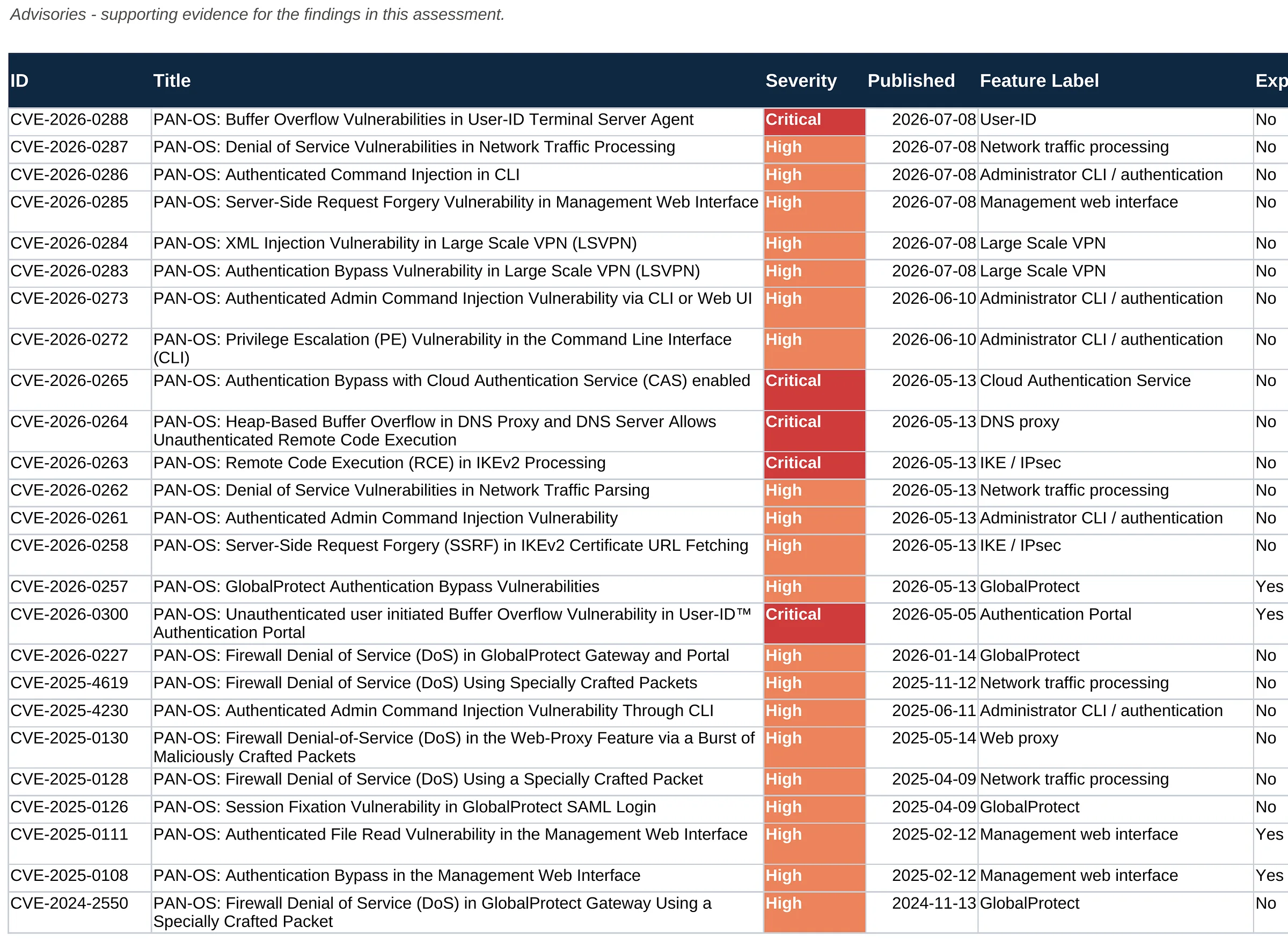
8 / 11Advisories tabVendor advisories for the installed release with severity, publication date, affected feature, exploitation and applicability.
Technical Findings Workbook sample, slide 9 of 11: Threats tab (fictional company, illustrative data)
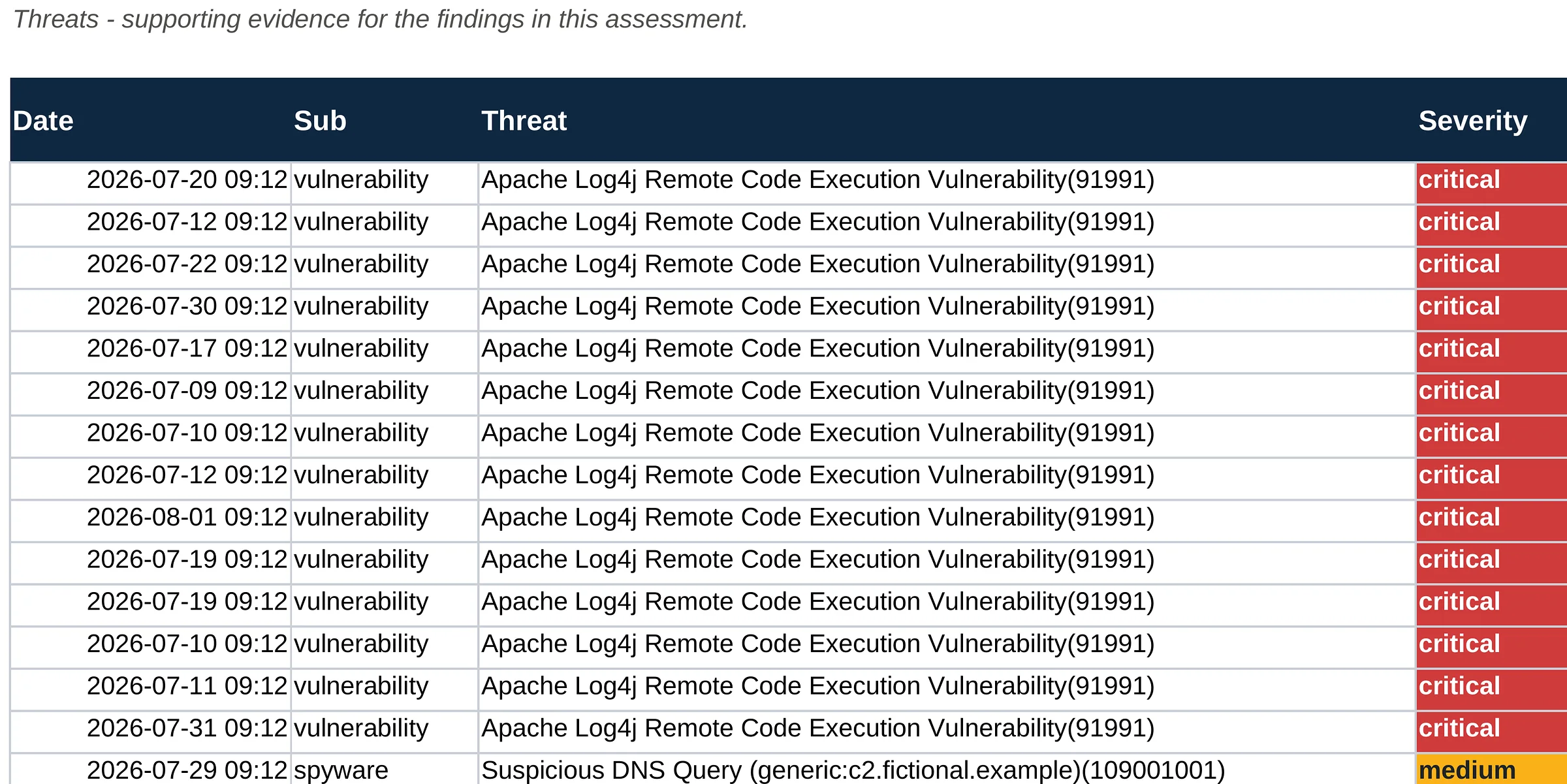
9 / 11Threats tabThreat log entries with date, type, threat name, severity, action, source, destination and rule.
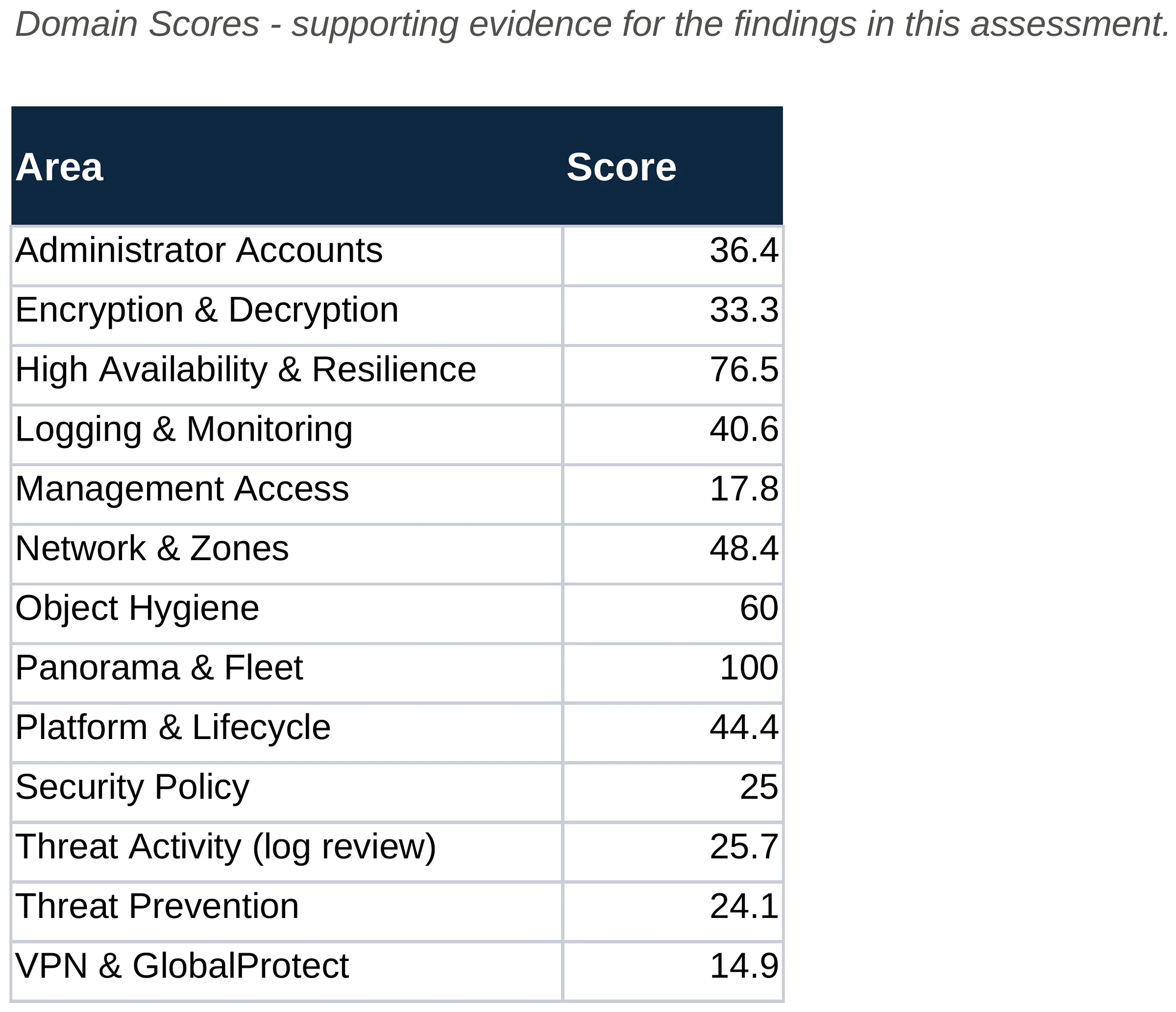
Technical Findings Workbook sample, slide 10 of 11: Domain Scores tab (fictional company, illustrative data)
10 / 11Domain Scores tabThe score for each of the 13 areas.
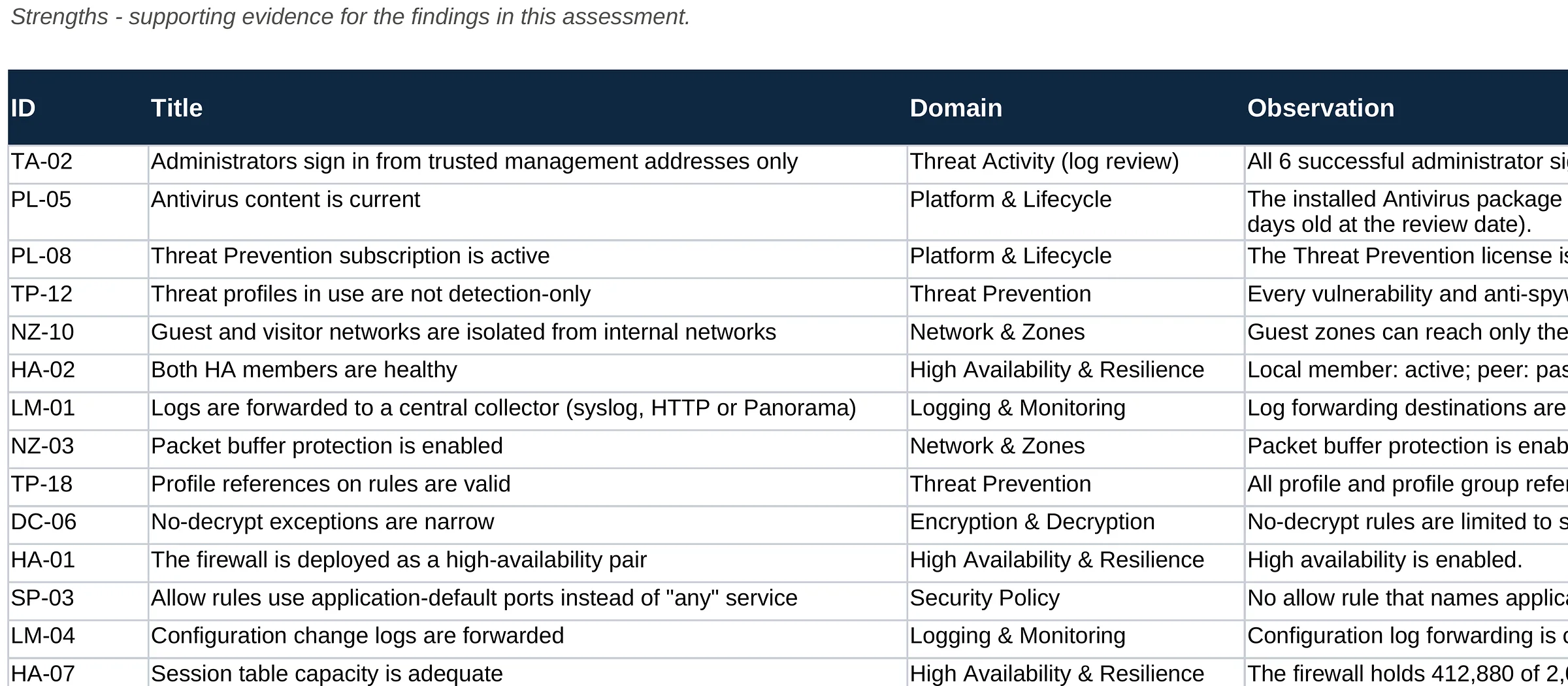
Technical Findings Workbook sample, slide 11 of 11: Strengths tab (fictional company, illustrative data)
11 / 11Strengths tabThe controls that passed, with the evidence for each.

Click the centre page to open it full size. Use the arrows, the thumbnails or your arrow keys to move between pages.

Want these reports for your own firewalls?

We run the same read-only review on your Palo Alto firewalls and Panorama: 141 controls in 13 areas, the 7-day log review, and all seven deliverables, for one fixed price.

This series

Page 10 of 13: Sample report

IT and business leaders planning security priorities

Know what your firewall really allows, before an attacker tests it

Schedule a consultation. We scope the Palo Alto firewall audit in 30 minutes and quote one fixed price.

Read-only audit. No changes to your firewalls. Irvine, Orange County and Southern California on-site; remote nationwide.