

LIBRARY 11.72Microsoft 365 Security Library
How to Find Windows 10 Devices After End of Support in Microsoft 365
Windows 10 stopped receiving free security updates on October 14, 2025. Many companies still have a few, or a few hundred, Windows 10 PCs opening company email and files. Here is how to find them and decide: upgrade, replace or pay for extended updates.
Reviewed by Ali Hassani, C|CISO, CISSP · Last verified November 20, 2026
Intune device inventory and compliance policies are included in Business Premium, E3 and E5. Windows 10 Extended Security Updates are a paid program (Microsoft Learn).
In one minute
- List every Windows 10 device that reaches company data.
- Upgrade the ones that can run Windows 11.
- Replace the rest, or enroll them in Extended Security Updates while you do.
- Add a minimum OS version to compliance so new Windows 10 devices can’t connect.
Unsupported operating systems are item EP-007 in our Microsoft 365 Security Audit.
What it is
What end of support means for Windows 10
On October 14, 2025, Windows 10 reached end of support. Microsoft stopped providing technical support, feature updates and quality updates, including security fixes, for the versions that ended that day (Microsoft Learn). The PCs keep working, which is why they stay in use.
What still gets updates on Windows 10
| Component | Updates until | Note |
|---|---|---|
| Windows 10 itself | October 14, 2025 | Only through the paid Extended Security Updates program after that |
| Microsoft 365 Apps on Windows 10 | October 10, 2028 (security only) | Microsoft still recommends moving to Windows 11 |
| OneDrive on Windows 10 22H2 | October 10, 2028 | Older Windows 10 versions no longer update |
Microsoft continues security updates for Microsoft 365 Apps on Windows 10 until October 10, 2028, but notes that using an unsupported operating system can cause performance and reliability issues (Microsoft Learn). Patched Office on an unpatched Windows is still an unpatched PC.
Why it matters
Unpatched systems are the most common way in
- Windows 10 PCNo security fixes since 2025.
- Vulnerability publishedExploit code follows.
- Minimum OS enforcedDevice can’t reach company data.
- Device compromisedWithout it: malware with email and file access.
- Ransomware or data theftAcross the network.
Drawing: where a minimum OS version breaks the path.
of ransomware attacks began with an exploited vulnerability, the top root cause in Sophos’s 2025 survey.
Source: Sophosthe last free security update for Windows 10.
Source: Microsoft Learnthe last security update for Microsoft 365 Apps on Windows 10.
Source: Microsoft Learnyears: the most Extended Security Updates can extend Windows 10, at a cost per device.
Source: Microsoft LearnYour options for each device
| Option | When it fits | Effect |
|---|---|---|
| Upgrade to Windows 11 | The hardware meets Windows 11 requirements. | Best, usually free |
| Replace the PC | Hardware can’t run Windows 11. | Fixes it for good |
| Extended Security Updates | A device you can’t replace yet. | Buys time paid |
| Cloud PC (Windows 365) | Old device used only to reach a desktop. | Moves the risk |
| Leave it | Never. | Open to exploits |
What we find in audits
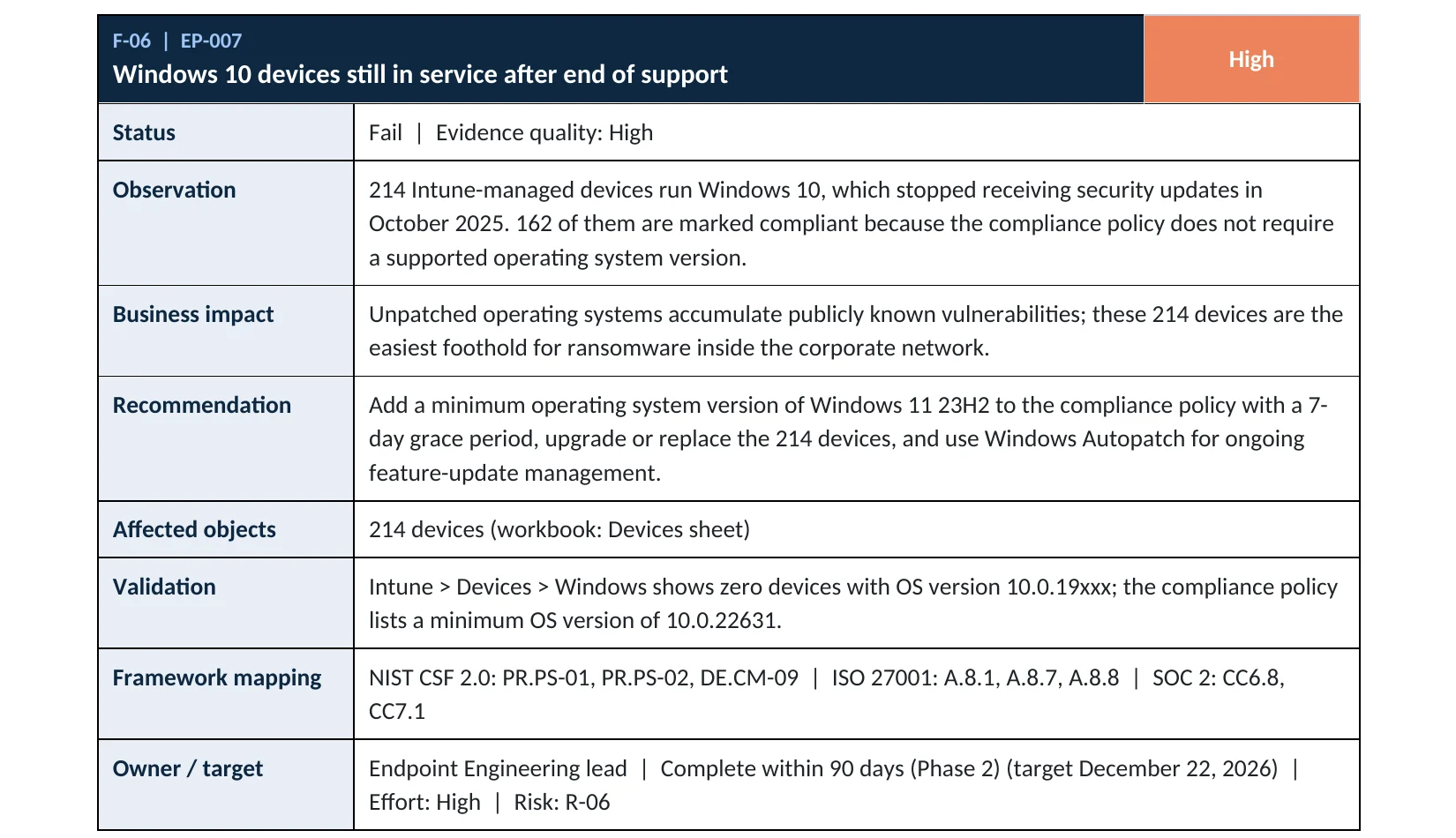
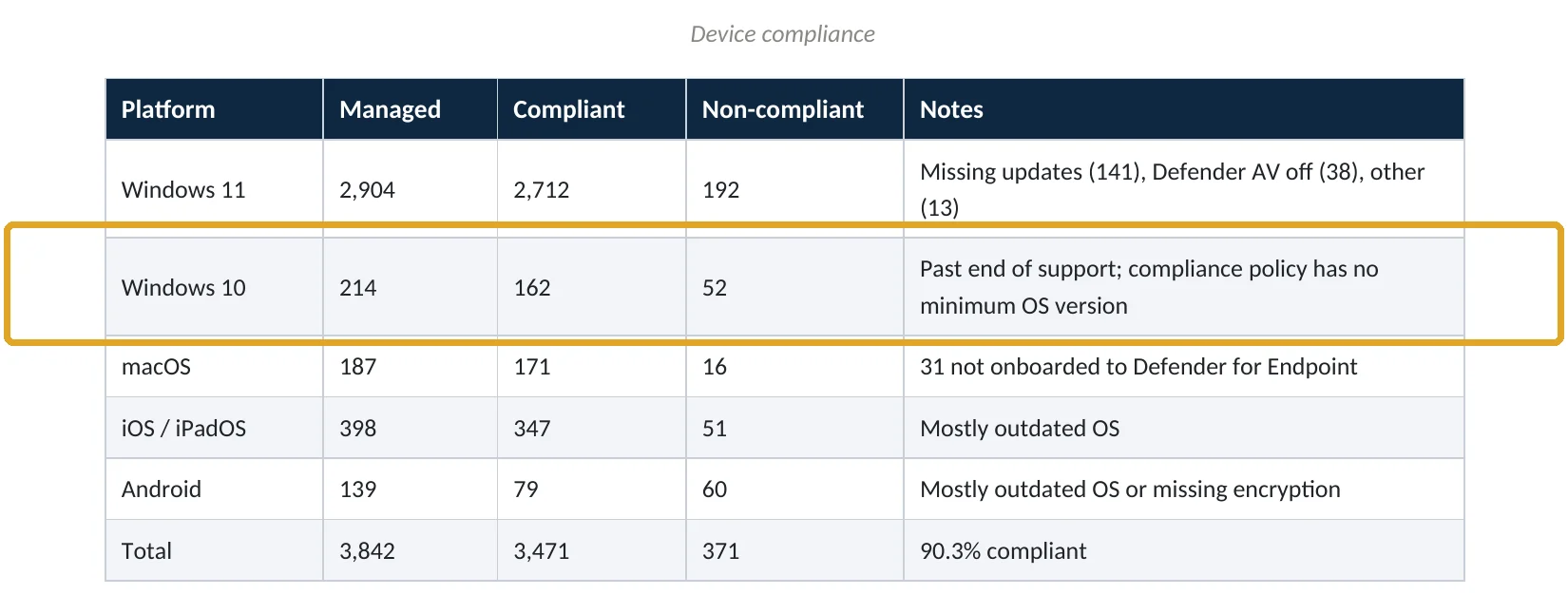
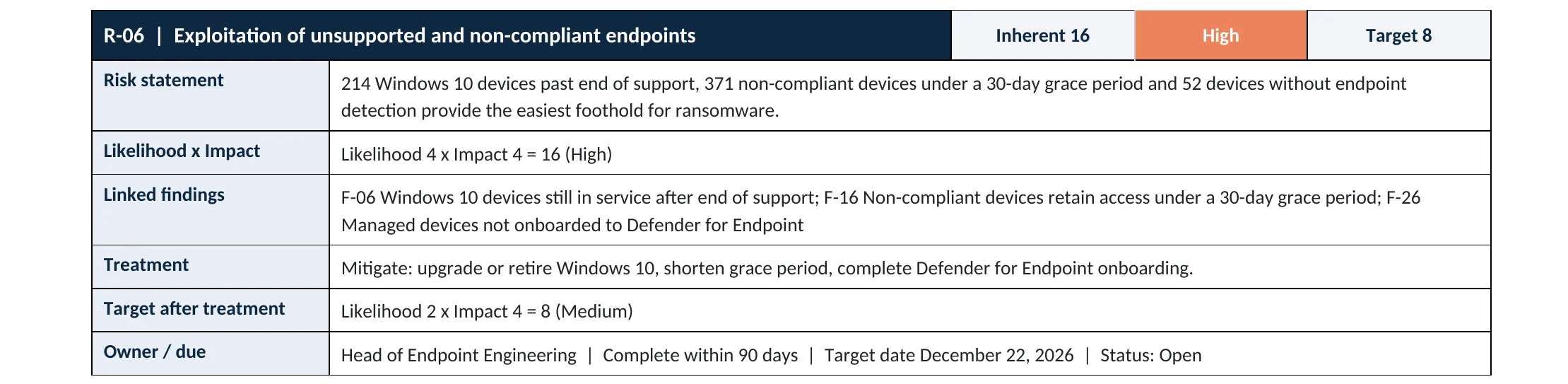
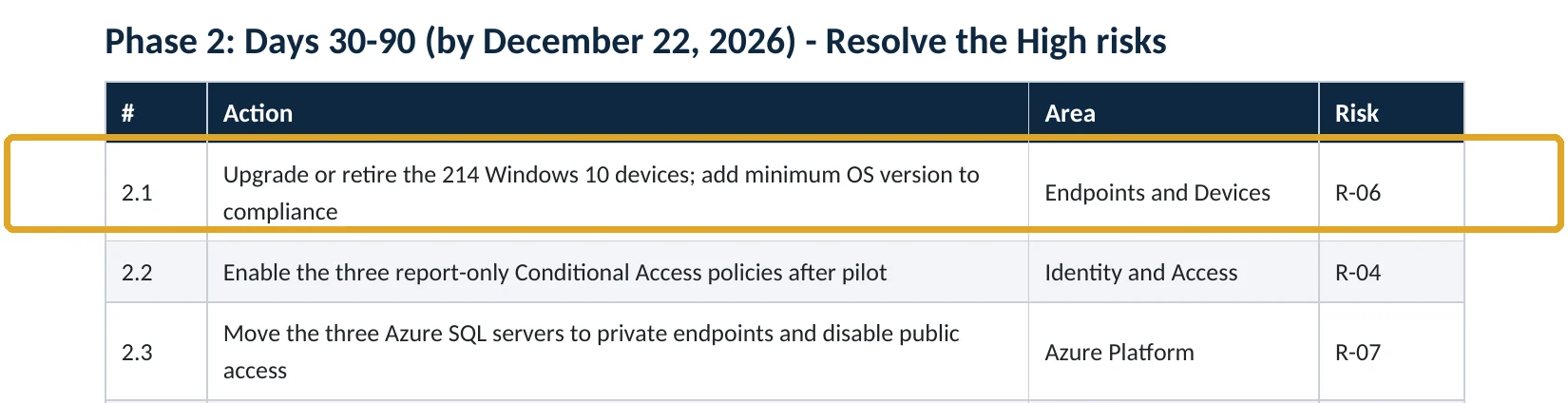
What this finding looks like in our audit reports
These are real pages from our published sample audit, written for a fictional company. Click any page to open it full size. The viewer follows the finding from the technical report to the device table, the risk register and the roadmap.
Your options
What each plan gives you
| Capability | Business Basic, Standard | Business Premium, E3, E5 |
|---|---|---|
| Device inventory with OS versions (Intune) | No | Yes |
| Minimum OS version in compliance policies | No | Yes |
| Block non-compliant devices with Conditional Access | No | Yes |
| Windows 11 upgrade through Intune or Autopatch | No | Yes |
Without Intune, check each PC’s Settings › System › About, or your RMM tool, for the Windows version.
How to check it yourself
Find every Windows 10 device, without changing anything
Windows 10 builds start with 10.0.19; Windows 11 builds start with 10.0.22 or higher. Also check Entra › Devices for registered devices that Intune doesn’t manage.
Read-only PowerShell: Windows 10 devices in Intune
Connect-MgGraph -Scopes "DeviceManagementManagedDevices.Read.All"
Get-MgDeviceManagementManagedDevice -All -Filter "operatingSystem eq 'Windows'" |
  Where-Object { $_.OsVersion -like "10.0.1*" } |
  Select-Object DeviceName, OsVersion, UserPrincipalName, ComplianceState, LastSyncDateTime
The command only reads inventory. Any device listed is running Windows 10.
How to configure
How to retire Windows 10 safely, step by step
Business Premium, E3, E5
Stop new Windows 10 devices connecting
- Open Intune › Devices › Compliance and edit your Windows policy.
- Under Device Properties, set Minimum OS version to a supported Windows 11 build.
- Give a short grace period and email users whose devices fail.
- Make sure the Conditional Access policy requiring a compliant device is on.
For each device found
Upgrade, replace or extend
- Check Windows 11 readiness in Intune’s endpoint analytics or Windows Update reports.
- Upgrade eligible devices with a feature update policy or Windows Autopatch.
- Order replacements for devices that can’t run Windows 11.
- Enroll any device you must keep in Extended Security Updates, and set a retirement date.
Set the minimum OS version only after the upgrades are scheduled, or users on old PCs will be blocked before they have a replacement.
What your users will notice
An upgrade to Windows 11 or a new PC. Users still on Windows 10 after the grace period lose access to company email and files until their device is upgraded.
How to undo it
Remove the minimum OS version from the compliance policy. Upgraded devices can roll back to Windows 10 only within a short window after the upgrade.
Proof and questions
How to prove it is fixed, and what to ask your IT provider
Evidence it is fixed
- No Windows 10 devices in Intune, or only ESU-enrolled ones with a retirement date.
- Windows compliance policies require a supported minimum OS version.
- Unmanaged Windows 10 devices can’t reach company data.
- Replacement purchases are scheduled for the rest.
Questions for your IT provider
- How many Windows 10 PCs do we still have?
- Which can upgrade to Windows 11, and which need replacing?
- Are any enrolled in Extended Security Updates, and until when?
- Does our compliance policy have a minimum OS version?
- Can a Windows 10 home PC still open our email?
Signs it was already abused
If an old Windows 10 PC may already be compromised, look for these signs
Red flags
- Antivirus turned off or out of date on a Windows 10 device.
- A Windows 10 PC that hasn’t synced with Intune in weeks but still signs in.
- Defender alerts for exploit activity on old devices.
- Unknown remote access tools installed.
- Sign-ins from a user’s account while their old PC is supposedly retired.
If you see these, isolate the device and keep the logs. Our compromise investigation establishes what was accessed, and the Microsoft 365 Evidence Clock shows how long the records are kept.
Framework mapping
Where unsupported systems fit
| Framework | Where it fits |
|---|---|
| NIST CSF 2.0 | ID.AM-08: systems managed throughout their life cycle; PR.PS-02: software maintained, replaced and removed |
| ISO/IEC 27001:2022 | Annex A 8.8 Management of technical vulnerabilities; 8.1 User end point devices |
| SOC 2 | CC7.1 vulnerability management; CC8.1 change management |
Reviewed by
Written and reviewed by a practicing CISO

Ali Hassani, C|CISO, CISSP
Ali has more than 25 years of IT and cybersecurity experience and holds the Certified CISO and CISSP certifications along with Microsoft and Cisco credentials. He leads every OC Security Audit engagement from Irvine, on-site across Southern California and remotely nationwide. Every Microsoft 365 audit is read-only.
FAQ
Frequently asked questions about Windows 10 end of support
Is Windows 10 still supported?
No. Windows 10 reached end of support on October 14, 2025. Security updates after that date are only available through the paid Extended Security Updates program.
Will Microsoft 365 still work on Windows 10?
Yes. Microsoft continues security updates for Microsoft 365 Apps on Windows 10 until October 10, 2028, but Windows itself isn't patched, so the PC is still at risk.
What are Extended Security Updates?
A paid program that provides critical and important security updates for Windows 10 devices for up to three years after end of support, while you upgrade or replace them.
How do I find Windows 10 PCs?
In Intune, filter Windows devices by OS version: Windows 10 builds start with 10.0.19. Without Intune, check each PC's About page or your management tool.
Should we block Windows 10 from Microsoft 365?
Yes, once upgrades are scheduled. Add a minimum OS version to your Intune compliance policy and require compliant devices in Conditional Access.
Can every Windows 10 PC upgrade to Windows 11?
No. Many older PCs don't meet Windows 11's hardware requirements and need replacing.
Next step
Know every PC that’s out of support
Prevent
Microsoft 365 Security Audit
$3,500 fixed
About 200 read-only checks across devices, sign-in protection, email, sharing and logging, for any tenant size, with four reports and a remediation roadmap.
Respond
Microsoft 365 & Azure Compromise Investigation
From $3,500
For when an old, unpatched PC may have been the way in: we establish what the attacker reached.
Want to see the deliverables first? Open the Microsoft 365 audit sample report or browse all our sample reports.

Service
Microsoft 365 Security Audit
The fixed-price audit that checks this item and about 200 more.
See the audit ›
Sample
Sample audit report
Every page of the five deliverables, with fictional data.
View the sample ›
Service
Compromise Investigation
When an account or mailbox may already be in an attacker’s hands.
See the investigation ›Related reading: How to require compliant devices · How to onboard devices to Defender for Endpoint · Identity, MFA and Conditional Access guide
Sources
Sources used on this page
- Microsoft Learn, Windows 10 release information (end of support)
- Microsoft Learn, Extended Security Updates (ESU) program for Windows 10
- Microsoft Learn, Windows 10 end of support and Microsoft 365 Apps
- Microsoft Learn, Windows 10, version 22H2 end of support
- Microsoft Learn, Windows compliance settings in Intune
- Sophos, The State of Ransomware 2025
This guide is general information, not a guarantee of protection or legal advice. Microsoft changes its admin centers often: menu names and steps were checked against Microsoft Learn on November 20, 2026. Drawings are simplified and are not screenshots of Microsoft products. Sample findings come from fictional companies. Incidents are described as reported by the cited sources; OC Security Audit was not involved in them. Questions? Call 949-777-5567 or email support@ocsecurityaudit.com.