

LIBRARY 11.70Microsoft 365 Security Library
How to Require Compliant Devices in Microsoft 365
Intune can tell whether a laptop or phone is patched, encrypted and protected. Conditional Access can then let only those devices open company email and files. Both settings have to be on, and the grace period has to be short.
Reviewed by Ali Hassani, C|CISO, CISSP · Last verified November 20, 2026
Requiring a compliant device uses Intune compliance policies and Entra Conditional Access (P1), both included in Business Premium, E3 and E5 (Microsoft Learn).
In one minute
- Check your compliance policies: OS version, encryption, antivirus, firewall.
- Shorten the Mark device noncompliant grace period to a few days.
- Fix the devices that are non-compliant today.
- Move the Require compliant device Conditional Access policy from report-only to on.
Device compliance is item EP-003 in our Microsoft 365 Security Audit.
What it is
How compliance and Conditional Access work together
An Intune compliance policy lists what a healthy device looks like: a minimum OS version, BitLocker or FileVault, antivirus on, a firewall. Each policy includes an action called Mark device noncompliant, which by default happens immediately; changing its schedule creates a grace period. Conditional Access can then block email, SharePoint and Teams on devices marked non-compliant (Microsoft Learn).
The pieces you need
| Piece | Where | What to set |
|---|---|---|
| Compliance policy | Intune › Devices › Compliance | OS version, encryption, antivirus, firewall per platform |
| Actions for noncompliance | Inside each compliance policy | Email the user on day 0; mark non-compliant after 1 to 7 days |
| Devices with no policy | Compliance policy settings | Mark devices with no compliance policy assigned as Not compliant |
| Conditional Access | Entra › Conditional Access | Require device to be marked as compliant (or app protection on phones) |
Why it matters
A healthy password on an unhealthy laptop is still a risk
- Device falls behindMissing updates, antivirus off.
- Still allowed inGrace period or report-only policy.
- Compliance enforcedAccess blocked until fixed.
- Malware on deviceWithout it: steals tokens and files.
- Company data stolenEmail, files, Teams.
Drawing: where compliance enforcement breaks the path.
of ransomware attacks began with an exploited vulnerability, the most common root cause for the third year running.
Source: Sophosdays: Intune’s default for marking a failing device non-compliant. Long grace periods are a choice.
Source: Microsoft Learndays is the longest grace period Intune allows; we recommend 1 to 7.
Source: Microsoft LearnConditional Access policies log what they’d do and block nothing.
Source: Microsoft LearnCommon gaps
| Gap | What happens | Effect |
|---|---|---|
| Policy in report-only | Non-compliant devices are logged, not blocked. | No protection |
| 30-day or longer grace period | A failing device keeps access for a month. | Long window |
| Devices with no policy count as compliant | New or unmanaged devices slip through. | Blind spot |
| No minimum OS version | Unsupported Windows 10 devices pass. | Old systems allowed |
| Short grace, policy on | Users fix issues quickly or lose access. | Enforced |
What we find in audits
What this finding looks like in our audit reports
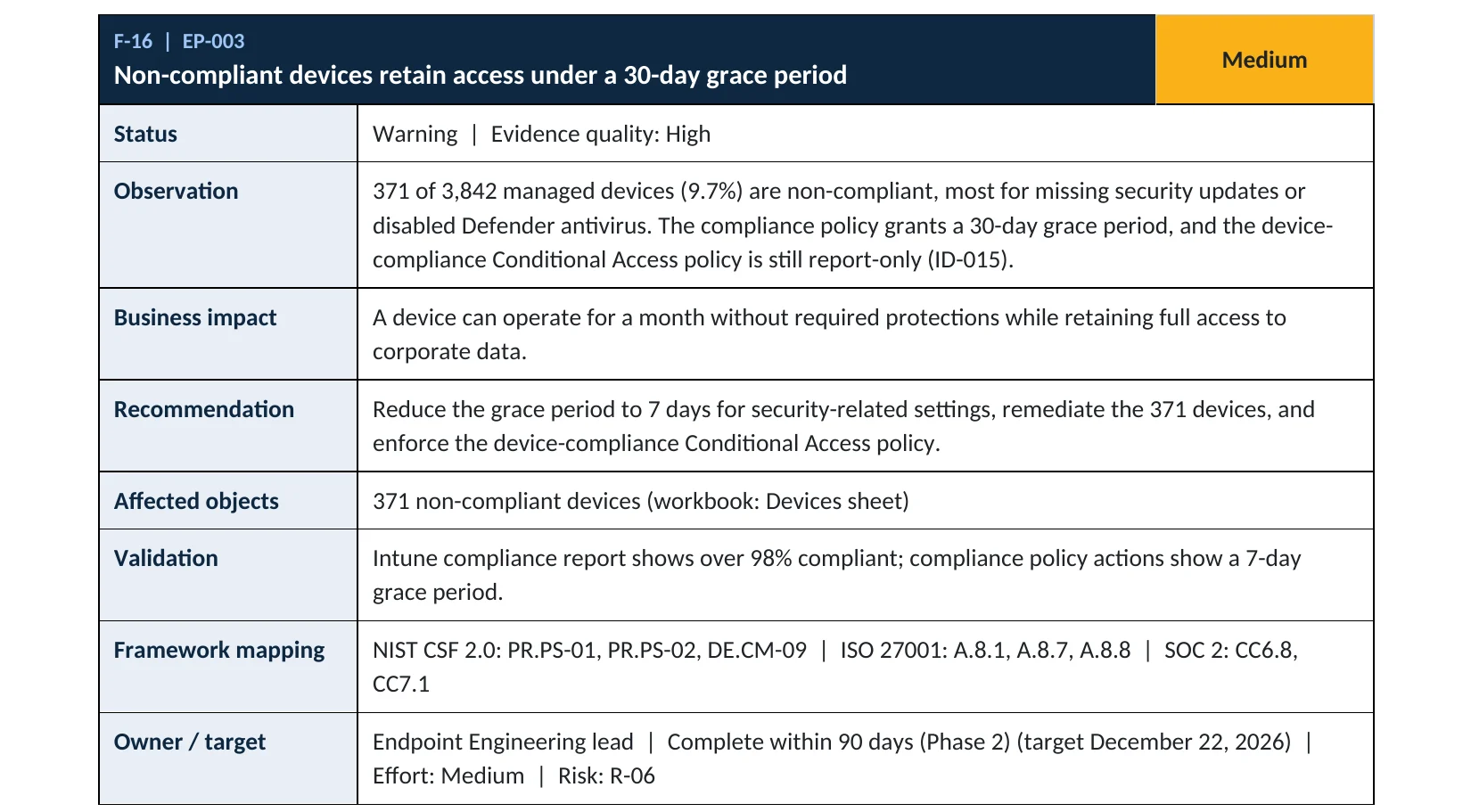
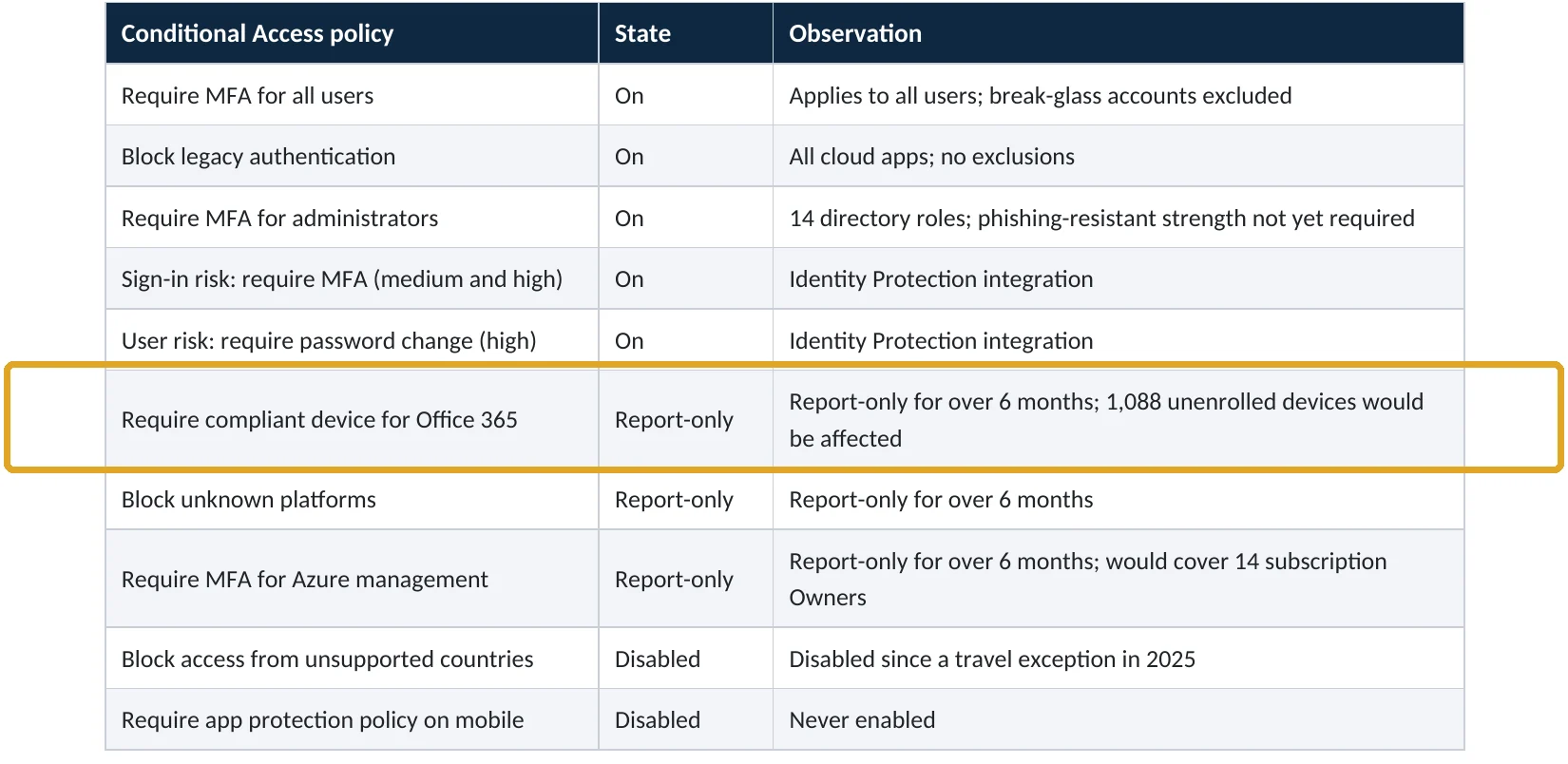
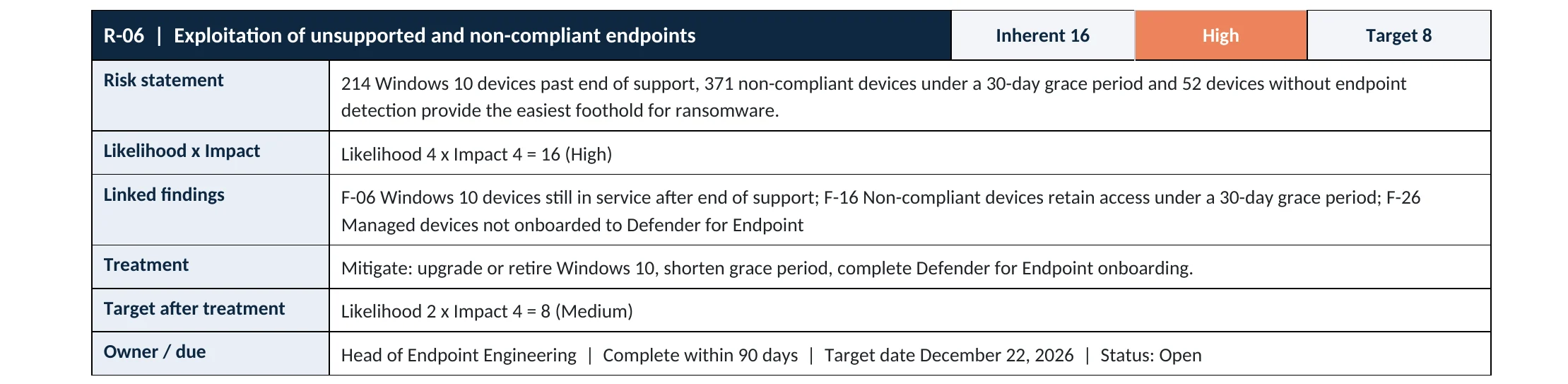
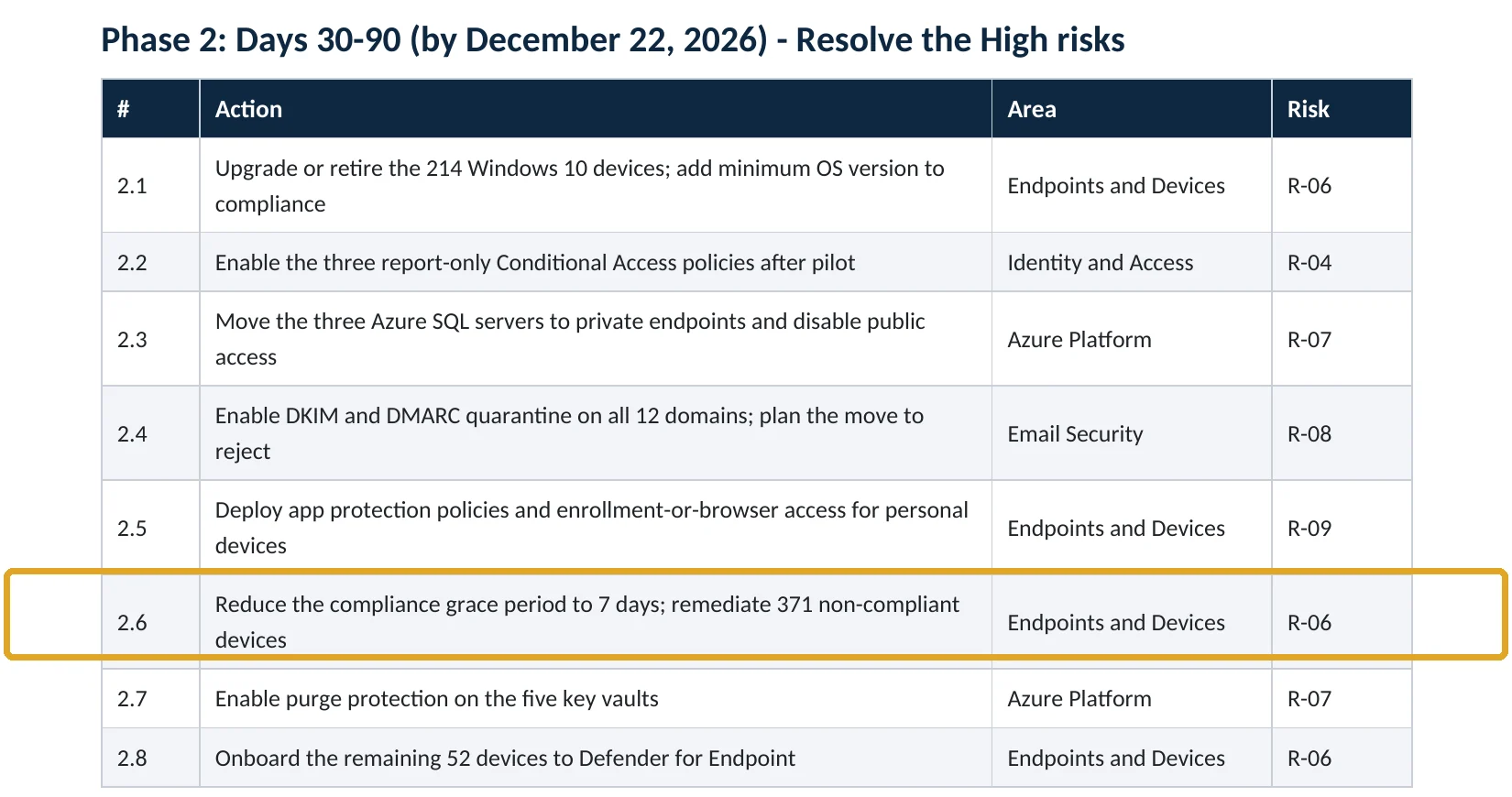
These are real pages from our published sample audit, written for a fictional company. Click any page to open it full size. The viewer follows the finding from the technical report to the Conditional Access table, the risk register and the roadmap.
Your options
What each plan gives you
| Capability | Business Basic, Standard | Business Premium, E3, E5 |
|---|---|---|
| Basic mobility and security (limited) | Yes | Yes |
| Intune compliance policies and actions | No | Yes |
| Conditional Access: require compliant device | No | Yes |
| Defender risk score as a compliance setting | No | Yes (with Defender for Business or Endpoint) |
How to check it yourself
See how strict compliance really is, without changing anything
Open each policy, then Properties › Actions for noncompliance: the Mark device noncompliant schedule is your grace period. Check Compliance settings for Mark devices with no compliance policy assigned as. Then in Entra, check whether the compliant-device Conditional Access policy is On or Report-only.
Read-only PowerShell: is the compliant-device policy enforced?
Connect-MgGraph -Scopes "Policy.Read.All"
Get-MgIdentityConditionalAccessPolicy |
  Where-Object { $_.GrantControls.BuiltInControls -contains "compliantDevice" } |
  Select-Object DisplayName, State
The command only reads settings. enabledForReportingButNotEnforced means report-only: nothing is blocked.
How to configure
How to enforce device compliance, step by step
Business Premium, E3, E5
Tighten compliance
- In Intune › Devices › Compliance › Compliance settings, set devices with no policy to Not compliant.
- In each policy, set a minimum OS version and require encryption, antivirus and firewall.
- Under Actions for noncompliance, add Send email to end user at day 0.
- Change Mark device noncompliant from 30 days to 1 to 7 days.
- Fix or retire the devices that are non-compliant today.
Entra ID P1
Turn on the Conditional Access policy
- Open the Require compliant device policy in report-only.
- Use the report-only results to find users who would be blocked, and fix their devices.
- Exclude break-glass accounts; keep mobile phones on app protection instead if they aren’t enrolled.
- Switch the policy to On and watch sign-in logs for the first week.
What your users will notice
An email when their device falls out of compliance, and a block with a link to the Company Portal if they don’t fix it within the grace period.
How to undo it
Set the Conditional Access policy back to report-only, or lengthen the grace period in the compliance policy.
Proof and questions
How to prove it is fixed, and what to ask your IT provider
Evidence it is fixed
- The compliant-device Conditional Access policy is on.
- Grace periods are 7 days or less.
- Devices with no compliance policy are marked not compliant.
- The non-compliant device count is low and falling.
Questions for your IT provider
- How many of our devices are non-compliant right now, and why?
- How long can a failing device keep access?
- Is the compliant-device policy on or report-only?
- Do our policies require a minimum OS version and encryption?
- How are phones handled: enrollment or app protection?
Signs it was already abused
If a weak device may already have been used against you, look for these signs
Red flags
- Sign-ins from devices that Intune has never seen.
- Defender alerts on a device that still had full access.
- A device out of compliance for weeks, still syncing files.
- Token theft alerts or sign-ins replayed from another country.
- Conditional Access exclusions added without a ticket.
If you see these, isolate the device, revoke sessions and keep the logs. Our compromise investigation establishes what was accessed, and the Microsoft 365 Evidence Clock shows how long the records are kept.
Framework mapping
Where device compliance fits
| Framework | Where it fits |
|---|---|
| NIST CSF 2.0 | PR.PS-02: software maintained; PR.AA-05: access permissions consider device health |
| ISO/IEC 27001:2022 | Annex A 8.1 User end point devices; 8.8 Management of technical vulnerabilities |
| SOC 2 | CC6.8 prevent unauthorized or malicious software; CC7.1 vulnerability management |
Reviewed by
Written and reviewed by a practicing CISO

Ali Hassani, C|CISO, CISSP
Ali has more than 25 years of IT and cybersecurity experience and holds the Certified CISO and CISSP certifications along with Microsoft and Cisco credentials. He leads every OC Security Audit engagement from Irvine, on-site across Southern California and remotely nationwide. Every Microsoft 365 audit is read-only.
FAQ
Frequently asked questions about compliant devices
What does requiring a compliant device do?
Only devices that Intune marks as compliant, meaning patched, encrypted and protected, can open company email, files and Teams.
What's a compliance grace period?
The time between a device failing a check and being marked non-compliant. Intune's default is zero days; we recommend 1 to 7.
Which plans include it?
Business Premium, E3 and E5 include Intune and Conditional Access. Business Basic and Standard don't.
What about personal phones?
Instead of enrolling them, use app protection policies and require an app protection policy in Conditional Access.
Will this lock people out?
Only devices that stay non-compliant past the grace period. Run the policy in report-only first and fix devices before turning it on.
Should devices with no policy count as compliant?
No. Set them to not compliant so new or unmanaged devices don't slip through.
Next step
Only healthy devices reach company data
Prevent
Microsoft 365 Security Audit
$3,500 fixed
About 200 read-only checks across sign-in protection, devices, email, sharing and logging, for any tenant size, with four reports and a remediation roadmap.
Respond
Microsoft 365 & Azure Compromise Investigation
From $3,500
For when an unmanaged or infected device reached company data: we establish what it accessed.
Want to see the deliverables first? Open the Microsoft 365 audit sample report or browse all our sample reports.

Service
Microsoft 365 Security Audit
The fixed-price audit that checks this item and about 200 more.
See the audit ›
Sample
Sample audit report
Every page of the five deliverables, with fictional data.
View the sample ›
Service
Compromise Investigation
When an account or mailbox may already be in an attacker’s hands.
See the investigation ›Related reading: How to protect Microsoft 365 data on personal devices · How to find Windows 10 devices after end of support · How to onboard devices to Defender for Endpoint · How to move Conditional Access from report-only to on
Sources
Sources used on this page
- Microsoft Learn, Configure actions for noncompliant devices in Intune
- Microsoft Learn, Create a compliance policy in Microsoft Intune
- Microsoft Learn, Require a compliant device with Conditional Access
- Microsoft Learn, Microsoft 365 Business Premium security FAQ
- Sophos, The State of Ransomware 2025
This guide is general information, not a guarantee of protection or legal advice. Microsoft changes its admin centers often: menu names and steps were checked against Microsoft Learn on November 20, 2026. Drawings are simplified and are not screenshots of Microsoft products. Sample findings come from fictional companies. Incidents are described as reported by the cited sources; OC Security Audit was not involved in them. Questions? Call 949-777-5567 or email support@ocsecurityaudit.com.