

LIBRARY 4.30Microsoft 365 Security Library
How to Set Up DMARC for Microsoft 365, Step by Step
Without an enforced DMARC record, anyone can send email that looks like it came from your domain. Here is how to go from no record to p=reject without blocking your own mail.
Reviewed by Ali Hassani, C|CISO, CISSP · Last verified November 20, 2026

DMARC is a DNS record, so it needs no Microsoft license. You publish it where your domain’s DNS is hosted (Microsoft Learn).
In one minute
- Set up SPF and DKIM first, for every domain that sends mail.
- Publish DMARC at p=none with a reporting address, and read the reports.
- Fix every legitimate sender that fails, then move to p=quarantine and finally p=reject.
- Publish p=reject straight away on domains that never send mail.
Email authentication is item EX-020 in our Microsoft 365 Security Audit.
What it is
What SPF, DKIM and DMARC do, in plain English
Email was designed without any proof of who sent it. Three DNS records add that proof for your domain:
| Record | What it says | Plain-English version |
|---|---|---|
| SPF | Which servers may send mail for your domain | The guest list |
| DKIM | A digital signature on each message | The wax seal |
| DMARC | What receivers should do when a message fails both, and where to send reports | The instructions to the doorman |
DMARC is defined in RFC 7489. Microsoft’s goal for every custom domain is p=reject, reached gradually so that receivers do not reject your own legitimate mail (Microsoft Learn). DMARC protects other people from fake mail using your name: your customers, vendors and staff.
Why it matters
Without DMARC, your name is free to borrow
Business email compromise often starts with a message that looks like it comes from a company the victim trusts. With no enforced DMARC record, attackers can put your exact domain in the From line, and many inboxes will deliver it.
- Attacker picks your domainChecks DNS: DMARC missing or p=none.
- Spoofed invoice sentFrom: accounts@yourdomain, to your customer.
- p=reject in placeThe receiving server rejects it.
- Customer paysWithout enforcement: new bank details look real.
- Your reputation paysThe fraud carries your name.
Drawing: DMARC enforcement stops exact-domain spoofing at the receiving server.
reported lost to business email compromise in 2025 across 24,768 complaints to the FBI. Impersonating a trusted sender is the core of the scheme.
Source: FBI IC3 2025 Internet Crime Reportmessages a day to Gmail accounts: above that, Google has required SPF, DKIM and DMARC since February 2024.
Source: Google sender guidelineswhen Outlook.com began routing mail from high-volume domains that fail SPF, DKIM or DMARC requirements to Junk.
Source: Microsoft Tech Communitythe policy CISA’s Binding Operational Directive 18-01 required for federal agency domains, and Microsoft’s goal for every custom domain.
Source: CISA BOD 18-01Attacks this stops, and what it does not
| Attack | How it works | Does DMARC at p=reject stop it? |
|---|---|---|
| Exact-domain spoofing | From: billing@yourdomain.com, sent from an attacker’s server. | Yes Receivers that honor DMARC reject it. |
| Fake invoices to your customers | Spoofed mail asking customers to pay a new account. | Yes When it uses your exact domain. |
| Spoofed internal mail | A fake message “from the CEO” to staff. | Yes Microsoft 365 honors DMARC on inbound mail. |
| Look-alike domains | yourdornain.com or yourdomain-billing.com. | No DMARC protects only your real domain. |
| Mail from a hacked real mailbox | The attacker sends from your genuine account. | No It passes DMARC; MFA and the forwarding and rules items cover this. |
| Display-name tricks | “Your CEO” <random@gmail.com>. | Partly Needs anti-phishing impersonation settings. |
A documented campaign
Joint advisory · FBI, NSA, State Department, 2024
Kimsuky exploits weak DMARC policies
In a May 2, 2024 joint advisory, the FBI, NSA and US Department of State warned that North Korea’s Kimsuky group was exploiting improperly configured DMARC record policies to send spearphishing email that appeared to come from legitimate domains, posing as journalists, academics and experts. The agencies recommended DMARC policies of p=quarantine or p=reject.
We were not involved in this case. The same weakness is used every day against smaller targets, for fake invoices and payment changes.
What we find in audits
What this finding looks like in our audit reports
These are real pages from our published sample reports, written for fictional companies. Click any page to open it full size. The viewer follows the finding from the technical report to the risk register and the roadmap.
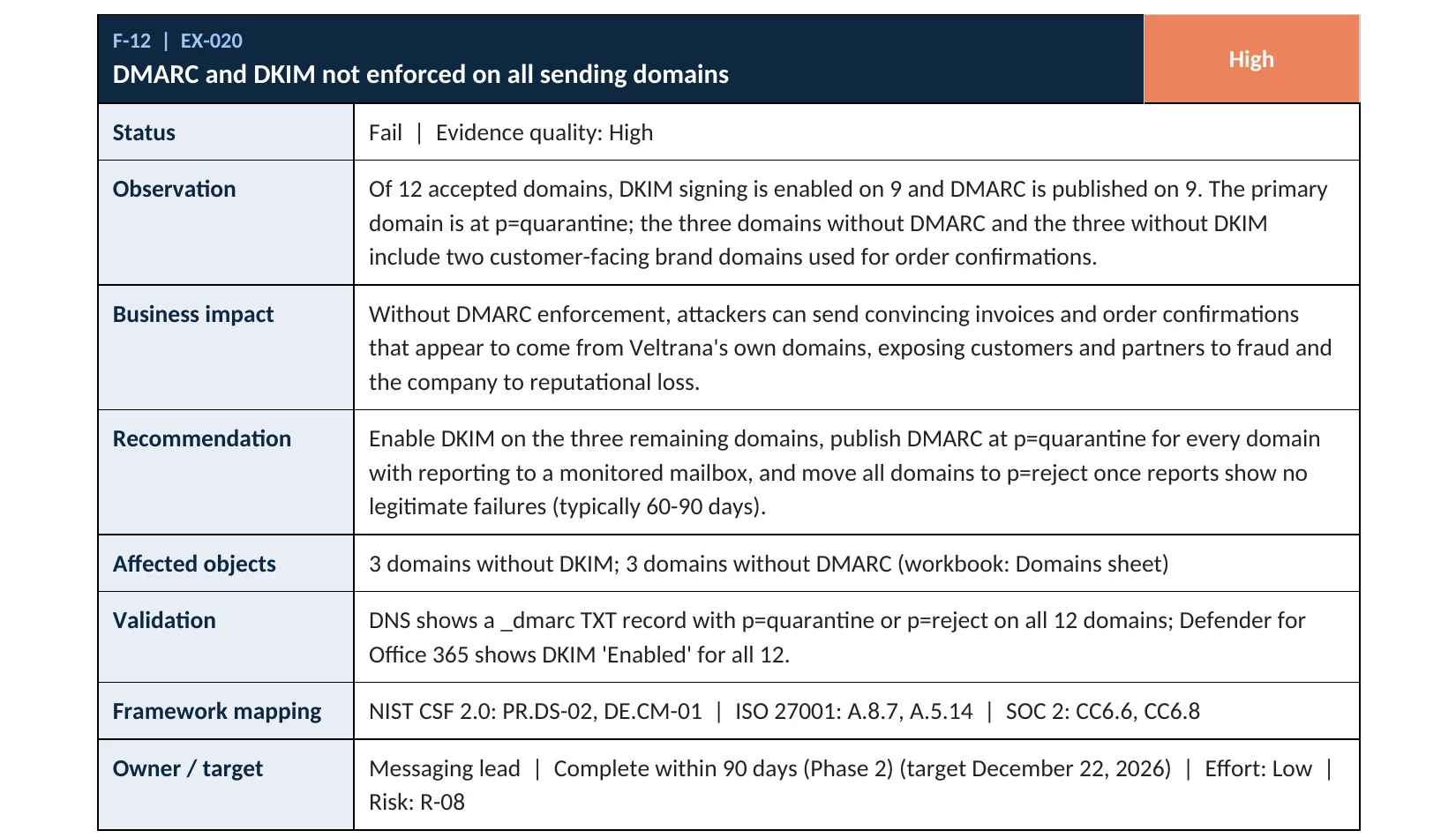
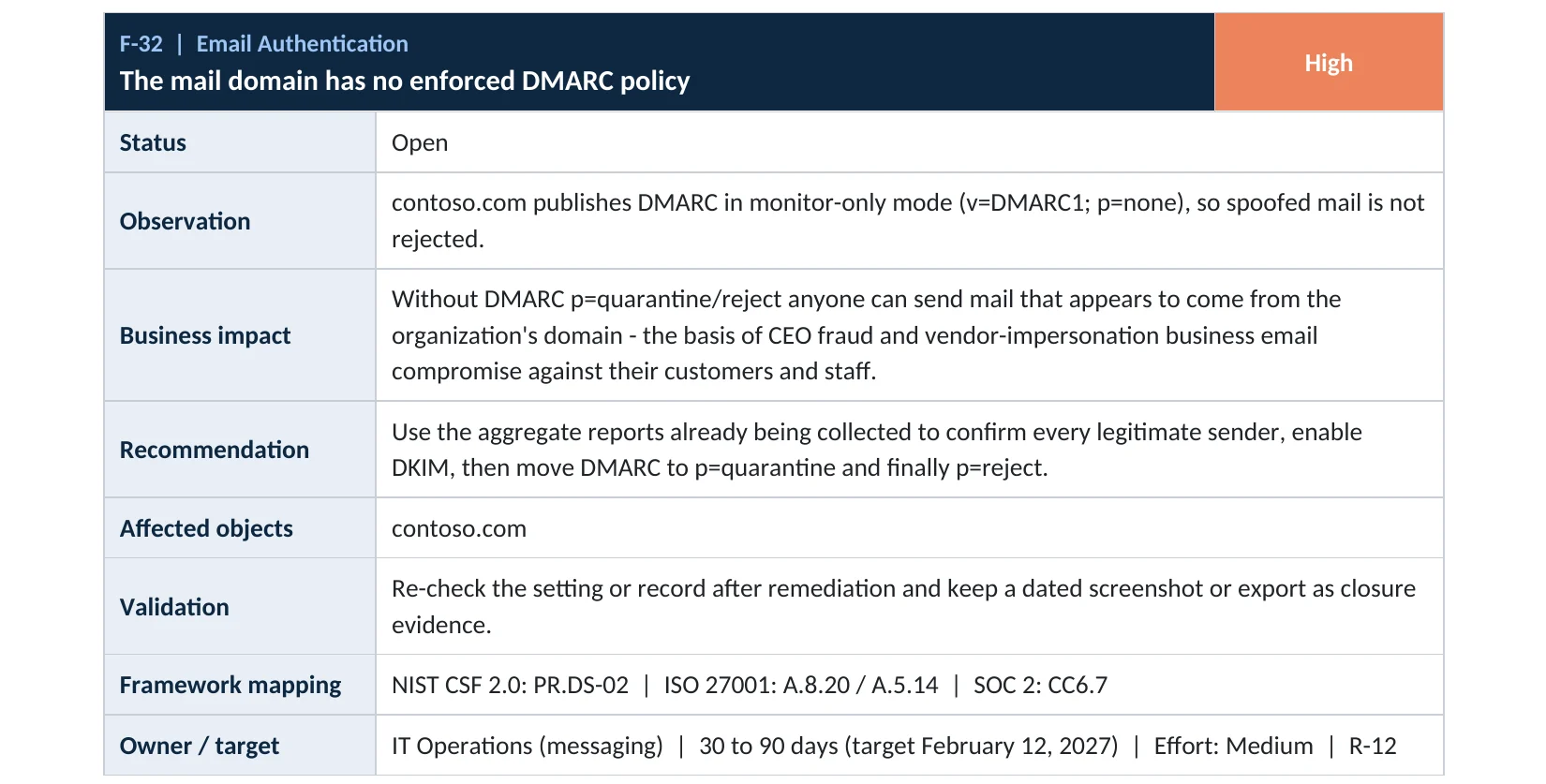
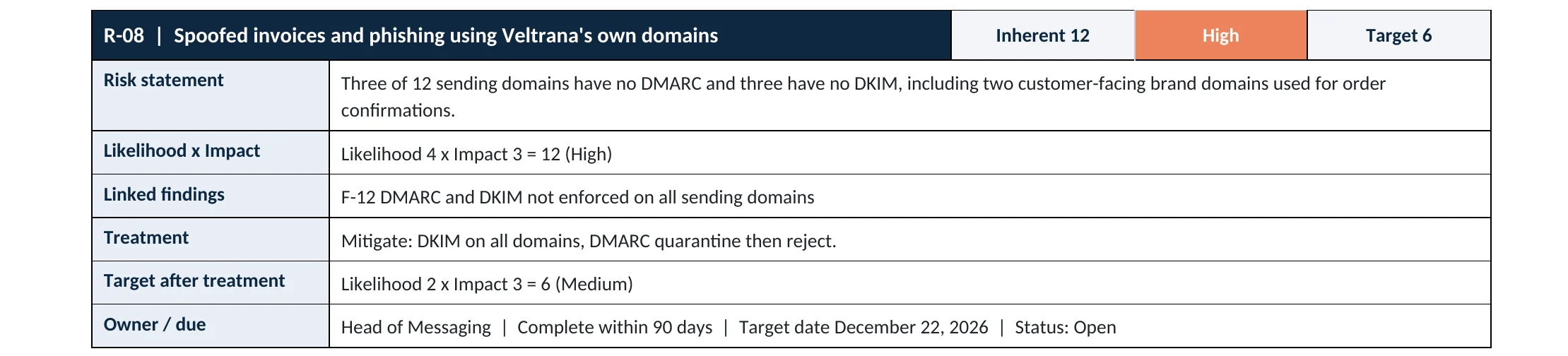
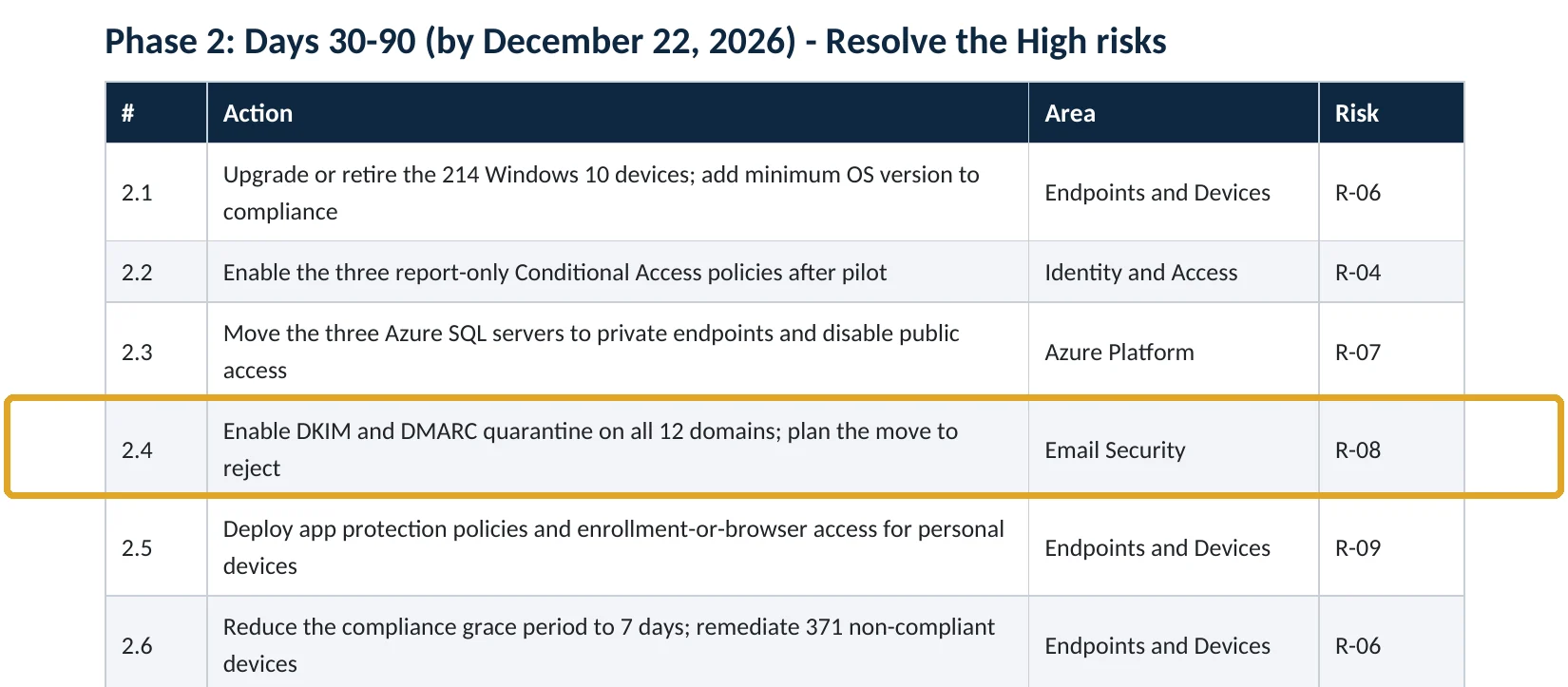
Your options
p=none, p=quarantine or p=reject
| Policy | What receivers do with failing mail | When to use it |
|---|---|---|
| p=none | Nothing special; they only send you reports. | Start here For 2 to 6 weeks while you find every sender. |
| p=quarantine | Usually deliver it to Junk or quarantine. | Step 2 Once reports show your real mail passes. |
| p=reject | Refuse it; it never arrives. | Goal For every domain, including ones that never send mail. |
Microsoft’s rollout plan starts with a low-volume domain or subdomain, uses reports at each step and can raise the pct= value in stages (10, 25, 50, 75, 100) to apply the policy to more mail gradually (Microsoft Learn). A domain that never sends mail, such as a parked or redirect domain, can go straight to p=reject.
How to check it yourself
Check your DMARC, SPF and DKIM without changing anything
Read-only: look up your DMARC and SPF records (Windows PowerShell)
Resolve-DnsName -Type TXT _dmarc.yourdomain.com
Resolve-DnsName -Type TXT yourdomain.com | Where-Object { $_.Strings -match "v=spf1" }
Read-only: DKIM signing status for every Microsoft 365 domain
Connect-ExchangeOnline
Get-DkimSigningConfig | Format-Table Domain, Enabled, Status
What a good result looks like
| Check | Good | Needs work |
|---|---|---|
| DMARC record | v=DMARC1; p=reject (or quarantine on the way there) with rua= reporting | No record, or p=none for months |
| SPF | One record, ending in -all or ~all, listing only services you use | Two SPF records, +all, or old providers still listed |
| DKIM | Enabled = True for every custom domain that sends mail | False, or only the onmicrosoft.com domain signing |
| Every domain | All accepted and parked domains covered | Brand or old domains with no records |
The DKIM page in the Defender portal shows each domain and whether signing is on.
How to configure
How to reach p=reject, step by step
Weeks 1 to 2
Prepare and monitor
- Make sure every sending domain has one correct SPF record (Microsoft Learn).
- Turn on DKIM signing for each custom domain in the Defender portal and publish its two CNAME records (Microsoft Learn).
- List every service that sends as your domain: Microsoft 365, newsletters, invoicing, CRM, website forms, scanners.
- Publish _dmarc as v=DMARC1; p=none; rua=mailto: a monitored mailbox or a DMARC reporting service.
- Read the aggregate reports and fix each legitimate sender that fails SPF or DKIM alignment.
Weeks 3 to 12
Enforce
- Change the record to p=quarantine, optionally with pct=25 and then higher.
- Keep reading reports for two to four weeks; fix any sender that lands in junk.
- Change the record to p=reject.
- Publish v=DMARC1; p=reject on parked domains and domains that never send mail.
- Review reports monthly and before adding any new email service.
Example DMARC records (TXT, host _dmarc)
Stage 1:  v=DMARC1; p=none; rua=mailto:dmarc-reports@yourdomain.com
Stage 2:  v=DMARC1; p=quarantine; pct=100; rua=mailto:dmarc-reports@yourdomain.com
Goal:     v=DMARC1; p=reject; rua=mailto:dmarc-reports@yourdomain.com
No mail:  v=DMARC1; p=reject
What your users will notice
Nothing, if every sending service was fixed during the monitoring stage. If a forgotten service sends as your domain, its mail may land in junk after you reach quarantine, which the reports will show.
How to undo it, safely
Change the DMARC record back one step (reject to quarantine, quarantine to none). DNS changes take effect as the record’s time-to-live expires, often within an hour.
Proof and questions
How to prove it is fixed, and what to ask your IT provider
Evidence it is fixed
- Every accepted domain publishes DMARC at p=reject, or p=quarantine with a dated plan to reach reject.
- DKIM shows Enabled for every custom domain that sends mail.
- Aggregate reports go to a mailbox or service someone actually reads.
- Parked and non-sending domains publish v=DMARC1; p=reject.
Questions for your IT provider
- What is our DMARC policy today, for every domain we own?
- Who reads the DMARC reports, and how often?
- Which outside services send email as our domain?
- Is DKIM turned on for each domain in Microsoft 365?
- When will we reach p=reject?
Signs it was already abused
If DMARC was missing, look for these signs
Red flags
- Customers or vendors asking about an invoice, bank change or request you never sent.
- Bounce messages for emails nobody in your company wrote.
- DMARC reports showing large volumes of mail from servers you do not use.
- Staff receiving messages that appear to come from your own executives but ask for urgent payments or gift cards.
- Your domain appearing on spam block lists.
Spoofing from outside is different from a hacked mailbox: the fix is DMARC, not a password reset. If you are not sure which one happened, our business email compromise investigation separates the two and tells you what was sent from your real accounts.
Framework mapping
Where DMARC fits in common frameworks
| Framework | Where it fits |
|---|---|
| NIST CSF 2.0 | PR.DS-02: data in transit protected; PR.PS: platform security |
| ISO/IEC 27001:2022 | Annex A 5.14 Information transfer; 8.20 Network security |
| SOC 2 | CC6.7 restricts transmission of information; CC6.6 protects against threats from outside |
| CISA | BOD 18-01 required DMARC p=reject for federal agency domains |
| MITRE ATT&CK | T1566 Phishing; T1656 Impersonation |
Reviewed by
Written and reviewed by a practicing CISO

Ali Hassani, C|CISO, CISSP
Ali has more than 25 years of IT and cybersecurity experience and holds the Certified CISO and CISSP certifications along with Microsoft and Cisco credentials. He leads every OC Security Audit engagement from Irvine, on-site across Southern California and remotely nationwide. Every Microsoft 365 audit is read-only.
FAQ
Frequently asked questions about DMARC
Does Microsoft 365 set up DMARC for me?
Not for your own domain. Microsoft 365 can sign with DKIM and you add the SPF include, but the DMARC record is a DNS record you publish at your DNS host. Microsoft does let you add one for the onmicrosoft.com domain in the admin center.
Is p=none good enough?
No. p=none only collects reports; receivers take no action on fake mail. It is the right first step, not the place to stay. Microsoft's goal is p=reject for every custom domain.
Will p=reject block my newsletters or invoices?
Only if those services are not set up to pass SPF or DKIM for your domain. That is what the monitoring stage is for: the reports show every service sending as you, so you can fix them before enforcing.
How long does it take to reach p=reject?
Usually 4 to 12 weeks for a small business, depending on how many outside services send email as your domain. Domains that never send mail can go to p=reject on day one.
Does DMARC stop look-alike domains?
No. DMARC protects your exact domain only. Look-alike domains need anti-phishing impersonation settings, user training and, where useful, registering common variations yourself.
Do I need DMARC if I send only a few emails a day?
Yes. The 5,000-a-day rules from Google and Microsoft are about deliverability for large senders, but attackers spoof small businesses too. A missing record lets anyone send mail as you.
Next step
Know exactly where your tenant stands
Prevent
Microsoft 365 Security Audit
$3,500 fixed
About 200 read-only checks across email authentication, identity, admin roles, sharing, data protection, logging and devices, for any tenant size, with four reports and a remediation roadmap.
Respond
Microsoft 365 & Azure Compromise Investigation
From $3,500
For when customers report invoices you never sent: we separate outside spoofing from a hacked mailbox and report what we can confirm.
Want to see the deliverables first? Open the Microsoft 365 audit sample report or browse all our sample reports.

Service
Microsoft 365 Security Audit
The fixed-price audit that checks this item and about 200 more.
See the audit ›
Sample
Sample audit report
Every page of the five deliverables, with fictional data.
View the sample ›
Service
Microsoft 365 Email Security
Our review of Exchange Online and Defender email protection.
See email security ›Related reading: How to block external email forwarding · Exchange Online and Defender email security guide · Microsoft 365 email security
Sources
Sources used on this page
- Microsoft Learn, Set up DMARC to validate the From address domain for cloud senders
- Microsoft Learn, Set up SPF to identify valid email sources
- Microsoft Learn, Set up DKIM to sign mail from your cloud domain
- Microsoft Learn, Email authentication in cloud organizations
- IETF, RFC 7489 Domain-based Message Authentication, Reporting, and Conformance
- FBI, NSA and US Department of State, North Korean Actors Exploit Weak DMARC Security Policies (May 2, 2024)
- FBI Internet Crime Complaint Center, 2025 Internet Crime Report
- Google, Email sender guidelines
- Microsoft Tech Community, Outlook’s new requirements for high-volume senders (April 2025)
- CISA, Binding Operational Directive 18-01: Enhance Email and Web Security
This guide is general information, not a guarantee of protection or legal advice. Microsoft changes its admin centers often: menu names and steps were checked against Microsoft Learn on November 20, 2026. Drawings are simplified and are not screenshots of Microsoft products. Sample findings come from fictional companies. Incidents are described as reported by the cited sources; OC Security Audit was not involved in them. Questions? Call 949-777-5567 or email support@ocsecurityaudit.com.