

LIBRARY 2.13Microsoft 365 Security Library
How Many Global Administrators Should You Have in Microsoft 365?
Every Global Administrator can change anything in your tenant, including every other account. Here is the right number, and how to move everyone else to smaller roles.
Reviewed by Ali Hassani, C|CISO, CISSP · Last verified November 20, 2026

Green: you can count and reduce Global Administrators on every plan. Blue: Privileged Identity Management, for admin rights only when needed, is included in Microsoft Entra ID P2, which comes with E5 (Microsoft Learn).
In one minute
- Keep two to four Global Administrators, including two emergency access accounts.
- Give everyone else the smallest role that fits: Exchange, User, Helpdesk, Security or Intune Administrator.
- Use separate, cloud-only admin accounts that are never used for email or web browsing.
- Protect every admin with phishing-resistant MFA, and review the list every quarter.
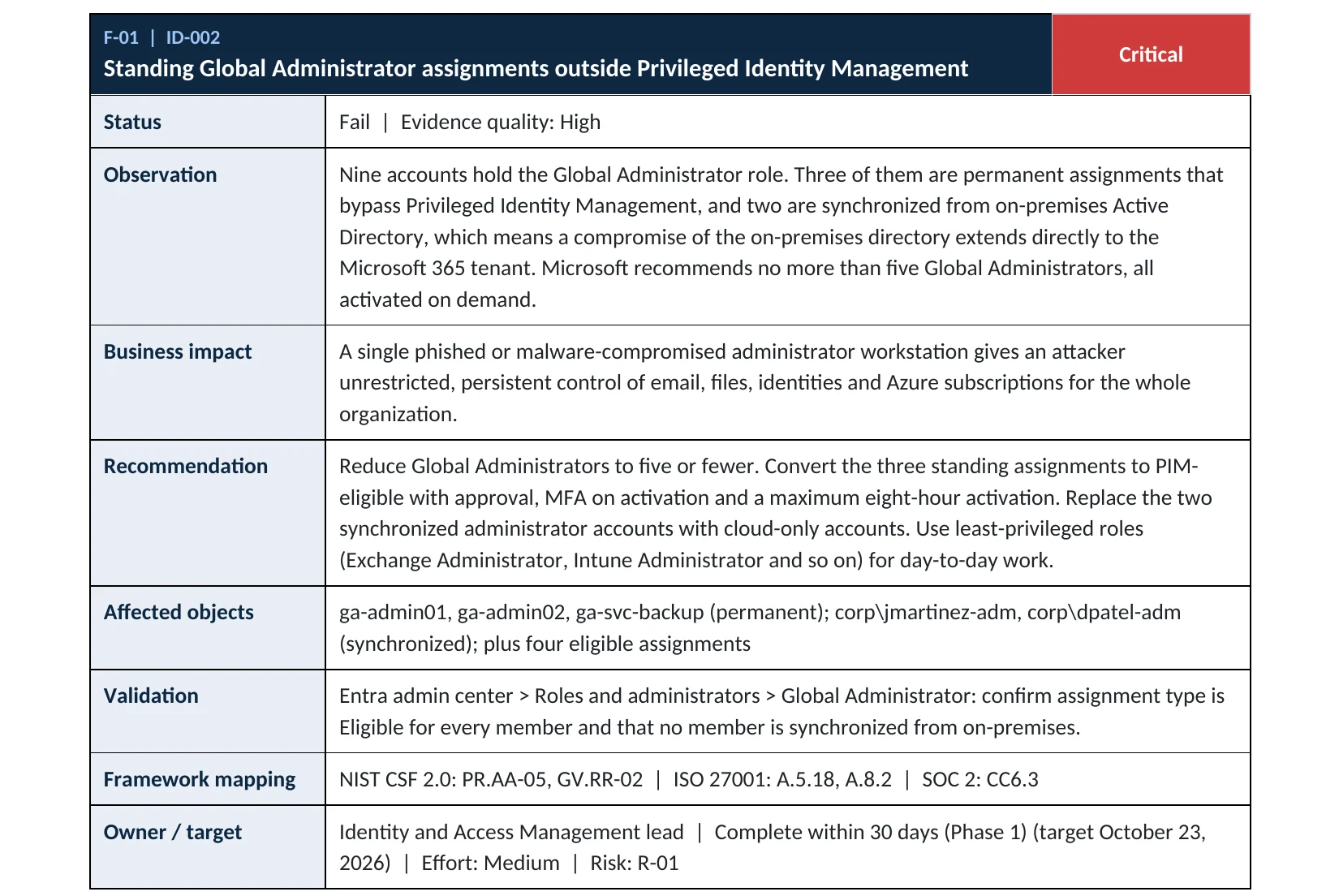
Admin role counts are item ID-002 in our Microsoft 365 Security Audit.
What it is
What a Global Administrator can do
Global Administrator is the top role in Microsoft 365. Microsoft describes it as having access to all administrative features in Microsoft Entra ID and the services that use it, such as Exchange Online, SharePoint and the Defender and Purview portals. A Global Administrator can reset the password of any user and any other administrator, and can elevate their access to manage every Azure subscription in the tenant (Microsoft Learn).
The person who signs up for Microsoft 365 becomes a Global Administrator automatically. Over the years, IT providers, former staff, vendors and test accounts get added and rarely removed, which is how small companies end up with six, eight or ten accounts that can each take over the whole tenant.
Why it matters
Each extra Global Administrator is one more master key
Attackers go after administrator accounts first, because one success gives them everything: they can read any mailbox, create new admin accounts for themselves, turn off logging and lock the real owners out.
- Admin targetedPhishing, a reused password or a hacked IT laptop.
- Global Admin takenFull control of identities, mail and files.
- Smaller role onlyThe attacker gets one service, not the tenant.
- Backdoor admins addedWithout limits: new accounts and apps for later.
- Owners locked outLogs off, data taken, ransom demanded.
Drawing: least privilege turns a tenant takeover into a contained incident.
Global Administrators: Microsoft’s best-practice limit. The Entra admin center shows a warning card when an organization has five or more.
Source: Microsoft Learnusers with the Global Administrator role: the range required by CISA’s Secure Cloud Business Applications baseline for federal agencies (MS.AAD.7.1v1).
Source: CISA SCuBAGlobal Administrators: the range in the CIS Microsoft 365 Foundations Benchmark, for redundancy without excess access.
Source: CIS Benchmarkprivileged role assignments in total: Microsoft’s second limit, covering roles that can change credentials.
Source: Microsoft LearnAttacks this limits, and what it does not
| Attack | How it works | Does limiting Global Admins help? |
|---|---|---|
| Phished administrator | A fake sign-in page captures an admin’s password and session. | Yes Fewer and smaller roles mean less to steal. |
| Hijacked synced account | An on-premises account that is also a cloud admin is reset from Active Directory. | Yes Cloud-only admin accounts break this path. |
| Rogue or departed IT staff | Old admin accounts that nobody removed. | Yes Quarterly reviews remove them. |
| Backdoor admin accounts | Attackers add their own Global Admin to keep access. | Partly A short list makes a new name stand out. |
| Consent to a malicious app | An app is granted tenant-wide permissions. | No Covered by the app consent item of this library. |
Documented cases
Cloud ransomware · Microsoft, 2025
Storm-0501 and a synced Global Admin without MFA
Microsoft Threat Intelligence describes Storm-0501 moving from on-premises Active Directory into Microsoft Entra ID. The group found a non-human synchronized identity that held Global Administrator and had no MFA method registered, reset its password on-premises so it synced to the cloud, and then used it to take full control of the Azure environment and delete data and backups.
Source: Microsoft Security Blog
Threat group · MITRE ATT&CK
LAPSUS$ adds its own Global Admins
MITRE ATT&CK records that LAPSUS$ added the global admin role to accounts it had created in targeted organizations’ cloud environments, a way to keep control after the first entry point is closed.
Source: MITRE ATT&CK T1098.003
We were not involved in either case. Both show why the number of Global Administrators, and whether they are cloud-only and protected by MFA, is checked in every audit.
What we find in audits
What this finding looks like in our audit reports
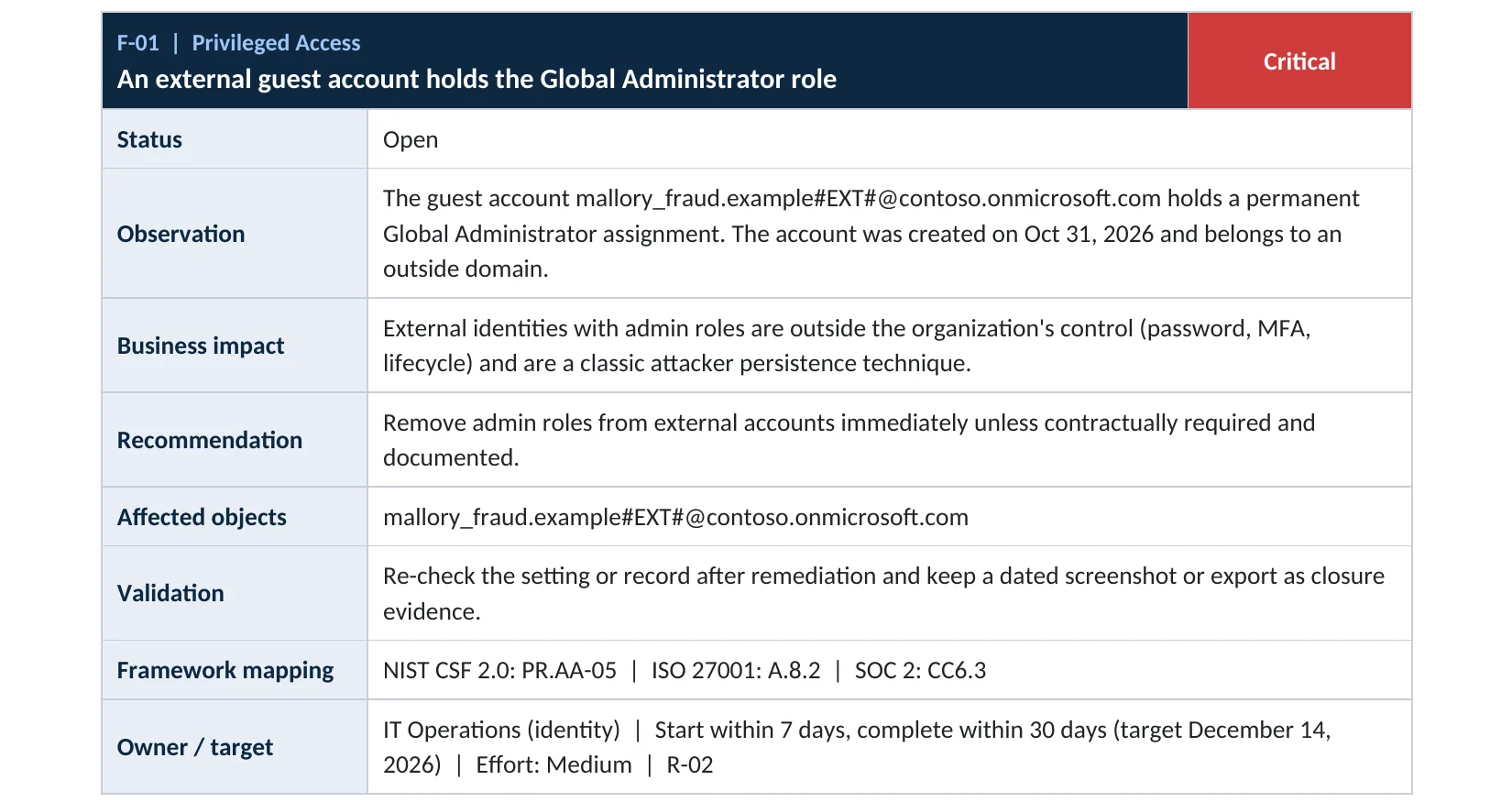
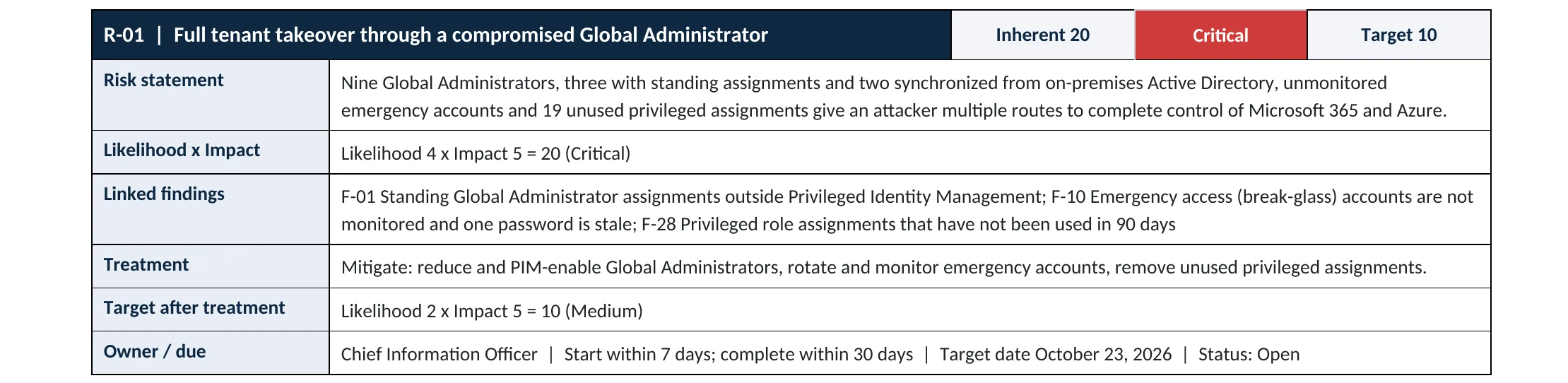
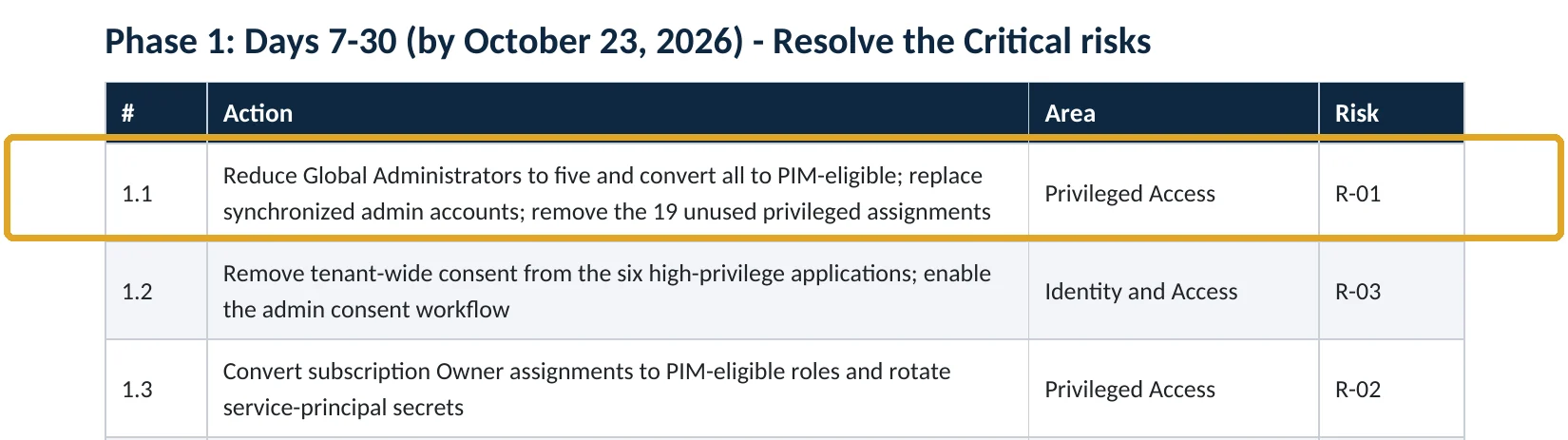
These are real pages from our published sample reports, written for fictional companies. Click any page to open it full size. The viewer follows the finding from the technical report to the risk register and the roadmap.
Your options
Which role to give instead of Global Administrator
Microsoft Entra ID has dozens of built-in roles. Microsoft publishes a list of the least privileged role for each task (Microsoft Learn). The common swaps:
| If the person needs to | Give them | Instead of |
|---|---|---|
| Manage mailboxes, mail flow and Exchange settings | Exchange Administrator | Global Administrator |
| Create users, reset passwords, manage groups | User Administrator | Global Administrator |
| Reset passwords for non-admin users only | Helpdesk Administrator | User or Global Administrator |
| Manage devices and Intune policies | Intune Administrator | Global Administrator |
| Manage security settings and alerts | Security Administrator | Global Administrator |
| Look at everything but change nothing (auditors, reviewers) | Global Reader | Global Administrator |
| Manage licenses and billing | License Administrator or Billing Administrator | Global Administrator |
How many, and which ones
| Account | How many | Notes |
|---|---|---|
| Emergency access (break-glass) | 2 | Cloud-only, not tied to a person, protected with a passkey (FIDO2) security key, used only when everyone else is locked out. |
| Named Global Administrators | 1 to 2 | Separate admin accounts for the people who truly need the top role. |
| Everyone else | As needed | Smaller roles, ideally assigned just in time with PIM on P2 plans. |
Microsoft recommends two cloud-only emergency access accounts permanently assigned Global Administrator (Microsoft Learn). With one or two named admins, that keeps you within Microsoft’s fewer-than-five guidance.
How to check it yourself
Count your Global Administrators, without changing anything
Look at Active assignments and, on P2 plans, Eligible assignments. For each name, ask: who is this, do they still work here, do they need the top role, is it a separate admin account, and is it cloud-only? The Microsoft 365 admin center also shows the list under Roles › Role assignments.
Read-only PowerShell: list Global Administrators
Connect-MgGraph -Scopes "RoleManagement.Read.Directory","User.Read.All"
$role = Get-MgDirectoryRole -Filter "displayName eq 'Global Administrator'"
Get-MgDirectoryRoleMember -DirectoryRoleId $role.Id |
  ForEach-Object { Get-MgUser -UserId $_.Id -Property DisplayName,UserPrincipalName,OnPremisesSyncEnabled,UserType } |
  Select-Object DisplayName, UserPrincipalName, OnPremisesSyncEnabled, UserType
OnPremisesSyncEnabled = True means the admin account comes from on-premises Active Directory; Microsoft recommends cloud-only accounts for admin roles (Microsoft Learn). UserType = Guest means an outside account holds the top role, which needs an explanation today.
How to configure
How to reduce Global Administrators, step by step
Before you start: make sure two working emergency access accounts exist and someone has tested signing in with them, so cleaning up cannot lock you out.
All plans
Trim the list
- In Roles & admins › Global Administrator, export or note every assignment.
- For each person, pick the smallest role that covers their work (table above) and assign it first.
- Ask them to confirm their work still functions with the new role.
- Then select their Global Administrator assignment and choose Remove assignment.
- Replace synchronized admin accounts with new cloud-only admin accounts protected by phishing-resistant MFA.
E5 or Entra ID P2
Just-in-time access
- Open Identity Governance › Privileged Identity Management › Microsoft Entra roles.
- Change named Global Administrators from Active to Eligible.
- In role settings, require MFA and a justification on activation, and set a short activation time.
- Require approval for Global Administrator activation.
- Turn on PIM alerts and access reviews for privileged roles.
What your admins will notice
Day-to-day admin work keeps functioning through the smaller roles. People who move to PIM activate the top role for a few hours when they need it, with a reason, instead of holding it all the time.
How to undo it, safely
Any Global Administrator or Privileged Role Administrator can assign the role again in seconds. That is exactly why the list must stay short: an attacker with one of these accounts can do the same.
Proof and questions
How to prove it is fixed, and what to ask your IT provider
Evidence it is fixed
- Two to four Global Administrators, including two documented emergency access accounts.
- Every Global Administrator is cloud-only, has phishing-resistant MFA and is not a guest.
- Named admins use separate admin accounts, not their daily mailbox.
- A dated quarterly review of all privileged role assignments.
Questions for your IT provider
- How many Global Administrators do we have, and who are they?
- Do your technicians use their own named accounts, or one shared admin login?
- Are any admin accounts synchronized from our on-premises server?
- Where are the emergency access accounts’ credentials kept, and when were they last tested?
- Who gets told when someone is added to an admin role?
Signs it was already abused
If too many people had the top role, look for these signs
Red flags
- A Global Administrator nobody can name, especially a guest or a recently created account.
- Role assignments added at night, on weekends or from an unusual location in the audit log.
- New federated domains, new app registrations or new app credentials you did not create.
- Security defaults, Conditional Access policies or audit logging turned off.
- Admin sign-ins without MFA, or from countries your company does not work in.
If you see any of these, treat it as an active incident: do not remove the account before its activity is preserved. Our compromise investigation reconstructs what an admin account did, and the Microsoft 365 Evidence Clock shows how long the records last.
Framework mapping
Where limiting Global Administrators fits
| Framework | Where it fits |
|---|---|
| NIST CSF 2.0 | PR.AA-05: access permissions managed with least privilege and separation of duties |
| ISO/IEC 27001:2022 | Annex A 8.2 Privileged access rights; 5.15 Access control |
| SOC 2 | CC6.3 role-based access with least privilege |
| CISA SCuBA | MS.AAD.7.1v1: two to eight Global Administrators; MS.AAD.7.2v1: finer-grained roles |
| MITRE ATT&CK | T1098.003 Account Manipulation: Additional Cloud Roles; T1078.004 Valid Accounts: Cloud Accounts |
Reviewed by
Written and reviewed by a practicing CISO

Ali Hassani, C|CISO, CISSP
Ali has more than 25 years of IT and cybersecurity experience and holds the Certified CISO and CISSP certifications along with Microsoft and Cisco credentials. He leads every OC Security Audit engagement from Irvine, on-site across Southern California and remotely nationwide. Every Microsoft 365 audit is read-only.
FAQ
Frequently asked questions about Global Administrators
How many Global Administrators should a small business have?
Two to four in total is a good target: two emergency access accounts that are only used when everyone is locked out, plus one or two named administrator accounts. Microsoft recommends fewer than five.
Why not just one Global Administrator?
If that one account is locked, lost or its owner leaves, nobody can manage the tenant. Microsoft recommends at least two emergency access accounts so you can always get back in.
Should our IT provider have Global Administrator?
Only if their work truly needs it, and through named accounts per technician rather than one shared login. Most day-to-day work can be done with Exchange, User, Helpdesk or Intune Administrator roles.
Can I remove my own Global Administrator role?
No. Microsoft does not allow a Global Administrator to remove their own assignment, so another Global Administrator or Privileged Role Administrator has to do it.
Do emergency access accounts need MFA?
Yes. Microsoft now recommends a passwordless, phishing-resistant method for them, preferably a passkey (FIDO2) security key, which also satisfies Microsoft's mandatory MFA requirements. They should be cloud-only, excluded from Conditional Access policies that could block them, stored safely, monitored and tested regularly.
Do I need Entra ID P2 to fix this?
No. Counting and reducing Global Administrators works on every plan. P2 adds Privileged Identity Management so the remaining admins hold the top role only when they activate it.
Next step
Know exactly where your tenant stands
Prevent
Microsoft 365 Security Audit
$3,500 fixed
About 200 read-only checks across admin roles, identity, email, sharing, data protection, logging and devices, for any tenant size, with four reports and a remediation roadmap.
Respond
Microsoft 365 & Azure Compromise Investigation
From $3,500
For when an admin account you cannot explain is already there: we establish what it did, when, and from where.
Want to see the deliverables first? Open the Microsoft 365 audit sample report or browse all our sample reports.

Service
Microsoft 365 Security Audit
The fixed-price audit that checks this item and about 200 more.
See the audit ›
Service
Microsoft Entra ID Security Audit
A deeper look at identities, Conditional Access, roles and apps.
See the Entra ID audit ›
Service
Compromise Investigation
When an account or mailbox may already be in an attacker’s hands.
See the investigation ›Related reading: How to set up MFA in Microsoft 365 · Privileged access and PIM review · Microsoft Entra ID security guide
Sources
Sources used on this page
- Microsoft Learn, Best practices for Microsoft Entra roles
- Microsoft Learn, Microsoft Entra built-in roles (Global Administrator)
- Microsoft Learn, Least privileged roles by task in Microsoft Entra ID
- Microsoft Learn, Manage emergency access accounts in Microsoft Entra ID
- Microsoft Learn, Admin account security in Microsoft 365 for business
- Microsoft Learn, What is Microsoft Entra Privileged Identity Management?
- CISA, BOD 25-01 required configurations (SCuBA MS.AAD.7.1v1)
- Center for Internet Security, CIS Microsoft 365 Foundations Benchmark
- Microsoft Security Blog, Storm-0501’s evolving techniques lead to cloud-based ransomware (August 2025)
- MITRE ATT&CK, T1098.003 Account Manipulation: Additional Cloud Roles
This guide is general information, not a guarantee of protection or legal advice. Microsoft changes its admin centers often: menu names and steps were checked against Microsoft Learn on November 20, 2026. Drawings are simplified and are not screenshots of Microsoft products. Sample findings come from fictional companies. Incidents are described as reported by the cited sources; OC Security Audit was not involved in them. Questions? Call 949-777-5567 or email support@ocsecurityaudit.com.