

How to Test Your Website’s CCPA Opt-Out and Global Privacy Control
Eight checks your web or marketing team can run in an ordinary browser, based on the website review in our CCPA readiness assessment.

Opt-out failures appear in many CCPA enforcement actions
Regulators have cited broken opt-out links, ignored Global Privacy Control signals and extra verification steps. A short test after each website release catches most of them.
What you need for the test
Two browsers: one with Global Privacy Control turned on and one without. Firefox offers it in its privacy settings, Brave and the DuckDuckGo browser support it natively, and extensions such as Privacy Badger add it to other browsers.
Use the browser’s developer tools (F12) to see network requests. Test on desktop and on a phone-sized window, and keep screenshots with the date for your evidence folder. This guide covers technical checks; whether a given tag counts as selling or sharing is a question for your counsel.

Eight browser checks, in order
Find the opt-out link
On the home page, look for “Do Not Sell or Share My Personal Information”, or the alternative “Your Privacy Choices” link with its icon. If you use sensitive personal information for purposes beyond those the regulations allow, look for “Limit the Use of My Sensitive Personal Information” too. Check the mobile layout and the app settings menu if you have an app.
Open the privacy policy
Confirm it is linked from the home page, shows a date within the last 12 months, lists the request methods and explains how you respond to opt-out preference signals such as Global Privacy Control.
Confirm your browser sends the signal
In the browser with GPC on, open the developer tools console and type navigator.globalPrivacyControl; it should return true. In the Network tab, requests should carry the header Sec-GPC: 1.
Load your site with GPC on and compare
Load the home page and a key page, such as checkout or a form, in both browsers. In the Network tab, filter for advertising and analytics domains and compare what loads. Tags used for cross-context behavioral advertising should stop, or stop receiving personal information, when the signal is honored.
Look for the confirmation
Since January 1, 2026, the regulations call for showing whether the opt-out preference signal was processed, for example “Opt-Out Request Honored”. Check that it appears for the GPC browser.
Test the opt-out link path
In the browser without GPC, click the opt-out link. Count the steps and compare them with opting in. No account, photo ID or email confirmation should be required, and closing a banner should not count as a choice.
Check that the choice sticks
Reload the page, visit another page and come back the next day. The opt-out should still apply, tags should stay suppressed, and the site should not ask again for at least 12 months.
Record and retest
Save screenshots, the network view and the date for each check. Retest after every website, tag manager or consent tool change, and at least monthly.
What usually goes wrong, and the fix
| Failure | What you see | Usual fix |
|---|---|---|
| Consent tool ignores GPC | Same tags load with GPC on and off | Turn on GPC handling in the consent tool and map it to the sale and sharing categories |
| Link only inside the cookie banner | No footer link once the banner is closed | Add the link to the footer of every page and the app settings |
| Opt-out asks for too much | Account login, ID upload or email confirmation before opting out | Remove verification from opt-outs; it is not required for them |
| Tags fire before the choice | Advertising requests on the first page load | Load advertising tags only after the consent tool reads the signal and the choice |
| No confirmation shown | Nothing tells a GPC visitor the signal worked | Display the opt-out status, for example “Opt-Out Request Honored” |
| Choice does not persist | Tags return after reload or on other pages | Store the choice and apply it site-wide, and to the account when the visitor is known |
What the readiness assessment checks automatically
The website review reads your home page and privacy policy without running scripts, normally with three page requests, and checks the links, the policy date, 16 disclosure elements, the GPC statement, published request methods and advertising tags. Every request is logged.
Behavior that only a browser shows, such as tags loading after consent or the site reacting to a GPC signal, is confirmed with the checks on this page.
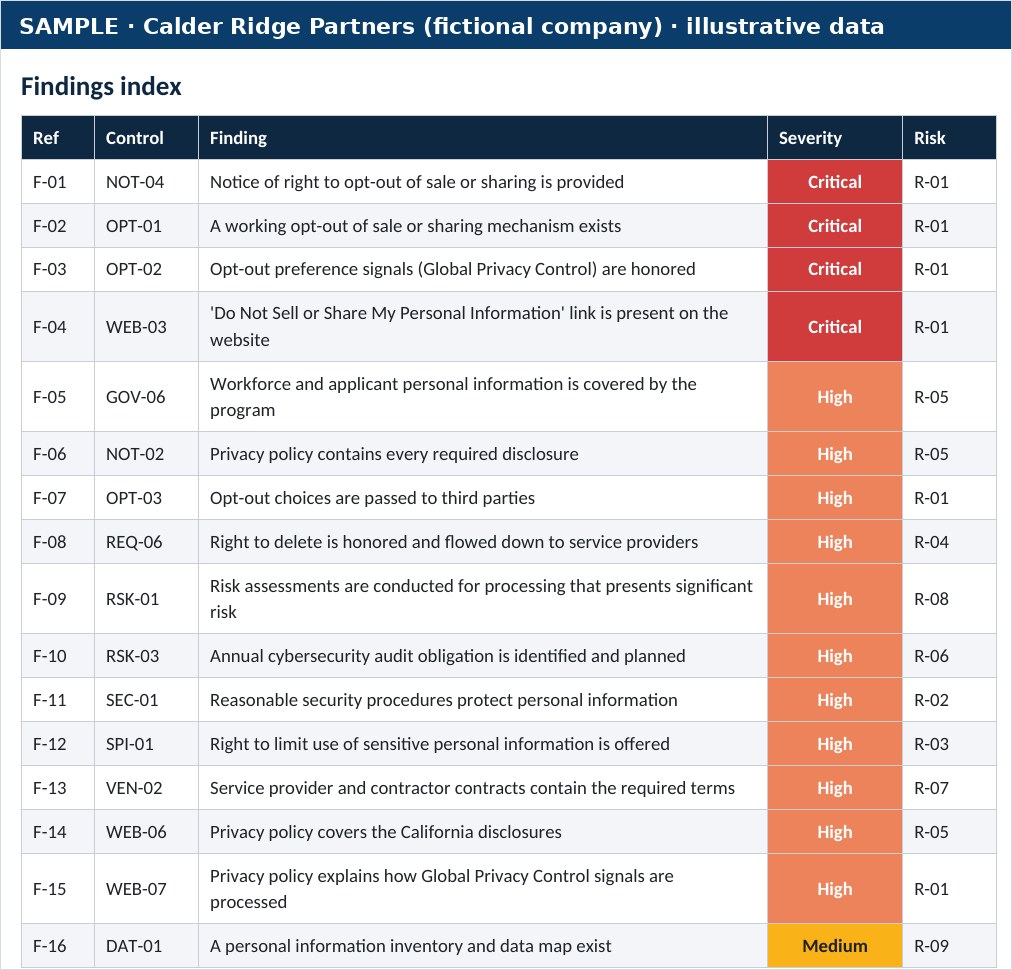
A sample finding
- Control
- OPT-02 · Opt-out preference signals (Global Privacy Control)
- Finding
- Global Privacy Control signals are not read; advertising tags behave the same with the signal on
- Severity
- Critical
- Evidence
- Browser test with GPC on and off: the same advertising requests loaded on the home page. No opt-out status was shown. The consent tool’s GPC option was off.
- Recommendation
- Turn on GPC handling in the consent tool, suppress sale and sharing tags when the signal is present, display the status and retest after each release.
Page 13 of 13: How to test opt-outs and Global Privacy Control
- 1. CCPA and CPRA compliance (hub)
- 2. CCPA vs CPRA explained
- 3. Does the CCPA apply to your business?
- 4. Consumer rights and privacy requests
- 5. Penalties, fines and lawsuits
- 6. Implementation roadmap
- 7. CCPA for IT administrators
- 8. CCPA cybersecurity audit
- 9. Risk assessments and ADMT
- 10. CCPA compliance checklist
- 11. CCPA readiness assessment
- 12. CCPA assessment sample report
- 13. How to test opt-outs and Global Privacy Control (this page)

Guided by Ali Hassani, CISSP, C|CISO
Certified CISO (C|CISO) and CISSP with 25+ years in IT, cybersecurity, compliance and infrastructure, who has earned dozens of Microsoft and Cisco certifications over his career, including MCSE, MCITP, MCSA Security, CCNP and CCNA. OC Security Audit handles the technical side of the CCPA: data inventories, security controls and evidence as your readiness advisor, or the cybersecurity audit as your independent auditor, one role per program. Legal interpretation stays with your privacy counsel.
Questions business owners and IT leaders ask
Do we have to honor Global Privacy Control?
Generally, yes, if you sell or share personal information: the regulations treat a valid opt-out preference signal as a request to opt out. Confirm your situation with counsel.
Is a cookie banner enough?
No. The regulations say a cookie banner alone is not an acceptable opt-out method. You still need the link or the alternative opt-out link, and GPC handling.
Is GPC the same as Do Not Track?
No, they are different signals. The CCPA regulations describe opt-out preference signals such as Global Privacy Control; ask your counsel how your site should treat older signals such as Do Not Track.
Who should run these checks?
Whoever manages the website or tag manager, with the privacy lead keeping the evidence. We can run them for you as part of a readiness assessment.
How often should we test?
After every change to the website, tag manager or consent tool, and at least monthly.
General information, not legal advice
This page summarizes California privacy law and regulations as of October 2026 to help businesses plan their cybersecurity and IT work. It is general information, not legal advice. It does not create an attorney-client relationship and does not guarantee compliance or any outcome. OC Security Audit is a cybersecurity firm, not a law firm. Confirm how the CCPA applies to your business with qualified California privacy counsel. Enforcement examples summarize the regulators’ public announcements; settlements can resolve allegations without an admission of wrongdoing. Laws, regulations and inflation-adjusted amounts change, so check the primary sources below.
Primary sources · Last reviewed October 2026

Want someone to run the checks for you?
Schedule a consultation. We test your opt-out link and Global Privacy Control handling in a browser and give you a short report with screenshots.
Read-only reviews. Irvine, Orange County and Southern California on-site; remote nationwide.