

CCPA for IT Administrators: What Your Team Must Build and Prove
Data maps, deletion runbooks, opt-out signals, encryption, logging and evidence. The technical work behind every CCPA requirement, system by system.

The law expects security that fits the data
The CCPA requires reasonable security, and a breach of nonencrypted, nonredacted personal information can lead to statutory damages of $107 to $799 per consumer per incident.
Why the CCPA is an IT project as much as a legal one
Legal decides what the law requires. IT decides whether the business can actually do it: find a person’s data in minutes, delete it everywhere, stop advertising tags for opted-out visitors and show auditors the controls that protect it.
Under rules in force since January 1, 2026, businesses in scope for cybersecurity audits must also have an independent auditor assess their security program against up to 18 components, where they apply, and certify completion to CalPrivacy. The first audit reports are due from April 1, 2028.

Ten things IT administrators should do
Build the personal information inventory
Every system that stores or processes personal information: on-premises, cloud, SaaS, backups and vendors, with categories, sensitive data, owner and retention.
Find shadow IT
Use firewall and proxy logs, Microsoft Entra sign-in logs and Microsoft Defender for Cloud Apps where licensed to find apps holding personal data.
Make requests searchable
Microsoft Purview content search for Microsoft 365, exports from CRM, ERP and HR systems, a written runbook per system and a suppression list.
Honor opt-out signals
Read the Sec-GPC: 1 header or navigator.globalPrivacyControl, block sale and sharing tags in the tag manager, show the opt-out status and retest after each release.
Encrypt personal information
At rest (BitLocker, storage and database encryption) and in transit (TLS). Encryption is an audit component, and statutory damages in breach lawsuits apply to nonencrypted and nonredacted data.
Enforce MFA and least privilege
Phishing-resistant MFA for staff, admins and vendors, just-in-time privileged access, regular access reviews and prompt removal of leavers.
Centralize logs
Keep audit logs centrally with retention and monitoring; alert on unusual access to personal data; use DLP for data leaving the business.
Patch, scan and harden
Secure configuration baselines, patch management, internal and external vulnerability scans and penetration testing.
Apply retention and disposal
Retention policies in Microsoft 365 and business systems, secure deletion and a documented process for backups.
Be ready for a breach
A tested incident response plan, evidence preservation and support for notices: residents within 30 calendar days of discovery (limited delays are allowed), the Attorney General within 15 days of that notice when more than 500 residents are affected.
The 18 audit components, translated for IT
| # | Component (11 CCR §7123(c)) | What IT shows the auditor |
|---|---|---|
| 1 | Authentication: MFA, including phishing-resistant MFA for staff and vendors; strong unique passwords (the regulation’s example: at least 8 characters, not on the business’s disallowed list, not reused) | MFA coverage reports, Conditional Access policies, password and banned-password settings |
| 2 | Encryption of personal information at rest and in transit | BitLocker and storage encryption status, database encryption, TLS configuration |
| 3 | Account management and access controls: least privilege, limited privileged accounts with just-in-time access, monitored account creation, physical access | Access reviews, privileged access settings, joiner-mover-leaver tickets, badge records |
| 4 | Inventory and management of personal information and systems: data maps, classification and tagging, hardware and software inventories, allowlisting, approvals | Data map, sensitivity labels, asset inventory, application control policies |
| 5 | Secure configuration: updates, on-premises and cloud hardening, masking sensitive data, patch management, change management | Configuration baselines, patch compliance, change records |
| 6 | Vulnerability scans, penetration testing and vulnerability disclosure | Scan and penetration test reports, remediation tracking |
| 7 | Audit-log management: centralized storage, retention and monitoring | Log retention settings, central log platform, alert samples |
| 8 | Network monitoring and defenses: intrusion detection and prevention, bot detection, data loss prevention | IDS/IPS alerts, DLP policies and incidents |
| 9 | Antivirus and antimalware | Endpoint protection coverage for every endpoint and server |
| 10 | Segmentation | Firewall rules and network segment design |
| 11 | Ports, services and protocols limited and controlled | Port scans and firewall rule reviews |
| 12 | Cybersecurity awareness of changing threats | Threat intelligence sources and review notes |
| 13 | Education and training for everyone with system access | Training completion records at hire, yearly and after a breach |
| 14 | Secure development and code review | Code review records and application security testing |
| 15 | Oversight of service providers, contractors and third parties | Vendor reviews and contract terms |
| 16 | Retention schedules and disposal | Retention policies and disposal records |
| 17 | Incident response management: the plan and how it is tested | Incident response plan and tabletop exercise records |
| 18 | Business continuity and disaster recovery, including data recovery and backups | Recovery plan and restore test results |
Where IT leads, and where it supports
| Activity | Leads | Supports |
|---|---|---|
| Data inventory and map | IT administrators | Business owners, privacy lead |
| Searching and deleting data for requests | IT administrators | Privacy lead |
| Opt-out signals and advertising tags | Web or marketing IT | Privacy lead, marketing |
| Security controls and evidence | IT and security | Executive sponsor |
| Vendor technical due diligence | IT and security | Legal, procurement |
| Breach detection and containment | IT and security | Incident response lead, legal |
| Applicability, notices and legal decisions | Legal or privacy lead | IT supplies system facts |
Most of your personal information lives in Microsoft 365
Purview content search finds it, retention policies dispose of it, sensitivity labels and DLP protect it, and Microsoft Entra ID controls who can reach it. These settings are worth checking against what the CCPA expects.
Our Microsoft 365 security audit reviews them read-only: 200 checks across 8 control domains, $3,500 fixed for any tenant size, with scope and terms set out in a written proposal.
Microsoft 365 settings that matter for the CCPA
- Purview content search and eDiscovery permissions
- Retention policies and labels
- Sensitivity labels and DLP policies
- Audit log retention
- Conditional Access and MFA coverage
- External sharing in SharePoint, OneDrive and Teams
- Mailbox forwarding rules
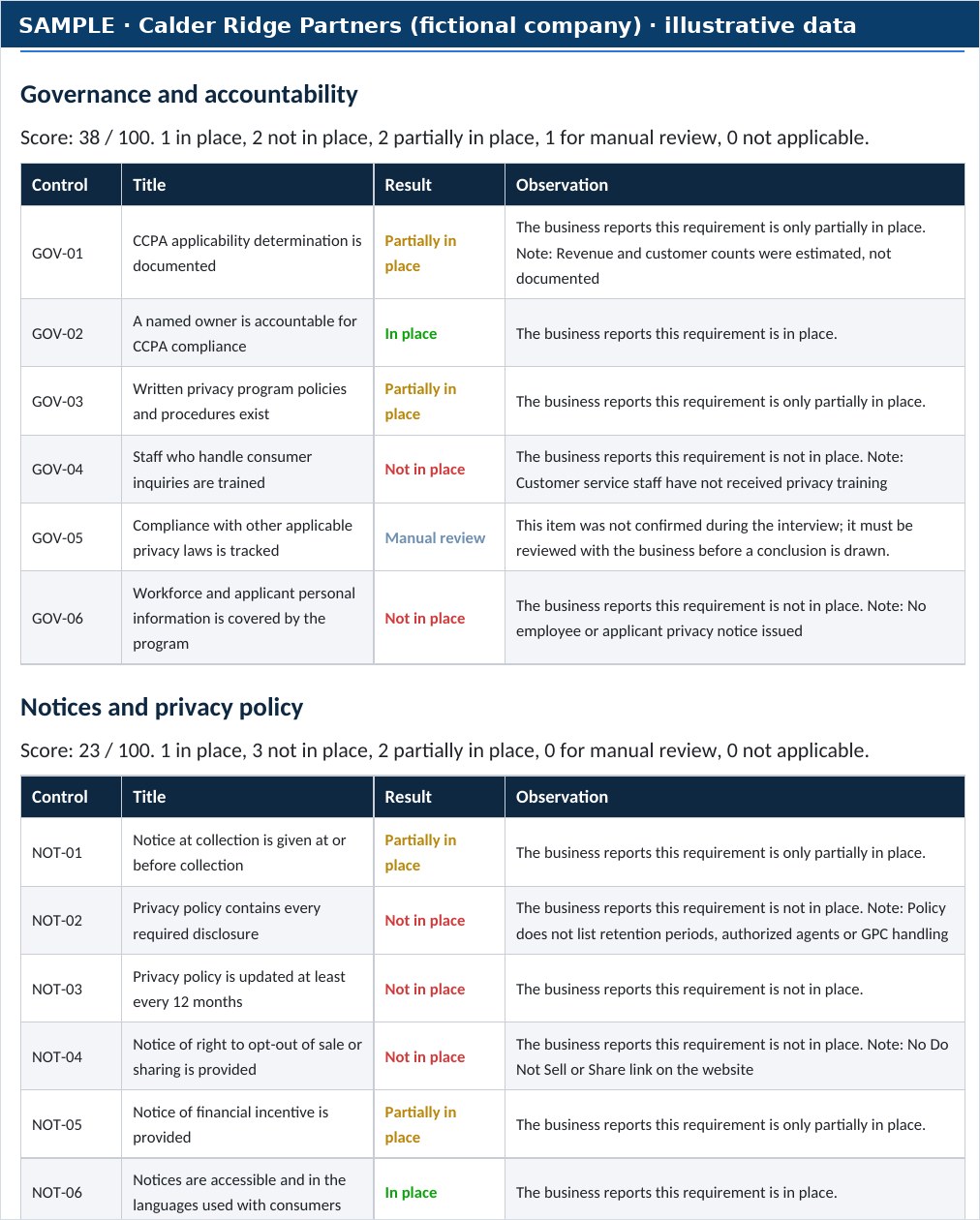
A finding from a sample report
- Area
- Authentication
- Finding
- MFA not enforced for 14 of 120 accounts, including two vendor accounts with access to the client database
- Severity
- High
- Evidence
- A Conditional Access exclusion group named “legacy-apps” covered 14 accounts. Sign-in logs show password-only sign-ins for all 14 in the last 30 days. 38 users rely on SMS codes.
- Fix
- Remove the exclusion, require phishing-resistant MFA for admins and vendors, and review exclusions monthly.
The technical requirements in numbers
cybersecurity program components the audit must assess, where applicable
Source: 11 CCR §7123(c)to keep records of consumer requests and how you responded
Source: 11 CCR §7101to notify affected residents of a breach
Source: SB 446, effective January 1, 2026to keep all documents relevant to each cybersecurity audit
Source: 11 CCR §7122(g)Page 7 of 13: CCPA for IT administrators
- 1. CCPA and CPRA compliance (hub)
- 2. CCPA vs CPRA explained
- 3. Does the CCPA apply to your business?
- 4. Consumer rights and privacy requests
- 5. Penalties, fines and lawsuits
- 6. Implementation roadmap
- 7. CCPA for IT administrators (this page)
- 8. CCPA cybersecurity audit
- 9. Risk assessments and ADMT
- 10. CCPA compliance checklist
- 11. CCPA readiness assessment
- 12. CCPA assessment sample report
- 13. How to test opt-outs and Global Privacy Control

Guided by Ali Hassani, CISSP, C|CISO
Certified CISO (C|CISO) and CISSP with 25+ years in IT, cybersecurity, compliance and infrastructure, who has earned dozens of Microsoft and Cisco certifications over his career, including MCSE, MCITP, MCSA Security, CCNP and CCNA. OC Security Audit handles the technical side of the CCPA: data inventories, security controls and evidence as your readiness advisor, or the cybersecurity audit as your independent auditor, one role per program. Legal interpretation stays with your privacy counsel.
Questions business owners and IT leaders ask
Does the CCPA require specific products?
No. It requires reasonable security, and the audit regulation lists 18 components to assess where applicable, scaled to your size and complexity.
Is encryption mandatory?
The statute requires reasonable security rather than naming controls, but encryption of personal information at rest and in transit is one of the audit components, and statutory damages in breach lawsuits apply to nonencrypted and nonredacted data. That makes it one of the most valuable controls to get right.
How do we handle deletion in backups?
Document it. Deletion of data in archived or backup systems can wait until that data is restored to an active system or next accessed or used for a sale, disclosure or commercial purpose.
How do we detect Global Privacy Control?
Browsers with GPC turned on send the Sec-GPC: 1 HTTP header and set navigator.globalPrivacyControl to true. Your consent tool or tag manager should read it and suppress sale and sharing tags.
Do we need to log privacy requests?
Yes. Keep records of requests and responses for at least 24 months.
General information, not legal advice
This page summarizes California privacy law and regulations as of October 2026 to help businesses plan their cybersecurity and IT work. It is general information, not legal advice. It does not create an attorney-client relationship and does not guarantee compliance or any outcome. OC Security Audit is a cybersecurity firm, not a law firm. Confirm how the CCPA applies to your business with qualified California privacy counsel. Enforcement examples summarize the regulators’ public announcements; settlements can resolve allegations without an admission of wrongdoing. Laws, regulations and inflation-adjusted amounts change, so check the primary sources below.
Primary sources · Last reviewed October 2026
- CalPrivacy: text of the CCPA regulations on cybersecurity audits, risk assessments and ADMT (effective January 1, 2026)
- California Civil Code, Title 1.81.5: California Consumer Privacy Act
- California Legislature: SB 446, data breach notification deadlines
- Cal. Code Regs. tit. 11, §7101, record-keeping (Cornell Legal Information Institute)
- Global Privacy Control specification and browser support
- CalPrivacy: CCPA updates, cybersecurity audit, risk assessment and ADMT rulemaking
Give your IT team a clear, prioritized list
Schedule a consultation. We review the systems that hold personal information, read-only, and show your team what to fix first and what evidence to keep.
Read-only reviews. Irvine, Orange County and Southern California on-site; remote nationwide.