

LIBRARY 11.71Microsoft 365 Security Library
How to Protect Microsoft 365 Data on Personal Phones and Laptops
Staff read company email on their own phones and laptops. App protection policies keep that data inside managed apps, and let you wipe it, without taking over anyone’s personal device.
Reviewed by Ali Hassani, C|CISO, CISSP · Last verified November 20, 2026
App-based Conditional Access needs Microsoft Entra ID P1 or Enterprise Mobility + Security for users (Microsoft Learn), included in Business Premium, E3 and E5 along with Intune.
In one minute
- Create app protection policies for iOS and Android covering Outlook, Teams, OneDrive, Word, Excel and Edge.
- Require a PIN, block saving to personal storage, allow selective wipe.
- Add a Conditional Access policy requiring an app protection policy on phones.
- For personal Windows and Mac computers, allow browser-only access.
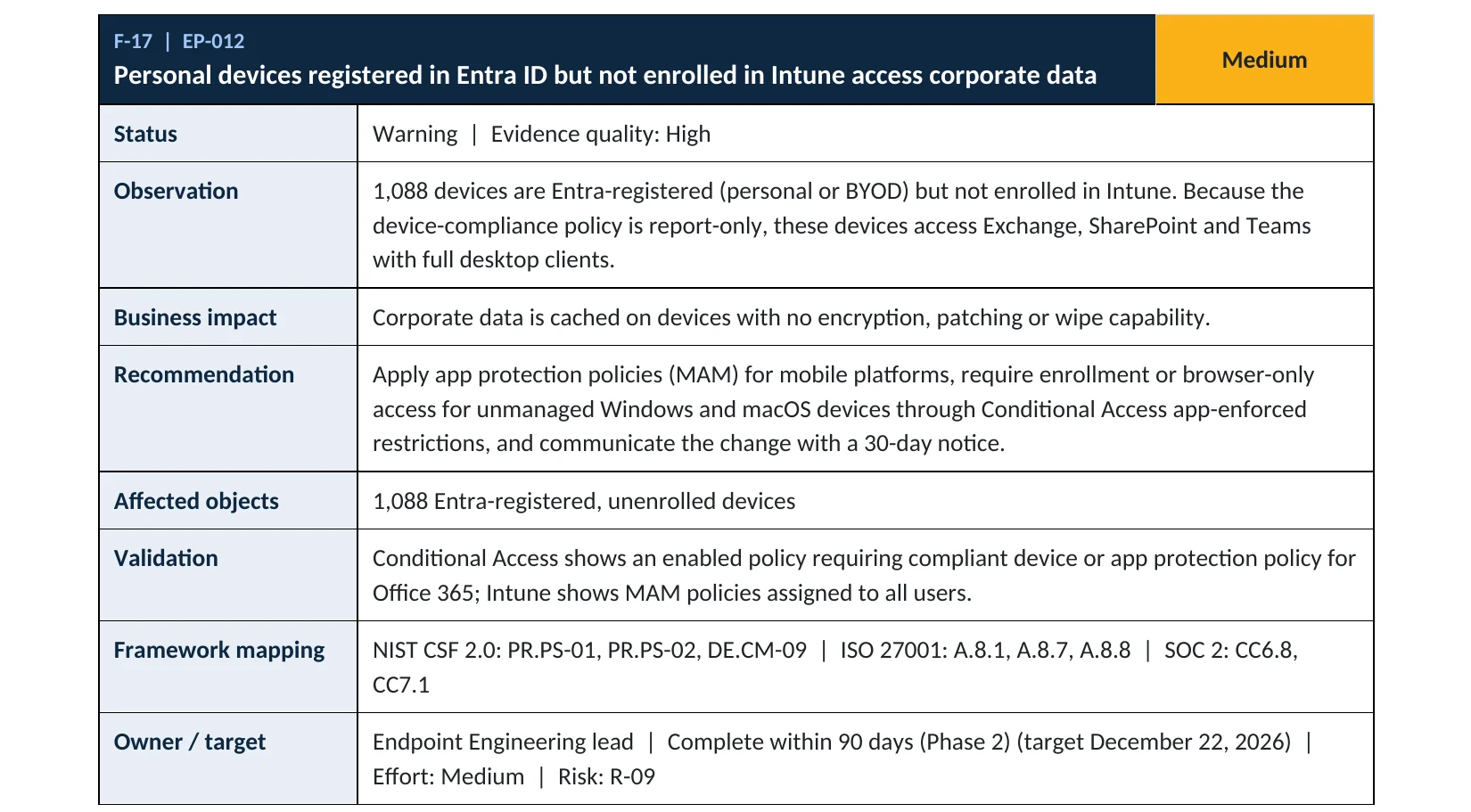
Personal device access is item EP-012 in our Microsoft 365 Security Audit.
What it is
What app protection policies do
App protection policies, sometimes called MAM or MAM without enrollment, apply rules to specific apps instead of the whole device. Inside Outlook, Teams or OneDrive on a personal phone, you can require a PIN, block copy and paste into personal apps, prevent saving to personal cloud storage and remotely wipe only the company data. Conditional Access then makes sure only apps that support these policies can reach company data (Microsoft Learn).
Two ways to handle personal devices
| Approach | What IT controls | Good for |
|---|---|---|
| App protection (no enrollment) | Company data inside managed apps only | Personal phones and tablets |
| Device enrollment | The whole device: settings, apps, wipe | Company-owned devices |
| Browser-only access | Web access with download limits | Personal Windows and Mac computers |
Why it matters
When an employee leaves, their phone leaves with your data
- Personal phoneEmail and files synced.
- Data copied outSaved to personal storage or apps.
- App protectionData stays in managed apps.
- Phone lost or employee leavesWithout it: no way to remove the data.
- Data exposedClient files, contracts, payroll.
Drawing: where app protection breaks the path.
personal devices with full desktop access and no management, in our sample audit (fictional company).
Source: Sample audit reportaverage cost of a U.S. data breach in 2025, according to IBM.
Source: IBMcore Microsoft apps in Microsoft’s recommended app protection policy, including Outlook, Teams, OneDrive and Edge.
Source: Microsoft Learnwipe removes only company data inside managed apps, leaving personal photos and apps alone.
Source: Microsoft LearnControls that work together
| Control | What it does | Effect |
|---|---|---|
| App protection policies | PIN, no copy to personal apps, selective wipe. | Contains the data |
| Require app protection policy (Conditional Access) | Only protected apps can connect. | Enforces it |
| Browser-only on personal computers | No full desktop sync on unmanaged PCs. | Limits downloads |
| Block legacy authentication | Native mail apps using old protocols can’t connect. | Closes a bypass |
| Registered but unmanaged | Full access, no controls. | Uncontrolled |
What we find in audits
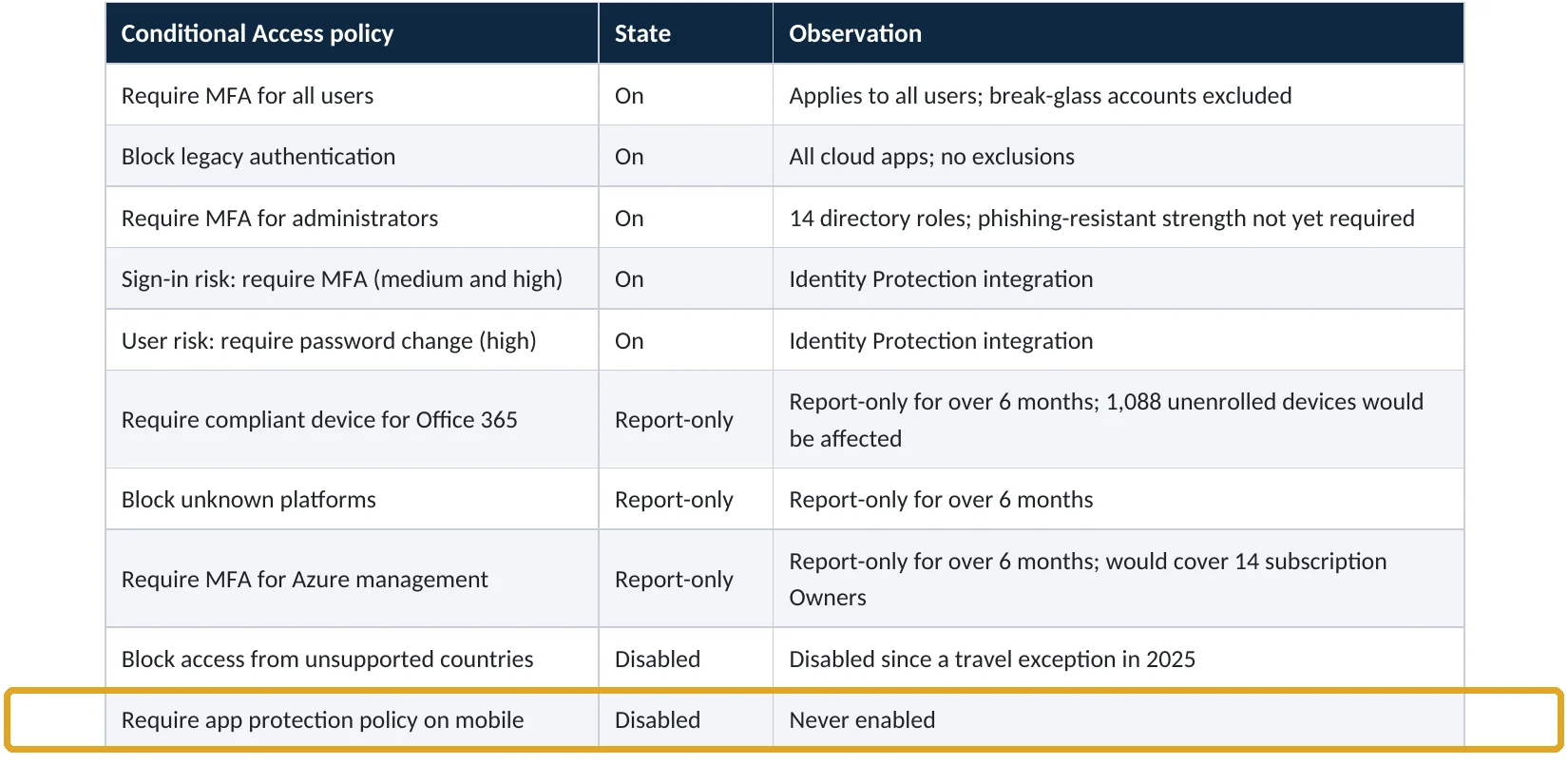
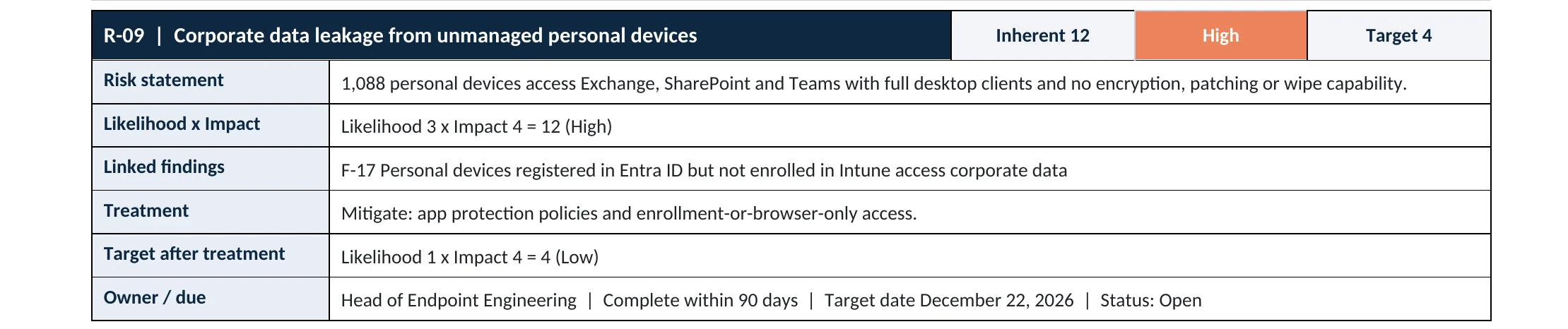
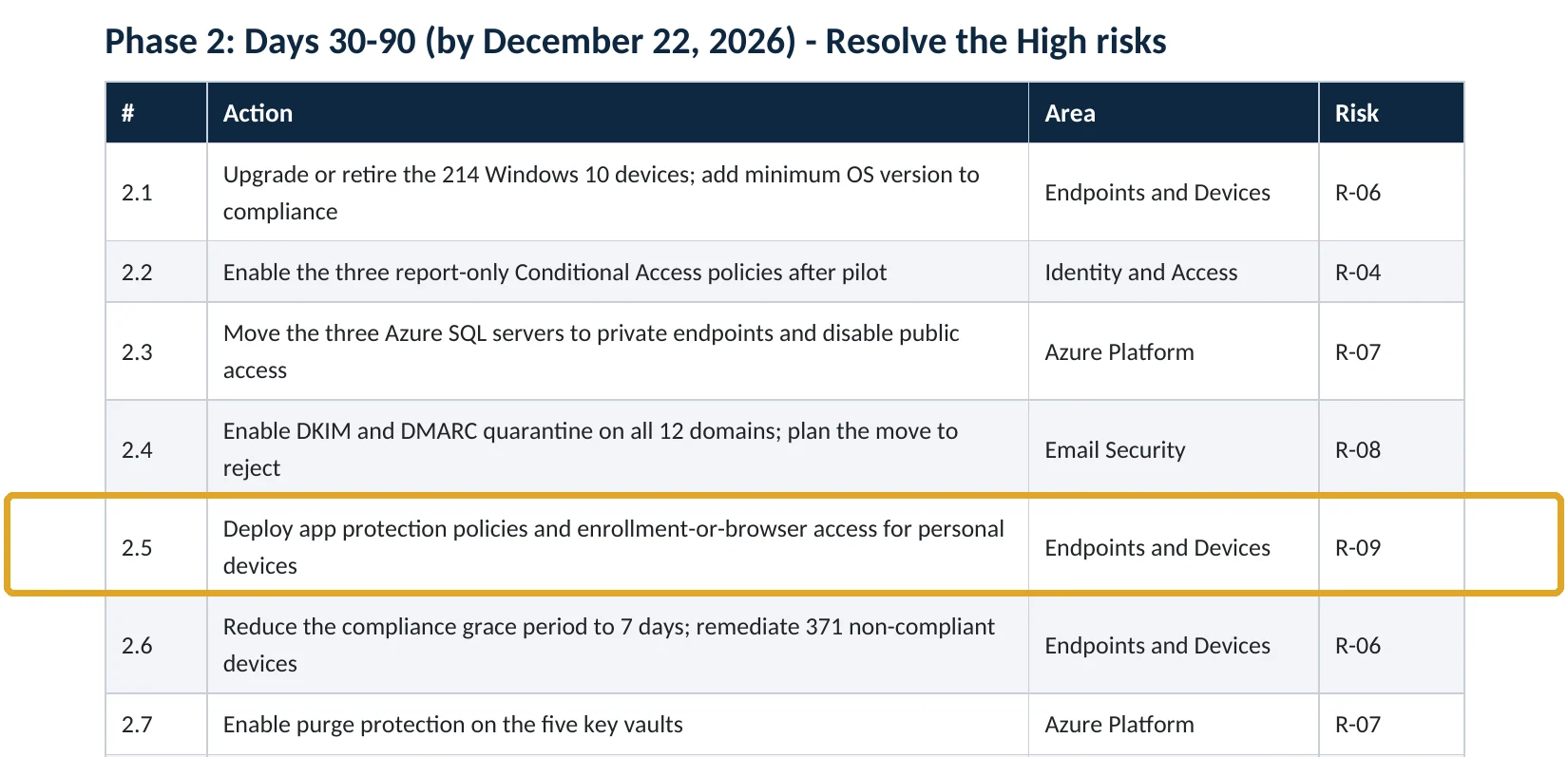
What this finding looks like in our audit reports
These are real pages from our published sample audit, written for a fictional company. Click any page to open it full size. The viewer follows the finding from the technical report to the Conditional Access table, the risk register and the roadmap.
Your options
What each plan gives you
| Capability | Business Basic, Standard | Business Premium, E3, E5 |
|---|---|---|
| Intune app protection policies (iOS, Android) | No | Yes |
| Conditional Access: require app protection policy | No | Yes |
| App protection for Microsoft Edge on personal Windows | No | Yes |
| Selective wipe of company data | No | Yes |
App protection on Windows works with the Microsoft Edge browser and the Windows App client (Microsoft Learn).
How to check it yourself
See what personal devices can reach, without changing anything
Check there’s a policy for iOS and Android that targets your users and the core Microsoft apps. Then in Entra › Conditional Access, look for a policy with the grant control Require app protection policy, and check it’s On.
Read-only PowerShell: app protection and Conditional Access
Connect-MgGraph -Scopes "DeviceManagementApps.Read.All","Policy.Read.All"
Get-MgDeviceAppManagementManagedAppPolicy | Select-Object DisplayName
Get-MgIdentityConditionalAccessPolicy |
  Where-Object { $_.GrantControls.BuiltInControls -contains "compliantApplication" } |
  Select-Object DisplayName, State
The commands only read settings. compliantApplication is the API name for Require app protection policy.
How to configure
How to protect company data on personal devices, step by step
Business Premium, E3, E5
App protection for phones
- Open Intune › Apps › Protection › Create policy for iOS/iPadOS, then again for Android.
- Target Core Microsoft Apps (Outlook, Teams, OneDrive, Word, Excel, PowerPoint, Edge and others).
- Set data protection: send data only to managed apps, block saving to personal storage, restrict cut and paste.
- Set access requirements: PIN or biometrics, and a minimum OS version.
- Assign to a pilot group, then to all users.
Entra ID P1
Require it with Conditional Access
- Create a policy for all users on iOS and Android, targeting Office 365.
- Grant access with Require app protection policy.
- For personal Windows and Mac computers, use app-enforced restrictions so they get browser access only.
- Start in report-only, check the results, then turn it on.
On Android, the Company Portal app must be installed for app protection to work, even though the device isn’t enrolled (Microsoft Learn).
What your users will notice
They need Outlook and Teams instead of the built-in mail app, a PIN to open company apps, and they can’t paste company data into personal apps. Their personal photos and apps are untouched.
How to undo it
Remove the user group from the app protection policy or turn off the Conditional Access policy.
Proof and questions
How to prove it is fixed, and what to ask your IT provider
Evidence it is fixed
- App protection policies exist for iOS and Android, assigned to all users.
- Conditional Access requires app protection on phones, and is on.
- Personal computers get browser-only access.
- Selective wipe has been tested on a departing user.
Questions for your IT provider
- How many personal devices reach our email and files?
- Can we wipe company data from a lost or former employee’s phone?
- Can staff save attachments to personal cloud storage?
- Do personal laptops sync full copies of SharePoint?
- Is the app protection Conditional Access policy on?
Signs it was already abused
If company data may already be on devices you don’t control, look for these signs
Red flags
- Former employees’ devices still syncing mail or files.
- Native mail apps connecting with legacy protocols.
- Large downloads from OneDrive or SharePoint to unmanaged devices.
- Many devices registered to one user.
- Sign-ins from personal devices in unexpected countries.
If you see these, revoke the user’s sessions and wipe company data where you can, then keep the logs. Our compromise investigation establishes what was downloaded, and the Microsoft 365 Evidence Clock shows how long the records are kept.
Framework mapping
Where personal device protection fits
| Framework | Where it fits |
|---|---|
| NIST CSF 2.0 | PR.DS-01: data at rest protected; PR.AA-05: access permissions enforced |
| ISO/IEC 27001:2022 | Annex A 8.1 User end point devices; 6.7 Remote working; 8.12 Data leakage prevention |
| SOC 2 | CC6.1 logical access security; CC6.7 restricts movement of information |
Reviewed by
Written and reviewed by a practicing CISO

Ali Hassani, C|CISO, CISSP
Ali has more than 25 years of IT and cybersecurity experience and holds the Certified CISO and CISSP certifications along with Microsoft and Cisco credentials. He leads every OC Security Audit engagement from Irvine, on-site across Southern California and remotely nationwide. Every Microsoft 365 audit is read-only.
FAQ
Frequently asked questions about personal devices
Can we protect company data without enrolling personal phones?
Yes. Intune app protection policies protect company data inside managed apps like Outlook and Teams without enrolling or controlling the whole device.
Can IT see or wipe my personal photos?
No. With app protection, IT can only wipe company data inside managed apps.
Which plans include app protection?
Business Premium, E3 and E5 include Intune and Conditional Access. Business Basic and Standard don't.
What about personal laptops?
Limit them to browser access with download restrictions, or use app protection for Microsoft Edge on Windows.
Why do Android users need the Company Portal app?
On Android, much of app protection is built into Company Portal, so it must be installed even though the device isn't enrolled.
Will the built-in iPhone mail app still work?
Not once you require an app protection policy. Users switch to Outlook, which supports the policy.
Next step
Keep company data in company apps
Prevent
Microsoft 365 Security Audit
$3,500 fixed
About 200 read-only checks across sign-in protection, devices, email, sharing and logging, for any tenant size, with four reports and a remediation roadmap.
Respond
Microsoft 365 & Azure Compromise Investigation
From $3,500
For when company data may have left on a personal device: we establish what was downloaded and where.
Want to see the deliverables first? Open the Microsoft 365 audit sample report or browse all our sample reports.

Service
Microsoft 365 Security Audit
The fixed-price audit that checks this item and about 200 more.
See the audit ›
Sample
Sample audit report
Every page of the five deliverables, with fictional data.
View the sample ›
Service
Compromise Investigation
When an account or mailbox may already be in an attacker’s hands.
See the investigation ›Related reading: How to require compliant devices · How to set up data loss prevention · Identity, MFA and Conditional Access guide
Sources
Sources used on this page
- Microsoft Learn, Require approved client apps or app protection policy
- Microsoft Learn, App protection policies overview
- Microsoft Learn, Use app-based Conditional Access policies with Intune
- Microsoft Learn, Data protection framework using app protection policies
- Microsoft Learn, Require an app protection policy on Windows devices
- Microsoft Learn, Troubleshooting app protection policy user issues
- IBM newsroom, Cost of a Data Breach Report 2025
This guide is general information, not a guarantee of protection or legal advice. Microsoft changes its admin centers often: menu names and steps were checked against Microsoft Learn on November 20, 2026. Drawings are simplified and are not screenshots of Microsoft products. Sample findings come from fictional companies. Incidents are described as reported by the cited sources; OC Security Audit was not involved in them. Questions? Call 949-777-5567 or email support@ocsecurityaudit.com.